ENTERPRISE NETWORK SWITCHING | UGANDA
Cisco Meraki MS130-48X Cloud-Managed Multigigabit PoE+ Access Switch
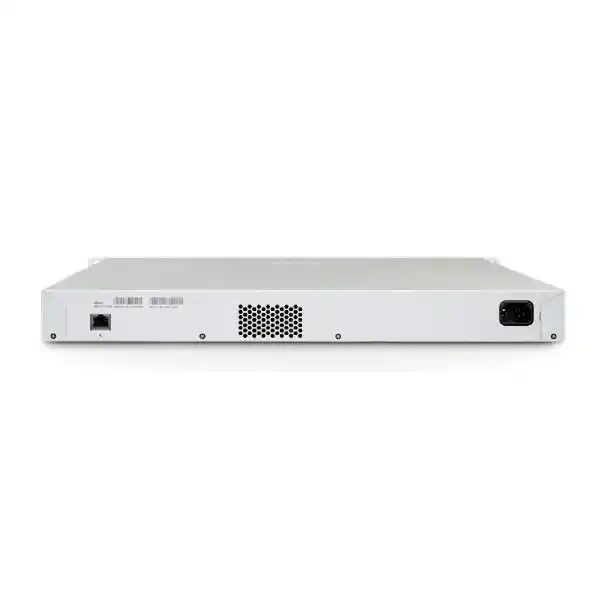
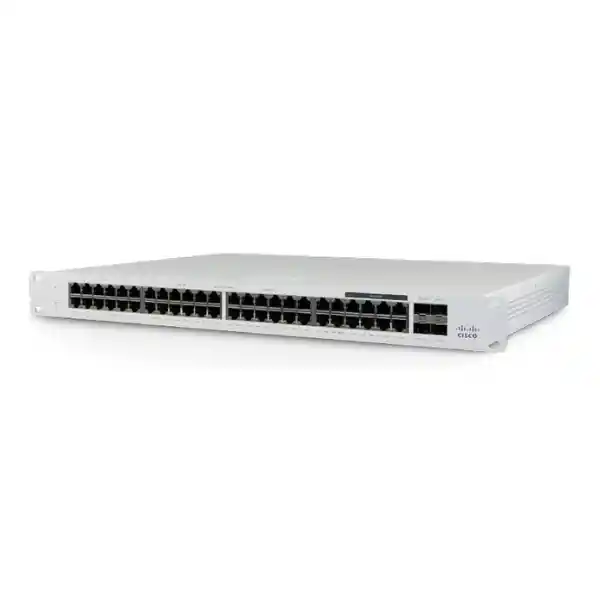
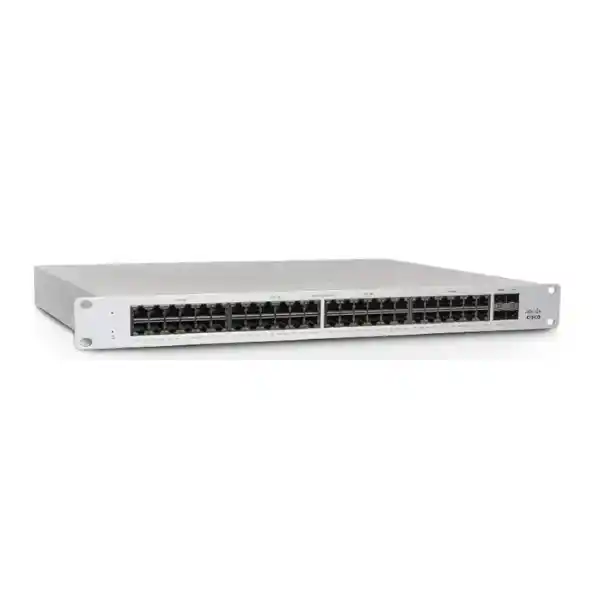
The Cisco Meraki MS130-48X is a 48-port cloud-managed Layer 2 access switch for organizations building reliable wired networks with higher-speed wireless access points and modern office devices. Forty RJ45 interfaces support Gigabit Ethernet, eight additional RJ45 interfaces support up to 2.5 GbE, and four SFP+ interfaces provide 10 GbE uplink connectivity. A shared 740 W PoE+ budget helps consolidate endpoint power distribution. Administrators use the Meraki Dashboard to manage switch settings, review events and perform remote troubleshooting. For Uganda procurement teams, the important purchase decision is not merely the number of sockets: it is whether the port mix, PoE allowance, uplink topology, license term, support coverage and site readiness match the actual project.
Procurement Facts at a Glance
MS130-48X-HW; confirm regional ordering suffix and bundled accessories in the quotation.
40 × 1 GbE RJ45 plus 8 × 100M/1G/2.5G RJ45.
4 × 10 GbE SFP+ interfaces; transceiver selection must match the fiber or copper design.
802.3at PoE+, 30 W per supported port, 740 W aggregate switch budget.
Cisco Meraki Dashboard; a suitable active license is required.
Price, stock, applicable manufacturer entitlement and local support arrangements confirmed at quotation.
Architecture and Practical Network Role
Deploy this switch at the access edge, where workstations, wireless access points, desk phones and other Ethernet endpoints join the network. Its 48 copper access interfaces combine mainstream Gigabit connectivity with eight multigigabit connections for endpoints that can exceed 1 GbE. Four 10 GbE SFP+ uplinks give the design room to aggregate access traffic into distribution equipment. The MS130 family is primarily a Layer 2 switching platform, not a replacement for a dedicated firewall or full-featured routed campus core. Place routing, policy enforcement and WAN services on suitable upstream systems. VLAN tagging allows administrators to separate operational traffic such as staff data, voice, guest wireless and building systems. The management dashboard enables administrators to inspect port status, apply configuration and troubleshoot remotely, which is particularly helpful when an organization operates multiple branches with limited on-site technical staff.
A successful deployment begins with traffic engineering rather than counting the maximum number of connected devices. Determine how many endpoints transmit simultaneously, which services are latency sensitive and whether upstream links are likely to become bottlenecks. An office with many ordinary desktop computers may need mostly Gigabit interfaces; a site with dense wireless access points may benefit from the eight 2.5 GbE connections. The 10 GbE uplinks should be mapped to compatible upstream ports and approved optics. Where fiber links run between buildings, verify the distance, cable type, optical standard and required resilience. Cloud management simplifies oversight, but the physical network still needs careful cabling, adequate cooling, a dependable power source and documented change procedures.
Business Outcomes
- Predictable access capacity: Forty standard Gigabit ports preserve cost-effective connectivity for ordinary endpoints while eight multigigabit ports provide headroom for selected higher-throughput devices.
- Operational continuity: Document uplink failover design, spare hardware policy, change windows and restoration procedures. The switch does not substitute for redundant network architecture.
- Scalable branches: A consistent dashboard-managed configuration helps teams operate additional locations without developing a separate management method for each office.
- Access governance: VLANs, 802.1X authentication, DHCP snooping and access-control capabilities help support a controlled campus access layer when correctly configured.
- Remote operations: Dashboard visibility, remote packet capture and monitoring integrations can reduce the need for repeated physical visits during routine troubleshooting.
- Cost discipline: Include license renewals, PoE electrical load, UPS sizing, optics, installation and replacement coverage when comparing lifetime project costs.
- Deployment consistency: A standardized port naming convention and staged configuration can reduce mistakes during site rollout.
Technical Specification Ledger
| Specification | MS130-48X |
|---|---|
| Switching role | Cloud-managed Layer 2 access switching |
| 1 GbE copper | 40 RJ45 ports |
| Multigigabit copper | 8 RJ45 ports, 100 Mbps / 1 Gbps / 2.5 Gbps |
| Uplink interfaces | 4 × 10 GbE SFP+ |
| Power over Ethernet | 802.3at, up to 30 W per supported port |
| Total PoE budget | 740 W |
| Electrical input | 100–240 V AC, 50–60 Hz, 12–6 A |
| Reported idle / maximum load | 60 W / 808 W, per Cisco MS130 datasheet |
| Operating temperature | 0–45°C |
| Rack installation | 1U rack-mountable; verify clearance and airflow |
| Administration | Meraki Dashboard; licensing required |
| Supported functions | VLANs, 802.1X, DHCP snooping, IPv4/IPv6 ACLs, SNMP/syslog integration |
Specifications reflect published Cisco MS130 family documentation for the named model. Verify the current datasheet, firmware capabilities, regulatory documentation and exact procurement SKU before purchase. Features that require a specific license or firmware release should not be treated as automatically included.
Configuration and Sizing Worksheet
1. Count ports by device class
List wired desktops, telephones, access points, cameras, controllers and spare ports. Allocate the eight multigigabit interfaces to devices that actually benefit from 2.5 GbE. Keep a growth reserve rather than filling every interface on day one.
2. Calculate PoE demand
For each powered device, record its negotiated PoE standard and expected maximum draw. Sum peak allowances, not just typical consumption. Ensure the aggregate remains within 740 W and no single powered port exceeds the supported per-port standard. Where the sum is too high, distribute loads across additional PoE switches.
3. Validate uplink media
Confirm that upstream equipment supports the planned 10 GbE interfaces. Select supported SFP+ optics or cables appropriate to the distance and media. Document fiber polarity, patch-panel positions and any diverse path requirements.
4. Check power and rack readiness
Budget for the published maximum electrical load where appropriate, check UPS runtime under realistic conditions, and ensure rack airflow and ambient temperatures remain within specification. A fully populated PoE switch can impose materially different electrical and cooling requirements from an idle unit.
5. Confirm licensing and support
Request a quotation showing the correct Meraki licensing model and term for your organization, renewal dates and applicable support entitlements. Confirm whether any advanced features require a higher tier or supported firmware.
6. Prepare a complete purchase request
Provide delivery location, quantity, requested license duration, device counts, optic requirements, preferred commissioning date, site electrical conditions and any procurement documentation needed for approval.
Uganda Deployment Scenarios
Multi-site enterprise offices
Use a standardized access design across headquarters and regional branches. Map voice and data VLANs consistently and centralize oversight while keeping site-specific uplink and power plans. The dashboard provides a common operational view; each location still requires a suitable upstream gateway and resilient internet strategy.
Banking and financial services
Separate staff, customer-facing, voice and operational networks with an approved segmentation plan. Integrate switch authentication and logging into the institution’s security procedures. Confirm regulatory and internal audit requirements before commissioning.
Schools, universities and campuses
Connect teaching rooms, administration spaces and higher-density wireless access points. Allocate multigigabit ports to access points with sufficient demand and preserve 10 GbE uplinks for aggregation. Confirm that classroom PoE loads and rack ventilation remain within limits.
Government and regulated organizations
Document asset identifiers, administrator access, logging, license ownership, support escalation and approved change windows. Validate procurement restrictions and applicable cloud-service policies before adopting a dashboard-managed switching platform.
Technical Deep Dives
Packet forwarding and uplink planning
Layer 2 switching connects endpoints within designated VLANs, while uplink design determines how traffic reaches upstream distribution and routing services. The four SFP+ ports should be selected and configured according to the network topology, not assumed to provide automatic resilience. A 10 GbE uplink can carry substantial aggregated access traffic, but the real-world design must account for oversubscription, traffic bursts and application priorities. Validate link aggregation and spanning-tree behavior against the chosen firmware and upstream platform.
Cloud operations and firmware governance
Meraki Dashboard offers centralized configuration and monitoring, simplifying repeatable deployment across sites. Administrators should establish role-based access, strong authentication, change approvals, configuration documentation and maintenance windows. Automatic firmware management is useful, but updates should still be reviewed against organizational release policies and compatibility requirements. Keep accurate licensing records and escalation contacts so renewals and incident handling do not become last-minute surprises.
Resilience and recovery
A dependable access layer needs more than a robust switch. Plan UPS capacity, spare units, backup uplink routes where supported and documented replacement procedures. If a switch fails, recovery speed depends on the availability of replacement hardware, retained dashboard configuration, labeled cabling and knowledgeable support. Physical stacking is not a capability to assume for the MS130 series; design redundancy at the network level and verify the exact supported topology.
Pre-Purchase Questions to Resolve
Will a hardware-only quote cover everything? Usually not. Meraki licensing, optics, cabling, delivery, taxes and installation may be separate line items. Request an itemized bill of materials.
Does every port supply 30 W simultaneously? No. The 740 W shared PoE budget limits the total powered load even though individual supported ports can deliver up to the PoE+ per-port limit.
Are the eight faster ports 10 GbE? No. The eight multigigabit RJ45 ports support up to 2.5 GbE. The four SFP+ uplinks provide 10 GbE connectivity.
Can this replace a Layer 3 campus core? It is positioned as a Layer 2 access switch. Specify routing and security services separately where required.
Can an existing organization adopt the switch? Check the existing dashboard organization, licensing model, administrator permissions and supported network configuration before ordering.
What about future lifecycle planning? Ask for the current product lifecycle notice, supported firmware branch and manufacturer warranty terms applicable to the supplied hardware.
Uganda Procurement and Delivery Coordination
FourTeck can receive requests for the Cisco Meraki MS130-48X from buyers in Kampala, Entebbe, Jinja, Mbarara, Gulu and other Uganda locations. A useful quotation should identify the exact hardware SKU, quantity, currency, applicable taxes, license duration, accessory requirements, delivery destination and warranty handling. Stock availability and delivery timelines depend on sourcing and destination and must be confirmed before an order is committed. Buyers planning scheduled cutovers should request a lead-time allowance for transport, staging, network configuration and testing. For procurement across borders, explore the regional FourTeck sites for Uganda, Kenya, Africa, United Arab Emirates and Kuwait. Confirm import documentation and any region-specific licensing restrictions before cross-border purchasing.
Related Switching and Network Procurement
For a smaller port requirement, ask about Cisco Meraki MS130-24 and MS130-24X models. Where standard Gigabit access is sufficient, compare the MS130-48 and MS130-48P variants. A complete network bill of materials may also include compatible SFP+ transceivers, fiber patch cords, rack accessories, UPS equipment, gateways and wireless access points. Use the FourTeck Uganda contact page to request a compatible configuration rather than assuming accessories are interchangeable across product families.
Technical Service and Staging
Ask FourTeck to scope bill-of-materials verification, interface mapping, PoE budget review, license selection, staging, pre-shipment firmware planning and post-sales escalation as separately confirmed service items. Provide the intended dashboard organization, installation site requirements and proposed maintenance window. Any pre-configuration should follow the buyer’s access-control and data-handling procedures. Acceptance testing can include power-on, dashboard claim, uplink connectivity, VLAN assignment, PoE negotiation and device inventory reconciliation.
Frequently Asked Questions
How many copper ports does the MS130-48X have?
It has 48 copper access interfaces in total: forty 1 GbE ports and eight multigigabit ports supporting up to 2.5 GbE. The four 10 GbE SFP+ interfaces are separate uplinks. Match endpoint speed requirements to the correct interface class during design.
What is the maximum PoE budget?
The published shared PoE budget is 740 W, with 802.3at PoE+ support up to 30 W per supported port. The total load must remain within the switch budget. Calculate the expected maximum draw of all powered endpoints before confirming the switch count.
Does the switch require a Meraki license?
Yes. Select an appropriate active Meraki license and confirm the licensing model used by your organization. Licensing costs and renewal obligations should appear clearly in the project quotation. Some capabilities may depend on firmware and licensing tier.
Can it be managed without an on-site controller?
Management is provided through the Meraki Dashboard, which centralizes monitoring and configuration. The switch still needs correct local connectivity and network services. Review organizational policy for cloud-managed infrastructure before deployment.
Are transceivers included?
Do not assume optics or direct-attach cables are included. Request an itemized quotation and confirm supported modules against the exact uplink distance, fiber type and upstream equipment.
Can it power wireless access points?
Yes, where the access point’s Ethernet speed and PoE requirement are compatible. The eight multigigabit interfaces are useful for selected higher-throughput access points. Confirm the access point’s power class and calculate the cumulative PoE load.
Is it suitable for campus core routing?
The MS130-48X is a Layer 2 access switch. It can be part of a campus network, but routing, security inspection and core functions should be assigned to suitable upstream infrastructure rather than assumed to be available on this model.
What warranty applies in Uganda?
Warranty and replacement arrangements depend on the applicable Cisco entitlement, supplied hardware, purchase channel and support contract. Request written confirmation of coverage, exclusions, replacement procedure and local logistics in the quotation.
What should be checked before installation?
Verify rack capacity, electrical input, cooling, UPS sizing, cabling labels, uplink optics, dashboard licensing, administrator access and an approved change window. A staged acceptance checklist reduces commissioning errors.
Can FourTeck help with configuration?
Request a defined technical services scope covering bill-of-materials validation, VLAN planning, dashboard onboarding, PoE checks and handover documentation. Confirm service availability and commercial terms before scheduling work.


Reviews
There are no reviews yet.