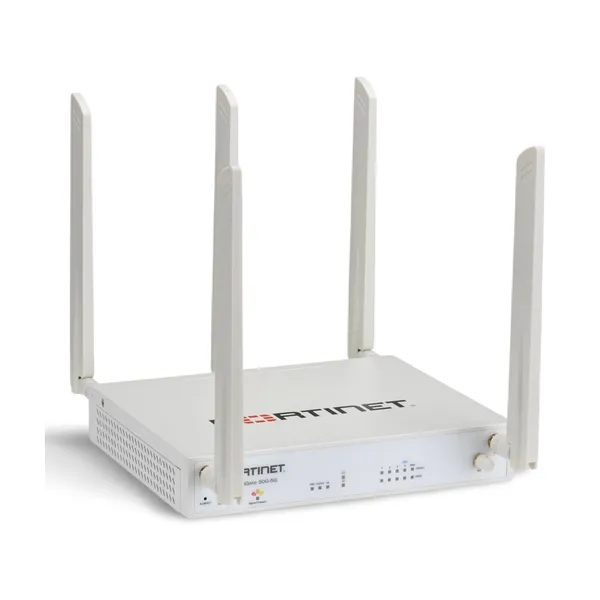
Fortinet FortiWiFi 50G-SFP in Uganda
A compact FortiOS-based next-generation firewall that combines secure branch connectivity, Wi-Fi 6 and a 1 GbE SFP interface in a desktop appliance.
Designed for distributed business sites, the 50G-SFP helps organizations consolidate perimeter security, wireless access and software-defined WAN functions without turning a smaller branch into a complicated multi-appliance deployment. The exact security service package, support entitlement and regional radio code should be confirmed before purchase.
Fortinet
FortiWiFi 50G-SFP
NGFW with Wi-Fi 6
1 GbE RJ45 WAN + 1 GbE SFP
FortiOS / Fortinet ecosystem
Configuration dependent
A secure branch edge with wired and wireless roles in one platform
The FortiWiFi 50G-SFP belongs to Fortinet’s 50G family of next-generation firewalls and is intended for distributed enterprise sites, smaller offices and branch locations that require converged networking and security. Its practical distinction is the combination of a FortiGate-class security platform, integrated Wi-Fi 6 and an SFP interface that can support a fiber handoff or other compatible optical/transceiver deployment. For organizations that would otherwise deploy a firewall, a separate wireless gateway and additional management tooling, this consolidation can simplify a branch design.
Fortinet positions the 50G family around secure networking, SD-WAN and zero-trust network access functions delivered through FortiOS. The appliance can therefore serve as more than a basic edge router. In a suitable subscription and policy design, it can participate in threat prevention, application control, web and DNS security, VPN, segmentation, secure SD-WAN and other FortiGuard-backed controls. Which security functions are licensed and supported depends on the purchased bundle and subscription term.
The 50G-SFP hardware provides one USB port, one management console port, one 1 GbE SFP interface, one 1 GbE RJ45 WAN interface, one 1 GbE RJ45 FortiLink interface and three 1 GbE RJ45 Ethernet ports. The FortiWiFi variant adds three antenna connectors for its integrated wireless capability. This port mix is particularly relevant to offices where the incoming service could arrive over copper today but may move to fiber, or where a protected SFP link is already part of the local network design.
Selection still needs care. Buyers should verify the exact regional wireless code, the SFP transceiver type and optical standard, subscription bundle, intended WAN architecture, expected inspection load and whether external switching or additional access points will be required. FourTeck can review these factors for Uganda deployments and prepare a configuration-aligned quotation rather than treating the appliance as a one-size-fits-all firewall.
What the architecture can improve for a branch network
01
Reduce appliance sprawl
Integrated firewalling, secure routing, wireless networking and FortiOS management can reduce the number of separate devices required at a modest site. Fewer standalone platforms can simplify policy ownership, change control and troubleshooting for a central IT team.
02
Keep fiber and copper edge options open
The presence of both a 1 GbE RJ45 WAN interface and a 1 GbE SFP interface gives designers more flexibility when connecting to ISP equipment, a metro-Ethernet handoff or an internal fiber segment. The actual SFP module must still be selected for the required media and optical specification.
03
Bring Wi-Fi 6 into the secure branch design
The FortiWiFi variant adds integrated dual-band wireless capability, making it suitable for smaller sites where an appliance-based WLAN can satisfy coverage needs. Larger or denser premises may still require dedicated FortiAP access points.
04
Coordinate security and WAN policy
FortiOS integrates secure SD-WAN and security controls, allowing a branch architecture to make path-selection decisions while maintaining policy enforcement. This is useful for organizations standardizing branch connectivity across multiple offices.
05
Support centralized network operations
Fortinet’s broader management ecosystem can help administrators apply consistent configurations, monitor events and coordinate branch policies. The exact management approach should be planned around the organization’s existing Fortinet tools and licensing.
06
Use a quiet desktop form factor
The appliance is a compact desktop unit and the published 50G-SFP specification is fanless. That makes it practical for offices where the security gateway may sit near staff rather than inside a dedicated data-center room.
Its strongest value is not a single port or feature; it is the way branch security, Wi-Fi and WAN control share one FortiOS operating model.
SP5 security processing
Fortinet identifies the 50G family with its purpose-built SPU architecture, designed to accelerate networking and security functions.
Wi-Fi 6 capability
The FortiWiFi model supports 802.11a/b/g/n/ac/ax and is specified with 2×2 multi-user MIMO. Published maximum radio rates are up to 1201 Mbps at 5 GHz and 574 Mbps at 2.4 GHz.
Dedicated SFP interface
One 1 GbE SFP port provides an optical/transceiver option alongside the 1 GbE RJ45 WAN interface. Transceiver selection remains a separate compatibility decision.
FortiLink-ready LAN design
A dedicated 1 GbE RJ45 FortiLink port can be used in a Fortinet-managed switching architecture, while three additional 1 GbE Ethernet interfaces serve local connectivity needs.
For buyers, these facts matter because a branch firewall is rarely selected on firewall function alone. The incoming circuit type, wireless user density, local switching requirements, subscription package and expected inspection profile can all change the correct configuration. A small office with a single internet circuit and modest WLAN demand has a very different bill of materials from a retail site that needs resilient WAN links, segmented POS devices, centrally managed switching and stronger security subscriptions.
| Product | Fortinet FortiWiFi 50G-SFP |
| Form factor | Desktop, fanless |
| Processor / security acceleration | Fortinet SP5 security processing architecture |
| WAN | 1 × 1 GbE RJ45 WAN |
| SFP | 1 × 1 GbE SFP |
| FortiLink | 1 × 1 GbE RJ45 FortiLink |
| Local Ethernet | 3 × 1 GbE RJ45 Ethernet |
| Management / service ports | 1 × USB, 1 × management console |
| Wireless standards | 802.11a/b/g/n/ac/ax, dual-band Wi-Fi 6 |
| Wireless MIMO | 2 × 2 MU-MIMO |
| Maximum published Wi-Fi rates | 1201 Mbps at 5 GHz; 574 Mbps at 2.4 GHz |
| Antenna connectors | 3 × Wi-Fi antenna connectors |
| Dimensions | 40.5 × 216 × 160 mm |
| Weight | 1.0 kg |
| Power | 12 V DC, 3 A; external AC adapter 100–240 V, 50–60 Hz |
| Power consumption | Published average / maximum for 50G-SFP class: 8.3 W / 8.9 W |
| Operating temperature | 0°C to 40°C |
| Operating humidity | 10–90% non-condensing |
| Security services / support | Based on selected FortiGuard and FortiCare bundle |
Which specifications matter most when buying?
The SFP port is the first point to validate because an SFP cage does not itself define the cable, optical wavelength or reach. The selected transceiver must match the upstream device and media. Next, evaluate whether integrated Wi-Fi is appropriate for the floor plan. The published wireless radio capability is useful for a small site, but physical walls, user density, interference and coverage expectations determine whether additional FortiAP access points are necessary.
Security licensing is equally important. FortiOS provides the platform, while FortiGuard subscriptions determine access to specific security services and update feeds. A hardware-only quote and a bundled enterprise or unified threat protection quote should not be treated as equivalent. Finally, review the number of wired devices. The appliance has a compact local port count, so sites with many desktops, phones, cameras or access points will usually require a managed switch. A FortiSwitch design can use the dedicated FortiLink connection and may simplify branch operations.
Five questions that shape the correct branch configuration
- Workload or operational requirement. Define whether the appliance will primarily protect internet access, terminate VPNs, segment local networks, support SD-WAN, provide Wi-Fi, or combine all of these roles. The more security inspection and connectivity functions used simultaneously, the more carefully the expected traffic profile should be reviewed.
- User, device and performance scale. Count staff, wireless clients, phones, printers, cameras, POS devices and guest users. Peak concurrent activity is more useful than a simple employee count. A site with video collaboration and cloud backup may create a much heavier inspection load than an office with the same number of users doing light browsing.
- Compatibility with existing systems. Confirm ISP handoff type, SFP requirements, VLAN design, existing FortiSwitch or FortiAP equipment, authentication systems and any third-party routers or switches that remain in service.
- Growth, licenses and expansion. Decide whether this site is expected to add users, new circuits, more access points or additional security services during the lifecycle of the appliance. Subscription term and renewal planning should be included in the project budget.
- Installation, support and delivery expectations. Identify who will configure policies, migrate the existing firewall, coordinate ISP addressing, install the appliance and provide ongoing administration. FourTeck can align the hardware and subscription quotation with the implementation responsibilities shared by the customer and service team.
Business environments where the 50G-SFP makes practical sense
Professional branch office
A finance, consulting, legal or services office may need secure internet access, Wi-Fi for staff, guest segmentation, VPN connectivity and an SFP option for a fiber-based ISP. The compact 50G-SFP can combine those functions, provided user scale and security inspection requirements fit the chosen model.
Retail or distributed service location
A store or customer-service branch often has a small local footprint but several distinct device groups: staff endpoints, payment devices, guest Wi-Fi, printers and cameras. FortiOS segmentation and secure SD-WAN can help central IT apply consistent policy. A managed switch is commonly added when local wired port requirements exceed the appliance itself.
Education or training satellite site
A small campus building, training center or administrative annex may value integrated Wi-Fi and centralized policy control. Wireless coverage should be surveyed carefully; dense classrooms or multi-floor buildings are likely to need separate access points even if the firewall includes Wi-Fi 6.
Regional office connecting to head office
Organizations with several sites can use the appliance as a branch security edge for site-to-site VPN and SD-WAN designs. The business benefit comes from consistent policy and centralized administration rather than treating every branch as a standalone network.
SFP flexibility at the branch edge
The SFP interface is a defining feature of this model because it opens a design option that many small desktop appliances do not emphasize. A business may receive its internet service through a copper Ethernet handoff, a provider-supplied media converter or a direct fiber presentation. Using the appropriate SFP can create a cleaner design when the upstream equipment supports it. It can also be useful for a fiber connection into a nearby distribution switch where distance, electrical isolation or cabling conditions favor optical media.
However, the presence of an SFP slot does not mean every optical module is interchangeable. The transceiver must match the speed, fiber type, connector, wavelength, reach and supported module requirements on both ends. Single-mode and multimode optics are not selected by appearance; they are chosen according to the cable plant and link budget. For that reason, an SFP should be treated as a bill-of-materials item rather than an afterthought.
Uganda buyers should share the ISP handoff specification or the model of the upstream device when requesting a quotation. If the service provider already supplies an optical network terminal with RJ45 Ethernet output, the SFP may be better reserved for another network role. If the provider hands off fiber directly, FourTeck can help identify the information needed to select a suitable transceiver. This prevents a common procurement problem: ordering the correct firewall model but an incompatible optic.
Wi-Fi 6 integrated into the security appliance
For a small branch, integrated Wi-Fi can remove the need for a separate access point controller or standalone wireless router. The FortiWiFi 50G-SFP supports 802.11ax along with earlier Wi-Fi generations, and Fortinet publishes 2×2 MU-MIMO capability with maximum radio data rates of 1201 Mbps on 5 GHz and 574 Mbps on 2.4 GHz. These values describe the wireless radio capability, not guaranteed application throughput.
Real-world wireless design depends on client capability, channel conditions, interference, walls, floor layout, antenna positioning and the number of active users. A single compact appliance may serve a smaller office well when placed centrally, but it should not be assumed to cover a large warehouse, hotel, school block or multi-floor premises. Those environments usually require a proper access-point layout.
Capability 01
Dual-band Wi-Fi 6 supports modern wireless clients while retaining backward compatibility with common earlier standards.
Capability 02
Integrated wireless can suit compact sites that want fewer edge devices and common FortiOS policy control.
Capability 03
FortiAP expansion remains the better path when coverage, density or placement requirements exceed an appliance-integrated radio.
Security subscriptions are part of the architecture
The appliance runs FortiOS, but a business buying a next-generation firewall should evaluate the security subscription at the same time as the hardware. FortiGuard service bundles can add capabilities and intelligence feeds for functions such as intrusion prevention, antivirus, web and DNS security, application control and other advanced protections. FortiCare provides vendor support services according to the selected entitlement. Package names, included services and subscription terms can change, so the exact bundle should be confirmed on the quotation.
This matters commercially because a low hardware-only acquisition cost can be misleading if the organization expects continuously updated threat-prevention services. Conversely, a buyer should not automatically select the broadest bundle without mapping it to the security policy and operational capacity. A practical procurement process starts with the required controls, then selects the service bundle and term that support them.
Buyer decision checklist
- Which FortiGuard security services are required by policy or risk assessment?
- Is FortiCare support needed for one year, three years or another available term?
- Will the site use VPN, SD-WAN and zero-trust access functions?
- Who will monitor events and maintain security policies after deployment?
- Does the project need centralized management or reporting tools?
- What renewal date should procurement plan for?
What to confirm before issuing a purchase order
| Risk | What to confirm | Why it matters | What to share with FourTeck |
|---|---|---|---|
| Wrong regional model | Wireless region / regulatory code | Radio operation must align with the intended market. | Country of deployment and site details. |
| Incompatible SFP | Media, wavelength, reach and upstream port | An incorrect optic can prevent the link from coming up. | ISP specification, cable type and upstream device. |
| Insufficient WLAN coverage | Floor area, walls, density and client types | Integrated Wi-Fi is not a substitute for a proper site design in large spaces. | Floor plan and approximate wireless client count. |
| Missing subscription | FortiGuard bundle and FortiCare term | Expected security services may depend on an active entitlement. | Required controls, support level and preferred term. |
A correct purchase order should describe the hardware, regional code, bundle term and accessories clearly. For multi-site projects, it should also distinguish locations that need different optics, switches, access points or support periods. This is especially important when branches have different ISP services or floor plans.
Planning the appliance for a Uganda deployment
FourTeck can assist Uganda organizations with model review, quote preparation, subscription selection and delivery coordination for the FortiWiFi 50G-SFP. Availability may vary by regional code, license bundle and project quantity, so customers should request current confirmation rather than assume a particular configuration is immediately available.
For a Kampala deployment, the fastest way to prepare an accurate quotation is to share the site requirement rather than only the model name. Provide the ISP interface type, number of users and devices, whether Wi-Fi will be delivered by the appliance or separate access points, and the required security subscription period. FourTeck can then structure the quote around the actual deployment. Warranty and vendor-support expectations should also be discussed before order placement so that the selected FortiCare entitlement reflects the organization’s support process.
Project quantities should be planned early. A rollout covering several offices may require matching regional SKUs, identical subscription end dates and a repeatable bill of materials. Coordinating these details before shipment can make deployment and lifecycle management substantially easier for the IT team.
Coverage across key Uganda business locations
FourTeck can coordinate product enquiries and project requirements for customers in Kampala as well as organizations planning deployments in Entebbe, Jinja, Mbarara and Gulu. The same technical information should be supplied for each site, particularly where ISP handoffs, wireless coverage or user counts differ. Consolidating multiple locations into one project brief helps keep firewall models, license terms and accessory requirements consistent while still accounting for local site differences.
East Africa and regional project support
Organizations operating beyond Uganda may need a consistent Fortinet branch design across Kenya or other selected East Africa markets. FourTeck can help prepare region-aware product quotations and coordinate requirements for multi-country projects where suitable. Regional procurement should still account for wireless regulatory codes, electrical accessories, support entitlements and local deployment conditions rather than assuming every site can use an identical boxed SKU.
For wider Africa projects, buyers can also review FourTeck Africa. Businesses sourcing through the Gulf can visit FourTeck UAE or FourTeck Kuwait where relevant. Regional availability, commercial terms and delivery arrangements should be confirmed for the specific country and configuration.
Build the surrounding branch solution, not just the firewall
Fortinet next-generation firewall options
Best for buyers comparing branch firewall capacity, interfaces and form factors. Browse FourTeck Uganda for Fortinet security solutions.
FortiSwitch secure switching
Best for sites that need more wired access ports, VLAN segmentation or a FortiLink-managed access layer. Explore business networking options in Uganda.
FortiAP wireless access points
Best for larger premises where one integrated Wi-Fi radio cannot provide the required coverage or client density. Review enterprise wireless solutions.
FortiGuard and FortiCare bundles
Best for organizations that need defined security services and vendor support entitlements over a selected term. Ask FourTeck to compare available bundle options.
Kenya project coordination
Best for organizations standardizing branch security across Uganda and Kenya. Visit FourTeck Kenya.
Practical help before the configuration becomes a purchase order
01 Product selection guidance. FourTeck can help determine whether the 50G-SFP’s interface mix, integrated wireless and branch positioning fit the proposed site.
02 Configuration review. Buyers can provide ISP, SFP, switching, Wi-Fi and subscription requirements so the quotation reflects the intended deployment.
03 Quote assistance. Project quantities, subscription terms and accessories can be consolidated into a clearer bill of materials for procurement review.
04 Uganda delivery coordination. Delivery planning can be discussed based on current availability and the actual project location without making assumptions about stock.
05 Alternative product matching. If the deployment needs more ports, greater wireless coverage, a different WAN medium or a different performance class, FourTeck can help identify a more suitable path rather than forcing the requested model into the wrong role.
FortiWiFi 50G-SFP buyer questions
01. What is the FortiWiFi 50G-SFP designed for?
It is designed as a compact next-generation firewall and wireless security appliance for branch and distributed enterprise sites. It combines FortiOS security and networking functions, integrated Wi-Fi 6, an RJ45 WAN port, an SFP interface and local Ethernet connectivity. The model is particularly relevant to smaller sites that want secure wired and wireless networking in one platform.
02. Does the FortiWiFi 50G-SFP include Wi-Fi 6?
Yes. Fortinet specifies the FortiWiFi model with 802.11ax Wi-Fi 6 support alongside earlier 802.11 standards. The published radio configuration is 2×2 MU-MIMO, with maximum rates up to 1201 Mbps at 5 GHz and 574 Mbps at 2.4 GHz. Actual wireless performance depends on site conditions, clients and radio design.
03. What is the SFP port used for?
The appliance includes one 1 GbE SFP interface that can be used with a suitable transceiver for an optical or compatible copper SFP link. Buyers must confirm the upstream device, fiber type, wavelength and required reach. The correct firewall model can still fail to connect if the SFP module is incompatible with the network handoff.
04. Does it replace a separate wireless access point?
It can for some smaller sites, but not every deployment. Integrated Wi-Fi is convenient where a centrally placed appliance can cover the required workspace and client count. Larger offices, multi-floor buildings, dense classrooms or complex layouts normally benefit from dedicated FortiAP access points positioned according to a wireless design.
05. Are FortiGuard services included automatically?
The exact FortiGuard services depend on the purchased bundle and subscription. Hardware-only and bundled part numbers should not be treated as equivalent. Buyers should specify the desired security controls and support period so the quotation can identify the correct FortiGuard and FortiCare package.
06. Can it be used for secure SD-WAN?
Yes. Fortinet positions the 50G family as a converged next-generation firewall and secure SD-WAN platform running FortiOS. A successful deployment still requires appropriate WAN circuits, routing and policy configuration. Organizations with multiple branches should design SD-WAN rules centrally so application steering and security policy remain consistent.
07. How many wired Ethernet connections does the appliance provide?
The published hardware layout includes one 1 GbE RJ45 WAN port, one 1 GbE RJ45 FortiLink port and three 1 GbE RJ45 Ethernet ports, plus one 1 GbE SFP interface. Sites with more local wired devices should normally add a suitable switch rather than trying to use the firewall as the entire access layer.
08. What information should I provide for a Uganda quote?
Provide the number of sites, user and device count, internet bandwidth, ISP handoff type, whether an SFP optic is required, Wi-Fi coverage needs, existing Fortinet infrastructure, preferred subscription term and project quantity. These details allow FourTeck to prepare a more relevant configuration and identify any required switches, access points or optics.
09. Is the 50G-SFP suitable for a multi-site rollout?
It can be suitable when each branch fits the model’s connectivity and workload profile. Multi-site projects benefit from consistent FortiOS policy, standardized subscriptions and repeatable accessory choices. However, each branch should still be checked for ISP interface, wireless coverage and local port requirements before assuming one identical bill of materials applies everywhere.
10. How do I confirm current availability and support terms?
Contact FourTeck with the exact model, required regional deployment, quantity and preferred subscription term. Availability can vary by regional code and bundle. Support and warranty guidance also depends on the selected FortiCare entitlement and applicable manufacturer terms, so these should be confirmed on the formal quotation.
Plan the firewall, optic, wireless coverage and subscription as one branch solution
Share your ISP handoff, user count, Wi-Fi coverage requirement, preferred license term and project quantity. FourTeck can review the configuration and prepare a Uganda quotation that reflects the actual deployment rather than a bare hardware SKU.
Useful details to send: site count, bandwidth, fiber or copper handoff, SFP specification, wireless client count, existing Fortinet products, FortiGuard requirement and delivery location.


Reviews
There are no reviews yet.