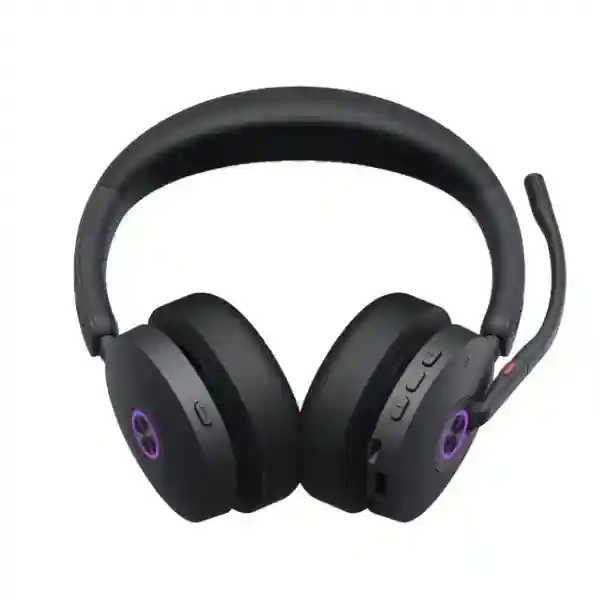
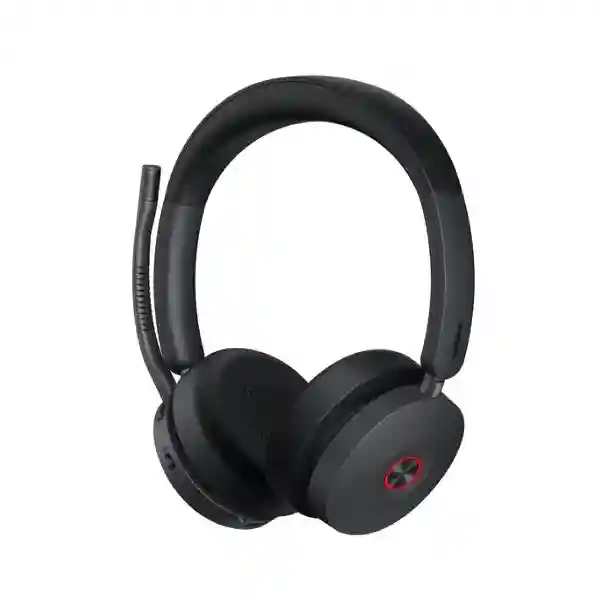
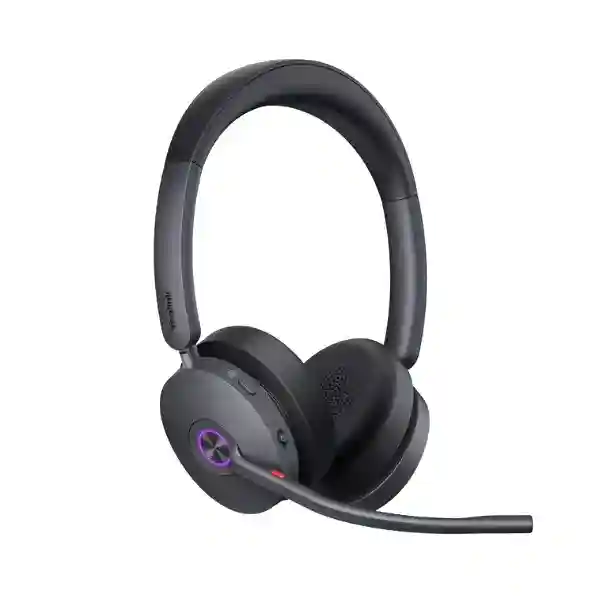
Yealink BH74 ANC Bluetooth Headset for Enterprise Hybrid Work
The Yealink BH74 is a premium wireless business headset designed for people who spend a substantial part of the working day on calls, online meetings, focused audio tasks and collaboration sessions. It combines Bluetooth 5.3 connectivity, hybrid active noise cancellation, a multi-microphone voice system, long battery endurance and an ergonomic on-ear format in a device that can move between a computer and mobile phone without forcing the user into a fixed desk position. For organizations in Uganda, this makes the BH74 relevant to executives, customer-facing teams, project managers, consultants, contact-centre supervisors, remote staff and knowledge workers who need dependable speech clarity without moving to a large over-ear headset.
The procurement value of the BH74 is not simply that it is wireless. Its design addresses several everyday operational problems at once: distracting office noise, inconsistent microphone pickup, frequent device switching, cable clutter, short battery cycles and uncertainty about collaboration-platform compatibility. Yealink specifies a wireless range of up to 50 metres in suitable conditions, up to 32 hours of talk time, up to 65 hours of music playback with ANC disabled, simultaneous connection to two Bluetooth devices and a pairing list of up to eight devices. The included BT51C dongle and USB-C/A adapter provide a controlled computer connection while native Bluetooth remains available for compatible devices.
FourTeck Uganda supplies the BH74 for business procurement projects where the exact variant, accessories, deployment volume and collaboration environment need to be confirmed before purchase. Buyers can select Microsoft Teams or UC variants, and deployments can also include the optional BHC74 charging stand where desk-based charging and presentation are preferred. For multi-user rollouts, FourTeck can assist with bill-of-materials validation so that headset versions, adapters and stands are consistent across the order.
Instant Specifications & Procurement Fact Rail
Yealink BH74 premium on-ear wireless business headset.
Professional office, hybrid work, executive, mobile and collaboration environments.
Bluetooth 5.3, BT51C USB-C dongle, USB-C/A adapter and USB cable connectivity.
Up to 32 hours talk time and up to 65 hours music with ANC off; up to 90 minutes charging.
Business quotation basis; variant, quantity and delivery schedule confirmed at order stage.
Regional warranty terms should be confirmed on the FourTeck quotation for the supplied batch.
The BH74 is available in Teams and UC configurations, with headset-only and charging-stand package choices depending on part number. Procurement teams should avoid treating all BH74 listings as identical because the collaboration certification and package contents can differ. For standardized rollouts, the purchase order should state the intended platform, required connector environment, number of users and whether every workstation needs a charging stand. This reduces mixed-variant deliveries and makes support simpler after deployment.
Operational Product Architecture & Overview
At the center of the BH74 is a wireless audio architecture intended to keep business communication stable while giving the wearer freedom to move. Bluetooth 5.3 provides the radio foundation, while Yealink specifies a working range of up to 50 metres or 160 feet under suitable conditions. Actual range in an office will depend on walls, furniture, radio congestion, endpoint placement and other environmental factors, so buyers should treat the published figure as a maximum rather than a guaranteed distance through every building layout. The included BT51C dongle is particularly useful for managed computer fleets because it gives IT teams a consistent endpoint connection rather than relying entirely on the varied Bluetooth implementations built into different laptops.
Voice capture is designed around multiple microphones and Yealink Acoustic Shield Technology 3.0. Yealink lists six microphones in the product specification, with four premium microphones used in the voice-noise-reduction system and hybrid ANC architecture. The operational objective is straightforward: preserve the user’s speech while reducing competing sound from nearby conversations, office equipment and general background activity. This is valuable in open-plan offices where conventional laptop microphones can capture too much room sound, causing meeting participants to hear keyboards, colleagues and other distractions.
Hybrid active noise cancellation works on the listening side to reduce environmental distraction for the wearer. Feedforward and feedback microphone techniques monitor external and internal acoustic conditions so that unwanted ambient energy can be reduced electronically. The ear-cushion fit also contributes passive isolation. This combination is useful for professionals who alternate between focused individual work and live calls without wanting to change devices. Ambient sound and noise-cancellation controls allow the user to adjust awareness according to the situation, which is important when moving between a quiet private office, a shared floor and a public work setting.
The speaker system uses 30 mm drivers with a published speaker frequency response of 20 Hz to 20 kHz. Yealink distinguishes music and talk use, with talk bandwidth designed around speech intelligibility. The headset therefore serves both collaboration and general business audio rather than being limited to telephony. Adaptive equalization further supports a consistent listening experience, while auto-wear detection can coordinate playback behavior as the headset is worn or removed.
Battery architecture is another major procurement consideration. The BH74 uses a rechargeable lithium-ion battery rated at 500 mAh. Yealink publishes up to 32 hours of talk time with the busylight off and up to 65 hours of music with ANC off, plus standby of up to 20 days. Charging is specified at up to 90 minutes. These figures create enough headroom for typical full-day use, but real runtime varies with ANC use, radio conditions, call volume, busylight activity, audio level and battery age. Organizations with shift work should assess whether cable charging between shifts is sufficient or whether the optional BHC74 stand offers a better operating routine.
The BH74 also addresses device switching. It can remember up to eight paired devices and maintain two simultaneous Bluetooth connections. A user can therefore remain linked to a computer and smartphone and move between communication tasks with less manual re-pairing. This matters in sales, management, consulting and field coordination roles where calls may arrive through both enterprise collaboration software and a mobile network. The architecture is not intended to replace a telephony platform; instead, it provides the personal audio endpoint that connects users to compatible software and devices.
Enterprise Business Outcomes & Value Analysis
Clear speech is a productivity issue, not merely an audio preference. Repeating statements, moving to quieter rooms and reconnecting unsuitable consumer headsets all waste meeting time. The BH74 combines a boom microphone arrangement, multi-microphone processing and Acoustic Shield Technology 3.0 to prioritize the speaker’s voice. For teams working around office chatter, printers, ventilation and keyboard activity, improved voice isolation can make remote conversations easier to follow and reduce fatigue for both sides of a call.
Up to 32 hours of published talk time gives organizations more operational margin than a headset designed for only a few hours of calls. A user can normally complete a working day without searching for a charger between meetings. The USB charging option also means recovery does not depend on a proprietary desktop base. Where a fixed workstation is used, the optional charging stand can encourage consistent charging habits and reduce the chance that a headset begins the next shift with a low battery.
A standardized headset model simplifies onboarding, spares planning, user instructions and IT support. Teams and UC variants allow organizations to align procurement with their main collaboration environment while keeping the underlying BH74 user experience consistent. The USB-C dongle and USB-A adapter are practical where laptop fleets contain a mixture of newer and older ports. This reduces the need to maintain separate headset models simply because workstation connectors differ.
Personal headsets reduce the amount of meeting audio broadcast into a shared workplace and support more private listening than speakers. Yealink also lists Peak Block Protection aligned with EN50332, Australian G616 protection and daily noise exposure protection. These features should be considered part of a broader workplace audio policy rather than a substitute for occupational assessment, but they provide useful safeguards for organizations deploying headsets to frequent callers.
Yealink provides USB Connect for PCs, the Yealink Connect mobile application and device-management capabilities. This gives administrators and users defined tools for supported settings and maintenance rather than relying only on physical buttons. For larger estates, procurement should confirm which management service is intended, what administrative functions are required and whether corporate endpoint policies permit the supporting software.
The cost of a business headset includes replacement frequency, support time, accessories and user downtime as well as the initial purchase. Replaceable ear cushions can extend practical serviceability where cushions wear before electronics fail. Long battery endurance reduces mid-day charging interruptions, while the ability to use one headset with both computer and phone can reduce duplicate personal audio devices for eligible users. Buyers should include spare cushions and a controlled percentage of spare headsets in larger rollout budgets.
At 152 g, the BH74 is designed to remain portable enough for movement between office, home and travel locations. The carrying case protects the headset during transport, and native Bluetooth enables direct connection to compatible mobile devices. Employees who divide time across multiple workplaces can retain one familiar communication endpoint, which can reduce setup variability and make remote collaboration more predictable.
Key Hardware & Software Highlights
| Component | Technical Role | Operational Outcome |
|---|---|---|
| Hybrid ANC | Uses microphone-based active cancellation with the physical ear-cup fit. | Helps the wearer focus in shared or changing acoustic environments. |
| Six-microphone system | Supports voice capture and noise-control functions. | Improves call clarity when nearby sound competes with the user’s voice. |
| 30 mm speakers | 20 Hz–20 kHz published speaker frequency response. | Supports calls, meetings, training media and music playback. |
| Bluetooth 5.3 | Wireless connectivity with up to 50 m published range. | Allows movement away from a workstation under suitable radio conditions. |
| BT51C dongle + USB-C/A adapter | Provides a standardized computer-side connection. | Useful for mixed USB-C and USB-A business fleets. |
| 500 mAh battery | Rechargeable lithium-ion power source. | Supports extended workdays and reduces charging interruptions. |
| Dual busylights | Visible call-status indication. | Helps colleagues recognize when the wearer is engaged in a call. |
| Auto-wear detection | Detects wearing state for supported playback behavior. | Reduces manual media control during frequent transitions. |
The hardware and software features are most valuable when assessed as a complete user workflow. A long-range radio is useful only when call controls remain accessible; long battery life is useful only when charging is straightforward; noise reduction is useful only when comfort allows the headset to remain worn. The BH74 combines these functions into one standardized endpoint, which is why variant selection and accessory planning should happen before a volume order is released.
Technical Specifications Ledger
| Specification | Yealink BH74 Detail | Procurement Note |
|---|---|---|
| Wearing style | On-ear, stereo | Suitable for users who prefer a lighter on-ear design. |
| Headset weight | 152 g | Relevant for all-day wear and travel kits. |
| Bluetooth | Bluetooth 5.3 | Confirm endpoint policy for native Bluetooth or dongle use. |
| Wireless range | Up to 50 m / 160 ft | Real range varies with obstacles and radio conditions. |
| Simultaneous Bluetooth links | 2 | Supports common PC-plus-mobile workflows. |
| Pairing memory | Up to 8 devices | Useful for users moving among approved endpoints. |
| Microphones | 6 total; microphone response 100 Hz–10 kHz | Designed for business voice capture and noise reduction. |
| Voice technology | Acoustic Shield Technology 3.0 | Supports speech isolation in busy environments. |
| Listening noise control | Hybrid active noise cancellation | Useful for open offices, travel and shared work areas. |
| Speaker | 30 mm; 20 Hz–20 kHz response | Supports voice and multimedia use. |
| Talk bandwidth | 100 Hz–8 kHz | Optimized around intelligible speech. |
| Battery | Rechargeable lithium-ion, 500 mAh | Runtime depends on operating mode and battery condition. |
| Talk time | Up to 32 hours | Published conditions vary by feature usage. |
| Music time | Up to 65 hours with ANC off | ANC use reduces available runtime. |
| Standby | Up to 20 days | Useful for intermittent users and travel kits. |
| Charging | Up to 90 minutes | Optional BHC74 stand available for selected packages. |
| Hearing protection | Peak Block EN50332, AU G616 and daily noise exposure protection | Supports organizational hearing-safety practices. |
| Management | Yealink USB Connect, Yealink Connect app and management services | Confirm corporate software and administration requirements. |
| Core package | Headset, carrying case, charging cable, quick guide, BT51C dongle, USB-C/A adapter | Exact package should be matched to part number. |
Specifications should be read in the context of the selected commercial part number. Yealink identifies BH74 Teams USB-C/A, BH74 UC USB-C/A, and corresponding packages with a stand. A procurement document should therefore include the intended certification and package configuration, not only the family name “BH74.” This is especially important in larger orders where a small variant mismatch can create inconsistent user controls, packaging and desk accessories across departments.
Configuration & Sizing Worksheet
Step 1 — Estimate the User Workload
Classify users by call intensity rather than job title alone. A manager with six hours of daily meetings has a different requirement from an occasional mobile caller, even if both work in the same department. Record approximate daily call hours, expected music or training playback, whether ANC will remain enabled for long periods, and whether users work one or multiple shifts. The BH74’s published battery figures provide substantial capacity, but high-intensity teams should still establish a charging routine. For shared shift positions, consider whether each worker receives an individual headset for hygiene and accountability.
Step 2 — Assess the Physical Workplace
Map the acoustic environment. Open-plan floors, reception zones and shared operations rooms may benefit most from hybrid ANC and microphone noise reduction. Private offices may place greater value on wireless mobility and comfort. Also consider storage: mobile staff need the carrying case, while fixed desks may benefit from the optional stand. The BH74 does not require rack space or a dedicated network switch port; however, organizations should still assess available USB ports, charging locations and whether laptop docking stations expose USB-A or USB-C connections.
Step 3 — Confirm Power & Cabling
The headset is battery powered and charges by USB, so there is no separate AC power architecture to size for each unit. The supplied connection accessories support USB-C and USB-A computer environments. Verify whether security policy permits USB Bluetooth dongles and whether users will charge through laptops, docking stations, powered USB hubs or the optional stand. For hot-desk areas, decide whether chargers stay at desks or travel with users. Standardizing the charging method can prevent misplaced cables and inconsistent readiness.
Step 4 — Select Platform Variant & Management Approach
Choose the Microsoft Teams variant when the organization wants the Teams-certified user experience; choose the UC variant for broader unified-communications deployments where that certification profile is preferred. The BH74 is designed to work across many mainstream collaboration platforms, but procurement should still test the exact application, operating system and endpoint combination used by the organization. Determine whether Yealink USB Connect or management services will be deployed centrally and assign responsibility for firmware maintenance.
Step 5 — Build the Quote Checklist
A useful quotation request includes: total quantity; Teams or UC preference; headset-only or stand package; delivery city; required delivery date; endpoint types; operating systems; primary meeting platforms; any Yealink desk-phone integration requirement; number of spare units; replacement ear-cushion requirements; staging expectations; and warranty or support documentation needed by procurement. For a phased rollout, identify pilot quantity and production quantity separately. FourTeck can then validate the bill of materials before the order is finalized.
Deployment Scenarios & Industry Use Cases
Large Enterprise & Multi-Site Networks
A multi-site enterprise can standardize the BH74 for meeting-intensive users across headquarters, branches and home offices. The benefit is consistency: the same basic call controls, charging process, dongle and support documentation can be used across locations. Employees transferring between sites do not need to learn a new audio endpoint. IT teams can define a standard supported configuration and maintain a small spare pool. For executives and project teams, dual-device connectivity supports a laptop and mobile phone without requiring a second headset. For open offices, dual busylights also give colleagues a visual indication that a wearer is occupied.
Financial & Banking Institutions
Banks, insurance companies and financial-services organizations often combine controlled office environments with high volumes of internal and client communication. A personal headset can reduce speakerphone use and keep incoming audio localized to the wearer. The BH74’s noise-control functions are useful where nearby conversations would otherwise compete with a call. Procurement teams should still apply their own security policies to Bluetooth, USB devices, recording and collaboration applications. The headset provides the audio endpoint; it does not replace information-security controls, access management or the institution’s approved communications platform.
Educational & Campus Networks
Universities, colleges and training organizations can use the BH74 for administrators, lecturers, remote-learning coordinators and support staff who move between offices and teaching spaces. Long battery life is useful when a user has back-to-back virtual classes or meetings. The carrying case supports movement across campus, while USB and Bluetooth options allow the same headset to work with institution-managed computers and compatible mobile devices. Before a large purchase, institutions should pilot the headset with their learning and meeting platforms and verify any restrictions applied to managed student or staff endpoints.
Government & Public-Sector Procurement
Government deployments typically require clearer documentation around part numbers, warranty, delivery, support and acceptance. The BH74 can be specified for administrative offices, project teams, call-intensive departments and hybrid staff, but the tender should identify the exact Teams or UC configuration rather than leaving the variant open. Agencies with strict device-control policies should validate Bluetooth and USB dongle use with their security team before ordering. FourTeck can support bill-of-materials confirmation and quotation documentation for projects where consistent supplied configuration is important.
Technical Deep Dive 1: Audio Processing, Radio & Hardware Engine
The BH74’s practical performance comes from the coordination of microphones, digital signal processing, Bluetooth radio behavior and the physical acoustic design. The headset contains six microphones in total. Yealink describes four premium microphones as part of its voice-noise-reduction and hybrid cancellation approach, while the complete microphone system supports both outgoing speech quality and environmental control. Acoustic Shield Technology 3.0 is intended to distinguish the wearer’s voice from surrounding sound. This matters because office noise is often speech-like and therefore harder to ignore than a constant low-frequency hum.
On the listening side, hybrid ANC combines feedforward and feedback sensing. A feedforward microphone can detect ambient sound before it reaches the ear, while feedback sensing can monitor the acoustic result closer to the listener. Processing generates an opposing signal intended to reduce unwanted sound. The physical ear cushions contribute to isolation as well. The result is not absolute silence; rather, it is a reduction in distracting environmental energy so that calls and focused work can be easier to follow at comfortable listening levels.
Bluetooth 5.3 supports the wireless transport layer. The published maximum range of 50 metres is useful for office mobility, but radio planning remains environmental. Dense reinforced walls, metal partitions, congested 2.4 GHz conditions and endpoint placement can shorten range. In a managed enterprise deployment, the BT51C dongle can provide a more standardized computer connection than depending on many different laptop Bluetooth chipsets and drivers. Buyers should pilot in the actual workplace if roaming distance is a critical requirement.
Technical Deep Dive 2: Software Ecosystem, Firmware Security & Operational Control
Business headsets increasingly behave like managed endpoints rather than passive audio accessories. The BH74 supports Yealink USB Connect on computers and the Yealink Connect application on supported mobile platforms. Yealink also provides management services for device estates. These tools can assist with configuration and maintenance, but the exact operational model should be defined by the customer’s IT team. Decide who is allowed to change settings, who is responsible for firmware updates, and whether users can install supporting applications themselves.
Firmware maintenance should follow the same change-control principles applied to other collaboration peripherals. Organizations should review release information, validate updates on a small pilot group, confirm compatibility with the current operating-system and collaboration-app versions, and then deploy more broadly according to internal policy. A headset update may appear low risk, but call-control integration is important to business users, so untested changes can create unnecessary support tickets.
The platform choice should also be documented. The BH74 comes in Teams and UC variants. Both are designed for professional collaboration, but the certification and user-control behavior should match the organization’s primary environment. For mixed estates, procurement can either standardize on one approved variant after testing or allocate variants by user group. The better approach is the one that minimizes support complexity while preserving the required platform experience.
Technical Deep Dive 3: Availability, Redundancy & Work Continuity
A personal headset does not provide infrastructure redundancy in the same way as a network appliance, but continuity still matters. The BH74 reduces several single-user failure points through flexible connectivity and charging. It can connect through the BT51C USB dongle, native Bluetooth or USB cable pathways depending on the supported endpoint scenario. It can maintain two simultaneous Bluetooth connections and remember up to eight paired devices. If a user’s workflow shifts between computer and phone, this reduces repeated setup and makes the headset more adaptable.
Battery resilience is primarily about capacity and operating discipline. With up to 32 hours of talk time, a fully charged BH74 has substantial reserve for normal business days. Organizations should nevertheless establish a predictable charging routine. Fixed-desk users can return the headset to an optional stand; mobile users can charge by cable. A small spare pool is recommended for large deployments so that a damaged or misplaced headset does not stop a user from joining critical calls.
Replaceable ear cushions also matter to service continuity. Cushions are wear components, and being able to replace them can extend the useful life of the electronic assembly. Procurement teams should consider ordering a modest quantity of approved replacement cushions alongside a large headset deployment. This approach is often more economical and operationally efficient than replacing complete units for cosmetic or comfort wear.
Pre-Purchase Buyer Gap Checklist
Are there hidden collaboration licences? The BH74 is an endpoint and does not itself provide a meeting or telephony service. Your organization may still require licences for Microsoft Teams, Zoom, a softphone, cloud calling or another collaboration service. Those service licences are separate from the headset purchase. Confirm the platform already licensed by your organization and then select the appropriate headset variant.
Is every BH74 package the same? No. Yealink lists Teams and UC part numbers, plus versions packaged with a charging stand. The quotation should show the exact commercial configuration. Do not approve a large order using only the family name if platform certification or the charging stand matters.
Will the 50-metre range work through several rooms? The range is a maximum under suitable conditions. Walls, radio interference and building materials reduce practical coverage. If users must walk far from their computers during calls, test the intended path before volume deployment.
Does the headset need a special power adapter? It is USB rechargeable. The optional BHC74 stand changes the desk-charging workflow but does not turn the product into a networked base-station system. Confirm how users will charge at desks, at home and while travelling.
Will it work with both older and newer laptops? The supplied USB-C dongle and USB-A adapter provide flexibility across common computer port generations. Corporate device-control policy may still restrict removable USB or Bluetooth devices, so IT approval should be obtained before rollout.
What about cross-vendor collaboration applications? Yealink positions the BH74 for broad mainstream UC compatibility and lists compatibility with more than 100 platforms and operating systems. However, specific call controls can depend on application, operating system, firmware and connection method. Test the exact combinations used in your environment.
How should lifecycle planning be handled? Ask for current supply status, warranty terms and accessory availability at quotation time. Keep the exact part number in asset records. For larger deployments, retain spare headsets and replacement ear cushions so that day-to-day failures do not force emergency purchases of a different model.
Uganda Regional Procurement & Delivery Logistics
FourTeck Uganda supports business buyers that need a structured quotation rather than a consumer-style checkout decision. Start by providing the required quantity, delivery location, target deployment date, collaboration platform and whether charging stands are required. Where the project covers multiple departments, list quantities by site or user group. This helps separate a single-site requirement from a phased rollout and allows packaging and delivery expectations to be documented before order confirmation.
After the configuration is validated, the commercial quotation can identify the supplied model, quantity and relevant terms. Buyers should review the part number carefully, particularly where Teams versus UC certification matters. If the order includes accessories or spare units, they should appear as separate line items so that receiving teams can reconcile the shipment accurately.
Delivery timing depends on quantity, current supply position, import or transfer requirements and final destination. For this reason, project schedules should be based on the lead time confirmed on the current quotation rather than an assumed generic delivery period. Organizations planning a new office, migration or staff onboarding date should communicate that milestone when requesting pricing. Pre-configuration and technical validation requirements should also be stated early so that they can be included in the deployment plan rather than added after dispatch.
Local Coverage Matrix
Suitable for headquarters, corporate offices, financial institutions, technology teams and professional-services deployments requiring business quotations and volume planning.
Procurement support for offices, hospitality operations, transport-related organizations and hybrid teams that need portable professional headsets.
Supply planning for industrial, education, administration and branch-office users needing standardized wireless collaboration endpoints.
Regional business deployments can be quoted with quantities, destination details and required delivery milestones defined in advance.
Organizations can request project quotations for professional communications equipment with variant and accessory requirements clearly documented.
For all locations, final delivery arrangements and lead times depend on the specific order. Buyers should provide the complete delivery address, site contact, quantity and project deadline during quotation so that logistics can be planned accurately.
Cross-Border & Regional Supply Chains
Organizations operating across several countries often benefit from using consistent product specifications and part numbers. FourTeck supports regional sourcing through dedicated market channels for Uganda, Kenya, broader African markets, the UAE and Kuwait. A regional procurement team can use the same technical baseline while requesting country-specific commercial terms, logistics and warranty handling.
For cross-border projects, the bill of materials should identify exact BH74 variants and accessory requirements. Shipping, taxes, import processes, currency and lead time can differ by destination, so each country quotation should be treated as a commercial document for that market. The technical standard can remain consistent even where commercial conditions differ. This is particularly useful for companies opening branch offices or standardizing collaboration equipment across East Africa and Gulf operations.
Related Yealink Solutions & Internal Paths
The BH74 works best as part of a planned communications environment rather than as an isolated purchase. Organizations reviewing headsets can also explore the FourTeck Uganda communications portfolio for compatible endpoint and collaboration requirements. Teams replacing desk communications can evaluate Yealink IP phones alongside personal headsets, while meeting-room projects may require conference endpoints and room systems rather than individual audio devices.
For regional projects, procurement teams can coordinate requirements through the FourTeck Africa portal. Organizations with parallel operations in Nairobi can use FourTeck Kenya, while Gulf projects can reference FourTeck UAE and FourTeck Kuwait. For the BH74 itself, related procurement items include the BHC74 charging stand, replacement ear cushions, approved USB accessories and spare headset units for continuity.
The most useful related-product discussion begins with the user role. A fixed receptionist may need a different headset profile from a mobile executive; a meeting room requires a shared conferencing solution; a warehouse user may require a different wearing style and durability profile. FourTeck can help separate these requirements so that the BH74 is deployed where its ANC, mobility and collaboration features provide the strongest operational fit.
FourTeck Technical Service Capabilities
Enterprise headset projects can fail through small specification mistakes rather than major technical problems. FourTeck’s procurement support can begin with engineering validation of the requested model against the intended user environment. This includes confirming whether Teams or UC is required, checking the connector environment, reviewing the need for charging stands and validating quantities for users, spares and accessories.
Bill-of-materials verification is especially important when several Yealink part numbers share the same BH74 family name. A reviewed bill helps prevent a mixed shipment where some users receive stands and others do not, or where certification variants differ from the intended platform. For larger deployments, staging requirements can be discussed before shipment, including supported firmware preparation and deployment documentation where applicable to the agreed service scope.
Post-sales support should also be planned before purchase. Keep serial and part-number records, define the internal first-line support process, and establish how warranty cases will be escalated. FourTeck can assist with supplied-product support and warranty coordination according to the terms stated on the quotation. For recurring procurement, maintaining the approved configuration makes later additions easier because new users can be matched to the established standard.
Extended Technical FAQ
1. Is the Yealink BH74 suitable for a noisy open-plan office?
Yes, that is one of the BH74’s strongest use cases. It combines hybrid active noise cancellation for the wearer with Yealink Acoustic Shield Technology 3.0 and a multi-microphone system intended to reduce background sound captured during calls. Yealink also identifies Microsoft Teams Premium Open Office certification for the relevant configuration. No headset can remove every nearby sound in every environment, so organizations with unusually loud operations should run a pilot. For normal office chatter, keyboards and shared-workspace noise, the BH74 is designed specifically to improve focus and call clarity.
2. What is the difference between Teams and UC versions?
The BH74 family is offered in Microsoft Teams and UC variants, and Yealink assigns different part numbers to those configurations. The Teams version is intended for organizations standardizing around the Microsoft Teams experience, while the UC version is suited to broader unified-communications environments. The underlying headset family shares the principal BH74 hardware capabilities, but procurement should select the correct certification profile rather than assuming every listing is interchangeable. When requesting a FourTeck quote, state the primary collaboration platform and whether your IT team has an existing approved Yealink headset standard.
3. Does the BH74 require a paid headset licence?
The headset itself is purchased as hardware and does not replace the licences required by your calling or meeting platform. If your users rely on Microsoft Teams calling, Zoom, a cloud PBX, a contact-centre platform or another service, the applicable service subscriptions remain separate. Device-management requirements should also be reviewed with your IT team because organizations differ in how they administer peripherals. The quotation should therefore separate the headset hardware from any unrelated collaboration-platform licensing so procurement teams can understand the true project scope.
4. How long will the battery last in practical business use?
Yealink publishes up to 32 hours of talk time and up to 65 hours of music playback with ANC off, with standby up to 20 days and charging up to 90 minutes. Actual runtime depends on how the headset is used. ANC, busylights, radio conditions, call volume, listening level and battery age can all affect endurance. The published capacity is nevertheless designed to provide substantial margin for full-day business use. High-intensity teams should charge on a regular schedule rather than waiting for a low-battery warning, and fixed-desk users can consider the optional BHC74 stand.
5. Can one BH74 connect to a laptop and phone at the same time?
Yes. Yealink specifies two simultaneous Bluetooth connections and a pairing list of up to eight devices. This is useful for users who work from a laptop collaboration application but also receive calls or audio on a smartphone. Multipoint capability reduces repeated pairing, although the exact behavior when multiple applications compete for audio can depend on the endpoints and software involved. Organizations should test their common workflow during a pilot, especially if users need to move rapidly between softphone calls, mobile calls and media playback.
6. Is the published 50-metre wireless range guaranteed inside buildings?
No. The up-to-50-metre figure is a maximum wireless specification under suitable conditions, not a guarantee through walls or across every office floor. Bluetooth performance is affected by physical barriers, radio congestion, building materials, endpoint placement and other wireless devices. In an open office the usable distance may be strong, while several concrete walls can shorten it significantly. If roaming range is a critical business requirement, test the BH74 along the real walking path users will take before purchasing a large quantity.
7. What comes in the standard package, and is the charging stand included?
Yealink lists the headset, carrying case, USB charging cable, quick-start documentation, BT51C dongle and USB-C/A adapter among the standard package contents. The BHC74 charging stand is optional in the base configuration, and Yealink also offers BH74 part numbers packaged with the stand. This is why the exact part number matters on a quotation. If every executive desk needs a stand, specify that requirement explicitly rather than assuming it is included. Replacement ear cushions can also be planned as service accessories for larger deployments.
8. Can the BH74 be centrally managed and updated?
Yealink provides USB Connect for PC administration, the Yealink Connect application for supported mobile devices and device-management services. The appropriate method depends on the size of the deployment and the organization’s endpoint-management policy. Before rollout, IT teams should define a firmware-maintenance process, decide whether users can alter settings, and test updates with a pilot group. Central management can improve consistency, but it should be implemented according to the customer’s change-control and security procedures rather than treated as an automatic requirement for every deployment.
9. What warranty and replacement process should Uganda buyers expect?
Warranty terms should be confirmed on the FourTeck quotation for the specific supplied batch because commercial coverage and processing conditions can depend on the sales channel and project. Buyers should retain purchase documentation, exact part numbers and serial information so that a support case can be matched to the supplied unit. For larger estates, it is sensible to keep a small spare pool so a user can continue working while a damaged unit is assessed. Consumable wear such as ear cushions should be handled separately from electronic failure where appropriate.
10. Can FourTeck help confirm compatibility before a volume order?
Yes. A compatibility review should identify the primary meeting or calling application, operating systems, laptop connector types, any approved Yealink desk phones, device-control restrictions and the required Teams or UC profile. For important deployments, a small pilot is the safest way to validate call controls, audio behavior, roaming range and user comfort in the real environment. Once the configuration is accepted, the same part number and accessory set can be carried into the production order. This approach reduces procurement ambiguity and makes support documentation more consistent.
Procure the Yealink BH74 for Your Uganda Deployment
The Yealink BH74 is a strong fit for organizations that need a professional wireless headset with hybrid active noise cancellation, clear voice pickup, long battery endurance and practical multi-device connectivity. Before ordering, confirm the Teams or UC variant, quantity, charging-stand requirement, endpoint environment and delivery location. For larger projects, include spare-unit and replacement-cushion planning so the deployment remains serviceable after rollout.
FourTeck Uganda can prepare a business quotation for single-site or multi-site requirements and help validate the bill of materials before procurement approval. Share your user count, collaboration platform, delivery city and target date. Where compatibility is business-critical, request a pre-deployment review so that the selected configuration is aligned with your computers, applications and working environment.

Reviews
There are no reviews yet.