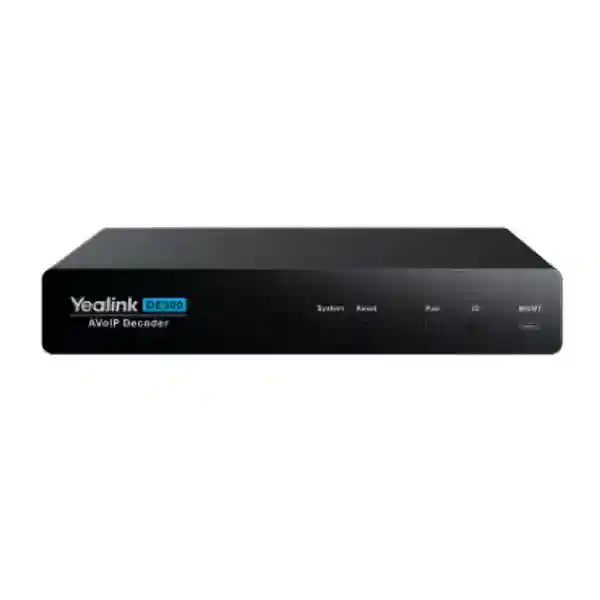
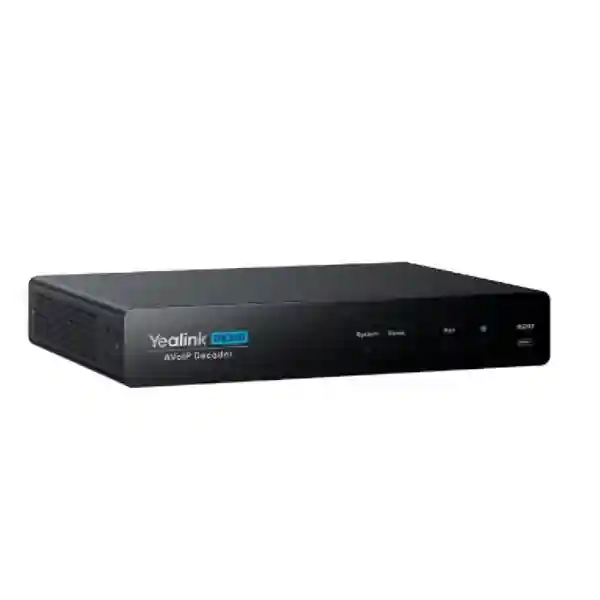
Yealink DE300 AV over IP Decoder for Enterprise 4K Signal Distribution
The Yealink DE300 is a professional AVoIP decoder designed to receive high-quality audio and video streams across a Gigabit Ethernet network and deliver them to room displays, capture systems and connected collaboration equipment. For organizations building modern boardrooms, training rooms, control environments, divisible spaces or multi-display meeting facilities, the decoder provides a practical way to move 4K content without treating every source-to-display path as a dedicated point-to-point cable run. It supports video up to 4K at 60 Hz with 4:4:4 chroma sampling, 8-bit color, HDR and latency below one frame. Yealink specifies 16 ms ultra-low latency for the platform, helping interactive content remain responsive in professional room workflows.
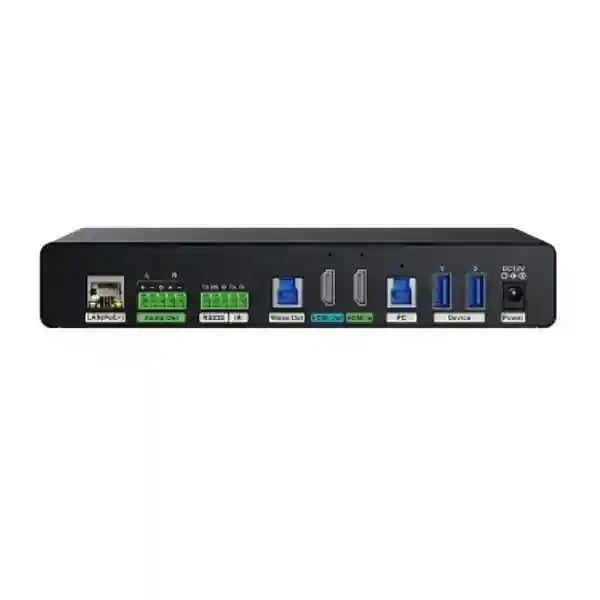
The DE300 combines network decoding with local connectivity. One HDMI input and one IP input can feed a flexible 2×2 video matrix, while HDMI and USB capture outputs create useful paths for display presentation and conferencing workflows. The built-in USB 3.0 capture capability is especially relevant where decoded room content must be presented to a computer or Microsoft Teams Rooms core as a secondary stream. Two USB 3.0 Type-A ports support local peripherals and USB-over-IP use cases, while RS232, IR and HDMI CEC give system designers several methods to control connected displays. A stereo analog audio output supports balanced or unbalanced integration, helping the decoder fit rooms with external amplification or audio processing.
For Uganda deployments, the DE300 is best procured as part of a validated AVoIP design rather than as an isolated endpoint. Network multicast behavior, PoE capacity, source count, decoder count, VLAN design, display control, cable distance and encoder pairing should all be reviewed before final ordering. FourTeck can assist with bill-of-materials validation and deployment planning so that the purchased endpoints match the intended room topology.
Instant Specifications & Procurement Fact Rail
Yealink DE300
Part number 1303135
Professional AV over IP decoder endpoint
Up to 4K@60Hz, 4:4:4, 8-bit, HDR
Gigabit Ethernet, multicast, DHCP, IPv4, HTTPS
PoE+ 802.3at Class 4 or 12V/2A DC
Request current Uganda availability and project pricing
Procurement teams should treat the DE300 as an infrastructure endpoint whose success depends on the surrounding network and source architecture. A quotation should therefore identify the number of displays, expected encoder endpoints, network switches, PoE budget, mounting positions and control requirements. The decoder’s average consumption is approximately 8 W, with an 8.5 W peak and 5.4 W standby figure. It can be rack mounted, installed beneath a desk or placed on a flat surface. The included mounting kit, power adapter and signal cables reduce accessory uncertainty, but project-specific network cabling, switch capacity and any additional room-control hardware remain design items. Warranty terms and exact delivery lead times should be confirmed on the project quotation because regional supply conditions and project quantities can vary.
Operational Product Architecture & Overview
The DE300 sits at the receiving side of a networked AV architecture. In a conventional room, an HDMI source is often cabled directly to a display or routed through a dedicated matrix switch. That approach can become difficult to scale when sources and destinations are separated by long distances or when many rooms need flexible routing. The DE300 changes the transport layer by receiving an encoded AV stream through the IP network. In a Yealink AVoIP design, an EN300 encoder supplies streams to decoder endpoints, and network routing allows the system to distribute content to the required destinations. The DE300 operates below 1 Gbps bit rate and is designed for standard Gigabit infrastructure, reducing the need for a specialized high-bandwidth transport fabric in supported topologies.
The video path supports resolutions up to 4K@60Hz with full 4:4:4 chroma sampling. This matters for business content because text, spreadsheets, diagrams and user-interface elements contain fine color transitions that can appear softer when chroma information is reduced. Eight-bit color and HDR support broaden compatibility with common UHD content. HDCP 2.3 support enables protected UHD sources to travel through the supported signal chain, subject to compatible source and display behavior. The stated latency is below one frame, with Yealink describing 16 ms low-latency transmission, making the platform suitable for meeting-room interaction where visible delay can disrupt mouse movement, presentation switching or collaborative work.
The local matrix is another important architectural element. The DE300 provides an HDMI input in addition to the IP input, creating two possible sources, while HDMI and capture paths provide flexible destinations. This 2×2 arrangement helps a room retain local source flexibility while also receiving networked content. Instead of designing the endpoint as a single-purpose network receiver, an integrator can account for local presentation requirements and conferencing capture. USB 3.0 capture allows high-quality audio and video to enter a computer workflow, including use as a secondary stream input for an MTR Core. This can simplify rooms where distributed AV content needs to become part of a collaboration session rather than only appearing on a display.
Control is built around several common professional AV methods. RS232 provides bidirectional serial control up to 115200 baud, IR output supports carrier frequencies from 34 kHz to 42 kHz, and HDMI output supports CEC. This gives designers choices when controlling display power, volume and related functions. The management interface uses USB 2.0 Type-C for computer management, while the network protocol set includes multicast, DHCP, IPv4 and HTTPS. A successful deployment should plan multicast behavior deliberately, particularly when several encoders and decoders share managed switching infrastructure. Switch selection should account for PoE+ requirements, port count, uplink design and the network policies needed by the selected Yealink architecture.
Physical design is compact at 216 × 160 × 36 mm and 1.24 kg. It can be mounted in a rack, under furniture or on a flat surface, which is useful in rooms where display-side hardware must remain concealed. Yealink specifies transmission distance of 100 metres over CAT5e or better for the Ethernet segment, aligning with familiar structured-cabling practice. For longer building-to-building paths, fiber uplinks and switching architecture can be considered at the network layer rather than extending a single copper run beyond specification.
Enterprise Business Outcomes & Value Analysis
Key Hardware & Software Highlights
| Capability | DE300 Implementation | Operational Benefit |
|---|---|---|
| Video decoding | Up to 4K@60Hz, 4:4:4, 8-bit, HDR | Preserves detail for professional presentation and collaboration content. |
| Latency | Less than one frame; platform specified at 16 ms | Supports responsive interactive room workflows. |
| Matrix | 2×2 video matrix | Provides flexible source and output routing at the endpoint. |
| Capture | USB 3.0 Type-B video capture output | Feeds decoded AV to a PC or compatible room-compute workflow. |
| Control | RS232, IR and CEC | Supports display power, volume and integration control strategies. |
| Power | 802.3at PoE+ Class 4 or 12V/2A | Offers centralized or local power choices. |
The hardware layout is designed for integrator practicality rather than consumer simplicity. HDMI, USB, analog audio, serial control, IR, management and PoE interfaces let the endpoint sit between the network, display, room computer and peripheral devices. Buyers should map each connector to an actual room requirement before ordering. Doing so avoids purchasing unnecessary adapters and identifies where Phoenix termination, USB reach, HDMI cable length or display-control programming will be required.
Technical Specifications Ledger
| Category | Specification |
|---|---|
| Model / Part | DE300 / 1303135 |
| Video resolution | Up to 4K@60Hz |
| Chroma / color | 4:4:4, 8-bit, HDR |
| Bit rate | Below 1 Gbps |
| Latency | Less than one frame; Yealink lists 16 ms low latency |
| Content protection | HDCP 2.3 |
| Video inputs | 1 × HDMI input; 1 × IP input |
| Video outputs | 1 × HDMI output; 1 × video capture output |
| Audio | Digital input de-embedded from HDMI; IP input; HDMI, capture and stereo analog output; LPCM multichannel |
| Network | Multicast, DHCP, IPv4, HTTPS; 100 m / 330 ft over CAT5e or above |
| USB | 1 × USB 3.0 Type-B capture; 2 × USB 3.0 Type-A; USB 2.0 Type-C management |
| RS232 | Bidirectional, up to 115200 baud |
| IR | Output carrier frequency 34–42 kHz |
| Power | Average 8 W; peak 8.5 W; standby 5.4 W; DC 12V/2A; PoE+ 802.3at Class 4 |
| USB-A output power | 5V / 0.5A |
| Installation | Rack, under-desk or flat installation |
| Operating environment | -10°C to +45°C; 10–95% operating humidity |
| Storage | -30°C to +70°C |
| Dimensions | 216 × 160 × 36 mm |
| Weight | 1.24 kg |
Package contents listed by Yealink include the DE300, a 1.8 m HDMI cable, two 2.5 m USB 3.0 Type-B to Type-A cables, a 1.0 m USB Type-C to Type-A management cable, two five-pin male Phoenix connectors, an infrared emitter, a 12V/2A power adapter, mounting hardware, three cable lockers and a quick-start guide. This package is unusually complete for an integration endpoint, but installers should still verify project cable lengths before deployment. Included patch cables may be suitable for rack or local equipment connections but are not substitutes for permanent structured cabling across a building.
Configuration & Sizing Worksheet
1. Estimate sources and destinations
Count every source that must enter the AVoIP system and every display or room-compute destination that must receive it. The DE300 is a decoder, so each required receive location may need a decoder depending on topology. Identify local HDMI sources separately because the DE300 also provides a local HDMI input. Document whether each destination needs only HDMI display output, USB capture to a room computer, analog audio breakout, or a combination.
2. Validate network scale
Record the access switch serving each encoder and decoder, available Gigabit ports, uplink capacity and multicast design. The DE300 stream is below 1 Gbps, but aggregate traffic can grow as sources and routes multiply. Confirm that managed switching behavior is appropriate for the chosen Yealink design and that network policies do not inadvertently block required endpoint communication. For converged enterprise networks, coordinate with the network team before installation rather than treating AVoIP as an unmanaged accessory network.
3. Plan environment and mounting
Measure the intended installation position. At 216 × 160 × 36 mm, the decoder can fit behind or below many displays and furniture systems, but adequate ventilation and service access are still necessary. The operating temperature range is -10°C to +45°C. Avoid enclosed cavities where display heat could raise local temperatures beyond specification. Keep enough clearance to remove HDMI, USB, Phoenix, Ethernet and power connectors without dismounting unrelated equipment.
4. Calculate power and cabling
Choose between PoE+ and the supplied 12V/2A adapter. For PoE, reserve an 802.3at Class 4 capable port and include every endpoint in the switch’s total PoE budget. The DE300 peaks at 8.5 W, but network switch engineering should follow the switch manufacturer’s allocation method. For local DC power, verify outlet availability and UPS strategy. Copper Ethernet distance is specified to 100 metres over CAT5e or better. Use certified cabling and maintain structured-cabling standards.
5. Review licensing and ecosystem dependencies
Do not assume that purchasing a decoder alone creates a complete AV distribution system. Confirm the required EN300 encoder endpoints, room device management components, collaboration-room hardware and any software or service entitlements relevant to the complete design. Licensing can change by solution component and project scope, so the quote should explicitly identify included licenses, subscriptions or support terms rather than leaving them implicit.
6. Prepare the quote request
Provide room count, source count, display count, encoder count, decoder count, desired resolution, switching topology, network switch models, PoE availability, approximate cable distances, control method, mounting requirements, deployment city and target project date. Add any requirements for staging, firmware validation, configuration documentation or installation support. This information allows the supplier to review the whole solution instead of quoting a decoder that may later require unplanned accessories.
Deployment Scenarios & Industry Use Cases
Large Enterprise & Multi-Site Networks
Corporate headquarters often contain boardrooms, training spaces, executive briefing rooms and multipurpose areas with different source-routing needs. The DE300 can serve as the receive endpoint at displays or room computers while Yealink encoders place sources onto the IP network. Standardizing on a repeatable endpoint design can simplify documentation and spare strategy across multiple rooms. For multi-site organizations, each site should be designed according to its local switching and room topology; AVoIP traffic should not simply be extended across wide-area links without architecture validation.
Financial & Banking Institutions
Banks and financial institutions may use professional AV distribution for operations rooms, executive meeting spaces, training centers and customer-facing information environments. The DE300’s 4K60 4:4:4 output is well suited to detailed dashboards, tables and presentation content. HDCP 2.3 can support protected media in compatible signal chains. Network and physical access controls remain essential: decoder endpoints should be placed on appropriate network segments, management access should be restricted, and room hardware should be installed where unauthorized tampering is minimized.
Educational & Campus Networks
Universities and training institutions frequently need to route teaching sources between lecterns, displays, overflow spaces and recording systems. USB capture can be valuable where distributed content needs to enter a lecture computer or streaming workflow. A campus design should account for the number of simultaneous streams, switch capacity, teaching-room support practices and the ability to replace endpoints quickly. PoE+ can simplify display-side installation where mains sockets are limited, provided switch budgets are engineered correctly.
Government & Defense Procurement
Public-sector environments often require detailed bills of materials, serial-number control, documented acceptance procedures and predictable support paths. The DE300’s standardized interfaces and network transport can support structured deployments, but procurement should include security review, approved network segmentation, controlled firmware processes and project-specific compliance requirements. Where sensitive content is involved, buyers should distinguish HDCP content protection from broader organizational cybersecurity requirements; HDCP does not replace network access control, encryption policy, endpoint hardening or information-classification procedures.
Technical Deep Dive: Processing, Acceleration & Signal Engine
The DE300’s core function is deterministic decoding of networked professional AV into presentation-ready outputs. The practical performance target is clear: preserve a 4K60 signal with full 4:4:4 chroma while keeping end-to-end delay low enough that users do not perceive the room as disconnected from their input actions. Yealink states less than one frame of latency and promotes a 16 ms figure for the DE300 platform. Rather than relying on a general-purpose software playback workflow, the endpoint is designed specifically around AV transport, switching, capture and control. The result is a device whose interfaces map directly to integration tasks: IP stream in, HDMI display out, USB capture out, local HDMI input, USB peripherals, analog audio breakout and control ports.
The 2×2 matrix is important because processing is not limited to a single fixed network-to-HDMI path. A room may need to switch between network content and a local source or send content to different output functions. That flexibility can reduce the need for a separate small matrix at each destination. However, system designers should document desired routes during commissioning and verify behavior under source disconnects, display sleep states and room-compute changes. In professional deployments, predictable failure behavior matters as much as nominal video quality.
Technical Deep Dive: Software Ecosystem, Firmware Security & Control
The network protocol list includes multicast, DHCP, IPv4 and HTTPS. These capabilities place the decoder naturally within managed enterprise networks, but they also create responsibilities for network administrators. Address assignment should be documented, management access should be controlled, multicast should be engineered rather than allowed to flood indiscriminately, and firmware should be maintained through an approved operational process. Before a large rollout, stage representative endpoints on the intended switch platform and test source discovery, switching, capture, display control and recovery after power or network interruption.
Room control is deliberately flexible. RS232 is useful for displays and devices with established serial command sets; IR can control equipment without serial integration; and CEC can simplify compatible HDMI display control. These methods differ in reliability and command depth across display models, so integrators should not assume identical behavior. A bill of materials should identify the exact display models and chosen control method. USB-over-IP functionality also requires design attention because peripheral routing can affect user experience in BYOD and room-compute scenarios.
Technical Deep Dive: Availability, Redundancy & Recovery
The DE300 offers two power approaches—PoE+ and local DC—which gives architects options when planning service continuity, though the product should not be described as having dual active redundant power supplies. A resilient design can place PoE switches on UPS-backed circuits, keep documented spare endpoints and maintain exported configuration information. If local adapters are used, UPS coverage should include the display and decoder where uninterrupted operation is required. Network redundancy must be designed at the switching layer according to the organization’s topology and Yealink solution requirements.
Disaster recovery for room AV is often operational rather than purely technical. Keep a current port map, endpoint inventory, firmware baseline and labeled spare. Document which encoder feeds which room, how displays are controlled and how to return a replacement decoder to service. Because the DE300 uses standard structured cabling and compact mounting, physical replacement can be straightforward when documentation is good. Commissioning should include restart tests, cable-disconnect tests, source-change tests and verification that displays return to the intended state after power restoration.
Pre-Purchase Buyer Gap Checklist
Is the decoder enough on its own? No. It is an endpoint in an AVoIP architecture. Confirm the required encoder, network switching, display, room computer and control components. Are there hidden licensing costs? The hardware specification alone does not establish every entitlement that may apply to a broader Yealink room solution. Ask for a quotation that itemizes licenses, subscriptions and support where applicable. Will it work with the existing switch? The DE300 is designed for Gigabit Ethernet and PoE+ is supported, but multicast behavior, port capacity and PoE budget must be validated for the actual switch and topology.
Can it fit behind the display? The chassis is 216 × 160 × 36 mm and weighs 1.24 kg. Measure connector clearance as well as chassis clearance. HDMI, USB and Ethernet plugs require service space. How much power should be planned? Yealink lists 8 W average, 8.5 W peak and 5.4 W standby. It accepts 12V/2A DC or 802.3at Class 4 PoE+. What happens with protected content? HDCP 2.3 is supported, but every source, intermediate path and destination must be compatible for a protected-content workflow to operate correctly.
Can existing CAT5e be used? Yealink specifies 100 metres over CAT5e and above. Existing cable should still be tested for condition, termination and compliance. Does USB capture replace a dedicated capture device? The DE300 includes USB 3.0 capture, which can reduce additional hardware in supported room workflows, but compatibility with the exact host computer and conferencing design should be tested. Can displays be controlled centrally? The endpoint supports RS232, IR and CEC. Actual command support depends on the connected display and the selected control architecture.
What is the product lifecycle? Buyers planning multi-year standardization should request current lifecycle, support and replacement information on the formal quotation. What should be stocked as spares? For business-critical deployments, consider at least one compatible spare endpoint or a quantity based on site count and recovery targets, plus labeled power and signal accessories. Will it interoperate with every third-party AV platform? Do not infer universal interoperability from standard connectors alone. Validate third-party integration at the protocol, resolution, HDCP, USB and control levels before mass deployment.
Uganda Regional Procurement & Delivery Logistics
Organizations purchasing the Yealink DE300 in Uganda should begin with a project quotation that identifies exact quantities and the complete AVoIP topology. FourTeck can review decoder counts, encoder requirements, switching assumptions, PoE capacity, mounting locations and room-control needs before commercial processing. This is especially valuable for projects where multiple meeting rooms share a standard design, because a small omission repeated across many rooms can create unnecessary delays during installation.
After bill-of-materials validation, the quotation can reflect the requested hardware, project accessories and available support scope. Delivery timing depends on quantity, current supply position and import logistics, so lead time should be confirmed on the issued quote rather than assumed from an overseas retail listing. For planned deployments, provide the required-on-site date early enough to accommodate procurement, shipping, customs handling, internal receiving and staging.
Pre-configuration can include practical engineering checks such as firmware baseline review, endpoint labeling, port mapping and room-by-room documentation where agreed in the project scope. On arrival, organizations should inspect packaging, verify model and quantities, record serial numbers where required and stage representative units before full installation. This process reduces the risk of discovering network, display-control or USB compatibility issues late in a rollout.
Local Coverage Matrix
Suitable for headquarters, financial institutions, government offices, hotels, universities and large conference facilities requiring professional AVoIP distribution.
Procurement support for hospitality, transport, institutional and enterprise meeting environments where networked AV can simplify room distribution.
Project supply for industrial, education, hospitality and commercial sites using standardized collaboration and presentation spaces.
Support for regional enterprise, healthcare, education and public-sector deployments requiring documented room technology.
Supply planning for institutional and business projects where centralized sourcing and validated bills of materials reduce deployment risk.
Cross-Border & Regional Supply Chains
FourTeck supports organizations that standardize collaboration and networked AV equipment across more than one market. Uganda projects can begin at FourTeck Uganda, while regional procurement teams can coordinate requirements through FourTeck Kenya and FourTeck Africa. Gulf-region requirements can be aligned through FourTeck UAE and FourTeck Kuwait.
For cross-border rollouts, standardize the approved model number, firmware baseline, room design and accessory list while allowing local quotations to account for taxes, freight, availability and support scope. A common technical bill of materials helps regional IT teams maintain consistent user experience and spare strategy without assuming that commercial terms are identical in every country.
Related Products & Internal Planning Links
A DE300 deployment commonly requires more than the decoder endpoint. Review the broader FourTeck Uganda enterprise technology portfolio and request compatible Yealink AVoIP components such as the EN300 encoder, room device management hardware, suitable PoE+ switching and collaboration-room equipment. Where the design includes Microsoft Teams Rooms, confirm the room-compute architecture and whether the DE300 USB capture path will be used as a secondary content stream. For projects that include new displays, structured cabling or rack infrastructure, those items should be added to the same design review so physical installation requirements are visible before ordering.
Related procurement paths can also include enterprise switching, UPS protection, rack accessories, HDMI cabling, USB cabling and room-control integration. Rather than choosing accessories by connector type alone, specify distance, bandwidth, mounting location and service requirements. Contact the Uganda sales and engineering team for a consolidated bill of materials that aligns the decoder with its encoder, network and room endpoints.
FourTeck Technical Service Capabilities
Enterprise AV projects benefit from validation before equipment reaches the site. FourTeck can support engineering review of the requested bill of materials, checking that decoder quantities align with destinations, encoder quantities align with sources and switch capacity reflects the planned endpoint count. Power method, mounting location and cabling assumptions can be reviewed at the same stage. This helps procurement teams distinguish core hardware from project-specific accessories.
Staging can be used to verify representative hardware, confirm firmware baselines and prepare labeling or deployment records where included in the project scope. Pre-shipment firmware review is particularly useful when a large room standard will be repeated across many sites. Post-sales support can then reference the agreed topology, model list and deployment documentation rather than beginning troubleshooting without context.
For organizations with internal AV or IT teams, the most valuable deliverable may be a clean handover: endpoint list, room mapping, network-port requirements, power assumptions and known integration dependencies. For integrator-led projects, FourTeck can coordinate product supply around the approved design and project schedule. Exact engineering, installation and support services should be defined in the quotation so responsibilities are clear before deployment begins.
Extended Technical FAQ
1. What is the Yealink DE300 used for?
The DE300 is an AV over IP decoder used at the receiving side of a professional networked AV system. It accepts an IP video stream and can deliver the content through HDMI or its USB capture path. It is designed for environments such as boardrooms, training facilities, multipurpose rooms, command spaces and other professional installations where sources and displays need flexible network-based routing. It also includes a local HDMI input and a 2×2 matrix, so the endpoint can participate in both network and local source workflows rather than acting only as a fixed IP-to-HDMI converter.
2. Does the DE300 support 4K60 video?
Yes. Yealink specifies decoding up to 4K at 60 Hz with 4:4:4 chroma sampling and 8-bit color, together with HDR support. The full 4:4:4 chroma format is useful for business presentation material containing fine text, diagrams and interface elements because it preserves chroma detail. The supported bit rate is below 1 Gbps and the device is designed for Gigabit Ethernet. Actual end-to-end results still depend on source format, encoder configuration, network design, display capability and the integrity of the HDMI and Ethernet signal paths.
3. What latency should be expected?
The DE300 datasheet states latency of less than one frame, and Yealink’s product information describes 16 ms ultra-low-latency transmission. This is intended to keep networked presentation interaction responsive. When evaluating latency for a complete room, remember that the decoder is only one component in the chain. Source processing, encoding, network switching, display processing and any capture or conferencing path can contribute additional delay. For applications with strict interaction requirements, test the complete planned topology rather than relying on a single component figure.
4. Can the DE300 be powered by PoE?
Yes. It supports PoE+ according to IEEE 802.3at Class 4 and also includes support for a 12V/2A DC power adapter. Yealink lists average consumption of 8 W, peak consumption of 8.5 W and standby consumption of 5.4 W. PoE+ can simplify display-side installations because network and power can be delivered through the Ethernet connection, but the switch must have sufficient per-port capability and total PoE budget. If local DC power is selected, include suitable outlet and UPS planning for rooms where service continuity is important.
5. Which control interfaces are available?
The DE300 supports RS232, IR and CEC for display-control scenarios. RS232 is bidirectional and supports up to 115200 baud. The IR output supports a carrier frequency range from 34 kHz to 42 kHz, while the HDMI output supports CEC. These options allow an integrator to select a control method appropriate to the connected display and room architecture. Compatibility should be checked against the exact display model because command sets and CEC behavior vary. Control requirements should be documented during design, not left until installation day.
6. What network infrastructure is required?
The DE300 is designed for Gigabit Ethernet and lists multicast, DHCP, IPv4 and HTTPS among its network capabilities. Yealink specifies up to 100 metres of transmission over CAT5e or better for the copper Ethernet segment. A professional deployment should use managed switching appropriate to the planned AVoIP topology and should account for aggregate stream traffic, multicast handling, uplinks, VLAN policy where applicable and PoE capacity. When AVoIP shares infrastructure with business data, voice or other services, coordinate with the network team so traffic and management policies are deliberately engineered.
7. Does it work with Microsoft Teams Rooms?
The DE300’s USB 3.0 capture capability is designed to transmit high-quality audio and video to a computer and Yealink specifically describes using it to output audio and video to an MTR Core as a secondary stream input. This makes the decoder relevant to sophisticated Microsoft Teams Rooms designs that need networked AV content inside the collaboration workflow. Compatibility should still be validated against the complete room design, including the selected Yealink room system, host interfaces, firmware and desired source-routing behavior. A project quotation should identify this workflow so the required cables and companion components are included.
8. What comes in the box?
Yealink lists the DE300 decoder, one 1.8 metre HDMI cable, two 2.5 metre USB 3.0 Type-B to Type-A cables, one 1.0 metre USB Type-C to Type-A management cable, two five-pin male Phoenix connectors for analog audio and control, one infrared emitter, a 12V/2A power adapter, mounting hardware, three cable lockers and a quick-start guide. The mounting kit supports wall, flat-surface or rack-related installation. Project-specific Ethernet cabling, switches, encoders and other room equipment are separate design items unless explicitly included in a supplier quotation.
9. What warranty and replacement process applies in Uganda?
Warranty coverage should be confirmed on the FourTeck Uganda quotation for the specific supply because regional terms, project agreements and service scope can vary. Keep purchase records, serial numbers and deployment locations documented so any warranty case can be processed efficiently. For critical rooms, warranty alone may not meet the organization’s restoration-time target because replacement logistics can take longer than the acceptable outage. A practical support strategy can therefore include one or more compatible spare endpoints, tested firmware baselines and documented replacement procedures alongside the manufacturer’s warranty process.
10. What information should be provided for configuration support?
Provide a room diagram or clear description showing sources, encoders, network switches, decoders, displays, room computers and control devices. Include model numbers, desired resolutions, cable distances, VLAN or subnet information relevant to the AV system, PoE availability and the required routing behavior. Also describe whether USB capture, USB-over-IP, analog audio, RS232, IR or CEC will be used. For multi-room projects, identify which rooms share the same standard. This information allows technical teams to review the intended architecture systematically and helps prevent troubleshooting caused by undocumented assumptions.
Procure the Yealink DE300 with a Validated Uganda Deployment Plan
The Yealink DE300 combines 4K60 4:4:4 decoding, low-latency Gigabit AV transport, USB capture, a flexible 2×2 matrix and professional display-control interfaces in a compact endpoint. The strongest procurement outcome comes from matching those capabilities to a correctly sized encoder, switching, PoE and room-control architecture. Send FourTeck your room count, source and display quantities, network-switch details, installation cities and required project date. The team can prepare a commercial quotation and review the supporting bill of materials before equipment is ordered.
For enterprise rollouts, also request guidance on staging, firmware baseline, labeling, spare strategy and deployment documentation. These steps can reduce commissioning delays and make future room support more predictable.



Reviews
There are no reviews yet.