Professional Call-Control Expansion for Uganda
Yealink EXP50 Expansion Module for High-Volume Business Call Control
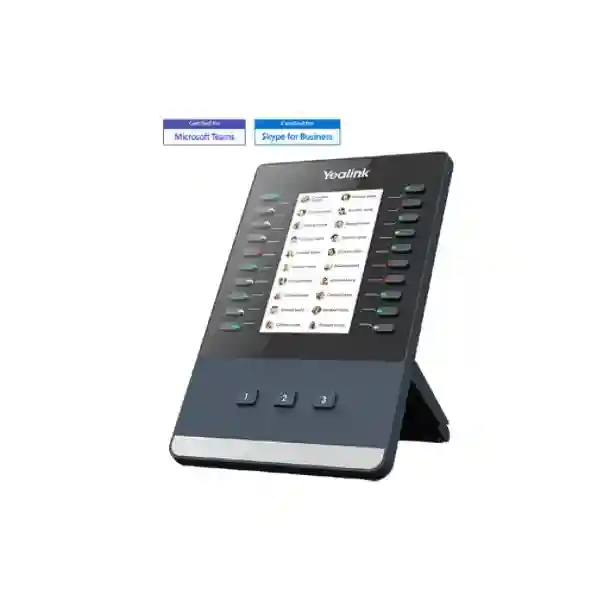
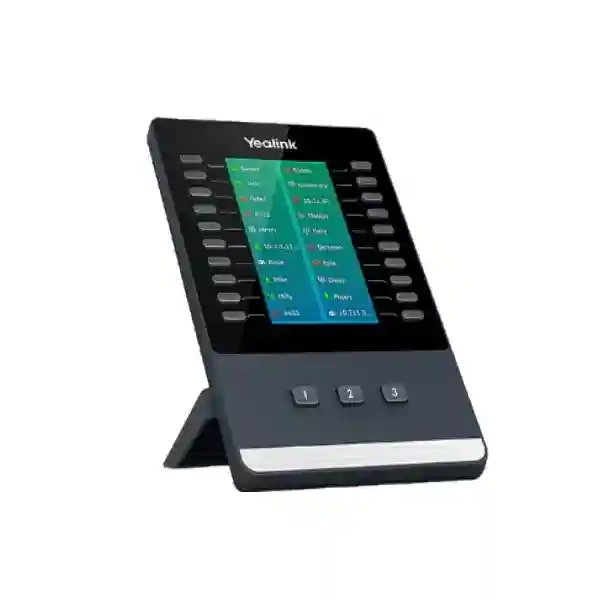
The Yealink EXP50 is a color-screen desk-phone sidecar designed to give receptionists, executive assistants, contact-center personnel and other high-volume call handlers substantially more immediately accessible programmable keys. Instead of forcing a user to navigate repeated on-screen menus during a busy working day, the EXP50 places frequently used contacts and telephony functions beside a compatible Yealink phone. Each module combines a 4.3-inch color display with 20 physical keys, dual-color indicators and three illuminated page controls. Three pages expose up to 60 programmable positions from a single module, while supported deployments can connect as many as three modules for a much larger control surface.
For procurement teams, the important question is not simply whether the EXP50 adds buttons. The practical issue is whether the exact host phone, firmware branch, communications platform, module count and power arrangement form a supported combination. FourTeck Uganda can validate those dependencies before quotation, helping organizations purchase the right module quantity and supporting accessories as one coherent bill of materials. This is especially useful for front desks, service counters and administrative stations where a small compatibility mistake can delay an entire voice rollout.
The module is connected by USB on supported models and provides a purpose-built visual extension of the phone. On SIP deployments, programmable functions can include BLF/BLA, speed dial, shared line, call park, conference, forwarding, group pickup and other supported features. On compatible Teams devices, the sidecar can present contacts and presence information according to the applicable software version and platform behavior. Buyers should therefore specify the intended phone model and calling environment when requesting a quote.

Instant Specifications & Procurement Fact Rail
Yealink EXP50
4.3-inch, 272 × 480 color LCD
20 physical keys + 3 page controls
60 programmable positions per module
Up to 3 modules on supported phones
USB 2.0 compliant
The EXP50 sits in the access-and-control tier of an enterprise voice deployment: it does not replace the IP phone, PBX or communications platform, but extends the user interface of a supported desk phone. Stock, warranty terms and lead time should be confirmed on the formal FourTeck quotation because these can vary by sourcing batch and project. For two- or three-module SIP configurations, Yealink documentation specifies an external 5V/2A power adapter requirement; Teams configurations can have platform-specific power guidance, so the complete topology should be validated before purchase.
Operational Product Architecture & Overview
A busy business phone position behaves very differently from an ordinary office extension. A receptionist may need to see the state of dozens of colleagues, transfer callers without delay, park and retrieve calls, reach departments through one-touch keys and distinguish active, available or busy resources quickly. An executive assistant may support several executives and shared lines. A contact-center supervisor may need direct access to frequently used destinations while simultaneously working in another desktop application. The EXP50 addresses this human-interface bottleneck by moving frequently accessed functions from nested menus onto a dedicated physical-and-visual control surface.
The architecture is intentionally simple. A compatible Yealink phone remains the primary communications endpoint and supplies the telephony logic. The EXP50 operates as an attached expansion interface. Its 4.3-inch backlit display provides labels and icons, while 20 physical keys align with the displayed assignments. Three independent illuminated page controls switch among three key pages, providing 40 additional logical assignments beyond the 20 visible positions. This means one module can expose 60 functions without occupying the desk space that 60 individual fixed buttons would require.
The dual-color LED indicators are particularly important in SIP environments because programmable line keys can be used for presence-oriented and call-control functions supported by the host phone and system. Administrators can map functions such as BLF lists, shared lines, call park, forwarding, conference, group pickup, LDAP access or XML-based services where supported. The precise behavior depends on the host phone, firmware and communications platform, so a procurement specification should describe the desired workflow rather than assuming every feature is universal across every deployment.
USB connectivity is used for data between the host and module. Yealink designed the EXP50 with an adjustable stand offering two angles so the sidecar can sit in a practical viewing position beside the phone. The module also supports wallpaper, screensaver and power-saving capabilities. On applicable SIP phones, the remaining USB capability may support extended phone functions such as compatible USB headsets, Wi-Fi accessories or USB call recording; however, accessory combinations should be checked because the host phone’s ports, firmware and power budget determine the final supported arrangement.

Scalability is one of the model’s defining procurement advantages. Supported phones can use up to three EXP50 modules, potentially providing 180 programmable positions across the sidecars. That capacity can make a single operator station much more efficient, but it also changes the physical and electrical design. Multiple sidecars occupy additional desktop width and can require external power. Buyers should therefore treat a three-module reception station as a small workstation design rather than merely adding accessories to a phone. Desk dimensions, cable routing, power sockets, headset requirements and user ergonomics should all be included in planning.
Enterprise Business Outcomes & Value Analysis
Direct physical access to frequently used destinations reduces dependence on repeated menu navigation. In reception and administrative environments, even small reductions in interaction time can matter because operators repeat transfer, pickup, park and speed-dial actions throughout the day. The EXP50 creates a consistent tactile layout that can be configured around the organization’s real call flow.
The module is purpose-built for supported Yealink endpoints and uses a direct USB connection rather than introducing a separate network endpoint. This keeps the extension architecture straightforward. Reliability still depends on correct host compatibility, firmware and power design, which is why FourTeck recommends validation before bulk ordering.
Organizations can start with one module for up to 60 assignments and expand supported phones with additional modules when a role requires more contacts or functions. This provides a practical growth path for reception, executive support and call-intensive desks without replacing the entire phone solely to gain more programmable keys.
Administrators can map approved functions to physical keys according to platform capabilities. A standardized key plan helps users follow defined procedures for transfers, shared lines, parking or group pickup. Security remains governed by the host phone and communications service; the module itself should be viewed as an interface extension rather than an independent security appliance.
Because the EXP50 extends the supported phone, administrators can design the key layout as part of the endpoint configuration process. For multi-site deployments, consistent templates can reduce training friction and make replacement desks easier to understand. Configuration methods depend on the Yealink model and provisioning environment.
The module allows organizations to expand a compatible phone instead of procuring a separate console simply for additional programmable controls. Published maximum module power consumption is low, but multi-module stations may require external adapters. Total cost should include modules, power accessories, compatible phones, platform licensing where applicable, staging and support.
Key Hardware & Software Highlights
| Component | Design | Operational Outcome |
|---|---|---|
| Display | 4.3-inch 272 × 480 backlit color display, 16-bit color | Readable labels, icons and visual organization for key assignments. |
| Physical keys | 20 keys with dual-color LED indicators | Fast tactile access to programmed functions and visual status cues. |
| Page controls | Three illuminated independent controls | Rapid switching across three pages for 60 logical positions. |
| Expansion | Up to three modules on supported phones | Large operator layouts of up to 180 programmable positions. |
| Stand | Two adjustable angles | Improved alignment and viewing comfort beside the host phone. |
| Interface | USB 2.0 compliant data connection | Direct integration with supported Yealink host phones. |
The strongest value comes from combining these elements. A color screen alone would still require touch navigation; physical keys alone would require fixed paper labels or limited status feedback. The EXP50 combines screen labels, indicators, tactile keys and page controls into one sidecar. For teams that repeatedly manipulate calls, this creates a familiar working surface. The practical benefit is highest when administrators design the assignments around the role: reception desks may prioritize BLF and transfers, executive assistants may prioritize executives and shared lines, and service teams may prioritize queues, groups and common destinations according to platform support.
Technical Specifications Ledger
| Specification | Published Detail | Procurement Note |
|---|---|---|
| Display | 4.3-inch, 272 × 480 pixels, backlit color; 16-bit depth | Provides three page views and function-specific color icons. |
| Keys | 20 physical keys, each with dual-color LED | Page switching exposes 40 additional logical positions. |
| Page keys | 3 independent illuminated control keys | Used for fast switching among pages. |
| Programmability | Functions can include shared line, BLF list, call park, conference, forward, group pickup, group listening, LDAP and XML Browser on applicable SIP systems | Exact options depend on phone, firmware and platform. |
| Module count | Up to 3 EXP50 modules on supported phones | Can provide up to 180 programmable positions. |
| USB | USB 2.0 compliant for data input/output | Accessory use depends on host-phone support and available power. |
| Power | Published maximum PSU consumption varies by documentation revision around 1.5–1.8 W | Use current model/edition documentation for project calculations; multi-module setups can require 5V/2A adapters. |
| Dimensions | 196.5 × 124.0 × 137.5 × 42.6 mm (W × D × H × T) | Allow extra horizontal desk clearance for chained modules. |
| Operating environment | Current support documentation: -10 to +45°C; 10–95% humidity | Keep away from direct heat, moisture and obstructed desk environments. |
| Storage | -30 to +70°C in current support documentation | Use suitable controlled storage before deployment. |
| Package | Module, stand, connecting sheet, USB cable, screwdriver, screws, quick-start guide | Confirm power adapter separately when the planned topology requires it. |
Compatibility is edition-sensitive. Yealink’s current product information lists SIP Edition support for T5 Series desktop IP phones and Teams Edition support for selected T56A, T58A/T58W, VP59, MP56 and MP58-family Teams devices. Published SIP datasheets specifically list T53, T53W, T54W, T57W, T58A and T58W. Older T5-series generations also appeared in earlier documentation. Because enterprise fleets often contain mixed hardware generations, the safest procurement method is to provide FourTeck with the exact model numbers and platform edition from the existing phones rather than relying on the broad phrase “T5 Series.”
Configuration & Sizing Worksheet
1. Estimate the operator workload
List the people, departments, shared lines, parking positions and functions the user needs to reach repeatedly. If the total comfortably fits within 60 assignments, one EXP50 may be enough. If a receptionist needs more, determine whether page switching is acceptable or whether two or three modules would create a more usable physical layout. Do not size purely by employee headcount: a 200-person organization may need only 30 monitored destinations, while a smaller service operation may require many shared functions.
2. Verify host-phone and platform compatibility
Record the exact Yealink phone model, whether it runs SIP, Teams or another supported edition, and its firmware. This is the most important pre-order check. The same EXP50 name is used across several supported environments, but available functions and contact behavior differ. Teams presence workflows, for example, are not identical to SIP BLF programming.
3. Plan physical desk space
The module is approximately 196.5 mm wide. A chained multi-module station can therefore require meaningful horizontal clearance in addition to the phone itself. Check monitor stands, laptop docks, document trays and partition walls. The two-angle stand helps viewing, but it does not remove the need for sufficient desktop width.
4. Calculate power and cabling
Confirm the number of modules and the edition-specific external power requirement. Yealink SIP documentation states that two or three expansion modules require an external 5V/2A adapter. Teams guidance can specify a different adapter count depending on the number of modules. Include the correct adapters, USB connectivity and local power outlets in the bill of materials instead of discovering the requirement during installation.
5. Review licensing and service dependencies
The EXP50 itself is an endpoint accessory; it does not create PBX features or user subscriptions. Features such as presence, shared lines, call recording, call queues or advanced call control may depend on the communications platform, account entitlements and administrative configuration. Confirm these separately with the platform owner.
6. Prepare the quote request
For a precise quotation, provide quantity, host-phone models, platform edition, module count per phone, delivery location, preferred warranty/support expectations and whether FourTeck should stage or validate the configuration. For replacements, also provide the existing module arrangement so accessory requirements can be checked.
Deployment Scenarios & Industry Use Cases
Large enterprise and multi-site operations
A headquarters reception desk may need one-touch visibility across executive offices, facilities, security, meeting-room support and departmental contacts. The EXP50 can be programmed around this operational map, while branch offices can use smaller layouts based on local requirements. Standardizing the same supported Yealink phone and sidecar combination across sites can simplify user training and replacement procedures. Administrators can define naming conventions and page layouts so a relief receptionist can move between sites without learning an entirely different console. For multi-site projects, the key design task is deciding which assignments are local, which are organization-wide and which are emergency or escalation destinations.
Financial and banking institutions
Branches and operations teams often handle time-sensitive internal transfers between service desks, managers and specialist functions. A configured sidecar can reduce manual dialing and make frequently used call-control functions accessible through dedicated keys. The module does not replace banking security controls or call-platform policies; rather, it provides a disciplined physical interface to functions already authorized on the host phone. Procurement teams should confirm the communications platform, recording policy, business-continuity requirements and endpoint management approach before standardizing the device.
Educational and campus networks
Universities, colleges and larger schools may operate reception, admissions, security, accommodation and administrative desks with extensive internal contact lists. An EXP50-equipped phone can organize important destinations across pages, helping operators route callers to faculties, offices or support teams. Campuses should consider whether contact assignments need seasonal changes during admissions, examinations or enrollment periods and ensure provisioning procedures can update key labels consistently.
Government and public-sector procurement
Public-facing offices often require clear call-routing procedures and durable, standardized endpoint configurations. The EXP50 can support roles that need many direct contacts without deploying a separate PC-based operator console at every desk. Formal procurement should specify compatible host models, required module quantity, accessories, warranty terms, delivery locations and configuration scope. Where agencies have strict firmware or platform standards, those requirements should be included during technical validation before the purchase order is finalized.
Technical Deep Dive: Control-Surface Architecture
The EXP50 is not a packet-processing appliance and does not provide an independent voice path. Its engineering value is the efficient mapping of host-phone functions to a larger physical control surface. Twenty physical keys are paired with screen positions and status indicators. Page switching multiplies the logical assignment count to 60 while preserving a compact footprint. This design matters because human call handling benefits from muscle memory: a trained operator can associate frequently used destinations with positions and pages rather than repeatedly typing extensions or searching directories. The color screen provides context that fixed unlabeled buttons cannot, and the LED indicators supply immediate visual cues supported by the platform.
When multiple modules are chained, the control surface scales without changing the underlying telephony endpoint. The phone remains responsible for registration, signaling, media and platform communication. That separation keeps the expansion module focused on interaction. It also means buyers should evaluate the host phone’s capabilities first. Purchasing three EXP50 units will not add a platform feature that the phone or service does not support. The modules expose supported capabilities more efficiently; they do not create new PBX entitlements.
Technical Deep Dive: Firmware, Platform & Operational Control
Firmware and platform edition influence how the EXP50 behaves. In SIP environments, administrators can map DSS-style functions supported by the phone, including BLF, speed dial, transfer-related workflows, call park and pickup. In Teams environments, Yealink documentation describes contact presentation and presence indicators, with behavior changing across software versions as line-key capabilities evolve. This is why a project specification should capture the software environment, not merely the physical accessory.
Operational control should be approached as part of endpoint management. Organizations deploying many units can establish a standard key plan by job role and document exceptions. Before a firmware upgrade, administrators should test critical reception workflows on a representative phone-and-module station. After an upgrade, verify key labels, presence states, page switching and transfer behavior. These simple acceptance checks reduce the chance that an otherwise successful firmware rollout disrupts front-desk operations.
Technical Deep Dive: Availability, Redundancy & Recovery
The EXP50 does not provide high availability in the server sense; there are no redundant processors or network links inside the sidecar. Business continuity therefore comes from sound endpoint and communications design. If a critical reception desk must remain operational during device failure, organizations should maintain a spare compatible phone and, where justified, a spare expansion module or a documented fallback workstation. Configuration backups or centralized provisioning can reduce recovery time because replacement hardware can receive the established key layout instead of being programmed manually from scratch.
Power planning is equally important for multi-module stations. Where external adapters are required, connect them to an appropriate protected power source consistent with the organization’s voice-continuity policy. Cable routing should prevent accidental disconnection when users move monitors, clean desks or access drawers. Disaster recovery plans should document how incoming calls are rerouted if the reception endpoint, local network or site becomes unavailable; the EXP50 is only one component of that wider continuity chain.
Pre-Purchase Buyer Gap Checklist
Will it work with my exact phone? Do not rely on appearance or connector type. Record the exact Yealink model and platform edition. Current Yealink information covers T5 Series SIP phones and selected Teams/Zoom devices, while individual datasheets enumerate specific models. Mixed-generation estates deserve model-by-model validation.
Are there hidden licenses? The hardware accessory itself is not a communications subscription, but the functions you want to expose may rely on PBX, SIP service, Teams or other platform entitlements. Ask the platform administrator whether presence, recording, shared lines, queues or other desired functions are licensed and enabled.
Do I need a power adapter? Possibly. A single-module topology may be powered through the supported host arrangement, while multi-module configurations can require external 5V/2A power. The requirement differs by edition and module count, so include power accessories explicitly in the quote.
How much desk space is needed? Each module is roughly 196.5 mm wide. Two or three sidecars can transform a normal desk phone into a wide operator station. Measure the usable desk area after accounting for monitors, keyboards, docking stations and partitions.
Does it work across vendors? The EXP50 is designed as a Yealink phone expansion module, not as a generic USB button panel. Do not plan it as a sidecar for another manufacturer’s desk phone. Cross-vendor interoperability belongs at the SIP or communications-platform layer, while this physical accessory should be paired only with supported Yealink hosts.
What happens during hardware refresh? If an organization expects to replace its phones during the project lifecycle, confirm that the target phone generation supports the existing EXP50 strategy. Accessory reuse can reduce migration cost, but only when the future host models and software editions remain compatible.
Can every key do anything? No. Programmability is governed by the phone and platform. Build a list of required functions and validate those functions rather than assuming a generic “programmable” label guarantees a particular workflow.
Uganda Procurement & Delivery Logistics
FourTeck Uganda can support organizations purchasing the Yealink EXP50 as an individual accessory, a reception-desk upgrade or part of a broader IP telephony rollout. A useful quotation request includes the required quantity, existing or proposed Yealink host phone, platform edition, number of modules per workstation and destination. This enables the technical team to identify obvious compatibility or power-accessory issues before order processing.
After technical scope is confirmed, the commercial quotation can define supply, applicable warranty terms, expected lead time and any staging or configuration services. Delivery timing varies according to stock position, project quantity and sourcing route, so buyers should use the issued quotation for the current commitment rather than relying on a generic web estimate. Larger deployments benefit from phased delivery planning, especially when phones, modules, headsets, power accessories and network components must arrive together.
Pre-configuration support can also reduce on-site workload. Where the chosen phone and platform permit, FourTeck can help verify firmware baselines, accessory combinations and the intended endpoint bill of materials before shipment. The customer’s communications administrator or service provider remains responsible for platform accounts, credentials and policies unless those services are explicitly included in project scope.
Local Coverage Matrix
Corporate headquarters, contact centers, hospitality, financial services and government office deployments.
Business, hospitality, logistics and administrative voice-system requirements.
Commercial, industrial, education and branch-office communications projects.
Regional enterprise, healthcare, education and distributed-office requirements.
Institutional, NGO, public-sector and multi-site communications deployments.
For every location, the same procurement principle applies: confirm the host-phone model and required module count before dispatch. Regional projects can be consolidated into a standardized bill of materials while still allowing site-specific quantities and key layouts. Delivery scope, freight method and lead time should be confirmed in the project quotation.
Cross-Border & Regional Supply Chains
Organizations operating across East Africa, the Gulf and wider African markets can coordinate Yealink accessory requirements across multiple FourTeck regional channels. Use FourTeck Uganda for Uganda requirements, FourTeck Kenya for Kenya, FourTeck Africa for broader African projects, FourTeck UAE for United Arab Emirates requirements and FourTeck Kuwait for Kuwait.
Cross-border procurement should preserve the same technical baseline while accounting for local commercial terms, freight, import handling, power accessories and warranty routing. Multinational buyers should provide a site-by-site quantity schedule and identify whether devices must share one standard configuration. This makes it easier to validate the model mix and reduce accidental differences between country deployments.
Related Yealink Solutions & Internal Paths
The EXP50 is normally purchased as part of a broader desk-phone environment rather than as a standalone communications endpoint. Explore the FourTeck Uganda enterprise technology portfolio for compatible Yealink desk-phone requirements, or use the technical quotation desk to request validation for T5 Series SIP phones, supported Teams endpoints, headsets, USB accessories, power adapters and multi-module operator configurations. Reception projects should consider the phone, expansion module, headset and power arrangement as one workstation. Contact-center projects should additionally confirm the calling platform, queue functions and endpoint-management approach. Executive-assistant deployments should document shared-line and presence requirements before hardware is finalized.
For organizations refreshing an existing Yealink estate, FourTeck can also help map old and new phone models against accessory requirements. This is particularly useful when older T5-generation endpoints coexist with current devices. Rather than assuming an existing sidecar strategy can be copied unchanged, a compatibility review can identify which accessories can be retained and where new power or connection requirements apply.
FourTeck Technical Service Capabilities
Enterprise accessory procurement benefits from engineering validation because the lowest-cost hardware line item can still cause deployment delays if it does not match the endpoint. FourTeck can review the proposed host-phone models, EXP50 quantity, platform edition and accessory list before commercial finalization. Bill-of-materials verification is especially valuable for multi-module stations where power adapters, cabling and desk-space planning become part of the design.
For project staging, the technical team can help confirm that the supplied hardware aligns with the agreed model list and can coordinate pre-shipment firmware considerations where this service is included in scope. Organizations with standardized endpoint templates can provide their requirements for validation and deployment planning. Post-sales assistance can cover hardware identification, warranty-routing guidance, accessory compatibility and troubleshooting coordination according to the support terms of the order.
The objective is to reduce avoidable site visits and last-minute substitutions. A well-prepared reception workstation should arrive with the correct phone, correct number of expansion modules, required power components and a documented configuration plan. That discipline is more valuable than treating each item as an isolated box.
Extended Technical FAQ
Is the Yealink EXP50 a standalone IP phone?
No. The EXP50 is an expansion module intended to work with supported Yealink phones. It does not independently register as a normal desk phone, replace the host endpoint or provide its own handset and voice path. Think of it as a dedicated sidecar that extends the phone’s physical controls and visual key assignments. The host phone remains responsible for the communications connection and platform features. When requesting a quotation, provide the exact host-phone model so compatibility can be confirmed. This is particularly important in organizations with mixed generations of Yealink equipment.
How many programmable positions does one EXP50 provide?
One module has 20 physical keys aligned with its display and three illuminated controls for switching among three pages. This arrangement exposes up to 60 programmable positions per module. The exact functions available on those positions depend on the host phone, firmware and communications platform. In SIP deployments, supported functions can include BLF, speed dial, shared line, park, conference, forwarding and pickup. In Teams environments, the module can present contacts and presence-related information according to the supported software behavior. Buyers should validate their required workflow rather than sizing solely by the number 60.
Can three EXP50 modules be connected to one phone?
Yes, supported Yealink phones can use up to three EXP50 modules, creating as many as 180 programmable positions across the sidecars. However, three-module deployment is not simply a matter of buying three units. It requires compatibility confirmation, adequate desk width and the correct power arrangement. Published Yealink guidance specifies external 5V/2A power for multi-module configurations, with details varying by SIP or Teams edition. For a three-module operator station, provide FourTeck with the exact phone model and platform so the complete accessory list can be checked before order placement.
Which Yealink phones support the EXP50?
Compatibility depends on edition and hardware generation. Yealink’s current product information identifies SIP Edition use with T5 Series desktop IP phones and lists Teams Edition compatibility with selected T56A, T58A/T58W, VP59, MP56 and MP58-family devices. Current SIP support documentation specifically lists models including T53, T53W, T54W, T57W, T58A and T58W, while older documents reference earlier T5 models. Because fleets can contain legacy and current endpoints, FourTeck recommends confirming the exact model printed on each phone or contained in the asset register before ordering.
Does the EXP50 require separate licensing?
The physical module is an accessory and does not by itself create a separate PBX or communications-service subscription. However, the functions displayed on it come from the host phone and communications platform. A desired feature such as shared lines, presence, call recording, call queues or advanced call handling may require an account entitlement, server configuration or service-provider feature. Procurement teams should separate the hardware question from the service question: confirm that the EXP50 and phone are compatible, then confirm that the communications platform is licensed and configured for the functions the user expects.
Does one EXP50 need an external power adapter?
Power requirements depend on the complete topology. Yealink documentation highlights an external 5V/2A adapter requirement when supporting multiple modules in applicable configurations. A single-module setup may operate through the supported phone connection, but the correct answer should be based on the exact phone, edition and accessory combination. Teams documentation can specify adapter counts for two- and three-module arrangements. To avoid installation delays, include the number of EXP50 units per phone in the quotation request and ask for the required power accessories to be listed explicitly.
Can the EXP50 be used for BLF and speed dial?
On supported SIP phone deployments, yes. Yealink documents multifunction line-key assignments including BLF/BLA, speed dial, call forward, transfer, call park, call pickup and additional functions supported by the host system. BLF behavior also depends on the SIP platform and provisioning configuration, so the module cannot guarantee presence information if the PBX or service does not provide it. For Teams devices, the interaction model is platform-specific and may use contacts and presence indicators rather than the same SIP terminology. Define the intended function list during technical validation.
What should be checked before replacing an older expansion module?
First identify the exact host phone and the old module model. Then document the current key layout, platform edition, firmware level, power arrangement and any USB accessories connected to the phone. An older Yealink phone may have used a different sidecar generation, and a newer module should not be assumed compatible solely because it is from the same manufacturer. If the phone is also due for refresh, it can be more efficient to validate the new phone and sidecar together. FourTeck can use the model information to prepare a cleaner replacement bill of materials.
Can FourTeck assist with configuration and staging?
FourTeck can scope technical validation and staging support according to the project requirement. This can include checking host-phone compatibility, module quantities, power accessories and firmware considerations before shipment. Actual key programming depends on the phone, provisioning method and communications platform, and access to customer systems may require separate coordination. For larger deployments, providing a role-based key plan—for example reception, executive assistant and service desk—helps establish consistent configurations. The commercial quotation should state which configuration and support activities are included so responsibilities are clear before rollout.
How is warranty or hardware replacement handled in Uganda?
Warranty terms should be taken from the formal FourTeck quotation and invoice for the supplied unit because coverage can depend on sourcing channel, project terms and manufacturer policy. If a suspected hardware fault occurs, retain the serial information, proof of purchase and a concise description of the problem. Basic troubleshooting may first confirm the host phone, cable, power and firmware state so a configuration issue is not mistaken for a failed module. Where replacement is applicable, FourTeck can guide the customer through the relevant support and warranty process under the terms of the order.
Build the Right Yealink EXP50 Operator Station
For a reliable quotation, send FourTeck Uganda the exact Yealink host-phone model, communications platform, number of workstations and number of EXP50 modules required per workstation. The team can review compatibility, power accessories and the proposed bill of materials before supply. This is the most effective way to avoid receiving a sidecar that cannot deliver the intended workflow or a multi-module station that is missing a required power component. Whether the requirement is a single executive-assistant desk or a standardized reception rollout across multiple Ugandan sites, start with technical validation and a project-specific commercial quote.



Reviews
There are no reviews yet.