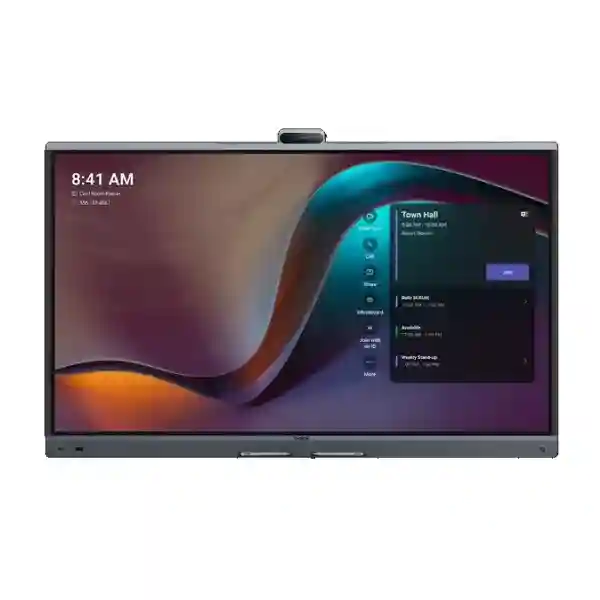
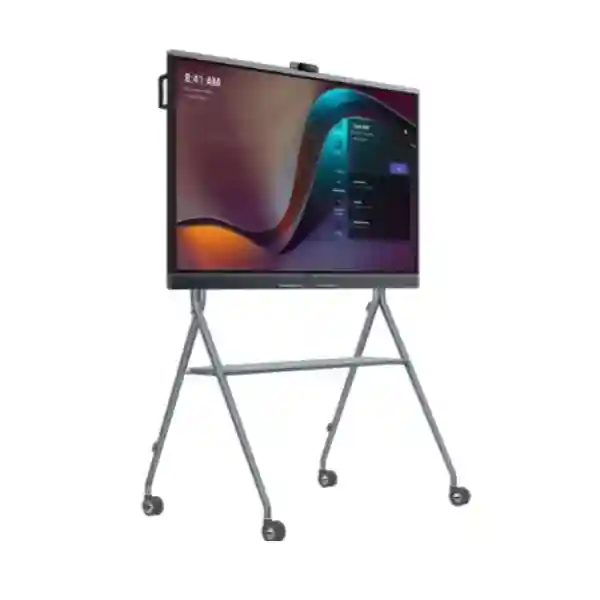
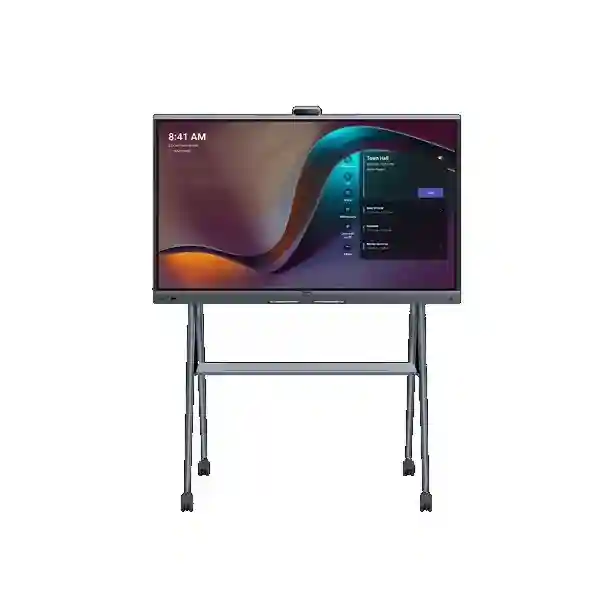
Yealink MeetingBoard Pro Zoom Rooms System for Enterprise Collaboration
Yealink MeetingBoard Pro is an integrated meeting-room platform that brings a 4K touch display, video conferencing, room audio, content presentation and collaborative whiteboarding into one coordinated device. It is designed for organisations that want a cleaner Zoom Rooms deployment with fewer separate components to mount, cable, power and maintain. The family is available in 65-inch, 75-inch and 86-inch screen sizes, allowing the same operating concept to be applied from smaller executive and huddle spaces through medium boardrooms and larger collaboration rooms. For procurement teams, that common platform approach can simplify room standards, user training, accessory planning and support procedures across multiple sites.
The MeetingBoard Pro uses a built-in triple 50 MP camera arrangement, a 16-element microphone array and integrated stereo speakers. The microphone system is specified for up to 12 metres of full-duplex pickup, while intelligent framing functions help keep participants visible without requiring a camera operator. The 4K panel supports 20 touch points and a four-level stylus experience for annotation and whiteboard work. Native Zoom support is complemented by General Mode for flexible computer-based conferencing workflows, so rooms can accommodate both standardised corporate meetings and guest-led sessions. Wired HDMI input, wireless presentation methods, Gigabit Ethernet, Wi-Fi 6 and Bluetooth 5.1 provide a broad connection set for common enterprise environments.
For Ugandan projects, the important purchasing decision is not simply screen size. Room depth, seating layout, wall construction, power location, network readiness, acoustic conditions, mounting preference and accessory requirements should be considered together. FourTeck can help organisations prepare a practical bill of materials for a single boardroom or a repeatable room standard for a multi-site deployment. Mounting accessories are selected separately, so the quote can be matched to a fixed wall installation, wall stand or movable floor stand.
Instant Procurement Fact Rail
MeetingBoard 65 Pro, 75 Pro and 86 Pro
Zoom Rooms video, presentation and interactive collaboration
4K UHD, 3840 × 2160, anti-glare, 20-point touch
Gigabit Ethernet, Wi-Fi 6, Bluetooth 5.1, HDMI and USB
100–240 V AC, 50/60 Hz
Project quotation; confirm size, mount and accessories
A complete procurement request should identify the intended screen size, room dimensions, expected participant count, preferred mounting arrangement and any requirement for expanded microphones, speakers, touch control or optical camera reach. This avoids comparing incomplete quotes where one proposal contains only the core board while another includes mounting and room accessories. Regional warranty terms and replacement procedures should be confirmed on the final quotation for the exact supplied part number and source channel.
Operational Architecture and Room Design
Traditional conference rooms often grow into collections of separate displays, cameras, microphones, speakers, controllers, mini computers and presentation adapters. Each device adds its own cable path, power requirement, firmware lifecycle and troubleshooting dependency. MeetingBoard Pro approaches the room as one integrated collaboration endpoint. Its display is also the interactive work surface; the camera assembly is integrated into the board; the microphone array and speakers are built in; and conferencing, presentation and whiteboard functions share the same physical platform. That architecture is particularly useful where an organisation wants a repeatable meeting-room standard without creating a custom audiovisual rack for every space.
The system runs Android 13 with 8 GB memory and 64 GB flash storage. Processing is provided by an eight-core arrangement with four cores at 2.2 GHz and four at 2.0 GHz. For video capture, three 50 MP Sony sensors form the built-in camera system. The wide-angle view reaches a 98.2-degree horizontal field of view, with electronic pan, tilt and up to 8× digital zoom. Automatic framing, speaker tracking, picture-in-picture, IntelliFocus and Video Fence functions are designed to help the room maintain useful participant composition during active conversations. An electric privacy shutter provides a visible physical privacy control when the camera is not intended for use.
Audio is engineered around a 16-MEMS microphone array, 48 kHz sampling and up to 12 metres of full-duplex pickup. Echo cancellation, noise suppression, reverberation reduction, beamforming and automatic gain functions are intended to improve intelligibility in real rooms where people sit at different distances from the display. Integrated stereo speakers cover normal meeting playback, while RCA input and output provide additional integration paths. For spaces that need broader coverage, the platform supports selected Yealink microphone and speaker accessories, enabling the base room design to grow without replacing the main board.
The display itself is a central part of the architecture rather than a passive monitor. All three sizes provide 3840 × 2160 resolution, 400 cd/m² brightness, 1200:1 contrast, 60 Hz refresh and wide 178-degree viewing angles. Infrared touch supports 20 simultaneous points with approximately 21 ms touch latency in the Yealink whiteboard environment and ±1 mm stated touch accuracy. The four-level stylus supports a more natural writing workflow for design reviews, teaching, planning and collaborative annotation.
Network integration includes two adaptive 10/100/1000 Mbps Ethernet ports, dual-band Wi-Fi 6 with 2×2 MIMO and Bluetooth 5.1. IPv4 and IPv6, DHCP or static addressing, VLAN, 802.1P/Q, DiffServ, 802.1X and LLDP-MED support help infrastructure teams align the board with established enterprise network policy. HTTPS management, encrypted media and signalling capabilities, certificate mechanisms and secure connection options provide controls that should be incorporated into the organisation’s own security baseline rather than treated as an afterthought.

Operationally, the strongest reason to consider MeetingBoard Pro is standardisation. A room can be designed around one primary collaboration surface and then extended only where the space requires it. A smaller room may need nothing beyond the board, suitable mount, network and power. A deeper boardroom may add an optical camera module or microphone extension. An open collaboration zone may use a floor stand so the system can move between teams. This modular approach lets procurement managers separate the mandatory core from optional room-specific elements and makes future room changes easier to plan.
Enterprise Business Outcomes and Value Analysis
The 4K display, triple-camera capture system and integrated audio chain reduce the number of independent signal paths that must be coordinated. For users, that can mean fewer decisions at meeting start. For administrators, it means camera, microphone, speaker, display and touch behaviour can be evaluated as one room platform. Wired HDMI content can be shown locally at up to 4K 60 fps, while meeting sharing capability depends on the active conferencing workflow. The practical benefit is a room that can support detailed spreadsheets, drawings, presentations and remote participant video without forcing staff to learn a custom switching system.
Reliability is not only a component specification; it is also the reduction of avoidable failure points. Combining core meeting functions reduces external USB links, power adapters and inter-device dependencies. This does not remove the need for sound network and electrical design, but it can make fault isolation more straightforward. A structured deployment should still document network ports, cable routes, firmware policy, administrator credentials, accessory connections and a fallback meeting procedure.
The 65, 75 and 86-inch options allow facilities and IT teams to create a family of room templates instead of specifying unrelated products for every room. Yealink positions the 65-inch version for smaller spaces, the 75-inch model for medium rooms and the 86-inch model for larger rooms. The correct selection should still be validated against actual viewing distance, seating geometry and wall area. Standardising accessories and network profiles across these room types can make expansion to additional branches easier.
Support for 802.1X, VLANs, QoS, HTTPS administration, TLS signalling, SRTP media protection and AES-256 encryption mechanisms gives network teams tools to place the room endpoint within established access-control and traffic-management practices. Security outcomes depend on configuration, identity policy, platform settings and ongoing updates. Procurement should therefore include ownership for onboarding, certificate handling, account configuration, firmware maintenance and decommissioning.
The platform supports management through the device interface and web methods, plus ecosystem tools including Zoom Device Management and Yealink management services. Batch deployment support and SNMP can be relevant for larger estates. Before purchase, administrators should decide which management plane will be authoritative, who receives alerts, how updates are approved and how room names, network settings and account ownership are documented.
An integrated board may reduce separate display, camera, microphone and speaker purchases, but the final ownership cost should include mounting, installation labour, room preparation, subscriptions, accessories, network switching, electrical work and support. Typical power consumption is specified at 141 W for the 65-inch model, 164 W for the 75-inch model and 199 W for the 86-inch model; maximum figures are higher. These values help facilities teams estimate circuit loading and operating consumption across a large deployment.
Native Zoom support is valuable for standard rooms, while General Mode and peripheral workflows help accommodate visitors or alternative meeting applications. This flexibility can reduce pressure to build a second conferencing room for occasional cross-platform sessions. The design objective should be a documented user journey: one standard method for normal meetings and one clearly supported method for guest or laptop-driven meetings.
Key Hardware and Software Highlights
| Component | Technical capability | Operational outcome |
|---|---|---|
| Display | 65, 75 or 86 inch; 4K; anti-glare; 20-point infrared touch | Shared meeting, presentation and writing surface with consistent interaction. |
| Camera | Three 50 MP sensors, 98.2° wide view, 8× digital zoom | Wide room coverage plus participant-focused framing without a separate base camera. |
| Audio capture | 16 MEMS microphones, up to 12 m full-duplex pickup | Supports natural discussion across meeting tables with fewer tabletop devices. |
| Network | Dual Gigabit Ethernet, Wi-Fi 6, IPv4/IPv6 | Flexible enterprise connectivity with wired deployment preferred where policy requires it. |
| Management | Web/device control, ZDM, Yealink services, batch deployment, SNMP | Supports repeatable configuration and remote fleet operations. |
| Expansion | VCH interfaces, RCA I/O, USB, OPS slot, pluggable camera interface | Allows selected rooms to gain additional audio, camera or Windows capabilities. |
The most important distinction in this matrix is between built-in capability and optional expansion. The core board already covers the principal meeting functions, but specialised rooms may require more. A long conference table may benefit from microphone extension. A training room may need different camera reach. A mobile collaboration zone may require a floor stand rather than wall mounting. A procurement bill should therefore identify every accessory by room rather than assuming one accessory bundle suits the entire estate.
Technical Specifications Ledger
| Category | Confirmed specification |
|---|---|
| Operating system | Android 13.0; 8 GB memory; 64 GB flash |
| Processor | 4 cores at 2.2 GHz plus 4 cores at 2.0 GHz |
| Display sizes | 65, 75 and 86 inches |
| Panel | Anti-glare, 3840 × 2160, 400 cd/m², 1200:1 contrast, 60 Hz, 178° viewing angle, 10-bit colour depth |
| Touch | Infrared, 20 points, ±1 mm stated accuracy, 21 ms stated latency in Yealink whiteboard, four-level stylus |
| Built-in camera | Triple 50 MP Sony sensors; 98.2° HFOV; electronic pan/tilt; 8× digital zoom; up to 3840 × 2160; autofocus; electric privacy shutter |
| Camera functions | Auto framing, speaker tracking, picture-in-picture, IntelliFocus and Video Fence |
| Optional optical camera | MB-12X Pro: 8 MP Sony sensor, 12× optical zoom, 90° HFOV |
| Microphones | 16 MEMS microphone array; up to 12 m full-duplex pickup; 48 kHz, 24-bit |
| Speakers | Integrated stereo speakers; 30 W rated, 36 W maximum; RCA output supported |
| Content sharing | HDMI input, VCH51 wired sharing, AirPlay, Miracast and compatible presentation pod options |
| Networking | Wi-Fi 6 dual band 2×2 MIMO; Bluetooth 5.1; TCP/IP IPv4/IPv6; DHCP/static IP; HTTPS |
| Security/network controls | TLS signalling, SRTP media, AES-256 mechanisms, VLAN, 802.1P/Q, DiffServ, 802.1X, LLDP-MED, OpenVPN support |
| Physical interfaces | 1 HDMI out, 1 HDMI in, RCA line input/output pairs, 3 USB-A 2.0, 2 Gigabit Ethernet, 2 VCH RJ45, Windows OPS slot, AC input, USB-B touch output, camera-module interface |
| Installation | Wall mount, wall stand or floor stand using compatible separately selected mounting hardware |
| Operating environment | 0–40°C operating temperature; 5–95% operating humidity; -20–60°C storage temperature |
| Power input | 100–240 V AC, 50/60 Hz |
| Power consumption | 65 Pro: 141 W typical / 243 W max; 75 Pro: 164 W typical / 277 W max; 86 Pro: 199 W typical / 357 W max |
Specifications should be matched to the exact regional part number on the quotation. Software capabilities can also depend on platform version, account configuration and firmware. For a controlled enterprise rollout, capture the approved firmware branch, room account ownership, management method and accessory list in the deployment record. This turns the specification table into an operational standard rather than a one-time purchasing document.
Configuration and Sizing Worksheet
Step 1 — Estimate room scale and viewing distance
Start with room dimensions, not participant count alone. Record the distance from the display wall to the furthest regular seat, the width of the table, the location of doors and windows and whether people will view detailed spreadsheets or mainly faces and slides. The 65-inch model suits smaller collaboration areas; the 75-inch model gives more visual area for medium rooms; and the 86-inch version supports larger spaces where distant viewers need readable content. Final selection should consider actual room geometry.
Step 2 — Confirm mounting and structural conditions
Decide whether the board will be wall-mounted, placed on a wall stand or installed on a movable floor stand. Wall installations require confirmation of wall type, fixing method, cable entry and service clearance. Mobile stands require floor clearance, safe movement routes and a plan for power/network connection when the board changes position. The compatible mount is a separate procurement item, so include it explicitly in the bill of materials.
Step 3 — Validate electrical and network readiness
Provide a suitable 100–240 V AC outlet and consider maximum rather than only typical consumption when planning circuits. Wired Gigabit Ethernet is usually the most predictable choice for permanent rooms, although Wi-Fi 6 is available. Confirm VLAN, 802.1X, DHCP or static addressing, firewall rules, DNS, time services and platform connectivity before installation day. Where possible, stage the endpoint on the intended network policy before the room is handed to users.
Step 4 — Define conferencing and subscription responsibilities
The hardware and the conferencing service are separate procurement layers. Confirm the required Zoom Rooms entitlement, account owner, room resource naming and administrative access. If General Mode or laptop-driven meetings will be used, document supported connection methods and provide the appropriate cables or sharing accessories. Avoid assuming that every software subscription is included with the physical board unless the quotation explicitly states it.
Step 5 — Size audio and camera expansion
The built-in 12-metre microphone pickup and triple-camera system cover many standard rooms, but unusual layouts deserve validation. Long tables, divisible rooms, high ceilings, reverberant surfaces or presentation areas away from the display may justify additional microphones, speakers or the MB-12X Pro optical camera module. Expansion should solve a defined room problem rather than be added automatically.
Quote preparation checklist
Provide quantity, preferred screen size, city/site, room dimensions, seating count, mounting preference, network method, conferencing platform, required content-sharing methods, accessory needs, target installation date and whether staging or onsite support is required. For multi-site projects, identify whether all rooms follow one standard or whether there are small, medium and large templates. This information enables a cleaner quotation and reduces later change orders.
Deployment Scenarios and Industry Use Cases
Large enterprise and multi-site networks
Enterprises with offices in Kampala and regional branches can use the MeetingBoard Pro family to define repeatable collaboration-room tiers. A 65-inch board may be assigned to executive offices and smaller meeting spaces, a 75-inch board to standard boardrooms and an 86-inch board to larger collaboration rooms. Common management, security and user workflows can then be documented across the estate. Central teams should create a standard network profile, naming convention, room-account procedure, firmware policy and accessory catalogue. This reduces site-by-site variation and helps support teams diagnose issues using a familiar architecture.
Financial and banking institutions
Banks and financial organisations often require controlled network access, consistent meeting-room behaviour and clear ownership of administrative credentials. Features such as 802.1X, VLAN support, encrypted signalling/media mechanisms and HTTPS management can be incorporated into an established security framework. The physical privacy shutter is useful for rooms where camera state must be visibly clear. Procurement should include security review, network onboarding, account governance, update responsibility and a documented support escalation path. For branches, standardised room templates can help maintain consistency while still allowing screen size to vary.
Educational and campus environments
The combination of touch display, stylus input, presentation and conferencing can suit seminar rooms, faculty collaboration areas and hybrid teaching spaces. Educators can present material, annotate content and include remote participants from the same front-of-room surface. The appropriate size depends heavily on classroom depth and whether students must read detailed text. In larger teaching spaces, camera and audio expansion may be required. Institutions should also plan user sign-in policy, guest access, after-hours security, physical protection and how room configurations are restored between classes.
Government and regulated procurement
Government deployments frequently require formal bills of materials, traceable part numbers, documented warranty terms and structured acceptance testing. MeetingBoard Pro can be specified as the core collaboration board while mounting, cabling, network configuration and optional room peripherals are listed separately. Technical acceptance can include display test, camera framing, microphone coverage, speaker playback, wired and wireless sharing, platform sign-in, network security controls and management visibility. For sensitive environments, the purchasing organisation should independently validate platform, data-handling and network requirements against its internal policy before deployment.

Technical Deep Dive: Processing, Video and Media Architecture
MeetingBoard Pro is built to process conferencing, touch interaction, presentation and room media within one appliance. Its eight-core processor, memory and local flash support the Android-based operating environment and conferencing workload. From a procurement perspective, the value of this architecture is not a synthetic benchmark; it is the ability to consolidate functions that otherwise live on separate room devices. Camera input, microphone capture, speaker output, touch interaction and presentation are coordinated through the same system, reducing the number of external endpoints involved in a normal meeting.
The triple-camera arrangement is particularly relevant in rooms where a single wide camera can make distant participants appear too small. One wide view can establish the room while additional sensors support participant-focused composition. Digital framing functions are designed to shift attention toward active participants while maintaining context. For rooms requiring true optical reach, the optional MB-12X Pro provides 12× optical zoom and a dedicated pluggable camera path. This should be considered for deeper rooms, podium views or layouts where participants sit substantially farther from the board.
Audio processing is equally important because a meeting can remain usable with imperfect video but quickly fails when speech is unclear. The 16-microphone array combines far-field pickup with echo cancellation, reverberation reduction, beamforming and gain control. Full-duplex operation is intended to allow natural interruption and conversation rather than forcing participants to take turns because of audio gating. During room design, however, acoustic treatment still matters. Hard glass, tile and bare walls can create reverberation that no endpoint should be expected to eliminate completely.
Technical Deep Dive: Software Ecosystem, Firmware Security and Control
A meeting-room endpoint should be managed as part of the corporate device estate, not as an isolated audiovisual appliance. MeetingBoard Pro supports configuration through the device and web interface, upgrade paths through supported management services and enterprise administration through platforms such as Zoom Device Management. Batch deployment and SNMP support can help larger environments establish repeatable configuration and monitoring practices. The precise management model should be chosen before rollout so administrators do not end up with overlapping tools and unclear ownership.
Network controls include VLAN and QoS mechanisms, 802.1X authentication, LLDP-MED and secure web access. Encryption support includes protected signalling and media mechanisms. These capabilities are building blocks; the actual security posture depends on how the organisation configures accounts, certificates, network segmentation, platform permissions and update processes. A deployment runbook should state who owns administrator credentials, how credentials are stored, which network segment is permitted, what outbound services are required, when updates are applied and how a board is securely reset before disposal or reassignment.
Firmware lifecycle management should be deliberate. For a single room, automatic updates may be acceptable under the organisation’s policy. For a large estate, staged deployment is usually easier to govern: test a release in a representative room, confirm camera, audio, sharing and platform behaviour, then roll it to wider groups. Record the installed version during commissioning and keep the room inventory linked to serial number, site, screen size, mount, accessories and support entitlement.
Technical Deep Dive: Availability, Redundancy and Recovery Planning
An all-in-one meeting board simplifies the room, but business continuity still requires planning. The endpoint depends on electrical power, network connectivity, conferencing service availability and room-account access. Critical boardrooms should therefore have a documented fallback. This may include a laptop-based meeting path, spare presentation cables, an alternate network connection permitted by policy and a known procedure for joining a meeting when the room account is unavailable. The goal is not to duplicate the entire room; it is to prevent a single configuration issue from cancelling an important meeting.
Power planning should use the published maximum figures when assessing circuit capacity: 243 W for the 65-inch model, 277 W for the 75-inch model and 357 W for the 86-inch model. Where the site uses UPS protection for collaboration spaces, verify the UPS output, runtime objective and any additional accessories connected to the same circuit. Network resilience may include redundant upstream switching or wireless fallback where permitted, but the board itself should be integrated according to the organisation’s standard network architecture rather than given an undocumented exception.
Recovery planning also covers hardware service. Keep purchase records, serial numbers, installation photos and configuration documentation. For multi-room estates, consider whether a spare unit, spare mount components or strategic accessory stock is justified by business criticality and logistics lead time. A defined support route—user help desk, internal collaboration team, supplier and manufacturer channel—prevents confusion when a fault occurs. Acceptance documentation should include a baseline test so post-fault behaviour can be compared against a known working state.
Pre-Purchase Buyer Gap Checklist
Is the wall mount included? Do not assume it is. Compatible wall mounts and stands are selected separately, so the quote should state the exact mounting accessory. Does the board include the conferencing subscription? Treat hardware and Zoom Rooms service entitlement as separate unless the quotation explicitly bundles them. Can it work with guest laptops? The platform supports General Mode and multiple content-sharing paths, but the exact user workflow should be defined and tested before rollout.
Will the built-in microphones cover every room? The specified pickup reaches up to 12 metres, but room acoustics and seating geometry matter. A long, wide or acoustically difficult room may need expansion microphones. Is the built-in camera enough for a deep room? Many spaces will be served by the triple 50 MP system; rooms needing stronger optical reach can consider the MB-12X Pro. Can existing network policy be retained? The board supports common enterprise controls including VLAN, 802.1X, IPv4/IPv6 and QoS, but infrastructure teams should validate their exact authentication and firewall design.
What hidden costs should be budgeted? Beyond the board, plan for mount or stand, delivery, installation, room cabling, possible electrical work, network switch capacity, conferencing subscriptions, optional microphones/cameras/controllers and support. For mobile stands, also consider safe storage and cable management. How much power is required? Typical consumption ranges from 141 W to 199 W across the three sizes, while maximum consumption ranges from 243 W to 357 W. Use maximum figures for circuit planning.
How should lifecycle risk be handled? Confirm the exact part number, warranty, support channel and current platform certification on the final quotation. Keep a room inventory and standard configuration so future replacements can be staged consistently. What about cross-vendor interoperability? General laptop-driven workflows can provide flexibility, but specialised third-party peripherals should not be assumed compatible without validation. Where an existing room already contains DSPs, cameras or control systems, request a compatibility review before purchase.
What physical checks are commonly missed? Verify lift access, doorway clearance, wall structure, installation height, glare from windows, cable pathways and service access. Large interactive displays are not ordinary desktop equipment; safe handling and appropriate mounting are essential. The 86-inch model in particular should be planned as a substantial room installation. How should acceptance be measured? Define a checklist covering power-on, network registration, Zoom sign-in, camera framing, privacy shutter, microphone coverage, speaker output, touch, stylus, wired sharing, wireless sharing, management visibility and user handover.
Uganda Procurement and Delivery Logistics
FourTeck Uganda can structure MeetingBoard Pro procurement around the actual room requirement rather than a board-only part number. A useful request begins with screen size or room dimensions, quantity, delivery city, mounting method and conferencing platform. The quotation can then identify the core MeetingBoard Pro model, compatible mount or stand and any selected audio, camera, controller or presentation accessories. For multi-room projects, a room-by-room schedule helps ensure the 65, 75 and 86-inch variants are allocated correctly.
Order processing should include confirmation of the exact supplied part number, commercial terms, warranty basis and expected logistics schedule. Delivery timing depends on stock position, project quantity, import route and accessory availability, so buyers should request a dated lead-time statement rather than assume immediate supply. Large boards also require suitable handling at the destination. Inform the supplier about stairs, restricted lift dimensions, difficult access or remote-site conditions before dispatch.
Technical pre-configuration can be planned where project scope requires it. Typical preparation may include firmware review, device naming, network parameter preparation, accessory validation and a documented commissioning checklist. Account credentials and sensitive tenant configuration should be handled according to the customer’s own security policy. For larger rollouts, pilot one representative room first, capture lessons from installation and user acceptance, then repeat the approved configuration at remaining sites.
Local Coverage Across Uganda
Projects in Kampala can be planned for corporate headquarters, boardrooms, training centres and multi-floor office deployments, with attention to building access and structured network integration. Entebbe requirements may include corporate offices, hospitality meeting areas and organisations operating near the airport corridor, where delivery scheduling and site access should be coordinated in advance. Jinja deployments can support industrial, education and commercial collaboration environments where remote participation reduces travel between operational sites.
For Mbarara and western Uganda, organisations can request room-specific bills of materials and consolidated project logistics for branch deployments. Gulu and northern Uganda projects can similarly be prepared with attention to transport, installation planning and local site readiness. Nationwide projects benefit from standard room templates: document the approved 65-inch small-room design, 75-inch standard-room design and 86-inch larger-room design, then apply the correct template at each site while recording local exceptions.
Cross-Border and Regional Supply
Organisations operating across East Africa and the Gulf often need consistent collaboration-room standards while purchasing through regional entities. FourTeck’s regional web presence can support project coordination across Uganda, Kenya, broader African markets, the UAE and Kuwait. Cross-border projects should still account for country-specific commercial terms, power accessories, local warranty handling, import requirements and availability.
For a regional rollout, create one technical standard and separate it from the commercial supply route. The technical standard defines room size, board size, mounting, accessories, network policy, platform settings and acceptance tests. Each country quotation can then map locally supplied part numbers and logistics to that common design. This approach helps avoid a situation where offices in different countries purchase superficially similar rooms that behave differently for users and support teams.
Related Yealink Solutions and Accessories
A complete collaboration project may extend beyond the MeetingBoard Pro itself. Browse FourTeck Uganda for complementary Yealink communication and meeting-room solutions, or contact the project team for a room-specific accessory list. Common MeetingBoard Pro options include MB-WallMount-650 for the 65-inch board, MB-WallMount-860 for 75 and 86-inch boards, compatible wall stands, MB-FS-P650T, MB-FS-P750T and MB-FS-P860T floor stands, plus MB-FS-Lift for supported movable installations.
Audio expansion can include VCM35 wired microphones, VCM36-W wireless microphones, CM20 ceiling microphones and CS10 ceiling speakers where the room design calls for broader coverage. Camera expansion can include the MB-12X Pro optical zoom module or selected external conferencing cameras. Presentation workflows can use VCH51-family wired sharing devices or compatible wireless presentation accessories. Control requirements may include the CTP25 touch panel or supported remote-control options. Windows-based requirements can be addressed with compatible MCore OPS modules where the project design calls for that architecture.
Accessory selection should always follow the room requirement. Adding every option increases cost and support complexity; omitting a necessary microphone or correct mount creates installation problems. FourTeck can help turn room drawings, seating plans and conferencing requirements into a concise bill of materials before purchase.
FourTeck Technical Service Capabilities
Enterprise collaboration projects benefit from validation before equipment reaches the meeting room. FourTeck can assist with bill-of-materials review to confirm that the selected board size, mount and accessories form a coherent room solution. This is especially useful when a project mixes several MeetingBoard Pro sizes or includes specialised microphone, camera and control requirements. Engineering review can also identify practical dependencies such as power position, Ethernet availability, wall condition and cable routing.
Where included in project scope, staging can provide a controlled point to inspect equipment, verify accessories, review firmware and prepare documented configuration information before shipment. Pre-shipment work should follow customer security requirements; sensitive tenant credentials should not be handled casually. For repeat deployments, a staging checklist can improve consistency by recording model, serial number, firmware, intended site, mount, accessory set and commissioning status.
Post-sales support can be organised around fault isolation rather than guesswork. A good support record includes the room name, board model, serial number, software version, network status, platform status, connected accessories and a clear description of the symptom. For hardware issues, warranty handling depends on the supplied product and commercial terms. For configuration issues, remote guidance or onsite service can be scoped according to the project agreement. Buyers should request the desired support model at quotation stage so responsibilities are clear before deployment.
Extended Technical FAQ
1. Which MeetingBoard Pro size should we choose?
Choose by room geometry, viewing distance and content type rather than headcount alone. The 65-inch model is suited to smaller rooms and executive collaboration spaces, the 75-inch model provides a larger canvas for medium rooms, and the 86-inch model is intended for larger spaces where participants sit farther from the display. If users regularly review spreadsheets, drawings or detailed dashboards, larger text visibility may justify moving up a size. Provide room dimensions and seating layout with your quotation request so the selection can be reviewed before ordering.
2. Is MeetingBoard Pro suitable for native Zoom Rooms?
Yes. Yealink positions MeetingBoard Pro as a Zoom Rooms appliance and also supports additional operating modes. For a native deployment, the customer should separately confirm the appropriate Zoom Rooms subscription and tenant configuration. During commissioning, test room sign-in, calendar behaviour, meeting join, camera framing, microphone pickup, speaker playback, content sharing and device-management visibility. Treat the board hardware, conferencing subscription and organisation account configuration as distinct parts of the overall solution so ownership and renewal responsibilities remain clear.
3. Can users connect laptops for other meeting platforms?
MeetingBoard Pro supports General Mode and computer-oriented collaboration workflows, giving organisations flexibility when a visitor or internal team needs to use a different conferencing application. The exact workflow depends on the selected connection method and accessories, so it should be documented during room design. Decide whether guests will use HDMI, USB peripheral operation, a sharing device or wireless presentation. Provide the required cables in the room and label them clearly. A simple, tested guest workflow prevents support calls when an important external meeting starts.
4. Does the built-in audio system eliminate the need for external microphones?
Not in every room. The built-in 16-MEMS microphone array is specified for up to 12 metres of full-duplex pickup and includes echo, noise and reverberation processing. That is substantial coverage for an integrated board, but acoustic conditions can change the result. Very long tables, rooms with hard reflective surfaces, divided spaces or seating positioned away from the normal pickup zone may benefit from additional microphones. A room survey or pilot installation is recommended when audio coverage is business-critical. Expansion should be based on measured need rather than added automatically.
5. What network requirements should the IT team prepare?
The board supports Gigabit Ethernet, Wi-Fi 6, IPv4/IPv6, DHCP or static addressing and common enterprise network controls such as VLAN, QoS and 802.1X. Permanent rooms are often best served by wired Ethernet for predictable performance, subject to the organisation’s design. Before installation, confirm switch port, VLAN, authentication, DNS, time services, firewall access and conferencing-platform requirements. If device management is used, validate management connectivity as well. Document the approved network profile so replacement or additional boards can be onboarded consistently.
6. Are wall mounts and floor stands included?
Mounting hardware should be treated as a separate selection unless the specific commercial bundle states otherwise. Yealink provides compatible wall mounts, wall stands and floor stands for the different MeetingBoard Pro sizes. The correct option depends on screen size and room use. A fixed wall mount gives a clean permanent installation; a wall stand can simplify some structural scenarios; and a mobile floor stand supports flexible collaboration areas. Before ordering, verify wall construction, mounting height, cable routes, floor condition and building access for safe installation.
7. What should we know about power consumption?
The published typical consumption is 141 W for MeetingBoard 65 Pro, 164 W for MeetingBoard 75 Pro and 199 W for MeetingBoard 86 Pro. Maximum consumption is 243 W, 277 W and 357 W respectively. The input range is 100–240 V AC at 50/60 Hz. Facilities teams should use maximum figures when assessing circuit capacity and include any connected accessories in the overall plan. If the meeting room is protected by a UPS, verify that the UPS can support the required load for the intended runtime.
8. How is the device managed after installation?
Configuration is available through device and web methods, and the platform supports management through relevant Yealink and conferencing ecosystem services, including Zoom Device Management. Batch deployment and SNMP are also supported. For a small installation, a simple management model may be sufficient. For a large estate, define a central owner, administrator roles, alerting, update windows, configuration standards and inventory records. Avoid leaving rooms under personal administrator accounts. Enterprise ownership should survive staff changes and make it possible to audit which devices are deployed at each site.
9. What warranty and replacement information should be confirmed?
Warranty terms can vary by supplied part number, region and commercial channel, so the final quotation should state the applicable warranty baseline and support route. Keep the invoice, serial number, delivery record and installation information. If a hardware fault occurs, support teams can then identify the unit quickly and provide the information needed for diagnosis or warranty processing. For business-critical estates, discuss spare strategy and replacement logistics before rollout rather than waiting for a failure. Optional onsite services should also be defined separately from manufacturer hardware warranty.
10. Can FourTeck help with configuration and rollout planning?
Yes, project scope can include technical review, bill-of-materials validation, staging and deployment guidance. For the most efficient quotation, provide room dimensions, quantity, preferred board size, city, mounting preference, network method, Zoom Rooms requirement, accessory needs and target timeline. Multi-site customers should identify standard room types and any exceptions. A pilot room can then be used to validate user experience, network settings, camera and audio coverage, content sharing and management procedures before the design is repeated across additional locations.
Plan Your Yealink MeetingBoard Pro Deployment
A successful meeting-room project starts with the room, not the catalogue. Share your room dimensions, participant capacity, preferred screen size, mounting method, conferencing platform and delivery location with FourTeck Uganda. The project team can help structure a quotation around the correct MeetingBoard Pro variant and the accessories that the room actually needs. Whether you are equipping one Kampala boardroom or standardising collaboration spaces across multiple Ugandan sites, document the technical baseline before ordering so installation, user training and ongoing support remain consistent.
For procurement teams, request an itemised bill of materials showing the board, mount or stand, optional microphones, camera modules, controllers and presentation accessories separately. For IT teams, include network and management requirements. For facilities teams, confirm power, wall structure, access and installation clearance. Bringing these requirements together early reduces project changes and gives stakeholders a clear acceptance standard.




Reviews
There are no reviews yet.