Enterprise Meeting Room Control • Uganda Supply
Yealink MTouch Plus-MB Touch Console for MeetingBoard Windows Rooms
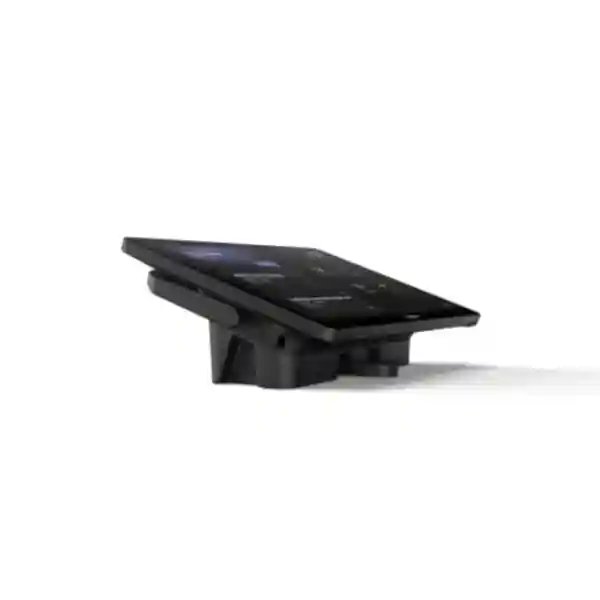
Yealink MTouch Plus-MB is a dedicated touch control console for compatible Yealink MeetingBoard and MeetingBoard Pro systems operating as Microsoft Teams Rooms on Windows. It gives users a clear 11.6-inch control surface for meeting interaction while allowing the room designer to place the console on a desk, flat surface or wall. For procurement teams, its value is straightforward: the room gains a purpose-built control point rather than relying on users to reach the main collaboration display or improvise with personal devices.
The MTouch Plus-MB uses an IPS panel with 1920 × 1080 resolution, an anti-glare and anti-fingerprint finish, and 10-point multi-touch. Yealink identifies it for MCore OPS-T and MCore-OPS-G2T based MeetingBoard/MeetingBoard Pro Windows-room solutions. That compatibility detail matters during purchasing because MTouch Plus-MB should be treated as part of a validated room system rather than as a universal standalone tablet. FourTeck can review the installed MeetingBoard model, OPS compute generation, room topology, cable path and mounting preference before supply.
In a boardroom, executive suite, training room or institutional meeting space, a dedicated console can make the room easier to operate for both regular and occasional users. The screen remains close to the table or chosen control position while the primary MeetingBoard stays focused on participants, shared content and collaboration. This separation between control and presentation supports cleaner meeting-room workflows and can reduce the number of user actions required at the front display.
Instant Specifications & Procurement Fact Rail
MTouch Plus-MB
Part number 1306072
11.6-inch IPS
1920 × 1080
10-point multi-touch
Anti-glare surface
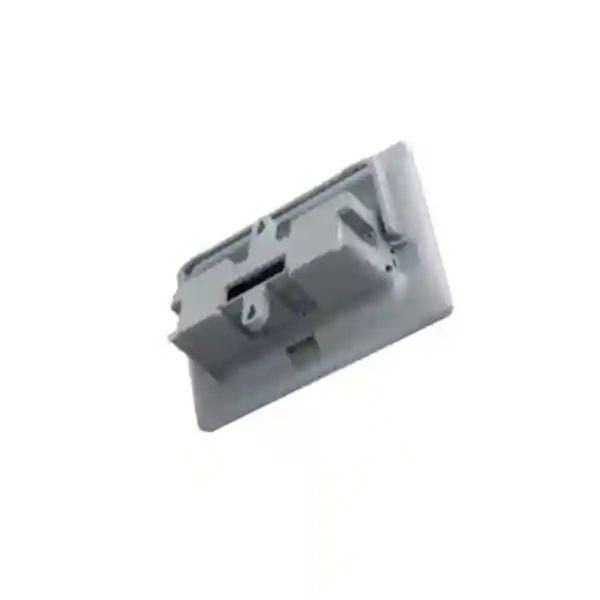
Wall, desktop or flat placement
Touch console for compatible MeetingBoard Windows-room solutions
Business quotation on request; compatibility validation recommended
The fact rail is intended to help procurement teams separate the confirmed core characteristics from project-specific variables. The display size, resolution, touch capability and placement choices are fixed product characteristics. By contrast, the final room bill of materials, cable routing, compute compatibility, mounting accessories, installation scope, warranty handling and delivery schedule should be confirmed against the exact project. This distinction prevents a common purchasing error: ordering a control panel because the model name appears similar to another Yealink accessory without first checking the host-room architecture.
Operational Product Architecture & Overview
MTouch Plus-MB sits at the human-control layer of a Yealink MeetingBoard Windows-room deployment. The MeetingBoard provides the primary room collaboration surface, while the compatible OPS compute platform supplies the Windows-room computing environment. The touch console provides a separate operator position. This architecture is useful because it divides the room into logical functions: presentation and participant visibility remain on the large front display, while meeting control stays within reach of the table or designated operator.
The 11.6-inch screen is large enough to present room controls without consuming the table area associated with a laptop-sized device. Full HD resolution supports crisp interface rendering, and the anti-glare treatment is practical in rooms with ceiling lighting, windows or reflective furniture. Anti-fingerprint treatment is equally relevant in shared rooms because the console is touched throughout the day by many users. Ten-point multi-touch gives the hardware a responsive touch foundation for supported room interactions.
The MB variant should be selected with particular care. Yealink documents it as a console for MeetingBoard and MeetingBoard Pro Microsoft Teams Rooms on Windows solutions using compatible MCore OPS-T or MCore-OPS-G2T hardware. A buyer therefore needs to know more than the screen size. The MeetingBoard generation, compute module, software state and intended room mode all affect whether the proposed accessory belongs in the final design. FourTeck can use these details to check the proposed topology before quotation.

Flexible placement addresses another practical room-design problem. A fixed control position can be awkward in long boardrooms, wall-led collaboration spaces or rooms where furniture changes frequently. MTouch Plus-MB supports wall, desk and flat placement, so integrators can choose a position based on cable access, participant reach and room ergonomics. The goal is not simply visual neatness; it is to make the room predictable. Users should enter, identify the control point immediately and operate the meeting without searching for a remote control or manipulating the large display unnecessarily.
Operational planning should also include software readiness. Yealink’s setup guidance recommends verifying and updating Yealink RoomConnect before connecting the MTouch Plus-MB, and it provides touch-calibration steps if touch behavior is abnormal. That makes commissioning a defined part of the project rather than an afterthought. For larger rollouts, a repeatable commissioning checklist can help keep room behavior consistent across multiple sites.
Enterprise Business Outcomes & Value Analysis
A dedicated console creates a repeatable control position. Staff do not need to decide whether to operate the front display, a personal laptop or another peripheral. That consistency is valuable in shared rooms where different departments, visitors and executives may use the same space throughout the day.
The 11.6-inch 1920 × 1080 IPS panel gives room controls a dedicated Full HD surface. Anti-glare and anti-fingerprint treatments are practical design choices for frequently touched equipment under office lighting. The result is a console designed for repeated shared-room interaction rather than occasional personal use.
Wall, desktop and flat placement options let the physical installation follow the room rather than forcing the room to follow the controller. This can simplify retrofit projects where furniture, conduits or table cut-outs already exist.
The MB model is designed for a defined Yealink MeetingBoard Windows-room ecosystem. For standardized enterprise estates, this can be preferable to introducing an unrelated generic controller. Procurement should still validate the exact MeetingBoard and OPS combination before purchase.
When meeting rooms use a documented and repeatable topology, service teams can diagnose issues more systematically. They can check RoomConnect version, physical connectivity, touch calibration, host compute and room configuration in a known sequence.
Organizations rolling out multiple MeetingBoard rooms can define a standard console position, commissioning process and user experience. Standardization can reduce training overhead and simplify handover documentation.
The strongest value comes from correct specification. Validating the board, compute module, cable route and mounting requirement before purchase reduces the risk of receiving an accessory that does not match the installed room architecture.
Key Hardware & Software Highlights
11.6-inch IPS Control Surface
The console uses an 11.6-inch IPS panel at 1920 × 1080. The size balances visibility and table footprint, while Full HD resolution supports a sharp room-control interface.
10-Point Multi-Touch
Multi-touch hardware supports responsive interaction and gives the console a modern control foundation suitable for collaborative room interfaces.
Anti-Glare & Anti-Fingerprint
Shared touch equipment quickly accumulates fingerprints and can sit directly under bright lights. The treated surface addresses these everyday meeting-room conditions.
Three Placement Methods
Install on a wall, position on a desktop or use flat placement according to room ergonomics and cable planning.
MeetingBoard Windows-Room Role
The MB variant is documented for compatible MeetingBoard and MeetingBoard Pro Windows-room deployments, including specified MCore OPS hardware.
RoomConnect Commissioning
Yealink recommends checking the RoomConnect software version during initial setup. Touch calibration procedures are available when commissioning requires them.
Technical Specifications Ledger
| Specification | Confirmed Detail | Procurement Relevance |
|---|---|---|
| Product | Yealink MTouch Plus-MB | Specify the MB suffix to avoid confusion with adjacent MTouch variants. |
| Part number | 1306072 | Useful for bill-of-materials verification. |
| Screen | 11.6-inch IPS | Confirm table or wall space around the chosen control position. |
| Resolution | 1920 × 1080 | Full HD room-control display. |
| Touch | 10-point multi-touch | Supports responsive multi-touch interaction. |
| Surface | Anti-fingerprint and anti-glare | Useful for shared rooms and bright office lighting. |
| Placement | Wall, desktop or flat | Choose mounting method before installation and cable routing. |
| Compatibility role | Touch console for compatible MeetingBoard/MeetingBoard Pro MTR on Windows solutions | Host-system validation is essential before order. |
| Documented compute context | MCore OPS-T / MCore-OPS-G2T | Record the installed OPS model in the request for quotation. |
Where a project requires exact electrical, environmental, cable-length, regulatory or packaging values beyond the confirmed MB product information above, those values should be checked against the current regional datasheet and the final Yealink bill of materials before purchase. Enterprise procurement benefits from separating confirmed model facts from assumptions carried over from visually similar MTouch products.
Configuration & Sizing Worksheet
- Identify the host room. Record the exact MeetingBoard or MeetingBoard Pro model, display size, current operating mode and installed OPS compute model. Photographs of the rear connection area and system information screen can help the engineering review.
- Define the control position. Decide whether users should control meetings from the conference table, a lectern, a side wall or another fixed position. Note approximate cable distance and whether the route passes through floor boxes, conduits or furniture.
- Select placement style. Choose wall, desktop or flat installation. Consider reach, viewing angle, cleaning access, accidental movement and whether the room furniture is reconfigured frequently.
- Check software readiness. Plan for a current Yealink RoomConnect installation before connecting and commissioning the panel. Include administrator access in the handover plan so installers can verify versions and perform touch calibration if required.
- Confirm the room workflow. State whether the room is a standard executive boardroom, divisible space, classroom, training room or another topology. This helps determine whether one control point is appropriate and whether additional room accessories should be considered.
- Prepare the quotation package. Include organization name, delivery city, quantity, host MeetingBoard model, OPS model, mounting preference, installation requirement and target delivery date. If the project is part of a multi-room rollout, include a room schedule so identical and exceptional rooms can be separated.
This worksheet is intentionally practical. MTouch Plus-MB is not sized by user count in the same way as a server or network appliance. The relevant sizing questions concern room geometry, control positions, host-system compatibility and rollout quantity. A ten-seat boardroom and a twenty-seat training room may use the same console model but require different mounting, cable management and user handover. For multi-site deployments, a room-by-room schedule can prevent small physical differences from becoming installation-day delays.
Deployment Scenarios & Industry Use Cases
Large Enterprise & Multi-Site Offices
Enterprises standardizing on Yealink MeetingBoard Windows-room systems can use MTouch Plus-MB to create a familiar meeting-control position across headquarters, branches and regional offices. The most important design principle is repeatability: consistent mounting height, table position, commissioning steps and user labels make rooms easier to adopt and support. A central IT team can maintain a room register containing MeetingBoard model, OPS generation, console location and software baseline.
Financial & Banking Environments
Banks and financial institutions often operate executive rooms, operations meeting spaces and branch collaboration rooms where meetings must start predictably. A dedicated console keeps control separate from the main presentation surface. Procurement teams should align the room solution with internal endpoint-management, network and physical-security policies, and should document administrator access and change-control procedures for commissioning.
Education & Campus Collaboration
Universities and training institutions can place the console at a lectern, teaching desk or wall location appropriate to the room. In spaces used by many lecturers or facilitators, a dedicated control surface can reduce dependence on individual devices. The institution should define who is responsible for room startup, software updates, physical cleaning and first-line support.

Government & Public-Sector Procurement
Government meeting rooms frequently require documented bills of materials, clear warranty channels and controlled installation. The MTouch Plus-MB can be specified as the room-control component within a larger validated MeetingBoard Windows-room package. Tender documents should state the exact model suffix and host-system compatibility rather than describing only an 11.6-inch touch panel. This reduces ambiguity during evaluation and delivery inspection.
Technical Deep Dive: Display, Touch & Control Architecture
A meeting-room console succeeds when it makes control feel immediate while remaining visually subordinate to the main collaboration display. The 11.6-inch IPS panel is a deliberate middle ground: larger than a phone-style controller yet compact enough for a conference table. Its 1920 × 1080 resolution provides a dense interface canvas, while 10-point touch capability supports natural interaction. The anti-glare finish is significant because meeting rooms often combine ceiling luminaires, daylight and glossy furniture. Reflections can make a control surface harder to read at shallow angles, so surface treatment has direct usability value.
The anti-fingerprint characteristic also has an operational dimension. Unlike a personal device, a room console may be touched by dozens of people. Regular cleaning remains necessary, but a surface designed for repeated touch helps preserve readability between cleaning cycles. When specifying the room, place the panel where users can reach it without leaning across microphones, laptops or other equipment. Physical ergonomics are part of system reliability because an awkward controller encourages workarounds.
Technical Deep Dive: Software Ecosystem & Operational Control
The MB variant belongs to a defined Yealink Windows-room ecosystem. Yealink’s setup documentation describes the panel for MCore OPS-T and MCore-OPS-G2T with MeetingBoard/MeetingBoard Pro solutions and recommends updating Yealink RoomConnect before connection. That guidance should become part of the commissioning method statement. An installer should record the pre-installation state, verify the software version, connect the console, test touch behavior and calibrate touch through Windows controls if necessary.
For enterprise support teams, documentation is as important as initial installation. Record the room name, MeetingBoard serial details, compute generation, console model, mounting position and software baseline. If a future incident occurs, the help desk can distinguish a physical touch issue from a host-compute, software or configuration issue more quickly. In multi-room estates, controlled baselines also make staged updates easier to plan.
Technical Deep Dive: Resilience, Serviceability & Recovery
MTouch Plus-MB is a room-control endpoint, so resilience planning is different from redundant switching or clustered servers. The practical objective is to make the room recoverable. That means documenting the physical connections, keeping administrator access procedures available, maintaining current room software according to organizational policy and knowing how to verify touch calibration. Spare strategy should be based on the number and business criticality of rooms. An organization with one boardroom may prefer rapid supplier support; a large estate may justify holding validated spare accessories.
Recovery procedures should be tested during handover. Facilities and IT teams should know which component provides the main room compute, which device is the touch console and who owns software changes. Labeling hidden cable routes can also reduce troubleshooting time. The best disaster-recovery plan for a meeting room is often simple, documented and reproducible rather than technically elaborate.
Pre-Purchase Buyer Gap Checklist
Is it a standalone meeting system? No. Treat MTouch Plus-MB as a touch-console component for a compatible Yealink MeetingBoard Windows-room architecture. Confirm the host board and compute module.
Does the MB suffix matter? Yes. Procurement descriptions should preserve the full MTouch Plus-MB name and part number 1306072 so the requested variant is unambiguous.
Can it be wall mounted? Yealink states three deployment methods: wall, desktop and flat placement. The installation plan should still confirm the exact bracket arrangement and cable path for the selected room.
What should be checked before commissioning? Verify the host hardware, current Yealink RoomConnect version, physical connection, touch behavior and room-control workflow. Administrator access may be needed for software verification or touch calibration.
Are all MTouch Plus specifications interchangeable with MTouch Plus-MB? Buyers should not assume that. Similar product families can have different host-system roles or interface details. Use the current MB documentation for the final bill of materials and request confirmation where a specification is project-critical.
What hidden costs should be planned? Consider installation labor, cable routing, mounting work, compatible host hardware, optional room accessories, configuration, travel for remote sites, and any project-specific support or warranty requirements. A hardware-only price is not always the complete deployed-room cost.
How should lifecycle risk be handled? Record the exact part number and purchase date, keep room documentation current, and validate compatibility again when replacing the MeetingBoard or OPS compute in future. A room accessory that is correct for today’s topology should be reassessed when the host platform changes.
Uganda Procurement, Delivery & Project Logistics
FourTeck can prepare a Uganda business quotation for the Yealink MTouch Plus-MB based on quantity, destination and project scope. For the fastest technical review, provide the exact MeetingBoard or MeetingBoard Pro model, the installed or proposed MCore OPS model, preferred console placement and whether installation or pre-configuration support is required. For replacement purchases, include photographs or existing bill-of-materials references where available.
Order processing should distinguish between hardware supply and a complete room deployment. Hardware supply focuses on the correctly specified product and agreed delivery. A deployment project can additionally require site readiness review, cable planning, mounting, software checks, touch validation and user handover. Separating these scopes in the quotation helps procurement teams compare like with like and reduces assumptions between purchasing, IT and facilities teams.
Delivery timing depends on confirmed stock position, quantity, import requirements and destination. Project teams should therefore request a dated quotation and confirm the required delivery window before issuing a purchase order. For phased rollouts, deliveries can be planned around room readiness so equipment does not remain unnecessarily in storage before installation.
Local Coverage Matrix
Head-office, enterprise, government and hospitality meeting-room procurement.
Corporate, aviation, hospitality and institutional collaboration projects.
Industrial, education and regional office meeting-room requirements.
Regional business, healthcare, education and public-sector deployments.
Institutional, NGO, education and distributed-enterprise room projects.
For locations outside these hubs, project logistics can be planned according to quantity, installation scope and delivery destination. Remote-site orders benefit from stronger pre-shipment validation because correcting a compatibility or mounting issue after delivery can add unnecessary travel and project delay.
Cross-Border & Regional Supply
Organizations operating across East Africa, the Gulf and wider African markets often need consistent room standards across countries. FourTeck regional channels can support procurement planning through Uganda, Kenya, Africa, UAE and Kuwait. For multi-country rollouts, use one master room specification and then document local differences in power, delivery, installation and support scope.
A consistent model reference is particularly important when equipment moves through regional procurement channels. Use “Yealink MTouch Plus-MB” and part number 1306072 in purchasing documents. The destination-country quotation should state the applicable commercial terms, lead time and warranty handling. This approach gives central IT teams technical consistency while allowing local procurement teams to manage country-specific logistics.
Related Yealink Room Components & Planning Links
A touch console should be evaluated as part of the complete room. Buyers planning a new deployment can review Yealink solutions in Uganda and discuss compatible MeetingBoard, compute, camera, audio and room accessories with the technical team. Existing MeetingBoard owners should provide their exact hardware details before adding the MTouch Plus-MB. Projects that also require broader office communications can start from the FourTeck Uganda enterprise technology portal.
Common companion planning areas include the MeetingBoard or MeetingBoard Pro itself, compatible MCore OPS compute, room sensors where supported, content-sharing accessories, camera or audio expansion for larger spaces, network connectivity, structured cabling and suitable power protection. Not every room requires every accessory. The correct approach is to map the room workflow first, then build a bill of materials that supports that workflow without unnecessary components.
For a validated proposal, use the contact and quotation page and include the room schedule. This lets the proposal distinguish standard rooms from exceptional spaces such as divisible rooms, training rooms or executive boardrooms.
FourTeck Technical Service Capabilities
Enterprise room projects benefit from validation before equipment ships. FourTeck can review the requested model against the stated MeetingBoard environment, check bill-of-materials consistency, identify obvious accessory gaps and align the quotation with the requested installation scope. For multi-room projects, room schedules can be normalized so quantities and exceptions are easier to audit.
Pre-shipment preparation may include agreed documentation checks and configuration planning. Where project scope includes commissioning, the installation method can cover physical placement, software-version verification, connectivity checks, touch testing and handover. Firmware or room-software changes should follow the approved project method and vendor guidance rather than being performed indiscriminately.
Post-sales support begins with accurate records. Keep purchase references, serial information, room names and the final bill of materials. When reporting an issue, provide symptoms, affected room, recent changes and photographs where relevant. This gives the support team a stronger starting point for distinguishing console, host compute, software, cabling and configuration problems.
Extended Technical FAQ
1. What is the Yealink MTouch Plus-MB used for?
It is a dedicated touch console for compatible Yealink MeetingBoard and MeetingBoard Pro Microsoft Teams Rooms on Windows deployments. Instead of using the main board as the only interaction point, participants can control the room from an 11.6-inch touch panel positioned on a table, wall or flat surface. Yealink specifically documents the MB variant in the context of MCore OPS-T and MCore-OPS-G2T based solutions. Buyers should therefore confirm the complete host-room configuration rather than purchasing it as a generic standalone touch display.
2. What are the display and touch specifications?
The MTouch Plus-MB has an 11.6-inch IPS screen with 1920 × 1080 resolution and support for 10-point multi-touch. Yealink also specifies anti-fingerprint and anti-glare treatment. These characteristics are well suited to a shared meeting-room controller because the panel is viewed from close range, touched frequently and may sit under strong office lighting. The Full HD display gives the control interface a clear visual surface while the compact size keeps the console manageable on conference-room furniture.
3. Can MTouch Plus-MB be installed on a wall?
Yes. Yealink lists three deployment methods for MTouch Plus-MB: wall, desktop and flat placement. The preferred method should be chosen during room design because it affects cable routing, user reach and installation work. A wall position can be useful where table space is limited, while desktop placement keeps control close to seated participants. Flat placement may suit particular furniture or temporary arrangements. Before installation, confirm the bracket arrangement and ensure the chosen location does not obstruct doors, chairs, presentation sightlines or maintenance access.
4. Is MTouch Plus-MB compatible with every Yealink MeetingBoard?
Compatibility should be verified for the exact MeetingBoard or MeetingBoard Pro generation and compute configuration. Yealink describes MTouch Plus-MB for MeetingBoard Windows-room solutions using compatible MCore OPS-T or MCore-OPS-G2T hardware and directs users to compatibility information for supported devices. Do not assume that visual similarity between Yealink room products guarantees interoperability. Send the board model and OPS details with the quotation request so the proposed accessory can be checked against the intended system.
5. Does the console require software preparation?
Yealink’s initial setup guidance recommends updating or verifying Yealink RoomConnect before connecting the MTouch Plus-MB. The software is part of the Windows-room environment and should be checked during commissioning. If touch behavior is abnormal, Yealink also documents a Windows touch-calibration process. For managed enterprise environments, these steps should be included in the change plan so installers have appropriate administrator access and can record the final software state after testing.
6. What information should I provide for a Uganda quotation?
Provide the quantity, delivery city, organization name, exact MeetingBoard or MeetingBoard Pro model, installed or planned MCore OPS model, preferred mounting method and whether installation is required. For an existing room, photographs of the system information and connection area can help technical validation. For a new project, include room size, table layout and a simple room schedule. This information allows the quotation to address the actual deployment rather than treating the touch console as an isolated item.
7. What should be considered for warranty and replacement planning?
Warranty terms should be confirmed on the commercial quotation for the destination and supply channel. Keep the invoice, serial information and room assignment so any future support case can be traced quickly. Organizations with many identical rooms may consider a spare strategy based on business criticality and acceptable downtime. Before replacing a console years later, validate the current host-system generation and software environment because the room architecture may have changed since the original purchase.
8. Can FourTeck assist with configuration and installation?
Project scope can include technical validation and deployment support according to the quotation. Typical preparation includes confirming the room bill of materials, identifying the intended console position, planning cable routing and checking the host MeetingBoard environment. Commissioning can include physical installation, RoomConnect verification, touch testing and handover where agreed. For remote locations, strong pre-shipment validation is particularly valuable because it reduces the chance of discovering a compatibility or mounting issue only after equipment reaches the site.
9. Is this the same as the standard MTouch Plus?
The names are closely related, but buyers should preserve the full MTouch Plus-MB designation and use the MB product documentation when specifying the unit. Yealink identifies the MTouch Plus-MB as a universal touch console for its MeetingBoard Windows-room context and lists part number 1306072. Specifications from neighboring MTouch models should not automatically be copied into a tender or purchase order. When an interface, cable, accessory or power detail is contractually important, confirm it against the current MB documentation before ordering.
10. How should organizations standardize this console across multiple rooms?
Create a standard room template containing the MeetingBoard model, OPS compute generation, console model and part number, mounting position, cable route, software baseline and commissioning checklist. Then document exceptions separately for rooms with unusual furniture or workflows. Use consistent labeling and handover instructions so users encounter the same control pattern at different sites. This approach makes procurement easier to audit and gives support teams a known reference architecture when troubleshooting rooms after deployment.
Request a Validated Yealink MTouch Plus-MB Proposal
Send FourTeck your MeetingBoard model, MCore OPS details, quantity, delivery location and preferred console position. The team can use that information to prepare a business quotation and align the requested hardware with the intended Windows-room deployment. For multi-room projects, attach a room schedule so standard and exceptional spaces can be reviewed separately. Clear technical inputs at quotation stage reduce uncertainty during purchasing, delivery and commissioning.
Whether the requirement is a single executive boardroom in Kampala or a distributed enterprise rollout across Uganda, specify the complete model name Yealink MTouch Plus-MB and part number 1306072. Confirm final compatibility, warranty terms, delivery timing and installation scope on the quotation before purchase.



Reviews
There are no reviews yet.