Professional AV Network Infrastructure • Uganda
Yealink RCH240 Managed PoE AV Switch for Enterprise Pro AV Networks
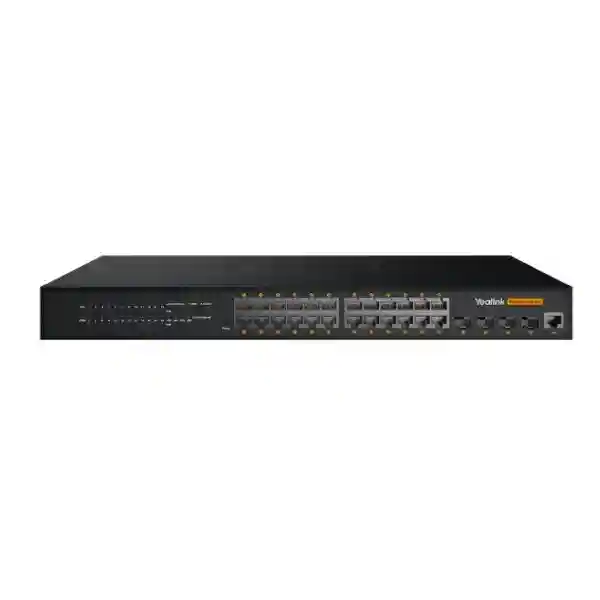
The Yealink RCH240 is a purpose-oriented 24-port L2+ managed switch for professional audio-video networks where ordinary office switching can create avoidable complexity around multicast traffic, endpoint power, media prioritization and room-system expansion. It provides twenty-four Gigabit PoE interfaces, four SFP uplinks and a 370W PoE/PoE+ budget in a managed platform designed around AV-over-IP workflows. Yealink identifies the platform for Yealink AV protocols and industry audio standards including Dante and AES67, while its multicast functions include IGMP Snooping and Fast Leave. This combination gives system designers a practical aggregation point for cameras, audio endpoints, controllers, encoders, decoders and other network-connected room equipment.
For an enterprise buyer, the value is not simply the number of Ethernet sockets. A collaboration room may contain endpoints with very different power demands and traffic behavior. Video streams can consume sustained bandwidth, network audio depends on consistent delivery, and multicast must be handled deliberately to prevent unnecessary traffic from reaching unrelated ports. The RCH240 brings these requirements into one managed switching layer, reducing dependence on improvised combinations of small switches and external power supplies.
In Uganda, the RCH240 can be specified for executive boardrooms, divisible conference facilities, command and monitoring spaces, lecture environments, training rooms and other installations where AV endpoints are concentrated around a managed network. Procurement should begin with an endpoint schedule, expected PoE load, copper run lengths, fiber-uplink requirements and the desired network segmentation. FourTeck can review these inputs before quotation so that the switch is assessed as part of the complete AV topology rather than as an isolated line item.
Instant Specifications & Procurement Fact Rail
Yealink RCH240
24 × Gigabit PoE
4 × SFP
370W PoE/PoE+
L2+ web managed
Quote on request
The fact rail should be read as a design starting point. Twenty-four access ports define physical endpoint capacity, while the 370W budget defines how much powered equipment can be supported collectively. These limits must be evaluated together. A design can have spare ports yet exhaust the available power budget, or have substantial power headroom while using every access interface. Yealink recommends retaining power headroom rather than designing continuously at the absolute PoE ceiling. Regional warranty terms, delivery lead time, included accessories and commercial availability should be confirmed on the issued quotation because they can vary with sourcing batch and project requirements.
Operational Product Architecture & Overview
Professional AV traffic behaves differently from ordinary intermittent desktop traffic. A meeting environment may simultaneously carry camera streams, encoded presentation content, control messages and time-sensitive audio. When multicast distribution is unmanaged, traffic intended for a subset of receivers can be forwarded more broadly than required. The RCH240 addresses this operational issue with managed multicast capabilities. IGMP Snooping allows the switching layer to learn where multicast groups are required, while Fast Leave can accelerate removal of a port from a multicast group when appropriate. Yealink documentation also describes IGMP querier configuration, unknown multicast discard and query interval controls for AVONE network deployment.
The access layer consists of 24 Gigabit PoE ports. This gives a designer a single chassis with enough copper density for substantial rooms or grouped AV systems. PoE is important because many professional room endpoints are deliberately designed to receive network connectivity and operating power through one structured cable. Consolidating power at the switch can reduce local adapters at ceilings, tables and equipment positions, simplify UPS planning, and make power allocation visible during design. The RCH240 has a maximum 370W PoE output capacity. Yealink’s own planning guidance recommends approximately 10 percent headroom, with 20 percent described as an optimal safety margin. That means a bill of materials should be calculated from rated endpoint loads before installation rather than from port count alone.
Four SFP uplinks extend the architecture beyond copper access. Fiber uplinks are valuable when the AV rack must connect to another network location over distance, when electrical isolation is desirable, or when structured backbone design already uses optical links. The correct SFP modules and fiber type should be confirmed against the building backbone and link distance. The switch’s web-based management layer adds VLAN, QoS, DHCP-related functions, access control and 802.1X authentication. These functions allow the AV network to be segmented and governed rather than treated as an unmanaged island.
Another important architectural consideration is Energy-Efficient Ethernet behavior. Yealink’s AV deployment guidance notes EEE is disabled by default for this use. In real-time AV networks, avoiding unnecessary link-state transitions can be part of maintaining predictable media behavior. The RCH240 therefore fits projects where integrators want AV-conscious defaults alongside conventional managed-switch controls.
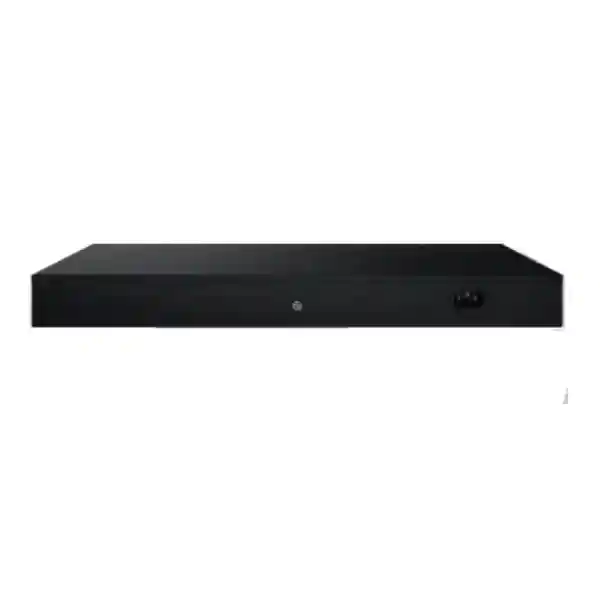
The chassis uses an integrated power supply and cooling fans, providing an appliance-style deployment model for equipment racks. The physical rack plan should still account for airflow, service clearance, cable bend radius, patch-panel placement and the thermal contribution of a heavily loaded PoE switch. When many powered endpoints are active, power conversion itself contributes heat. Good cabinet ventilation and clean cable organization are therefore part of reliable deployment.
Enterprise Business Outcomes & Value Analysis
1. Performance & Throughput Integrity
Gigabit access interfaces provide an appropriate foundation for current network-connected AV endpoints, while managed QoS and multicast handling help keep high-volume media traffic organized. The design objective is predictable delivery rather than merely raw link speed. Segmenting media classes and controlling multicast membership can reduce unnecessary contention across the AV access layer.
2. System Reliability
An integrated power supply, active cooling and a metal chassis suit fixed professional installations. Reliability also depends on system engineering: keep sensible PoE headroom, provide UPS-backed mains where uptime matters, maintain airflow, use certified cabling and document switch configuration so recovery does not depend on one technician’s memory.
3. Infrastructure Scalability
Twenty-four powered access ports permit growth beyond small-room topologies. Four SFP uplinks provide backbone options for distributed facilities. Buyers should reserve ports for future room endpoints and service access, while confirming that projected PoE consumption remains inside the available power envelope after expansion.
4. Security & Access Control
VLANs, access-control functions and 802.1X support allow the AV environment to participate in enterprise network policy. A dedicated AV VLAN can isolate media devices from general user traffic while still permitting approved management paths. Security policy should be coordinated between AV integrators and the customer’s network team before commissioning.
5. Centralized Management
Web-based management makes configuration visible and repeatable. Instead of troubleshooting an opaque unmanaged switch, administrators can inspect and configure network behavior. Yealink’s support guidance documents direct web-interface access and advises changing the initial login password during first configuration.
6. Total Cost of Ownership
A high-capacity PoE switch can reduce separate injectors, local power bricks and multiple small switching devices. The resulting rack may be easier to support and document. TCO should include suitable SFPs, patching, UPS capacity, cabinet cooling, installation labor and lifecycle support rather than comparing switch purchase price alone.
Key Hardware & Software Highlights
The RCH240’s hardware layout centers on twenty-four Gigabit powered access interfaces and four optical uplink positions. This density supports rooms with multiple cameras, ceiling microphones, speakers, controllers and AVoIP endpoints without immediately forcing a second access switch. The 370W PoE budget is particularly important for dense AV installations. Yealink lists representative endpoint loads such as 30W for UVC86 and SmartVision 80 cameras, 19.3W for CM50, 9W for CM20, 10W for CT200, 7.5W for EN300, 8.5W for DE300 and 13W for AVBridge. Actual project calculations should use the current rated figures for the exact device revision being supplied.
On the software side, the managed L2+ feature set brings together VLAN segmentation, QoS, multicast control, DHCP capabilities, access control and 802.1X. For an AV integrator, IGMP functions are especially significant because professional media distribution frequently relies on multicast. For the enterprise network team, VLAN and authentication controls are equally significant because they allow AV devices to be incorporated into a governed architecture. The result is a switch that bridges the priorities of AV engineering and IT operations.
Compatibility is another procurement advantage. Yealink positions the RCH240 for its AVONE ecosystem and lists compatibility across devices including UVC86, SmartVision 80, AVHub, MSpeaker II, MSpeaker Pro, AP08, AVBridge, CM50, CM20, CS10/CS10-D, CT200/CT300, EN300 and DE300. Compatibility lists can change with firmware and product generations, so a project BOM should be validated at quotation and again before commissioning if the deployment schedule is long.
Technical Specifications Ledger
| Product | Yealink RCH240 |
| Switching Class | L2+ web-based managed AV switch |
| Copper Access | 24 × Gigabit PoE ports |
| Optical Uplinks | 4 × SFP |
| PoE Capacity | 370W total PoE/PoE+ budget |
| AV Protocol Positioning | Yealink AV protocols, Dante and AES67 |
| Multicast | IGMP Snooping, Fast Leave; Yealink deployment guidance also documents IGMP querier and unknown multicast discard configuration |
| Management Functions | VLAN, QoS, DHCP functions, access control, 802.1X authentication |
| Construction | Metal chassis with built-in power supply and integrated cooling fans |
| Deployment Focus | Professional AV, conferencing, AV-over-IP and Yealink AVONE environments |
| Commercial Model | Business-to-business project procurement; price and availability by quotation |
Only confirmed headline specifications are presented as fixed values here. Items such as exact chassis dimensions, maximum electrical input, environmental limits, compliance marks, switching fabric figures, packet forwarding rate and included rack accessories should be checked against the current regional datasheet or supply documentation before they are inserted into a tender response. This avoids mixing values from similarly named switch generations or regional hardware revisions.
Configuration & Sizing Worksheet
Step 1 — Count endpoints by type
Create a schedule for every camera, microphone, speaker, controller, encoder, decoder, bridge and management connection. Do not simply count wall outlets. Identify which devices consume PoE and which use independent DC or AC power. Reserve practical spare capacity for commissioning and future additions.
Step 2 — Calculate PoE demand
Add the rated PoE requirement of each powered endpoint. Compare the total against 370W and preserve design margin. Yealink recommends 10 percent headroom and describes 20 percent as an optimal safety margin. A system calculated at 360W may fit numerically but leaves little allowance for planning uncertainty or endpoint changes.
Step 3 — Plan the backbone
Determine whether the four SFP interfaces will connect to a core switch, another AV zone or a remote equipment room. Specify fiber type, transceiver type and link distance. Check that the building’s optical distribution frame and patching are compatible with the selected modules.
Step 4 — Define segmentation and multicast policy
Agree VLAN IDs, IP addressing, DHCP responsibility, management access and multicast behavior before deployment. Decide whether the RCH240 or an upstream network device will perform relevant multicast-control roles. Align QoS policy with the wider enterprise network rather than configuring the AV rack in isolation.
Step 5 — Prepare the quote package
Provide the RCH240 quantity, endpoint BOM, expected PoE total, SFP requirements, rack location, UPS availability, delivery destination and any pre-configuration requirement. State whether the project is a new installation or an expansion of an existing Yealink environment. This information helps FourTeck identify accessory and compatibility dependencies early.
Deployment Scenarios & Industry Use Cases
Large Enterprise & Multi-Site Collaboration
A corporate headquarters may standardize several large rooms around common cameras, microphones, speakers and AVoIP endpoints. The RCH240 can serve as the local AV access layer in each major room or shared rack. VLAN templates and documented multicast settings can then be repeated across sites, while fiber uplinks connect AV zones to the broader campus network. Standardization reduces troubleshooting variation and makes spare planning easier.
Financial & Banking Environments
Banks and financial organizations often need reliable executive conferencing while maintaining strict network segmentation. The RCH240’s managed feature set allows AV equipment to be placed in controlled VLANs with defined access policy rather than sharing unrestricted office segments. 802.1X capability and access controls can support the organization’s network governance model where appropriately configured. Project teams should involve information-security stakeholders before deployment.
Educational & Campus Networks
Lecture halls, council chambers and hybrid-learning rooms can involve multiple cameras, distributed microphones, speakers and control devices. Twenty-four PoE access ports give designers room to consolidate many endpoints in one managed layer. SFP uplinks are useful where lecture buildings connect through campus fiber. The PoE budget should be checked carefully when multiple cameras and powered audio devices are installed.
Government & Structured Procurement
Government meeting facilities frequently require documented bills of materials, clear network boundaries and maintainable infrastructure. A managed switch enables settings to be documented as part of commissioning. Procurement documentation should identify the exact model, port requirements, expected PoE load, uplink modules, rack accessories, warranty route and required pre-shipment firmware state. Where additional compliance documentation is mandatory, request it during quotation rather than assuming generic certification statements apply to every supplied batch.
Three Technical Deep Dives
1. Packet Handling, Media Flow & AV Architecture
The practical challenge in an AV network is not only forwarding packets; it is forwarding the right traffic to the right destinations consistently. AVoIP systems can generate sustained media flows that differ from conventional bursty user traffic. Multicast is efficient because a source can feed multiple receivers without generating a separate stream for each one, but that efficiency depends on the network knowing which ports actually require the group. IGMP Snooping provides that intelligence at the switching layer. Fast Leave can help update forwarding promptly when receivers depart a group. VLAN segmentation can further limit the broadcast and multicast domain, while QoS policy helps preserve priority relationships among traffic classes. The RCH240 packages these controls in an AV-oriented managed switch rather than asking integrators to adapt an unmanaged access device to professional media behavior.
2. Management, Firmware Discipline & Operational Control
Yealink documents browser-based access to the RCH240 management interface. During first access, administrators should change default credentials immediately and record the final management address through the organization’s approved credential and configuration process. Production deployments should have a defined firmware policy: validate release compatibility with room-system components, back up or document important settings, schedule maintenance windows and avoid uncoordinated changes immediately before high-profile meetings. AV and IT teams should agree ownership of VLAN, multicast and authentication settings. A technically capable switch still requires disciplined operational control to deliver a stable service over its lifecycle.
3. Availability, Power Resilience & Recovery
High availability begins outside the switch. The RCH240 has an integrated power supply, so projects that require resilience should consider an appropriately sized UPS and facility power strategy. PoE makes the switch a power concentration point: if it loses power, many attached AV endpoints may also go offline. That makes UPS runtime, rack ventilation and electrical loading more consequential than with a lightly loaded data switch. Configuration documentation is equally important for recovery. Record VLAN assignments, uplink details, multicast settings, management addressing, authentication policy and endpoint-port mapping. Keep an approved configuration baseline and a current network diagram. Where room availability is mission-critical, consider the operational plan for spare hardware and replacement rather than relying only on theoretical network redundancy.
Pre-Purchase Buyer Gap Checklist
Are licenses required for basic switching? Confirm the current commercial package and any ecosystem-specific software requirements on the project quotation. Do not assume subscription terms from unrelated Yealink products apply to the switch.
Will 24 ports be enough? Count all powered and non-powered copper endpoints, commissioning connections and planned additions. A 24-port switch should not be specified merely because today’s diagram shows 22 devices if the room is likely to expand.
Will 370W be enough? Build a rated-power worksheet. Port count and PoE budget are separate constraints. Maintain the headroom recommended in Yealink’s planning guidance.
Which SFPs should be ordered? Match the building fiber, connector format, wavelength, link distance and upstream switch requirements. Treat transceivers as designed components, not generic accessories.
Can it coexist with third-party AV equipment? The switch supports industry AV standards such as Dante and AES67, but complete system interoperability depends on endpoint implementation, network design and firmware. Validate critical third-party devices before deployment.
How should it be mounted and cooled? Plan the equipment rack around service access, airflow and cable management. A heavily utilized PoE switch contributes thermal load. Avoid congested cabinets with blocked fan paths.
What happens during a switch failure? Document configuration and port mapping, define the replacement path and consider project-critical spares. Because PoE endpoints depend on the switch for both data and power, replacement planning affects the entire room.
Is it suitable for an existing enterprise LAN? Usually this is a design question rather than a simple yes/no question. Review VLANs, addressing, multicast boundaries, QoS, 802.1X policy and uplink topology with the network administrator before connecting the AV segment to production infrastructure.
Uganda Procurement & Delivery Logistics
FourTeck Uganda can quote the Yealink RCH240 as an individual switch or as part of a wider professional AV bill of materials. For the fastest technical validation, submit the intended room type, endpoint quantities, expected PoE demand, uplink requirement and delivery location. Projects involving multiple cameras, ceiling audio or AV-over-IP encoders should include a topology or endpoint schedule where possible. This allows commercial preparation and engineering review to happen against the same scope.
Order processing may include confirmation of model, sourcing status, accessories, warranty route and logistics. Delivery time varies with quantity, project timing and current supply position, so it should be confirmed on the formal quotation rather than inferred from a generic product listing. For scheduled installations, allow time for receipt inspection, firmware validation, rack preparation and pre-configuration before the commissioning date.
Pre-configuration can include management addressing, agreed VLAN preparation and other settings where sufficient project information is provided. Final integration remains dependent on the customer’s network architecture and AV endpoint configuration. For sensitive enterprise or public-sector projects, provide network policy requirements early so that staging work does not conflict with site security standards.
Uganda Coverage Matrix
FourTeck can support project enquiries originating from Kampala, Entebbe, Jinja, Mbarara and Gulu, as well as other locations in Uganda subject to logistics planning. Kampala projects commonly involve headquarters boardrooms, hotels, training centers and institutional campuses. Entebbe requirements can include hospitality, aviation-adjacent offices and conference facilities. Jinja, Mbarara and Gulu deployments may involve branch offices, education, healthcare, government facilities and regional enterprises. For locations outside the main commercial hubs, provide the final delivery point, site contact requirements and installation schedule when requesting the quotation. This allows transport and project timing to be considered together rather than after equipment has been sourced.
Cross-Border & Regional Supply
Organizations operating across East Africa and the Gulf can coordinate related procurement through FourTeck regional channels. Visit FourTeck Uganda, FourTeck Kenya, FourTeck Africa, FourTeck UAE or FourTeck Kuwait according to the receiving market. Cross-border projects should align exact model revisions, accessories and firmware expectations so room standards remain consistent. Freight, import processing, taxes, warranty routing and delivery terms can differ by destination and should therefore be documented on each regional quotation.
Related Yealink Infrastructure & AV Components
The RCH240 is normally purchased as part of a system rather than as an isolated network component. Buyers planning large meeting rooms can review the Yealink AVHub range for centralized audio-video processing, Yealink UVC86 cameras for multi-camera room designs, and Yealink SmartVision solutions for intelligent room capture. Network-audio projects can also be scoped with Yealink CM50 microphones, Yealink CS10 speakers, and AVoIP endpoint requirements such as Yealink EN300 and Yealink DE300. A complete quote should also consider suitable SFP transceivers, patch cords, rack accessories and UPS capacity.
FourTeck Technical Service Capabilities
FourTeck’s project role can extend beyond supplying a boxed switch. Engineering validation starts with checking whether the proposed RCH240 has sufficient port density and PoE budget for the endpoint list. Bill-of-materials verification can identify missing optical modules, patching or power dependencies before an order is finalized. For structured deployments, staging can be used to confirm hardware identity, inspect the unit, prepare approved baseline settings and align firmware state with the planned Yealink ecosystem.
Pre-shipment firmware work should follow the project’s compatibility requirements rather than automatically applying changes without context. Some environments need a specific validated software baseline. Post-sales support can assist with product-level troubleshooting and warranty coordination, while final network operation remains a shared responsibility between AV integration and the customer’s IT team. Clear documentation of port mapping, IP addressing, VLANs, multicast roles and connected endpoints significantly improves support efficiency after handover.
Extended Technical FAQ
Is the Yealink RCH240 designed specifically for AV-over-IP?
Yes. Yealink describes the RCH240 as a 24-port L2+ web-based managed AV switch optimized for high-performance AV-over-IP environments. Its feature set includes multicast controls important to professional media networks, and Yealink positions it for its own AV protocols as well as Dante and AES67. That does not remove the need for network design: integrators still need to calculate bandwidth and PoE demand, segment traffic appropriately and configure multicast behavior for the actual topology. Its advantage is that the hardware and management feature set are aligned with those requirements from the outset.
How many PoE devices can the RCH240 power?
There is no single endpoint count based solely on the 24 physical ports because connected devices have different power requirements. The RCH240 provides up to 370W of total PoE/PoE+ capacity. A deployment using low-power endpoints may approach the available port count, while a design dominated by higher-power cameras and audio devices may reach the power budget first. Add the rated load of every powered endpoint and retain design margin. Yealink recommends approximately 10 percent power headroom and describes 20 percent as an optimal safety margin.
Does the RCH240 support Dante and AES67?
Yealink lists Dante and AES67 among the standards for which the RCH240 is optimized. These are important in professional networked-audio environments, where multicast management and predictable switching behavior matter. However, stating that a switch supports an AV networking standard is not the same as guaranteeing every third-party device combination. Endpoint firmware, clocking architecture, VLAN design, QoS and multicast configuration still need to be engineered. For mixed-vendor rooms, provide the complete endpoint list during design review so compatibility and network requirements can be checked before procurement.
What multicast functions are available?
The product information highlights IGMP Snooping and Fast Leave, and Yealink’s AVONE deployment guidance for the RCH240 discusses IGMP querier settings, query interval and unknown multicast discard. These controls help a professional AV network direct multicast streams only where required rather than flooding traffic unnecessarily. The correct configuration depends on where multicast control is performed in the wider topology. If the RCH240 connects to an enterprise core, the AV integrator and network administrator should agree which device acts in each multicast role and how VLAN boundaries are defined.
Can the RCH240 connect to a fiber backbone?
Yes. It provides four SFP uplink interfaces, giving designers options for optical connectivity to upstream switching or remote AV network zones. The SFP slot alone does not determine the finished optical link. Procurement must also specify compatible transceivers, fiber mode, wavelength, connector and distance. Check compatibility with the upstream switch and the building’s existing optical distribution. For campus projects, document both ends of each fiber link in the bill of materials to avoid arriving on site with mismatched modules or patch leads.
Does the RCH240 require a subscription?
Basic product procurement should be distinguished from software or ecosystem services that may apply elsewhere in a collaboration solution. Confirm the current commercial package, firmware access terms and any service requirements on the formal project quotation. Avoid assuming that licensing from another Yealink product family applies to this switch. If the RCH240 will form part of a larger AVONE or managed collaboration environment, provide that architecture when requesting a quote so any associated software, platform or support requirements can be identified explicitly rather than discovered during commissioning.
How should the switch be prepared for secure deployment?
Begin by changing default management credentials during initial configuration, as Yealink’s support guidance instructs. Place management access within the customer’s approved network design, document the management IP, apply VLAN and access policy, and coordinate 802.1X use with the network team where required. Firmware changes should follow a controlled maintenance process. Physical security also matters: install the switch in an appropriate rack or secure technical space, protect mains power, maintain airflow and document cabling. Security is strongest when the AV switch is treated as managed enterprise infrastructure rather than an appliance hidden behind a display.
What happens if the switch loses power?
Because the RCH240 can power many connected AV devices, a switch power interruption can remove both network connectivity and operating power from those endpoints simultaneously. Critical rooms should therefore include the switch in UPS and electrical resilience planning. Size the UPS for the switch’s real deployment load and required runtime rather than using an arbitrary desktop UPS. Also document recovery procedures and switch configuration. Where meeting continuity is business-critical, consider spare-hardware strategy and replacement lead time as part of the service design.
Can FourTeck help size the RCH240 for a project?
Yes. The most useful inputs are the room type, number of rooms, endpoint list, quantity of each PoE device, expected uplink topology, fiber requirements, rack location and delivery destination. From this information, the project can be reviewed for port count, PoE capacity and obvious accessory dependencies. For multi-room installations, include future expansion assumptions. FourTeck can then prepare a quotation aligned with the intended architecture and identify items that require confirmation before order placement, such as transceiver selection, warranty terms or project-specific pre-configuration.
Is the RCH240 appropriate for a standard office data network?
The RCH240 is primarily positioned as a managed professional AV switch, so its strongest fit is where AV traffic, multicast behavior and powered media endpoints drive the design. It has conventional managed-network functions such as VLANs, QoS, access control and 802.1X, but buyers should choose switching platforms according to the workload they are intended to serve. For a mixed environment, it can be connected into enterprise infrastructure while keeping AV devices in appropriate segments. The network team should review routing, addressing, multicast boundaries, security policy and uplink capacity before production connection.
Procure the Yealink RCH240 for Your Uganda AV Project
For an accurate RCH240 quotation, send FourTeck your endpoint schedule, required switch quantity, planned PoE devices, SFP or fiber requirements and delivery location. A project-level review helps verify that the 24-port layout and 370W PoE budget match the room design and gives procurement teams a clearer picture of accessories, staging and logistics before purchase. Whether the requirement is a Kampala boardroom, a campus lecture facility, a regional branch or a standardized multi-site collaboration rollout, the objective is to supply the switch as part of a technically coherent AV network.



Reviews
There are no reviews yet.