Yealink UH34 Lite USB Headset – Professional Wired Business Communications
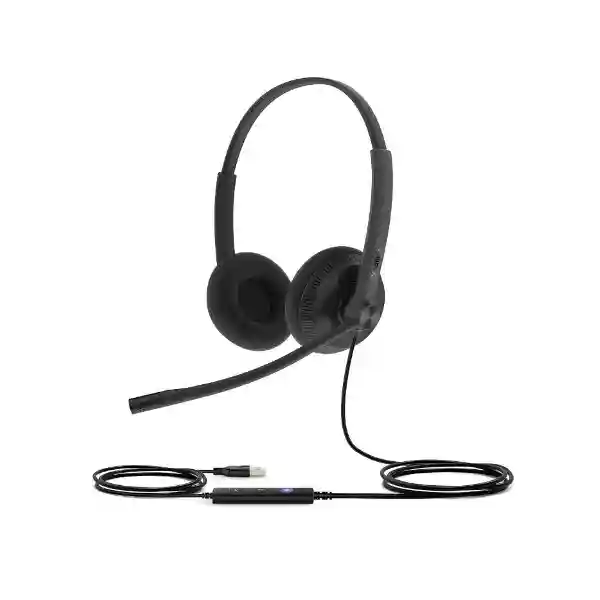
The Yealink UH34 Lite is a professional wired USB headset built for organizations that want predictable voice communications, simple endpoint deployment and comfortable daily use. It is available in monaural and binaural forms, uses soft foamy ear cushions, and connects by USB for plug-and-play operation with computers and supported Yealink desk phones. For procurement teams, the practical value is straightforward: there is no headset battery fleet to charge, no radio pairing workflow to maintain, and no need to introduce a wireless layer simply to equip fixed desks, contact-center positions or shared workstations.
The product family addresses several routine business problems at once. Users need intelligible speech in busy offices; supervisors need equipment that can be issued consistently; IT teams need a manageable endpoint; and buyers need clarity about connector, wearing style and collaboration-platform variant before placing a volume order. Yealink specifies a single microphone, professional 28 mm speakers, in-line call controls, passive acoustic isolation and hearing-protection capabilities. The UH34 Lite family can also be administered through Yealink USB Connect and Yealink Management Cloud Service, helping administrators inspect device information and manage firmware where supported.
FourTeck supplies the Yealink UH34 Lite for business requirements in Uganda with pre-sales guidance focused on choosing the correct variant. Because Mono, Dual, UC and Teams versions exist, the final part number should be matched to the user’s endpoint and collaboration environment rather than assumed from the family name alone. This prevents a common procurement error: ordering a large quantity before validating the exact connector and call-control behavior required by the deployed platform.
Instant Specifications & Procurement Fact Rail
Yealink UH34 Lite
Office, call center, shared desk and hybrid work
USB-A or USB-C depending on ordered variant
On-ear; Mono or Dual
USB powered; no headset battery
Business quotation on request
The UH34 Lite should be purchased by exact variant rather than family name alone. Yealink lists UH34 Lite Dual Teams, Dual UC, Mono Teams and Mono UC part-number variants, while current product information also identifies USB-A or USB-C connectivity within the family. The Mono format is useful where the user must remain aware of colleagues or surrounding activity; Dual is generally better suited to concentrated calling where both ears should receive program audio. The Lite designation specifically uses foamy ear cushions, differentiating it from UH34 editions using leather-style cushions. For a reliable quotation, state quantity, Mono or Dual preference, endpoint model, collaboration application, USB connector requirement and delivery destination.
Operational Product Architecture & Overview
Unlike a network appliance, the architecture of a professional USB headset is centered on the acoustic chain, digital interface, physical control path and endpoint software relationship. The UH34 Lite takes voice from a directional microphone mounted on an adjustable boom, converts and processes the signal through its integrated electronics, and presents the device to a compatible host through USB. On receive audio, the host sends digital audio through the USB connection to the headset, where the signal is reproduced by 28 mm speakers. This wired topology removes radio range, pairing state and battery endurance from the normal operating equation.
For a contact-center manager, that architecture translates into repeatability. An agent can arrive at a provisioned workstation, connect the headset and begin using the configured soft client without waiting for a wireless device to recharge. For IT, wired connectivity makes troubleshooting more deterministic: the support path can start with the physical USB port, operating-system recognition, application audio selection, call-control integration and firmware state. For procurement, it also simplifies lifecycle planning because there is no rechargeable cell whose capacity will gradually become a fleet-wide maintenance consideration.
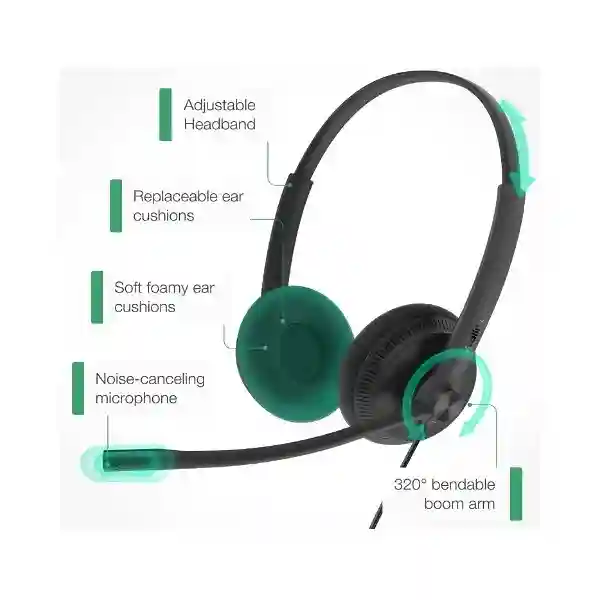
The acoustic design is equally important. Yealink positions the UH34 Lite for daily office and call-center use and specifies a single microphone, passive noise reduction and wideband-oriented voice performance. The boom can be positioned close to the mouth so speech is captured consistently. In practical deployment, microphone positioning matters: a well-positioned boom helps reduce the level difference between quiet and loud speakers and avoids forcing agents to raise their voices. The on-ear structure is deliberately lightweight, with listed weights of approximately 84 g for UH34 Lite Mono and 110 g for UH34 Lite Dual. That difference can become meaningful across long shifts.
The in-line controller creates a physical operating layer between user and application. Core actions such as answering, ending or rejecting calls, changing volume and muting can be handled without relying exclusively on an on-screen control. Exact behavior can vary with host application and endpoint integration, so enterprise rollouts should validate the intended workflow on a representative workstation before mass deployment. Yealink also provides USB Connect software and a management cloud service for device information and firmware management, which is useful where headsets are treated as managed business endpoints rather than disposable accessories.
Enterprise Business Outcomes & Value Analysis
A dedicated boom microphone and wired digital connection help create a consistent speech path for users whose work depends on frequent calls. The 28 mm speaker system supports both voice and general audio, allowing one endpoint to serve calling, meetings and routine media playback.
USB operation avoids battery depletion and wireless pairing issues. For fixed-seat teams, that can reduce preventable interruptions and simplify first-line troubleshooting.
Mono and Dual choices let an organization standardize on one headset family while matching different roles. USB Connect and centralized management capabilities can support a more controlled endpoint lifecycle.
Yealink documents hearing-protection functions within the UH34 family. This is relevant for organizations where staff spend substantial portions of the day receiving audio through a headset.
A wired endpoint can be inventoried, issued and replaced without maintaining charging stations or wireless credentials. Administrators can also use Yealink management tools for supported firmware workflows.
The design focuses spending on core calling functionality rather than wireless radios and batteries. The most useful cost comparison is therefore lifecycle cost per seat, including replacement cushions, support effort and expected user tenure.
These outcomes are especially relevant when hundreds of users need the same basic communication tool. A premium wireless headset can be appropriate for mobile executives and roaming supervisors, but fixed agents often gain little from paying for mobility they do not use. Conversely, choosing solely on initial unit price can create hidden cost if users reject uncomfortable equipment or if a headset does not integrate correctly with the chosen soft client. A pilot group should therefore include typical users, heavy callers and IT support staff so comfort, audio behavior and management requirements are tested before the purchase quantity is finalized.
Key Hardware & Software Highlights
| Component | Design | Operational outcome |
|---|---|---|
| Microphone | Single directional microphone on adjustable boom | Positions voice capture near the speaker for business calls. |
| Speakers | 28 mm drivers | Supports call audio and general listening. |
| Ear cushions | Soft foam on UH34 Lite | Designed for lightweight daily wear. |
| Controller | In-line call controls with indicators | Fast access to common call and audio functions. |
| USB interface | USB-A or USB-C by variant | Wired plug-and-play deployment without charging. |
| Management | Yealink USB Connect / Management Cloud Service | Device information and supported firmware administration. |
The strongest feature of the UH34 Lite is not a single specification but the way these components fit a fixed-seat communications workflow. The headset is light enough for prolonged wear, the boom microphone keeps voice capture close to the mouth, the controller gives the user tactile access to frequent actions, and the USB interface makes the endpoint easy to deploy. For organizations already using supported Yealink phones, direct USB compatibility can further simplify the desk environment, although phone firmware and model compatibility should be confirmed during planning.
Technical Specifications Ledger
| Specification | UH34 Lite family detail |
|---|---|
| Type | Professional wired USB on-ear headset |
| Variants | Mono and Dual; UC and Teams-oriented part numbers |
| Connection | USB-A or USB-C depending on variant |
| Headset-to-controller cable | 1.2 m |
| Controller-to-USB cable | 0.9 m |
| UH34 Lite Mono weight | Approx. 84 g |
| UH34 Lite Dual weight | Approx. 110 g |
| Microphone quantity | 1 |
| Microphone type | Directional ECM in published technical data |
| Microphone frequency response | 100 Hz–10 kHz in current technical listing |
| Speaker size | 28 mm |
| Speaker frequency response | 20 Hz–20 kHz |
| Speaker impedance | 32 ohms at 1 kHz in published technical data |
| Operating temperature | -10 °C to +50 °C |
| Storage temperature | -30 °C to +70 °C |
| Management | Yealink USB Connect and Yealink Management Cloud Service |
| Package | Headset and Quick Start Guide |
Specifications can change by revision and exact part number, so the commercial quotation should identify the ordered variant explicitly. This is particularly important for connector type and platform-oriented edition. Older datasheets may also show different microphone figures from current technical pages. For enterprise procurement, the current manufacturer specification attached to the quoted part number should take precedence over generalized family data.
Configuration & Sizing Worksheet
Step 1 – Count users by role, not only headcount
Separate full-time agents, occasional callers, reception staff, supervisors, hot-desk users and remote workers. A user who spends six hours per day on calls has different comfort and acoustic priorities from someone who joins two meetings per week. Also identify whether spare units are needed for rapid replacement. Contact centers commonly benefit from keeping a controlled spare pool rather than waiting for individual replacement procurement.
Step 2 – Choose Mono or Dual
Mono leaves one ear open to the surrounding workplace and can suit reception, service desks and roles that combine telephone work with face-to-face communication. Dual supplies audio to both ears and is often preferable for concentrated calling or virtual meetings. This is a workflow choice rather than a simple hierarchy of better and worse.
Step 3 – Validate the host interface
Record whether the headset will connect to Windows or Mac computers, thin clients, docking stations, USB hubs or compatible Yealink IP phones. Identify the available physical connector and whether USB-A or USB-C is required. Where adapters are proposed, validate them in the pilot rather than assuming every adapter will preserve call controls and device recognition.
Step 4 – Confirm application behavior
List the primary collaboration or contact-center application and verify microphone, speaker, mute, volume and call-control behavior. If the organization uses several applications, test the common combinations. The presence of Teams and UC variants makes this step especially important when consistent user controls are required.
Step 5 – Plan management and lifecycle
Decide whether firmware will be managed individually or centrally, who owns endpoint support, how damaged units are exchanged and whether replacement cushions should be stocked. Yealink USB Connect and the management cloud platform can form part of the administration approach for supported deployments.
Quote preparation checklist
Provide quantity, Mono/Dual preference, UC/Teams requirement, USB connector, computer or phone model, application, deployment city, desired delivery window and any staging requirement. For multi-site projects, provide quantities by site. FourTeck can then align the quoted part number and logistics plan to the actual deployment rather than quoting a generic family description.
Deployment Scenarios & Industry Use Cases

Large enterprise and multi-site operations
A multi-site business can use the UH34 Lite as a standardized wired endpoint for staff who work primarily from fixed desks. Standardization reduces the number of headset families support teams must understand and can simplify spare allocation. Headquarters, branches and remote offices can use the same basic operating model while selecting Mono or Dual variants by role. Before rollout, IT should create a tested baseline covering operating-system recognition, soft-client selection, firmware, call controls and replacement procedure.
Financial institutions and service centers
Banks, insurance operations and payment-service teams often run structured desks where reliable voice access is more important than roaming range. Wired headsets remove the need to manage charging cycles and can reduce the chance that an agent begins a shift with an unusable battery. Dual variants can support focused call handling, while Mono may fit customer-facing desks where staff must hear colleagues and visitors.
Education and campus networks
Universities, training centers and school administration teams can deploy USB headsets for admissions, help desks, remote teaching support and administrative meetings. The product’s plug-and-play nature is useful in environments where devices may move between desks, but shared use should be paired with a clear hygiene policy and replaceable consumables where appropriate.
Government and structured procurement
Public-sector projects usually require precise bills of materials, repeatable specifications and documented acceptance. The UH34 Lite family can be quoted by exact manufacturer part number after connector, wearing style and collaboration variant are confirmed. Procurement documents should avoid specifying only “UH34 Lite” if the tender expects a single exact configuration, because multiple variants exist under that family designation.
Technical Deep Dive 1: Audio Processing & Acoustic Architecture
A business headset is the final acoustic interface in a communications chain that may include a computer, desk phone, soft client, codec, LAN, WAN and remote endpoint. Even when the network is performing correctly, poor microphone positioning or unsuitable local acoustics can degrade the user experience. The UH34 Lite addresses the endpoint side with a close-positioned directional microphone, on-ear speakers and a physical boom that can be adjusted for the individual user. The 28 mm speaker architecture covers a broad published frequency range, enabling the headset to serve both speech and general audio.
Passive isolation is created primarily through the physical relationship between ear cushion and ear rather than through battery-powered active cancellation. That is appropriate for a lightweight wired product whose value proposition is simplicity. In a moderately busy office, Dual wearing can help the user focus on the call by delivering audio to both ears; in environments requiring situational awareness, Mono may be more appropriate. Buyers should not treat these variants as acoustically interchangeable when user concentration is a major objective.
The microphone boom should be included in user onboarding. A headset can meet its published specifications and still perform poorly if the microphone sits too far from the mouth, points away from the speaker or rubs against clothing. A short training note covering boom placement, mute state and application audio selection often prevents a disproportionate number of support tickets.
Technical Deep Dive 2: Software Ecosystem, Firmware & Operational Control
USB peripherals increasingly form part of the managed endpoint estate. Yealink supports the UH34 Lite with USB Connect and its management cloud service, giving administrators mechanisms to view device information and manage firmware for supported devices. In a small office, this may be used occasionally by a technician. In a large call center, the same capability can become part of change control: firmware can be validated with a pilot group before wider deployment, reducing the risk of introducing unexpected application behavior across hundreds of seats.
The host application remains important. Physical call-control functions depend on the interaction between headset, operating system, application and integration layer. Therefore, acceptance testing should include actual production software rather than only checking whether sound can be heard. Test incoming and outgoing calls, mute synchronization, volume adjustment, call answer/end behavior, device switching after reboot, and recovery after unplugging and reconnecting the headset.
Firmware governance should be proportionate to scale. A small team may simply keep devices current during routine support. A regulated or high-volume operation may prefer a defined approved version, staged testing and a maintenance window. The point is not to make a headset deployment unnecessarily complex; it is to recognize that a communication peripheral can affect the user’s ability to serve customers, so change should be controlled where business impact is high.
Technical Deep Dive 3: Availability, Redundancy & Continuity
A wired headset does not provide network high availability in the infrastructure sense, but it can contribute to service continuity by removing two local failure dependencies: battery charge and wireless pairing. For a fixed contact-center seat, those are meaningful operational advantages. If a unit fails, replacement can be simple when a compatible spare is available and the workstation already has the correct application configuration.
Continuity planning should therefore focus on spare ratio, cable damage, USB-port availability and replacement logistics. Organizations with critical voice operations should maintain a small pool of pre-approved spare units at each major site. Shared spares should be stored cleanly, labelled by variant and periodically inspected. If the deployment contains both USB-A and USB-C devices, the spare inventory must reflect that split or include validated adapters.
For disaster-recovery or temporary workplaces, a wired USB headset can be particularly convenient because users can move to a compatible computer without relocating charging bases. The organization should still test the recovery image or alternate workstation to ensure the headset is recognized and the communications application selects the correct microphone and speaker automatically.
Pre-Purchase Buyer Gap Checklist
Which exact version am I buying? Confirm Mono or Dual, UC or Teams orientation and USB connector. The family name alone is insufficient for a controlled enterprise bill of materials.
Are there recurring licenses? The headset’s basic USB audio operation is hardware-based. If an organization plans to use broader cloud management or platform services, licensing and account requirements for those services should be confirmed separately as part of the project.
Will it work with my desk phone? Yealink publishes compatibility for many of its USB-capable IP phones, but supported firmware level matters. Provide the exact phone model and current firmware so compatibility can be validated before volume ordering.
Will call buttons work in my application? Do not infer full call-control integration from basic USB audio recognition. Pilot the actual soft client and verify answer, end, mute, volume and device-selection behavior.
Is Dual always better? No. Dual can improve concentration, while Mono preserves awareness of nearby colleagues and visitors. The correct choice depends on role and workspace.
What physical space is required? There is no base station, but cable routing matters. Yealink lists 1.2 m from headset to controller and 0.9 m from controller to USB plug. Check sit/stand desks, under-desk PCs and docking stations so cable length is practical.
What happens when cushions wear? Treat ear cushions as consumable contact surfaces and include hygiene and replacement practices in the operating plan, especially for shared desks.
How should a large order be accepted? Use a pilot batch first, then define an acceptance checklist for model/part number, connector, audio input/output, controls, physical condition and packaging. This is more reliable than discovering a variant mismatch after all sites receive stock.
Uganda Procurement & Delivery Logistics
For Uganda projects, a useful procurement process begins with variant confirmation. Send FourTeck the quantity, user role, preferred wearing style, endpoint model, USB connector and collaboration platform. The commercial team can use that information to prepare the appropriate quotation and confirm availability at the time of request. Where an order covers multiple offices, quantities can be split by destination so packing and dispatch are easier to reconcile.
Order processing should preserve the manufacturer part number on the quotation, purchase order, packing list and receiving record. This is particularly valuable for the UH34 Lite because multiple family variants exist. For larger rollouts, request a small validation quantity before the main shipment if the environment has not already been tested. The validation group should include a typical office user, a high-volume caller and an IT administrator.
Delivery timing depends on confirmed stock position, ordered quantity and project logistics, so timelines should be established on the formal quotation rather than assumed from a generic web listing. Technical pre-configuration can focus on compatibility verification, firmware planning and rollout documentation. Because the headset is a USB peripheral, most user-side deployment remains simple, but standardized instructions for connecting, selecting the correct audio device and positioning the microphone can improve first-day adoption.
Uganda Local Coverage Matrix
Kampala: suitable for headquarters, contact centers, financial institutions, service providers and large corporate rollouts. Entebbe: appropriate for hospitality, logistics, aviation-related offices and distributed corporate teams. Jinja: supports industrial, education and regional office requirements. Mbarara: serves western-region businesses, healthcare administration, campuses and branch networks. Gulu: supports northern-region institutional, NGO, education and enterprise deployments.
For multi-city projects, submit a site-by-site quantity schedule with contact details for receiving teams. This enables clearer quotation and logistics planning and helps procurement teams distinguish the total bill of materials from the distribution plan. Where the same organization operates different workstation standards by branch, include the USB connector and endpoint model for each location so variants are not mixed unintentionally.
Cross-Border & Regional Supply Chains
Organizations operating beyond Uganda can coordinate related requirements through FourTeck regional sites. Visit FourTeck Uganda for local requirements, FourTeck Kenya for Kenya projects, FourTeck Africa for broader African enterprise sourcing, FourTeck UAE for UAE requirements and FourTeck Kuwait for Kuwait projects.
Cross-border procurement benefits from keeping the exact part number consistent across all regional purchase documents. If local workstation standards differ, document those differences explicitly rather than substituting variants informally. Delivery lead time, import handling, taxes and warranty routing can differ by destination and should be confirmed on each regional quotation. A shared technical standard combined with destination-specific commercial documentation can simplify multinational deployments while respecting local supply requirements.
Related Yealink Solutions & Internal Navigation
The UH34 Lite often sits within a broader communications project rather than being purchased in isolation. Explore Yealink solutions in Uganda for endpoint planning. Teams replacing complete desk environments may also evaluate Yealink IP phones, while users who need freedom to move away from the desk can compare Yealink wireless headsets. For meeting spaces, browse Yealink conferencing solutions.
Within wired headset projects, buyers should compare requirements rather than assuming a single model suits every role. A contact-center agent may prioritize low weight and a wired connection; an executive may need wireless mobility; a reception user may prefer Mono for environmental awareness. Keeping those user profiles in one bill-of-materials exercise makes it easier to standardize where practical while preserving exceptions that have a genuine operational reason.
FourTeck Technical Service Capabilities
FourTeck can support enterprise headset procurement with engineering validation before purchase. This includes checking the requested Yealink family against the workstation or phone environment, reviewing connector requirements and helping the buyer distinguish Mono, Dual, UC and Teams-oriented variants. For larger orders, bill-of-materials verification helps ensure the commercial document identifies the correct part numbers and quantities rather than relying on an ambiguous family label.
Staging can include representative compatibility checks and firmware planning where required. A pre-shipment validation approach is particularly useful when the customer has a standardized desktop image, contact-center application or supported Yealink phone fleet. The objective is to identify mismatches while the project is still easy to adjust. Post-sales support can then use the same baseline to troubleshoot device recognition, audio selection, call controls and firmware-related questions.
For distributed rollouts, FourTeck can also help structure delivery information by site and provide practical deployment guidance for receiving teams. The most effective support model begins with accurate environment details, so customers should provide endpoint models, operating systems, collaboration applications and connector standards during quotation rather than after shipment.
Extended Technical FAQ
1. Is the Yealink UH34 Lite a wireless headset?
No. The UH34 Lite is a wired USB headset. That distinction is central to its operating model: it receives power and audio through its USB connection and does not depend on a headset battery or wireless pairing process. For fixed office and contact-center seats, this can be an advantage because users do not need to monitor charge level. If users need to walk away from the workstation while remaining on calls, a wireless Yealink headset family may be more appropriate. Procurement should therefore classify users by mobility requirement before choosing between wired and wireless designs.
2. What is the difference between UH34 and UH34 Lite?
A key physical distinction documented by Yealink is the ear-cushion material. UH34 Lite uses foamy ear cushions, while the UH34 is associated with leather-style cushions in manufacturer material. Both sit within the same professional USB wired headset family and share the overall concept of lightweight business calling, in-line control and USB connectivity. When ordering, do not substitute one designation for the other without confirming the user’s comfort preference and the exact quoted part number. For a fleet purchase, consistency in cushion type can also simplify spare-parts and hygiene planning.
3. Should we choose Mono or Dual?
Choose based on the user’s work environment. Mono delivers call audio to one ear while leaving the other open, which can suit receptionists, service counters and staff who must communicate with nearby colleagues while wearing the headset. Dual delivers audio to both ears and can help users concentrate during frequent calls or virtual meetings. Neither is universally superior. A practical pilot should include both styles if the organization has mixed roles. Yealink lists UH34 Lite Mono at roughly 84 g and Dual at roughly 110 g, so weight is another consideration for long-shift users.
4. Does the UH34 Lite work with Yealink IP phones?
Yealink publishes USB headset compatibility for numerous Yealink IP phone models, including multiple T4, T5 and newer series devices, but required firmware levels vary by phone generation. The correct procurement approach is to provide the exact phone model and firmware level and verify it against the current compatibility guidance. Basic USB connector fit should not be treated as proof of complete functional compatibility. In particular, test call control, mute, volume and audio routing on the actual phone model before approving a large rollout.
5. Does it require software or a paid license to make calls?
The headset functions as a USB audio endpoint and its basic operation does not depend on a rechargeable battery or a separate headset subscription. Calls themselves still depend on the computer, desk phone, communications application and service used by the organization. Yealink provides USB Connect and management cloud capabilities for device administration. If your project plans to use a particular cloud-management feature, collaboration platform or enterprise calling service, confirm any account or licensing requirements for those separate services during solution design rather than attributing them to the headset hardware.
6. Is the headset suitable for call centers?
Yes, call centers are one of the scenarios identified by Yealink for the UH34/UH34 Lite family. The wired design, low weight, boom microphone, in-line controls and absence of charging requirements fit fixed agent positions well. Suitability still depends on the specific environment: very noisy operations may require a different acoustic strategy, and application call-control integration should be tested. For high-volume deployments, pilot the headset with real agents across complete shifts and collect feedback on comfort, microphone positioning, audio level, controls and cable routing before issuing the final purchase order.
7. What happens if a headset fails during operations?
For critical teams, the fastest recovery method is usually a locally held compatible spare. Because the UH34 Lite is wired and USB connected, replacement can be straightforward: disconnect the failed unit, connect the approved spare, confirm the application selects the correct microphone and speaker, and test call controls. The failed unit can then follow the organization’s warranty or replacement process without keeping the user offline. Large deployments should label spare stock by exact variant, especially where Mono/Dual, UC/Teams and USB-A/USB-C configurations coexist.
8. Can IT manage firmware centrally?
Yealink states that the UH34/UH34 Lite works with Yealink USB Connect and Yealink Device Management Platform or Cloud Service for device information and firmware management. The exact management workflow should be evaluated against the organization’s scale and IT policy. Before a broad firmware change, test the proposed version with representative operating systems and communications applications. That staged approach helps ensure microphone, speaker and call-control behavior remain consistent. Smaller teams may use simpler per-device maintenance, while larger estates can benefit from a more formalized device-management process.
9. What should be included in a Uganda quotation request?
Include the total quantity, required delivery location, Mono or Dual preference, UC or Teams requirement, USB-A or USB-C preference, workstation or Yealink phone model and primary calling application. For multi-site projects, split quantities by Kampala, Entebbe, Jinja, Mbarara, Gulu or other destination. Also state whether a pilot quantity is required before the main order. Providing these details at the start allows the quotation to identify the correct variant and reduces the risk of ordering a family name that does not fully specify the required product.
10. How should we evaluate total cost of ownership?
Look beyond the purchase price per headset. Include support time, spare ratio, expected physical wear, cushion replacement, user acceptance, application compatibility and the operational cost of downtime. Wired headsets can reduce some lifecycle complexity because they have no headset battery to charge or eventually replace, but cables and contact surfaces still experience wear. A model that is comfortable enough for daily use and standardized enough for rapid replacement may deliver better lifecycle value than a cheaper device that creates frequent support calls or inconsistent user experience.
Request a Yealink UH34 Lite Procurement Quote
Prepare your request with quantity, Mono or Dual preference, UC or Teams requirement, USB connector, endpoint model, collaboration application and delivery location. FourTeck can use these details to align the quotation with the correct UH34 Lite variant and help validate the deployment before volume ordering. For call centers and multi-site rollouts, include a site-by-site quantity schedule and indicate whether you want a pilot batch first. Accurate variant selection at the quotation stage is the simplest way to avoid connector or platform mismatches later in the project.
The UH34 Lite is best suited to organizations seeking a lightweight, wired and manageable communications endpoint for users who spend substantial time on calls. Its value comes from practical simplicity: USB operation, no charging routine, accessible controls, professional voice hardware and a choice of wearing styles. Contact FourTeck Uganda for current commercial availability, project pricing, delivery planning and compatibility guidance.



Reviews
There are no reviews yet.