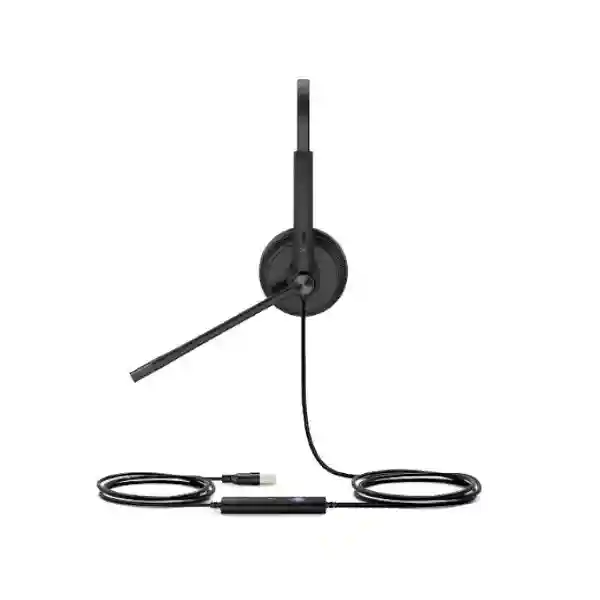
Professional wired communications headset • Uganda business supply
Yealink UH34 USB Headset for Professional Office and Contact-Center Communications
The Yealink UH34 is a professional USB wired headset built for organizations that need dependable voice communication at desks, service counters, call-center positions, support teams and hybrid-work stations. Its role is straightforward: provide a consistent personal audio endpoint between the user and a compatible computer, soft client or supported Yealink IP phone without introducing the charging routines, radio planning and battery lifecycle considerations associated with wireless headsets. For procurement teams, this makes the UH34 particularly relevant when standardization, simple onboarding and predictable day-to-day operation matter more than mobility away from the desk.
The UH34 family includes mono and dual-ear configurations and multiple business variants. Buyers should therefore treat “UH34” as a product family rather than assume every box contains the same connector or platform-oriented controls. FourTeck can validate the requested connector, wearing style, UC or Teams-oriented edition, endpoint compatibility and quantity before quotation. This is useful for organizations replacing mixed legacy headsets, opening a new support floor, equipping branch offices, refreshing meeting workstations or standardizing headsets alongside Yealink desk phones.
The design combines a unidirectional microphone, wideband voice handling, passive acoustic isolation, 28 mm speakers, an adjustable boom and an inline controller. Yealink also supports device inspection and firmware maintenance through its USB Connect software and management services. These capabilities help IT administrators move beyond one-off peripheral purchasing toward a more manageable fleet model. The headset remains lightweight: published UH34 family figures list approximately 88 g for UH34 Mono and 118 g for UH34 Dual, while Lite variants are lighter still.
Uganda buyers can request a project quotation that reflects the exact variant, quantity, delivery point and deployment requirements rather than relying on a generic retail assumption. FourTeck can also assist with bill-of-materials validation where headsets are being purchased together with Yealink phones, computers, UC platforms or branch-office communications equipment.
Instant Specifications and Procurement Fact Rail
UH34 / UH34 Lite, Mono or Dual variants
Office, contact-center and unified-communications headset
USB; USB-A and USB-C editions are available depending on SKU
28 mm driver, published 20 Hz–20 kHz response
Single unidirectional microphone, published 100 Hz–10 kHz response
Yealink USB Connect and supported Yealink management services
Procurement should begin by identifying the required wearing style and connector. Mono models leave one ear open to the surrounding workspace, which can be valuable for reception desks, supervisors and staff who must communicate with nearby colleagues. Dual models provide audio to both ears and are generally better suited to users who spend much of the day on calls or who work in busier environments where greater acoustic focus is desirable. UH34 and UH34 Lite also differ in ear-cushion treatment, with the standard UH34 associated with leatherette-style cushions and Lite versions with foam cushions. Connector and platform edition should be confirmed at SKU level before an order is released.
Quote status should be treated as project-based. Availability, lead time and commercial terms can vary by exact variant and quantity. Regional warranty processing should likewise be confirmed on the quotation, especially for institutional orders that require documented support procedures, serial tracking or replacement workflows.
Operational Product Architecture and Overview
Unlike a network appliance, the UH34 does not depend on switching throughput, rack backplanes or redundant power supplies. Its architecture is that of a wired digital audio endpoint. The headset combines a microphone path, speaker path, digital signal processing, USB interface, physical call-control keys and a boom microphone assembly into a lightweight peripheral intended for continuous business use. The practical advantage is architectural simplicity. There is no headset battery to schedule for charging, no wireless base to place on the desk and no radio spectrum to coordinate across a dense call floor. A workstation receives the headset through USB and, with a compatible application or Yealink phone, can expose call and audio functions to the user.
The microphone is a critical part of this design because office voice quality depends as much on capture discipline as speaker fidelity. Yealink specifies a unidirectional ECM microphone for the UH34 family. Directionality helps prioritize speech arriving from the intended position of the boom while reducing the relative contribution of sound from less favorable angles. This does not make an open office silent, and procurement teams should avoid interpreting passive noise reduction as complete environmental isolation. Instead, the value is a more controlled speech path when the boom is positioned correctly and the user follows sensible microphone placement.
The speaker system uses 28 mm drivers and supports a published 20 Hz–20 kHz frequency response, allowing the headset to serve both spoken communications and general computer audio. For business calling, intelligibility remains the priority. Wideband handling can preserve more speech information than narrow legacy telephony paths when the entire call chain supports it. Actual end-to-end quality still depends on the soft client, codec, network, computer or phone, and the far-end device.
The inline controller is an important operational element. Users can reach common controls without searching inside an application window. Depending on compatible platform behavior, functions include answer, end, reject, volume adjustment and microphone mute. LED indication gives immediate visual feedback. In large deployments this small usability improvement can reduce repetitive friction because agents and office staff perform these actions many times each day.
Cable architecture also matters. Published documentation lists about 1.2 m from headset to call-control unit and about 0.9 m from the controller to USB plug, producing useful desk reach without requiring a wireless link. Buyers should still examine workstation placement. Under-desk computers, docking stations, monitor hubs and desk cable trays can alter the effective routing distance. Extension accessories should not be assumed necessary or compatible until the physical layout is reviewed.
At fleet level, Yealink USB Connect and management services provide a path for administrators to inspect supported device information and coordinate firmware activity. This is particularly useful where dozens or hundreds of headsets must remain on an approved baseline. A headset may look like a simple accessory, but inconsistent peripheral firmware, uncontrolled substitutions and mixed connector standards can create support overhead. Standardizing the exact UH34 variant and documenting the endpoint environment reduces that risk.
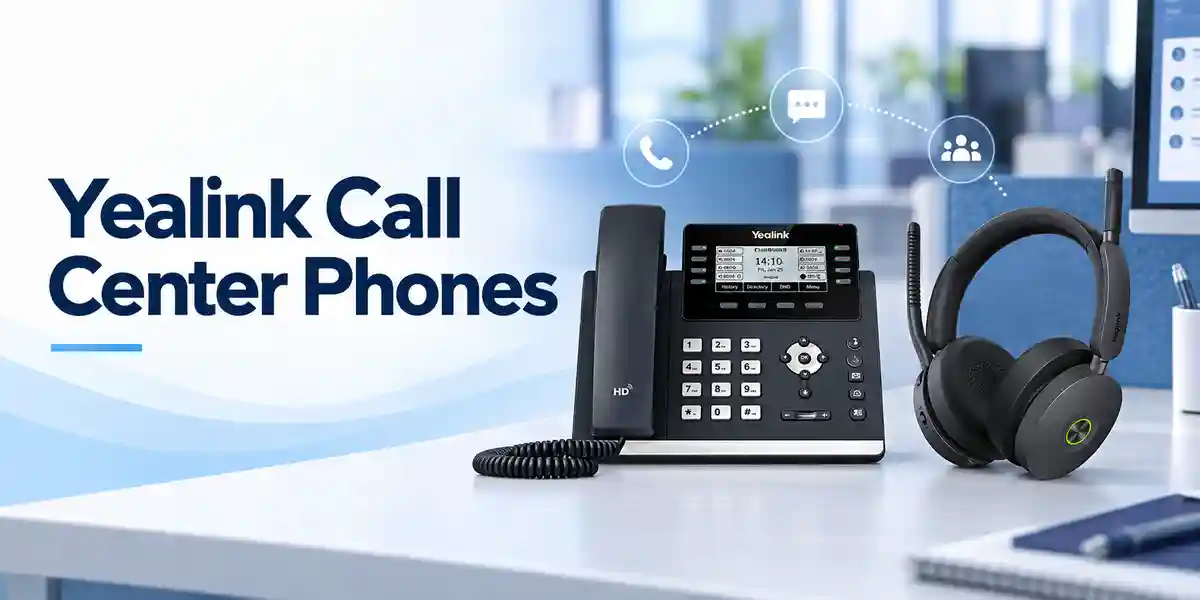
Common procurement pain points include uncertainty over Mono versus Dual, confusion between UH34 and UH34 Lite, USB-A versus USB-C selection, compatibility with a particular Yealink phone, and whether call-control functions behave identically on every third-party soft client. These questions should be resolved before purchase. FourTeck can structure the quote around the target endpoint list and can recommend a small validation batch for large rollouts where application behavior is business-critical.
Enterprise Business Outcomes and Value Analysis
Key Hardware and Software Highlights
28 mm speaker system
The 28 mm drivers support business speech and general workstation audio. Published frequency response extends from 20 Hz to 20 kHz. The practical outcome is one standardized device for calls, training material, conferencing and ordinary computer playback.
Directional boom microphone
A unidirectional ECM microphone is positioned on an adjustable boom. Correct positioning keeps speech capture close to the user and supports clearer conversations in normal office environments. The boom can be adjusted to suit wearing preference.
Inline call controls
Physical controls place frequently used functions within reach. Compatible environments can expose call handling, mute and volume behavior directly from the cable controller, reducing dependence on application menus.
USB connectivity
USB operation is designed for quick deployment to PCs and supported Yealink phones. Because the family includes different connector editions, buyers should specify USB-A or USB-C requirements rather than assuming a connector from the family name alone.
Lightweight wearing design
Published weights are approximately 88 g for UH34 Mono and 118 g for UH34 Dual. Low mass matters for staff who remain on calls for long periods, though individual comfort should still be validated with representative users.
Fleet management pathway
Yealink USB Connect and supported management services give IT teams tools for device information and firmware maintenance. This helps establish an approved peripheral baseline across larger deployments.
Technical Specifications Ledger
| Specification | Published UH34 family detail | Procurement interpretation |
|---|---|---|
| Wearing styles | Mono and Dual | Choose by job role and desired environmental awareness. |
| Connection | USB; USB-A or USB-C editions depending on SKU | Confirm workstation, dock or phone port before ordering. |
| Headset cable | Approximately 1.2 m to controller | Review desk routing and user movement requirements. |
| USB-side cable | Approximately 0.9 m from controller to USB plug | Check under-desk PC and docking-station placement. |
| Microphone | Single unidirectional ECM | Designed to prioritize speech from the boom direction. |
| Microphone response | 100 Hz–10 kHz in current technical listing | Suitable for wideband business voice capture. |
| Speaker size | 28 mm | Supports calls and general computer audio. |
| Speaker response | 20 Hz–20 kHz | Broad published playback range; actual call bandwidth depends on the full communications chain. |
| Weight | UH34 Mono about 88 g; UH34 Dual about 118 g | Low-mass design for long-duration desk use. |
| Operating temperature | -10 °C to +50 °C | Use in normal controlled office conditions; avoid heat and moisture exposure. |
| Storage temperature | -30 °C to +70 °C | Relevant for warehousing and transport planning. |
| Management | Yealink USB Connect; supported Yealink management service | Useful for information checks and firmware maintenance across fleets. |
| Power | USB powered; no headset battery | No charging cycle or battery replacement planning for the headset. |
Specifications can vary by exact UH34, UH34 Lite, Teams-oriented, UC-oriented, USB-A, USB-C or later family edition. A procurement document should therefore identify the manufacturer part number wherever the connector or platform behavior is material. FourTeck can validate this mapping before order placement. Compatibility with third-party communications applications should be tested where hardware call-control behavior is mandatory, because basic USB audio operation and full application control are not the same requirement.
Configuration and Sizing Worksheet
Step 1 — Estimate user workload and role
Count users by actual role rather than simply counting desks. Separate dedicated call agents, receptionists, managers, shared-desk users, occasional meeting users and staff who need to hear nearby colleagues. High-call-volume users may prefer Dual, while roles requiring ambient awareness may prefer Mono. Include a reasonable spare pool so damaged or hygienically withdrawn units do not interrupt operations.
Step 2 — Audit physical workstation conditions
Record whether the USB port is on a desktop computer, laptop, docking station, monitor hub or supported Yealink IP phone. Note whether the port is USB-A or USB-C. Measure cable routing around monitor arms, cable trays and under-desk equipment. Wired reliability is valuable only when the cable path is practical and does not create strain or snag points.
Step 3 — Validate endpoint and application compatibility
List the exact Yealink phone models and firmware families, or the computer operating system and communications applications in use. Yealink publishes compatibility information for many of its IP phones, but application-level call controls can differ. For a large rollout, test the intended headset SKU on the approved workstation image before committing every seat.
Step 4 — Define management and firmware policy
Decide whether devices will simply operate as unmanaged peripherals or be included in a formal maintenance process. If administrators will use Yealink USB Connect or a supported management service, define who owns firmware approval, how updates are staged, and how exceptions are recorded. Peripheral governance becomes increasingly important as deployment size grows.
Step 5 — Prepare the quote checklist
Provide the required quantity, Mono or Dual preference, UH34 or UH34 Lite preference, connector type, UC or Teams-oriented requirement where applicable, target computer or phone models, destination city, requested delivery window and any staging expectations. Include whether spare ear cushions or spare units are required. This information enables a cleaner quotation and reduces substitutions that could affect compatibility.
Licensing is normally driven by the communications platform rather than by the headset’s basic USB audio function. Buyers should nevertheless confirm whether their chosen collaboration service, endpoint-management method or enterprise software arrangement has separate commercial terms. The headset should not be treated as a substitute for the licenses required by the calling platform itself.
Deployment Scenarios and Industry Use Cases
Large enterprise and multi-site operations
A multi-site company can use the UH34 as a standard wired endpoint for departments that do not require wireless roaming. A central procurement team can define approved Mono and Dual SKUs, then allocate them by role. Branch IT teams receive the same connection and control conventions, simplifying user guidance. Where Yealink phones are already standardized, compatibility can be validated against the deployed phone families and firmware levels. Spare pools can be maintained at larger sites while smaller branches receive scheduled replenishment.
Financial and banking institutions
Banks and financial organizations often need consistent desk hardware, controlled device standards and predictable support. A wired headset is useful for service desks, internal support teams and operations staff who remain at fixed workstations. Procurement should assess cable routing, user hygiene, call-recording platform requirements and the behavior of mute and call controls with the approved application. Device standardization also supports asset documentation across branches.
Education and campus networks
Universities, training organizations and schools can deploy UH34 units for admissions desks, remote teaching support, service centers, administration offices and computer-based communication stations. Mono can suit staff who interact with people at a counter, while Dual can suit dedicated remote support. Shared devices should have a defined cleaning process and, where practical, replaceable cushion planning.

Government and public-sector procurement
Public-sector projects may require formal specifications, model references, delivery schedules and acceptance criteria. The UH34 can be specified by exact part number, connector, wearing style and intended endpoint. For tenders, avoid describing the family too broadly. A clear schedule should state whether equivalent substitutions are permitted, whether platform-oriented controls are mandatory, and whether delivery includes staging or compatibility validation. FourTeck can help prepare a product-aligned bill of materials and support documentation for institutional review.
Technical Deep Dive 1: Audio Processing and Hardware Architecture
The UH34’s hardware architecture is intentionally compact. Voice enters through a boom-mounted unidirectional microphone, is handled through the headset’s digital audio path and passes through USB to the connected endpoint. Return audio travels from the endpoint to the 28 mm speaker system. Integrated digital signal processing supports the headset’s business-audio behavior. Because the device is wired and USB powered, the signal path avoids a separate wireless base, radio link and rechargeable battery. This is operationally useful in high-seat-count deployments where simplicity is itself a reliability feature.
Microphone positioning has a direct effect on results. A directional microphone rejects some sound outside its preferred pickup region, but it cannot compensate for poor boom placement or extremely loud surroundings. User onboarding should include a simple standard for boom position and listening volume. In a contact center, this can be combined with workstation acoustic treatments, sensible seating layouts and application-level audio settings.
Speaker specifications should also be interpreted in context. A 20 Hz–20 kHz published range describes the headset transducer capability, not a promise that every telephone call will carry that entire spectrum. The call codec, client, network and remote endpoint can constrain usable bandwidth. The business benefit is that the headset itself is suitable for both communications and broader workstation audio rather than being limited to narrow speech reproduction.
Technical Deep Dive 2: Software Ecosystem, Firmware Security and Operational Control
USB peripherals increasingly form part of the managed workstation environment. Yealink USB Connect provides a local management path for supported USB devices, while Yealink’s management services can support broader administration scenarios. For IT teams, the relevant outcome is the ability to identify device information and coordinate firmware maintenance rather than treating every headset as an invisible accessory.
A sensible enterprise process begins with an approved headset part number and a tested firmware baseline. Changes should be validated against the organization’s operating system, communications client and any call-control integrations before broad deployment. This approach mirrors normal endpoint governance: test first, stage deliberately and document exceptions. Firmware maintenance should not be confused with communications-platform licensing; the headset and the service used to place calls are separate layers.
Security-conscious organizations should also control physical USB access and workstation policy according to their own standards. The UH34 is an audio peripheral, not a network firewall or authentication device. Its management capabilities are valuable for lifecycle administration, but workstation security remains the responsibility of the endpoint environment and organizational controls.
Technical Deep Dive 3: Availability, Redundancy and Recovery Planning
A single headset does not provide high availability in the server sense, but headset fleets can be designed for service continuity. The most effective method is operational redundancy: keep a defined number of compatible spare units, maintain spare cushions for hygiene and wear, document the approved SKU, and ensure local support staff know how to switch the communications application to the replacement device.
For critical contact centers, the spare ratio should reflect seat count, historical damage rates and replacement lead time. A small office may keep one or two spare units, while a large service operation may hold a percentage-based buffer. Where multiple sites use the same approved model, stock can sometimes be balanced between branches. Standardization reduces recovery time because a replacement headset does not require a new user workflow.
Disaster-recovery planning should also consider alternative work locations. If staff may relocate to laptops, verify the connector available on those laptops or docks. A fleet built entirely around one connector can create avoidable friction if recovery workstations use another. Exact SKU planning at procurement stage therefore contributes to continuity even though the headset itself is a simple peripheral.
Pre-Purchase Buyer Gap Checklist
Is UH34 the same as UH34 Lite? No. They belong to the same family and share the general wired USB concept, but cushion materials and SKU details differ. Confirm the exact model rather than accepting a family-level description on a purchase order.
Does every UH34 use the same USB connector? No. Yealink offers different connection editions, including USB-A and USB-C variants. The quote should name the connector or manufacturer part number.
Will every soft client support every button? Basic USB audio compatibility is broader than full call-control integration. If answer, reject, mute indication or other controller behavior is mandatory, validate the exact application and workstation build.
Are there hidden headset licenses? Basic headset audio does not itself replace or create the licenses required by the communications platform. Any subscription costs normally arise from the calling, collaboration or management environment. Confirm those separately.
How much desk clearance is needed? There is no base station, but the cable path matters. Allow space for the inline controller and route approximately 2.1 m of combined published cable length without creating a trip, snag or strain point.
What is the power draw? The headset is USB powered and has no rechargeable headset battery. For ordinary workstation planning, it does not need a separate power adapter. Organizations with tightly controlled USB power budgets should validate the host configuration as part of endpoint testing.
What about lifecycle? Procurement should confirm current SKU availability and avoid assuming that all historic part numbers remain equally available. For a long rollout, record the approved substitute policy so later batches do not introduce unexpected connector or cushion changes.
Can it work with non-Yealink platforms? It can operate as a USB audio device across common computer environments, but advanced call controls may depend on application support. For third-party desk phones or unusual platforms, validate before bulk purchase.
Uganda Procurement and Delivery Logistics
FourTeck can prepare Uganda quotations around the exact UH34 requirement rather than a generic headset line. The preferred request includes quantity, Mono or Dual, standard or Lite preference, USB-A or USB-C, target phone or computer, communications platform, delivery city and requested schedule. Where a customer is unsure of the exact part number, the endpoint information can be used to narrow the suitable variant before commercial confirmation.
Order processing for business projects may include bill-of-materials review, stock or lead-time confirmation, commercial approval, delivery coordination and optional pre-deployment validation. Large deployments benefit from a pilot stage. A small quantity can be tested on the production workstation image before the remaining units are released, reducing the chance of discovering call-control or connector issues after a full rollout.
Delivery timelines depend on exact SKU, quantity and sourcing position at the time of order. Buyers with fixed project deadlines should request a dated quotation and identify whether partial delivery is acceptable. For institutional procurement, FourTeck can align documentation with the quoted model and agreed commercial scope. Pre-configuration for a headset primarily concerns firmware and compatibility validation rather than complex network programming.
Uganda Local Coverage Matrix
Kampala: suitable for headquarters, contact centers, financial institutions, technology teams and large office deployments where centralized receiving and rollout are common. Entebbe: useful for hospitality, aviation-related offices, public agencies and branch operations requiring professional desk communications. Jinja: supports industrial, education, service and branch-office requirements. Mbarara: enables western-region businesses, institutions and service teams to standardize business headsets without relying on mixed consumer peripherals. Gulu: supports northern-region offices, education, development organizations and distributed enterprise teams. Delivery and lead time should be confirmed against the final destination and order size.
For organizations with several Uganda branches, one quotation can be structured around a common technical standard while quantities are allocated by destination. This helps preserve connector and model consistency across the estate and makes future replenishment easier.
Cross-Border and Regional Supply Chains
Organizations operating beyond Uganda can coordinate related requirements through FourTeck’s regional presence. Visit FourTeck Uganda for Uganda requirements, FourTeck Kenya for Kenya projects, FourTeck Africa for broader African enterprise sourcing, FourTeck UAE for UAE requirements, and FourTeck Kuwait for Kuwait procurement.
Cross-border projects should standardize manufacturer part numbers, connector types and platform editions in the bill of materials. This is more reliable than using a generic family description in several countries. Shipping terms, import requirements, taxes, warranty handling and lead times can differ by destination, so each regional quotation should state its own commercial conditions while preserving the common technical standard.
Related Yealink Products and Internal Paths
A headset project often sits inside a wider communications refresh. Buyers can explore Yealink solutions in Uganda and coordinate compatible desk phones, conference endpoints and accessories with the headset bill of materials. For environments focused on desktop calling, review the broader FourTeck Uganda communications portfolio. Organizations comparing wired and wireless user experiences can request alternatives alongside the UH34 so mobility, charging, density and cost can be assessed against actual job roles.
Related planning should include compatible Yealink IP phones, replacement ear cushions, workstation docking arrangements, USB port availability and any required UC service licensing. A receptionist may need a Mono headset and desk phone, while a dedicated support agent may benefit from Dual. Supervisors who move frequently may be better served by a wireless family. FourTeck can therefore quote the UH34 as a standalone peripheral or as one component of a larger voice deployment. For assistance selecting related models, use the FourTeck Uganda contact page and provide the intended user roles and existing communications platform.
FourTeck Technical Service Capabilities
Technical procurement support begins with engineering validation. For the UH34, this means checking the exact headset variant against the target computer, dock, operating environment or Yealink phone. The bill of materials can be reviewed for Mono versus Dual requirements, connector selection, platform edition and spare-unit quantities. This is particularly useful when a purchase request has been written only as “Yealink UH34” without a manufacturer part number.
For larger projects, staging can include representative compatibility checks and firmware review before shipment. Where supported, firmware can be brought to an agreed baseline subject to project scope. The goal is not to alter the customer’s communications environment without approval, but to reduce avoidable first-day issues and document the delivered configuration.
Post-sales support can assist with basic deployment questions, variant identification and warranty coordination under the terms of the supplied order. Organizations should retain purchase records and device information so any support case can be matched to the correct product. For fleets, maintaining a small spare pool remains the fastest way to handle immediate user incidents while a failed unit is assessed.
Extended Technical FAQ
1. Is the Yealink UH34 suitable for a full-day call-center shift?
The UH34 is designed for professional office and call-center use and emphasizes low weight and soft ear cushions. Published weights are about 88 g for UH34 Mono and 118 g for UH34 Dual. Those figures make it attractive for long-duration wear, but comfort remains individual. For a large contact-center purchase, a representative user trial is sensible. Test both wearing style and cushion preference, especially where agents remain on calls for many hours. Proper headband adjustment, microphone position, listening volume and hygiene practices also contribute to long-term comfort. A headset should be evaluated as part of the complete workstation rather than by weight alone.
2. Should we order UH34 Mono or UH34 Dual?
Choose according to the user’s need for environmental awareness. Mono places audio on one ear and leaves the other ear open, which can suit reception, front-desk, supervisory and mixed-interaction roles. Dual covers both ears and can help users focus more closely on calls in busy office environments. Neither choice is universally better. A practical enterprise deployment can standardize both: Mono for staff who frequently speak with nearby colleagues and Dual for dedicated call agents. The purchase order should identify the exact variant, because a family-level description can lead to receiving the wrong wearing style.
3. Does the UH34 work with Yealink IP phones?
Yealink publishes compatibility with a range of its USB-capable IP phones, with required phone firmware varying by model family. Examples in Yealink documentation include T4-series, T5-series and VP-series devices. Compatibility should still be checked against the exact phone model and firmware in the customer environment. A phone having a USB port does not automatically guarantee every control behavior on every headset edition. FourTeck can validate the target phone list before quotation, and large deployments should test a representative headset on the actual production phone firmware before broad rollout.
4. Does the headset require a separate driver or power adapter?
The UH34 is designed around USB plug-and-play operation and is powered through its USB connection, so it does not use a separate headset battery or dedicated power adapter. The connected operating system or phone handles the USB audio device. Organizations may use Yealink USB Connect for supported device information and firmware management. In managed corporate environments, local software installation may be controlled by IT policy, so administrators should decide whether management software is deployed centrally, installed only by support teams or omitted where basic USB audio operation is sufficient.
5. Are USB-A and USB-C versions available?
Yes, the UH34 family includes editions with different USB connection options. This is why connector type must be stated in the quote request. A laptop fleet may have mostly USB-C ports, while desktop computers and many desk phones may use USB-A. Docking stations can further complicate the picture. Before bulk ordering, audit the port that users will actually connect to rather than relying only on the computer model. Using adapters may be possible in some environments, but a native connector is generally cleaner for standardized enterprise deployment and reduces another support variable.
6. What is the difference between UH34 and UH34 Lite?
Both sit within the same professional wired headset family and share the general USB, Mono/Dual and business-calling design. A notable physical distinction in Yealink documentation is the cushion treatment: UH34 uses leatherette-style ear cushions while UH34 Lite uses foam cushions. Published weights also differ slightly, with Lite models lighter in the listed configurations. Procurement teams should not substitute one for the other without approval where comfort, hygiene material or a specified part number matters. For a new deployment, representative users can compare the cushion feel before the organization chooses a standard.
7. Will the inline controller work with every calling application?
Do not assume identical control behavior on every platform. USB audio can work even where advanced application integration is limited. Functions such as answer, end, reject, mute indication or redial may depend on the communications client, operating environment and exact headset edition. If these controls are part of an operational requirement, especially in a contact center, include them in acceptance testing. Test the production application version and workstation image with the proposed headset SKU. This small validation step can prevent a large deployment from discovering that audio works correctly but a workflow-specific hardware button does not behave as expected.
8. What warranty and replacement process should an Uganda buyer expect?
Warranty terms should be confirmed on the FourTeck quotation for the exact supplied SKU and project. Keep invoices, serial or device references where available, and delivery documentation so a support case can be matched to the original order. For business-critical users, warranty processing should not be the only continuity plan. Maintain a small pool of spare approved headsets that can be issued immediately if a unit is damaged or fails. The affected unit can then move through diagnosis or warranty handling without leaving the employee unable to work. Large deployments should also stock appropriate replacement cushions for hygiene and normal wear.
9. Can FourTeck help us choose quantities and prepare a rollout?
Yes. Quantity planning should start with active users by role, then add shared desks, training positions, new-starter buffer and a spare percentage appropriate to operational criticality. FourTeck can help map Mono and Dual choices, connector requirements and target endpoints into a clearer bill of materials. For larger deployments, a pilot batch is recommended before full release. Once compatibility and user comfort are confirmed, remaining quantities can follow the approved standard. Multi-site organizations should also decide whether spare stock is held centrally in Kampala or distributed among branches for faster local replacement.
10. Is the UH34 a good choice compared with a wireless headset?
It is a strong fit when the user primarily works at a fixed desk and the organization values simplicity, low weight, plug-and-play connection and freedom from headset charging. Wireless headsets are preferable when users need to walk away from the workstation while remaining on calls. The tradeoff is therefore operational rather than purely technical. A call-center agent seated at a fixed position may gain little from wireless mobility, while a supervisor moving around a floor may value it highly. Many organizations use both categories and assign them by role instead of forcing one headset type onto every employee.
Request Your Yealink UH34 Uganda Procurement Quote
Send FourTeck your required quantity, preferred Mono or Dual wearing style, UH34 or UH34 Lite preference, USB-A or USB-C requirement, target Yealink phone or computer environment, communications application and delivery city. The team can use those details to validate the bill of materials and prepare a business quotation aligned with the deployment rather than a generic family-level offer.
For contact centers, branch offices, banks, educational institutions, government projects and enterprise support teams, consider including spare units and replacement cushion requirements in the same request. If application call controls are critical, identify the software platform so compatibility can be checked before a bulk rollout. This preparation reduces purchasing ambiguity and helps ensure the delivered headset variant matches the workstation environment.



Reviews
There are no reviews yet.