Wireless meeting-room audio for Uganda
Yealink VCM36-W Pro Wireless Microphone for Conference Room Voice Capture
The Yealink VCM36-W Pro Wireless Microphone is designed for organizations that need flexible conference-room voice pickup without permanently routing microphone cables across meeting tables. The VCM36-W platform combines a built-in three-microphone array, 360-degree pickup and a maximum pickup radius of 6 metres with wireless connectivity, allowing deployment teams to position the microphone where participants actually sit rather than where cable paths dictate. This makes it particularly useful for boardrooms, training rooms, executive meeting spaces and multipurpose collaboration areas where furniture layouts change.
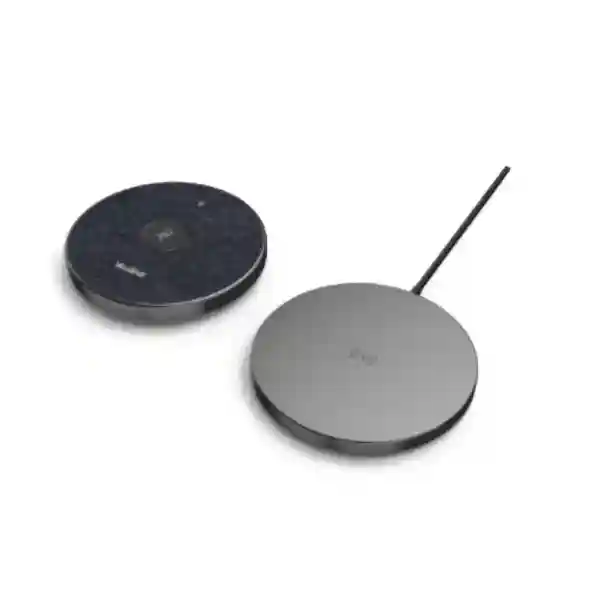
For procurement teams, the practical value is straightforward: fewer table cables, faster room reconfiguration, a dedicated charging cradle and conference-focused audio processing. Yealink specifies Optimal HD Audio, Full-Duplex Technology, acoustic echo cancellation and Noise Proof Technology. The wireless platform operates on 2.4 GHz and 5 GHz networks and supports WPA-PSK/WPA2-PSK security. A 2450 mAh internal battery provides up to 12 hours of use and up to seven days of standby under specified conditions. The microphone can operate as an expansion microphone in supported Yealink room configurations, but endpoint compatibility and supported microphone quantities should always be validated against the exact room-system model and firmware before procurement.
FourTeck supports Uganda buyers with configuration review, bill-of-materials checking, supply coordination and deployment guidance. Share the room dimensions, table shape, endpoint model and expected participant count for a quotation aligned to the actual meeting environment.
Procurement snapshot
Product: Yealink VCM36-W Pro Wireless Microphone
Core platform: VCM36-W wireless video conferencing microphone array
Pickup: 360° coverage, up to 6 m
Wireless: 2.4 GHz / 5 GHz Wi-Fi
Battery: 2450 mAh; up to 12 hours use
Supply region: Uganda
Instant Specifications & Procurement Fact Rail
VCM36-W
Meeting-room expansion audio
Dual-band Wi-Fi
Dedicated cradle / USB-C cable
Request project quotation
Confirm regional terms on quote
The VCM36-W is not a general-purpose USB desktop microphone. It belongs in a compatible Yealink meeting-room architecture where wireless microphone support is available. That distinction matters when preparing a purchase order. Buyers should provide the exact Yealink endpoint or room kit, current firmware branch, desired microphone count and room dimensions. The microphone itself measures approximately 100 × 16.5 mm, while the charging cradle is approximately 100 × 10.5 mm. The package includes the microphone, charger cradle, 1.2 m USB-C cable, USB adapter in applicable markets, double-sided adhesive and quick-start documentation. Procurement teams should confirm local package contents because regional packaging can vary.
Operational Product Architecture & Meeting-Room Overview
Conference-room audio problems are often caused less by the conferencing platform than by room geometry. A camera or meeting bar installed below a display may be several metres away from participants at the far end of a long table. Hard surfaces introduce reflections, participants speak at different volumes, and a fixed microphone location may not remain suitable after a room is rearranged. VCM36-W addresses this by moving an additional pickup point closer to participants without requiring a wired microphone run across the table.
At the capture layer, the unit uses a three-microphone array with omnidirectional room coverage. Yealink rates the pickup range at up to 6 metres and provides a 100 Hz to 8 kHz frequency response. The audio path incorporates acoustic echo cancellation and noise-reduction processing designed for full-duplex conversation. Full duplex is operationally important because natural meetings contain interruptions and overlapping speech. A conference system that handles simultaneous far-end and near-end audio poorly can make discussion feel constrained; the VCM36-W is engineered as part of Yealink’s room-audio chain to support more natural exchanges.
At the transport layer, the microphone uses Wi-Fi rather than a table-to-codec audio cable. Supported wireless standards include 802.11 b/g/n/ac across 2.4 GHz and 5 GHz bands. Security support includes WPA-PSK and WPA2-PSK, with Yealink also identifying AES128 encryption technology for the product. Wireless deployment reduces visible cabling, but it does not remove the need for proper radio planning. Dense offices, adjacent meeting rooms, access points and other wireless devices can affect spectrum conditions. During rollout, administrators should validate the supported pairing method for the room endpoint, choose a suitable band, keep firmware aligned and test the microphone from its intended table position.
Power architecture is battery based. The built-in 2450 mAh battery is rated for up to 12 hours of conference use and up to seven days standby. The charging cradle provides a defined home position between meetings. This design works best when facilities teams incorporate charging into normal room-reset procedures. Battery endurance figures are maximum specified values; actual endurance can vary with usage, radio conditions, battery age and operating environment.
The primary procurement friction is compatibility. Buyers may see a wireless Yealink microphone and assume it pairs with every Yealink conferencing device. That should not be assumed. Compatibility, supported quantity and operating role vary by endpoint and solution generation. Some room systems can use the VCM36-W as an expansion microphone alongside built-in pickup. Before ordering multiple units, validate the exact endpoint and supported maximum count. FourTeck can perform that check as part of quotation preparation.
Enterprise Business Outcomes & Value Analysis
Key Hardware & Software Highlights
Three-microphone array
The array provides 360-degree pickup around the unit, supporting central table placement. Yealink specifies a maximum pickup range of 6 metres, although recommended design distance should consider room acoustics and speaker volume.
Full-duplex audio processing
Yealink Full-Duplex Technology and acoustic echo cancellation are intended to preserve conversational flow when near-end and far-end participants speak at the same time.
Noise Proof processing
Yealink states that the system can filter environmental noise within 90 dB. This is useful for ordinary office disturbances, though acoustic treatment and room discipline remain important in challenging spaces.
Dual-band wireless
Support for 2.4 GHz and 5 GHz gives deployment teams flexibility to align the microphone with the supported room-system wireless architecture and local spectrum conditions.
Battery and charging cradle
A 2450 mAh internal battery, up to 12 hours specified use and a dedicated cradle support cable-light table deployment while providing a predictable charging location.
Touch mute control
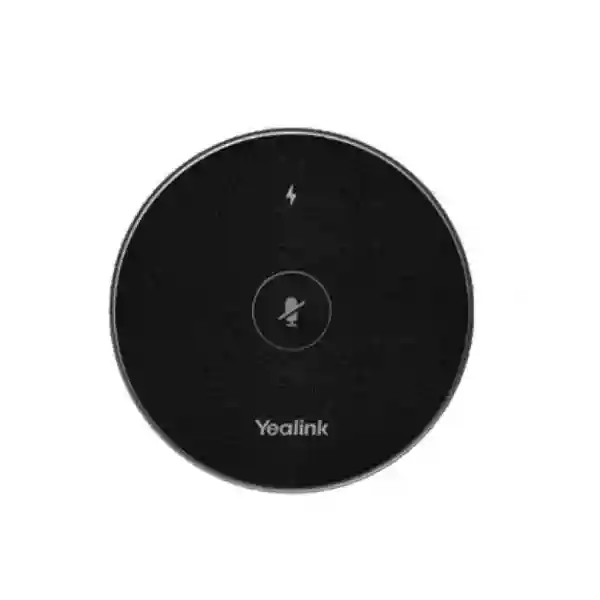
A capacitive mute touchpad gives participants immediate local control during confidential side discussions or room interruptions.
Technical Specifications Ledger
The following ledger consolidates manufacturer-published specifications for the VCM36-W platform. Where a procurement requirement depends on a particular endpoint, firmware or regional package, confirmation should be obtained before purchase.
| Category | Specification | Procurement relevance |
|---|---|---|
| Microphone array | Built-in 3-microphone array | Designed for table-centered meeting pickup. |
| Pickup | 360°, up to 6 m / 20 ft | Room geometry and acoustics should be checked. |
| Audio | Optimal HD Audio; Full Duplex; AEC; Noise Proof | Supports business conversation and echo control. |
| Frequency response | 100 Hz–8 kHz | Voice-oriented conferencing response. |
| Wireless standards | 802.11 b/g/n/ac | Validate endpoint pairing and RF environment. |
| Bands | 2.4 GHz / 5 GHz | Useful in mixed-density wireless offices. |
| Wireless security | WPA-PSK / WPA2-PSK; AES128 referenced by Yealink | Include in wireless-security review. |
| Battery | Built-in 2450 mAh | No replaceable AA/AAA workflow required. |
| Rated use | Up to 12 hours | Plan daily charging for high-use rooms. |
| Standby | Up to 7 days | Actual duration varies by conditions and battery age. |
| Microphone dimensions | 100 × 16.5 mm | Compact tabletop footprint. |
| Cradle dimensions | 100 × 10.5 mm | Allow a fixed charging position. |
| Operating humidity | 10%–90% | Use in controlled indoor meeting environments. |
| Storage temperature | 0°C–40°C | Avoid hot vehicles and uncontrolled storage. |
Configuration & Sizing Worksheet
Step 1 — Estimate room scale and speaking positions
Record room length and width, table dimensions, maximum seated participants and the location of the primary Yealink endpoint. Do not size only from the headline 6-metre maximum. Consider the farthest speaker, soft-spoken participants, ceiling height, reflective surfaces and whether people routinely turn away from the microphone. In larger rooms, a design with multiple supported pickup points may provide more consistent results than relying on one device at maximum distance.
Step 2 — Map the physical placement
Choose a stable, unobstructed tabletop position. Avoid placing the microphone directly beside loudspeaker outlets, HVAC vents, laptop fans or objects that block the array. The wireless design allows repositioning when tables are reconfigured, but standard room diagrams help users return the unit to a validated location.
Step 3 — Validate charging and power logistics
The microphone is battery powered during normal wireless operation, while the cradle requires a practical charging arrangement. Identify a nearby power point and decide whether the cradle remains on the conference table, credenza or equipment area. For high-utilization rooms, establish an overnight or between-meeting charging routine. Include the supplied charging accessories in receiving inspection.
Step 4 — Confirm endpoint and firmware compatibility
Provide the exact model of MeetingBar, MeetingBoard, MVC room system or other Yealink endpoint. Compatibility and maximum supported microphone count can vary. Also record current firmware versions and the target conferencing platform. This prevents a common procurement error: purchasing an accessory based solely on brand matching.
Step 5 — Review network and wireless policy
Confirm that the planned Yealink architecture can use the required wireless mode within corporate security policy. Review 2.4 GHz and 5 GHz channel conditions in dense sites. If the organization uses strict segmentation or wireless controls, involve the network team before rollout rather than during installation.
Step 6 — Prepare the quotation request
Send product quantity, endpoint model, room count, room dimensions, city, delivery address, desired deployment date, tax requirements and any installation or pre-configuration needs. For multi-room projects, a simple room schedule showing room name, capacity, endpoint and microphone quantity helps FourTeck validate the bill of materials.
Deployment Scenarios & Industry Use Cases
Large enterprise and multi-site meeting rooms
Enterprises often standardize collaboration rooms to reduce support variation. VCM36-W can fit that approach where supported Yealink room systems need an additional wireless pickup point. A headquarters boardroom may place the microphone near the center or far end of a long table, while branch offices can use the same accessory family in rooms with different furniture layouts. Standardization should include pairing instructions, charging position, firmware policy and spare-unit strategy. IT teams should document which endpoints support which microphone quantities so room refreshes do not create accidental incompatibility.
Financial and banking institutions
Banks and financial organizations require dependable meetings between headquarters, branches, operations teams and external stakeholders. Wireless table audio can be useful in formal boardrooms where visible cabling is undesirable. Procurement should include security review of the wireless architecture, controlled device administration and clear mute procedures. Sensitive meetings also require organizational policies beyond microphone technology, including physical room access, conferencing-platform controls and endpoint hardening.
Educational and campus networks
Universities, training centers and professional institutes frequently repurpose rooms between seminars, hybrid lectures and administrative meetings. A wireless microphone can be repositioned as tables move, avoiding a fixed cable path that only suits one layout. Facilities teams should protect the charging cradle from loss, label units by room and establish a check-in routine where spaces are shared. For teaching rooms, verify that the conferencing endpoint and microphone arrangement covers both instructor and student discussion zones.
Government and public-sector procurement
Government buyers commonly require model identification, technical compliance, warranty information, delivery documentation and a clear bill of materials. The VCM36-W specifications can be mapped into tender schedules covering pickup radius, wireless bands, battery endurance, frequency response and package contents. Where a tender calls for a named platform or approved room system, compatibility should be documented before bid submission. Buyers should request country-of-supply details, lead time and warranty procedure on the commercial quotation.
Technical Deep Dive 1: Capture, Processing & Wireless Architecture
The most important architectural decision in VCM36-W is the separation of the microphone pickup point from a wired table connection. The three-microphone array listens around the device rather than toward one narrow speaking direction. That geometry supports round, rectangular and collaborative seating patterns where participants face one another. The rated 6-metre maximum range is a useful boundary, but professional room design should seek comfortable margin rather than treating the maximum as an ideal operating distance.
Captured speech is supported by Yealink’s conferencing audio functions, including acoustic echo cancellation, Noise Proof processing and full-duplex operation. Echo cancellation is important when room loudspeakers reproduce far-end speech that could otherwise re-enter the microphone path. Noise processing aims to reduce environmental distractions, while full duplex supports simultaneous speech. Together these functions address the practical meeting problem of maintaining understandable conversation in rooms that are not recording studios.
Wireless transport uses 802.11 b/g/n/ac and dual-band operation. This provides deployment flexibility but makes radio planning part of the audio design. A microphone placed in a room with heavy 2.4 GHz congestion may benefit from a supported 5 GHz configuration, while site-specific constraints can dictate another approach. Administrators should avoid making assumptions based on ordinary client Wi-Fi behavior because room accessories pair and operate according to the supported Yealink solution design.
Technical Deep Dive 2: Firmware Security & Operational Control
A conference microphone is part of a wider endpoint ecosystem. Operational control therefore starts with the room system rather than the microphone in isolation. Keep the paired Yealink endpoint on an approved firmware branch and review accessory compatibility when planning updates. Large deployments benefit from a change-control process in which a representative room is updated and tested before a wider rollout. Testing should include microphone pairing, mute behavior, far-end audio quality, battery reporting where available and recovery after endpoint restart.
Wireless security support includes WPA-PSK and WPA2-PSK, and Yealink identifies AES128 encryption technology in product materials. These features should be evaluated within the organization’s broader conferencing security controls. Security also includes physical custody, administrator passwords, room-system configuration, conferencing-platform identity controls and network segmentation. The microphone itself should not be treated as a substitute for those controls.
The capacitive mute touchpad is a simple but important operational control. Users can mute locally without searching through a touch controller interface during an interruption. Training should make clear how microphone mute state relates to the room system and conferencing platform so users understand when audio is actually disabled.
Technical Deep Dive 3: Availability, Charging & Recovery Planning
The VCM36-W does not provide server-style redundant power supplies, so availability is achieved through operational discipline. The 2450 mAh battery is rated for up to 12 hours of use, which is sufficient for many normal meeting days, but continuous high-use rooms need reliable charging. The cradle should have a permanent location and users should return the microphone after meetings. Support teams can include battery checks in periodic room maintenance.
For critical executive, command or operations rooms, resilience may justify holding a compatible spare microphone or retaining the endpoint’s supported built-in pickup path where applicable. The exact fallback behavior depends on the room endpoint. A recovery runbook should describe how to re-pair a replacement unit, how to select audio input where the endpoint exposes that control, and who owns first-line support.
Disaster recovery in meeting rooms is mostly about maintaining communications during component failure. Document endpoint configuration, keep approved firmware packages and compatibility information available, and maintain spare charging accessories where downtime carries business cost. For multi-site deployments, a small centralized spare pool can be more economical than a spare in every room while still shortening replacement time.
Pre-Purchase Buyer Gap Checklist
Is a separate software subscription required for the microphone? The microphone is an accessory within a Yealink room solution; conferencing-platform licensing belongs to the room system and service design. Ask for a complete bill of materials so endpoint, platform and accessory requirements are separated clearly.
Will it work with every Yealink device? Do not assume so. Compatibility varies by endpoint and solution generation. Provide the exact endpoint model before ordering.
How many units can one room use? Supported quantities vary by endpoint. A compatibility matrix should be checked for the target model and firmware.
Does 6 metres mean ideal pickup at 6 metres? Six metres is the stated maximum range. Real rooms differ in reverberation, ambient noise, seating direction and speaker volume. Design with margin and test demanding rooms.
What happens when the battery ages? Rechargeable batteries naturally lose capacity over time. High-use rooms should monitor endurance and include accessory lifecycle replacement in support planning.
Can it be left anywhere on the table? Wireless freedom helps, but placement still affects audio. Avoid HVAC vents, loudspeakers, physical obstructions and unstable surfaces. Mark a validated position where practical.
Will corporate Wi-Fi policies block it? The device supports established Wi-Fi standards and security methods, but the actual Yealink pairing architecture must be checked against site policy. Involve network administrators for tightly controlled environments.
Is the charger included? Manufacturer documentation lists a charger cradle and 1.2 m USB-C cable in the package, plus a USB adapter in applicable markets. Confirm regional package contents on the quotation.
What should be included on the purchase order? Use the exact product description and SKU from the quotation, quantity, delivery location, tax details, warranty terms and any installation or configuration services. For projects, attach the approved room schedule.
Uganda Procurement, Delivery & Project Logistics
FourTeck supplies enterprise communication and meeting-room equipment for Uganda projects with a quotation-led procurement process. For the Yealink VCM36-W Pro Wireless Microphone, buyers can request a quote for a single room, a branch rollout or a multi-site collaboration project. The most useful request includes the existing or planned Yealink room endpoint, room count, microphone quantity, delivery city and target deployment date. This allows compatibility questions to be addressed before commercial processing.
After configuration review, the quotation can identify the requested microphone units and any related room-system components. Buyers should confirm lead time at quotation stage because stock position and inbound supply can change. For project orders, staged delivery may be considered where multiple sites have different readiness dates. Receiving teams should check model labels, quantities, charging accessories and packaging against the delivery documentation before installation.
Technical pre-configuration requirements should be stated before dispatch. Where supported and agreed, project teams can coordinate firmware alignment, endpoint planning and installation guidance. The objective is to reduce site surprises: incompatible accessories, missing power points, uncertain charging locations and room layouts that were never assessed.
Uganda Coverage Matrix
Corporate offices, hotels, banks, NGOs, government facilities and conference-room refresh projects.
Hospitality, aviation-related offices, institutions and distributed enterprise meeting spaces.
Industrial, education, hospitality and regional business collaboration requirements.
Regional offices, universities, healthcare administration and commercial meeting-room deployments.
Public-sector, development, education and regional enterprise communication projects.
For locations outside these hubs, provide the exact delivery destination during quotation. Delivery feasibility, transit arrangements and project scheduling can then be confirmed for the specific order rather than assumed from a national estimate.
Cross-Border & Regional Supply Chains
Organizations operating across East Africa, the Gulf and wider African markets often prefer a consistent equipment family and documentation process. FourTeck regional sites support coordination across Uganda, Kenya, broader African markets, UAE and Kuwait. Multi-country buyers should specify destination, required quantities and rollout sequence by country so commercial terms, logistics and regional requirements can be handled appropriately.
Cross-border standardization is most successful when the technical bill of materials is fixed first and local commercial handling follows second. Maintain a master room standard with approved endpoint, microphone, display, mounting, cabling and power requirements, then adapt only what local infrastructure requires. This reduces support variation without assuming that warranty, tax, delivery or package contents are identical in every market.
Related Yealink Solutions & Internal Paths
A wireless microphone should be selected as part of the complete room rather than as an isolated purchase. Explore the Yealink portfolio in Uganda for compatible communication products and room-system options. Buyers planning complete collaboration spaces can also use the FourTeck project consultation page to submit room schedules and bills of materials.
Typical related requirements include Yealink MeetingBar systems for integrated Android meeting rooms, MVC room systems for Microsoft Teams Rooms, MeetingBoard collaboration displays, touch controllers, cameras, speakers and mounting accessories. Exact related models should be chosen according to room size, conferencing platform and the compatibility matrix. For new rooms, procure the endpoint and audio accessories together so microphone count, camera coverage, speaker output and controller placement can be reviewed as one system. For existing rooms, provide the installed endpoint model and firmware before adding the VCM36-W.
Power protection and network readiness are equally important. Meeting-room endpoints, displays and network switches may benefit from appropriate UPS protection, while wired room components should use properly specified network cabling. FourTeck can help consolidate these requirements into a project quotation rather than leaving facilities, AV and IT teams to procure disconnected components.
FourTeck Technical Service Capabilities
Enterprise meeting-room projects succeed when the bill of materials matches the actual room. FourTeck can assist with engineering validation before order placement by reviewing endpoint models, room dimensions, participant capacity and accessory quantities. This is especially important for VCM36-W because supported microphone quantity and operating behavior depend on the room endpoint.
Bill-of-materials verification can identify missing controllers, charging provisions, mounts, cables, displays or network requirements before equipment reaches site. For repeat deployments, a standardized room template can be created so branches receive a consistent equipment set. Project staging requirements, firmware alignment and pre-shipment checks can be discussed during quotation and order planning where applicable.
Post-sales support can focus on installation guidance, compatibility troubleshooting and replacement workflow according to the supplied warranty terms. Customers should retain serial information, invoice records and deployment details for efficient support. For large estates, maintain an asset register linking each microphone to its room and paired endpoint. That simple practice shortens troubleshooting and helps lifecycle planning.
Extended Technical FAQ
1. What is the Yealink VCM36-W Pro Wireless Microphone used for?
It is a wireless video-conferencing microphone accessory intended to extend or improve voice pickup in supported Yealink meeting-room environments. The VCM36-W platform uses a three-microphone array with 360-degree coverage and a maximum specified pickup range of 6 metres. Its wireless design is useful where a table microphone is needed but permanent signal cabling would be inconvenient or visually intrusive. It is not a standalone conferencing service or a generic USB podcast microphone. Before purchase, the paired Yealink endpoint should be identified so compatibility, microphone quantity and expected operating role can be verified.
2. What pickup range should we use when sizing a room?
Yealink specifies up to 6 metres, or 20 feet, with 360-degree pickup. Treat that figure as a maximum specification rather than a promise that every participant at exactly 6 metres will sound identical in every room. Reverberation, HVAC noise, glass surfaces, ceiling height, speaker volume and furniture all influence real-world capture. For important rooms, design with margin. Place the microphone near the participant group it needs to cover and consider additional supported microphones where the endpoint permits them. A room drawing with dimensions and seating positions is valuable during quotation review.
3. Does the microphone support both 2.4 GHz and 5 GHz wireless operation?
Yes. Manufacturer specifications list 802.11 b/g/n/ac and both 2.4 GHz and 5 GHz operation. This gives deployment teams options in offices where one band is more congested than the other. The microphone’s wireless behavior should nevertheless be configured according to the supported Yealink room-system architecture rather than treated like an ordinary laptop Wi-Fi client. In high-density buildings, include the conferencing rooms in wireless planning and test actual meeting performance. Network administrators should also review security and spectrum policies before a large rollout.
4. How long does the battery last?
The built-in 2450 mAh battery is rated for up to 12 hours of use and up to seven days of standby. These are maximum manufacturer figures and actual endurance can change with operating conditions, radio behavior, meeting patterns and battery age. For rooms used throughout the day, return the microphone to its charging cradle whenever practical. Facilities or IT teams should periodically check that the cradle remains powered and that the unit reaches a suitable charge. Critical rooms may warrant a documented spare or fallback audio procedure rather than relying on battery estimates alone.
5. Is the VCM36-W compatible with every Yealink MeetingBar or room system?
Compatibility should be checked by exact endpoint model. Yealink publishes accessory compatibility information, and supported microphone quantity can vary between products and solution generations. Some systems use the VCM36-W as an expansion microphone, and endpoint settings may determine whether built-in pickup, the wireless microphone or an automatic selection mode is used. When requesting a quote, provide the full endpoint model and, for an installed system, its firmware version. FourTeck can use that information to validate the intended configuration before the purchase order is finalized.
6. Does it require a separate license?
The microphone itself is a hardware accessory, but the complete meeting room may rely on licenses or subscriptions associated with Microsoft Teams, Zoom or another collaboration platform, depending on the endpoint and deployment. Those service requirements should not be confused with the microphone hardware. For a new room, request a complete bill of materials and identify the target conferencing platform. For an existing room, confirm that the current room license and endpoint are already suitable. This separation helps procurement teams avoid paying for unnecessary items or overlooking platform requirements that belong elsewhere in the solution.
7. What wireless security features are listed for the VCM36-W?
Yealink lists WPA-PSK and WPA2-PSK support and references AES128 encryption technology for the product. These are useful technical controls, but enterprise security should evaluate the complete conferencing architecture. Keep the room endpoint on approved firmware, protect administrator access, follow corporate credential policies, control physical access to sensitive rooms and apply the organization’s network segmentation standards. Buyers in regulated environments should submit their security requirements during design review so the room solution can be assessed as a system rather than approving a microphone based on one encryption specification.
8. What is included in the package?
Manufacturer documentation lists one VCM36-W video conference microphone, one charger cradle, a 1.2-metre USB-C cable, a USB adapter in applicable markets, double-sided adhesive and a quick-start guide. Package contents can be region dependent, so the commercial quotation and received goods should be checked for the destination market. For multi-room rollouts, receiving teams should count cradles and charging accessories as carefully as the microphones themselves. Missing charging components may not stop installation immediately, but they can create operational failures after the first day of meetings.
9. How should warranty and hardware replacement be handled?
Warranty terms should be confirmed on the Uganda quotation because regional terms, supplier conditions and project agreements can differ. Keep the purchase invoice, serial information, delivery documentation and a clear description of the fault. Before requesting replacement, support teams should verify charging, pairing, endpoint firmware and configuration so a room-system issue is not mistaken for microphone failure. For business-critical rooms, organizations may choose to keep a compatible spare while a warranty case is processed. Large deployments benefit from an asset register that maps serial numbers to rooms and purchase dates.
10. Can FourTeck help with configuration before deployment?
Yes, project requirements can be reviewed before ordering. Provide room dimensions, seating layout, existing or proposed Yealink endpoint, conferencing platform, desired microphone count and delivery locations. This allows the bill of materials to be checked for obvious compatibility or sizing issues. Where project scope requires it, staging and firmware-alignment requirements can also be discussed before shipment. For multi-site deployments, a standard room template is recommended so each location follows the same endpoint, microphone placement, charging and support model while still allowing documented exceptions for unusually large or acoustically difficult rooms.
Request a Yealink VCM36-W Pro Quote for Uganda
Send FourTeck your room count, Yealink endpoint model, participant capacity, delivery city and required deployment date. For an existing room, include the installed endpoint and current microphone arrangement. For a new room, share the conferencing platform and room dimensions so the microphone can be reviewed as part of the complete collaboration design. A configuration-led quotation helps reduce incompatible accessory purchases, avoids under-sizing voice coverage and gives procurement teams a clearer bill of materials for approval.
Whether you are equipping one Kampala boardroom or standardizing collaboration spaces across multiple Uganda locations, confirm compatibility before issuing the purchase order. The VCM36-W platform is strongest when its wireless flexibility, 360-degree pickup and charging workflow are matched to a supported Yealink endpoint and a properly planned room.


Reviews
There are no reviews yet.