Rugged Enterprise Mobility • Uganda
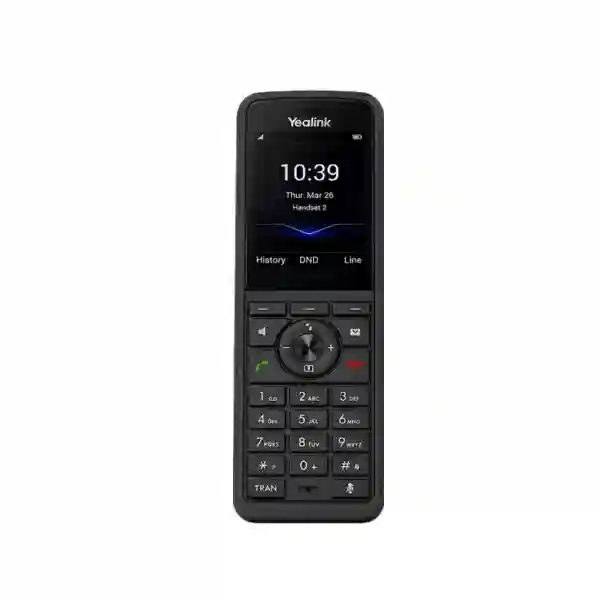
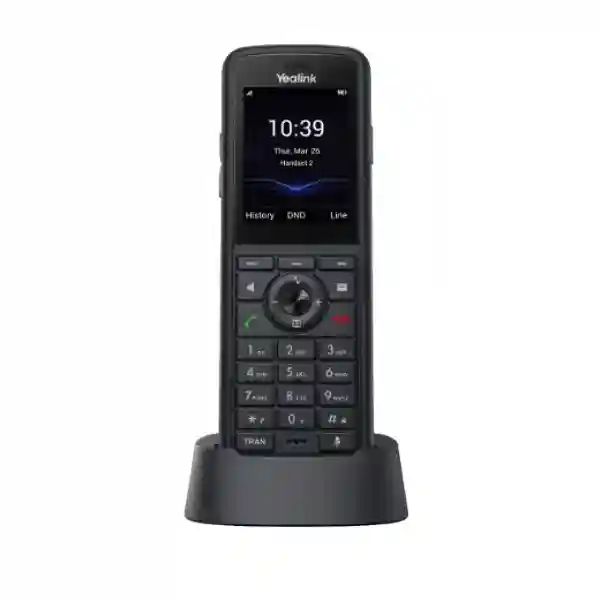
Yealink W59R Pro DECT Handset for Rugged Enterprise Voice Mobility
The Yealink W59R Pro is a professional ruggedized cordless DECT handset built for organizations that need dependable voice mobility beyond the office desk. It combines an IP67-protected body, resilient physical controls, Bluetooth 5.2, vibration notification, occupational-safety alarms and Yealink HD audio in a handset intended for warehouses, manufacturing floors, maintenance teams, utilities, healthcare operations, logistics facilities and other demanding work areas. Rather than treating mobility as a consumer cordless-phone problem, the W59R Pro fits into a managed Yealink DECT architecture where administrators can plan radio coverage, register users, control firmware and support roaming across compatible single-cell or multi-cell systems.
For procurement teams in Uganda, the important question is not simply whether a handset can make calls. The practical questions are whether it will survive routine drops, resist dust and water, remain usable in noisy areas, integrate with the selected Yealink DECT base architecture, provide adequate shift-length battery life, and give supervisors useful safety functions. The W59R Pro addresses those requirements with IP67 protection, resistance to drops of up to two metres, a 2.4-inch 240 × 320 colour display, backlit controls, Flexible Noise Reduction, full-duplex speakerphone operation and configurable push-button, no-movement, man-down and running alarms.
FourTeck can support buyers with handset and base-station matching, bill-of-materials review, multi-cell sizing guidance, accessory planning and quote preparation. This is particularly valuable when a project includes multiple zones, reinforced walls, racking, machinery or outdoor transition areas where radio design should be considered before quantities are finalized.

Instant Specifications & Procurement Fact Rail
Yealink W59R Pro rugged DECT handset
IP67; designed for dust, water and demanding workplaces
2.4-inch 240 × 320 TFT colour screen
Built-in Bluetooth 5.2
W70B and W75/W80/W90 systems
Rechargeable battery; 5 V / 0.6 A charger output
Project quotation and supply confirmation on request
Confirm applicable regional warranty terms on quotation
This fact rail should be used as a starting point rather than a substitute for project validation. A W59R Pro handset requires a compatible Yealink DECT infrastructure; it is not a stand-alone SIP endpoint that connects directly to an Ethernet outlet. For a small site, W70B may suit a focused single-cell requirement. For larger facilities, W75, W80 or W90 multi-cell architecture can provide the roaming framework required for users moving between coverage zones. Actual radio performance depends on walls, shelving, metal structures, machinery, floor layout and interference, so stated ideal DECT ranges should not be treated as guaranteed building coverage.
Operational Product Architecture & Overview
The W59R Pro sits at the user edge of a Yealink DECT voice system. The handset communicates over DECT radio to a compatible Yealink base environment, while the base side provides the network connection and SIP integration. This separation is useful in industrial and operational settings because workers can move without carrying Wi-Fi credentials, relying on a radio system designed specifically for cordless voice. In a single-cell design, a W70B can provide coverage for a localized work area. In a multi-cell design, W75, W80 or W90 infrastructure can coordinate coverage across a wider facility and support seamless roaming and handover where the deployment has been correctly surveyed and engineered.
The handset itself is designed around resilience and rapid physical interaction. The 2.4-inch TFT display provides a clear interface while physical keys remain accessible when a touch-first interface would be inconvenient. Backlighting supports darker plant rooms, loading areas and night shifts. Four side keys include volume controls, an alarm key and push-to-talk control, while the familiar telephone keypad and function keys reduce retraining for staff accustomed to business telephony. The rubberized construction is intended to reduce slipping and scratching, and the Pro model is designed to tolerate routine disinfectant or chemical-resistant cleaning practices specified by Yealink.
Audio architecture is equally important. Industrial users frequently work near ventilation equipment, conveyors, production machinery, loading operations or active service counters. Yealink combines HD audio, Flexible Noise Reduction and full-duplex speakerphone operation so the handset can preserve intelligibility in environments where background sound would otherwise make short operational calls difficult. Receiver and ringer volume controls allow local adjustment, while vibration alert gives an additional notification path when an audible ring may be masked.
Safety functions distinguish the W59R Pro from ordinary office cordless handsets. Administrators can configure push-button, no-movement, man-down and running alarms for appropriate users. These capabilities can help form part of a wider occupational communication process, particularly for lone workers or staff in higher-risk zones. They should not be represented as a replacement for certified safety systems, emergency procedures or site-specific risk controls; instead, they provide another communication mechanism that organizations can integrate into their operational response design.
Battery architecture is intended for extended working periods. Yealink specifies up to 28 hours of talk time and up to 320 hours of standby time in ideal conditions. Real-world endurance varies with signal conditions, call activity, Bluetooth usage, alarm configuration, display behavior, battery age and temperature. Procurement teams should therefore size charging points around shift patterns rather than assuming laboratory maximums. Charging cradles can be positioned in dispatch rooms, supervisor stations or controlled equipment areas, and spare workflow planning can be considered for operations that run continuously.
A further architectural consideration is vendor compatibility. Yealink states that its DECT technology is not compatible with third-party DECT base stations or handsets. Buyers migrating from another DECT estate should therefore treat the W59R Pro as part of a Yealink system design, not as a generic replacement handset. This avoids a common procurement error in which physical DECT terminology is mistaken for cross-vendor registration compatibility.
Enterprise Business Outcomes & Value Analysis
The combination of HD voice, Flexible Noise Reduction, full-duplex audio and a vibration alert is designed around the reality that industrial communication often happens where background sound is high. Clearer short calls can reduce repeated instructions and unnecessary movement between teams. The operational value comes from keeping voice available to mobile staff without requiring them to return to fixed desks.
IP67 protection, two-metre drop resistance, scratch resistance and cleaning-resistant construction can reduce exposure to the common causes of handset damage in warehouses and field-oriented facilities. Ruggedization does not make a device indestructible, but it aligns the hardware with environments where consumer-grade cordless devices can generate frequent replacement cycles.
Compatibility with W70B and W75/W80/W90 gives buyers a path from localized cordless coverage to larger multi-cell deployments. This helps standardize user experience across different facility sizes while allowing the base architecture to match the actual coverage requirement.
Dedicated alarm functions can support documented response workflows for selected staff. Push-button, no-movement, man-down and running alarms give administrators several event types to map to operational procedures. Organizations should validate how alerts are routed and escalated during commissioning.
Handset firmware can be upgraded over the air through the base station. Directory options include remote phonebooks, LDAP and XML phonebooks, while call features can be delivered through the associated SIP environment. Centralized base-side administration is especially useful where dozens of mobile users would be inefficient to configure individually.
A rugged handset can improve lifecycle economics where accidental damage is a meaningful cost driver. Buyers should evaluate handset price together with base infrastructure, survey effort, charging accessories, replacement batteries, spares, support and the expected service life rather than comparing only unit prices.
Physical keys, a conventional dial pad, caller information, speed dial, call transfer, hold, voicemail and conference functions create a familiar telephone workflow. This can be advantageous for mixed technical and nontechnical teams where rapid adoption matters more than application-heavy interfaces.
Key Hardware & Software Highlights
Rugged enclosure: IP67 protection and two-metre drop resistance help the handset suit dusty, wet and impact-prone work areas. Colour interface: the 2.4-inch 240 × 320 TFT display provides icons, caller information, notifications and multilingual menu support. Bluetooth 5.2: compatible Bluetooth headsets can support hands-free workflows. Safety sensing: integrated motion-aware alarm functions support no-movement, man-down and running events alongside a dedicated push-button alarm. Audio: HD voice, FNR and full duplex improve practical conversation quality. Management: OTA upgrades via the base help administrators keep deployed handsets aligned with supported firmware.
The W59R Pro supports up to two simultaneous calls per handset and familiar functions including three-way conferencing, forwarding, waiting, hold, mute, do-not-disturb, transfer, redial, speed dial, voicemail and emergency calling. Directory functions include base-stored contacts, remote phonebook, LDAP and XML sources. Call history supports up to 100 entries. These capabilities make the handset suitable for roles that need business telephony rather than simple point-to-point radio communication.

Technical Specifications Ledger
The following ledger consolidates the principal published specifications relevant to procurement. Frequency availability and regional compliance should always be confirmed for the exact supplied variant before purchase.
| Product type | Rugged professional DECT handset |
| Display | 2.4-inch 240 × 320 TFT colour screen; icons, soft keys, caller ID, notification light, screen saver and multilingual interface |
| Protection | IP67; dust and water protection with rugged construction; up to two-metre drop resistance |
| Bluetooth | Bluetooth 5.2 for compatible wireless headset use |
| Audio | HD audio, FNR, full-duplex speakerphone, HAC support, adjustable receiver and ringer volume |
| Safety alarms | Push-button, no-movement, man-down and running alarm functions |
| Compatible systems | Yealink W70B single-cell and W75/W80/W90 multi-cell systems |
| DECT range | Up to 50 m indoors and 300 m outdoors under ideal conditions |
| Calls | Up to two simultaneous calls per handset; three-way conference support |
| Directories | Base phonebook, remote phonebook, LDAP and XML phonebook support |
| Battery endurance | Up to 28 hours talk and up to 320 hours standby in ideal conditions |
| Charger | DC 5 V / 0.6 A output |
| Power adapter | 100–240 V AC, 50/60 Hz, 0.2 A input; 5 V / 0.6 A output |
| Operating temperature | 0 to 40 °C |
| Storage temperature | -30 to +70 °C |
| Operating humidity | 10–95% |
| Package | Handset with belt clip, charging cradle, rechargeable battery, decorative cover, quick-start guide and power adapter |
Published ideal range values are radio benchmarks, not site guarantees. Reinforced concrete, lift shafts, dense metal shelving, cold-room panels and machinery can materially change coverage. Similarly, published battery values are measured under controlled conditions. For a procurement document, it is more defensible to state the published maximum and then plan a margin for real operating conditions.
Configuration & Sizing Worksheet
1. Estimate users and concurrent calling
Count the people who require a handset, then separate that number from expected concurrent calls. A warehouse may issue 40 handsets but only have a fraction of users on calls simultaneously. Multi-cell design should consider both registered devices and call concurrency. Document shift changes as well, because handsets may be shared, individually assigned or rotated through charging stations.
2. Map physical coverage
Mark loading bays, aisles, production zones, stairwells, offices, security posts, yards and transition areas. Identify concrete cores, metal racking, insulated panels and machinery. Do not size solely from square metres. A smaller dense industrial floor can require more careful radio planning than a larger open office. For multi-floor sites, include vertical movement and stair cores in the survey plan.
3. Select the DECT architecture
Use W70B where a single-cell topology satisfies the requirement. Consider W75, W80 or W90 architecture where seamless roaming, wider coverage or greater system scale is needed. The exact platform should be selected against handset count, expected calls, redundancy requirements, network topology and expansion plans. The handset should be treated as one element of the overall design.
4. Plan charging and accessories
Determine where users start and finish shifts, whether devices are individually assigned, and whether charging should occur at desks, dispatch stations or secure equipment rooms. Include belt clips and compatible headsets where hands-free operation is important. Bluetooth use should be considered in battery planning. For continuous operations, maintain a controlled spare pool rather than relying on a single handset per critical role.
5. Validate network and SIP requirements
Confirm VLAN design, DHCP, DNS, time services, firewall policy, SIP platform details, extension plan and provisioning approach for the base infrastructure. Multi-cell bases require appropriate network connectivity and should be placed where both Ethernet access and radio design make sense. Confirm whether PoE is required for the selected base system and whether existing switches provide the needed power budget.
6. Prepare the quotation package
A useful request should state site location, number of users, building type, approximate floor plans, number of floors, target PBX or hosted voice platform, current network switching, desired safety functions, headset requirements and deployment schedule. This allows FourTeck to review the bill of materials instead of quoting handsets in isolation. Also request clarity on warranty, lead time, delivery, configuration scope and any professional services required.
Deployment Scenarios & Industry Use Cases
Large enterprise and multi-site operations
A distributed enterprise may use W59R Pro for mobile facilities teams, security, stores, loading operations and maintenance while retaining desk phones for office staff. Standardizing on a Yealink DECT platform can give each site a common handset experience even when base density differs. A compact branch might use single-cell coverage while a larger distribution centre uses multi-cell roaming. Procurement should define a standard device profile, firmware baseline, naming convention and spare policy so support teams do not manage each site as an unrelated installation.
Financial and banking institutions
Banks may require mobile voice for facilities, security, cash-handling support areas, technical rooms or back-office operations rather than public customer desks. The rugged body is valuable where devices move between teams, while centralized directories can help users reach internal extensions quickly. Security teams should validate SIP platform policy, VLAN separation, provisioning access and firmware controls. Safety alarms can be evaluated for selected lone-worker workflows, but they should be integrated with the institution’s formal incident procedures.
Educational and campus networks
Universities, technical institutes and large schools often have workshops, maintenance compounds, stores, laboratories, sports facilities and security routes where fixed phones are insufficient. Multi-cell DECT can provide voice mobility across defined zones without making every call dependent on a smartphone. The W59R Pro is particularly suited to maintenance and operational teams that need a device more resilient than an ordinary office handset. Campus planning should distinguish indoor academic spaces from outdoor walkways and remote service buildings.
Government and regulated procurement
Government buyers typically need precise model identification, documented specifications, delivery scope, warranty terms and a traceable bill of materials. The W59R Pro can be specified as a rugged DECT endpoint within a wider communications system, with base infrastructure listed separately. Procurement documentation should identify the exact regional model, accessories, quantities and service scope. Where communications form part of critical operations, acceptance testing should include coverage walks, call handover, directory access, alarm behavior, battery charging and recovery after network interruptions.
Warehousing, manufacturing and logistics
This is one of the clearest fits for the W59R Pro. Users may work around racks, loading docks, forklifts, production equipment and high ambient noise. Vibration notification, physical buttons, Bluetooth headset support and ruggedization directly address those conditions. Radio design is especially important because metal shelving can create reflections and shadow areas. A pre-deployment survey and post-installation validation are therefore more valuable than assuming a nominal radius around each base.
Technical Deep Dive 1: Radio, Audio & Handset Architecture
The W59R Pro uses DECT for the handset-to-base radio layer. This design separates voice mobility from the Wi-Fi data network used by laptops and smartphones. DECT is optimized for cordless voice and, when correctly designed, provides predictable roaming behavior within the supported Yealink system. Yealink publishes ideal radio reach of up to 50 metres indoors and 300 metres outdoors, but physical construction is the dominant factor in real deployments. Metal racks, reinforced walls and machinery can reduce or redirect radio energy, which is why base placement should be validated on site.
On the audio side, HD voice and Flexible Noise Reduction are paired with a full-duplex speakerphone. This matters because intelligibility, not raw volume, determines whether a mobile voice system is useful. FNR is intended to reduce distracting environmental noise, while full-duplex operation supports a more natural two-way conversation. Hearing Aid Compatibility broadens accessibility. Bluetooth 5.2 provides an additional path for headset use where workers need both hands free.
The physical interface remains deliberately tactile. A rugged handset may be used with gloves, in motion, or in places where a touch-only screen is not ideal. Dedicated keys reduce the number of menu steps for common actions. The emergency and side controls also support safety workflows that would be cumbersome if buried in an application menu. The overall architecture therefore combines a specialized voice radio, a rugged physical interface and business telephony functions rather than trying to reproduce a smartphone experience.
Technical Deep Dive 2: Firmware, Directories & Operational Control
Enterprise handset management depends on consistency. The W59R Pro supports over-the-air firmware upgrades through the base station, reducing the need to physically collect every handset for routine software maintenance. In a controlled deployment, administrators should establish a supported firmware baseline for bases and handsets, test updates against the SIP platform, and schedule changes around operational shifts. Firmware governance is particularly important in multi-cell systems because interoperability between handset and base versions should remain within the vendor-supported matrix.
Directory integration can reduce dialing errors and speed internal communication. The system supports a base phonebook plus remote, LDAP and XML directory methods. Which method is appropriate depends on the organization’s voice platform and identity architecture. Buyers should confirm whether the intended directory source is supported by the selected base configuration and whether authentication, certificates or network access rules are required.
Operational controls include call forwarding, waiting, hold, mute, do-not-disturb, transfer, redial, speed dial and voicemail access. These features make the handset suitable for enterprise extension use rather than treating it as a simple radio. Provisioning should map features to role needs; for example, a warehouse picker may need only a short directory and emergency workflow, while a facilities supervisor may require transfer, conference and multiple contact lists.
Technical Deep Dive 3: Availability, Resilience & Recovery
High availability for cordless voice is an end-to-end property. A rugged handset can survive a drop, but service still depends on base stations, switching, power, SIP registration, call control and upstream connectivity. Buyers should therefore identify critical failure points before procurement. For multi-cell systems, review base layout and platform capabilities; for network switching, consider UPS coverage and redundant power where business continuity requires it; for hosted calling, confirm internet resilience and firewall policy.
The handset’s battery provides local continuity during short power interruptions, but charging infrastructure eventually depends on mains power. Critical sites should include charging stations in UPS-backed areas or maintain charged spares. A written recovery procedure should explain how handsets re-register after base or network maintenance and how staff communicate if the voice platform is unavailable.
Alarm workflows require their own resilience test. During commissioning, trigger each configured alarm under controlled conditions and confirm where the event is delivered, who receives it and what happens if the first recipient is unavailable. A safety feature only becomes operationally useful when escalation behavior is understood by staff. Periodic testing can then be incorporated into maintenance procedures.
Pre-Purchase Buyer Gap Checklist
Does the handset work by itself? No. Plan a compatible Yealink DECT base system. The choice between W70B and W75/W80/W90 should be made from coverage, scale and roaming requirements.
Can it register to any DECT base? Buyers should not assume generic cross-vendor compatibility. Yealink states its DECT technology is not compatible with third-party DECT devices. Treat the handset and base as part of the same Yealink ecosystem.
Are there hidden platform costs? The handset purchase is only one part of the project. Budget for base stations, network switching or PoE where applicable, SIP service or PBX licensing, headsets, spares, survey work, installation and support. Licensing varies by the call-control platform, so obtain a complete bill of materials before approval.
Will 50 metres indoor range cover my building? Not necessarily. That figure is an ideal-condition specification. Dense racks, concrete and machinery can change coverage dramatically. Use drawings and, for important sites, a survey or validation process.
Is IP67 enough for any environment? IP67 addresses defined dust and water exposure, while Yealink also specifies drop resistance and cleaning-resistant construction. It does not remove the need to assess chemicals, extreme temperature, explosive atmospheres or specialized regulatory requirements. The published operating temperature is 0 to 40 °C.
Will the battery last an entire shift? The published ideal maximum is up to 28 hours of talk time and 320 hours standby. Real usage varies. Long shifts should be planned around actual call volume, Bluetooth use, battery age and charging discipline.
Can it replace a certified lone-worker platform? The handset includes useful alarm functions, but organizations should validate them within their own risk framework. Procurement should avoid presenting a communications handset as a complete safety system without the required site-specific assessment.
What should be checked before accepting delivery? Verify exact model, regional variant, quantities, included charging accessories, warranty documentation, firmware plan and compatibility with the selected bases. For a configured project, also confirm extension assignments and labeling.
Uganda Procurement & Delivery Logistics
FourTeck Uganda can structure a quotation around the full deployment rather than only the handset quantity. A useful commercial request includes the number of W59R Pro users, the intended Yealink base platform if already known, the target PBX or hosted SIP service, required accessories, delivery city and desired implementation date. For multi-cell projects, floor plans and basic building information can help identify whether a radio design review should be included before the final equipment list is approved.
Order processing should distinguish stocked items from project-sourced items and confirm lead time at quotation stage. Buyers with fixed implementation dates should request a written supply schedule rather than relying on general availability assumptions. Where pre-configuration is requested, provide extension information and system details through an agreed secure process. Staging can include firmware alignment, base preparation, handset registration planning and labeling depending on project scope.
Delivery planning matters for distributed organizations. A centralized shipment to Kampala may be appropriate when an internal IT team will stage devices before forwarding them to branches. Direct project delivery can be considered for Entebbe, Jinja, Mbarara, Gulu and other locations according to order scope and logistics arrangements. Packaging, serial records and site allocation should be agreed for larger batches so receiving teams can reconcile equipment efficiently.
Warranty processing should be confirmed on the quotation for the exact supplied regional unit. Keep purchase documentation, serial information and fault details. Where a fault is reported, basic diagnostics should distinguish handset, battery, charger, base coverage and SIP-service issues before hardware replacement is initiated.
Local Coverage Matrix
Corporate offices, warehouses, hospitals, retail operations and multi-site headquarters.
Hospitality, logistics, airport-linked operations, institutions and service facilities.
Manufacturing, industrial sites, distribution and commercial operations.
Regional enterprises, healthcare, education, warehousing and branch networks.
Institutional, commercial, NGO, education and distributed operational requirements.
Coverage in this context refers to procurement and project support reach, not a promise of same-day stock or installation. Delivery timing, engineering scope and onsite requirements should be confirmed per quotation. For organizations with branches outside these hubs, provide a site list so equipment allocation and logistics can be planned as one project.
Cross-Border & Regional Supply Chains
Organizations operating across East Africa, the Gulf and wider African markets may need consistent device standards across several procurement entities. FourTeck regional channels can help buyers coordinate model references and project requirements across Uganda, Kenya, broader African markets, UAE and Kuwait. Regional procurement should still validate the exact radio variant, local compliance, warranty path, power accessories and lead time for each destination.
For a multi-country rollout, create a master equipment standard containing handset model, approved base platform, firmware baseline, headset option, labeling format and minimum spare ratio. Then create country-specific schedules for quantities and delivery. This approach reduces configuration drift while allowing local commercial and regulatory details to be handled correctly.
Related Systems & Internal Procurement Paths
A W59R Pro deployment is normally purchased with supporting voice infrastructure. Explore the FourTeck Uganda technology portfolio for enterprise communications and network infrastructure, or use the project contact desk to request a matched bill of materials. Relevant companion components can include Yealink W70B single-cell bases for compact sites, W75/W80/W90 multi-cell systems for larger roaming areas, compatible Bluetooth or DECT headsets, network PoE switching for applicable base infrastructure, UPS systems for voice continuity, and SIP or IP PBX services.
When requesting alternatives, specify whether ruggedization is mandatory. Standard business DECT handsets may be more economical for offices, while the W59R Pro is intended for demanding roles. Mixed deployments can therefore use rugged handsets for operations and standard handsets for lower-risk areas while sharing a compatible Yealink DECT environment where supported. This role-based approach can improve budget control without compromising the requirements of warehouse, facilities or security users.
FourTeck Technical Service Capabilities
A successful DECT project begins with validation. FourTeck can review the proposed handset count, base architecture, network environment and call-control platform before the purchase order is finalized. Bill-of-materials verification is especially important when a customer is upgrading from an older Yealink DECT generation or migrating from another vendor, because handset compatibility, base support and firmware requirements should be checked as a system.
Staging services can be scoped to project needs. Typical preparation may include firmware alignment, basic configuration, extension mapping, handset registration planning, device labeling and packaging by site. For larger deployments, a pilot group can be used to validate call flow, roaming, audio, directory access and alarms before the remaining estate is rolled out.
Post-sales support can assist with structured troubleshooting across the handset, charger, base radio, network and SIP layers. This layered method prevents unnecessary replacement when the root cause is coverage or configuration rather than hardware. Organizations should retain configuration backups, firmware records and a small spare pool where communication is operationally important.
Extended Technical FAQ
1. Is the Yealink W59R Pro suitable for warehouses and factories?
Yes, those are strong use cases because the handset is designed for harsh working conditions. IP67 protection addresses dust and water exposure, while the rugged body is specified for drops of up to two metres. Vibration alert can help in noisy zones, and FNR plus HD audio are designed to improve conversation clarity. However, the radio network still requires planning. Metal shelving, production equipment and reinforced structures can create coverage challenges, so a warehouse deployment should be designed around actual aisles, mezzanines, loading bays and movement routes rather than only floor area.
2. Which Yealink bases work with W59R Pro?
Yealink specifies compatibility with the W70B single-cell platform and W75/W80/W90 multi-cell systems. The correct choice depends on coverage, scale, concurrent calls, roaming requirements and future growth. A small localized site may not need multi-cell architecture, while a distribution centre or campus often benefits from multiple coordinated cells. Buyers should also verify supported firmware versions and the exact regional hardware supplied. The W59R Pro should not be purchased on the assumption that it will register to a third-party DECT base, because Yealink states its DECT devices are not cross-compatible with third-party DECT equipment.
3. How long does the battery last?
Yealink publishes up to 28 hours of talk time and up to 320 hours of standby time in ideal conditions for the W59R Pro. These are maximum laboratory-style figures, not a guarantee for every shift. Real endurance depends on call frequency, radio conditions, Bluetooth headset use, display activity, alarm functions, temperature, battery age and charging habits. For critical operations, plan charging around real shifts and maintain spares rather than designing to the published maximum. During pilot deployment, observe actual battery consumption for representative users and use that evidence to determine charger locations and spare ratios.
4. What safety alarms are available?
The W59R Pro supports push-button, no-movement, man-down and running alarm functions. These can be configured for occupational communication workflows so selected events can trigger an emergency communication action. The handset includes an integrated sensor used for motion-related alarm behavior. During deployment, administrators should configure and test each required alarm, document who receives the event and train users on expected response. These functions can strengthen a communication process, but they should not be described as a complete substitute for certified safety systems, site emergency controls or formal risk procedures.
5. Does W59R Pro support Bluetooth headsets?
Yes. The Pro model includes Bluetooth 5.2 and can pair with compatible Bluetooth headsets, which can be useful for warehouse, maintenance and supervisory roles that require hands-free communication. Headset selection should consider wearing style, environmental noise, shift duration and charging logistics. Bluetooth usage can affect battery endurance, so organizations with long shifts should validate runtime during the pilot. For operational consistency, standardize one or two approved headset models rather than allowing an uncontrolled mix of accessories. This makes user training, spare management and troubleshooting easier.
6. Does the handset connect directly to Ethernet or Wi-Fi?
No. The W59R Pro is a DECT handset and communicates wirelessly with a compatible Yealink DECT base environment. The base system provides the network-side connection to the IP voice infrastructure. This distinction is important during budgeting because a handset-only quantity is not a complete system if the site does not already have compatible Yealink bases. Network planning therefore focuses Ethernet, VLAN, power and SIP requirements on the base infrastructure, while handset planning focuses users, radio coverage, charging, accessories and operational workflows.
7. Can the W59R Pro roam across a large site?
Yes, when deployed with a correctly designed compatible Yealink multi-cell system. W75, W80 and W90 architectures are intended to support seamless roaming and handover so a user can move between coverage areas during a call. The experience depends on correct base placement, synchronization, network design and radio overlap. A nominal range value cannot replace a site plan. For large or difficult buildings, map movement routes and validate handover at boundaries such as stairwells, doors, loading bays and transitions between office and warehouse areas.
8. What should be included in a procurement quote?
A complete quote should identify W59R Pro handset quantities, compatible base infrastructure, charging accessories, approved headsets if required, network or PoE items where applicable, SIP or PBX requirements, configuration services, installation scope, warranty terms, delivery location and lead time. For multi-cell projects, include design or survey work if the building is not straightforward. Also request a clear distinction between hardware supply and professional services. This makes bids easier to compare and prevents a low handset-only price from being mistaken for the full installed cost of a working DECT system.
9. How are firmware updates handled?
The handset supports over-the-air upgrades through the base station. Administrators should maintain a controlled firmware policy rather than updating production devices without validation. Check release compatibility with the base system and call-control platform, test a representative handset group, record the approved version and schedule broad deployment during a suitable maintenance window. This approach is particularly important for multi-site organizations because inconsistent versions can complicate troubleshooting. A documented firmware baseline also gives support teams a clear starting point when investigating audio, registration, roaming or feature behavior.
10. How should warranty or replacement cases be handled?
Keep the purchase record, serial information and applicable warranty terms supplied with the quotation. Before requesting replacement, isolate the fault. Test the handset with a known-good charger and battery where practical, confirm whether the issue follows the handset, and check whether radio coverage or SIP registration is involved. For physical damage, document the condition. For intermittent communication issues, record location, time and base coverage because the root cause may be environmental. FourTeck can use this structured information to guide troubleshooting and, where appropriate, the applicable warranty process.
Build a W59R Pro Deployment That Matches the Site
For a reliable rugged DECT rollout, purchase the handset together with the right base architecture, coverage plan, charging strategy and voice-platform configuration. Send FourTeck Uganda your required quantity, facility type, deployment city, PBX or SIP platform and any available floor plan. The team can help review compatibility, prepare a project bill of materials, identify suitable base infrastructure and structure a quotation around the actual operating requirement. For multi-cell sites, include user movement areas and critical coverage zones so roaming and handover requirements are understood before equipment quantities are finalized.
Whether the requirement is a warehouse in Kampala, a manufacturing operation in Jinja, a campus environment, a regional branch network or a broader East African deployment, the goal is the same: a supportable voice mobility system with clearly documented hardware, accessories, configuration scope, delivery terms and warranty path.




Reviews
There are no reviews yet.