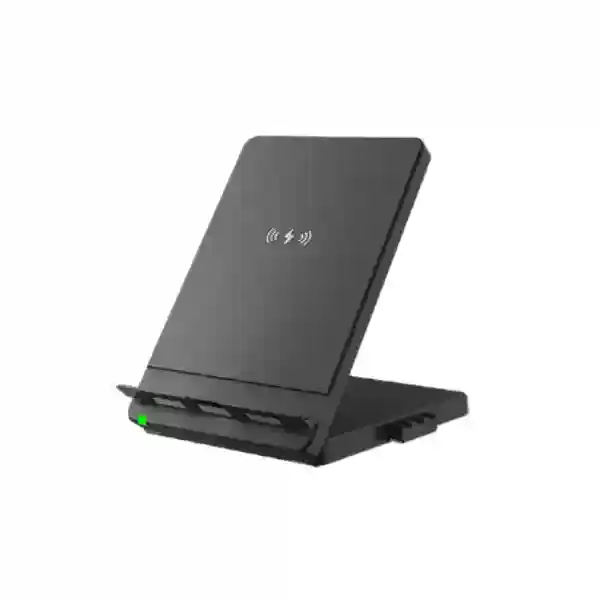
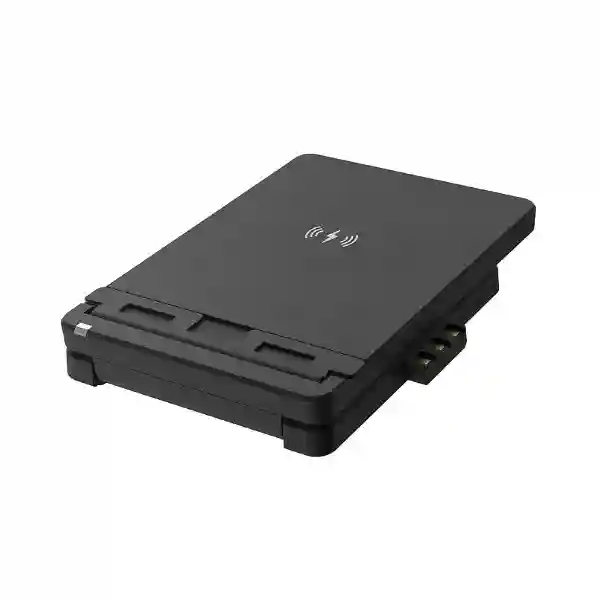
Yealink WHC60 Wireless Charger – WH66/WH67 Mobile Workstation Accessory
The Yealink WHC60 is a compact wireless charging stand engineered to extend the desktop usefulness of Yealink WH66 and WH67 professional wireless headset workstations. Rather than adding another loose charging pad to a busy desk, the WHC60 provides a dedicated place for a compatible mobile phone beside the headset base, with an adjustable panel that keeps the handset visible during the working day. Yealink positions the accessory as a plug-and-play addition: it can attach to the compatible headset base, and Yealink support documentation also describes powering the charger from a USB charger adapter through USB Type-C. This makes the product particularly relevant to organizations that already use WH66 or WH67 workstations and want a more coherent desktop arrangement.
For procurement teams in Uganda, the central buying question is not whether the WHC60 is a general-purpose communications device; it is whether the accessory fits the exact Yealink workstation and mobile-device workflow being standardized. The product does not replace a headset, desk phone or conferencing endpoint. Its role is focused: provide wireless phone charging and an adjustable viewing position as part of a WH66/WH67 desk setup. A user can pair a mobile phone to the WH66/WH67 environment through Bluetooth, place the phone on the WHC60 and position the display for convenient viewing during mobile video meetings while continuing to use the headset audio experience.
This focused design is valuable in executive offices, reception desks, customer-service workstations, shared administrative areas and hybrid-work environments where mobile phones remain an important communications channel. Buyers should verify that the intended smartphone supports compatible wireless charging and should identify the exact WH66 or WH67 base variant before ordering. FourTeck Uganda can help validate the bill of materials and prepare a quotation for single-site or multi-site deployment.
Procurement Fact Rail
WHC60
Wireless charging stand
Yealink WH66 / WH67
Plug-and-play
Adjustable panel
Quote on request
The fact rail should be read as a compatibility summary rather than a substitute for project validation. Yealink’s published material specifically associates the WHC60 with WH66 and WH67. The accessory is intended for wireless charging of a compatible mobile phone and for positioning that phone as part of a desktop mobile workstation. For large orders, buyers should state the headset base model, number of desks, smartphone estate where known, delivery city and whether the requirement forms part of a larger Yealink rollout.
Operational Architecture and Product Overview
The WHC60 solves a small but persistent workplace problem: users often operate a professional headset, computer, desk phone and smartphone simultaneously, yet the smartphone is left flat on a desk, connected to a loose cable or placed away from the main communications position. In a WH66/WH67 environment, the WHC60 consolidates the mobile device into the workstation. Its charging surface supports wireless charging for compatible phones, while the adjustable structure presents the display at a useful angle. This arrangement can reduce repeated handling of charging cables and gives the user a predictable place to return the phone.
The architecture is intentionally simple. There is no separate network stack, call-control server, subscription platform or user account required for the charger itself. Communications functions remain with the paired phone and WH66/WH67 workstation. The WHC60 provides the physical charging and positioning layer. That distinction matters to IT teams because it means the accessory does not create another managed endpoint on the corporate network. Deployment planning therefore focuses on mechanical fit, charging compatibility, workstation power arrangement and the user’s existing Yealink headset environment.
Yealink describes the accessory as plug-and-play and documents two practical connection approaches. In the integrated arrangement, the charger connects to the WH66/WH67 base. Yealink support material also states that it may connect to a USB charger adapter using a USB Type-C cable. This second arrangement can be useful during staging, testing or desk-layout planning where a buyer needs to understand how the accessory will be powered. Exact adapters, cables and phone charging behavior should be confirmed against the ordered package and the mobile-device manufacturer’s requirements.
The workstation concept becomes most useful when a user connects a mobile phone to the WH66/WH67 through Bluetooth. The phone can remain positioned on the charger while its display is used for a mobile video meeting, and the professional headset handles audio. The result is not a new conferencing system but a more coherent use of equipment already present at the desk. For organizations with many identical workstations, that consistency can simplify user orientation and desk standards.
Business Outcomes and Value Analysis
Key Hardware and Usage Highlights
| Capability | Operational Meaning |
|---|---|
| Wireless charging | Charges a compatible mobile phone without repeatedly attaching a phone charging connector. |
| Adjustable panel | Supports a user-selected phone viewing position for desk use and mobile video meetings. |
| WH66/WH67 integration | Designed as an accessory to Yealink’s compatible professional wireless headset workstation family. |
| Plug-and-play design | Reduces installation complexity and avoids a separate software onboarding process for the charger. |
| USB Type-C power option | Yealink documentation describes connection to a USB charger adapter with Type-C cable as an alternative to direct base connection. |
Technical Specifications Ledger
| Specification | Confirmed Detail | Buyer Note |
|---|---|---|
| Brand | Yealink | Match accessory sourcing with the existing Yealink estate. |
| Model | WHC60 | Use model reference on RFQ and purchase order. |
| Manufacturer part reference | 1308017 commonly listed | Confirm regional packaging on quotation. |
| Primary compatible headset workstations | WH66 and WH67 | Do not assume compatibility with unrelated Yealink bases. |
| Charging function | Wireless mobile-phone charging | Phone must support compatible wireless charging. |
| Mechanical feature | Adjustable panel | Useful for selecting screen viewing angle. |
| Installation | Plug-and-play | No independent network provisioning is required for the charger. |
| Alternative connection | USB charger adapter via USB Type-C cable | Verify adapter/cable inclusion for the ordered package. |
| Package content | WHC60 | Published datasheet identifies WHC60 as package content. |
| Gift-box size | 102 × 30 × 138 mm | Useful for bulk logistics planning. |
| Carton quantity | 50 pieces | Relevant to distributor-scale orders. |
Where a specification is not published in Yealink’s WHC60 datasheet, buyers should avoid treating third-party catalog values as guaranteed manufacturer specifications. For example, charging performance can depend on the phone, alignment, power source and device implementation. FourTeck can confirm the commercially supplied configuration before order acceptance.
Configuration and Sizing Worksheet
Step 1 – Count eligible workstations. Identify desks using WH66 or WH67 bases. Separate these from other Yealink headset families because the WHC60 should not be assumed to fit every base. Record each site, department and required quantity.
Step 2 – Validate mobile charging needs. Confirm that the user population relies on phones that support wireless charging. Mixed phone fleets may require a pilot test, particularly where protective cases, unusual device dimensions or corporate rugged cases are used.
Step 3 – Review desk layout. Check that the charging panel and positioned phone will not interfere with monitors, keyboard movement, document stands or other desktop equipment. The adjustable panel is intended to improve visibility, but physical clearance still matters.
Step 4 – Confirm the power arrangement. Decide whether the planned configuration will use direct integration with the compatible WH66/WH67 base or the alternative USB charger adapter arrangement described by Yealink. Include any required power accessories in the bill of materials after confirmation.
Step 5 – Prepare the quotation request. Provide model, quantity, destination, organization name, desired delivery schedule and whether WH66/WH67 headsets are already installed or are part of the same purchase. For multi-branch rollouts, provide a site-by-site quantity schedule. This allows freight, staging and packaging requirements to be evaluated accurately.
Deployment Scenarios and Industry Use Cases
Large enterprises and multi-site offices: The WHC60 is best treated as a workstation-standard accessory. An organization can define an executive, supervisor or hybrid-worker desk bundle containing the selected WH66/WH67 headset workstation plus WHC60 where mobile charging is required. Standardization makes replacement and relocation easier because facilities and IT teams know what belongs at each desk.
Financial institutions: Branch managers, relationship teams and operations staff frequently use multiple communications channels. A dedicated phone position can help maintain a tidy customer-facing desk while keeping the mobile device visible. Procurement should still follow the institution’s device and charging policies, especially for managed smartphones.
Education and campus administration: Administrative offices, admissions teams and departmental coordinators may use professional headsets alongside institution-issued smartphones. The WHC60 can provide a consistent charging position where compatible WH66/WH67 bases are deployed.
Government and structured procurement: The product’s narrow scope makes tender description relatively clear: Yealink WHC60 wireless charging stand for WH66/WH67, plug-and-play, adjustable panel, wireless charging capability. Procurement teams should request exact model references and compatibility confirmation rather than accepting a generic wireless charging pad as an automatic equivalent.
Three Technical Deep Dives
1. Charging and Physical Workstation Architecture
Unlike a network appliance, the WHC60’s engineering value is physical integration. It combines a wireless charging surface with an adjustable phone support and a connection method designed around the WH66/WH67 workstation. This reduces the number of unrelated accessories occupying the desk. Wireless charging also changes the user interaction: the phone can be placed and removed without inserting a charging connector every time. In environments where employees move between calls, meetings and mobile tasks, that simple behavior can make charging more likely to happen consistently. Buyers should remember that the phone itself determines whether wireless charging is supported and that cases or accessories may affect alignment.
2. Communications Ecosystem and Operational Control
The WHC60 does not introduce its own communications platform. The mobile phone can connect to the WH66/WH67 workstation through Bluetooth, while the charger keeps the phone positioned and powered. This separation is operationally useful because administrators continue to manage the phone, headset environment and collaboration applications through their normal processes. There is no separate charger subscription to budget for. Firmware and communications policy remain associated with the relevant managed devices rather than the passive desktop charging role of the WHC60.
3. Availability, Resilience and Replacement Planning
High availability for a desktop accessory means maintaining practical spares rather than building electronic redundancy into each desk. For a large rollout, procurement can hold a small replacement pool so a damaged charging stand can be swapped without affecting the underlying headset or mobile phone. Because the WHC60 is an accessory, a failure should not be confused with a failure of the WH66/WH67 communications system itself. Users can continue using their phone and headset while the charging accessory is replaced. This modularity supports simple service-desk troubleshooting: isolate the charger, confirm the phone’s wireless charging capability, inspect the power connection, test with a known compatible setup and replace the accessory where necessary.
Pre-Purchase Buyer Gap Checklist
Is a license required? The charger itself is a hardware accessory and no separate charger subscription is identified by Yealink. Will it work with every Yealink headset? Procurement should not assume so; the manufacturer specifically positions WHC60 for WH66/WH67. Will every smartphone charge? The phone must support compatible wireless charging, and physical cases can influence charging behavior. Does it replace the WH66/WH67 base? No. It extends the workstation and is not a substitute for the headset base. Can it be powered separately? Yealink support documentation describes connection to a USB charger adapter through USB Type-C as well as direct base connection. Should buyers specify exact part references? Yes. Use WHC60 and request confirmation of the supplied regional package. What about lifecycle planning? For projects with long deployment windows, ask for availability confirmation at quotation stage and consider ordering the required accessory quantity with the associated headset rollout rather than relying on later spot purchases.
Another important question is whether the organization genuinely benefits from integrated wireless charging at every desk. Some users may rarely use a mobile device during desk work, while executives, managers, reception personnel and hybrid workers may find the accessory substantially more useful. Segmenting requirements can improve cost control. A pilot deployment can also reveal how corporate phone cases, desk dimensions and user habits affect the real-world experience before a large purchase order is released.
Uganda Procurement and Delivery Logistics
FourTeck Uganda can prepare commercial quotations for Yealink WHC60 requirements ranging from individual replacement accessories to organization-wide workstation projects. For an accurate quotation, buyers should provide the required quantity, destination, associated WH66/WH67 models, preferred delivery schedule and whether other Yealink products are being sourced in the same order. Consolidating accessories with the main communications equipment can simplify receiving and asset allocation.
Order processing should include model verification before dispatch. For multi-site organizations, units can be planned against branch quantities so that the receiving team can allocate accessories efficiently. Delivery timing depends on confirmed stock position, order volume, import requirements and destination; therefore project schedules should be based on the written quotation rather than an assumed generic lead time. Organizations with fixed rollout dates should communicate those dates at RFQ stage.
Local Coverage Matrix
FourTeck can support procurement planning for organizations operating in Kampala, Entebbe, Jinja, Mbarara and Gulu, as well as projects serving additional locations across Uganda. Kampala deployments may include corporate headquarters, contact teams and administrative offices; Entebbe requirements may involve hospitality, aviation-linked offices and regional operations; Jinja and Mbarara projects often require coordination with branch or institutional IT teams; and Gulu deployments can benefit from clear advance quantity planning where equipment is being consolidated for regional delivery. For every location, the recommended process is the same: confirm the WH66/WH67 workstation estate, identify the number of users needing wireless mobile charging, validate the phone fleet where practical and request a site-specific commercial quotation.
Cross-Border and Regional Supply Chains
Organizations operating across East Africa or the Gulf can coordinate communications accessory requirements through FourTeck’s regional web presence. Visit FourTeck Uganda for Uganda requirements, FourTeck Kenya for Kenya, FourTeck Africa for broader African projects, FourTeck UAE for United Arab Emirates requirements and FourTeck Kuwait for Kuwait. Cross-border projects should use a consolidated model and quantity schedule while still accounting for destination-specific freight, tax, warranty handling and delivery terms. Standardizing on the same accessory reference can simplify support across offices, but each regional order should be commercially confirmed.
Related Yealink Workstation Products
The WHC60 belongs in a broader professional communications bill of materials rather than being evaluated in isolation. Buyers commonly assess it alongside the Yealink WH66 and WH67 wireless headset workstations, compatible Yealink desk phones, USB communications accessories, busy-light options and other unified communications endpoints. Explore FourTeck Uganda for the wider portfolio and use the contact page to request related model recommendations. When preparing a project, list the required headset model, charger quantity, desk-phone platform and collaboration environment. This helps avoid accessory mismatch and enables the commercial team to review the complete workstation instead of quoting disconnected components.
FourTeck Technical Service Capabilities
A reliable accessory deployment begins with bill-of-materials verification. FourTeck can review the requested WHC60 quantity against the stated WH66/WH67 environment, flag obvious compatibility gaps and help organize accessory quantities by site. For larger communications projects, staging can include verification of model references, packaging and allocation before shipment. Where the order includes active Yealink communications equipment, firmware and configuration requirements can be addressed as part of the wider project scope where applicable.
Post-sales troubleshooting for the WHC60 should follow a disciplined sequence: confirm that the phone supports wireless charging, remove possible case-related interference for testing, verify that the charger receives power, test the connection method, and compare behavior with a known compatible device if available. This avoids unnecessarily replacing the headset workstation when the issue may relate to phone compatibility, positioning or power. For warranty handling, retain purchase documentation, model information and a clear description of the fault.
Extended Technical FAQ
Is the Yealink WHC60 designed specifically for WH66 and WH67?
Yes. Yealink’s product page and datasheet identify the WHC60 as a wireless charger for WH66/WH67. Buyers should therefore treat those models as the confirmed compatibility baseline. If a project uses another Yealink headset family, request a compatibility check rather than assuming the physical connection is identical. This is particularly important for bulk procurement because a generic description such as “Yealink wireless headset charger” is not precise enough to protect against ordering the wrong accessory.
Does the WHC60 charge the headset?
Its highlighted purpose is wireless charging of a compatible mobile phone while working with the WH66/WH67 workstation. The WH66/WH67 base retains its own role in the headset system. Procurement documents should therefore describe WHC60 as a mobile-phone wireless charging stand accessory for the compatible headset workstation, not as a replacement headset charging base. Keeping those functions distinct prevents confusion during tender evaluation and receiving.
Does the phone need Bluetooth for charging?
Bluetooth and wireless charging serve different functions. Wireless charging powers a compatible phone. Bluetooth is used when the user wants the mobile phone to communicate through the WH66/WH67 headset environment. Yealink describes a workflow where the phone is connected to WH66/WH67 through Bluetooth, placed on the WHC60 and positioned for a video conference. A phone may therefore use the charging function independently of whether a particular call workflow is active, subject to compatibility.
Can the viewing angle be adjusted?
Yes. An adjustable panel is one of Yealink’s published key features for the WHC60. This matters because the product is intended to do more than leave the phone flat on a charging surface. Users can position the screen for easier viewing during calls or routine desk work. Exact preferred positioning will vary with phone size, desk height and user posture, so organizations planning a large rollout may want to test the accessory at representative desks.
Does the WHC60 require software installation or a subscription?
Yealink presents the WHC60 as a plug-and-play hardware accessory. No separate software subscription is identified for the charger itself. The broader communications environment may of course include applications, headset software or collaboration services associated with the user’s phone, PC or WH66/WH67 workstation, but those should not be confused with a recurring license for the WHC60 charging stand. This makes accessory budgeting relatively straightforward.
How can the WHC60 be connected?
Yealink support documentation describes direct connection to the WH66/WH67 base and also an alternative connection to a USB charger adapter through a USB Type-C cable. The best arrangement depends on the workstation and supplied accessories. Buyers should confirm what is included in the quoted package and should not assume that every third-party power adapter provides the intended behavior. For standardized corporate deployment, document one approved connection method for users and support teams.
What should be checked before ordering in quantity?
Start with the exact headset base models and total number of eligible desks. Then review the corporate smartphone fleet for wireless-charging support, especially if rugged or unusually thick cases are mandatory. Confirm desk clearance and decide whether every user needs the accessory or only selected roles. Finally, request written confirmation of model, quantity, commercial terms, delivery location and warranty handling. For multi-site projects, break the order into site quantities even if procurement is consolidated.
What is included in the published package information?
Yealink’s datasheet lists the WHC60 as the package content and provides logistics information including a gift-box size of 102 × 30 × 138 mm and a carton quantity of 50 pieces. Those details are useful for warehouse and bulk-shipping planning. Exact regional packaging and any power accessories should still be confirmed on the commercial quotation because procurement should rely on the supplied SKU configuration rather than assuming all markets package accessories identically.
How should a charging problem be diagnosed?
First verify that the mobile phone itself supports wireless charging. Next check alignment on the charging surface and test without a thick or unusual case. Confirm that the WHC60 is receiving power through the intended connection. If possible, test a second known-compatible phone and compare the behavior. These steps help distinguish phone compatibility or positioning issues from an accessory fault. For persistent problems, record the model references and purchase details before requesting technical or warranty assistance.
Is the WHC60 suitable for enterprise standardization?
It can be a sensible standardized accessory where WH66/WH67 workstations are already part of the approved desktop design and employees regularly use wireless-charging smartphones. The strongest case is consistency: users receive the same charging position and support teams work with a known accessory. It is less useful to standardize blindly across desks that use different headset families or phones without wireless charging. A role-based or pilot-led deployment can produce a more efficient bill of materials.
Request a Yealink WHC60 Procurement Quote
Send FourTeck Uganda your required quantity, delivery location and the Yealink WH66/WH67 models in your environment. For larger deployments, include a branch-by-branch quantity schedule and indicate whether the WHC60 accessories will be purchased with new headset workstations or added to an existing estate. This enables compatibility review, commercial preparation and logistics planning around the actual project rather than a generic accessory request.



Reviews
There are no reviews yet.