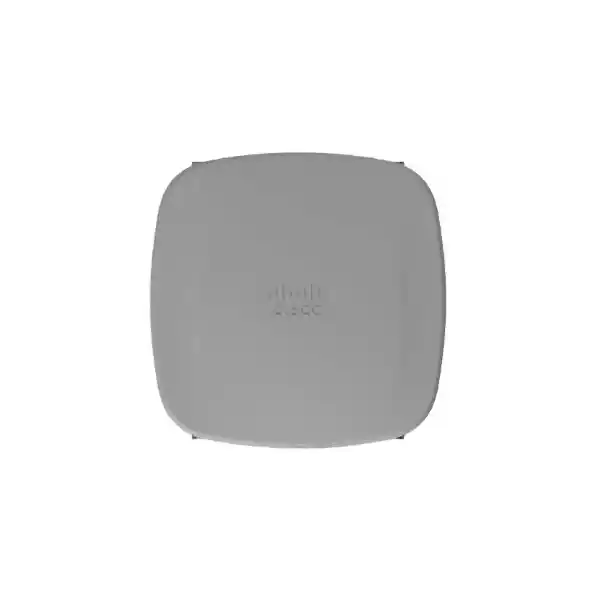
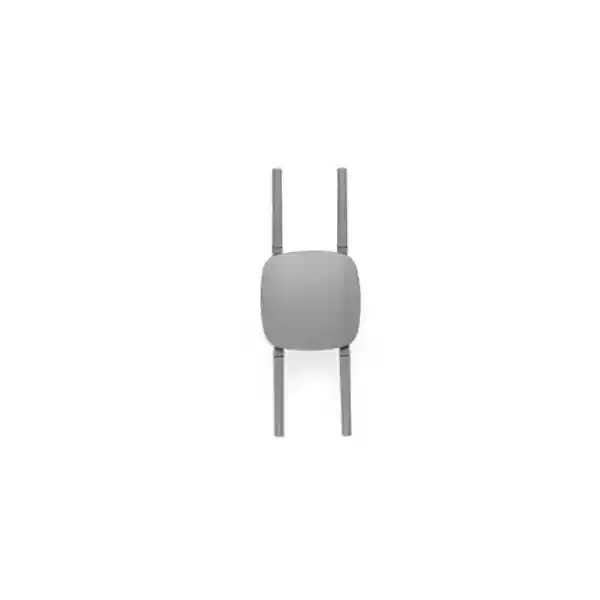
Cisco Meraki CW9163E-MR Outdoor Wi-Fi 6E Access Point for Enterprise Networks
The Cisco Meraki CW9163E-MR brings centrally managed enterprise wireless connectivity to outdoor areas where indoor access points cannot provide suitable weather protection or predictable radio coverage. Designed for low- and medium-density installations, it combines concurrent 2.4 GHz, 5 GHz and conditional 6 GHz wireless operation with a rugged IP67 enclosure and a multigigabit wired uplink. Organizations evaluating wireless infrastructure for campuses, business compounds, logistics premises and visitor spaces can use this model as a building block in a surveyed, properly powered and licensed deployment.
The MR designation identifies the Meraki Dashboard-managed version. This distinction matters when specifying a wireless estate: the chosen management mode, license, antennas, regulatory domain and upstream network capabilities should all match the planned installation. A product quote should therefore cover the complete working system rather than the access point alone.
Request a Uganda Project Quote
Procurement Facts at a Glance
CW9163E-MR, Meraki cloud-managed outdoor access point
Wi-Fi 6E, concurrent 2.4/5/6 GHz radios where authorized
2.5 GbE uplink; 802.3at PoE+ for full operation
Stock, lead time, regional eligibility and final price on quotation
Outdoor Wireless Architecture
The platform uses 2×2:2 radio chains across its three client bands, a separate tri-band scanning radio for wireless visibility, and a 2.4 GHz radio for supported IoT functions. The dedicated monitoring capability helps administrators examine the surrounding radio environment without treating a simple signal-strength reading as a complete wireless health assessment. A 2.5 GbE port provides headroom beyond standard gigabit access connections, subject to compatible switching and cabling. Cisco advertises an aggregate maximum wireless frame rate of up to 3.9 Gbps; this is a radio specification, not a guaranteed application throughput figure or a single-client speed promise.
Outdoor planning begins with client devices, obstructions and desired service quality. Trees, building facades, vehicles, crowds and wet surfaces alter propagation. The higher-frequency 6 GHz band may provide useful additional spectrum where permitted, but it does not automatically extend range. Antenna direction, mounting position and regulatory limits govern the actual coverage footprint. Select supported antennas according to whether the installation needs broad surrounding coverage or a focused service zone.
Business Outcomes
- Performance integrity: Separate traffic bands and a multigigabit uplink support thoughtful capacity allocation. Conduct a site survey and estimate active rather than merely registered clients.
- Outdoor resilience: The IP67 enclosure is built for exposed installations, while correct seals, cable routing and surge protection remain essential.
- Scalability: Centralized Dashboard administration can simplify consistent policies across multiple supported sites.
- Security: Enterprise authentication, segmentation and wireless intrusion monitoring help establish controlled access when configured with the broader network.
- Operational simplicity: Remote visibility and configuration can reduce unnecessary site visits, subject to connectivity and license status.
- Lifecycle economics: Include antennas, license renewals, power, mounting, installation, spares and support in the total project budget.
Hardware and Software Highlights
The CW9163E-MR is not an all-in-one outdoor bridge or a substitute for a designed campus distribution network. Its strengths are enterprise access, management consistency, radio flexibility and outdoor packaging. The 802.3at power option permits the full 2×2 tri-band configuration and up to a 2.5 Gbps link. When operated on 802.3af, the documented reduced-power mode limits 2.4 GHz and 5 GHz to 1×1, disables 6 GHz and reduces the wired link speed to 1 Gbps. Procurement teams should therefore verify switch power budgets before ordering, particularly when many units share one access switch.
Technical Specifications
| Specification | CW9163E-MR |
|---|---|
| Management | Meraki Dashboard cloud-managed variant; applicable subscription required |
| Wireless standard | 802.11ax / Wi-Fi 6E |
| Client radios | 2×2 2.4 GHz, 2×2 5 GHz, 2×2 6 GHz; 6 GHz subject to local approval |
| Additional radios | Tri-band scanning and 2.4 GHz IoT radio |
| Maximum aggregate frame rate | Up to 3.9 Gbps theoretical across radios |
| Ethernet | One 2.5 Gigabit multigigabit port |
| Power | 802.3at PoE+ up to 25.5 W; reduced 802.3af operation up to 14 W |
| Ingress rating | IP67 |
| Dimensions | 245 × 245 × 63.5 mm, excluding mounting brackets |
| Weight | Approximately 1.50 kg |
| Operating temperature | −40°C to 65°C without solar derating; −40°C to 55°C with solar derating |
| Humidity | 5–95% noncondensing |
| Memory | 2048 MB DRAM, 1024 MB flash |
| Manufacturer warranty baseline | Cisco documentation lists one-year outdoor AP hardware warranty with advanced replacement; verify local fulfillment terms |
| Antennas | External supported antennas required and sold separately |
Configuration and Sizing Worksheet
1. Map demand: Record the site footprint, expected simultaneous users, device types, target applications and peak-hour traffic. 2. Survey: Identify mounting structures, line of sight, interference, lightning exposure and likely client roaming routes. 3. Validate switching: Check 802.3at power budgets, 2.5 GbE availability, VLAN design and outdoor-rated cabling. 4. Select antennas: Match supported omnidirectional or directional options to the coverage geometry; avoid assuming that legacy antenna accessories are compatible. 5. Review subscriptions: Request the applicable Meraki license term and support entitlement as separate quoted line items. 6. Confirm legal operation: Validate the correct regulatory variant and 6 GHz authorization for Uganda before specifying that band in a design. 7. Prepare acceptance criteria: Define signal, throughput, roaming and authentication tests for commissioning.
Deployment Scenarios
Enterprise Compounds and Multi-Site Networks
Use outdoor access points to extend managed service from a wired campus backbone into pedestrian routes, courtyards and designated work areas. Maintain consistent authentication and VLAN policies while surveying each outdoor zone independently. Avoid assuming that a single unit will cover an entire industrial compound.
Financial Institutions
Outdoor access may support controlled staff areas or authorized visitor zones. Segregate traffic, use enterprise identity policies and document change management. Wireless coverage should not be treated as a replacement for transaction-network security architecture.
Education and Hospitality
Campus walkways, event spaces and hotel gardens benefit from targeted outdoor coverage. Plan around busy periods, mixed client capabilities and physical obstacles. Guest isolation and bandwidth policies should be validated before public access is enabled.
Government and Public Facilities
For public-sector procurement, specify regulatory compliance, documented support entitlements, approved management practices and installation acceptance testing. Sensitive environments may impose additional network architecture or data-governance requirements.
Technical Deep Dives
Radio Processing and Uplink Design
Multiple simultaneous radios permit client distribution by capability and coverage requirement. OFDMA and MU-MIMO can improve spectrum utilization under appropriate conditions, but performance depends on compatible clients and realistic RF conditions. The dedicated scanning radio assists visibility into the surrounding wireless environment. Design the 2.5 GbE uplink as part of an end-to-end network: a fast AP interface cannot compensate for an oversubscribed switch uplink, constrained WAN service or excessive interference.
Cloud Management and Security Operations
The Meraki Dashboard provides centralized configuration and monitoring for supported deployments. Administrators should define access roles, secure identity integration, firmware maintenance windows, alert handling and documentation ownership. The exact license entitlement and term must be verified in the quote. Wireless security depends on correct authentication, segmentation and operational response, not merely the presence of a security feature in the product description.
Resilience and Recovery Planning
Outdoor AP reliability requires more than a weather-resistant enclosure. Installers must provide sound mounting, protected cabling, suitable grounding and surge mitigation according to site engineering standards. Plan spare units and replacement procedures for locations where wireless service is operationally important. Document the network settings needed to replace failed hardware and assess the implications of upstream switch, power or internet failures on local service and cloud administration.
Pre-Purchase Questions Worth Resolving
Does the offer include the access point, compatible external antennas, mounts and licensing? Is the selected hardware approved for the destination country? Will 6 GHz be available under current local rules? Can the proposed PoE switch deliver full 802.3at power to every connected access point? Is the network cable suitable for outdoor use and the intended distance? Are weather seals, cable entries, grounding and surge devices specified? Has the antenna coverage pattern been reviewed against the actual site? What is the lead time for the exact SKU, and who handles warranty escalation? A complete written response to these questions prevents costly omissions during installation.
Uganda Procurement and Delivery
FourTeck supports quotation-led purchasing for Ugandan business and institutional projects. Share the destination, quantity, required license duration, antenna type and installation schedule so the offer can be aligned to the bill of materials. Stock and delivery estimates are confirmed when quoted rather than represented as guaranteed availability. Buyers in Kampala, Entebbe, Jinja, Mbarara and Gulu should provide a delivery address and any site-access constraints. Regional sourcing coordination may also involve Kenya, African markets, UAE or Kuwait, with FourTeck Uganda as the local enquiry point.
Related Equipment and Planning Resources
A complete installation may require Cisco-approved CW9163E omnidirectional antennas, supported directional patch antennas, compatible PoE+ switching, multigigabit network ports, outdoor-rated Ethernet cable, protective accessories and suitable Meraki licensing. Compare related Cisco outdoor wireless solutions and confirm accessory part numbers against manufacturer documentation before issuing a purchase order. For coordinated procurement of the AP and supporting infrastructure, send the full equipment schedule to FourTeck.
Technical Service and Project Validation
FourTeck can discuss specification review, bill-of-materials checks, accessory matching, staging requirements and post-sales coordination as part of a scoped quotation. Any requested configuration, firmware preparation, onsite work or support package should be explicitly included in the commercial offer. Where a customer already operates a Meraki estate, providing the current management architecture and license details helps avoid mismatched assumptions.
Frequently Asked Questions
Is the CW9163E-MR suitable for outdoor use?
Yes. The manufacturer specifies an IP67-rated enclosure and outdoor environmental tolerances. This does not eliminate the need for suitable mounting hardware, correctly installed connectors, weather-protected cabling and surge protection. The installation design must consider the actual site, including sun exposure, wind, drainage and accessibility for future service.
Does the product include antennas?
No. Cisco identifies antennas as separate items. The appropriate supported antenna selection depends on the coverage footprint and regulatory requirements. Ask for antenna part numbers and quantities to be stated explicitly in the quotation; a bare access point should not be mistaken for a complete radiating installation.
Can the 6 GHz band be used in Uganda?
Do not assume it can. The manufacturer states that 6 GHz operation depends on country authorization, certification and software support, with outdoor standard-power operation also subject to applicable coordination requirements. Obtain confirmation for the exact deployment jurisdiction and regulatory variant before basing the coverage plan on 6 GHz.
What power source is needed?
Use a suitable 802.3at PoE+ source for the documented full tri-band configuration. The access point supports a reduced 802.3af mode, but that mode disables 6 GHz and reduces other radio capabilities and uplink speed. Check the total switch PoE budget and cable condition, especially for multiple outdoor units.
Is a Meraki license required?
The CW9163E-MR is the Dashboard-managed variant, so the applicable Meraki cloud-management license and term must be considered in procurement. License options and entitlements should be confirmed against the current vendor offering. Request hardware and subscription pricing as distinct line items so renewal obligations remain visible.
What speeds should users expect?
Cisco lists up to 3.9 Gbps aggregate wireless frame rate across the radios. That figure is not equivalent to one device’s internet speed. Practical results depend on signal strength, client capability, channel width, interference, airtime contention, wired uplink capacity and WAN performance. Validate actual requirements with a site survey and acceptance tests.
Can existing outdoor antennas be reused?
Compatibility must be checked carefully. Cisco lists supported CW9163E antenna models and documents restrictions around third-party antenna use for self-identifying antenna platforms. Reusing a physically connectable antenna does not establish manufacturer support, legal transmit-power compliance or expected performance. Specify supported accessories in the bill of materials.
How does warranty replacement work?
Cisco documentation lists a one-year hardware warranty with advanced replacement for this outdoor access point family. Actual service handling, entitlement validation, shipping arrangements and regional conditions should be confirmed before purchase. Retain serial numbers, invoices and deployment records to simplify any subsequent support request.
Can FourTeck help with a multi-site rollout?
Customers can request a coordinated equipment schedule covering AP quantities, antenna choices, PoE infrastructure, licensing and delivery destinations. Any engineering, staging or installation service should be defined and priced in the quote. Providing a site list and intended deployment dates helps establish a realistic procurement sequence.
Request a Complete CW9163E-MR Quotation
For an accurate Uganda quotation, include the number of access points, site locations, anticipated user density, preferred antenna coverage, existing switch capabilities and desired Meraki license term. FourTeck can use those details to review the proposed equipment scope and clarify accessory, regulatory and delivery assumptions before an order is placed.



Reviews
There are no reviews yet.