ENTERPRISE WIRELESS | UGANDA PROCUREMENT
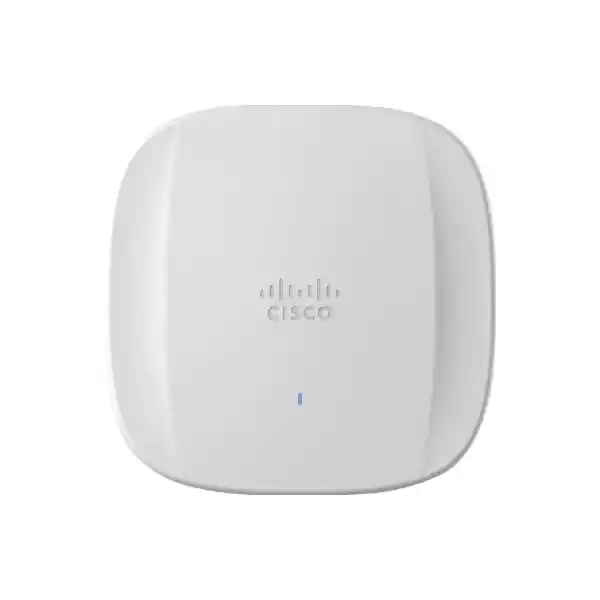
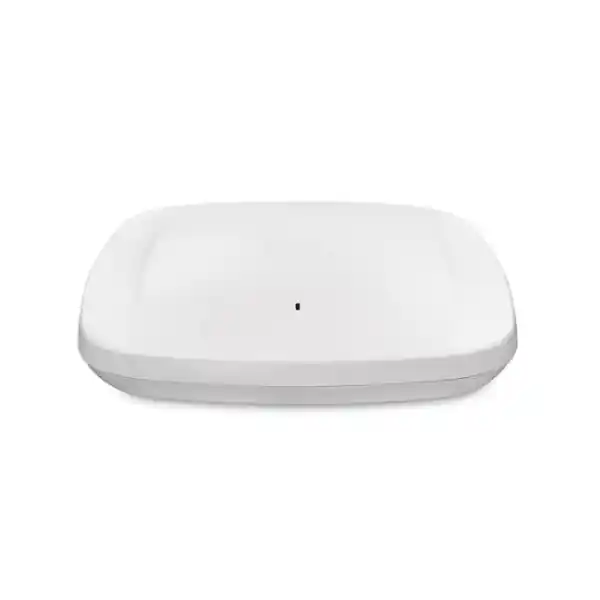
Cisco Meraki CW9164I-MR Wi-Fi 6E Indoor Enterprise Access Point
The Cisco Meraki CW9164I-MR is a cloud-managed, tri-band indoor wireless access point built for organizations that need dependable user connectivity, centralized visibility and an upgrade path to 6 GHz-capable client devices. Rather than selecting wireless hardware from headline speeds alone, IT teams should evaluate the radio design, wired uplink, switch power delivery, licensing obligations and building-specific radio conditions. The CW9164I-MR combines three client-serving bands with dedicated wireless monitoring and Bluetooth Low Energy functions. Its 2.5GbE Ethernet interface is particularly relevant to refresh projects where older 1GbE access switch ports may limit the benefit of higher-capacity radios. The device suits modern offices, education facilities, professional services locations and distributed enterprise estates where a consistent Meraki dashboard operating model is desirable. This is an indoor integrated-antenna model, not a weatherproof outdoor bridge or a standalone broadband router. A successful deployment needs upstream switching, network services, correct licensing, structured cabling and an appropriate wireless design.
FourTeck supports quotation-led purchasing in Uganda. Procurement teams can request hardware-only pricing or a structured bill of materials including cloud subscriptions, power equipment, mounting accessories and rollout considerations. Stock, lead times, applicable warranty route and regulatory suitability should be confirmed against the actual quotation rather than assumed from a generic catalog listing.
Procurement Facts at a Glance
CW9164I-MR, Cisco Meraki cloud-managed indoor access point.
2.4 GHz 2×2:2, 5 GHz 4×4:4, 6 GHz 4×4:4 Wi-Fi 6E client radios.
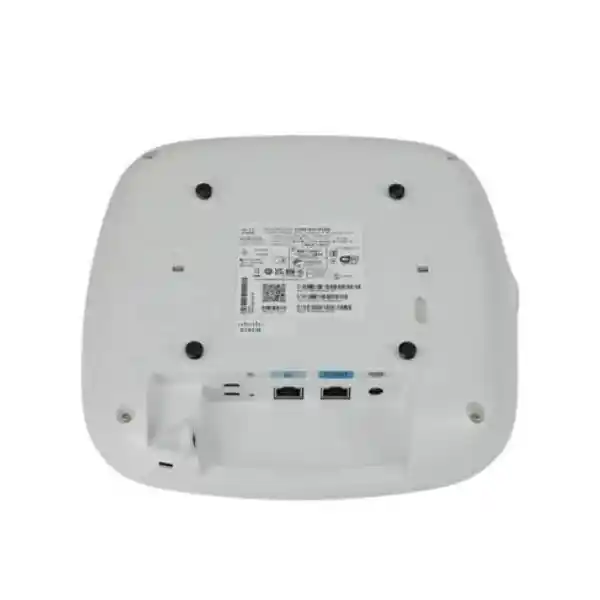
One 100/1000/2.5GBASE-T port; 802.3at PoE+ or 802.3bt UPOE as specified.
Meraki access point license required; verify power accessories, stock, landed cost and warranty with quotation.
The CW9164 family has a manufacturer-stated limited lifetime indoor access point hardware warranty with advanced replacement provisions, subject to applicable terms and regional eligibility. Do not interpret that statement as an unconditional local replacement promise: verify entitlement, registration, coverage and the route for a Uganda-based claim before placing the purchase order.
Wireless Architecture and Operational Role
The access point serves legacy and current wireless clients across 2.4 GHz and 5 GHz while enabling supported Wi-Fi 6E devices to use the 6 GHz band where national regulations permit. That distinction matters for mixed device fleets. Older handheld terminals, printers and embedded systems often remain on 2.4 GHz; laptops and phones may prefer 5 GHz; compatible modern endpoints may benefit from additional 6 GHz spectrum. The presence of 6 GHz does not automatically increase the speed of a device that lacks 6 GHz radio support. Similarly, a nominal aggregate frame rate of up to 7.49 Gbps is a sum of radio capabilities, not a guaranteed per-client download speed or the throughput available on a single Ethernet port.
A dedicated tri-band scanning radio provides continuous spectrum analytics and wireless intrusion detection and prevention capabilities without relying exclusively on the client-serving radios for monitoring. Integrated Bluetooth Low Energy scanning and beacon support offers an additional foundation for approved location and IoT-related applications. The radio design supports OFDMA, MU-MIMO, beamforming, traffic prioritization and modern Wi-Fi efficiency features. Benefits depend on client population, channel plan, interference, configuration and software support.
For network operations, Meraki cloud management provides a consistent place to organize access points, configure SSIDs, apply access policies, examine client connectivity and troubleshoot performance. It is important to distinguish the hardware family’s broader management flexibility from this particular MR ordering SKU. Buyers should specify the intended management persona and licensing from the outset rather than assuming controller-mode conversion is included in every commercial arrangement.
Enterprise Outcomes
- Capacity planning: Tri-band service can distribute compatible devices across available spectrum. Validate coverage and airtime requirements with a predictive and, where practical, on-site survey.
- Continuity: Cloud-based management and dedicated monitoring help administrators identify connectivity issues. High availability still depends on upstream switching, WAN, power and network architecture.
- Expansion: A repeatable access point profile helps teams deploy multiple floors and branches while retaining local RF tuning.
- Access security: Support for enterprise wireless security and guest segmentation enables policy-led access when identity, VLANs and firewall controls are properly designed.
- Operational visibility: Client diagnostics, application analytics and radio monitoring can shorten investigation cycles for service desk teams.
- Investment control: A 2.5GbE uplink offers headroom when matched with capable cabling and switching, while subscription and support costs must be modeled over the planned ownership period.
- Energy planning: The manufacturer specifies up to 25 W without USB on PoE+ and up to 30.5 W with USB under UPOE. Budget switch power across all ports, not only per-device consumption.
Technical Specifications
| Specification | Manufacturer-stated detail |
|---|---|
| Model | CW9164I-MR |
| Wireless standards | 802.11ax Wi-Fi 6E; backward-compatible supported 802.11 standards |
| Client radios | 2.4 GHz 2×2:2; 5 GHz 4×4:4; 6 GHz 4×4:4 |
| Aggregate frame rate | Up to 7.49 Gbps, theoretical across client radios |
| Additional radios | Dedicated tri-band scanning; Bluetooth Low Energy |
| Antennas | Integrated omnidirectional; peak gains 3 dBi at 2.4 GHz, 5 dBi at 5 GHz, 4 dBi at 6 GHz |
| Wired interface | 1 x 100/1000/2.5GBASE-T RJ45 |
| Other interfaces | USB 2.0 host, 4.5 W budget; 54 V DC power option |
| Power | 802.3at PoE+ up to 25 W without USB; 802.3bt UPOE up to 30.5 W with USB; 802.3af unsupported |
| Dimensions | 241.3 x 241.3 x 56.9 mm excluding mounting plate |
| Weight | Approximately 1.60 kg |
| Operating conditions | 0 to 50 degrees C; 10–90% noncondensing humidity |
| Mounting | Ceiling, wall or desktop; AIR-AP-BRACKET-2 included per manufacturer ordering information |
| Management | Meraki dashboard for MR SKU; appropriate AP license required |
Technical reference: Cisco Meraki CW9164 manufacturer datasheet. Check current software, region and ordering terms before purchase.
Sizing and Configuration Worksheet
Step 1: Count users and endpoints. Record concurrent laptops, phones, scanners, voice devices and guest clients rather than relying on employee headcount alone. Include meeting-room peaks, scheduled training events and seasonal demand. Step 2: Map the building. Identify wall materials, ceiling heights, metal shelving, elevator shafts and sources of RF noise. A floor plan is the starting point, not a substitute for a validated survey. Step 3: Plan spectrum. Document 2.4 GHz legacy dependencies, 5 GHz channel reuse and 6 GHz client readiness; confirm Uganda-specific 6 GHz regulatory permissions and supported channels before enabling the band. Step 4: Verify switching. Check 2.5GbE availability, cable condition, LLDP and PoE budgets. Standard 802.3af alone is insufficient. Step 5: Select licensing. Quote an eligible Meraki license for every access point and confirm subscription term, renewal model and account ownership. Step 6: Specify installation. List brackets, cable routes, uplink patch leads, switch ports, UPS capacity and commissioning responsibilities. Step 7: Document acceptance. Define coverage, roaming, guest access, application performance and security tests before rollout.
Deployment Patterns by Industry
Multi-floor corporate offices
A common layout connects ceiling-mounted access points to multigigabit PoE switches in floor distribution closets. SSIDs may separate managed employee endpoints, contractors and visitors. Firewall policies, identity services and VLAN design should follow the organization’s security standards. Radio placement should account for conference-room density, glass partitions and neighboring tenants rather than simply placing one device in every corridor.
Banking and financial services
Financial institutions typically need strict separation between regulated business systems, guest devices and building services. Use enterprise authentication, auditable administrative access and carefully scoped management permissions. Wireless monitoring can support detection and troubleshooting, but it does not replace network segmentation, incident response or endpoint protection. Branch connectivity should be assessed for dashboard reachability and the operational effect of WAN interruptions.
Education and campuses
Classrooms and shared learning spaces experience abrupt changes in client density. Size by simultaneous device use and application load, especially when video lessons or online examinations are involved. Build policies for student, faculty, guest and facility devices. Confirm whether existing client hardware supports 6 GHz; many deployed school devices will continue to rely on 5 GHz or 2.4 GHz.
Government and public administration
Public-sector teams should align cloud-management requirements with procurement rules, data governance, national radio regulations and approved security controls. Tender documentation should specify the exact SKU, licensing, acceptance tests, warranty evidence, import requirements and expected support response. Avoid assuming that the device itself establishes regulatory or security compliance for the entire network.
Technical Deep Dives
Radio efficiency and wired uplink design
Wi-Fi 6E capacity is influenced by channel width, spatial streams, signal quality, contention, client radio capabilities and protocol overhead. OFDMA and MU-MIMO can improve use of airtime under suitable client and traffic conditions, while beamforming helps direct transmissions more effectively. The CW9164I-MR offers 160 MHz channel capability on supported Wi-Fi 6E configurations, subject to regional rules and channel availability. Wide channels are not automatically preferable: they consume more spectrum and may complicate reuse in dense buildings. The 2.5GbE uplink supports greater wired capacity than 1GbE when the upstream switch, cable and network design permit. However, the advertised radio aggregate rate is not the wired forwarding rate, and actual application throughput will be lower.
Cloud administration and firmware operations
The Meraki dashboard operating model can simplify distributed configuration, device inventory, monitoring and troubleshooting. Administrators should establish organization ownership, role-based privileges, multifactor authentication and change-control procedures before claiming hardware. Wireless policies should be tested in a pilot site before broad rollout. Firmware schedules need coordination with operational windows, application dependencies and manufacturer guidance. License status and renewal dates belong in the asset register so that subscription costs and service continuity are visible to finance and IT teams. Confirm exact feature entitlements under the selected license rather than treating every dashboard capability as universally included.
Resilience and recovery planning
A single access point has one wired Ethernet uplink and is not itself a dual-uplink redundant appliance. Network resilience therefore comes from thoughtful overlapping radio coverage, resilient switch architecture, UPS-backed power, reliable DHCP and DNS services, appropriate WAN connectivity and documented recovery procedures. For sites with critical voice or transaction applications, survey coverage at the edge of each cell and test roaming behavior with real devices. Keep spare mounting hardware and agreed replacement procedures in the operations plan. A manufacturer warranty may support hardware replacement but cannot guarantee uninterrupted service if the building has insufficient overlap or if upstream systems fail.
Pre-Purchase Questions That Matter
Is a subscription included? Do not assume so; request hardware and licensing as separate quotation lines. Can a 1GbE switch be reused? A supported gigabit connection may function, but it can constrain uplink capacity; verify PoE+ as well. Does 802.3af provide enough power? No, the manufacturer lists 802.3af as unsupported. Is the power adapter bundled? The datasheet identifies injectors and DC adapters as separately sold items. Does every client get Wi-Fi 6E? Only clients supporting the band and permitted regional operation can use 6 GHz. Can the access point be installed outdoors? This is an indoor model; choose purpose-built outdoor equipment for exposed sites. Will it replace the router? No, it supplies wireless access and still needs appropriate upstream network services. What is the practical client limit? Design around measured application load, airtime and coverage instead of a universal maximum number. What about product lifecycle? Ask for current manufacturer lifecycle and software support notices at quotation time. Is cloud access acceptable? Review organizational governance and operational policies before selecting a cloud-managed architecture.
Uganda Procurement, Delivery and Support Coordination
FourTeck Uganda can prepare a request-for-quotation response around the specified access point quantity, delivery destination and required commercial documentation. Buyers in Kampala and Entebbe may have different handover needs from institutions in Jinja, Mbarara or Gulu, particularly where site access, installer scheduling or multi-branch delivery is involved. Provide the destination, contact person, preferred currency, tax documentation requirements and target commissioning date. Delivery timing and stock are subject to confirmation. For remote sites, allow time for transportation, equipment inspection and commissioning coordination. An effective procurement pack also records license ownership, switch model, power source, installation method and the technical contact responsible for acceptance.
For cross-border programs, the regional FourTeck network can support initial routing of requests across Uganda, Kenya, broader African markets, the UAE and Kuwait. Import duties, local certification, applicable taxes, transit periods and warranty service arrangements must be confirmed for each destination rather than generalized across countries.
Compatible Infrastructure and Related Planning
The CW9164I-MR should be considered as one component of a complete enterprise WLAN. Explore enterprise wireless access points and discuss matching multigigabit PoE switches, 802.3bt injectors, Meraki access point licenses, mounting brackets and structured cabling accessories. Other CW916x models may be appropriate where a different coverage, radio or cost profile is required; comparison should be based on current datasheets and site needs. FourTeck can help review a proposed bill of materials, identify missing power accessories, coordinate staging requirements and outline post-delivery configuration assistance subject to the agreed service scope.
Frequently Asked Questions
1. What is the Cisco Meraki CW9164I-MR?
It is an indoor enterprise Wi-Fi 6E access point with three client-serving frequency bands, a multigigabit Ethernet uplink and dedicated monitoring capabilities. The MR variant is ordered for Meraki cloud management. It provides wireless connectivity to supported client devices and works with upstream switching and network services. It is not an internet subscription, firewall, modem or outdoor wireless bridge. Buyers should specify the MR model exactly to avoid confusion with other management variants in the broader Catalyst 9164 family.
2. Is Meraki licensing mandatory?
Yes. The manufacturer lists a Meraki access point license requirement for the CW9164I-MR. Request the current eligible licensing options, entitlement level and subscription term with the hardware quotation. Confirm whether an existing organization uses a particular licensing model and whether a proposed new purchase fits that arrangement. Include renewals in total cost calculations and assign responsibility for dashboard ownership and license administration. Do not assume that purchasing the access point hardware alone provides a complete licensed production deployment.
3. Can it use 6 GHz in Uganda?
The hardware supports 6 GHz Wi-Fi 6E, but operation depends on applicable Uganda radio spectrum rules, approved channels, power restrictions and regulatory domain. Buyers should seek confirmation of current local authorization and the exact supplied SKU before designing a 6 GHz deployment. Even where 6 GHz is permitted, individual laptops and phones need compatible hardware and software. Plan the 2.4 GHz and 5 GHz service layers for older clients and validate radio behavior on site.
4. What switch and PoE equipment does it require?
The device has one 100/1000/2.5GBASE-T Ethernet port. A compatible multigigabit switch helps take advantage of the higher uplink speed, but the switch must also provide sufficient power. Cisco specifies 802.3at PoE+ for operation without USB and 802.3bt UPOE for the higher USB-enabled power budget. Standard 802.3af is not supported. Verify LLDP negotiation, switch power budget, cabling and available ports. If a suitable switch is unavailable, quote a manufacturer-compatible injector or power adapter separately.
5. Is 7.49 Gbps the internet speed?
No. The figure is the advertised aggregate wireless frame rate across the client radios under specified radio capabilities. It is not a promise of sustained application throughput for one device, nor the throughput of the wired uplink. Performance depends on radio conditions, the number and capabilities of clients, protocol overhead, channel plan, upstream bandwidth and application behavior. For procurement acceptance, define measurable throughput, coverage and latency requirements under realistic traffic conditions rather than using only a headline radio figure.
6. Can it serve older wireless devices?
Yes, the 2.4 GHz and 5 GHz client radios support compatible earlier Wi-Fi standards, subject to the configured SSID security and radio settings. Some legacy scanners, printers and embedded devices have limited encryption or channel support, so inventory them before rollout. Use pilot testing to check association, roaming, authentication and application stability. A new access point cannot correct outdated endpoint firmware or unsupported client security configurations by itself. Keep separate legacy access policies only where justified by risk assessment.
7. What mounting options are available?
The CW9164 is designed for indoor ceiling, wall or desktop placement using supported mounting hardware. Cisco lists AIR-AP-BRACKET-2 as included for the product family. Confirm the actual package contents, ceiling tile rail type and any additional brackets before ordering. Installation location affects radio coverage, aesthetics, cable routing and maintenance access. Avoid concealed placements behind metal panels or dense obstacles. A professional survey should determine mounting positions where consistent connectivity is critical.
8. What warranty applies in Uganda?
Cisco’s CW9164 datasheet describes a limited lifetime hardware warranty with advanced replacement for indoor access points. Actual eligibility, entitlement, regional service arrangements and replacement procedures remain subject to the manufacturer terms and the sales channel. Before purchase, request written confirmation of the warranty route, invoice requirements and any local support or shipping responsibilities. Maintain serial numbers and purchase records. A warranty is a hardware remedy and should not be treated as a substitute for spare-unit planning or a resilience design.
9. Can FourTeck assist with configuration?
Configuration assistance can be scoped during quotation. Useful pre-deployment activities include verifying the bill of materials, checking PoE budgets, planning SSIDs and VLANs, defining authentication requirements and agreeing dashboard administration responsibilities. The final service scope should specify whether it includes staging, onsite installation, remote configuration, acceptance testing and documentation. Organizations with internal network teams can request supply-focused quotes while retaining their own configuration and change-management processes.
10. What information should accompany a quotation request?
Provide the model CW9164I-MR, requested quantity, delivery location, required license term, current switch model, PoE capability, approximate floor area, expected concurrent devices and project schedule. Include whether you need power injectors, mounting accessories, installation or support services. If the project involves multiple branches, provide a location-by-location quantity schedule. These details help prevent omissions and allow the quotation to distinguish hardware, subscription, accessories, taxes, logistics and optional services clearly.
Request a Cisco Meraki CW9164I-MR Uganda Quote
Build a complete purchasing plan covering wireless access points, Meraki licenses, suitable PoE switching, mounting and deployment assistance. Share your site requirements and preferred delivery location to receive a tailored commercial response. All stock, pricing, lead times and service commitments are confirmed in the formal quotation.



Reviews
There are no reviews yet.