ENTERPRISE WIRELESS | UGANDA PROCUREMENT
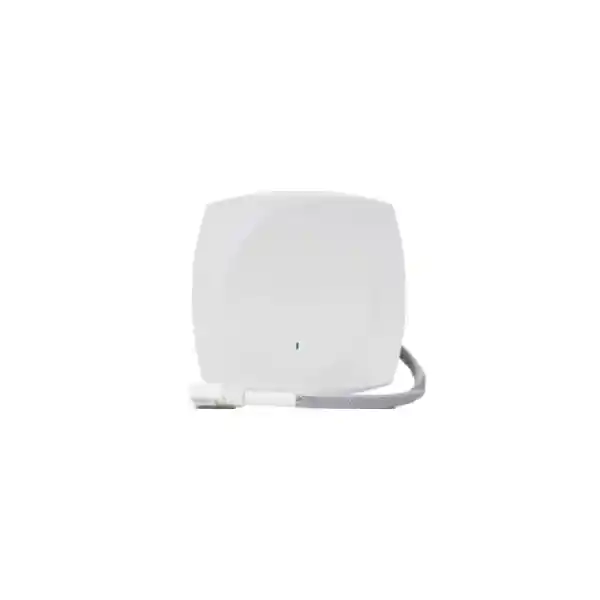
Cisco Meraki CW9174E Wi-Fi 7 External Antenna Access Point
The Cisco Wireless CW9174E brings Wi-Fi 7 to indoor business networks where radio coverage must be shaped around the building, not left to chance. Unlike a conventional ceiling access point with an internal omnidirectional antenna, this model uses an external DART8 antenna interface. The deployment team can select a supported antenna pattern to serve a warehouse aisle, clinical room, lecture space or other defined coverage area. It is suitable for moderate- to high-density environments when properly surveyed and sized.
Procurement should treat the access point as one element of a complete wireless system. The final bill of materials may need a compatible antenna, mounting kit, multigigabit switching, sufficient Power over Ethernet, management licensing and professional site validation. The model supports Cisco Meraki cloud management or compatible Cisco controller-based workflows, subject to the chosen software personality, licensing and release support. This flexibility is useful for organizations standardizing wireless operations across branches, but management mode should be decided before ordering rather than assumed to be interchangeable without planning.
The CW9174E offers Wi-Fi 7 features including multichannel operation, advanced modulation, OFDMA and multi-link capabilities subject to clients, software and local spectrum rules. Its 5 Gbps-capable Ethernet interface helps reduce the chance that a 1 Gbps access switch port becomes the first constraint on a busy cell. The actual delivered throughput depends on channel availability, interference, clients, antenna selection, switching, uplink design and power mode; headline physical-layer rates should never be mistaken for guaranteed application throughput.
For Uganda projects, FourTeck can help consolidate the equipment list and identify questions that must be answered before procurement approval: whether 6 GHz operation is permitted for the intended regulatory domain, whether the required antenna is in the quote, whether existing switch ports supply the correct power class and whether software entitlement is included. A disciplined purchasing process reduces change orders during installation.
Procurement Fact Rail
CW9174E, indoor external-antenna Wi-Fi 7 access point.
2.4 GHz, 5 GHz and conditional 6 GHz operation; multigigabit Ethernet up to 5 Gbps.
802.3at PoE+ supported with restrictions; 802.3bt Class 5 or approved DC source for full-feature operation.
Availability, delivery date, authorized regional SKU and warranty terms confirmed in written quotation.
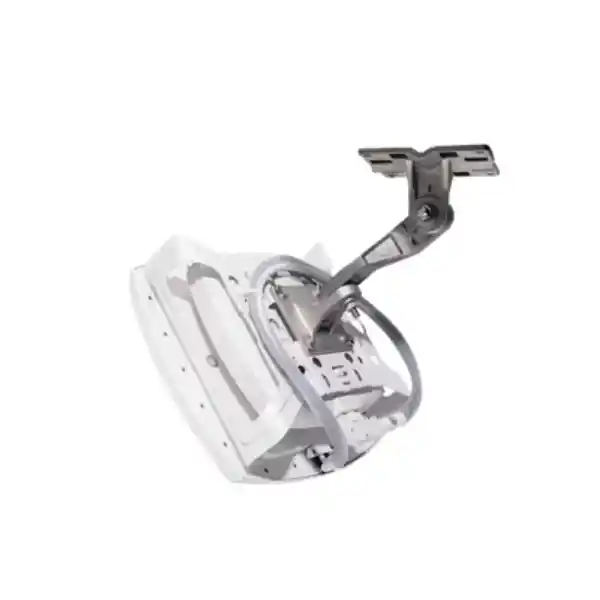
Ask the purchasing team to specify the exact antenna part number and count. CW9174E uses DART8 rather than the RP-TNC connectors used by certain older external-antenna models. The connector distinction is critical when planning reuse of existing antennas. Verify mounting accessories and supported software versions at the same time. Do not assume that the bare access point includes every component needed to commission a functioning cell.
Operational Architecture and Network Design
Wireless access points are the point where radio traffic enters the wired network. For the CW9174E, an effective design starts with the radio environment, continues through Ethernet switching and power, and ends with security policy and management. The device supports a flexible serving-radio arrangement: tri-band operation with 2×2 streams on 2.4 GHz and 4×4 streams on each of 5 GHz and 6 GHz, or a dual-band configuration with 4×4 streams on 2.4 GHz and 5 GHz. Which mode is available and appropriate depends on local authorization, configuration and firmware. This matters because an organization cannot plan channel reuse or client capacity solely from a global marketing specification.
External antennas are the defining architectural advantage. A directional antenna concentrates usable coverage toward a desired zone; an omnidirectional antenna serves a broader surrounding area. Neither is universally superior. In long warehouse aisles, directional coverage can reduce wasted energy across shelving and support predictable roaming routes. In a more open workspace, a suitable omnidirectional pattern may be simpler. The antenna installation height, polarization, mounting angle and cable arrangement affect results. A radio survey should account for metal stock, moving vehicles, doors, glass, reflective surfaces and the actual handheld devices that staff use.
At the wired edge, the multigigabit port negotiates supported Ethernet rates up to 5 Gbps when the power source and switching environment permit. A switch port advertised as multigigabit is not sufficient if its PoE budget is inadequate. Likewise, a high-power injector does not increase the speed of an upstream 1 Gbps switch connection. Cabling must be tested, and category 6 or 6A is a sensible preference for new runs, while Cisco identifies category 5e or better as the baseline. Cable routes should avoid electrical interference and meet building safety requirements.
Dedicated scanning and IoT radio capabilities support operational visibility and connected-device planning. They should not be interpreted as a replacement for enterprise monitoring, authentication design or a dedicated IoT security program. Segmentation, identity controls and firewall policies remain necessary. Network architects should establish separate staff, guest and device access requirements, choose appropriate encryption and authentication methods, and validate application roaming behavior before full rollout.
Central management can streamline configuration and fleet oversight, but management architecture is a procurement decision. Cloud-managed organizations should verify Meraki subscription requirements and dashboard readiness. Controller-managed organizations should check the supported Cisco Wireless Controller platform, IOS XE release, licensing and operational ownership. The supported software baseline listed in Cisco documentation includes Meraki MR32.1.5 or later and IOS XE 17.18.2 or later; later releases and feature requirements should be checked against current compatibility guidance.
Wireless throughput is shared airtime rather than a dedicated circuit for every client. Client count alone is therefore a poor sizing method. A classroom with many idle devices can create a different load from a small design studio moving large files. Estimate concurrent active clients, applications, packet sizes, video usage, upstream capacity and peak duty cycles. Plan enough access points for both coverage and capacity, with particular attention to handoff routes and noisy zones.
Enterprise Outcomes and Business Value
- Performance integrity. Wi-Fi 7 capabilities and multigigabit backhaul provide a stronger foundation for dense, demanding wireless environments. Real gains require capable clients, clean spectrum, proper antennas and sufficient wired capacity. Benchmark using representative traffic rather than relying on maximum theoretical radio rates.
- Reliability. Thoughtful channel plans, power design, secure mounting and resilient switching reduce avoidable service interruptions. A single access point is not a high-availability system: overlapping cells, spare hardware and redundant upstream infrastructure should be planned according to the business impact of an outage.
- Scalability. A consistent wireless model across sites simplifies templates, inventory and replacement planning. Site-specific antenna selection remains essential; a warehouse and a meeting-room floor should not receive identical radio plans simply because both use the same hardware family.
- Security. WPA3 support and enterprise authentication options can contribute to strong access control when properly configured. Apply separate access policies for guests, employees and operational technology, maintain firmware and review logs. Security outcomes depend on the complete network, not just the access point.
- Central operations. Compatible management tools can help teams maintain configurations, observe faults and coordinate updates. Define who owns dashboards, subscriptions, administrator roles, backup records and incident escalation before deployment.
- Lifecycle cost. Include antennas, brackets, PoE upgrades, switching, cable certification, software entitlement, commissioning and support. A cheaper hardware-only quote may cost more once missing essentials are added. Compare complete, supportable configurations over the intended service period.
- Energy planning. Verify switch-wide power budgets and reserve operational headroom. Cisco documents up to 37 W at the powered-device interface in the full-feature Class 5 mode with USB allowance. Power requirements vary with mode and peripherals; calculate against the approved power profile rather than typical idle consumption.
- Deployment control. Pilot one representative location, record baseline signal and roaming measurements, then scale. This approach makes acceptance criteria measurable and allows antenna adjustments before the installation team repeats a mistake across dozens of sites.
Hardware and Software Highlights
| Capability | Operational implication |
|---|---|
| External DART8 antenna interface | Choose a supported radiation pattern for difficult indoor spaces; verify antenna SKU separately. |
| Wi-Fi 7 radio technology | Provides advanced radio features for compatible clients and permitted channels. |
| Up to 5 Gbps Ethernet | Allows a faster wired uplink when paired with correct switch, cable and power. |
| Dedicated scan and IoT radios | Supports monitoring and device-oriented workflows in compatible deployments. |
| PoE and DC power options | Offers installation choices; power class controls enabled features. |
| Meraki or controller management | Align the software personality with enterprise operating practices and entitlements. |
Hardware selection should follow the applications rather than the reverse. A site that needs consistent barcode scanning along tall shelving may benefit more from a well-aimed directional antenna and sound roaming design than from installing additional access points without a survey. A hospital corridor may prioritize predictable signal boundaries, secure authentication and manageable maintenance windows. In both cases, the CW9174E is a component of an engineered system.
Technical Specifications Ledger
| Parameter | CW9174E details and purchasing notes |
|---|---|
| Product type | Indoor enterprise Wi-Fi 7 access point with external antenna connector. |
| Standard | IEEE 802.11be; compatibility with earlier supported Wi-Fi clients depends on configuration. |
| Radio arrangement | Tri-band 2×2 2.4 GHz plus 4×4 5 GHz plus 4×4 6 GHz, or dual-band 4×4 2.4 GHz plus 4×4 5 GHz. |
| 6 GHz | Subject to regional authorization, regulatory domain and supported software. |
| Antenna connection | DART8; use specifically supported antenna assemblies. |
| Example antennas | CW-ANT-T-O2-D8 omnidirectional; CW-ANT-T-D2-D8 directional, subject to ordering compatibility. |
| Ethernet | One multigigabit uplink supporting 100 Mbps, 1 Gbps, 2.5 Gbps and 5 Gbps modes. |
| Power | 802.3at PoE+ with reduced feature envelope; 802.3bt Class 5 or approved DC supply for full operation. |
| Maximum PoE requirement | 37 W at powered device for full-feature Class 5 profile including USB allowance, per Cisco data sheet. |
| USB | USB interface; available peripheral power depends on input power mode. |
| Additional interfaces | Console and DC power input as described in Cisco installation materials. |
| Security | WPA3 support; policy and authentication require network configuration. |
| Management | Cisco Meraki or compatible Cisco controller architecture; validate release and licenses. |
| Software baseline | Meraki MR32.1.5+ or Cisco IOS XE 17.18.2+ as listed in Cisco product documentation. |
| Dimensions and environmental ratings | Confirm exact current regional data sheet and installation guide before enclosure, clearance or environmental approval. |
| Warranty and compliance | Confirm regulatory SKU, local certifications and applicable warranty terms in supplier quotation. |
Specifications describe equipment capabilities, not a commitment that every feature operates simultaneously in every region. The final approved design must reconcile local spectrum rules, software, antenna approvals, available power and connected client capabilities. Do not use unverified physical dimensions to manufacture custom enclosures or mounting fixtures. Obtain the latest installation drawing for such work.
Configuration and Sizing Worksheet
1. Define workload and scale
Record floor area, number of floors, peak simultaneous clients, traffic classes and applications. Distinguish voice handsets, handheld scanners, guest devices and laptops. Note whether devices are Wi-Fi 7 capable and whether 6 GHz is supported locally. Establish a minimum signal and roaming acceptance target appropriate to each application. A count of 768 supported associations in a reference design is not a promise that hundreds of clients can all sustain high throughput simultaneously.
2. Survey physical conditions
Document ceiling heights, racking, cold rooms, suspended ceilings, corridors and restricted access zones. Choose a supported directional or omnidirectional DART8 antenna based on the desired coverage footprint. Determine safe mounting positions, service access, cable pathways and whether a special bracket is required. Confirm that the indoor device will remain within its published environmental limits.
3. Audit switching and power
Inventory each switch model, firmware, multigigabit capability, PoE class, aggregate power budget and upstream capacity. For full 5 Gbps and USB allowance, plan the specified Class 5 power source or approved DC alternative. Verify cable condition and length. Include a suitable injector only where switching cannot provide the required power; avoid assuming that an injector solves a slower upstream link.
4. Select management and entitlements
Decide whether the organization will use the Meraki dashboard or a supported Cisco controller-based architecture. Confirm the exact subscription, license duration, organization ownership, renewal process and software feature support. Include these in the purchasing comparison so the cost of operation is visible from the start.
5. Prepare a complete request for quotation
Provide the CW9174E quantity, approved regulatory domain, antenna type and quantity, mounting hardware, PoE or DC accessories, switch requirements, software entitlement, site location, target delivery date, support expectations and any installation services. Request separate line items for optional components. Confirm acceptance testing, commissioning responsibility and warranty escalation procedure before signing.
Deployment Scenarios
Multi-site enterprises
Regional offices often need consistent security settings and operational reporting, but floor layouts differ. Standardize the network policies while selecting antennas according to each building. Pilot a representative branch and capture a reusable deployment record covering VLANs, authentication, power profiles and commissioning checks. Multi-site consistency should not mean ignoring local radio conditions.
Financial institutions
Branches and service centers need controlled staff connectivity, guest isolation and reliable application access. Use secure authentication, documented administrative permissions and network segmentation. Plan redundant upstream paths where business continuity requires them. Confirm that the deployment aligns with institutional risk controls and applicable regulatory requirements; an access point by itself does not confer compliance.
Universities and campuses
Lecture rooms, libraries and corridors have different densities and usage patterns. A site survey can identify when directional coverage is useful and when conventional internal-antenna access points are a better fit. Establish separate service levels for examination systems, faculty traffic, student access and guest users. Consider change windows, software maintenance and the operational impact of semester peaks.
Warehouses and logistics
The CW9174E is particularly relevant to tall shelving, narrow aisles and industrial indoor layouts. Directional antennas can focus signal along picking routes, while careful overlap supports roaming handhelds. Test at realistic stock levels and with moving forklifts, not only in an empty facility. Cold-storage applications may require the access point and antenna to be mounted in different environments according to approved installation practice.
Government and regulated organizations
Procurement teams may require documented supply provenance, approved regional hardware, access controls, configuration records and formal acceptance. Prepare a complete bill of materials and confirm management deployment requirements. Where cloud services are restricted by policy, evaluate whether the supported controller architecture meets the organization’s operational and legal needs.
Technical Deep Dive: Radio Processing and Airtime
Wi-Fi 7 adds mechanisms intended to improve the efficiency of radio resources, including advanced modulation, multi-link operation and preamble puncturing. These features do not override physical constraints. A client at the edge of coverage may use a lower modulation rate; an obstructed aisle may have reflections that alter performance; and wide channels may be impractical where spectrum is congested. The CW9174E supports channel widths up to 320 MHz in 6 GHz where permitted, but selecting the widest channel everywhere can reduce frequency reuse across a campus. Design should balance per-client peak speed against aggregate network capacity.
OFDMA and multiuser capabilities can help manage multiple active stations, but client support and real traffic mix determine the outcome. Engineers should test representative endpoints and applications. Packet capture, spectrum analysis, retry statistics and roaming logs are more useful than a single speed-test number when diagnosing an unreliable installation. The external antenna option enables more precise shaping of the radio cell, but poor antenna placement can negate the advantages of modern silicon.
Technical Deep Dive: Software and Operational Control
Choose the management architecture as part of the project design. Meraki cloud workflows emphasize centralized dashboard administration; compatible Cisco controller deployments follow a different operating model. Confirm the supported software personality, release path, required subscriptions and controller compatibility before placing the order. Document administrator privileges, configuration ownership, change approvals, monitoring alerts and maintenance windows. Wireless security also requires coordinated identity, segmentation, logging and upstream firewall controls. Firmware updates should be tested against critical clients before broad rollout, particularly where scanners or specialized medical devices have narrow interoperability requirements.
Technical Deep Dive: Resilience and Recovery
High availability depends on architecture, not a single radio. For critical areas, plan overlapping coverage with adequate capacity to absorb the loss of one cell where justified. Assess switch stack or chassis resilience, uplink diversity, power backup and upstream network dependencies. Keep a documented replacement procedure that identifies the correct regional CW9174E variant, antenna, mounting hardware, software entitlement and configuration workflow. Periodically test failure scenarios, including switch outages and authentication service unavailability. Recovery planning should include spare inventory, responsible contacts, change records and realistic service restoration targets.
Pre-Purchase Questions Buyers Should Resolve
Is the antenna included? Do not assume so. Require the supplier to itemize the compatible DART8 antenna and associated mounting parts. Can older RP-TNC antennas be reused? Not by direct connection; CW9174E uses a different connector system. Confirm any approved migration accessories before budgeting. Will an existing PoE+ switch work? The access point supports PoE+ operation with feature restrictions. Full 5 Gbps and USB power operation require the specified higher-power source. Is 6 GHz available in Uganda? Availability must be confirmed against the current regulatory framework and exact regional SKU; never assume global specifications grant local spectrum rights.
Does the hardware price include management? The quote should explicitly state licensing, duration and renewal responsibilities. Is 5 Gbps throughput guaranteed? No. The Ethernet interface can support that link rate under appropriate conditions, while actual application throughput depends on many factors. Can the device serve a warehouse? Yes, where the indoor environmental rating, antenna design and coverage survey support the use case. What about lifecycle? Ask for current orderability, software support policy, replacement procedures and warranty entitlement in writing. What if existing cabling is old? Test the installed link for the intended speed and power, and replace marginal runs before commissioning.
Uganda Procurement, Delivery and Regional Coverage
FourTeck Uganda can receive a project request covering the access point, supported antenna assemblies, switching, power accessories and software entitlement. Buyers should submit site details and quantities so the quotation can distinguish essential equipment from optional services. Stock and lead times are not represented as guaranteed on this page; confirm them in the written offer. Regional warranty eligibility and replacement processing should also be checked before purchase.
Kampala: headquarters, commercial offices, education campuses and dense indoor facilities may need a mix of directional and omnidirectional cells. Entebbe: hospitality, logistics and institutional facilities benefit from careful coverage planning and managed service continuity. Jinja: production and warehouse sites should account for metal structures, high ceilings and scanner roaming. Mbarara: branch offices and education deployments may prioritize consistent policy and maintainable spares. Gulu: distributed institutions should evaluate support logistics, upstream resilience and local installation resources. Delivery options, costs and schedules vary by destination and order scope.
For regional projects, coordinate purchasing and technical standards across FourTeck Uganda, FourTeck Kenya, FourTeck Africa, FourTeck UAE and FourTeck Kuwait. Cross-border supply may involve import requirements, country-specific regulatory variants, freight arrangements and tax considerations. Confirm these details individually rather than assuming that a model sourced for one country is automatically suitable for another.
Related Solutions and Procurement Bundles
Explore a complete enterprise wireless networking solution with the CW9174E as the access layer. For conventional open offices, compare the CW9174I internal-antenna variant through the wireless access point quotation team. Ask about compatible DART8 directional antennas for aisles, DART8 omnidirectional antennas for open areas, multigigabit PoE switches for adequate wired capacity and Cisco wireless licensing for the intended management platform. These links direct buyers to consultation rather than implying unverified product-category URLs.
Technical services may include bill-of-materials checking, switch-power review, staging plans, supported firmware validation and coordination of post-sales assistance, subject to written scope and availability. Request explicit deliverables for survey work, configuration, installation, testing, documentation and knowledge transfer. A service proposal should define which team supplies licenses, who administers the management tenant or controller and who handles escalation after handover.
Frequently Asked Questions
1. What is the Cisco Meraki CW9174E best suited for?
It is designed for indoor enterprise Wi-Fi 7 environments where an external antenna provides useful control over coverage. Warehouses, corridors, specialist healthcare spaces and high-ceiling interiors are examples. The strongest justification is not merely a desire for a newer wireless standard, but a documented need for deliberate antenna placement, reliable roaming and an appropriately sized network. Confirm the antenna pattern, installation height and supported environmental conditions before ordering. A standard internal-antenna model may be preferable in a straightforward office layout.
2. Does the CW9174E include an external antenna?
Purchasers should not assume that an antenna is included in the access point hardware line. Ask for the exact antenna SKU, mounting accessories and quantities on the written quote. Cisco identifies DART8-compatible options including CW-ANT-T-O2-D8 and CW-ANT-T-D2-D8. The first is an omnidirectional choice and the second a directional choice. Selection should follow a coverage survey and approved product compatibility guidance. Older RP-TNC antenna assemblies are not direct substitutes for the CW9174E connection.
3. Can the CW9174E use a regular PoE+ switch?
Yes, Cisco documents 802.3at PoE+ operation, but with limitations on the full feature envelope. The full 5 Gbps uplink and higher USB power capability require 802.3bt Class 5 or a specified approved DC power source. Verify the exact operating mode and the switch’s total PoE budget. A port may negotiate power while still restricting functionality, so installation acceptance should check both the power state and actual negotiated Ethernet link speed. For new builds, provision adequate headroom rather than designing at the limit.
4. Is 6 GHz Wi-Fi 7 supported in Uganda?
The hardware supports 6 GHz in eligible tri-band configurations, but operation depends on the applicable country rules, regulatory domain and supported software. Buyers should verify current Ugandan authorization before specifying 6 GHz as a project requirement. If the local operating conditions do not permit 6 GHz, the product may be configured for supported dual-band operation. A procurement document should distinguish the hardware’s global technical capabilities from the frequencies legally available at the installation site.
5. Can the CW9174E be managed through Meraki?
The product family supports Meraki management as well as supported Cisco controller-based options. These are different operational models with different software and entitlement considerations. Before buying, decide which platform the IT team will use and ask for a license schedule that matches the selected model and planned service term. Confirm administrator ownership, renewal arrangements, software compatibility and onboarding procedure. Do not assume that a hardware-only purchase includes all management rights or that moving between operating modes requires no planning.
6. How many users can one access point support?
Client association limits should not be confused with usable application capacity. Cisco’s deployment reference lists up to 768 associated clients across serving radios, but practical sizing depends on active devices, applications, airtime, interference, channel widths, antenna pattern and uplink design. A busy classroom or logistics area may require several cells despite being below a published client count. Conduct capacity modeling and test representative endpoints at realistic load. Procurement should define measurable performance targets rather than purchase solely by nominal client capacity.
7. Is the CW9174E suitable for outdoor installation?
The CW9174E is an indoor access point. Outdoor or exposed installation should not be assumed appropriate because an external antenna is used. Where coverage is needed across an outdoor area, evaluate purpose-built outdoor hardware and its environmental rating. Indoor cold-storage or clean-room designs may position the antenna and access point in different locations, but such arrangements still require approved cabling, mounting, environmental compliance and a documented installation method. Always validate the actual location against the manufacturer installation instructions.
8. What should be included in a complete Uganda quotation?
Specify access point quantity, approved regional variant, antenna model, mounting kit, required power method, multigigabit switching, cables, software entitlement, service term, delivery address and desired commissioning support. Ask the supplier to identify exclusions clearly. Written pricing should separate equipment, subscriptions, freight, taxes and professional services where applicable. Request warranty terms, lead time and return procedures before approval. A complete quote makes it easier to compare suppliers and reduces installation delays caused by missing antennas or insufficient power.
9. How are warranty and replacement handled?
Warranty coverage depends on the applicable Cisco entitlement, product origin, purchase terms and regional support arrangements. Obtain the warranty statement and escalation contacts in writing. Keep purchase documents, serial numbers, licensing details and configuration records accessible to the support team. For business-critical deployments, decide whether an on-site spare is necessary and how it will be provisioned. A replacement plan should include antenna and mounting compatibility, software onboarding and validation testing, not only the shipment of a new hardware unit.
10. Can FourTeck assist with design and commissioning?
Buyers can request a scoped technical proposal for requirements review, bill-of-materials validation, power and cabling checks, staging and commissioning support. Confirm which services are available for the project location and which acceptance tests will be delivered. For a warehouse, that might include aisle-level coverage and scanner roaming checks. For a campus, it might include authentication, guest isolation and peak-load testing. The final statement of work should name deliverables, responsibilities, schedule, handover documentation and support boundaries.
Request a Complete CW9174E Deployment Quote
Make the next purchase decision with a complete, technically validated equipment list. Tell FourTeck how many access points you require, which facilities they will cover, whether directional antennas are needed, and what switches and management platform are already in place. Include the installation city, preferred delivery window and any regulatory or operational requirements. The resulting discussion can address the CW9174E hardware, compatible DART8 antennas, mounting components, adequate power sources, multigigabit uplinks, licensing and available implementation services.
Confirm stock, pricing, regional variant, warranty and shipping in the final written quotation. If the network is replacing older access points, share the existing model numbers and cabling information so compatibility can be assessed before procurement approval. For new buildings, share floor plans and intended device types to support a practical design review. A carefully scoped quote provides a clearer basis for budgeting, technical sign-off and successful commissioning.




Reviews
There are no reviews yet.