ENTERPRISE CELLULAR CONNECTIVITY · UGANDA
Cisco Meraki MG41E Cat 18 LTE Cellular Gateway for Enterprise WAN
The Cisco Meraki MG41E provides a managed bridge between an LTE mobile network and a wired Ethernet uplink. Designed for organizations that cannot afford to lose access to payment services, branch applications, cloud workloads or remote monitoring, it gives network teams a practical option for a cellular primary connection or a resilient alternative to fixed broadband. Its external-antenna design is particularly useful where the strongest cellular signal is not found beside the main firewall or network rack.
The MG41E is not a 5G gateway and its cellular headline speed is not a guaranteed application throughput figure. It is a Category 18 4G LTE platform with a stated theoretical maximum of 1.2 Gbps downlink and 150 Mbps uplink. Two nano-SIM slots, cloud management and carrier diagnostics simplify the work of operating multiple remote locations. Actual throughput depends on radio conditions, network provisioning, antenna installation and upstream Ethernet constraints.
For buyers evaluating cellular connectivity in Uganda, the key questions go beyond the appliance itself. Which operator supports the required bands at the site? Is the cellular link meant to carry all traffic or only emergency workloads? Is an external patch antenna needed? What licensing term matches the budget? How will the existing firewall detect failure and return traffic to its primary circuit? FourTeck can help translate these questions into a coherent quotation and deployment checklist.
The MG41E hands off connectivity through Ethernet to compatible routers, switches and security appliances, including equipment from other manufacturers. This separation allows a business to improve cellular reception without replacing its existing security architecture. The gateway remains a cellular uplink device; firewall policies, VPN termination and application failover behavior must be designed in the downstream network.
At-a-Glance Procurement Facts
MG41E-HW; Cisco Meraki external-antenna LTE cellular gateway.
LTE Category 18; dual nano-SIM; automatic SIM failover capability.
Two Gigabit Ethernet ports: one dedicated LAN and one configurable LAN/WAN.
Up to 10 W; compatible PoE input or suitable DC adapter; -30°C to 50°C operating range.
Applicable Meraki license required; confirm the organization’s licensing model and term.
Stock, price, lead time, import requirements and replacement eligibility subject to written confirmation.
Architecture and Operational Overview
The embedded LTE modem receives service through approved external antennas and an activated carrier SIM. The appliance converts the mobile data connection into a conventional Ethernet interface that can be attached to an existing WAN edge. This is operationally important because the radio should be installed where signal quality is favorable, while the firewall may need to remain inside a secure equipment room. Network teams should design the cable path and PoE budget before choosing the final mounting position.
Carrier aggregation allows the modem to use multiple compatible LTE component carriers, with support for up to five downlink carriers under suitable operator conditions. Aggregation availability is determined by the operator network, radio spectrum and coverage. A stronger received signal does not automatically translate into maximum speed: signal quality, uplink congestion and carrier traffic policies all matter. During acceptance testing, capture latency, packet loss, throughput and signal measurements over several business periods.
Meraki Dashboard gives administrators centralized configuration and operational visibility. It can expose useful radio information such as APN, IMEI, ICCID, RSRP and RSRQ. These values help distinguish a subscription problem from poor reception or a cabling issue. A documented change process remains important because a remote configuration error may affect access to an unattended location.
Dual SIM slots allow the organization to prepare two cellular subscriptions and configure supported SIM switching behavior. This should not be mistaken for two simultaneously active independent cellular modems. Test the actual switch sequence and recovery time with both intended operators before depending on the feature for critical services. Where stronger redundancy is required, a second gateway, diverse access media or alternate power source may be appropriate.
For distributed organizations, the architecture also supports a repeatable deployment standard: consistent mounting, documented SIM ownership, defined APNs, labeled Ethernet cables, cloud inventory records and predictable escalation contacts. Such standards reduce the time required to restore service when staff turnover or operator changes occur.
Business Outcomes and Value
- Performance integrity. Category 18 LTE and carrier aggregation provide a capable mobile uplink, but the design should be sized around measured site performance rather than theoretical modem rates. Prioritize transaction traffic during failover and set realistic service targets.
- Reliability. A cellular connection can reduce dependence on a single fixed-line provider. For true path diversity, check whether the cellular operator shares upstream infrastructure or power dependencies with the primary circuit.
- Scalability. Centralized configuration and a repeatable bill of materials simplify rollout across branches. Record serial numbers, SIM ICCIDs, operator details and licenses for each location.
- Security and access control. Dashboard administration supports role-based operational governance. Continue to enforce firewall, VPN, segmentation and logging controls on the appropriate network devices.
- Operational simplicity. Remote diagnostics reduce unnecessary dispatches and help technicians identify radio, SIM, power or Ethernet issues. Set alert ownership and escalation thresholds before go-live.
- Total cost of ownership. Include hardware, licensing, cellular data, mounting, antenna accessories, power, installation and replacement logistics. A low purchase price is not a reliable measure of lifetime cost.
- Deployment flexibility. External antennas and multiple mounting choices help position the radio away from signal-blocking metal racks or internal walls, subject to approved accessory and cable requirements.
- Business continuity. A planned cellular backup can preserve essential applications during a fixed-line outage. Validate which services are permitted to run on the metered link and how traffic returns after recovery.
Hardware and Software Highlights
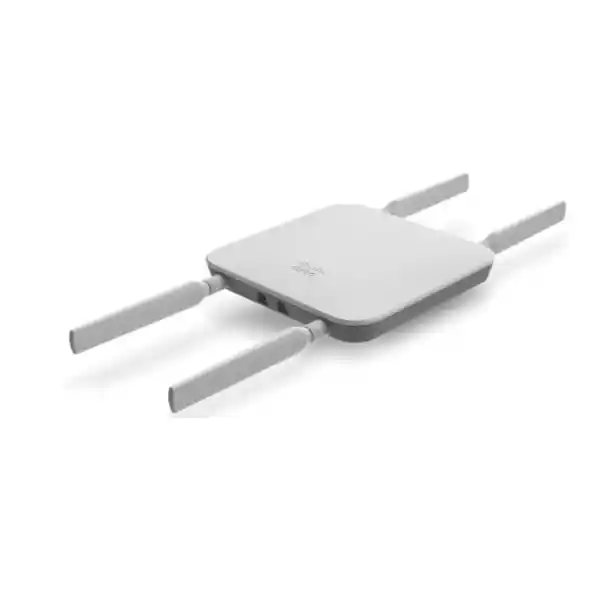
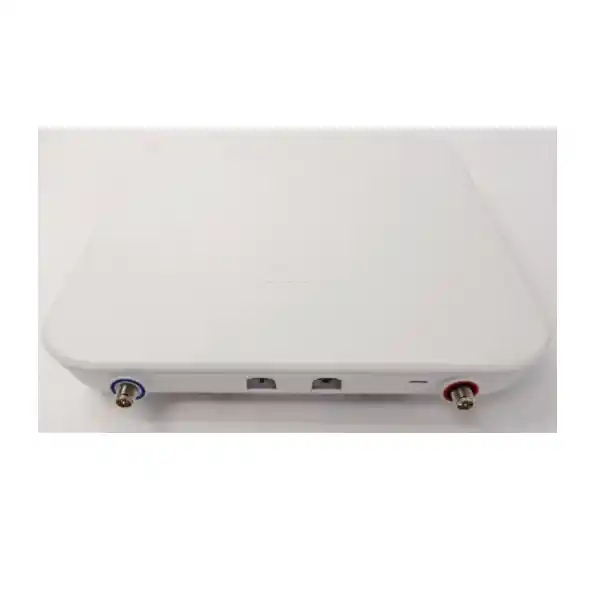
The MG41E combines a Category 18 LTE modem, four external antenna connections, two nano-SIM slots and two Gigabit Ethernet interfaces in a compact enclosure. The dedicated LAN port and convertible LAN/WAN port give installers useful wiring choices, but each planned topology should be checked against current Meraki firmware documentation. The device supports PoE input and suitable DC power, allowing placement to be determined by reception rather than the nearest wall socket. The external antennas are not interchangeable with arbitrary third-party antennas; supported Meraki accessories and regulatory limits should guide selection.
Cloud-managed capabilities include provisioning, status monitoring, cellular diagnostics, SIM-related controls, scheduled firmware management and remote troubleshooting. These capabilities are valuable when hundreds of sites have small local teams. Firmware changes should nevertheless follow a maintenance policy, particularly for transaction-processing sites where a short reboot can interrupt service.
The MG41E should be considered an uplink component rather than a substitute for a branch security gateway. Its strongest value comes from fitting into a complete design that includes a firewall or router, defined failover logic, monitored cellular service and a supported license. Organizations requiring native 5G should evaluate a different cellular gateway family rather than assuming the MG41E can be upgraded to 5G through software.
Technical Specifications Ledger
| Attribute | Cisco Meraki MG41E |
|---|---|
| Hardware SKU | MG41E-HW |
| Cellular generation | 4G LTE Category 18; not 5G |
| Maximum theoretical LTE rates | 1.2 Gbps downlink / 150 Mbps uplink |
| Carrier aggregation | Up to five downlink carriers; network dependent |
| SIM | Two nano (4FF) SIM slots; SIM failover support |
| Ethernet | 1 dedicated GbE RJ45; 1 convertible LAN/WAN GbE RJ45 |
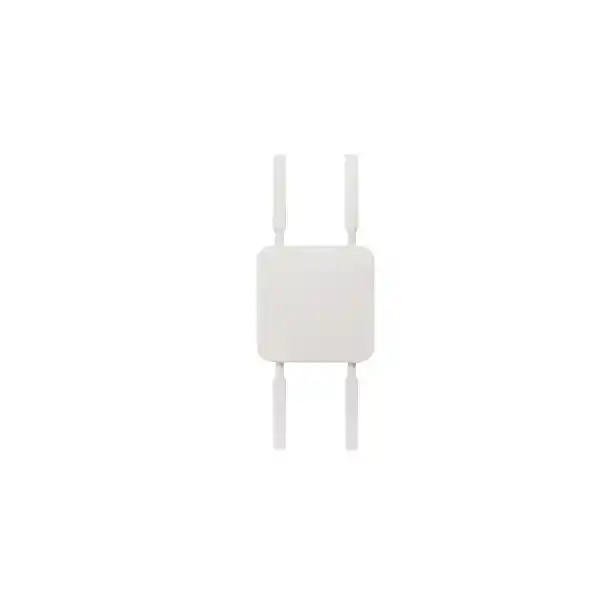
| Antenna design | Four external dipole antennas; supported optional patch antenna |
| Dimensions | 168 × 168 × 35 mm |
| Weight | 670 g without accessories |
| Power | 12 V / 1 A DC or 48–57 V DC / 0.35 A; maximum stated load 10 W; 802.3af PoE |
| Operating temperature | -30°C to 50°C |
| Operating humidity | 5–95% non-condensing |
| Ingress protection | IP67 according to Cisco product information; installation must follow applicable guidance |
| Management | Cisco Meraki Dashboard; active appropriate licensing |
| Warranty | Cisco-published lifetime hardware warranty terms; verify eligibility and regional fulfillment |
Published modem rates are radio-interface maximums and should not be used as a committed end-to-end bandwidth figure. Ethernet handoff capacity, carrier policy and real-world reception can reduce measured results. Confirm regional radio approvals and supported LTE bands against the specific operator before issuing a purchase order. Accessories, licensing and power components may appear as separate line items on the quotation.
Configuration and Sizing Worksheet
1. Define the workload
List the applications that must remain reachable during a primary WAN outage. Separate payment authorization, voice, remote access, telemetry and routine software downloads. Estimate the peak simultaneous users, typical data volume, acceptable latency and maximum outage duration. For a backup-only deployment, document what traffic should be blocked or rate-limited while the LTE path is active.
2. Survey the location
Measure operator signal in more than one mounting position, including a wall or pole location if practical. Avoid assumptions based solely on a handset signal icon. Capture radio quality, latency and throughput under representative load. Evaluate antenna clearance, exposure, cable routes and physical security. Where the gateway is mounted outside, plan suitable power and cabling protection with qualified installers.
3. Design power and cabling
Check the availability of a supported PoE source, injector or regional DC adapter. Include power backup where a cellular uplink is expected to operate during an electrical outage. Label the gateway’s Ethernet handoff and verify the connected router’s WAN port configuration. Redundant power infrastructure elsewhere in the network does not automatically make the gateway itself dual-power redundant.
4. Match licenses and subscriptions
Identify the Meraki organization’s licensing model before ordering. Legacy co-termination and subscription models can use different product identifiers and entitlement rules. Request a written breakdown of the hardware price, eligible management license, license term, cellular operator data plan and any professional services. A SIM subscription is distinct from the Meraki cloud management entitlement.
5. Prepare the quote
Provide site count, destination city, hardware SKU, operator preferences, existing firewall model, expected activation date, mounting conditions and required support coverage. Include a request for accessory compatibility review and an itemized bill of materials. For public-sector projects, add documentation, acceptance-testing and invoicing requirements at the outset.
Deployment Scenarios
Multi-site businesses
A retailer with stores across several districts may use fixed broadband as the preferred uplink and the MG41E as a cellular standby. The downstream firewall monitors path health and decides when traffic moves. This approach can help maintain point-of-sale authorization, inventory synchronization and remote support. Each store should have a documented SIM data allowance, failover test procedure and escalation contact.
Banking and financial services
A branch or service kiosk may need a secondary connection for regulated transactions. The MG41E can supply the transport path, but encryption, segmentation, authentication and logging remain responsibilities of the complete network design. Institutions should confirm whether carrier addressing, private APNs and traffic-routing policies satisfy internal risk requirements. Testing should include the return from cellular to the primary link, not only initial failover.
Education and campuses
Campus facilities may use LTE to connect temporary offices, remote buildings or critical administrative systems. Where many users share the link, policy-based traffic control is important to protect examination, identity or payment applications from bandwidth-heavy recreational usage. Confirm indoor and outdoor coverage separately; thick construction materials and crowded public networks can produce inconsistent performance.
Government and public infrastructure
Field offices, monitoring stations and service counters may benefit from a centrally supervised cellular connection. Procurement teams should review regulatory approvals, equipment provenance, physical tamper controls, data-handling requirements and supported replacement channels. Cellular resilience should be assessed against local tower power, carrier outages and site security. The MG41E is a networking appliance, not a substitute for an accredited end-to-end security architecture.
Technical Deep Dive: LTE Radio and Ethernet Handoff
LTE Category 18 defines the capability class of the integrated modem. The modem’s stated maximum downlink rate relies on favorable carrier aggregation and radio conditions that are rarely uniform across a national footprint. In practice, a branch may experience excellent download throughput but much lower uplink speed, especially at peak hours. Application design should therefore use measured round-trip latency, jitter and packet loss as well as speed tests. The two Ethernet interfaces provide practical connection choices; they do not transform the device into a multi-gigabit wired router. Evaluate the exact supported configuration before building a topology around the convertible port.
The external-antenna model is useful where radio propagation is a constraint. Installers should evaluate distance to the cell site, building materials, antenna orientation, approved cable lengths and lightning protection requirements. Unapproved antennas may create performance, compliance or support issues. Document the baseline signal readings so that future troubleshooting can identify degradation caused by new structures, carrier changes or damaged cabling.
Technical Deep Dive: Dashboard, Firmware and Control
The Meraki management environment allows an authorized network team to view device status and apply supported configuration centrally. In an organization with many branches, this can reduce the administrative burden of individual site visits. The benefit depends on maintaining accurate inventory, appropriate administrator permissions and a working management path. Role separation and change logs should be integrated with the company’s normal network governance procedures. Schedule firmware updates for agreed maintenance windows and maintain a rollback or recovery plan where supported.
Radio diagnostics can reveal whether a site is struggling with poor signal quality, an incorrect APN or a failed subscription. Operators should record baseline RSRP and RSRQ readings and interpret them alongside real traffic outcomes. A healthy signal reading alone does not guarantee reachability to cloud applications. Where an incident affects many sites, correlate cellular operator events with Dashboard alarms before dispatching local technicians.
Technical Deep Dive: Resilience and Recovery
A backup uplink only improves availability when the complete failover chain works. The router must detect failure of the preferred path, select the cellular interface, maintain suitable security policy and recover gracefully. Carrier diversity can help with local network failures, but two SIM cards do not guarantee independence when operators share facilities or transport. For critical environments, document failure modes covering tower outage, exhausted data allowance, SIM suspension, PoE failure and accidental cable disconnection.
Run periodic drills that simulate loss of the fixed circuit, cellular carrier disruption and recovery of normal service. Record how long sessions take to re-establish and whether important applications reconnect automatically. Backup power should support not just the gateway but also the firewall, switch and other dependencies. A written incident runbook is often more valuable than an untested promise of seamless connectivity.
Buyer Gap Checklist: Questions to Resolve Before Ordering
Does the price include licensing? Do not assume so. Ask for separate hardware and license lines with the correct entitlement for your organization’s model. Does the unit include mobile data? Typically a carrier subscription must be purchased and activated separately. Can it use any antenna? No: use supported antenna accessories and validate installation rules. Will it reach 1.2 Gbps in Uganda? That is a theoretical LTE modem ceiling, not a local speed promise. Is it a 5G device? No, the MG41E uses 4G LTE Category 18. Can it work with a non-Meraki firewall? The Ethernet handoff supports integration with compatible third-party routing equipment, subject to correct configuration.
What about rack clearance? The appliance is compact, but antenna orientation, mounting brackets, cable bend radius and reception matter more than simply fitting into an enclosure. What is its power draw? Cisco publishes a maximum 10 W load; calculate the upstream PoE budget and any injector overhead separately. How long is the hardware supported? Review current lifecycle notices and warranty eligibility at the time of purchase. Will dual SIM provide uninterrupted traffic? SIM switching is a resilience mechanism, not a guarantee of session continuity. What should appear on the purchase order? Model number, quantity, license type and term, accessories, delivery address, taxes, service scope and acceptance conditions.
Uganda Procurement and Delivery Planning
FourTeck supports quotation-led procurement for businesses seeking Cisco Meraki MG41E equipment in Uganda. Request confirmation of current availability, estimated dispatch and delivery dates, approved regional supply route, applicable taxes and any installation support before committing to a project schedule. A quotation should distinguish confirmed stock from equipment requiring sourcing or import. Delivery time may vary with the requested quantity, destination, licensing processing and customs requirements.
Organizations rolling out multiple gateways can benefit from a staged procurement plan. A pilot unit should first be tested with the intended operator and existing firewall. Once radio performance and failover behavior are accepted, the remaining sites can use a standardized deployment checklist. Where pre-configuration or firmware staging is required, agree on the exact scope, access permissions and acceptance criteria in writing.
Local Coverage: Kampala to Regional Sites
Kampala deployments may prioritize dense-building reception, branch transaction continuity and centralized IT support. Entebbe sites can require resilient connectivity for offices, hospitality and logistics operations. Jinja businesses may focus on industrial facilities and distributed operations, while Mbarara and Gulu procurement teams may place greater emphasis on operator coverage surveys, field-installation planning and spare-device logistics. FourTeck can discuss requirements for these locations; specific delivery commitments and service availability must be confirmed in the quotation.
Regional Sourcing and Cross-Border Coordination
Organizations managing sites across East Africa and the Gulf may wish to align hardware specifications, support processes and procurement documentation. Explore FourTeck Uganda, FourTeck Kenya, FourTeck Africa, FourTeck UAE and FourTeck Kuwait for regional enquiries. Local carrier band support, import rules, regulatory approvals, invoicing and warranty fulfillment should be evaluated country by country rather than assumed to be identical.
Related Equipment and Accessories
A complete cellular connectivity design may also involve the Cisco Meraki MG41 with internal antennas, the MG41E manufacturer overview, MG41/41E technical documentation and Meraki licensing guidance. Ask FourTeck to quote compatible Meraki antenna options, a suitable PoE injector, regional power adapter and the correct license. Accessories should be checked against the exact gateway revision and intended environment.
FourTeck Technical Services
Technical procurement assistance can include requirements gathering, operator and band compatibility review, bill-of-materials validation, power and mounting review, configuration planning and coordination of acceptance testing. Where contracted, staging can include inventory documentation, firmware review and preparation of site-specific installation notes. Post-sale support scope, manufacturer escalation eligibility and replacement logistics should be explicitly documented. Do not assume that onsite installation or next-business-day local replacement is included without written confirmation.
Frequently Asked Questions
1. What is the Cisco Meraki MG41E used for?
It converts a 4G LTE cellular connection into an Ethernet uplink for business networking equipment. Common uses include backup WAN for branches, primary access at sites without dependable wired service and temporary connectivity for remote facilities. It is cloud managed through the Meraki environment and has external antennas to support flexible positioning. The gateway should be combined with a properly configured router or firewall for traffic policy, secure connectivity and automated WAN decisions. Buyers should test the complete application path rather than evaluating the modem in isolation.
2. Is the MG41E compatible with Ugandan mobile networks?
Compatibility depends on the specific carrier’s active LTE bands, SIM provisioning, APN settings and local radio conditions. The model supports a broad set of LTE bands, but a global specification does not guarantee service on every operator or at every address. Before purchase, obtain the carrier’s supported bands and test reception at the proposed installation location. Confirm any enterprise APN, public or private addressing requirements and permitted router connectivity. For a multi-site project, pilot representative urban and regional locations before standardizing the rollout.
3. Does the MG41E support 5G?
No. The MG41E is an LTE Category 18 gateway. Its headline cellular capability is up to 1.2 Gbps downlink and 150 Mbps uplink under suitable network conditions, but this should not be confused with 5G support. If a project explicitly requires a 5G radio, ask for a compatible 5G gateway model and verify local operator coverage. A 5G label is not a substitute for measuring real performance, since available spectrum, antenna placement and carrier congestion determine the quality users experience.
4. Does the MG41E require a Meraki license?
Yes, buyers should budget for the appropriate Meraki licensing entitlement in addition to hardware and the cellular operator’s SIM plan. License identifiers and entitlement rules differ by organization licensing model. Before requesting a quote, confirm whether the existing organization uses co-termination or subscription licensing and identify the desired term. Ask for a clear statement of what is included, how renewal is handled and which support services apply. This prevents a hardware delivery from arriving without the entitlement needed for the planned managed deployment.
5. How does dual-SIM failover work?
The appliance provides two nano-SIM slots and supports managed SIM switching and automatic failover behavior. Organizations can use this to prepare an alternate operator subscription, subject to configuration and service compatibility. Dual SIM does not mean two independent modems are active simultaneously, and switching may interrupt existing sessions. Test the behavior using the intended carriers, APNs and downstream router. Monitor data allowances and renewal dates for both SIMs; an unused backup subscription can become ineffective if it expires unnoticed.
6. Can the gateway connect to a third-party firewall?
Yes. Cisco documents Ethernet handoff to compatible Meraki and non-Meraki routing equipment. The receiving firewall or router must be configured to use the cellular path correctly, including addressing, path monitoring, security policy and any necessary VPN behavior. Some mobile operators use carrier-grade NAT, which can affect inbound connectivity. If applications need inbound access or stable public addressing, discuss enterprise APN or tunnel options with the operator. Validate failover and failback with the actual firewall model before a production cutover.
7. What antennas and mounting accessories should be ordered?
The MG41E uses external antennas and Cisco documentation describes included dipole antennas as well as supported optional patch antenna arrangements. Antenna choice depends on signal conditions and the permitted installation method. Avoid assuming that generic third-party antennas are supported; review Cisco accessory compatibility and regulatory guidance. Plan the mounting surface, orientation, cable route, physical protection and access for maintenance. A site survey can establish whether the included antenna arrangement is sufficient or a supported directional option merits evaluation.
8. What power source is suitable for the MG41E?
Cisco lists a maximum load of 10 W and support for 802.3af PoE as well as specified DC power arrangements. Check the chosen switch or injector against the gateway’s electrical requirements and account for cabling and installation conditions. If the device is used for outage recovery, the gateway, its PoE source, the firewall and necessary switches should all have suitable backup power. Request the appropriate regional adapter or supported injector as a separate quotation item when needed. Do not assume that the appliance includes every power accessory.
9. How are warranty and replacement handled in Uganda?
Cisco publishes a lifetime hardware warranty statement for the MG41E, subject to applicable terms and eligibility. Replacement timing and advanced-replacement availability should not be interpreted as a guaranteed next-day delivery to every Ugandan address. Ask the supplier to confirm authorized sourcing, warranty documentation, return procedures, local logistics and any service-level commitments in writing. For critical locations, consider a spare-unit strategy and maintain accurate serial-number records so that a hardware failure can be escalated without administrative delays.
10. What information is needed for a procurement quotation?
Provide the quantity, delivery city, project timeline, current network equipment, intended cellular operators, required Meraki licensing term, expected applications and installation conditions. State whether the cellular service is primary or backup and whether an external patch antenna, PoE injector, DC adapter or installation service is needed. For larger projects, include pilot-site requirements and acceptance criteria. A complete request allows the supplier to distinguish essential hardware from optional accessories and reduces the risk of purchasing an incompatible or incomplete bill of materials.
Request Your Cisco Meraki MG41E Procurement Quote
Planning a single-site resilience upgrade or a nationwide branch rollout? Send FourTeck your location, expected quantity, operator details, license preference and required delivery date. Request a written proposal that identifies the MG41E-HW hardware, supported accessories, licensing, delivery assumptions and technical assistance scope. For reliable deployment planning, confirm radio compatibility and site performance before committing the gateway to a critical production application.



Reviews
There are no reviews yet.