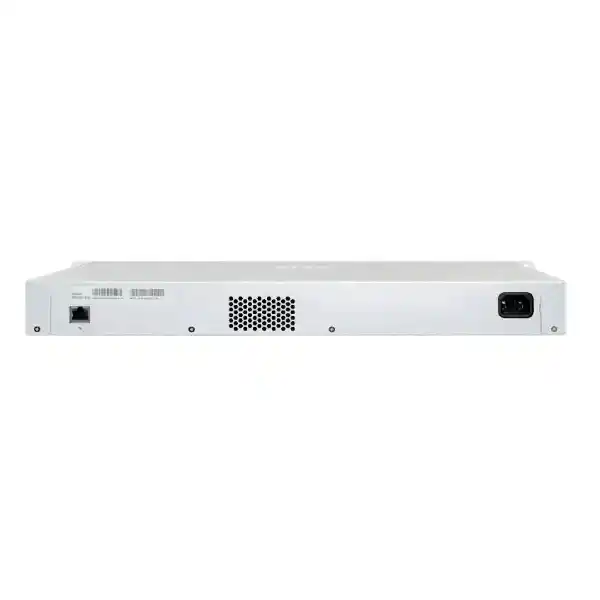
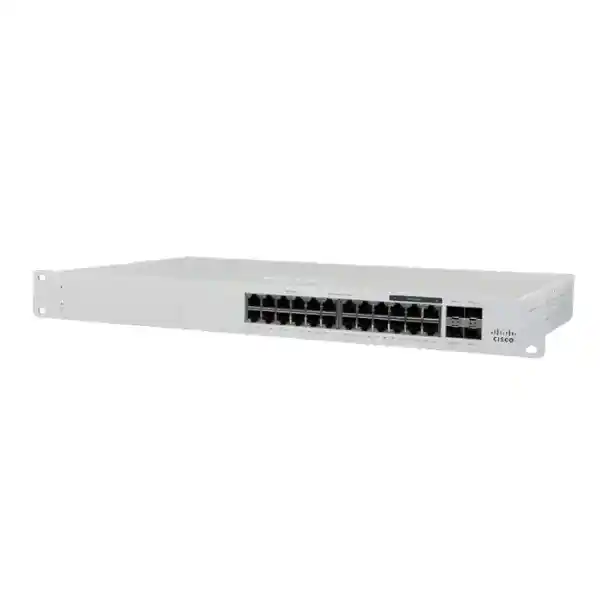
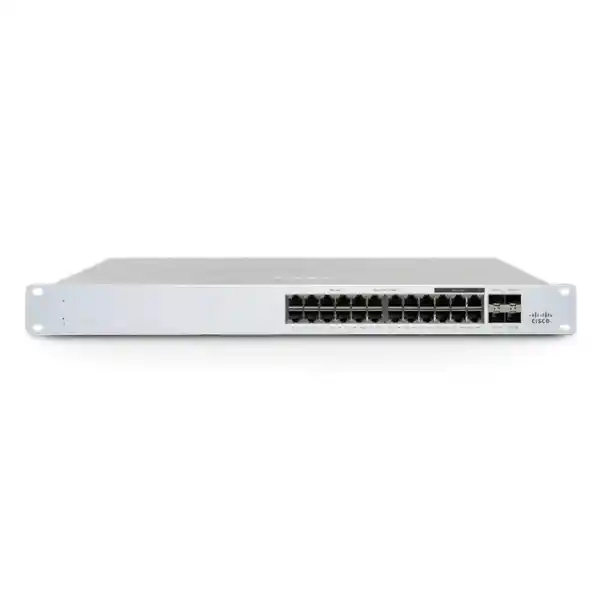
Cisco Meraki MS130-24X Cloud-Managed Multigigabit PoE+ Access Switch in Uganda
The Cisco Meraki MS130-24X is a cloud-managed Layer 2 switch for organizations upgrading access networks to support multigigabit wireless, wired users and powered endpoints. Eighteen 1GbE copper ports, six 2.5GbE-capable copper ports, four 10GbE SFP+ uplinks and a shared 370W PoE+ budget make this model especially relevant where new wireless access points exceed conventional gigabit requirements. The switch is administered through the Meraki Dashboard and is intended for professionally designed enterprise access networks rather than standalone unmanaged installations.
For procurement teams in Uganda, the key decision is not simply the switch purchase price. A complete project budget should account for the appropriate Meraki license, compatible uplink transceivers or cables, rack infrastructure, power protection, installation and any required technical services. FourTeck can help structure an itemized request covering the hardware, licensing and deployment accessories.
At-a-Glance Procurement Specifications
Model: MS130-24X-HW
Class: Cloud-managed Layer 2 access switch
Access ports: 18 × 1GbE plus 6 × 100M/1G/2.5GbE RJ45
Uplinks: 4 × 10GbE SFP+
PoE: 802.3at, up to 30W per eligible port, 370W shared budget
Power: 100–240V AC, 50–60Hz
Consumption: 50W idle, 421W maximum per manufacturer data
Operating temperature: 0–45°C
Licensing: Separately selected Meraki entitlement
Pricing, availability, freight, warranty and support terms are confirmed on quotation; no stock commitment or fixed local price is implied.
Network Architecture and Operational Fit
Deploy the MS130-24X at the network edge to aggregate desktop computers, printers, voice endpoints, access points and other Ethernet devices. Its six multigigabit ports are useful for compatible access points whose wired throughput can exceed 1Gbps. The four 10GbE uplinks offer headroom toward distribution switches and can help avoid a congested 1Gbps aggregation link. Network architects should still calculate oversubscription ratios, expected east–west traffic and upstream capacity rather than assume every endpoint can simultaneously attain its theoretical line rate.
The switch uses Meraki’s cloud-management model, allowing authorized operators to apply switch settings, inspect client and port information and coordinate firmware maintenance across sites. Local forwarding and management-plane dependencies should be evaluated separately: the cloud service supports configuration and monitoring, while the organization’s network design must independently provide resilient uplinks, addressing, DHCP, routing, DNS and internet access. This model is a Layer 2 access switch; do not purchase it as a substitute for a feature-rich Layer 3 core without validating the required routing functions.
Business Benefits
- Access throughput: Allocate six 2.5GbE ports to higher-demand compatible endpoints and preserve standard Gigabit ports for conventional devices.
- Availability planning: Use appropriate uplink design, UPS protection and tested recovery procedures; the switch itself does not replace a redundant switching topology.
- Scalability: Standardize configurations across multiple branches and add switches as endpoint counts grow.
- Access security: Evaluate 802.1X, VLAN segmentation, DHCP snooping and other supported controls against corporate policies.
- Central operations: Reduce routine site visits through remote monitoring and guided troubleshooting in Meraki Dashboard.
- Power consolidation: Deliver PoE+ to compatible devices within the shared 370W budget, reducing the need for individual adapters.
- Budget visibility: Account for hardware, license renewals, optics, energy, rack space and support in a multiyear ownership model.
Technical Specifications
| Specification | MS130-24X |
|---|---|
| Copper access interfaces | 18 × 1GbE RJ45 and 6 × multigigabit RJ45 (100Mbps/1Gbps/2.5Gbps) |
| Fiber uplinks | 4 × 10GbE SFP+ |
| Management | Meraki Dashboard; dedicated management interface |
| PoE standard | IEEE 802.3at PoE+, up to 30W per port subject to shared budget |
| PoE budget | 370W |
| AC input | 100–240V, 50–60Hz |
| Power load | 50W idle / 421W maximum (manufacturer published) |
| Operating temperature | 0–45°C |
| Primary role | Layer 2 branch and campus access switching |
Consult the current Cisco Meraki MS130 datasheet for detailed dimensions, acoustic characteristics, optics compatibility and regulatory approvals before final engineering sign-off.
Configuration and Sizing Worksheet
Step 1 — Count endpoints: Record the number of desktop devices, phones, cameras and access points, then reserve ports for growth. The switch provides 24 copper access ports in total, but only six support 2.5GbE.
Step 2 — Budget power: Sum the actual maximum power needs of every PoE device. For example, twelve endpoints budgeted at 25W each require 300W, leaving 70W within the nominal 370W shared PoE allowance. Consider startup demand and headroom.
Step 3 — Size uplinks: Identify 10GbE fiber type, transceiver support, distance, aggregation switch ports and any required link redundancy.
Step 4 — Validate facilities: Check rack mounting, ventilation, AC supply, earthing, UPS runtime and patching clearances. The published 421W maximum provides a useful upper bound for electrical planning.
Step 5 — Confirm license: Select a compatible Enterprise, Advanced or subscription entitlement according to the organization’s existing Meraki licensing model. Do not assume licenses of different tiers can be mixed without checking the current rules.
Step 6 — Request the quote: Specify switch quantity, license term, destination, optics, patch leads, deployment support, warranty expectations and target delivery date.
Deployment Scenarios
Multi-Site Businesses
Use consistent access VLANs and templates where appropriate, with 10GbE connections toward aggregation equipment. Central administration can simplify policy consistency, but each site still needs a documented IP addressing and failover design.
Banking and Financial Services
Segment staff, guest, voice and infrastructure traffic in line with internal security requirements. Coordinate authentication, logging and configuration approval processes with the institution’s security team; switch features alone do not constitute regulatory compliance.
Education and Campus Networks
Use multigigabit interfaces for selected high-density wireless access points and PoE+ for compatible classroom endpoints. Estimate peak concurrent usage during examinations, events and term registration.
Government and Public Institutions
Include procurement documentation, approved supplier conditions, license lifecycle, inventory identifiers and information-security review in the bill of materials. Confirm cloud-service suitability for applicable data and connectivity policies.
Three Engineering Considerations
Switching Capacity and Hardware Processing
The switch is designed to provide wire-speed Layer 2 access connectivity under supported operating conditions. Effective application throughput depends on traffic profiles, uplink contention, cable quality, endpoint negotiation and network design. Plan 10GbE aggregation capacity using actual utilization data instead of multiplying advertised access-port rates and assuming unconstrained upstream bandwidth.
Dashboard Management and Firmware Governance
Cloud management provides centralized configuration and monitoring. Before commissioning, define administrative roles, authentication, change windows, configuration standards and a firmware maintenance process. Validate the precise feature set against the deployed firmware release and license tier. Advanced capabilities may depend on additional licensing and firmware support.
Resilience and Recovery
A single access switch remains a potential single point of failure. Protect the installation with suitable UPS capacity, documented spare-device procedures, backup uplinks where supported and tested restoration steps. Confirm replacement entitlements and shipping arrangements rather than assuming immediate local hardware replacement.
Questions to Resolve Before Ordering
Is the hardware price separate from the Meraki license? Which license model is used by the existing organization? Are four compatible 10GbE optics included or sold separately? Does the site require fiber or direct-attach connectivity? Can the rack support airflow and cable bend radius? Is the electrical circuit and UPS sized for maximum PoE demand? Are all proposed access points compatible with 802.3at, or do some require higher-power standards? Which ports need 2.5GbE rather than 1GbE? What is the expected lead time to the destination? Are warranty and replacement terms stated in writing? Resolving these questions before purchase prevents common budget and installation surprises.
Uganda Procurement and Delivery
FourTeck can receive itemized requests for Uganda projects, including offices in Kampala, Entebbe, Jinja, Mbarara and Gulu. Specify the installation address, required quantity and delivery deadline so freight and lead time can be evaluated. Quotes should distinguish hardware, subscription or license charges, optional optics, installation services and applicable taxes. Availability, delivery windows and warranty terms are not guaranteed until confirmed in writing.
For organizations coordinating multiple countries, procurement discussions can begin through FourTeck Uganda, FourTeck Kenya, FourTeck Africa, FourTeck UAE and FourTeck Kuwait. Cross-border pricing, import requirements and local service arrangements should be verified for each destination.
Related Infrastructure Planning
Compare the MS130-24X against other Cisco Meraki access switches if your design needs fewer multigigabit ports, higher endpoint density or different PoE budgets. Review compatible 10GbE transceivers and fiber accessories, wireless access points, rack and UPS equipment and licensing options as separate bill-of-materials lines. The MS130-24 and MS130-24P are relevant comparisons for deployments that do not require six 2.5GbE ports.
FourTeck Technical Coordination
Before procurement, request assistance validating port allocation, PoE loading, optics compatibility, uplink topology, licensing alignment and the complete bill of materials. Where included in an agreed scope, staging can cover inventory recording, basic connectivity checks, firmware planning and handover documentation. Post-sales assistance and replacement handling depend on the purchased service terms.
Frequently Asked Questions
How many multigigabit ports does the MS130-24X have?
It offers six copper interfaces capable of 100Mbps, 1Gbps or 2.5Gbps, alongside eighteen standard Gigabit copper ports. Allocate the multigigabit ports to compatible access points or other endpoints with demonstrated bandwidth requirements. Verify cable condition and endpoint support before expecting a 2.5Gbps negotiated link.
Does the switch support PoE+?
Yes. The MS130-24X supports 802.3at PoE+ with a 370W shared budget and up to 30W per eligible port. Calculate the total power required by connected devices rather than assuming every port can deliver its individual maximum simultaneously. Check device requirements carefully, particularly where access points require more than PoE+.
Does the switch need a license?
Meraki licensing is a core procurement requirement. Compatible licensing depends on the organization’s licensing model and selected feature tier. Ask for a quotation that separately identifies hardware and entitlement, including the exact term and support coverage. Confirm the rules governing tier mixing and renewal before placing an order.
Are the uplinks 10GbE?
Yes. Four SFP+ uplink interfaces support 10GbE connectivity with suitable approved transceivers or cabling. Confirm the far-end switch, optical standard, fiber type, connector, distance and supported module list. The presence of an SFP+ slot does not mean that an optic or cable is included in the box.
Can it replace a Layer 3 core switch?
The MS130-24X is positioned as a Layer 2 access switch. It is a strong candidate for connecting users and wireless access points, but a network requiring extensive inter-VLAN routing, dynamic routing or advanced core services should retain appropriately specified Layer 3 infrastructure. Validate routing needs in the network diagram before purchase.
Can it be managed from another country?
Meraki Dashboard is designed for centralized management across geographically distributed sites, subject to appropriate network connectivity, administrator permissions and licensing. Organizations can coordinate branches without requiring an engineer on-site for every routine configuration change. Establish secure administrator access and clear change-control procedures.
What should I budget for electrical power?
The manufacturer lists 50W idle and 421W maximum power load for the MS130-24X. Actual consumption depends heavily on connected PoE devices and operating conditions. Size UPS systems and circuits for expected load with appropriate engineering headroom, and consider cooling requirements within the rack or communications room.
What warranty applies in Uganda?
Do not assume a particular local warranty term, replacement time or service level solely from the model name. Request written confirmation of manufacturer eligibility, support entitlement, supplier handling procedures and replacement logistics. Include the installation destination and any critical uptime requirements in the request for quotation.
Can the switch work with equipment from other vendors?
It supports standard Ethernet connectivity and can participate in mixed-vendor networks when interface standards and configurations align. Test VLAN tagging, link negotiation, authentication, PoE behavior and optics compatibility as part of acceptance. Meraki Dashboard management is specific to the supported Meraki ecosystem and does not directly manage unrelated third-party switches.
What information is needed for a formal quotation?
Provide the model MS130-24X, quantity, licensing preference or existing Meraki organization details, site location, expected deployment date, uplink media, connected PoE devices and any installation requirements. An itemized request enables more accurate pricing and reduces the chance of missing accessories or license terms.
Request Cisco Meraki MS130-24X Pricing for Uganda
Share your required quantity, delivery destination, licensing term and network design constraints. FourTeck can prepare a procurement discussion around the switch, compatible accessories and project services, with final availability and commercial conditions confirmed by quotation.



Reviews
There are no reviews yet.