FOURTECK UGANDA | ENTERPRISE NETWORK SECURITY
Cisco Meraki MX105 Cloud-Managed Enterprise Security and SD-WAN Appliance
Protecting a growing enterprise network requires more than a fast internet connection. A branch security gateway must enforce consistent policy, support resilient connections to critical applications, carry encrypted traffic between locations and provide the operations team with clear visibility when an incident occurs. The Cisco Meraki MX105 addresses these requirements in a centrally managed rack-mount platform. It combines stateful firewall functions, SD-WAN capabilities, VPN connectivity and security services with administration through the Meraki Dashboard. Rather than treating every site as an isolated firewall project, administrators can coordinate deployment and policy across locations from a common management environment.
The MX105 is especially relevant when a large branch or regional headquarters has outgrown lower-throughput security appliances. Its published performance ratings include 5 Gbps stateful firewall throughput, up to 3.5 Gbps site-to-site VPN throughput and 2.5 Gbps advanced security throughput. These ratings describe different traffic-processing scenarios and should not be combined or interpreted as a guarantee of simultaneous performance. The platform includes 10 Gigabit optical interfaces for both WAN and LAN connectivity, making it useful when the edge appliance must connect to fiber handoffs or an aggregation switch without forcing every connection through a one-gigabit interface.
For procurement in Uganda, the right decision depends on the wider bill of materials. The appliance requires an appropriate Meraki license; transceivers, patch leads, rack power arrangements and potentially a second appliance for high availability must be planned separately. Buyers should verify the selected subscription capabilities, term, local support arrangements and the precise hardware configuration before approving a purchase order. FourTeck can help translate those technical requirements into a practical quotation and deployment scope. The objective is a network edge that fits real application demand, operational staffing and business continuity expectations, not merely a device with an attractive headline throughput figure.
Procurement Facts at a Glance
Meraki MX105; 1U rack-mount security appliance for large branches and distributed enterprises.
5 Gbps firewall; 3.5 Gbps VPN; 2.5 Gbps advanced security published ratings.
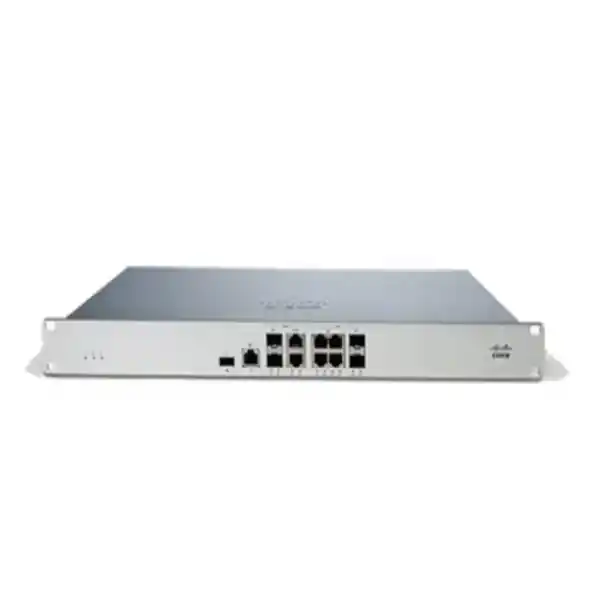
Four dedicated physical WAN ports; four 1GbE copper LAN ports; two 10GbE SFP+ LAN ports.
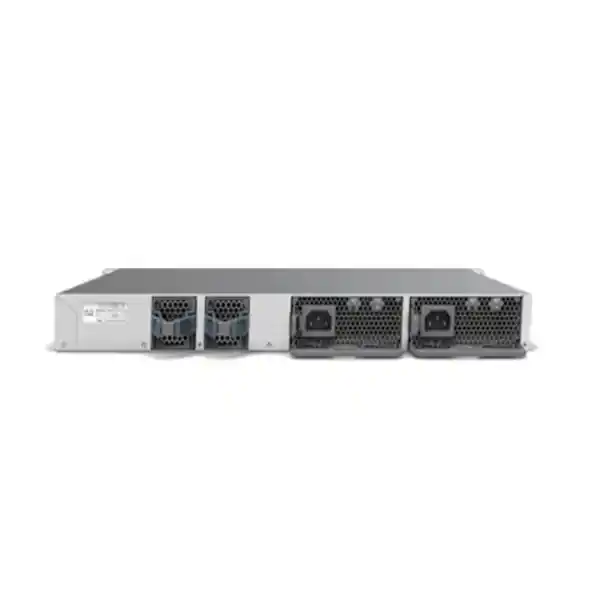
Modular 150W AC power supply architecture; confirm included and optional PSU quantities.
Active Meraki licensing required; confirm tier, term and supported security features.
Quotation-based availability, delivery estimates and warranty terms subject to written confirmation.
The distinction between physical interfaces and supported operating modes is important. Although the MX105 presents four dedicated WAN interfaces, Cisco documentation describes a firmware limitation of two simultaneously active WAN uplinks. An organization expecting four independently load-balanced internet circuits should validate its proposed firmware release and topology before ordering. Similarly, an SFP+ socket is not the same as a complete optical connection: the correct module, fiber type, connector and service-provider handoff must all match. These details are easy to overlook during budget approval but can materially affect the installation date.
Architecture and Operating Model
At the network boundary, the MX105 sits between service-provider circuits and the organization’s switching or routing infrastructure. Its policy engine evaluates traffic according to configured firewall rules, network segments, application classifications and enabled security services. The appliance can perform address translation, DHCP-related functions, VLAN-aware connectivity and routing appropriate to its supported feature set. The Meraki Dashboard provides centralized configuration, device inventory, event visibility and operational controls, reducing the need for engineers to maintain unrelated local configuration files at every branch.
The WAN side offers two 10GbE SFP+ interfaces and two 2.5GbE RJ45 interfaces, one of the copper WAN ports supporting PoE+ capability for applicable deployment scenarios. The LAN side offers four 1GbE RJ45 ports and two 10GbE SFP+ ports. This arrangement supports a straightforward design in which copper interfaces connect selected local services while a higher-speed optical link connects the core or distribution switch. It does not turn the MX105 into a general-purpose campus switch; dense access-port requirements should still be handled by appropriately selected switching hardware.
Cloud administration is a major architectural benefit for geographically dispersed organizations. A central team can standardize policies and investigate problems without dispatching an engineer to every office. However, cloud management does not remove the need for careful initial design. Administrators must establish correct uplink addressing, DNS reachability, upstream routing, management access, VLAN segmentation and change control. When a location depends on a single internet circuit, remote management may be unavailable during an outage even though some local forwarding behavior can continue according to platform capabilities. The recovery procedure should therefore include local access arrangements and documented escalation contacts.
SD-WAN functions help administrators define how branch traffic uses available uplinks and secure intersite paths. Auto VPN simplifies the establishment of supported Meraki-to-Meraki connectivity, especially in organizations with many sites. It does not mean every third-party firewall automatically joins the same overlay. Mixed-vendor VPN interoperability, authentication parameters, routing policies and security proposals require explicit validation. Teams migrating from a traditional firewall should inventory NAT rules, inbound services, VPN peers, content controls and logging requirements before attempting a cutover.
For performance planning, distinguish nominal internet speed from actual inspection demand. A branch with a 2 Gbps service and advanced threat inspection enabled should be sized against the relevant security-processing rating rather than only the stateful firewall rating. Encrypted site-to-site transfers must be assessed against VPN throughput. High concurrent sessions, application behavior, packet sizes and policy complexity can change practical results. Procurement should ask engineering to measure peak traffic, growth projections and business-critical flows so the device is not selected solely on employee headcount.
Operational visibility is also part of the architecture. Dashboard statistics, event records, remote packet capture, syslog export and traffic analysis can support troubleshooting, but organizations should define retention, access privileges and external monitoring integration as part of the deployment plan. A firewall is most useful when administrators can explain which policy is active, why traffic is permitted or denied, and who approved the change. For regulated organizations, that process may be as important as raw throughput.
Enterprise Outcomes and Practical Value
01 — Throughput Integrity
Separate firewall, VPN and inspection ratings help teams design against actual workloads. Document normal and peak bandwidth, enabled security features and required headroom before selecting an appliance. A port supporting 10GbE does not imply 10 Gbps of inspected traffic.
02 — Availability
Dual power-supply capability and supported high-availability deployment patterns can reduce selected failure risks. Redundancy must extend to power feeds, uplinks, switching and an appropriately designed second security appliance where required.
03 — Network Growth
10GbE uplinks and centralized management help organizations expand from one headquarters to multiple sites. Future growth should be evaluated against the recommended device population, VPN capacity and application demand.
04 — Security Policy
Layer 3 and Layer 7 firewall controls, optional advanced protection services and segmentation practices support more consistent access decisions. Subscription entitlements and feature availability should be confirmed for the proposed license.
05 — Central Operations
Dashboard-based administration enables distributed troubleshooting, policy review and device monitoring. Role-based access, administrator authentication and change procedures remain essential governance controls.
06 — Lifecycle Cost
Compare appliance, subscriptions, optics, secondary hardware, electrical consumption, support and renewal costs across the intended service life. Lower initial equipment cost is not always lower total cost.
07 — Faster Branch Rollout
Standardized templates and centralized provisioning can reduce repetitive setup effort when new branches use compatible designs. Successful rollout still depends on correct addressing, internet handoff and onsite cabling.
08 — Better Incident Response
Traffic visibility and event export can help engineers isolate outages or suspicious flows. Incident response quality also depends on staffing, alert ownership and tested escalation procedures.
Hardware and Software Highlights
The MX105 brings together higher-capacity interfaces and a management approach designed for organizations that want predictable policy across sites. The two SFP+ WAN interfaces suit supported 10GbE optical handoffs; the two multigigabit copper WAN interfaces offer alternatives for compatible service equipment. On the inside, the combination of copper LAN ports and 10GbE SFP+ LAN connectivity allows engineers to choose a practical handoff to a core switch. A dedicated management port supports access to local status functions, while the USB 3.0 interface is documented as part of the hardware interface set.
The 1U enclosure is designed for rack mounting and includes modular power components. Cisco lists an idle draw of 53W and maximum system draw of 123W. These are useful for preliminary UPS and heat planning, although an installation should account for surrounding equipment, environmental conditions and actual operating profiles. The unit has a published weight of approximately 4.87 kg with two fans and two power supplies inserted. Rack selection must allow appropriate front and rear clearance, cable management and airflow.
Meraki Dashboard management, firmware updates, traffic shaping, VPN, firewall rules, NAT, client visibility and monitoring tools are significant software capabilities. Some protection services depend on the selected subscription. Before approving the license, security teams should identify whether they need intrusion prevention, malware controls, content filtering or additional enterprise services. Do not assume every feature is included in every subscription or that licenses can be freely mixed across a managed organization.
A meaningful feature comparison should focus on outcomes. An extra WAN interface matters only if the supported firmware and routing design can use it as intended. A redundant PSU matters only when both feeds are installed and tested. A high VPN benchmark matters only when the overlay topology, tunnel count and applications fit within operational limits. These distinctions help prevent procurement documents from overstating the protection delivered by the physical appliance alone.
Confirmed Technical Specifications
| Parameter | Cisco Meraki MX105 | Procurement Interpretation |
|---|---|---|
| Product class | Cloud-managed security and SD-WAN appliance | Enterprise branch edge deployment |
| Recommended scale | Large branch, up to approximately 750 devices | Validate actual sessions and workload |
| Firewall throughput | 5 Gbps | Published test rating, not an unconditional guarantee |
| VPN throughput | 3.5 Gbps maximum | Assess encrypted traffic separately |
| Advanced security throughput | 2.5 Gbps | Relevant for inspection-enabled designs |
| WAN ports | 2 × 10GbE SFP+; 2 × 2.5GbE RJ45 | Confirm supported simultaneous active uplinks |
| WAN PoE+ | One supported multigigabit copper WAN interface | Check device and power compatibility |
| LAN ports | 4 × 1GbE RJ45; 2 × 10GbE SFP+ | Plan switch interconnects and optics |
| Management | Dedicated RJ45 management port | Supports local status access |
| USB | USB 3.0 port | Check supported use cases in current documentation |
| Form factor | 1U rack mount | Reserve rack space and airflow clearance |
| Dimensions | 44 × 315 × 484.6 mm (H × D × W) | Check rack depth and cable bend radius |
| Weight | 4.87 kg with two fans and two PSUs | Account for rack loading |
| Power supply | Modular 150W AC; dual-PSU architecture | Confirm included quantity and spare options |
| Input | 100–127 VAC or 200–240 VAC, 50/60 Hz | Verify site power distribution |
| Idle / maximum power | 53W / 123W | Use for preliminary UPS sizing |
| Temperature | 0–40°C in Meraki model documentation | Use conservative site planning; verify current hardware revision guidance |
| Humidity | 5–95% | Maintain appropriate controlled rack conditions |
| Management platform | Cisco Meraki Dashboard | Requires active appropriate license |
Specifications above are based on published Cisco documentation. Cisco’s family datasheet and individual installation documentation can differ in some benchmark or environmental entries across revisions. Confirm the current hardware revision, supported firmware and exact orderable part numbers during quotation. No undocumented internal processor, ASIC or backplane figure is asserted here. Such components should not be treated as purchasing specifications unless Cisco publishes verifiable details for the offered revision.
Configuration and Sizing Worksheet
Step 1: Measure the Workload
Record each ISP circuit’s contracted speed and observed busy-hour throughput. Separate general web traffic, business applications, intersite VPN, backup replication, voice and video. Identify which flows require inspection and which services cannot tolerate an outage. Use the applicable performance rating for each class of traffic and leave practical growth headroom. A site with modest user numbers may still require a high-capacity appliance when backups or data transfers are intensive.
Step 2: Map the Network
Create a diagram showing service-provider equipment, WAN handoff types, LAN aggregation switches, VLANs, IP subnets and any existing firewall or router. Identify static routes, NAT requirements, public IP services and remote-access needs. Confirm whether the environment will use Auto VPN with other Meraki devices or standards-based tunnels to third-party peers. Document expected VPN tunnel counts and routing behavior during failure conditions.
Step 3: Check Rack and Electrical Readiness
Reserve 1U plus necessary service clearance. Measure cabinet depth, rear cabling space and access for power replacement. Check UPS capacity against the device’s published consumption and other connected equipment. If dual power supplies are ordered, identify independent protected feeds wherever possible. A second PSU connected to the same unprotected extension lead does not provide the resilience buyers usually expect.
Step 4: Select Licenses and Accessories
Specify the required Meraki license edition and term in the quotation. Match SFP+ modules and fiber patch leads to actual handoffs. Verify approved transceiver compatibility, fiber distance and whether copper or optical links are required. Include spare components only where they meaningfully reduce downtime. Ask the seller to itemize hardware, subscriptions, optics, shipping, taxes and services rather than hiding critical dependencies in a single ambiguous line.
Step 5: Define Acceptance Criteria
Before delivery, agree on device identity, license assignment, management organization ownership, software version policy, WAN connectivity, failover testing, firewall rule review and operational handover. Establish which party performs staging and who retains administrative access. For regulated networks, record approval responsibilities and change windows. An acceptance checklist helps procurement confirm that the purchased solution is usable, not merely that a box arrived.
Deployment Patterns Across Industries
Large Enterprises and Regional Branches
A multi-site company may place an MX105 at a major regional office, connect it to an aggregation switch using 10GbE and establish secure connectivity to other managed branches. Central administrators can coordinate security rules and monitor link health through the Dashboard. The design should account for branch application traffic, centralized services and local internet breakout. Where business continuity is critical, assess a supported high-availability pair and independent provider circuits. The MX105 is not a substitute for proper LAN redundancy or a tested disaster-recovery strategy.
Financial Services
A bank or financial-services office may need segmented access between employee networks, transactional systems, guest connectivity and managed devices. Firewall rules, VPN policy and event export can form part of a broader control environment. Before purchase, the institution should verify security features under the chosen license, logging retention, administrator permissions, external monitoring integration and change audit requirements. Compliance obligations are determined by the institution and relevant regulators; buying an appliance alone does not establish compliance.
Universities and Campus Administration
Education networks often mix administrative applications, student connectivity, laboratory systems and guest internet use. An MX105 may be appropriate at a substantial campus edge where measured throughput and client counts fit its recommended capacity. Network teams should consider how traffic is segmented upstream and downstream, whether content controls are needed and whether multiple sites require encrypted connections. Large campus switching fabrics and wireless access systems remain separate design components, even when managed in a coordinated network ecosystem.
Government and Public-Sector Offices
Public-sector buyers commonly require documented sourcing, controlled administrative access, predictable warranty terms and repeatable configuration standards. The MX105 can be evaluated as a centrally managed edge platform where cloud administration is permitted by applicable policy. Before procurement, confirm any data-handling, hosting, security-assurance and vendor-approval requirements. Sensitive deployments may require an architecture review that goes beyond general commercial feature comparisons.
Healthcare, Logistics and Service Operations
A hospital administration office, logistics center or service operator may rely on continuous access to scheduling, communications and cloud applications. Traffic prioritization and redundant connectivity can improve operational resilience when properly designed. However, availability also depends on local power, provider service levels, switching and application architecture. Buyers should identify essential services and define how staff continue operating when a primary circuit or device fails.
Three Technical Deep Dives
1. Processing and Interface Capacity
The MX105’s published throughput numbers represent different processing demands. Stateful firewall forwarding is not equivalent to encrypted VPN forwarding or advanced security inspection. Engineers should use the 5 Gbps firewall, 3.5 Gbps VPN and 2.5 Gbps security figures as separate sizing references and consider the effect of real traffic patterns. The presence of 10GbE ports is useful for connectivity flexibility but should not be misread as a promise that all traffic will be processed at line rate. Cisco does not need to disclose every internal silicon detail for buyers to perform a sound design: workload measurements, documented limits and proof-of-concept tests are more useful than speculative processor descriptions.
Port planning also requires care. Two SFP+ interfaces are dedicated to WAN connectivity, while another two are dedicated to LAN connectivity. Four copper LAN interfaces support 1GbE; the two copper WAN interfaces support 2.5GbE. Engineers should confirm the supported link media and module compatibility, then map the ports to their actual topology. Where a provider presents a 1GbE copper handoff, an expensive optical link may not be necessary. Where the aggregation switch is located farther away, optical transceivers and fiber standards become important design decisions.
2. Software Control and Security Operations
Central management changes the way network teams work. Instead of relying exclusively on locally maintained device configurations, administrators use the Meraki Dashboard to organize networks, apply policies, review events and manage firmware. This is useful when branches have limited onsite technical staff. It also creates a need for strong administrative governance. Organizations should require appropriate authentication, restrict privileged accounts, review access regularly and document who may approve changes to internet access, VPN routes and security policies.
Firmware maintenance should be planned rather than ignored. A controlled process considers supported releases, known issues, maintenance windows, rollback expectations and compatibility with other network components. Security subscriptions must be mapped to the functions the organization intends to use. Firewall controls, threat prevention, content filtering and advanced services can have different licensing dependencies. During a migration, export or document the existing rules, then validate each required service after cutover. An untested policy conversion can disrupt business applications even when the hardware itself is functioning normally.
3. Availability and Recovery Engineering
Resilience is achieved through architecture rather than a single product specification. The MX105 supports a modular dual-power design and can participate in supported high-availability arrangements, but the full solution may require two appliances, appropriate licensing, redundant links and carefully planned switching connections. A buyer should distinguish component redundancy from site redundancy. Two power supplies can address a PSU failure, while two firewalls can address selected device failures; neither protects against every provider outage, incorrect policy change or site-wide electrical incident.
A recovery runbook should specify what happens when the primary ISP fails, when a firewall stops responding, when a software update introduces an unexpected behavior and when an upstream switch becomes unavailable. Test cases should include critical application access, intersite VPN restoration, DNS reachability, public-facing services and remote administration. Teams should also confirm what monitoring alerts are generated and who responds outside office hours. These operational details often determine whether a redundancy investment delivers the intended business outcome.
Questions to Resolve Before Purchase
Is the license included? Do not assume it is. Ask for a separate license line showing edition, duration and device applicability. Are both power supplies included? Confirm the shipping configuration and part numbers. Does four WAN ports mean four active providers? No: published Meraki guidance notes a two-active-uplink firmware limitation; validate current behavior for the planned software release. Can the unit run without the Dashboard? The Meraki operating model depends on appropriate licensing and cloud management; confirm licensing and connectivity requirements before deployment. Will any SFP+ module work? Do not assume so; verify compatible modules and optical specifications.
How much rack space is required? Allow one rack unit plus cabling and airflow clearance, and verify the cabinet’s usable depth. Will it protect a 5 Gbps internet circuit with every security service enabled? The 5 Gbps stateful firewall benchmark and 2.5 Gbps advanced security benchmark represent different workloads. Size according to the functions actually enabled. Can it replace every traditional firewall feature? Not necessarily; review advanced routing, custom VPN interoperability, logging and application requirements. What happens when the license expires? Review Cisco’s current licensing terms and renewal procedures before ordering. What is the warranty? Obtain the applicable manufacturer warranty and local replacement procedure in writing.
Buyers should also investigate product lifecycle status, firmware support, support entitlement and the suitability of the platform for future growth. Avoid assuming that an appliance currently listed in a catalog has an unlimited sales or software-support horizon. Ask for the current lifecycle notice and confirm that the proposed license term is appropriate. For critical sites, plan spare logistics and recovery times rather than relying on an unspecified promise of immediate replacement. Finally, establish whether installation, rule migration, onsite testing and administrator training are included in the commercial offer.
Uganda Procurement, Delivery and Coverage
FourTeck Uganda can prepare a requirements-based quotation for the Cisco Meraki MX105, including the appliance, appropriate subscriptions, compatible connectivity accessories and optional deployment assistance. Procurement teams should provide the delivery city, target installation date, network size, ISP interface type, security requirements and preferred subscription duration. Where a project involves multiple branches, a consolidated bill of materials helps avoid mismatched licenses or overlooked optical modules.
For Kampala deployments, buyers should confirm site access, rack readiness, power availability and the handoff details supplied by the internet provider. Entebbe organizations may need coordination around office access and scheduled installation windows. In Jinja, the design may involve manufacturing or operational systems that require strict maintenance windows. Mbarara branches may prioritize reliable VPN connectivity to a central office, while Gulu deployments may require particular attention to provider options and spare-part lead times. These are planning considerations rather than promises of local stock or specific delivery speeds.
Delivery lead times depend on stock location, supplier confirmation, import requirements and destination. Quoted warranty terms and support processes should be checked before payment. Where staging is requested, define who supplies the configuration, who owns the Dashboard organization and what tests will be completed before shipment. FourTeck should confirm any agreed preconfiguration or onsite services in the final scope of work. Procurement teams should not treat estimated availability as a binding stock commitment until confirmed in writing.
Cross-Border Enterprise Supply Coordination
Organizations purchasing for multiple countries may need consistent device standards while observing different import, tax, service and warranty requirements. FourTeck regional sites include Uganda, Kenya, African regional markets, United Arab Emirates and Kuwait. These links provide regional contact routes; they should not be interpreted as confirmation of stock in every location.
For a regional rollout, align the hardware bill of materials, licensing model, shipment responsibilities and acceptance criteria before placing separate orders. Check whether transceivers and power cables are appropriate for each site. Identify the importer of record and the entity responsible for local taxes, customs clearance and delivery. A coordinated approach can reduce mismatches between branch installations and simplify support documentation.
Related Equipment and Planning Resources
A complete edge solution may require additional switching, wireless access, fiber connectivity and power protection. Review the FourTeck Uganda catalog for complementary infrastructure and contact the team about Meraki MX95 comparisons, MX250 sizing, compatible SFP+ modules, rack power and UPS planning, Meraki subscription options and high-availability appliance pairs. These consultation links avoid implying that an unverified product category or individual listing already exists.
When comparing models, document the workload first and the model second. A smaller gateway may meet an office’s present needs at lower cost, while a larger platform may provide needed security throughput or VPN capacity. Selecting the MX105 should follow an explicit evaluation of traffic, interfaces, resilience, subscription needs and growth assumptions.
FourTeck Technical Services and Handover
A useful procurement service begins with requirements validation. The engineering discussion should review internet circuits, current firewall rules, VPN relationships, network segmentation and expected traffic levels. The resulting bill of materials should identify the exact appliance, subscription, compatible optical modules, power options and any requested spare hardware. Where a buyer needs a formal implementation scope, the quotation should separate equipment supply from staging, installation, testing and training.
Pre-shipment work may include inventory checks, accessory verification and agreed firmware or configuration preparation where authorized and technically feasible. Security-sensitive credentials and administrative ownership should remain under the customer’s approved process. During handover, the team should verify uplink status, key application reachability, VPN connectivity, firewall policy behavior and monitoring access against an agreed acceptance checklist. Post-sales support arrangements, response targets and manufacturer escalation routes should be recorded rather than assumed.
For replacement projects, preserve the existing configuration and define a rollback procedure before the change window. Document every exception to the standard policy, including externally published services and third-party VPN requirements. The result should be a maintainable network edge with clear ownership, rather than an undocumented installation that depends on one engineer’s memory.
Extended Technical Frequently Asked Questions
1. What type of organization should consider the MX105?
The MX105 is intended for substantial branch and distributed-enterprise deployments where central administration, advanced security functions and higher-speed WAN or LAN interfaces are important. Cisco positions the model for large branches with approximately 750 devices as a sizing reference, not a guaranteed limit for every workload. Organizations should measure their peak traffic, encrypted application use and required security inspection before deciding. A smaller office with limited bandwidth may not need this platform, while a campus with heavy traffic or extensive routing requirements may need a different architecture. The most reliable selection process compares real workloads with published performance categories and operational requirements.
2. Does the MX105 need a separate license?
Meraki appliances use a cloud-managed licensing model, so buyers should budget for the appropriate active subscription alongside the hardware. The chosen edition and term affect both commercial cost and available service capabilities. Before ordering, request a quotation that explicitly identifies the appliance and the license rather than a single unclear price. Ask the seller to explain renewal responsibilities, start dates, organization licensing compatibility and what happens if licensing becomes noncompliant. Subscription policies can evolve, so the authoritative terms are the current Cisco documentation and the specific offer supplied for your organization.
3. Can four WAN interfaces run four active internet circuits?
The MX105 has four dedicated physical WAN interfaces: two 10GbE SFP+ and two 2.5GbE copper ports. Physical port count does not necessarily equal the number of simultaneously active service-provider uplinks. Meraki’s published model documentation notes a firmware limitation of two active WAN uplinks. An organization requiring three or four independently active internet connections should not assume that the physical sockets alone provide that behavior. Validate the current firmware capability, failover design and supported topology with Cisco documentation and the implementation engineer before finalizing the purchase. This is particularly important for organizations replacing routers with more extensive multi-WAN features.
4. What throughput should be used for sizing?
Use the rating that matches the traffic processing your design requires. Cisco publishes 5 Gbps stateful firewall throughput, 3.5 Gbps maximum site-to-site VPN throughput and 2.5 Gbps advanced security throughput for the MX105. Those values should not be added together or treated as universal application performance. If the branch uses inspection-heavy internet access, advanced security throughput may be the more relevant planning reference. If large encrypted backups move between sites, VPN capacity deserves attention. Measure actual busy-hour traffic and allow headroom for growth, traffic bursts, policy changes and maintenance. A pilot can help validate demanding application patterns.
5. How is the appliance connected to a 10 Gigabit network?
The MX105 provides dedicated SFP+ interfaces for 10GbE WAN connectivity and two separate SFP+ interfaces for 10GbE LAN connectivity. A suitable transceiver or supported direct-attach option must match the other endpoint and the intended cabling medium. Confirm fiber type, optical reach, connector style and compatibility before purchase. The core switch may need an available SFP+ port and an appropriate configuration. Do not assume that an optical transceiver is bundled with the appliance. Also remember that a 10GbE link describes interface speed, not guaranteed 10 Gbps throughput through firewall or security processing.
6. What does high availability require?
High availability should be treated as a full design exercise. Depending on the intended architecture, the project may require a second compatible appliance, suitable licensing, correct network connectivity and properly configured failover behavior. The MX105’s modular power architecture can help address power-supply failures when redundant components and independent feeds are present, but it cannot prevent all outages. Test the failure of the primary WAN, a security appliance and relevant switching connections. Document how public IP services, VPNs and business applications recover. Agree on who monitors alerts and who is authorized to make changes during an incident. Redundancy without testing is an incomplete continuity plan.
7. Can the MX105 connect to firewalls from other vendors?
The appliance supports standards-based VPN capabilities alongside Meraki Auto VPN, but interoperability with a specific third-party device should be validated against current supported protocols and configuration options. Auto VPN is primarily designed for compatible Meraki deployments; it should not be assumed to provide automatic integration with unrelated firewall ecosystems. Before migration, document tunnel peers, authentication methods, encryption proposals, routing expectations, NAT behavior and failover requirements. A test tunnel can reveal mismatches before the production cutover. For complex networks, the implementation team should confirm that all required routing and security functions are supported by the selected firmware and licensing configuration.
8. How should warranty and hardware replacement be handled in Uganda?
Request written confirmation of manufacturer warranty eligibility, support entitlement and the seller’s replacement process for the specific appliance being supplied. Clarify whether replacement equipment ships locally or from another region, who handles return logistics and which response times are contractual. A manufacturer’s general warranty statement is not necessarily the same as an onsite service-level agreement. Critical locations may benefit from spare hardware or an appropriately designed high-availability pair when replacement lead times are uncertain. Retain invoices, serial numbers, license records and acceptance documents so that any future claim can be processed efficiently. FourTeck should confirm applicable commercial terms in its quotation.
9. Can FourTeck assist with configuration and migration?
Configuration and migration assistance can be included in a scoped service proposal where available. The customer should provide a current topology, IP addressing, firewall rules, VPN information, ISP handoff details and a list of business-critical applications. An agreed plan can cover preconfiguration, controlled installation, testing, documentation and administrator handover. Credentials and administrative access should be handled under the customer’s security procedures. For a replacement project, a rollback path and approved change window are essential. Buyers should ask which services are included in the equipment price and which are separately quoted rather than assuming installation or policy migration is automatic.
10. What information is needed for an accurate quotation?
Provide the required quantity of MX105 appliances, destination city, expected installation date, license edition and term, WAN circuit types, desired SFP+ modules, power redundancy requirements and whether a second appliance is needed for high availability. Describe the number of sites, approximate client population, VPN traffic, security services and any special compliance or documentation requirements. If you are replacing an existing gateway, include its model and the reason for replacement. A complete request helps the supplier verify compatible accessories and avoid omissions. Ask for itemized hardware, subscriptions, taxes, shipping, warranty conditions, support and implementation charges, with stock and lead times confirmed in writing.



Reviews
There are no reviews yet.