UGANDA ENTERPRISE NETWORK PROCUREMENT
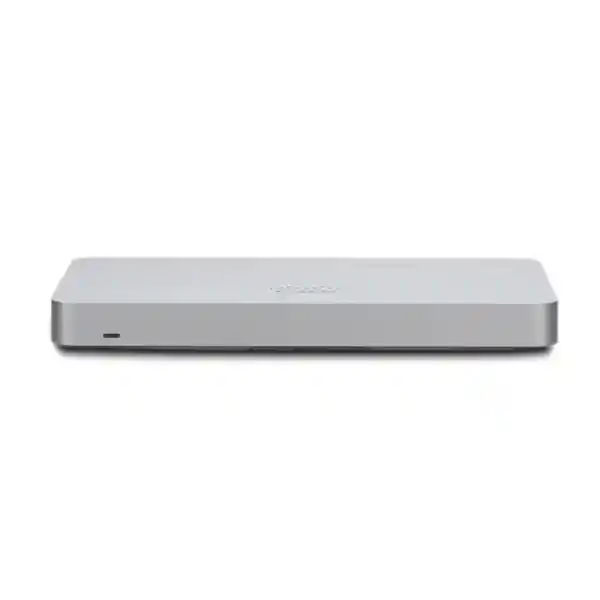
Cisco Meraki MX68 Cloud-Managed Security and SD-WAN Appliance
The Cisco Meraki MX68 gives a branch office a centrally managed security gateway, resilient dual-WAN design and ten local Gigabit Ethernet ports in a compact desktop or wall-mounted enclosure. It is suited to organizations that need consistent security policy and straightforward oversight across multiple locations without maintaining a separate on-site management server.
For Uganda buyers, the central purchasing question is not simply whether the firewall fits a branch network. The correct choice also depends on licensed security capabilities, real application throughput, available internet connections, device count, physical mounting and operational support. FourTeck can prepare a bill of materials that distinguishes the appliance from subscription entitlements and optional deployment services.
At-a-Glance Procurement Facts
Architecture and Operational Fit
The MX68 sits between local networks and internet service providers. Its dedicated WAN ports allow two wired uplinks to be connected, while integrated Gigabit LAN ports provide convenient attachment points for a modest number of devices or downstream switches. Two LAN ports support PoE+, potentially reducing the need for separate power injectors for compatible equipment when the available power budget and device requirements align. Cloud-based dashboard administration enables authorized administrators to review appliance status, configure security rules, coordinate VPN connectivity and maintain consistent site settings.
A branch deployment might connect the primary fiber service to WAN 1, a secondary fixed connection to WAN 2, an access switch to a LAN port and a compatible access point to a PoE+ port. Application traffic can then be routed through the gateway under centrally defined policies. Dual uplinks improve design flexibility but do not guarantee uninterrupted service: successful failover depends on provider independence, monitoring settings, physical cabling and the health of upstream infrastructure.
The MX68 is not an all-in-one wireless access point. Organizations needing local Wi-Fi should specify a separate access point or compare the MX68W variant. Likewise, the standard MX68 does not have an integrated cellular modem; cellular resilience requires a separately validated solution. These distinctions are important when procurement documents use the MX68 family name without an exact hardware suffix.
Business Outcomes
- Throughput planning: Published firewall throughput is 700 Mbps; advanced security services and maximum site-to-site VPN throughput are rated at 400 Mbps. Size around the workload and enabled features rather than only ISP headline speed.
- Availability: Dual wired WAN interfaces support resilient uplink designs where two suitable services exist.
- Growth: Dashboard-based management helps teams apply common policies to additional branches, while each appliance must still be sized for its local demand.
- Access control: Firewall policy, segmentation and licensed security services can help reduce unnecessary access between network zones.
- Operational simplicity: Central visibility reduces the need for routine configuration visits to every location.
- Cost control: Integrated ports and compact form factor may simplify small-site infrastructure, but licensing, internet services and support must be included in total ownership cost.
Hardware and Software Highlights
The appliance combines two dedicated Gigabit Ethernet WAN interfaces, ten fixed Gigabit Ethernet LAN interfaces, two PoE+ LAN connections, cloud-managed policy administration, site-to-site VPN capabilities and a compact enclosure. The published maximum site-to-site VPN tunnel figure is 50 under Cisco’s laboratory conditions; practical tunnel sizing must consider active traffic and encryption overhead. Meraki licensing determines the service entitlements available to the organization. Buyers should ask for the exact license tier, duration and activation requirements in writing.
Technical Specifications
| Attribute | Cisco Meraki MX68 |
|---|---|
| Recommended site size | Small branch, up to 50 devices |
| Firewall throughput | 700 Mbps |
| Advanced security throughput | 400 Mbps |
| Maximum site-to-site VPN throughput | 400 Mbps |
| Maximum site-to-site VPN tunnels | 50, laboratory maximum |
| Dedicated WAN | 2 × 1GE RJ-45 |
| Fixed LAN | 10 × 1GE RJ-45, including 2 × PoE+ |
| Mounting | Desktop or wall mount |
| Dimensions | 284 × 148 × 27 mm |
| Weight | 1.12 kg |
| Power supply | 100 W DC |
| Idle / maximum load | 11 W / 79 W |
| Operating temperature | 0–45 °C |
| Humidity | 5–95% |
Technical values are from Cisco’s MX family data sheet; actual application performance varies with configuration, traffic characteristics and enabled services.
Configuration and Sizing Worksheet
Step 1 — Count users and devices. Record workstations, telephones, cameras, access points, printers, guest devices and anticipated growth. The recommendation of up to 50 devices is a planning reference, not a universal guarantee.
Step 2 — Map traffic. Estimate simultaneous business application usage, video conferencing, cloud backup and VPN transfer requirements. Compare expected encrypted and inspected traffic against the appropriate throughput rating.
Step 3 — Validate internet connections. Confirm Ethernet handoff, addressing method, provider diversity and failover expectations. Two WAN ports are useful only when supported by a viable upstream design.
Step 4 — Check power and space. Confirm outlet type, compatible power supply, ventilation, surge protection, UPS runtime and cable clearance.
Step 5 — Specify licenses. Request a quote identifying the supported Meraki license edition, subscription duration, renewal terms and organizational licensing model.
Step 6 — Prepare purchase details. Supply site location, quantity, deployment date, required accessories, tax documentation and support expectations.
Deployment Scenarios in Uganda
Distributed Retail and Corporate Branches
Use an MX68 at a small branch to connect point-of-sale terminals, staff systems and local network equipment to centrally managed services. A site-to-site VPN can link the branch to other compatible Meraki environments under the appropriate configuration.
Financial Services
Separate sensitive transaction networks from general office traffic, enforce approved outbound policies and plan redundant provider paths. Regulatory compliance requires additional controls and assessment beyond purchasing the appliance.
Schools and Training Centers
Provide controlled internet access for administration and classroom networks while evaluating whether peak student traffic exceeds the MX68 sizing envelope.
Government and Public Services
Support standardized branch policy, documented change control and secure interoffice connectivity, subject to agency procurement rules and approved security architecture.
Technical Deep Dives
Packet Handling and Performance
Throughput figures represent distinct operating conditions. Basic firewall forwarding is not equivalent to performance with security inspection or encrypted site-to-site traffic. For procurement, define the busiest expected hour, the number of simultaneous applications and the security services required. Avoid selecting a gateway solely because a service provider advertises a particular broadband speed.
Dashboard Administration and Firmware
The Meraki management model centralizes configuration, monitoring and device administration. Organizations should establish role-based administrator access, maintain ownership of the Meraki organization and document firmware maintenance windows. An active, suitable license is a core requirement. Cloud management should be accounted for in internet access and operational continuity planning.
Redundancy and Recovery
Two WAN ports permit a primary and backup wired service design. For more demanding availability requirements, evaluate supported appliance high-availability architecture, compatible licensing, upstream switch topology and power continuity. Keep documented recovery procedures and test failover before production acceptance.
Pre-Purchase Checks
Confirm whether the requested SKU is the wired MX68 rather than MX68W or MX68CW. Confirm the appliance’s ownership and license eligibility, especially for refurbished units. Ask whether the offer includes the power adapter, wall-mount accessories and any necessary cables. Determine whether the project needs a separate rack shelf because the MX68 is designed for desktop or wall mounting. Check whether the two PoE+ ports provide sufficient connectivity and power for the intended endpoints. Obtain a written list of license terms and clarify whether the quote includes configuration, installation, freight, duties and local taxes. Request lifecycle confirmation for the exact SKU: notices concerning MX68CW should not automatically be interpreted as notices for the standard MX68.
Uganda Procurement and Delivery
FourTeck supports quotation-led procurement for organizations in Kampala, Entebbe, Jinja, Mbarara and Gulu. Buyers can submit the required quantity, delivery destination, license duration and technical scope to receive a tailored commercial proposal. Stock, lead times, shipping options, taxes and warranty handling should be confirmed before a purchase order is issued. For multisite projects, identify the number of branches and target deployment phases so staging and shipment planning can be coordinated.
Regional Supply Coordination
Cross-border requirements may involve sourcing and logistics coordination across Uganda, Kenya, other African markets, the UAE and Kuwait. Confirm regional electrical accessories, commercial terms, applicable import documentation and support arrangements for each destination.
Related Network Procurement
When comparing branch gateways, request a technical assessment of Cisco Meraki MX67, MX68W, MX75 and compatible Meraki switches or wireless access points. A smaller gateway may suit modest demand; a larger model may be preferable where inspected throughput or future expansion exceeds MX68 capacity. Review the FourTeck Uganda catalog and contact the procurement team for validated combinations, licensing and accessory requirements.
Technical Service and Procurement Support
Request assistance with bill-of-materials review, uplink mapping, network segmentation planning, VPN topology, power assessment and license selection. Where separately agreed, staging activities may include configuration preparation, firmware planning, basic connectivity testing and deployment documentation. The final service scope should be defined in the quotation rather than assumed to accompany hardware purchase.
Frequently Asked Questions
Does the MX68 require a license?
Yes. Cisco Meraki appliances are managed under a licensing model. Before purchase, confirm the applicable edition, license term, organizational licensing arrangement and renewal obligations. Hardware pricing alone is not a complete ownership-cost estimate.
How many users can it support?
Cisco recommends the MX68 for a small branch with up to approximately 50 devices. Real suitability depends on simultaneous traffic, application requirements, VPN usage and security inspection settings. Plan capacity using the busiest expected operating period.
Does the MX68 include Wi-Fi?
No. The standard MX68 is the wired model. If wireless access is needed, specify separate compatible access points or compare an appropriate wireless-equipped MX68 family variant. Confirm the exact model suffix in every purchase order.
Can it connect to two internet providers?
Yes. Two dedicated Gigabit Ethernet WAN ports enable dual wired uplink designs. Effective failover requires suitable provider connections, configuration and testing. It does not by itself remove single points of failure elsewhere in the network.
What firewall speed should buyers expect?
The published firewall rating is 700 Mbps, while advanced security services and maximum site-to-site VPN throughput are rated at 400 Mbps. Production results vary with traffic characteristics and enabled functions. Choose capacity using the relevant performance metric.
Does it support PoE devices?
Two of the ten LAN ports support PoE+. Verify each connected endpoint’s power requirements and the appliance’s available power budget. For larger deployments, a dedicated PoE switch may provide a more suitable distribution architecture.
Is it rack mountable?
Cisco lists desktop or wall mounting for the MX68. A suitable rack shelf or compatible mounting solution may be needed for cabinet installations. Check ventilation, physical clearance, power cabling and access to ports before finalizing the site design.
Can it serve multiple branch offices?
The MX68 can participate in a centrally managed multi-site network and supports site-to-site VPN. Each branch still requires suitable hardware, licenses, connectivity and configuration. Larger sites should be evaluated independently rather than assuming a single model fits all locations.
How are warranty and replacement handled?
Warranty eligibility and replacement procedures depend on Cisco Meraki terms, the hardware’s entitlement and the commercial source. Ask for written warranty confirmation, applicable support terms and the process for replacement units before ordering.
Can FourTeck assist with configuration?
Buyers can request a scoped quotation for deployment planning, configuration preparation and support. Provide current network diagrams, internet handoff details, required security policies and a list of sites. Service availability and deliverables should be confirmed in writing.



Reviews
There are no reviews yet.