Uganda enterprise networking | Branch security
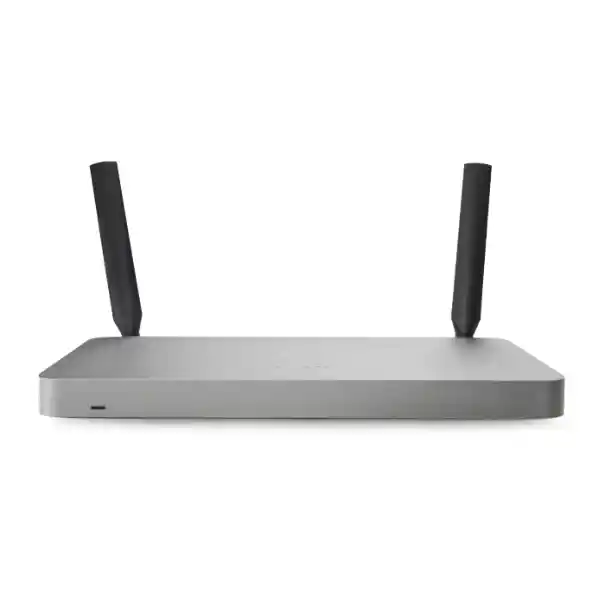
Cisco Meraki MX68CW Cloud-Managed Security, SD-WAN, Wi-Fi and LTE Appliance
The Cisco Meraki MX68CW is a compact security gateway for organizations that need a managed branch firewall, encrypted site connectivity, local wired ports, integrated wireless access and a backup cellular path. It is especially relevant where a remote office must remain reachable despite interruptions to its primary internet connection. Instead of maintaining an unrelated firewall, access point and cellular router, the MX68CW places several functions under the Meraki cloud-management framework. This can make branch rollout easier for a central network team responsible for locations across Uganda.
The device should be evaluated as a small-branch platform, not a high-capacity data-center firewall. Cisco positions the model for approximately 50 client devices. Its 700 Mbps stateful firewall rating and 400 Mbps published maximum VPN throughput provide useful sizing boundaries, but a real design must account for inspection policies, concurrent applications, upstream circuit performance and the number of connected users. Wireless performance is likewise influenced by building materials, interference and client density. LTE failover needs a supported mobile network, an activated SIM and a suitable data plan. These practical considerations should be documented before purchase.
FourTeck can help procurement teams frame a request around exact hardware identification, appropriate regional cellular compatibility, license duration, deployment location and accessories. A responsible quotation should distinguish the appliance from the required Meraki subscription and any separately priced installation or connectivity services. Buyers should also confirm lifecycle milestones before committing to a multi-year installation.
Procurement Fact Rail
Meraki MX68CW; confirm worldwide-region hardware part number before ordering.
Small branch, approximately 50 client devices.
2 × 1GbE WAN; 10 × 1GbE LAN, including 2 × PoE+.
802.11ac Wave 2 dual-band wireless; integrated Cat 6 LTE backup modem.
100W DC supply; published idle/max appliance load approximately 19W/89W.
Stock, commercial terms, local replacement arrangements and eligible manufacturer coverage subject to written confirmation.
How the MX68CW Fits a Branch Network
A typical installation connects the primary business broadband circuit to WAN1 and, where available, a second fixed service to WAN2. Local workstations, point-of-sale terminals, printers and switching equipment attach through the Gigabit Ethernet LAN interfaces. Two PoE+ LAN ports can power compatible network devices within their rated power budget. The built-in wireless radios can serve modest office coverage requirements, while the integrated LTE modem supplies a contingency path when configured and supported. VLANs and firewall policies divide trusted operational equipment from guest and other restricted traffic.
The Meraki Dashboard is the operational center for device configuration, monitoring, event review and troubleshooting. This is particularly useful when a network engineer in Kampala supports multiple sites in Jinja, Mbarara or Gulu. Templates and documented standards help keep policies consistent, while dashboard visibility helps the team identify failing links, unusual client activity and connectivity events. A cloud-managed product still needs an active, correctly assigned Meraki license; buyers should not treat the hardware purchase as a perpetual standalone management entitlement.
The MX68CW is not a 5G appliance and its integrated LTE radio should not be described as such. Cellular frequency compatibility depends on the specific regional unit and the local carrier. Before ordering, validate the hardware suffix, supported LTE bands, SIM form factor and operator service in the intended district. Antenna placement also matters, especially in reinforced buildings or sites with poor indoor mobile coverage.
Business Outcomes and Practical Value
01 — Predictable performance planning
Use published firewall and VPN throughput as the starting point, then allow headroom for encrypted traffic, filtering and growth. Measure actual application demands before selecting a service tier.
02 — Better continuity
Two wired WAN ports and LTE backup provide multiple connectivity options. Failover improves resilience but does not guarantee uninterrupted application sessions or immunity from local power failures.
03 — Repeatable branch expansion
Consistent policies and centralized provisioning can reduce manual site-by-site configuration. Standardize addressing, VLAN naming and deployment records before expanding.
04 — Layered access control
Stateful firewalling, VLAN segmentation, VPN connectivity and license-dependent advanced protection help separate workloads and apply organization-wide security policies.
05 — Central administration
Remote configuration, event visibility and troubleshooting tools allow a small technical team to support multiple locations without routine travel for every change.
06 — Transparent lifetime cost
Evaluate appliance cost together with licensing, LTE data, cabling, power protection, installation and support. A lower initial hardware price does not necessarily mean lower total operating expense.
Hardware and Software Highlights
The fixed ten-port Gigabit Ethernet LAN layout makes the MX68CW useful where a small office wants direct connections without immediately installing an additional switch. The two PoE+ interfaces can simplify powering compatible endpoints, but larger PoE deployments still need a correctly sized switch. Dual dedicated WAN ports support primary and secondary fixed-line designs. Integrated LTE offers an additional backup path, subject to carrier availability. Dual-band 802.11ac Wave 2 wireless provides local connectivity, although demanding coverage plans may require separate access points.
Software capabilities include Meraki AutoVPN, SD-WAN policy controls, VLAN configuration, DHCP, NAT, firewall policies, traffic shaping, monitoring and remote troubleshooting. Advanced inspection and protection features depend on the chosen license entitlement. Before comparing quotations, ask each supplier to specify the exact subscription package rather than using the vague description ‘licensed’.
Technical Specifications Ledger
| Specification | MX68CW detail |
|---|---|
| Product category | Cloud-managed security and SD-WAN appliance |
| Recommended scale | Small branch, up to approximately 50 client devices |
| Firewall throughput | 700 Mbps |
| Advanced security services throughput | 400 Mbps published family specification |
| Maximum VPN throughput | 400 Mbps in MX67/MX68 technical datasheet; verify application-specific sizing |
| WAN | 2 × dedicated Gigabit Ethernet RJ45 |
| LAN | 10 × Gigabit Ethernet RJ45, including 2 × PoE+ |
| Wireless | Dual-band 802.11ac Wave 2, 2 × 2 MU-MIMO |
| Cellular | Integrated Cat 6 LTE modem; nano-SIM; regional bands vary |
| Dimensions | 284 × 148 × 27 mm (W × D × H) |
| Weight | Approximately 1.18 kg |
| Power | 100W DC supply; published idle/max load 19W/89W |
| Operating temperature | 0–45°C |
| Relative humidity | 5–95% |
| Mounting | Desktop or wall mounting |
| Management | Cisco Meraki Dashboard with appropriate active license |
Technical figures reflect Cisco’s MX family and MX67/MX68 documentation; some Cisco product overview pages publish differing VPN figures. Confirm the currently applicable datasheet and firmware behavior for the precise orderable unit.
Configuration and Sizing Worksheet
Step 1: Inventory users and workloads
Count laptops, desktops, phones, payment terminals, printers, cameras and other network clients rather than counting employees alone. Estimate peak simultaneous use, business application bandwidth, video conferencing and traffic crossing site-to-site VPNs. Consider the expected growth over the planned license term.
Step 2: Define WAN and failover priorities
Record both fixed-line providers, their handoff type, bandwidth and service commitments. Determine whether the LTE path will carry all traffic or only priority applications during an outage. Confirm mobile signal strength, supported LTE bands and monthly data allowances before rollout.
Step 3: Check physical installation
Reserve a ventilated shelf or appropriate wall location, ensure power-adapter clearance and avoid placing the unit inside metal enclosures that degrade wireless and cellular reception. Where power interruptions are common, size a UPS for the appliance and upstream connectivity equipment.
Step 4: Define security and subscription needs
Document the desired firewall rules, guest isolation, content controls, threat inspection, VPN topology and reporting needs. Ask for a clearly itemized license proposal matching the required feature set and term.
Step 5: Prepare the request for quotation
Provide destination city, quantity, exact model, required regional hardware variant, license duration, delivery date, installation needs and whether the unit will replace an existing gateway. Request confirmation of stock, warranty eligibility and any applicable lifecycle notices.
Deployment Scenarios
Retail chains and distributed offices
For a multi-branch organization, each MX68CW can provide consistent firewall and VPN policy while a central team supervises WAN health. A shop can connect payment devices to a restricted VLAN, staff equipment to a separate network and guests to isolated wireless access. LTE backup may help maintain essential transaction connectivity when fixed broadband is disrupted, provided the payment service and mobile network remain available.
Financial service offices
Smaller financial branches need documented network segmentation, controlled administrative access and clear incident escalation. The MX68CW can support a branch security design, but financial institutions should validate all required controls against internal compliance policies. No single appliance automatically makes an organization compliant with banking standards.
Schools and training centers
Administrative systems, staff workstations and student access should be separated. The integrated wireless capability can suit modest coverage areas, while larger campuses will generally require purpose-built access points and switching. Evaluate the client count during examination or enrollment peaks, not only during quiet periods.
Public-sector and field locations
Government offices and remote service sites may value centralized configuration and alternate connectivity. Procurement should explicitly verify data handling requirements, permitted cloud-management arrangements, cellular coverage, equipment lifecycle and support commitments before purchase.
Three Engineering Considerations
Packet processing and realistic performance
The firewall throughput rating is a controlled benchmark rather than a promise that every enabled service will operate at that rate. Encryption, inspection, traffic mix and remote endpoint capacity all affect practical results. For VPN-heavy offices, use the relevant VPN performance figure and include safety margin. Avoid selecting this model solely because its physical interfaces are Gigabit Ethernet: interface speed and inspected traffic capacity are different measures.
Cloud software and security operations
Meraki Dashboard provides centralized configuration and observability. Establish named administrative accounts, strong authentication, role-based access and change-management records. Schedule firmware changes in suitable maintenance windows, review security policy after major application changes and maintain a current inventory of license expiry dates. Remote management reduces travel but does not eliminate the need for good operational governance.
Resilience and recovery
Multiple uplinks improve the options available during a carrier outage, but they do not remove every single point of failure. The appliance, power supply, upstream switching and building power remain important dependencies. For higher availability requirements, assess supported warm-spare designs, power protection and recovery procedures. Test WAN failover with real applications and document how staff should respond if both fixed-line and cellular connectivity fail.
Buyer Questions to Resolve Before Ordering
Is licensing included? Do not assume so. Request hardware and subscription lines separately, including exact tier, duration and renewal conditions.
Will the LTE modem work with a Ugandan operator? Confirm regional part number, supported bands, active nano-SIM and coverage at the actual installation site.
Can the appliance provide full-office wireless? It includes Wi-Fi, but coverage depends on building design and client density. Additional access points may be needed.
Does it support 5G? No. The integrated cellular capability is Cat 6 LTE.
Can it be rack-mounted? It is designed for desktop or wall placement. Any rack-shelf solution should be separately specified with ventilation and cable access.
What about product lifecycle? Ask for current manufacturer end-of-sale and end-of-support information, license eligibility and replacement options before committing to long-term use.
Is there an uninterrupted failover guarantee? No. Application sessions may need to reconnect after path changes; test the actual operational workflow.
Uganda Procurement, Delivery and Local Coverage
For Uganda buyers, a useful quote includes destination, requested quantity, intended use, licensing and implementation scope. Delivery costs and timing vary with inventory position, shipping route, import procedures and the final address. FourTeck should confirm any available staging, configuration or after-sales services in writing rather than treating them as automatically included.
Kampala: headquarters and branch-network projects often benefit from a standard configuration template. Entebbe: hospitality, logistics and service offices may prioritize reliable alternate connectivity. Jinja: industrial and commercial sites should check signal strength and power resilience. Mbarara: regional offices may need remote administration with limited local technical support. Gulu: field deployments should verify operator coverage, delivery lead time and practical replacement arrangements.
Cross-border procurement may involve sourcing or coordination through FourTeck Uganda, FourTeck Kenya, FourTeck Africa, FourTeck UAE or FourTeck Kuwait. These regional links do not imply stock availability or a guaranteed cross-border delivery commitment; request written confirmation for the actual order.
Related Network Planning and Products
When comparing alternatives, review the Uganda product catalogue for related Meraki security gateways, switches, wireless access points and power accessories. The MX68W is relevant when integrated Wi-Fi is wanted without the MX68CW’s built-in LTE capability. The MX68 base model suits wired deployments where integrated wireless and cellular are unnecessary. A larger MX platform may be preferable when branch device counts, security throughput or VPN demand exceed the MX68CW’s intended scale. For broader wireless coverage, plan suitable dedicated access points and PoE switching. For extended power continuity, include an appropriately rated UPS in the bill of materials. Contact FourTeck procurement support to confirm current model availability and compatible accessories.
Technical Service and Implementation Planning
A complete project can include bill-of-materials review, hardware-region verification, license alignment, WAN addressing review, VLAN and VPN design, configuration staging, firmware planning and post-installation acceptance testing. These are potential service activities to request, not guaranteed bundled services. Establish who owns the Meraki organization, who has dashboard administrator access, who activates the SIM and who receives license-renewal notices. Document baseline settings and recovery contacts before a remote site goes live.
Frequently Asked Questions
1. What does the Cisco Meraki MX68CW do?
It combines a cloud-managed branch security gateway, SD-WAN functionality, integrated dual-band wireless and Cat 6 LTE backup connectivity. It is intended for smaller locations that want centrally managed access policies and secure links to other sites. Its ten Gigabit Ethernet LAN ports support direct wired connections, while two of those ports provide PoE+. The model is not a substitute for a full campus switching and wireless design when device density or coverage needs are extensive.
2. How many devices can the MX68CW support?
Cisco’s guidance places the MX68CW in a small-branch category of approximately 50 client devices. This is a planning recommendation, not a guarantee that every combination of 50 devices will deliver identical performance. Video calls, backups, cloud applications, VPN traffic and security inspection can produce very different loads. Count simultaneous clients and estimate traffic during the busiest period. If demand is near the published boundaries, consider a higher-capacity gateway rather than designing without headroom.
3. Is a Meraki license necessary?
Yes. Meraki appliances rely on the applicable cloud-management licensing framework. Procurement should identify the correct subscription type, term and entitlement for the intended security features. Ask the supplier to show the hardware and license as distinct quote lines and explain renewal obligations. A secondhand or unclaimed appliance can present additional ownership and licensing complications, so buyers should verify provenance and eligibility before ordering. Confirm any changes in available license packages with the manufacturer or authorized supply channel.
4. Can the built-in LTE modem replace fixed broadband?
The integrated Cat 6 LTE modem is designed primarily for cellular failover. It can provide valuable continuity when fixed connectivity is interrupted, but its practical speed and stability depend on carrier signal, congestion, coverage and the purchased data plan. Validate the regional LTE bands and test the operator at the installation site. High-volume backup traffic can create substantial mobile-data charges. If the site needs a permanent mobile-first connection, assess the design requirements and available connectivity products separately.
5. What is the difference between MX68W and MX68CW?
Both models offer integrated wireless functionality and the MX68 family wired interface layout. The MX68CW adds a built-in LTE modem for cellular backup, making it relevant for branches where fixed-line outages are a concern. The exact hardware-region suffix matters because LTE bands differ between markets. Do not assume that every similarly named unit has the same cellular compatibility. Request the full orderable part number and compare it with the intended network operator before confirming the purchase.
6. Does the MX68CW provide PoE for connected equipment?
Yes, two of its ten Gigabit Ethernet LAN ports support PoE+. This may be useful for compatible access points, phones or other powered network devices, subject to port and aggregate power limits. It is not intended to replace a multiport PoE switch for a larger installation. Check each endpoint’s required standard and consumption, and account for the appliance’s total power requirements. If several cameras or wireless access points need power, include a correctly sized PoE switch in the proposal.
7. Can it establish secure VPN connections to other branches?
The MX68CW supports Meraki AutoVPN and other documented VPN functions within the applicable configuration and licensing framework. A multi-site design should consider tunnel count, traffic throughput, routing requirements and compatibility with the devices at the other end. Use the published VPN throughput figures as sizing guidance rather than assuming the 1GbE ports represent encrypted tunnel performance. For a mixed-vendor deployment, confirm supported standards and the exact interoperability requirements before making commitments.
8. How should the appliance be installed and powered?
The compact chassis supports desktop or wall placement. Allow airflow around the unit and ensure its power adapter and Ethernet cabling can be serviced safely. Avoid enclosed metal cabinets when relying on the integrated wireless and cellular radios, because reception may be impaired. In locations with unstable electricity, protect the appliance, modem and any necessary switch with a properly sized UPS. Record cable labels, upstream circuit details and the dashboard organization assignment to make later troubleshooting easier.
9. What warranty and replacement terms should buyers expect?
Manufacturer warranty documentation describes coverage for eligible Meraki hardware, but the practical replacement process depends on purchase channel, eligibility, location and applicable service terms. Request a written warranty statement identifying the covered hardware, replacement process, shipping responsibilities and escalation contact for Uganda. Do not assume that an advertised next-day replacement arrangement applies to every remote delivery address. Retain purchase records, serial numbers and license details to support any future claim.
10. What information should be sent for a FourTeck quotation?
Provide the requested quantity, installation city, exact MX68CW model or preferred regional variant, expected client count, internet connection speeds and required Meraki license term. Explain whether LTE failover is essential and identify the proposed mobile operator. Mention any additional access points, PoE devices, UPS equipment or configuration assistance. Ask for separate pricing for hardware, licensing, accessories, freight and services, along with confirmed stock, lead time, warranty terms and product lifecycle status. This produces a clearer comparison between competing offers.
Request a Cisco Meraki MX68CW Procurement Proposal
Share your branch location, quantity, preferred license duration, cellular operator and expected deployment date. Ask for a quote that confirms the exact regional appliance, included accessories, subscription details, warranty arrangements and delivery conditions. FourTeck can review the requirements supplied and clarify the commercial scope before an order is placed.


Reviews
There are no reviews yet.