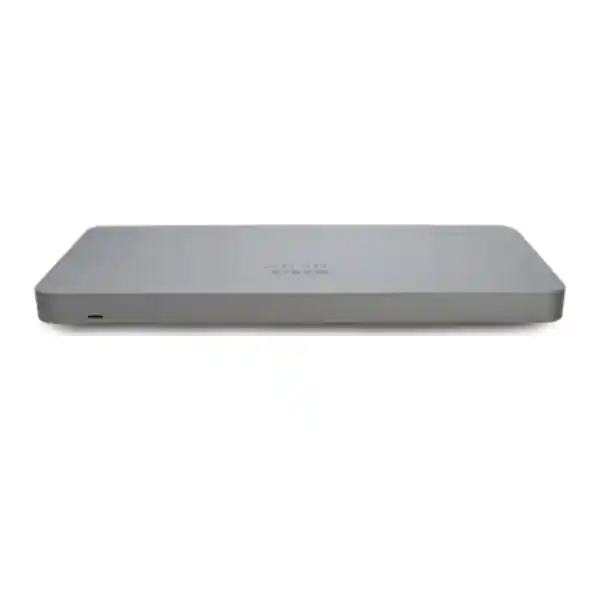
Cisco Meraki MX75 Cloud-Managed Security and SD-WAN Appliance
The Cisco Meraki MX75 is a centrally administered network security appliance for businesses that need consistent internet-edge policies, branch connectivity, secure remote access and operational visibility. For Uganda-based organizations, the MX75 is a practical option for a branch office, retail location, school administration network, medical office or regional operations site where network teams want cloud-based configuration instead of separately administering each firewall at the command line.
The MX75 supports a recommended deployment of up to 200 devices, with published maximum stateful firewall and site-to-site VPN throughput figures of 1 Gbps. Actual results depend on enabled features, packet sizes, traffic patterns, software version and the surrounding network. A correctly sized purchase therefore begins with workload measurement rather than a simple comparison of internet circuit headline speeds.
Procurement should include the appliance, compatible licensing, power arrangements, required mounting accessories, any approved optical modules and a documented implementation plan. A subscription and support entitlement are fundamental parts of a Meraki deployment, not an optional afterthought. FourTeck can assemble a quotation reflecting the buyer’s desired license duration and service requirements.
MX75 Procurement Facts at a Glance
Deployment: Small branch, up to 200 devices
Management: Meraki cloud dashboard
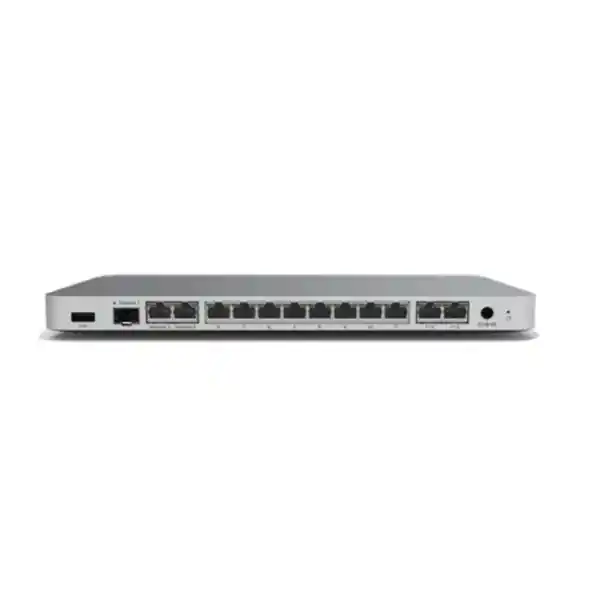
LAN: Ten 1 GbE copper ports, including two PoE+ ports
Power: 100 W DC supply
VPN: Up to 1 Gbps rated site-to-site
Commercial terms: Quote, availability, license and warranty confirmation required
The three physical WAN interfaces do not imply three simultaneous active WAN uplinks: Cisco documentation notes a firmware limit of two active WAN uplinks. Specify any cellular failover requirements separately and verify the supported modem or uplink architecture. This distinction matters when planning resilient connections from two independent internet service providers.
Operational Architecture and Network Design
The MX75 combines routing, stateful firewall inspection, secure site-to-site connectivity, traffic policies and centralized configuration within a single branch-edge platform. Instead of treating security and connectivity as unrelated appliances, administrators can establish policies for applications, client networks and remote branches from the Meraki dashboard. This model reduces repetitive work when several sites need consistent settings.
Typical topology places the MX75 between the internet service provider equipment and the site’s access-switching infrastructure. One or two supported WAN uplinks terminate on the security appliance. The LAN side connects to distribution switches, wireless access points, office endpoints, voice devices and segmented operational networks. VLANs can separate guest access from business applications and sensitive administrative traffic. The exact configuration depends on addressing, existing switches and organizational policy.
Dashboard management is particularly useful when the technical team is based in Kampala but must support branches elsewhere in Uganda. Authorized administrators can inspect health information, configuration state and network events without traveling to every site. That operational benefit does not remove the need for a secure administrative access model, documented change control, monitoring and escalation procedures.
Before purchase, map peak user concurrency, circuit speed, VPN encryption demand and the impact of security features. A 1 Gbps headline rating is not a promise that every mixed workload will achieve that speed under all inspection configurations. The 75 maximum site-to-site VPN tunnel figure is a laboratory capability indicator; practical sizing should allow margin for live traffic and growth.
Enterprise Outcomes and Business Value
- Throughput integrity. Design around the published 1 Gbps firewall capability and real traffic profiles. Measure peak application use, not only average utilization, and account for encrypted branch traffic.
- Continuity. Dual supported active WAN connectivity enables designs that can tolerate some provider failures when both circuits and failover behavior are correctly configured. It does not replace an uninterrupted power supply or a tested recovery procedure.
- Scalability. Standardized dashboard templates and consistent network policies can simplify additional site deployments. Larger sites or higher traffic levels may require a different model.
- Security. Stateful firewall policies, network segmentation and licensed security services help enforce the organization’s access rules. Protection quality depends on configuration, subscriptions and ongoing administration.
- Visibility. Cloud administration gives authorized personnel a common operational view across geographically separated branches.
- Cost control. Consolidated functions can reduce the number of separately administered edge devices, but total cost includes subscription renewal, internet circuits, power, training and support.
- Repeatability. Documented configuration standards can reduce deployment variation between offices and make incident response more predictable.
- Procurement assurance. A detailed bill of materials reduces unexpected expenditure on optics, licensing, mounting hardware and onsite labor.
Hardware and Software Highlights
The MX75 offers two dedicated 1 GbE RJ-45 WAN interfaces, one dedicated 1 GbE SFP WAN interface and ten fixed 1 GbE RJ-45 LAN interfaces, two of which provide PoE+. These interfaces support conventional branch deployments that combine internet edge protection with a modest number of directly connected devices. Larger switching estates should use appropriately sized access and distribution switches rather than assuming the firewall ports replace a campus switching design.
The SFP interface gives the buyer an optical or modular uplink option subject to supported transceiver selection. Confirm fiber type, connector, distance and compatibility before ordering. PoE+ availability can be useful for selected endpoints, but check the power budget and actual device draw before using the firewall as a power source. The appliance uses a 100 W DC supply, with published idle and maximum load figures of 12 W and 96 W. Provide stable mains power and suitable surge protection.
Meraki dashboard capabilities and security services depend on current software and license entitlements. Confirm which features are available with the chosen subscription tier, including security inspection and traffic analytics, before finalizing an order.
Technical Specifications
| Specification | Cisco Meraki MX75 |
|---|---|
| Recommended deployment | Small branch with up to 200 devices |
| Stateful firewall throughput | 1 Gbps maximum published rating |
| Advanced security throughput | 1 Gbps published rating |
| Site-to-site VPN throughput | Up to 1 Gbps |
| Maximum site-to-site VPN tunnels | 75 laboratory maximum; size conservatively |
| Dedicated WAN ports | 2 × 1 GbE RJ-45 and 1 × 1 GbE SFP |
| Active WAN uplinks | Maximum two, per documented firmware behavior |
| LAN interfaces | 10 × 1 GbE RJ-45, including 2 × PoE+ |
| Dimensions | 283 × 148 × 27 mm (width × depth × height) |
| Weight | 0.85 kg |
| Power supply | 100 W DC |
| Idle / maximum power load | 12 W / 96 W |
| Operating temperature | 0–45°C |
| Relative humidity | 5–95% |
| Mounting | Desktop or wall mounting; confirm accessories |
Specifications follow Cisco’s published MX family information. The final commercial quotation should specify the exact hardware part number, licensing SKU, accessories and any regional variations. No particular stock position or delivery date is implied by this technical ledger.
Configuration and Sizing Worksheet
1. Estimate actual workload
Record the number of connected endpoints, simultaneous users, cloud applications, voice calls, video sessions and inter-branch flows. Identify expected peak periods, planned internet speed increases and any large data transfers. A deployment with 80 busy video users may have a different traffic profile from one with 150 lightly active office endpoints.
2. Map physical infrastructure
Document cabinet or wall location, cable routing, ventilation, power socket availability and the placement of upstream provider equipment. The appliance is compact, but adequate cable bend radius and service access still matter. Do not assume rack rails or brackets are included without verifying the supplied package.
3. Review power and cabling
Confirm the correct local mains adapter, UPS capacity, PoE endpoint draw and RJ-45 cable quality. If the SFP interface will be used, identify approved optics and matching fiber termination. Redundant internet circuits should ideally avoid shared upstream failure points.
4. Select licensing
Confirm current Meraki licensing model, security tier, term, renewal responsibility and dashboard organization ownership. Request an itemized quote that separates hardware from recurring entitlements and professional services.
5. Prepare the purchase request
Provide site addresses, circuit bandwidth, endpoint count, VPN peers, preferred delivery schedule, billing details, tax requirements, existing Meraki organization information and a named technical contact. This information allows FourTeck to validate a complete bill of materials before procurement.
Deployment Scenarios
Distributed business offices
Deploy MX75 appliances at suitable branch edges to apply consistent network segmentation, firewall policies and encrypted site-to-site connectivity. A headquarters team can administer distributed sites from the dashboard, while local staff handle basic cabling and provider handoffs. Validate tunnel counts and application sensitivity before standardizing across a large estate.
Financial and professional services
Separate teller, administration, visitor and service-provider networks with carefully reviewed access policies. Define audit responsibilities, log retention requirements and approved remote access procedures. The appliance can support a security architecture, but does not independently establish compliance with banking or privacy regulations.
Schools and campuses
Use the MX75 at a suitable school office or small campus edge to distinguish staff, learner and guest traffic. Consider bandwidth spikes during examinations, learning-platform use and software updates. Large campus backbones may require higher-capacity hardware.
Government and regulated operations
Document data classification, procurement approvals, configuration ownership, firmware controls and incident response. Review any restrictions on cloud-managed infrastructure before purchase. The buyer remains responsible for determining suitability against applicable government requirements.
Three Technical Design Considerations
Packet processing and practical throughput
The MX75’s published performance numbers are useful comparison points, not universal guarantees. Throughput varies with packet size, encryption, inspection features and traffic composition. When designing for a 1 Gbps provider connection, account for overhead and business-critical traffic rather than assuming all applications will sustain the maximum rated figure simultaneously. Confirm expected performance with a representative test plan.
Dashboard administration and software maintenance
Cloud management helps maintain consistent policy across multiple locations. Protect administrator identities, assign least-privilege roles, document change windows and maintain a tested configuration recovery process. Before deployment, confirm supported firmware and license entitlements with Cisco documentation and the procurement team. Cloud management should be integrated into the organization’s governance model rather than treated as an unmanaged convenience.
Availability and disaster recovery
Two active WAN uplinks can support connectivity resilience, but availability also depends on the upstream providers, power supply, switches and configuration. For business-critical sites, evaluate a second compatible appliance, the supported high-availability design, licensing requirements, configuration synchronization and spare equipment arrangements. Test failover under controlled conditions before relying on it during an outage.
Pre-Purchase Questions That Prevent Costly Surprises
Is the license included? Do not assume so. Ask for the hardware line item and the exact compatible license and duration as separate quote entries. Can the unit use three internet providers at once? The hardware has three dedicated WAN interfaces, but Cisco documents a maximum of two active WAN uplinks. Does PoE+ eliminate the need for a switch? Not in larger installations; confirm port count and power budget. Can the firewall support every application at 1 Gbps? Actual performance is workload-dependent. What happens after the subscription expires? Review the applicable Meraki license terms before committing. Is there a fixed delivery lead time? No lead time is promised until supplier and shipping arrangements are confirmed. Is installation included? Request it explicitly in the proposal. What about warranty replacement? Obtain written warranty and return terms applicable to the quoted hardware and territory.
Uganda Procurement and Delivery
FourTeck can prepare a Uganda-focused commercial proposal based on the MX75 hardware configuration, license selection, accessories and optional implementation scope. Buyers should specify whether the unit will be delivered to an existing network team, a managed-service provider or a site that needs onsite configuration assistance. This affects staging, packaging, labeling and the required acceptance checklist.
For delivery planning, provide a precise receiving address, contact person, business hours and any site access restrictions. Kampala and Entebbe deliveries may have different handling needs from shipments to Jinja, Mbarara or Gulu. Transport schedules, customs considerations for imported stock and supplier availability must be confirmed before a binding delivery commitment is made.
Where requested and agreed, technical preparation may include reviewing interface assignments, VLAN requirements, dashboard organization details and a change plan. Sensitive administrator credentials should be exchanged only through approved secure channels.
Local Coverage Across Uganda
Kampala: Central offices, commercial headquarters and service providers often prioritize dashboard visibility, structured procurement and short maintenance windows. Entebbe: Offices with time-sensitive connectivity may emphasize dual-provider planning and documented recovery. Jinja: Industrial and distributed organizations may require segmented operational and office networks. Mbarara: Regional branches benefit from standardized remote support and clear site acceptance procedures. Gulu: Distributed service operations can reduce unnecessary travel through centrally administered configurations. Availability of local installation resources and delivery terms should be confirmed individually for every site.
Regional Supply Coordination
Cross-border buyers can coordinate regional procurement requirements through FourTeck Uganda, FourTeck Kenya, FourTeck Africa, FourTeck UAE and FourTeck Kuwait. Organizations with sites in multiple countries should document local power compatibility, import responsibilities, shipping terms, taxes, warranty geography and license ownership. A common hardware standard can simplify administration, but commercial and regulatory requirements may differ between Uganda, Kenya, the UAE, Kuwait and other African markets.
Related Solutions and Procurement Resources
Compare the MX75 with other appropriately sized Cisco Meraki security appliances when bandwidth, site scale or physical interfaces differ. For supporting infrastructure, evaluate managed access switches, approved SFP transceivers, structured copper cabling, UPS protection and wireless access points. The FourTeck Uganda product catalog is a starting point for related enterprise equipment. For MX appliance comparisons, compatible licensing, switching and optics or power and installation accessories, request a validated bill of materials instead of assuming compatibility from product family names.
FourTeck Technical Services
Pre-sales assistance can include a requirements review, interface and optics compatibility check, subscription selection discussion, deployment topology review and bill-of-materials validation. Where agreed in the project scope, preparation can also include asset labeling, staging instructions, firmware planning, configuration documentation and coordination with the customer’s technical team. Post-sales support arrangements, response windows and warranty handling must be described in the accepted quotation. Customers should preserve serial numbers, purchase records, subscription details and the final configuration documentation to streamline future service requests.
Frequently Asked Questions
1. What is the Cisco Meraki MX75 used for?
The MX75 is a cloud-managed firewall and SD-WAN appliance designed for branch internet edges. It provides network security policy enforcement, routing and secure connectivity between locations, with centralized administration through the Meraki dashboard. It is suitable for organizations that want to standardize configuration across several branches without maintaining a separate local management process for every site. Buyers should confirm device counts, application throughput and security subscriptions before choosing it as a standard model.
2. How many users can the MX75 support?
Cisco recommends the MX75 for small branches with up to 200 devices. This is a planning guideline rather than a guarantee that 200 simultaneously busy endpoints will experience identical performance. A site with heavy encrypted traffic, video conferencing and intensive inspection may need more headroom than a lightly used administrative office. Count both wired and wireless devices and consider future growth, guest access and any connected operational equipment.
3. Does the MX75 require a license?
Meraki deployments require careful attention to cloud-management licensing and the selected feature entitlement. Obtain the current compatible license SKU and subscription term as part of the quotation. Confirm renewal dates, organization ownership, support coverage and the consequences of license expiry under the applicable licensing model. Do not rely on a hardware-only price to estimate the full operating cost of a multi-year deployment.
4. What internet connections can I attach?
The appliance provides two dedicated Gigabit Ethernet copper WAN ports and one dedicated Gigabit Ethernet SFP WAN interface. Cisco’s documentation notes a maximum of two active WAN uplinks under the supported firmware behavior. For optical connectivity, verify transceiver support and provider handoff requirements. For continuity planning, select independent internet services where practical and test the intended failover sequence after installation.
5. Is the MX75 suitable for site-to-site VPN?
Yes. Cisco lists up to 1 Gbps site-to-site VPN throughput and a laboratory maximum of 75 site-to-site VPN tunnels. These figures help guide initial sizing but should not be treated as guaranteed application performance under every traffic pattern. Consider the number of branches, expected encrypted data volume, latency, routing requirements and the availability of the remote peers. Review the planned topology with a network engineer before placing an order.
6. Can the MX75 power other devices?
Two of its ten fixed Gigabit Ethernet LAN ports support PoE+. This may simplify connection of compatible endpoints, but the availability of PoE+ ports does not imply that every connected device can be powered without additional infrastructure. Confirm endpoint power demand and the appliance’s supported power budget. For a larger number of phones or access points, a dedicated PoE access switch will generally be more appropriate.
7. What power and installation space does it need?
The MX75 measures approximately 283 × 148 × 27 mm and weighs approximately 0.85 kg. Cisco specifies a 100 W DC supply, 12 W idle load and 96 W maximum load. It supports desktop or wall mounting. Check the supplied mounting components, local power adapter, cable clearance and ventilation. For sites with unreliable mains power, specify a suitable UPS and test the complete network edge during simulated outages.
8. What warranty is available in Uganda?
Warranty and return processing depend on the exact supplied part number, manufacturer terms, channel eligibility and the accepted sales agreement. Request written confirmation of the warranty entitlement, proof-of-purchase requirements, replacement procedure and responsibility for shipping or onsite labor. A manufacturer’s warranty should not be interpreted as an unconditional promise of immediate local stock replacement. Record serial numbers and preserve packaging and purchase documentation when required.
9. Can FourTeck help with configuration?
Configuration assistance can be discussed as part of a project quotation. Useful tasks include reviewing network diagrams, validating VLANs and WAN handoffs, planning VPN connectivity, documenting firewall rules and preparing acceptance tests. The scope should identify who owns dashboard access, who authorizes security changes and who performs the final cutover. Any onsite service, after-hours support or continuing managed service should be priced and agreed separately.
10. How do I obtain an accurate MX75 quotation?
Send the number of sites, approximate endpoint population, primary and backup internet circuit speeds, VPN requirements, security subscription preferences, delivery location and desired installation date. Include any existing Meraki dashboard organization details that can be shared safely. FourTeck can then prepare an itemized proposal covering the appliance, suitable licensing, accessories, shipping and any requested technical services. Stock status, price, delivery schedule and commercial conditions become authoritative only when confirmed in the issued quotation.
Request a Cisco Meraki MX75 Proposal for Uganda
Send your branch count, internet speeds, network device estimate and preferred delivery city. Ask for hardware and licensing to be listed separately, together with any approved optics, mounting accessories, configuration services and warranty conditions. FourTeck can review your requirements and provide a commercial offer subject to current supplier availability and agreed project scope.



Reviews
There are no reviews yet.