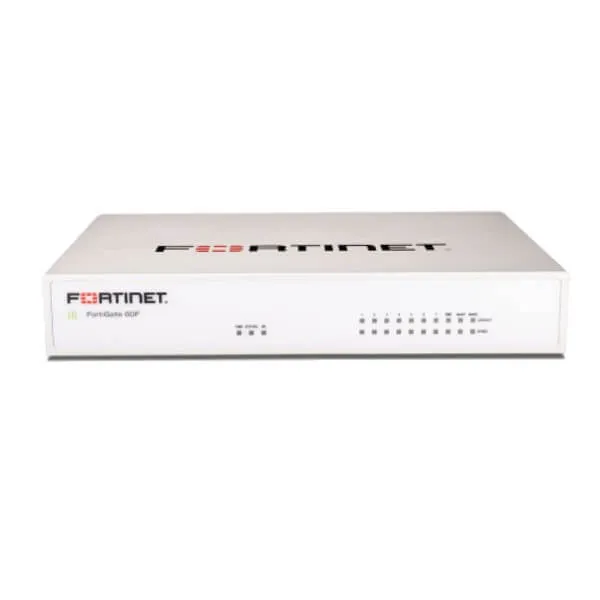
Fortinet FortiWiFi 61F in Uganda
A compact branch security appliance combining next-generation firewall functions, secure SD-WAN, integrated Wi-Fi and 128 GB SSD storage.
For organizations consolidating branch connectivity and perimeter security, the 61F offers a practical single-platform approach. The important procurement decision is not only the appliance itself: radio region, FortiGuard security services, FortiCare support, WAN design, expected inspected traffic and wireless coverage all influence the final configuration.
Product overview: where the 61F fits
The FortiWiFi 61F belongs to Fortinet’s 60F family of converged branch-security appliances. Fortinet positions the family for distributed enterprise sites where firewalling, SD-WAN and security need to operate together. The WiFi version adds an integrated single-radio wireless interface, while the 61F variant adds 128 GB of onboard SSD storage. This makes it particularly relevant when a small or medium branch needs a compact appliance at the network edge without separating basic local Wi-Fi and firewall hardware.
Its business role is broader than simple internet routing. FortiOS provides the operating environment for firewall policy, secure networking and associated security services. Depending on the licenses and services selected, a deployment can use capabilities such as intrusion prevention, application control and malware protection. Buyers should therefore size the appliance against inspected traffic and enabled services, not against the headline firewall number alone.
Fortinet publishes up to 10/10/6 Gbps firewall throughput for 1518/512/64-byte UDP packets, 1.4 Gbps IPS throughput, 1 Gbps NGFW throughput and 700 Mbps threat-protection throughput. These are vendor test figures and real deployment performance varies with configuration, traffic composition, inspection settings and software version. For a procurement team, the useful question is whether the expected branch traffic remains comfortably within the security profile that will actually be enabled.
The hardware supplies two GE RJ45 WAN ports, one GE RJ45 DMZ port and seven GE RJ45 internal ports, with two internal ports designated as FortiLink by default. The integrated wireless interface supports 802.11a/b/g/n/ac Wave 2 on 2.4 GHz or 5 GHz. It is a single-radio design, so organizations with larger premises, high client density or more demanding coverage requirements should consider managed FortiAP access points rather than treating the built-in radio as a replacement for a designed wireless network.
Business benefits
Consolidate branch-edge functions
Firewalling, SD-WAN and integrated wireless can operate from one compact platform, reducing the number of separate devices needed at a small site and giving administrators a common FortiOS policy environment.
Protect traffic at useful branch performance levels
The published enterprise-mix figures give buyers a practical basis for sizing security services. The key benefit is the ability to apply inspection and application controls while maintaining performance appropriate to many branch deployments.
Support multi-link WAN design
Two GE WAN interfaces and Fortinet secure SD-WAN capabilities allow organizations to design resilient or policy-driven internet connectivity when suitable services are available at the site.
Keep local storage in the appliance
The 61F differentiates itself from the 60F through its 128 GB SSD. This is a meaningful model-selection point for organizations that specifically require the storage-equipped variant.
Integrate with Fortinet access infrastructure
The platform supports FortiLink and can manage FortiSwitch and FortiAP devices within published limits, helping a branch adopt a more coordinated security and access architecture.
Compact desktop deployment
At 38.5 × 216 × 160 mm and about 1.01 kg, the appliance fits offices where a full rack appliance is unnecessary, while optional rack or wall mounting accessories can support a tidier installation.
Product highlights grounded in the hardware
The FortiWiFi 61F stands out by combining the 60F family’s security and SD-WAN platform with built-in 802.11ac Wave 2 wireless and the 61F’s 128 GB SSD.
- 10 GE RJ45 interfaces: 2 WAN, 1 DMZ and 7 internal ports.
- Wireless: single radio supporting 2.4 GHz or 5 GHz, 802.11a/b/g/n/ac Wave 2.
- Maximum Wi-Fi data rates: vendor specification of 1300 Mbps at 5 GHz and 450 Mbps at 2.4 GHz.
- VPN: published IPsec VPN throughput up to 6.5 Gbps under Fortinet test conditions.
- High availability: Active-Active, Active-Passive and clustering configurations are listed for the family.
- Fortinet access management: published maximums include 24 FortiSwitches and 64 FortiAPs total / 32 tunnel mode, subject to software and deployment conditions.
Technical specifications ledger
| Specification | FortiWiFi 61F |
|---|---|
| GE RJ45 WAN / DMZ | 2 / 1 |
| GE RJ45 internal | 7 total internal; 2 FortiLink by default |
| Wireless | Single radio, 2.4 GHz / 5 GHz, 802.11a/b/g/n/ac Wave 2 |
| MU-MIMO | 3 × 3 |
| Internal storage | 1 × 128 GB SSD |
| USB / console | 1 USB / 1 RJ45 console |
| Firewall throughput | Up to 10/10/6 Gbps (1518/512/64-byte UDP) |
| IPS throughput | 1.4 Gbps enterprise mix |
| NGFW throughput | 1 Gbps |
| Threat protection throughput | 700 Mbps |
| Concurrent TCP sessions | 700,000 |
| New TCP sessions/second | 35,000 |
| IPsec VPN throughput | 6.5 Gbps (512 byte, AES256-SHA256 test) |
| SSL inspection throughput | 630 Mbps (IPS, average HTTPS test) |
| Maximum FortiSwitches | 24 |
| Maximum FortiAPs | 64 total / 32 tunnel mode |
| Dimensions | 38.5 × 216 × 160 mm |
| Weight / form factor | 1.01 kg / desktop |
These figures should be read as sizing inputs rather than guarantees for every network. Firewall throughput uses a different test profile from NGFW and threat-protection throughput. A business planning IPS, application control, malware protection and encrypted traffic inspection should focus on the enterprise-mix and security-service figures that resemble the intended workload. Interface speed also matters: the appliance uses Gigabit Ethernet RJ45 interfaces, so a requirement for multi-gigabit or 10-gigabit physical connectivity points toward another platform even though aggregate firewall processing figures may be higher.
Wireless sizing needs similar care. The integrated radio is convenient for a compact site, but coverage depends on building layout, interference, client count and placement. For larger or denser offices, managed FortiAPs can provide a more scalable design. Fortinet’s published maximum controller counts are platform limits, not a recommendation to attach the maximum number at every site. FourTeck can review the intended floor area, user population, WAN circuits and security services before the quote is prepared.
Configuration worksheet
01 What traffic must be protected?
List internet bandwidth, critical applications, cloud services, voice/video traffic and expected encrypted sessions. This determines whether the inspected-throughput profile is appropriate and which FortiGuard services should be considered.
02 How many users, devices and wireless clients?
User count alone is not enough. A branch may have laptops, phones, printers, cameras and IoT devices. The answer affects session load, wireless design, segmentation and whether external FortiAPs are preferable to relying on the built-in radio.
03 What must integrate with the appliance?
Confirm ISP handoff, VLAN design, existing switches, access points, VPN peers, authentication services and Fortinet components. Compatibility planning avoids discovering after purchase that a required uplink speed, PoE requirement or wireless coverage model needs different hardware.
04 What growth and licensing path is expected?
Consider future bandwidth, additional branches, security subscriptions, support term and centralized management. Security features and support entitlements can depend on the selected bundle and term.
05 What installation and project conditions apply?
Share mounting preference, power environment, delivery location, project quantity and implementation schedule. Optional rack tray and wall-mount accessories may be relevant.
Ideal business use cases
Branch office with local internet and corporate VPN
A distributed company can place the appliance at a branch edge to enforce firewall policy, connect to headquarters through IPsec VPN and use SD-WAN policy across suitable WAN links. The built-in Wi-Fi may serve a compact office, while a larger site can add managed access points. The configuration should be checked against VPN topology, inspected traffic and authentication requirements.
Professional office needing compact security and Wi-Fi
Legal, consulting, accounting and similar offices often need secure internet access, segmentation for staff and guest devices, and straightforward local wireless. The 61F can consolidate those functions, but guest isolation, SSID design and security subscriptions should be planned before deployment.
Retail or service location in a multi-site organization
For a site with business systems, staff endpoints and internet-connected devices, centralized security policy and SD-WAN can simplify consistency across branches. Device segmentation and secure management are important, and external switching or wireless may be needed where port count or coverage exceeds the built-in hardware.
Small institutional or project office
Organizations that require a desktop security appliance with local storage and Fortinet ecosystem integration can use the 61F as a controlled network edge. Procurement should confirm the regional wireless SKU and the exact FortiCare/FortiGuard package required by policy.
Deep dive 1 — security performance that matches the enabled controls
Headline firewall throughput is useful for understanding packet-forwarding capability, but business security sizing should focus on the functions that will actually inspect traffic. Fortinet lists 1.4 Gbps IPS, 1 Gbps NGFW and 700 Mbps threat-protection throughput for the 60F family under defined enterprise-mix test conditions. NGFW testing includes firewall, IPS and application control; threat protection adds malware protection. That distinction matters because a branch with a fast internet circuit can still experience a different practical ceiling once multiple security controls are enabled.
Encrypted traffic is another important factor. Fortinet lists SSL inspection throughput of 630 Mbps under its specified average HTTPS test profile. Organizations that inspect substantial HTTPS traffic should account for this in sizing rather than assuming the 10 Gbps firewall figure applies to decrypted and inspected sessions. Application mix, policy design, logging and FortiOS release can influence observed results.
The purchasing outcome is straightforward: define the security policy first, then select hardware. If the organization expects rapid bandwidth growth, unusually heavy inspection, or interfaces faster than 1 GbE, FourTeck can help compare a higher platform rather than forcing the 61F into an unsuitable role.
Deep dive 2 — integrated wireless without pretending every site is the same
The FortiWiFi model includes a 3×3 MU-MIMO single radio that operates on 2.4 GHz or 5 GHz and supports 802.11ac Wave 2. Fortinet lists maximum Wi-Fi speeds of 1300 Mbps at 5 GHz and 450 Mbps at 2.4 GHz. Those are radio specifications, not guaranteed user throughput.
Capability line 1
Integrated Wi-Fi can reduce equipment count in a small branch where one well-positioned radio provides adequate coverage.
Capability line 2
For larger spaces, the appliance can manage FortiAPs within Fortinet’s published platform limits, enabling a designed multi-AP network.
Capability line 3
Regional radio-code selection must be correct for the deployment market; the ordering SKU uses a regional-code suffix.
Deep dive 3 — ports, storage and branch architecture
The physical layout provides two WAN, one DMZ and seven internal Gigabit Ethernet RJ45 ports, with two internal ports designated for FortiLink by default. That gives a compact branch useful connection flexibility, but it does not provide multi-gigabit Ethernet or integrated PoE. If phones, cameras or access points require PoE, a suitable PoE switch should be included in the design.
The 128 GB SSD is the defining hardware difference between the 61F and the otherwise closely related 60F model. Buyers should choose the 61F when the storage-equipped variant is specifically required rather than assuming every 60F-family appliance includes the SSD.
Buyer decision checklist
- Are all required WAN and LAN handoffs 1 GbE or below?
- Is PoE required for connected devices? If yes, plan a compatible switch.
- Does the project specifically require the 128 GB SSD?
- Will FortiLink be used for FortiSwitch management?
- Is a desktop placement acceptable, or is a rack/wall accessory needed?
- Does the expected wireless footprint require additional FortiAPs?
What buyers should check before purchase
| Risk | What to confirm | Why it matters | Share with FourTeck |
|---|---|---|---|
| Wrong SKU or radio region | Exact FortiWiFi 61F regional code | Wireless models use regional variants | Deployment country and required model |
| Undersized security performance | Bandwidth plus enabled inspection | Security throughput differs from raw firewall throughput | WAN speed and required FortiGuard functions |
| Coverage or port mismatch | Wi-Fi area, port speed and PoE needs | Built-in radio and 1 GbE ports may not fit every site | Floor area, clients and connected devices |
| Incomplete subscription plan | FortiGuard and FortiCare term | Services and support depend on selected entitlement | Security policy and desired support term |
Additional practical checks include mounting accessories, power arrangement, cabling, high-availability design and project quantity. Buyers replacing an older appliance should also share the existing model, FortiOS environment, interface use and VPN dependencies so migration considerations can be identified before quotation. For a multi-site rollout, provide a site matrix rather than assuming every location needs an identical bill of materials.
Uganda availability and service planning
FourTeck can assist Uganda organizations with configuration review, quotation, delivery coordination and guidance around the support or security-service options associated with the appliance. Availability may vary by regional wireless SKU, subscription bundle and project quantity, so current supply should be confirmed at quotation stage rather than inferred from a generic product listing.
For Kampala deployments, sharing the required date, quantity, WAN design and desired security term helps the team prepare a more useful response. FourTeck can also discuss accessory requirements and whether a different Fortinet platform is more appropriate when the project needs higher interface speeds, additional capacity or a more extensive wireless design. Warranty and support expectations should be stated in the request so the relevant FortiCare option can be considered.
Uganda location coverage
Projects can be coordinated for organizations in Kampala and for requirements serving Entebbe, Jinja, Mbarara and Gulu. The appropriate approach depends on quantity, configuration and delivery details. Rather than treating location as a substitute for technical planning, FourTeck uses the buyer’s site information to help align the requested appliance, subscriptions and accessories with the intended deployment.
East Africa and regional requirements
Organizations operating across Uganda and Kenya, or selected East Africa and Africa markets, may need consistent firewall standards across multiple sites. FourTeck can discuss multi-location product requirements and configuration consistency where relevant. Regional supply, support handling and delivery arrangements can differ by country and should be confirmed for each project.
For regional enquiries, visit FourTeck Uganda, FourTeck Kenya or FourTeck Africa. Requirements connected with the UAE or Kuwait can be discussed through FourTeck UAE and FourTeck Kuwait. These links are provided for regional enquiry routing and do not imply local stock or identical commercial terms.
Related Fortinet paths to consider
FortiGate / FortiWiFi 40F family: consider when the branch requirement is smaller and the 60F-family capacity is unnecessary. Review the Fortinet security range in Uganda with FourTeck.
FortiGate 60F: suitable when the 60F platform is desired without integrated Wi-Fi and without the 61F’s onboard SSD. Ask through the Uganda firewall configuration desk.
FortiWiFi 60F: relevant when integrated wireless is required but the 128 GB SSD of the 61F is not a purchasing requirement.
FortiGate / FortiWiFi 80F family: a useful alternative path when the site needs a different interface or capacity profile. FourTeck can compare the requirements before a model is selected.
FortiAP: consider managed access points when the premises needs broader coverage, multiple AP placement or a more deliberate wireless architecture than one integrated radio can provide.
FortiSwitch: consider compatible switching when more access ports, PoE or FortiLink-managed switching is required.
Why buyers contact FourTeck
01 — Product selection guidance. The team can review whether the 61F’s security performance, interfaces, wireless design and storage match the actual branch requirement.
02 — Configuration review. Buyers can share WAN speed, users, security controls, VPN needs and existing infrastructure before the bill of materials is finalized.
03 — Quote assistance. Regional SKU, quantity, subscription term and accessories can be reflected in a project-specific quotation.
04 — Business IT context. Firewall selection is considered alongside switching, wireless, cabling, WAN and deployment requirements rather than as an isolated box.
05 — Delivery coordination. Uganda project details can be reviewed so delivery planning is based on the requested configuration and destination.
06 — Alternative matching. If interface speed, security capacity or wireless scale indicates another model, the requirement can be compared before purchase.
FortiWiFi 61F buyer FAQs
01. What is the FortiWiFi 61F mainly used for?
It is a desktop next-generation firewall and secure networking appliance for branch or compact business sites. It combines FortiOS firewall and SD-WAN functions with integrated 802.11ac Wave 2 wireless and 128 GB SSD storage. The best fit depends on expected inspected traffic, interface requirements, wireless coverage and the FortiGuard/FortiCare services selected for the deployment.
02. How is the 61F different from the FortiWiFi 60F?
The important published hardware difference is onboard storage: the FortiWiFi 61F includes a 128 GB SSD, while the FortiWiFi 60F does not list internal storage. Both belong to the same 60F family and share the integrated wireless profile. Buyers should confirm that the storage-equipped 61F is actually required before choosing it over the 60F.
03. Does it include Wi-Fi?
Yes. The FortiWiFi 61F includes a single 3×3 MU-MIMO radio supporting 2.4 GHz or 5 GHz and 802.11a/b/g/n/ac Wave 2. Fortinet lists maximum radio rates of 1300 Mbps at 5 GHz and 450 Mbps at 2.4 GHz. Real coverage and client throughput depend on placement, interference and site design.
04. Does the appliance need FortiGuard or FortiCare?
The hardware can be sold in different service and support configurations. Advanced security services and support entitlements depend on the selected FortiGuard and FortiCare package or bundle. A buyer should specify required threat-protection functions and support term so the quotation can reflect the intended operating model rather than hardware alone.
05. Can it handle a 1 Gbps internet connection?
Fortinet publishes 1 Gbps NGFW throughput and 700 Mbps threat-protection throughput for the family, while raw firewall throughput is higher. Whether it is suitable for a particular 1 Gbps service depends on which inspection features are enabled and the traffic profile. For heavily inspected gigabit traffic, sizing should be reviewed carefully before purchase.
06. Can it manage additional FortiAP access points?
Yes. Fortinet publishes support for up to 64 FortiAPs total and 32 in tunnel mode for the 60F family under current documented limits. Those are maximum platform figures, not a recommended design target. The practical number should be based on site size, client density, traffic and controller workload.
07. Does it provide PoE ports?
The published 61F hardware specification lists Gigabit Ethernet RJ45 ports but does not list integrated PoE ports. If access points, IP phones, cameras or other powered devices need PoE, plan a compatible PoE switch or injectors as appropriate. Sharing the connected-device list with FourTeck helps identify this requirement before quotation.
08. What information should I provide for a Uganda quote?
Provide quantity, deployment city, WAN bandwidth, estimated users and devices, required security services, VPN needs, Wi-Fi coverage expectations, existing Fortinet equipment, preferred support term and mounting requirements. For multi-site projects, include the number of locations and whether each site has the same connectivity and user profile.
09. Is availability guaranteed in Uganda?
No availability claim should be assumed from this page. Supply can vary by regional wireless code, bundle, subscription term and quantity. FourTeck can check the requested configuration during quotation and coordinate the procurement requirement based on the current project details. Contact the Uganda team for the latest applicable option.
10. What if the 61F is not large enough for my site?
If the project needs faster physical interfaces, more inspected throughput, denser wireless, additional expansion or a different deployment form factor, a higher Fortinet platform may be more suitable. Share the expected workload and growth plan with FourTeck so the requirement can be matched to an alternative instead of oversizing the 61F’s role.
Prepare the right Fortinet branch-security configuration
Send FourTeck the site count, WAN speed, user/device estimate, security services, VPN requirement, wireless coverage, preferred support term and project quantity. The team can use those details to prepare a configuration-focused Uganda quotation and flag any accessory or model-selection issues before purchase.



Reviews
There are no reviews yet.