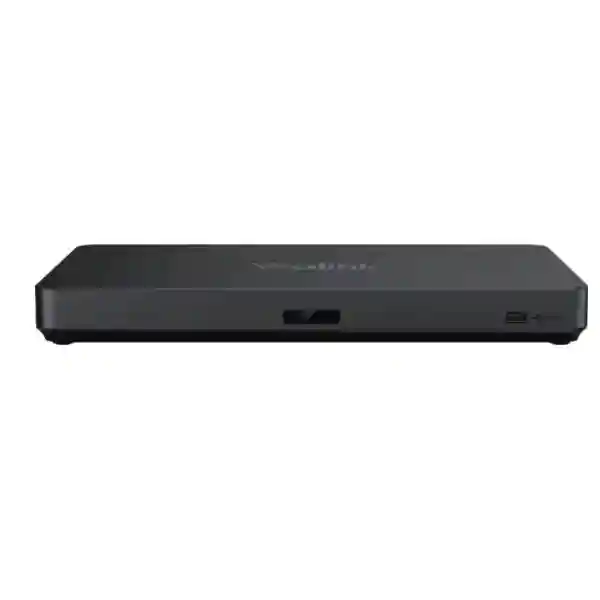
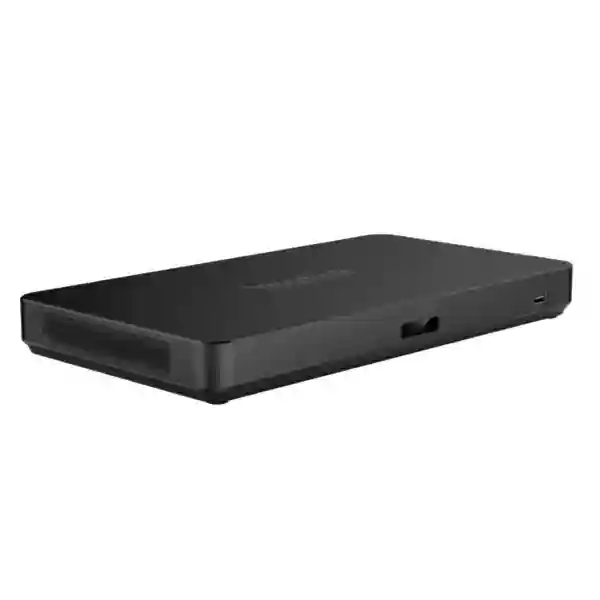
Yealink AVHub Audio Video Processor for Enterprise Conference Rooms
Yealink AVHub is a dedicated meeting audio and video processor for large and extra-large conference rooms where a conventional single-camera USB setup no longer provides enough device connectivity, room coverage or deployment flexibility. It creates a central connection point for compatible cameras, microphone arrays, speakers, a room codec or computer, and professional audio equipment. This architecture is especially useful when a meeting space must support multiple camera viewpoints, distributed microphones, multiple loudspeakers, divisible-room operation or a more structured installation than direct peripheral-to-PC cabling can provide.
For procurement teams in Uganda, AVHub should be evaluated as part of a complete room design rather than as an isolated accessory. The correct bill of materials depends on room dimensions, table layout, participant capacity, acoustic conditions, camera sightlines, microphone pickup requirements, speaker placement, meeting platform and the preferred control architecture. FourTeck can help translate those requirements into a compatible configuration and quotation, reducing the risk of ordering too many peripherals, missing necessary cables or selecting devices that do not fit the intended room topology.
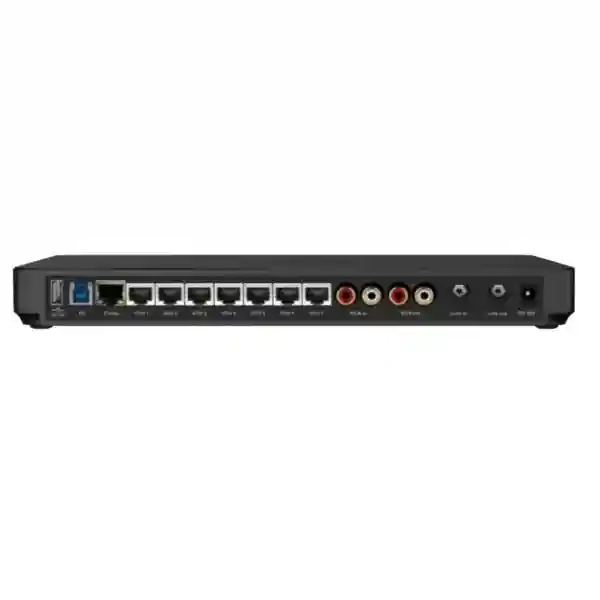
The platform supports multi-camera layouts, divisible-room designs, BYOD use and centralized audio-video processing. Its physical connectivity includes two USB-A 2.0 ports, one USB-B 3.0 port, one codec port, seven VCH RJ-45 ports, RCA input/output, 6.3 mm line input, 6.3 mm line output and a dedicated power connection. The supplied power adapter is rated at 48V DC, 2A, 96W output, with universal 100-240V AC input. These interfaces allow the AVHub to sit at the center of a professionally engineered conferencing environment while keeping endpoint wiring organized.
Instant Specifications & Procurement Fact Rail
Yealink AVHub
Large / extra-large meeting rooms
7 × VCH RJ-45 plus USB, codec and analog audio
48V DC, 2A, 96W output
Project quotation / configuration validation
Confirm regional terms on quotation
This fact rail is intended to help buyers establish whether AVHub belongs in the room architecture before detailed design begins. The unit is particularly relevant where several audiovisual endpoints need to be consolidated, where long cable runs would otherwise make a room difficult to maintain, or where a divisible space requires a flexible approach to camera and audio coverage. Warranty duration, stock position, lead time and any project-specific service scope should be confirmed on the formal quotation because these commercial terms can vary by supply batch and deployment.
Operational Product Architecture & Overview
Large meeting rooms create a different engineering problem from huddle spaces. Participants may sit far from the display, a single camera angle can leave portions of the room poorly represented, and one microphone may not provide consistent pickup across a long table or classroom arrangement. AVHub addresses this category of deployment by acting as a centralized meeting audio-video processor capable of supporting multiple compatible cameras, microphones and speakers. Instead of forcing every peripheral into a limited set of computer ports, the design allows supported room devices to be connected through the AVHub architecture.
Seven VCH RJ-45 ports form an important part of that topology. Compatible endpoints can be distributed around the room using structured network-style cabling, making cable routing cleaner than a collection of independent USB extensions. The processor also provides USB connectivity to the host environment, a codec port and analog audio interfaces for projects that need integration with other room equipment. Broad compatibility with third-party DSP equipment is valuable in rooms where an existing installed-audio system must remain part of the design.
Multi-camera layouts help large rooms present more useful viewpoints than a single fixed feed. Depending on the wider Yealink solution and supported firmware, deployments can be designed around several compatible cameras so that presenters, audience areas or different sections of a boardroom can be represented appropriately. Divisible-room support is relevant to conference spaces that operate as one large room for major sessions but can be partitioned for smaller meetings. The design objective is operational flexibility without rebuilding the audiovisual system every time the room configuration changes.
BYOD capability is another practical consideration. Many organizations operate formal room systems while still needing to accommodate guest laptops or alternate collaboration workflows. AVHub’s role within an engineered BYOD design can reduce the need to maintain separate peripheral sets for every possible meeting mode. Buyers should nevertheless validate the exact host, room-system generation, firmware, peripheral combination and required adapters before ordering, because room interoperability is determined by the complete solution rather than by the processor alone.
From a support perspective, centralization also improves troubleshooting. A technician can document a defined hub-and-endpoint topology instead of tracing unrelated USB and audio connections around the room. That can shorten fault isolation when a camera, microphone or speaker needs attention. It also makes future room changes easier to plan because the current device map, cable routes and port assignments can be recorded as part of handover documentation.
Enterprise Business Outcomes & Value Analysis
Dedicated room processing and organized peripheral connectivity reduce dependence on ad-hoc chains of adapters. For large-room deployments, this provides a cleaner engineering foundation for multi-camera and distributed-audio designs.
A centralized topology is easier to document, test and support. Integrators can validate each endpoint, label ports and cables, and maintain a repeatable troubleshooting process rather than relying on user-managed connections.
Support for multiple cameras, microphone arrays and speakers makes AVHub appropriate where room size or participant distribution exceeds the practical limits of a basic conferencing kit. Buyers can design coverage according to the room rather than forcing the room around a small-room appliance.
Structured endpoint connectivity reduces loose cabling and helps IT teams maintain a defined room standard. Physical security, cable routing, cabinet placement and access to the processor should be included in the installation design.
Consolidating audiovisual endpoints around a common processor simplifies the logical room map. This supports clearer documentation, handover and future maintenance for internal IT teams and service partners.
The strongest cost benefit comes from correct initial design. Matching camera count, microphone coverage, speaker quantity and cabling to the actual room avoids unnecessary hardware while reducing the likelihood of expensive redesign after installation.
Key Hardware & Software Highlights
| Component / Capability | Technical Role | Operational Outcome |
|---|---|---|
| 7 × VCH RJ-45 | Room endpoint connectivity | Cleaner distributed-device architecture |
| USB-B 3.0 | Host-side high-speed connection | Practical integration with conferencing compute |
| 2 × USB-A 2.0 | Peripheral connectivity | Additional integration flexibility |
| RCA + 6.3 mm audio | Analog audio integration | Connection path for professional room audio designs |
| Multi-camera layout | Multiple camera views | Better representation of large spaces |
| Divisible room support | Flexible room operation | Supports spaces used in combined or partitioned modes |
Technical Specifications Ledger
| Specification | Confirmed Detail |
|---|---|
| Product type | Meeting audio and video processor |
| Target rooms | Large and extra-large conference rooms |
| USB-A | 2 × USB-A 2.0 |
| USB-B | 1 × USB-B 3.0 |
| Codec | 1 × codec port |
| VCH | 7 × VCH RJ-45 ports |
| RCA | 1 × RCA input/output |
| Line input | 1 × 6.3 mm line in |
| Line output | 1 × 6.3 mm line out |
| Power input | Dedicated power supply port |
| Adapter input | 100-240V AC, 50/60Hz, 1.5A |
| Adapter output | 48V DC, 2A, 96W |
| Power cord | 2 m |
| DC cable | 1.8 m |
| Box contents | AVHub, power adapter, 2.5 m USB cable, 7.5 m Ethernet cable, quick start guide |
| Net carton weight | 2.31 kg |
| Gross carton weight | 2.62 kg |
| Giftbox size | 382 × 215 × 120 mm |
Specification planning should distinguish confirmed product data from project assumptions. For example, the power adapter rating is a confirmed electrical specification, but the actual room’s protected power, UPS capacity, socket type, cable pathway and cabinet ventilation remain installation decisions. Likewise, the availability of seven VCH ports does not mean every project should populate all seven. Device count should follow coverage and room-use requirements.
Configuration & Sizing Worksheet
1. Estimate the room workload
Document room length, width, ceiling height, seating capacity and furniture layout. Identify presentation zones, audience zones and any areas that require dedicated camera coverage. Note whether meetings are primarily boardroom discussions, training sessions, hybrid events or formal presentations. This determines whether one camera viewpoint is sufficient or a multi-camera arrangement is justified.
2. Map audio coverage
Mark participant positions and likely speaking locations. Decide whether table microphones, ceiling microphones or an existing DSP-based installed-audio system will be used. AVHub supports compatible Yealink microphone arrays and broad third-party DSP integration, but the exact design should be validated before purchase. Acoustic treatment, reverberation and background noise can matter as much as microphone quantity.
3. Review equipment placement
Choose a secure, serviceable location for AVHub and its power adapter. Confirm cable routes from cameras, microphones and speakers to the central point. Maintain appropriate bend radius and separation from interference sources. Ensure technicians can reach connectors without dismantling furniture or wall finishes.
4. Confirm power and cabling
The supplied adapter accepts 100-240V AC and provides 48V DC at 2A. Confirm protected mains power, UPS strategy where required, plug compatibility and grounding according to site standards. Validate cable lengths against the room plan rather than assuming the included cables reach every installation point.
5. Validate software and platform requirements
Record the intended conferencing platform, room-compute model, operating mode and required collaboration features. Firmware and supported feature combinations can evolve, so compatibility should be checked for the actual deployment generation. Do not assume that a capability supported by one Yealink room bundle is automatically available in every host configuration.
6. Prepare the quotation brief
Provide the AVHub quantity, room dimensions, number of rooms, camera preference, microphone preference, speaker requirements, display count, existing DSP details, host platform, installation city and requested commissioning scope. Include photographs or drawings for complex rooms. A complete brief helps the supplier quote the right bill of materials the first time.
Deployment Scenarios & Industry Use Cases
Large Enterprise & Multi-Site Networks
Enterprises can standardize AVHub-based designs for flagship boardrooms, executive briefing centers and large collaboration spaces. Standardization should include a room template covering cameras, microphones, speakers, cable labels, firmware baseline and support documentation. Multi-site organizations benefit when technical teams encounter a familiar topology in Kampala, regional offices and remote branches.
Financial & Banking Institutions
Banks often require dependable executive meeting spaces and controlled infrastructure. AVHub can form part of a centrally engineered conferencing design where devices are installed permanently and documented. Procurement teams should align the room build with internal change control, network segmentation policies, physical access controls and approved conferencing platforms.
Educational & Campus Networks
Universities and training institutions may use large rooms for lectures, seminars and hybrid teaching. Multi-camera capability can help distinguish lecturer, panel and audience viewpoints, while distributed microphones can improve participation from different seating areas. The room should be designed for repeatable operation by teaching staff rather than requiring a technician for every session.
Government & Institutional Procurement
Government meeting rooms, council chambers and institutional conference facilities often require formal bills of materials, documented acceptance testing and predictable maintenance. AVHub’s centralized architecture can support a structured deployment approach. Tender documentation should specify required endpoints, cabling, installation, commissioning, training, warranty handling and any spare-unit strategy rather than describing the processor alone.
Technical Deep Dive: Processing & Room Architecture
AVHub is valuable because it changes the room from a collection of independent peripherals into an integrated audiovisual system. In a basic room, a camera and speakerphone may connect directly to a laptop. In a large room, that approach becomes difficult as camera count grows and microphones must be distributed across longer distances. AVHub provides the connectivity and processing role needed to coordinate those endpoints. Multi-camera layouts allow the room design to present more context, while the processor reduces the host computer’s burden within supported solutions.
The physical port mix also reflects professional installation requirements. VCH RJ-45 connectivity is suitable for structured endpoint distribution, USB provides host integration, the codec interface supports room-system architecture, and RCA plus 6.3 mm line connections provide paths into professional audio workflows. Buyers should treat these interfaces as design resources: each connection should have a documented purpose, destination and cable route in the final installation drawing.
Technical Deep Dive: Firmware & Operational Control
A meeting-room processor is part of a wider software ecosystem. Firmware compatibility between the processor, cameras, microphones, speakers and room compute can influence available features and stability. For that reason, commissioning should include version recording, functional testing and a controlled update policy. Updates should be evaluated against the deployed room configuration before being rolled out broadly across multiple critical meeting spaces.
Operational control should also include documentation. Keep a room record with serial numbers, firmware versions, port assignments, cable labels, IP-related information where applicable, installed applications and support contacts. When a future technician services the room, this record can prevent unnecessary trial and error. Organizations with many rooms should use a common naming convention and acceptance checklist.
Technical Deep Dive: Availability & Recovery Planning
AVHub itself is a centralized component, so room availability depends on good installation practice and sensible recovery planning. Critical executive or operations rooms may justify a spare strategy, protected power and documented replacement procedures. Cabling should be labeled at both ends, and installers should avoid inaccessible mounting locations that make emergency replacement difficult.
Disaster recovery for collaboration rooms is not limited to hardware redundancy. A practical plan may include a tested BYOD fallback, spare cables, documented peripheral substitution, configuration records and an alternate room. The appropriate level depends on the business impact of room downtime. A standard conference room may tolerate scheduled service, while a command or executive room may require much faster restoration.
Pre-Purchase Buyer Gap Checklist
Licensing: confirm which licenses belong to the meeting platform, room compute or management environment rather than assuming they are bundled with AVHub. Lifecycle: verify the proposed room-system generation and compatibility roadmap when standardizing across many sites. Physical clearance: confirm the planned mounting or cabinet location provides access to all cables and the power adapter. Power: design around the supplied 48V, 2A, 96W adapter and the site’s protected AC supply. Compatibility: validate exact camera, microphone, speaker, DSP and room-compute models. Cabling: map every cable run and do not rely only on bundled cable lengths. Support: define who owns first-line troubleshooting, firmware updates and warranty coordination. Acceptance: specify tests for camera views, microphone pickup, speaker coverage, content sharing, meeting join, BYOD operation and room partition modes where applicable.
Another frequent procurement gap is buying to a device count rather than to a coverage requirement. More cameras do not automatically create a better meeting experience, and more microphones do not correct poor acoustics. The correct design starts with how people use the room. Camera placement should avoid blocked sightlines and extreme backlighting. Microphones should be positioned for expected speakers. Loudspeakers should deliver even coverage without creating feedback problems. Displays should be visible from the farthest seats. The AVHub then becomes the central processor that ties an already coherent room plan together.
Buyers should also clarify what is included in the commercial scope. Hardware supply, installation, cable containment, mounting, configuration, platform licensing, commissioning, user orientation and post-installation support are separate deliverables unless a quotation explicitly combines them. A clear scope prevents disputes and makes competing proposals easier to compare on equivalent terms.
Uganda Procurement & Delivery Logistics
For Uganda projects, the procurement process should begin with a room brief and quantity requirement. FourTeck can prepare a quotation around the requested AVHub units and associated compatible equipment. Where the deployment includes multiple cameras, microphone arrays, speakers or professional DSP integration, sharing a room drawing before quotation can reduce revisions. Commercial documents should identify model names, quantities, included accessories, warranty terms, delivery location and any engineering services.
Order processing and delivery timing depend on stock position, project quantity and the final bill of materials. Buyers planning office openings, boardroom renovations or tender deadlines should request lead-time confirmation before committing installation dates. Complex deployments benefit from pre-configuration and staging, allowing basic hardware inspection, firmware alignment and bill-of-material verification before equipment travels to site.
For regional deliveries, packaging and handover should be planned around the final destination. The AVHub giftbox measures 382 × 215 × 120 mm, with a gross carton weight of approximately 2.62 kg for one unit, but a complete room solution will have a larger logistics footprint once cameras, microphones, speakers, mounting hardware and cables are included. Procurement teams should therefore plan shipping based on the complete solution rather than the processor carton alone.
Local Coverage Matrix
Kampala: suitable for corporate headquarters, banks, ministries, hotels and major institutions requiring engineered conference rooms. Entebbe: supports organizations around the airport corridor, hospitality sector and institutional facilities. Jinja: suitable for industrial, education and regional business deployments. Mbarara: supports western-region enterprises, universities, healthcare and government facilities. Gulu: provides a procurement pathway for northern-region institutions and distributed organizations. Delivery and installation scope should be confirmed per project because site access, cabling readiness and commissioning requirements differ by location.
Cross-Border & Regional Supply Chains
Organizations operating across several countries can coordinate conferencing standards through FourTeck’s regional channels. Visit FourTeck Uganda, FourTeck Kenya, FourTeck Africa, FourTeck UAE or FourTeck Kuwait for the appropriate regional procurement route. Cross-border projects should standardize model references and technical room templates while allowing for local power, logistics, warranty and installation requirements.
Related Products & Solution Planning
A complete AVHub project may include compatible Yealink UVC-series conference cameras, VCM-series microphone arrays, CM20 ceiling microphones, CS10 ceiling speakers, MSpeaker II units, room-compute systems and appropriate cabling. Browse the FourTeck Uganda catalogue or request a matched bill of materials through the project contact team. For multi-country deployments, the Africa supply channel can support regional planning, while Kenya, UAE and Kuwait sites provide country-specific procurement routes.
When comparing related components, prioritize verified compatibility over superficial feature matching. A camera may have the required optical characteristics but still need validation for the intended AVHub and room-system generation. The same principle applies to microphones, speakers and DSP equipment. A matched design minimizes integration risk and makes support responsibilities clearer.
FourTeck Technical Service Capabilities
FourTeck can support engineering validation before procurement by reviewing the requested room topology, peripheral quantities and compatibility assumptions. Bill-of-material verification helps identify missing cables, mounting components or mismatched endpoints before equipment is dispatched. For larger rollouts, staging can establish a consistent baseline and simplify installation across multiple rooms.
Pre-shipment checks may include model verification, accessory checks and firmware planning where included in the agreed service scope. On-site or remote configuration assistance can then focus on the actual room rather than basic inventory issues. Post-sales support should be defined in the quotation, including the process for troubleshooting, warranty coordination and escalation. Organizations deploying many rooms should also request a repeatable handover format covering port maps, cable labels, device records and acceptance results.
Extended Technical FAQ
What is the Yealink AVHub used for?
AVHub is a meeting audio and video processor designed for large and extra-large conference rooms. It centralizes compatible cameras, microphones and speakers and provides the processing and connectivity foundation for sophisticated room designs. It is particularly useful where a single USB camera and speakerphone cannot provide enough coverage. The processor supports multi-camera layouts, divisible-room applications, BYOD workflows and professional audio integration. It should be specified as part of a complete room architecture, with camera positions, microphone coverage, speakers, host compute and cabling validated together.
How many VCH ports does AVHub provide?
The AVHub provides seven VCH RJ-45 ports. These ports are central to the distributed-room architecture because compatible devices can be connected using structured network-style cabling. The number of ports should not be treated as a recommendation to populate every connection. Actual endpoint count should follow room size, device compatibility and coverage requirements. During design, create a port map showing which device connects to each port and label cables at both ends. This makes commissioning and later troubleshooting substantially easier.
Which cameras and audio devices can be used?
Current Yealink documentation describes support for multiple compatible cameras, microphones and speakers, including specified UVC, VCM, CM, CS and MSpeaker families depending on solution generation and firmware. Because product ecosystems change over time, buyers should validate the exact model numbers proposed for the project before ordering. Third-party DSP compatibility is also supported broadly, which is useful for rooms with installed professional audio. Compatibility should be confirmed at the complete-solution level rather than inferred from connector type alone.
Does AVHub support divisible conference rooms?
Yes, divisible-room capability is a highlighted AVHub use case. This is relevant where movable partitions allow one large conference space to become two or more smaller rooms. A successful divisible-room design requires more than the processor: camera fields of view, microphone zones, speaker coverage, displays, control logic and cable pathways must all work in both combined and separated modes. The integrator should document each operating state and include acceptance tests for every supported room configuration before handover.
Can AVHub be used with BYOD workflows?
BYOD is among the AVHub’s supported capabilities within appropriate Yealink room designs. This can be valuable when guests or employees need to use their own computers while accessing the installed room cameras and audio system. The exact user workflow depends on the surrounding room components and configuration, so procurement teams should specify what they expect users to connect, which operating systems are in scope, and whether wired or other supported presentation methods are required. Testing the intended laptop types during commissioning is recommended.
What power supply does the AVHub require?
The documented adapter accepts 100-240V AC at 50/60Hz, 1.5A and provides 48V DC at 2A with a 96W output rating. The power cord is listed at 2 metres and the DC cable at 1.8 metres. Site planning should include a nearby protected outlet, suitable UPS strategy where meeting continuity is important, and a mounting position that does not strain the DC lead. Do not hide the adapter in an inaccessible location because technicians may need to inspect or replace it during service.
What comes in the AVHub package?
The documented package includes the AVHub, power adapter, 2.5-metre USB cable, 7.5-metre Ethernet cable and quick start guide. These bundled items are useful for basic installation, but they do not replace a room-specific cable schedule. Large conference rooms may require additional approved cables or structured routes depending on equipment placement. Before ordering, compare the planned distances between the AVHub, room compute and endpoints with the included cable lengths and the supported cabling requirements for each connected device.
Does AVHub require separate licenses?
The processor should not be assumed to include every license required by the complete collaboration room. Meeting-platform subscriptions, room-system licenses, management services or host-compute entitlements may be separate depending on the selected architecture. During procurement, list each software service expected in the room and identify which party supplies it. This prevents a common commissioning delay in which all physical hardware is installed but the room cannot be activated because an account, room license or administrative permission has not been prepared.
How should warranty and replacement be handled in Uganda?
Warranty terms should be confirmed on the FourTeck quotation for the specific supply. Keep the invoice, serial number and deployment record for each unit so any claim can be traced quickly. For business-critical rooms, consider whether the organization needs a spare processor or an agreed replacement procedure rather than relying only on standard warranty turnaround. Before replacing hardware, support teams should document the symptoms, connected devices, firmware versions and troubleshooting already completed so that fault isolation is efficient.
Can FourTeck assist with configuration and room design?
FourTeck can assist with procurement-oriented engineering such as bill-of-material review, compatibility validation, cable planning, staging and deployment support according to the agreed project scope. The best starting point is a room drawing or dimensions, participant capacity, required conferencing platform, camera expectations, microphone and speaker preferences, and details of any existing DSP or audiovisual equipment. This allows the quotation to reflect the room’s real requirements instead of supplying the AVHub as an isolated component without the endpoints needed to create a working solution.
Request a Yealink AVHub Project Quote in Uganda
Send FourTeck your room dimensions, site location, expected participant capacity, preferred meeting platform and required camera/audio coverage. The team can help validate the AVHub bill of materials, identify compatible room endpoints and prepare a procurement quotation for your deployment. For multi-room rollouts, include the number and type of rooms so a repeatable configuration can be developed. Clear technical requirements at quotation stage reduce installation changes, improve handover quality and help establish a supportable room standard for future expansion.




Reviews
There are no reviews yet.