Enterprise Mobility Communications • Uganda
Yealink BH71 Bluetooth Headset for Mobile Business Communications
The Yealink BH71 is a mono Bluetooth business headset built for professionals who spend meaningful parts of the working day in calls but cannot remain fixed at a desk. It combines a compact ear-hook format, four-microphone beamforming noise cancellation, business-focused wireless connectivity and a rechargeable battery rated for up to 10 hours of talk time. For procurement teams, that combination matters because headset selection is rarely only about audio. It affects call clarity, user adoption, mobility, device compatibility, charging routines, support overhead and the consistency of communication across hybrid teams.
BH71 is especially relevant to executives, field managers, sales teams, service coordinators, travelling professionals, supervisors and hybrid workers who need one ear kept open to their surroundings. The mono design avoids the isolation associated with two-ear headsets while still providing a dedicated business microphone system. Yealink specifies Bluetooth 5.3 for the headset, an adjustable ear hook, a 160 mAh rechargeable lithium-ion battery, support for two simultaneous Bluetooth connections and pairing memory for up to eight devices. In ideal conditions the standard headset has a wireless reach of up to 40 metres, giving users room to move around a workspace while maintaining a call.
The BH71 family also gives buyers a clear expansion path. The base BH71 is oriented toward mobile use, while Pro and Workstation editions add capabilities such as a USB adapter, charging case or integrated desk station depending on the selected package. This makes it important to specify the intended endpoints before issuing a purchase order. A smartphone-only user has different requirements from an employee who alternates between a PC softphone, mobile handset and physical desk phone.
BH71 Procurement Fact Rail
BH71 mono Bluetooth headset series
Mobile, hybrid and office professionals
Bluetooth 5.3 headset connectivity
Up to 10 hours
Project quotation on request
Confirm regional warranty terms on quotation
The fact rail should be treated as a starting point rather than a substitute for variant selection. BH71 packages differ. Buyers should identify whether users need mobile-only operation, a PC adapter, an extended-life charging case, or the Workstation platform for combined PC, smartphone and desk-phone use. FourTeck can map those requirements against the appropriate bill of materials so that a fleet purchase does not arrive with unnecessary accessories or, more importantly, omit a component required for the intended calling workflow.
Operational Architecture and Product Overview
At the centre of BH71 is a four-microphone beamforming system. Instead of depending on a single microphone to capture both speech and environmental sound, the microphone array is designed to focus pickup toward the wearer’s voice. Yealink positions the technology for suppressing background noise during mobile and business calls. That is operationally useful in reception zones, open offices, airport waiting areas, vehicles parked near traffic, shared workspaces and other locations where conventional mobile audio can make the far-end participant work harder to understand the speaker.
The audio path is designed primarily around business voice while still supporting media playback. The headset uses a 13 mm speaker, with a stated speaker frequency range of 100 Hz to 20 kHz, speech bandwidth of 100 Hz to 8 kHz and music bandwidth of 100 Hz to 20 kHz. The microphone frequency range is specified at 100 Hz to 8 kHz. This is a practical architecture for a communications headset: intelligibility and speech consistency take priority, while the wider speaker range allows the same device to handle notifications, training content and ordinary media between calls.
Bluetooth connectivity is equally important to the operating model. The headset supports HFP 1.7, A2DP 1.3 and AVRCP 1.6 profiles, stores up to eight paired Bluetooth devices and can maintain two simultaneous Bluetooth connections. In practice, multipoint connectivity can reduce friction for a user who carries both a corporate smartphone and another supported endpoint. It does not eliminate the need to validate the complete application and endpoint workflow, but it can reduce repeated pairing during normal work.
Power is provided by a 160 mAh rechargeable lithium-ion battery. The published talk-time figure is up to 10 hours, with charging taking up to approximately 90 minutes. Actual endurance depends on calling patterns, wireless conditions, volume and battery age. For staff who routinely exceed a normal shift of active calls, the Pro package deserves consideration because its charging case adds reserve capacity. Procurement teams should therefore size battery needs from real duty cycles rather than simply selecting the least expensive package.
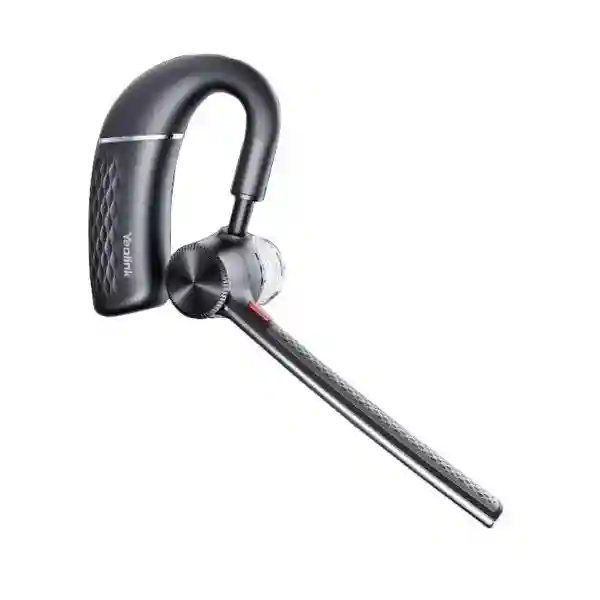
Physical ergonomics are a major part of the architecture. The headset is very light and uses an adjustable ear hook so the wearer can tune the fit. This matters in deployments involving dozens or hundreds of employees: a technically capable headset that employees repeatedly remove because it is uncomfortable will not deliver its intended productivity benefit. Ear-hook fit, preferred wearing side, eyewear, movement level and daily call duration should all be included in pilot testing.
For central support, Yealink provides management paths including Yealink USB Connect on PC, the Yealink Connect application on supported mobile platforms and the Yealink Device Management Platform. Available functions depend on product, connection method and deployment environment, so enterprise teams should define which settings must be centrally governed and which can remain user-controlled. Standardising firmware and configuration is particularly valuable where headsets are part of a larger Yealink communications estate.
Enterprise Business Outcomes and Value Analysis
1. Voice Performance and Call Integrity
The four-microphone beamforming design is intended to keep the wearer’s voice prominent when background activity is present. For customer-facing teams, this can improve the professionalism of calls and reduce repetition. The value is particularly clear for staff who move between quiet offices and uncontrolled environments during the same day.
2. User Reliability and Daily Availability
Up to 10 hours of rated talk time gives many business users enough capacity for a working day without mid-shift charging. Pro variants can extend practical operating flexibility through a charging case. A disciplined charging policy remains advisable for call-intensive teams.
3. Workforce Scalability
A common headset family can serve road warriors, hybrid workers, office staff and executives through different BH71 packages. That allows procurement teams to standardise the user experience while allocating accessories according to role rather than purchasing an identical premium kit for every employee.
4. Access and Endpoint Control
Bluetooth pairing and multipoint capability simplify endpoint access, but organisations should still document approved devices and applications. Where stronger desktop integration is needed, selecting the appropriate Pro or Workstation package can create a more predictable corporate setup than unmanaged ad-hoc Bluetooth pairings.
5. Centralised Operational Simplicity
Yealink management utilities provide a route for configuration and firmware administration. Standard settings reduce variation between users and help support teams troubleshoot against a known baseline. Fleet managers should include headset firmware in routine endpoint-management procedures.
6. Total Cost and Energy Practicality
A lightweight rechargeable headset avoids disposable battery consumption and can reduce the operational friction of wired devices. Cost should be assessed across the expected service period, including adapters, replacement accessories, support effort and the productivity cost of poor audio. The lowest initial kit price is not always the lowest operational cost.
7. Mobility Without Full Environmental Isolation
The mono format leaves one ear open, which can be useful for supervisors and mobile employees who must remain aware of colleagues or surroundings. Organisations should still apply their own safety rules regarding headset use in vehicles, industrial areas or any environment requiring full situational awareness.
Key Hardware and Software Highlights
| Component | Design | Operational Outcome |
|---|---|---|
| Microphone array | 4-mic beamforming noise cancellation | Improved voice focus in busy environments |
| Speaker | 13 mm driver, wide playback range | Business speech plus everyday media playback |
| Wireless subsystem | Bluetooth 5.3, multipoint | Flexible connection to supported endpoints |
| Battery | 160 mAh rechargeable lithium-ion | Up to 10 hours rated calling |
| Ear hook | Adjustable fit | Supports extended mobile wear |
| Management | USB Connect, Connect app, device platform | Configuration and lifecycle administration |
The important procurement distinction is that these elements work as a system. Noise reduction is valuable only when the microphone sits correctly; multipoint is useful only when endpoints and applications behave as expected; long battery life is meaningful only when users have a consistent charging routine. A small pilot should therefore test the full daily workflow rather than individual specifications in isolation.
Technical Specifications Ledger
| Category | Specification | Procurement Note |
|---|---|---|
| Form factor | Mono adjustable ear-hook business headset | Pilot fit with representative users |
| Bluetooth | Version 5.3 on current headset specification | Endpoint capability can affect behaviour |
| Profiles | HFP 1.7, A2DP 1.3, AVRCP 1.6 | Validate calling controls with target applications |
| Pairing memory | Up to 8 Bluetooth devices | Useful for multi-device users |
| Simultaneous connections | 2 | Supports multipoint workflows |
| Wireless range | Up to 40 m / 130 ft in ideal conditions | Walls and radio congestion reduce real range |
| Battery capacity | 160 mAh rechargeable lithium-ion | Plan charging cycles for heavy call users |
| Talk time | Up to 10 hours | Real results vary with usage |
| Charging time | Up to 90 minutes | Include charging windows in shift planning |
| Speaker frequency | 100 Hz–20 kHz | Supports speech and media |
| Speech bandwidth | 100 Hz–8 kHz | Business voice focus |
| Microphone frequency | 100 Hz–8 kHz | Designed around voice communication |
| Codec | SBC | Confirm application expectations |
| Supported OS families | Windows, macOS, Android, iOS | Software support can change by release |
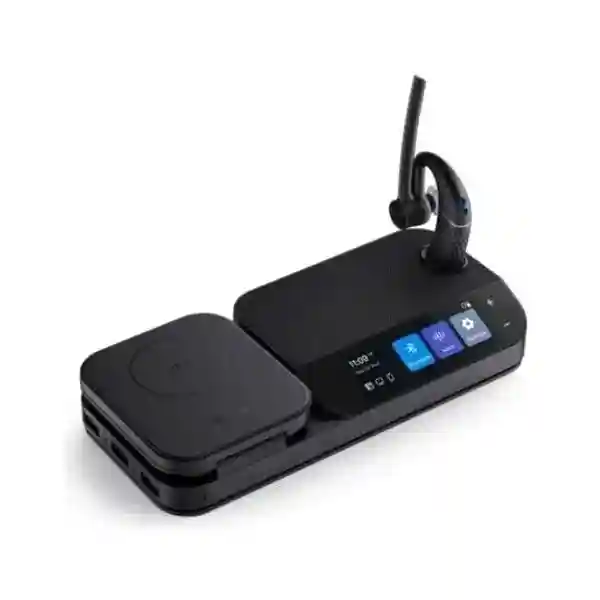
Specifications should be matched to the exact ordered package and current manufacturer documentation. The BH71 family includes Lite, standard, Pro, Workstation and Workstation Pro configurations. Station specifications such as a 3-inch screen, USB hub and wireless charging apply to Workstation packages rather than the base headset. Likewise, charging-case reserve capacity belongs to applicable Pro bundles. FourTeck can state the precise included accessories on the commercial quotation so receiving teams know what to expect.
Configuration and Sizing Worksheet
Step 1 — Estimate User Workload
Divide users by actual call pattern: light mobile callers, frequent hybrid callers, call-intensive managers and desk-centric users. Record typical active call hours rather than total shift length. A user with eight hours at work may spend only two hours speaking, while a sales coordinator can approach the headset’s rated talk-time envelope. This determines whether the standard package is sufficient or whether charging-case access is operationally valuable.
Step 2 — Map Endpoints
List smartphones, PCs, Yealink SIP phones and third-party desk phones. Record operating systems and primary calling applications. For desk-phone users, identify the exact phone model and any adapter or electronic hook-switch requirement. Do not assume that Bluetooth presence alone guarantees every call-control function.
Step 3 — Review Workplace Conditions
Identify open offices, reception areas, vehicles, branch counters and quiet executive spaces. Note expected radio congestion, wall construction and movement distance. Published range is measured in ideal conditions; real buildings create attenuation. For employees who need substantially greater desk roaming, investigate Workstation variants and test them in the actual site.
Step 4 — Plan Charging and Accessories
Decide whether users return to a fixed desk, carry laptops, travel between branches or spend long periods away from power. Include charging cables, cases, USB adapters and workstation accessories in the bill of materials where applicable. Standardising the package by role simplifies spares management.
Step 5 — Define Management Requirements
Determine who is responsible for firmware, device settings and troubleshooting. For larger fleets, establish a configuration baseline before rollout. Record firmware at acceptance, keep a small pool of spare units and define how failed equipment is swapped so users are not left without a calling device while warranty processing occurs.
Quote Preparation Checklist
For an accurate quotation, provide the number of users, preferred BH71 variant if known, smartphone and computer types, desk-phone models where relevant, primary communications applications, delivery location, required project date and whether staging or compatibility validation is needed. If the exact variant is not known, FourTeck can use the workflow information to recommend the appropriate package.
Deployment Scenarios and Industry Use Cases
Large Enterprise and Multi-Site Organisations
A multi-site organisation can use BH71 as a role-based mobility headset for executives, branch managers, roaming supervisors and employees who frequently transition between mobile and computer communications. The main design task is standardisation. Rather than allowing each branch to purchase unrelated consumer headsets, IT can establish approved BH71 packages, configuration standards and replacement procedures. This creates a repeatable support model and makes expansion to new branches easier.
Financial and Banking Institutions
Banking employees often combine customer conversations, internal calls and movement between controlled office areas. A mono headset can preserve awareness of nearby colleagues while improving microphone focus. Deployment policy should still address confidentiality: headsets improve audio capture but do not make a public or open environment suitable for discussing sensitive information. Device pairing, physical custody and approved applications should follow institutional security policy.
Educational and Campus Networks
University administrators, ICT staff, admissions teams and faculty coordinators can benefit from a compact headset when moving across offices or between buildings. For a campus rollout, test wireless performance inside representative construction types and establish charging points in staff offices. Users who spend most of the day at a fixed service desk may be better served by a workstation-oriented package, while mobile administrators may need only the base or Pro variant.
Government and Public-Sector Procurement
Public-sector buyers typically require clear model identification, documented quantities, predictable delivery, warranty handling and a transparent bill of materials. The BH71 family should be quoted with the full variant name because accessory content differs. A staged acceptance process can verify package contents, serial records where required, basic pairing and charging before distribution to end users.
Field Sales, Logistics and Service Management
Managers who spend time in vehicles, warehouses, customer premises and branch offices need a headset that can travel easily. BH71’s compact ear-hook design suits that pattern. Use while driving or in operational environments must always comply with local law, company policy and site safety requirements. The headset should never be treated as a substitute for safe operating procedures.
Technical Deep Dive: Voice Processing and Wireless Architecture
The key engineering characteristic of BH71 is not raw computing throughput but selective voice capture. Four microphones give the system multiple acoustic observations of the environment. Beamforming processing uses that spatial information to emphasise sound arriving from the intended speaking direction and reduce unwanted background contribution. For the far-end participant, the desired outcome is a more stable voice signal in locations where a conventional phone microphone would capture a larger share of surrounding noise.
This architecture works best when the headset is fitted correctly. The adjustable ear hook is therefore not merely cosmetic. Microphone geometry, wearer movement and the position of the device influence capture. During pilot deployment, users should be shown how to adjust the headset rather than simply removing it from the box and accepting the first fit. That small onboarding step can improve both comfort and acoustic consistency.
The Bluetooth radio layer supports common telephony and media profiles and multipoint connection. Wireless range figures represent ideal conditions and should never be translated directly into guaranteed building coverage. Concrete, metal partitions, dense wireless environments and the position of the paired endpoint can all reduce effective range. A real-site walk test is the appropriate validation for employees who intend to leave the phone or PC at a desk while continuing conversations elsewhere.
Technical Deep Dive: Software, Firmware and Operational Control
Headsets have become managed endpoints rather than passive audio accessories. Firmware can influence interoperability, call controls and device behaviour, so organisations should include BH71 in endpoint lifecycle procedures. Yealink USB Connect and related management tools provide mechanisms for settings and device administration. Before a large rollout, establish an approved firmware level and document how updates will be evaluated, staged and deployed.
Application compatibility also deserves deliberate testing. A headset can provide standard Bluetooth audio while particular mute indicators, answer controls or call switching behaviours depend on the endpoint, adapter and communications application. The correct acceptance test is therefore task-based: place and receive calls, mute and unmute, switch between paired devices, reconnect after sleep or restart, and verify audio routing after common user actions.
For support teams, maintaining a small known-good test kit is valuable. When a user reports intermittent audio, the team can separate headset issues from endpoint Bluetooth, application settings, network voice quality and user fit. This prevents unnecessary hardware replacement and shortens troubleshooting.
Technical Deep Dive: Availability, Redundancy and Recovery
A personal headset does not use high-availability clustering in the network-equipment sense, but enterprise availability still matters. Resilience comes from battery planning, spare-device strategy, accessory standardisation and rapid reassignment. For business-critical calling roles, maintain spare charged headsets or charging cases at the site. A failed or misplaced headset can then be replaced immediately while the original unit follows warranty or service procedures.
Power resilience is primarily operational. Users should know when and where devices are charged, and organisations should avoid reaching the start of a call-intensive shift with depleted units. Pro charging cases can provide additional energy away from a wall outlet. Workstation deployments introduce their own powered base, so those sites should include the station in desk power planning and surge-protection policy.
Recovery also includes pairing and configuration. Document a short reset and re-pair procedure, approved device names and expected connection sequence. In a large fleet, this simple documentation can reduce help-desk time substantially because many perceived failures are actually routing or pairing-state problems.
Pre-Purchase Buyer Gap Checklist
Which BH71 package is actually required? The family contains several variants, and their included accessories differ. Do not order based only on the BH71 family name. Specify base, Lite, Pro, Workstation or Workstation Pro according to the endpoint and charging requirements.
Are there recurring licences? The physical headset itself should not be confused with the licensing of the communications platform used with it. Calling services, collaboration platforms, endpoint-management services or third-party phone systems may carry their own commercial terms. Ask for these to be separated clearly from headset hardware on the solution bill.
Will it work with a particular desk phone? Workstation variants broaden desk-phone possibilities, but compatibility and call-control functions depend on the exact phone and required adapters. Supply the phone manufacturer and model before ordering.
Will the advertised range be achieved? Up to 40 metres for the headset is an ideal-condition figure. Walls, interference and endpoint radio performance affect results. Test the actual office if roaming distance is a critical requirement.
Is ten hours enough? Talk time is not the same as shift length. Estimate active calls. Users with exceptionally heavy duty cycles may benefit from a Pro charging case or managed charging breaks.
What is included in the box? Contents vary by variant. The standard BH71 includes the headset, eartips, cable, quick-start material and a carrying case according to current manufacturer documentation; Pro and Workstation packages change the accessory set. The quotation should state the exact kit.
How should replacements be handled? Keep a small spare pool for operationally critical teams. Record the purchase source and warranty documentation and avoid waiting for a failure before defining the swap process.
Does one-ear audio suit every role? No. Mono is excellent where environmental awareness matters, but users needing stronger acoustic isolation for concentrated work may prefer a different headset category. Match the form factor to the role.
Uganda Procurement and Delivery Logistics
FourTeck can prepare BH71 quotations for organisations purchasing individual executive units, departmental batches or wider fleet deployments in Uganda. A useful request includes quantity, delivery destination, required variant, target devices and the date the equipment is needed. Where the variant is uncertain, describe the intended workflow instead: smartphone only, smartphone plus laptop, or combined mobile, PC and desk-phone operation.
After commercial confirmation, order processing should align the exact part configuration with the approved bill of materials. For multi-site projects, equipment can be organised by branch or user group to simplify distribution. Project timelines depend on requested quantity, selected variant and supply position at the time of order, so delivery commitments should be taken from the formal quotation rather than assumed from a generic webpage.
Technical pre-configuration can include compatibility review, firmware baseline planning, basic staging and deployment documentation where agreed for the project. Large customers may also choose a pilot batch before full release. This is particularly useful where the fleet spans different laptop models, mobile devices or desk phones.
Warranty handling should be documented with the quotation and purchase records. Regional warranty conditions, turnaround procedures and replacement eligibility can depend on supply terms. For business-critical teams, local spare stock remains the most reliable method of maintaining user availability during any service process.
Local Coverage Across Uganda
Kampala organisations can source BH71 for headquarters, contact teams, executive offices and hybrid staff, with project coordination suited to larger multi-department deployments. Entebbe customers may use the headset for mobile management, hospitality administration, travel-facing operations and branch communications. Jinja businesses can standardise mobile voice equipment for manufacturing administration, commercial teams and distributed offices. Mbarara deployments can support regional management, healthcare administration, education and growing private-sector operations, while Gulu organisations can use a standardised headset fleet to connect regional personnel with central teams.
Coverage is not limited to these hubs. Procurement planning can accommodate delivery to other Ugandan locations subject to order size, logistics method and project requirements. For distributed organisations, provide a branch list and quantities per destination at quotation stage so packaging and dispatch can be planned efficiently.
Cross-Border and Regional Supply Chains
Organisations operating across East Africa or the Gulf often benefit from coordinated product standards. A business can define BH71 as an approved mobility headset while arranging procurement through the appropriate regional FourTeck operation. This helps maintain consistent model selection and user experience across offices even where local delivery and commercial terms differ.
FourTeck Uganda supports Uganda requirements; FourTeck Kenya serves Kenyan projects; FourTeck Africa provides a broader regional route; FourTeck UAE supports UAE requirements; and FourTeck Kuwait supports Kuwait deployments.
Cross-border planning should account for lead times, destination-specific tax and import treatment, warranty routing, shipment consolidation and the exact part configuration available in each market. For a multinational rollout, maintain one master technical standard while allowing local commercial documentation to reflect the destination.
Related Communications Products and Internal Paths
BH71 is commonly evaluated as part of a wider unified communications environment rather than as an isolated accessory. Buyers planning a complete office refresh can review FourTeck Uganda communications solutions for complementary Yealink endpoints, conferencing equipment and workplace devices. Teams deploying mobile headsets alongside fixed telephony should consider compatible Yealink SIP phones, USB audio devices and conferencing solutions as part of one user-role design.
For users who need a desk-centric experience, compare the BH71 Workstation family rather than adding unrelated adapters after purchase. For hybrid laptop users, evaluate the Pro package with the appropriate USB adapter. For users who need two-ear concentration rather than environmental awareness, request an alternative Yealink headset recommendation. For meeting rooms, pair personal headset planning with suitable speakerphones or video collaboration equipment so each communication scenario has an appropriate endpoint.
Internal product selection should therefore follow user personas: mobile executive, hybrid knowledge worker, fixed desk user, reception or service user, and meeting-room participant. This prevents overbuying premium accessories for simple roles and avoids under-specifying employees who need multi-device integration.
FourTeck Technical Service Capabilities
A successful headset rollout begins with engineering validation. FourTeck can review user endpoints, required quantities and operating scenarios before the bill of materials is finalised. This is particularly important with the BH71 family because base, Pro and Workstation packages have materially different accessory sets. Validation reduces the risk of discovering after delivery that a user group needed a USB adapter, charging case or desk-phone integration component.
For project deployments, staging requirements can be defined in advance. These may include visual inspection, package verification, firmware planning, device grouping and basic configuration guidance. Where pre-shipment firmware work is included, the agreed release should be documented so internal IT teams know the baseline received.
Post-sales support can focus on practical operational issues such as pairing, audio routing, user fit, firmware, supported endpoint behaviour and warranty coordination. Organisations should designate an internal technical contact for larger deployments so troubleshooting information can be consolidated rather than fragmented across individual users.
Extended Technical FAQ
1. Is Yealink BH71 suitable for noisy offices and mobile work?
Yes, that is one of its principal use cases. The headset uses a four-microphone beamforming noise-cancellation design intended to focus on the wearer’s speech and reduce the background sound transmitted to the far end. It is useful for open offices, travel and mobile business activity. However, no headset can make every environment quiet, and microphone noise reduction does not protect confidential conversations from people physically nearby. Organisations should still choose appropriate locations for sensitive calls and pilot the headset in representative workplaces.
2. How long can the BH71 be used for calls between charges?
Yealink rates the headset for up to 10 hours of talk time, with charging taking up to around 90 minutes. Actual results vary with volume, wireless conditions, connection behaviour, battery age and usage. A user who spends only part of the day on calls may comfortably cover a normal shift. For very call-intensive or travelling users, consider a Pro package with a charging case and build charging discipline into the operating routine rather than relying on the maximum laboratory figure.
3. Can BH71 connect to two devices at the same time?
The headset specification supports two simultaneous Bluetooth connections and a pairing list of up to eight devices. This is useful for employees who move between supported endpoints. Multipoint does not mean every application will behave identically, so businesses should test the exact workflow, including incoming calls, media playback, mute behaviour and device switching. For managed PC environments, a Pro variant with the appropriate Yealink USB adapter may provide a more standardised setup than relying entirely on built-in laptop Bluetooth.
4. Does the BH71 require a software subscription?
The headset hardware should be separated from the commercial terms of the communications services used with it. A user may connect BH71 to calling or collaboration applications that have their own licences, subscriptions or account requirements. Management platforms may also have service terms depending on the environment. During procurement, request that headset hardware, accessories, communications-platform licensing and any services be shown separately so there are no assumptions about what is included in the device price.
5. What is the difference between BH71 and BH71 Pro?
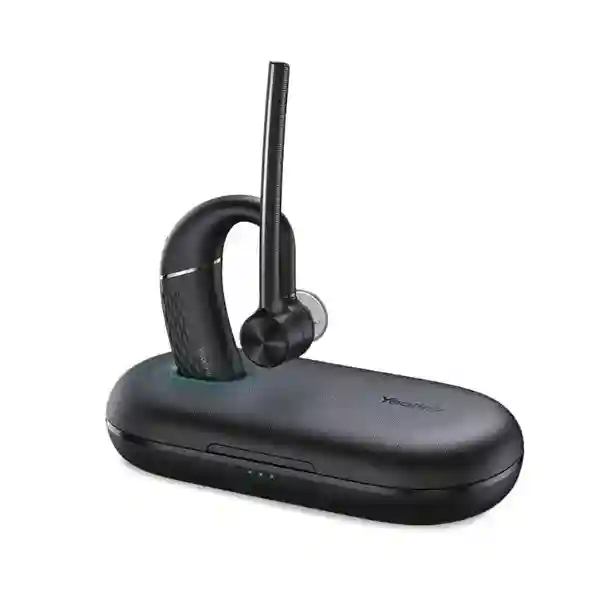
Both belong to the same mono Bluetooth headset family, but their packages target different workflows. The standard BH71 is suited to mobile use and includes a carrying case, while the Pro package is intended for hybrid users and adds items such as the BT51A USB adapter and a charging case according to current manufacturer package information. The charging case supplies additional reserve energy. Always quote the complete variant name because accessory content is a meaningful part of the purchasing decision.
6. When should an organisation choose BH71 Workstation?
Choose a Workstation variant when the user needs a more integrated desk environment involving PC, smartphone and compatible desk-phone workflows. The station adds a touch display, speakerphone functions, USB connectivity and a wireless charging facility for supported smartphones. It is a materially different desk deployment from the base mobile headset. Before ordering, provide the exact desk-phone model and intended call-control requirements so any required interface accessories can be identified and compatibility can be validated.
7. Is the published wireless range guaranteed inside an office?
No. The standard headset’s range is stated as up to 40 metres or 130 feet in ideal conditions. Real buildings contain walls, glass, concrete, metal furniture and competing radio traffic that can shorten that distance. Endpoint radio quality also matters. If a user must roam to a specific storeroom, corridor or adjacent office while remaining on a call, test that route before fleet rollout. Range should be treated as an engineering condition to validate, not a guaranteed radius.
8. How should a company manage firmware and configuration?
Treat the headset as a managed endpoint. Establish an approved firmware baseline, test updates with representative calling applications and document settings that matter to the organisation. Yealink provides management utilities including USB Connect and related device-management options. Larger fleets should avoid unmanaged variation because support becomes more difficult when users run different firmware and settings. Keep a known-good test headset available to distinguish endpoint or application problems from actual headset faults.
9. What should be checked when the headset appears to have an audio problem?
Start with the complete signal chain. Confirm charge level, physical fit, selected microphone and speaker in the calling application, Bluetooth connection state, active endpoint, mute status and application audio routing. Then test a known-good call and, if possible, another endpoint. Intermittent speech can also originate from network voice quality rather than the headset. A structured test prevents unnecessary replacements. If the issue follows the headset across known-good endpoints, proceed with service or warranty assessment according to the purchase terms.
10. How should warranty and replacement planning be handled in Uganda?
Warranty terms should be confirmed on the FourTeck quotation for the exact supplied product and project. Keep invoices, delivery records and any serial documentation required by organisational policy. For critical users, maintain a small spare pool rather than depending on warranty turnaround as the continuity plan. When a unit fails, issue a spare immediately, isolate the affected device, record the fault symptoms and process the original unit through the agreed support channel. This provides users with continuity while preserving an orderly service record.
Plan Your Yealink BH71 Deployment in Uganda
A reliable headset purchase starts with the right variant, not simply the right brand name. Tell FourTeck how many users you are equipping, whether they call from smartphones, PCs or desk phones, how long they typically spend on calls, and where the equipment must be delivered. The team can use that information to prepare a practical bill of materials and quotation for the appropriate BH71 configuration.
For larger projects, include branch quantities and deployment dates so staging, delivery and spare-device planning can be considered from the beginning. This approach helps avoid accessory gaps, inconsistent user kits and last-minute compatibility issues.


Reviews
There are no reviews yet.