Professional wireless communications • Uganda
Yealink BH76 Plus Bluetooth Headset for Enterprise Calls & Hybrid Work
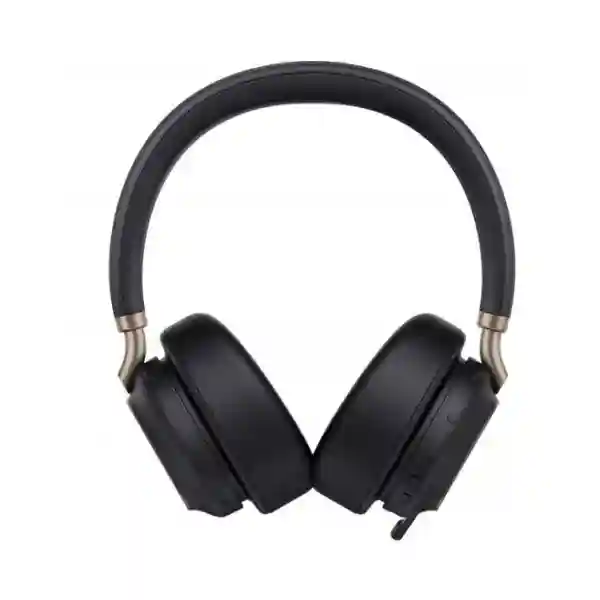
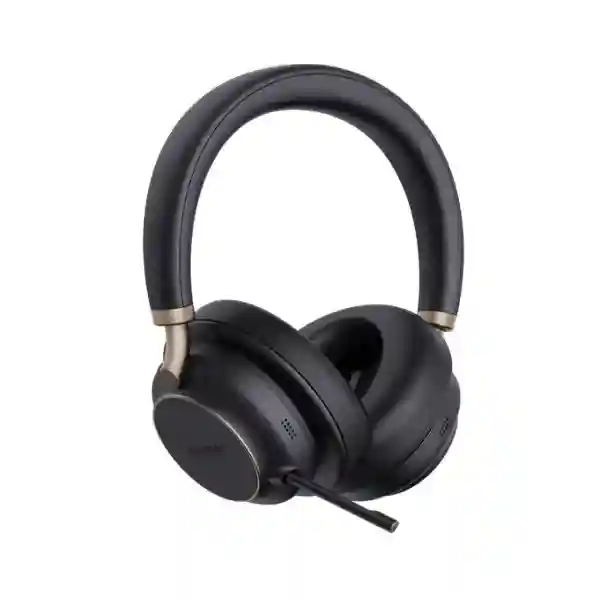
The Yealink BH76 Plus is a dual-ear Bluetooth business headset designed for professionals who move between voice calls, video meetings, focused desk work and travel. It combines a five-microphone voice system, Yealink Acoustic Shield technology, three-level hybrid active noise cancellation, switchable over-ear and on-ear cushions, a retractable hidden microphone arm and long battery endurance in one enterprise-ready platform. For procurement teams, the practical advantage is consolidation: one headset can serve computer collaboration, mobile calling and compatible business communication environments while giving users physical controls for calls, volume, mute, media and noise-control modes.
The current BH76 Plus platform uses Bluetooth 5.3 and supports up to 45 m / 150 ft stated wireless range, up to eight paired devices and two simultaneous Bluetooth connections. Talk time is rated up to 35 hours with ANC and busylight off, while music playback can reach up to 40 hours with ANC off. A supplied BT51C dongle and USB C/A adapter provide a controlled computer connection, and native Bluetooth provides flexibility for mobile devices. Teams and UC variants allow organizations to align ordering with their collaboration environment.
FourTeck Uganda supports business customers that need a clearly specified headset bill of materials rather than an ambiguous retail bundle. Before quotation, buyers can identify the required Teams or UC version, user quantity, preferred charging method, endpoint mix and rollout location. This helps reduce variant errors and makes staged enterprise deployment easier to manage.
Instant Specifications & Procurement Fact Rail
Yealink BH76 Plus
Executive, hybrid work, office and travel
Bluetooth 5.3, BT51C, USB cable
Up to 45 m / 150 ft
Up to 35 h talk / 40 h music
Commercial quotation on request
The BH76 Plus should be specified by variant rather than by family name alone. Current Yealink listings include Teams and UC configurations and packages with or without the BHC76 charging stand. Organizations should state their collaboration platform, connector preference and charging requirement when requesting a quote. Warranty terms can vary by supply channel and project, so the applicable regional warranty should be confirmed on the FourTeck quotation rather than assumed from a generic listing.
Operational Product Architecture & Overview
A business headset is an endpoint in the communications chain, and its design influences what remote participants hear, how reliably users can move between devices and how consistently staff can operate controls. The BH76 Plus approaches this with separate layers for voice capture, acoustic isolation, wireless transport, user control and centralized device administration. Five microphones support voice pickup and noise-handling functions. Yealink Acoustic Shield is designed to suppress surrounding noise while preserving the speaker’s voice, which is valuable in open offices, shared rooms, home environments and travel locations where nearby conversations or ambient activity can otherwise enter meetings.
For the wearer, hybrid active noise cancellation complements the physical isolation of the ear cushions. Three ANC levels let users choose an appropriate degree of isolation instead of treating every environment the same. The product also supports an ambient mode, useful when a user needs greater awareness of colleagues or surroundings. Dual busylights provide a visible status signal during calls and meetings, helping reduce interruptions in shared offices.

The physical architecture addresses a frequent enterprise headset compromise: some users prefer the isolation of over-ear cushions while others prefer the lighter feel and awareness of on-ear cushions. The BH76 Plus includes replaceable cushion options so a standardized headset model can accommodate different wearing preferences. Firmware recognizes the ear-cushion type and adjusts audio parameters accordingly. This can simplify fleet standardization while giving employees a meaningful ergonomic choice.
The retractable microphone arm is another operational detail. It can be extended for calls and hidden when not required, preserving a cleaner headphone profile. Raising and lowering the boom can participate in mute behavior, reducing dependence on software controls. Physical buttons handle answer/end/reject, volume, mute, power/pairing, ANC or ambient selection, and media playback. These controls matter when applications are minimized or users are moving away from the keyboard.
Connectivity is designed around mixed-device work. The headset can pair with up to eight Bluetooth devices and maintain two simultaneous Bluetooth connections, supporting common computer-and-mobile workflows. For managed PC use, the included BT51C dongle and USB C/A adapter can provide a repeatable connection method. Yealink USB Connect, the Yealink Connect mobile application and Yealink’s device management platform provide administration paths for configuration and fleet operations.
Enterprise Business Outcomes & Value Analysis
The five-microphone architecture and Acoustic Shield capability target a central hybrid-work problem: background sound entering the far end of a call. Better voice isolation can reduce repeated statements and listener fatigue, particularly where staff cannot guarantee a dedicated quiet room.
Hybrid ANC with multiple levels gives users control over environmental distraction. Passive isolation from the cushions complements electronic cancellation. The combination is useful for concentration work, meetings and travel, while ambient mode provides a practical alternative when situational awareness is required.
Two simultaneous Bluetooth connections reduce friction for professionals who work from both a computer and smartphone. Pairing memory for up to eight devices helps users retain connections across a broader personal device set without repeatedly rebuilding every pairing.
Switchable on-ear and over-ear cushions allow IT and procurement teams to standardize on one headset family while accommodating different wearing preferences. This can reduce catalog complexity compared with purchasing unrelated models for every comfort profile.
Hardware controls, boom-based mute behavior, wearing detection and busylights reduce dependence on application windows. Central management options can also support more consistent configuration when a business deploys the headset across multiple users.
Up to 35 hours of rated talk time and up to 40 hours of music playback provide substantial working endurance. Cable charging takes up to approximately two hours, while optional wireless charging offers a desk-based replenishment workflow.
Replaceable cushions, device-management tools and optional charging infrastructure can support a more maintainable fleet. Procurement teams should still budget for wear items, spares and charging accessories according to user profile rather than evaluating headset price alone.
Key Hardware & Software Highlights
| Component / capability | Implementation | Operational outcome |
|---|---|---|
| Microphone system | Five microphones with Acoustic Shield | Improved voice isolation in busy environments |
| Noise control | Three-level hybrid ANC plus passive isolation | Adjustable focus for office and travel |
| Microphone arm | Retractable hidden boom | Business-call pickup with cleaner off-call profile |
| Ear cushions | Switchable on-ear and over-ear | User-selectable comfort and isolation |
| Wireless | Bluetooth 5.3, up to 45 m | Mobility around work areas |
| Administration | USB Connect, Connect App, device management platform | Local and centralized management options |
Dynamic equalization supports different audio behavior for calls and music, while hearing-protection functions are intended to control excessive acoustic exposure. The dual busylights communicate call status to people around the wearer. The optional BHC76 wireless charging stand can charge compatible headsets and Qi devices, allowing a desk installation to serve both as storage and charging infrastructure.
Technical Specifications Ledger
| Specification | BH76 Plus detail |
|---|---|
| Bluetooth | Bluetooth 5.3 |
| Wireless operating range | Up to 45 m / 150 ft under stated conditions |
| Pairing capacity | Up to 8 devices |
| Simultaneous Bluetooth connections | 2 |
| Connection methods | BT51C USB adapter, USB cable, native Bluetooth |
| Microphones | 5 total; directional ECM and MEMS architecture |
| Noise control | Hybrid active noise cancellation; Acoustic Shield; passive isolation |
| Speaker frequency range | 20 Hz–20 kHz |
| Talk-mode bandwidth | 100 Hz–8 kHz |
| Talk time | Up to 35 hours with ANC and busylight off |
| Music time | Up to 40 hours with ANC off |
| Standby | Up to 360 hours / 15 days |
| Cable charging | Within approximately 2 hours |
| Wireless charging | Supported with optional compatible charging stand; approximately 3 hours stated |
| Controls | Call, volume, mute, pairing/power, ANC/ambient/off, play/pause |
| Management | Yealink USB Connect, Yealink Connect App, Yealink device management services |
| Included accessories | BT51C dongle, USB C/A adapter, USB cable, on-ear cushion, bag and documentation; bundle details should be confirmed |
| Compliance | Regional compliance varies by marketed variant; current Yealink documentation lists CE/FCC/IC among applicable marks |
Published Yealink documentation has evolved across revisions, so procurement should use the exact part number on the commercial quotation as the controlling reference. In particular, accessory bundles, listed net weight and adapter details can differ by document revision and variant. FourTeck can validate the requested bill of materials before order confirmation.
Configuration & Sizing Worksheet
1. Estimate users and work patterns
Separate full-time headset users from occasional meeting users. Identify executives, sales staff, customer-facing personnel, remote workers and frequent travelers. A deployment of 20 headsets in one office has different spare, charging and staging requirements from 200 units distributed across branches. Include a sensible spare pool where communications availability is important.
2. Map endpoints and collaboration platforms
Record whether each group uses Windows or Mac computers, smartphones, compatible desk-phone workflows, Microsoft Teams or other UC applications. Select the Teams or UC variant deliberately. Where consistent PC behavior is important, plan use of the supplied Yealink dongle rather than assuming every workstation’s native Bluetooth stack will provide identical behavior.
3. Choose wearing and acoustic policy
Decide whether users should receive both cushion types as part of the standard issue. Over-ear cushions suit stronger passive isolation; on-ear cushions may be preferred by users who want a different pressure profile. Determine whether staff need ANC for concentration or whether greater ambient awareness is appropriate in their work area.
4. Plan charging
Cable charging is sufficient for many deployments, but executive desks and shared work areas may benefit from the optional BHC76 wireless charging stand. Confirm available desk power and accessory quantities. Wireless charging should be treated as an optional convenience, not a prerequisite for headset operation.
5. Prepare the quote request
Provide quantity, Teams or UC preference, charging-stand quantity, delivery city, deployment deadline, endpoint environment and any requirement for staging or firmware preparation. For larger projects, also state whether units should be grouped by branch or department. This information enables a cleaner commercial response and reduces clarification cycles.
Deployment Scenarios & Industry Use Cases

Large enterprise and multi-site organizations
A multi-site business can standardize the BH76 Plus for roles that require frequent online meetings and mobile calling. Central device-management capabilities can support consistent configuration practices, while a controlled part-number policy reduces branch-level purchasing variation. For deployments across Kampala headquarters and regional offices, headsets can be allocated by department, with spare stock held centrally or distributed to larger branches.
Financial and banking institutions
Banking staff frequently work in acoustically active offices where customer conversations and colleague discussions occur nearby. A noise-reducing headset can improve meeting intelligibility, but organizations should still apply their own privacy and endpoint-security policies. The BH76 Plus is appropriate for collaboration and business calls; it does not replace room privacy, information-handling controls or approved application security.
Educational and campus networks
Universities, training institutions and distributed administration teams can use the headset for virtual teaching, staff meetings, admissions work and cross-campus coordination. Long battery endurance suits users moving between offices and meeting spaces. IT teams can standardize accessories and provide a documented pairing workflow for managed computers.
Government and regulated procurement
Public-sector procurement often requires explicit model references, quantities, compliance documentation and controlled acceptance. FourTeck can structure quotations around the requested variant and accessories. Buyers should state any mandatory tender documentation, delivery packaging, serial-number recording or pre-shipment validation requirements before order placement so these can be assessed as part of the supply scope.
Technical Deep Dive: Audio Processing & Acoustic Architecture
The BH76 Plus separates the two sides of the noise problem: what the wearer hears and what the remote participant hears. Hybrid ANC primarily supports the wearer’s listening environment by using electronic cancellation in combination with physical cushion isolation. Acoustic Shield and the multi-microphone arrangement support transmitted voice quality by identifying and reducing surrounding sound relative to the user’s speech. These functions should not be conflated: strong listening isolation does not automatically guarantee clean outgoing speech, and microphone noise suppression does not automatically create a quiet experience for the wearer.
The headset also uses dynamic equalization so the audio presentation can adapt between communication and music use. The published speaker frequency range extends from 20 Hz to 20 kHz, while talk-mode bandwidth is focused on the voice range. This distinction is appropriate because business speech prioritizes intelligibility and communications transport, whereas music playback benefits from broader frequency reproduction. Hardware mute and call controls provide deterministic user interaction even when software windows are not in focus.
For procurement evaluation, audio performance should be tested in the real workplace. A pilot should include quiet rooms, open-plan areas and typical mobile use. Teams can assess far-end speech intelligibility, comfort over long sessions, ANC preference and whether staff understand boom and mute behavior. A small structured pilot often reveals more operational information than comparing specification sheets alone.
Technical Deep Dive: Software Ecosystem, Firmware & Operational Control
Yealink provides PC, mobile and centralized management paths. Yealink USB Connect supports computer-side configuration and maintenance, while the Yealink Connect application provides mobile access. The device-management platform supports broader administration scenarios. In an enterprise fleet, the value of these tools is consistency: administrators can define how devices are prepared, updated and supported instead of relying on every user to troubleshoot independently.
Firmware governance should follow organizational change-control practice. Before a broad update, IT teams can validate a release against the organization’s operating-system build, collaboration application and key calling workflows. Headset firmware should be treated like other endpoint firmware: maintain an inventory, document approved versions where required, and test major changes with representative users before mass deployment. The included Yealink adapter can also simplify support by giving IT a known connection component rather than relying exclusively on varying computer Bluetooth implementations.
Licensing should be checked in context. Core headset operation does not mean the organization receives licenses for third-party calling or meeting services. Microsoft Teams, other UC platforms, softphones and enterprise management systems may have their own subscriptions. The headset is an endpoint that integrates with supported environments; it is not a substitute for those application entitlements.
Technical Deep Dive: Availability, Charging & Continuity
Headset availability is largely a battery, spare-pool and accessory-management question rather than a traditional server-style redundancy problem. The BH76 Plus offers long rated endurance, and cable charging provides a straightforward recovery path. For desk-based users, the optional wireless charging stand encourages a habit of returning the headset to a powered location between sessions. For mobile staff, spare charging cables and clear responsibility for charging can be more useful than fixed stands.
Business continuity planning should include spare headsets for critical roles, spare cushions for hygiene and wear, and documented pairing instructions. Large fleets should retain a small quantity of known-good dongles and accessories. If a user’s headset fails, the fastest recovery is usually replacement from prepared spare stock followed by re-pairing, rather than attempting component-level repair during the working day.
Where uptime is important, procurement should calculate spare ratios based on user count, geographic distribution and replacement lead time. A nationwide organization may need local spares at major branches because shipping a replacement from Kampala can take longer than swapping from on-site stock. FourTeck can discuss project quantities and accessory planning during quotation.
Pre-Purchase Buyer Gap Checklist
Which exact variant is being quoted? Confirm Teams or UC, connector/dongle bundle and whether the BHC76 charging stand is included. Do not assume a product photograph defines the bundle.
Are there hidden application subscriptions? The headset can work with supported communication platforms, but licenses for Microsoft Teams, softphones, calling services or other business applications remain separate unless explicitly included in a project quote.
Will native Bluetooth behave exactly like the supplied dongle? Not necessarily. Computer Bluetooth hardware, drivers and operating-system behavior vary. For standardized enterprise PC deployments, validate the supplied Yealink adapter workflow during pilot testing.
Is 45 metres guaranteed everywhere? No. The stated figure is an up-to operating range. Walls, radio congestion, workstation placement and other environmental conditions can reduce practical range.
Does 35-hour talk time apply with every feature enabled? Published maximum talk time is stated with ANC and busylight off. Real endurance depends on feature use, volume, radio conditions, battery age and calling patterns.
What wears out first? Ear cushions are contact components and should be treated as replaceable wear items. Battery capacity also naturally changes over a product’s service life. Fleet planning should account for hygiene, user turnover and long-term consumables.
Can it replace specialist hearing protection? No assumption should be made that a communications headset substitutes for occupational protective equipment. Organizations with regulated noise environments should follow their safety requirements and approved protective-device policy.
What should be tested before a large rollout? Test call controls, mute behavior, meeting-platform compatibility, device switching, comfort, ANC preference, microphone performance in representative noise, charging practice and administrator update workflow. Record the accepted variant and firmware baseline after the pilot.
Uganda Procurement & Delivery Logistics
FourTeck Uganda can prepare commercial quotations for individual business purchases, departmental refreshes and larger headset rollouts. A useful request includes the exact model, user quantity, preferred Teams or UC variant, charging-stand quantity and delivery destination. Where the organization is replacing an existing headset estate, include the computer platform and primary collaboration application so compatibility questions can be addressed before supply.
Order processing depends on confirmed commercial terms and the availability of the specified variant. Delivery timelines should therefore be taken from the issued quotation rather than assumed from a generic web listing. For projects with a fixed go-live date, provide that date at the quotation stage. This gives the supply team an opportunity to align stock, inbound logistics and any requested staging activity.
Pre-configuration requirements should also be identified early. Examples include firmware validation, labeling, grouping units by branch, accessory verification or preparing a deployment note for internal IT staff. Not every project requires staging, but it can reduce workload when a large number of headsets must be issued in a short window.
Local Coverage Matrix
Head-office, enterprise, financial, government and multi-site deployment coordination.
Business, hospitality, aviation-adjacent and distributed office requirements.
Industrial, commercial, education and regional office headset supply.
Western-region business and institutional deployment planning.
Northern-region enterprise, NGO, education and branch requirements.
For locations outside these hubs, provide the destination during quotation so delivery arrangements can be assessed. Multi-branch projects can be quoted with quantities broken down by location, helping procurement teams maintain a single commercial view while planning distribution.
Cross-Border & Regional Supply Chains
Organizations operating across East Africa, the Gulf and wider African markets may need consistent product families across multiple countries. FourTeck regional sites can support country-specific commercial engagement: Uganda, Kenya, Africa, UAE and Kuwait. Cross-border buyers should identify which entity will purchase, receive and support each shipment because taxes, import processes, warranty handling and lead times can vary by destination.
For regional standardization, maintain an approved model and part-number list rather than only a marketing family name. This helps subsidiaries order compatible variants and accessories even when local commercial documentation differs.
Related Yealink Solutions
A BH76 Plus deployment often sits alongside a wider communications environment. Explore FourTeck Uganda’s enterprise technology portfolio for compatible communications planning. Organizations refreshing desktop communications can consider Yealink IP phone and unified-communications options alongside headset procurement. Meeting-room teams can coordinate personal headsets with conference-room endpoints, while mobile and hybrid users can standardize dongles, charging accessories and approved UC applications.
For a project-specific selection, use the FourTeck Uganda contact page to request related Yealink models, replacement ear cushions, BHC76 wireless charging stands, compatible business phones or meeting-room equipment. Related products should be selected by user role rather than simply by price: executives may prioritize ANC and travel comfort, call-intensive teams may prioritize microphone clarity and controls, and fixed-desk users may prioritize charging convenience and repeatable PC integration.
FourTeck Technical Service Capabilities
FourTeck’s project role can extend beyond supplying a sealed box. For enterprise orders, technical validation can begin with the bill of materials: confirming the requested BH76 Plus variant, quantity, dongle arrangement and optional charging accessories. This reduces the risk of mixing Teams and UC requirements or assuming that an optional accessory is included.
Where agreed for a project, staging activities can include visual bill-of-material checks, firmware preparation, basic device validation, labeling or grouping by deployment destination. Pre-shipment firmware work should be based on an agreed version and scope rather than performed indiscriminately, particularly where a customer’s IT team maintains its own approved firmware baseline.
Post-sales assistance can support troubleshooting around pairing, device recognition, charging, call controls and supported management tools. Hardware warranty processing follows the terms attached to the supplied product and commercial transaction. For large fleets, organizations should retain their own asset records, serial information and spare strategy so support cases can be resolved efficiently.
Extended Technical FAQ
Is the Yealink BH76 Plus suitable for Microsoft Teams?
Yes. Yealink offers Microsoft Teams variants as well as UC variants. For an enterprise purchase, specify the preferred variant instead of assuming all BH76 Plus units have the same application-specific designation. The headset supports common call controls with Microsoft Teams and major softphone environments, but actual integration can depend on the application, operating system and connection method. A pilot on the organization’s managed workstation image is recommended before a large rollout. Microsoft Teams service licensing is separate from the headset itself and remains the customer’s responsibility unless a broader project quote explicitly includes services.
Can the BH76 Plus connect to a laptop and phone at the same time?
The BH76 Plus supports two simultaneous Bluetooth connections and can remember pairing information for up to eight devices. This is useful for users who need a computer for meetings and a smartphone for mobile calls. In a standardized corporate deployment, the computer can use the supplied BT51C adapter while the smartphone uses native Bluetooth. Organizations should test how their chosen calling applications handle competing audio sessions and notifications, because application behavior can differ even when the headset itself supports the underlying connections.
How effective is the noise cancellation?
The headset combines three-level hybrid active noise cancellation for the wearer’s listening environment with passive isolation from the ear cushions. Yealink’s Acoustic Shield and multi-microphone design address outgoing voice clarity by reducing surrounding noise picked up during calls. These are complementary functions. Results depend on the type and position of noise, fit, selected cushion and ANC setting. For open offices or travel use, organizations should evaluate the headset in representative conditions rather than treating a laboratory or published maximum as a guarantee for every workplace.
What battery life should business users expect?
Yealink rates the BH76 Plus for up to 35 hours of talk time with ANC and busylight off and up to 40 hours of music playback with ANC off. Cable charging is specified within approximately two hours, and supported wireless charging takes longer. Actual endurance changes with volume, feature use, Bluetooth conditions, call patterns, temperature and battery age. For operational planning, a business should treat published figures as maximum rated values and establish a normal charging routine. Critical users can be supported with spare units or strategically placed charging accessories.
Is the BHC76 wireless charging stand included?
The answer depends on the exact package and part number. Yealink lists variants with a charging stand as well as packages where the BHC76 is optional. The safest procurement practice is to state explicitly how many charging stands are required and ask for the bill of materials to identify them as separate line items or included bundle components. The BHC76 can serve as a headset stand and wireless charger, and it supports compatible Qi devices. Its value is greatest for fixed desks where users can routinely return the headset to the stand.
Do users need special software to operate the headset?
Basic headset operation is based on its supported USB and Bluetooth connections, but Yealink software provides configuration and management functions. Yealink USB Connect supports PC-side management, the Yealink Connect application supports mobile administration, and Yealink’s device-management services support broader fleet use. Organizations should decide whether end users may change settings or whether IT will maintain a controlled configuration. Third-party meeting and calling applications can require their own software and subscriptions; those services are not automatically licensed simply because the headset is compatible with them.
Can the ear cushions be changed?
Yes. A distinctive BH76 Plus capability is switching between over-ear and on-ear cushions. The headset’s firmware can recognize the cushion type and adjust audio parameters. This makes the model useful where a business wants a standardized headset but employees have different comfort or isolation preferences. Cushions are also wear components, so larger deployments should consider replacement stock for hygiene, damage and lifecycle maintenance. When requesting a quote, specify whether additional cushion pairs are required beyond the standard package contents of the selected variant.
What is the practical wireless range in an office?
Yealink states an operating range of up to 45 metres or 150 feet. Practical range can be lower because Bluetooth performance is affected by walls, metal structures, floor layouts, radio congestion, endpoint placement and the user’s body position. A range figure should therefore be treated as an upper stated capability, not a guaranteed radius through every building. If users must walk between rooms during calls, include that movement in pilot testing. For predictable PC deployments, also validate the location of the supplied adapter and avoid unnecessarily obstructed USB placement.
How should warranty and replacement be handled?
Warranty processing should follow the terms shown on the FourTeck commercial documentation for the supplied units. Organizations should keep purchase records and asset or serial information where applicable. For business-critical users, warranty should not be the only continuity mechanism because diagnosis and replacement processing can take time. Maintain a small spare pool so a user can resume work immediately, then process the affected unit through the agreed support path. Replacement cushions, cables and charging accessories should also be treated separately from complete-headset hardware faults when managing fleet support.
Can FourTeck help configure a large BH76 Plus rollout?
FourTeck can discuss technical validation and project staging requirements during quotation. Useful pre-deployment tasks can include confirming Teams versus UC variants, checking accessory quantities, agreeing firmware expectations, grouping units by destination and preparing a consistent deployment approach. The customer’s IT team should provide its endpoint platform, application environment and any internal change-control requirements. For a large rollout, begin with a representative pilot group, document accepted settings and support procedures, then use that baseline for the wider deployment. This approach reduces user disruption and avoids discovering compatibility assumptions after bulk distribution.
Prepare Your Yealink BH76 Plus Procurement Request
For an accurate Uganda quotation, provide the number of users, Teams or UC preference, charging-stand requirement, delivery location and intended computer or mobile environment. For multi-site projects, include quantities by branch and the target deployment date. FourTeck can then align the requested model, accessories and commercial scope before order processing. A clear bill of materials is especially important for BH76 Plus purchases because multiple variants and charging options are available.
Whether the requirement is a small executive deployment in Kampala or a coordinated fleet across Uganda, define the user workflow first and purchase the headset configuration around that workflow. This produces a more supportable communications endpoint estate and reduces avoidable accessory or variant changes after delivery.


Reviews
There are no reviews yet.