Professional wireless communications • Uganda supply
Yealink BH78 ANC Bluetooth Headset for Enterprise Communications
The Yealink BH78 is an over-ear Bluetooth business headset created for professionals who need dependable voice pickup, controlled listening, long battery endurance and flexible connectivity across modern work environments. It combines adaptive active noise cancellation, a multi-microphone voice system, Bluetooth 5.3 and a hidden boom microphone in a foldable design suitable for offices, home workspaces, travel and shared collaboration areas.
For procurement teams, the practical value of the BH78 is its ability to standardize a premium headset experience without restricting users to one work location. A member of staff can connect to a laptop through the supplied BT51C adapter while maintaining a second Bluetooth connection to a mobile device. This reduces daily cable changes and makes the headset useful for employees who move between meetings, calls, media playback and mobile communication.
The headset weighs approximately 245 g and uses 35 mm speakers. Its adaptive ANC can reduce environmental distraction while an ambient mode allows users to remain aware of their surroundings when appropriate. Dual busylights provide a visible indication that the wearer is occupied. The retractable boom supports a clean appearance when the device is used away from calls, while boom movement also provides intuitive microphone mute control.
FourTeck supplies the Yealink BH78 for organizations in Uganda that need business headset procurement, rollout planning, endpoint compatibility review and delivery coordination. Quotes can be prepared for a single executive headset, a team deployment or a broader communications refresh. Buyers should specify user count, computer interfaces, calling platform, delivery location and any requirement for staging or standardized configuration.

Business communications procurement for office, hybrid and mobile teams.
BH78 Procurement Fact Rail
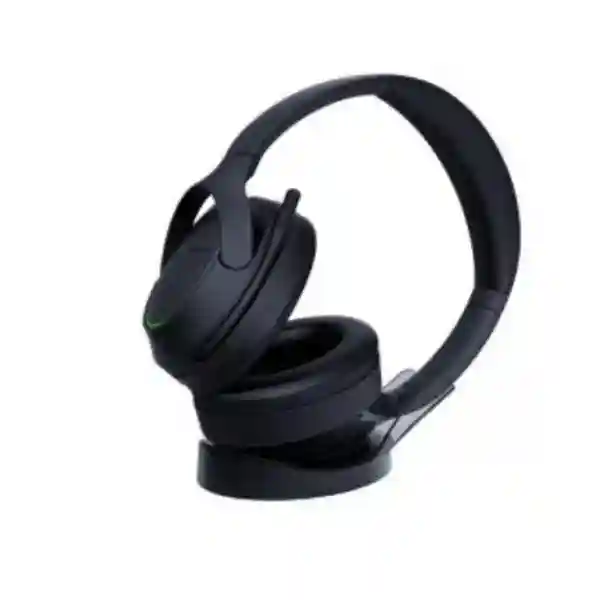
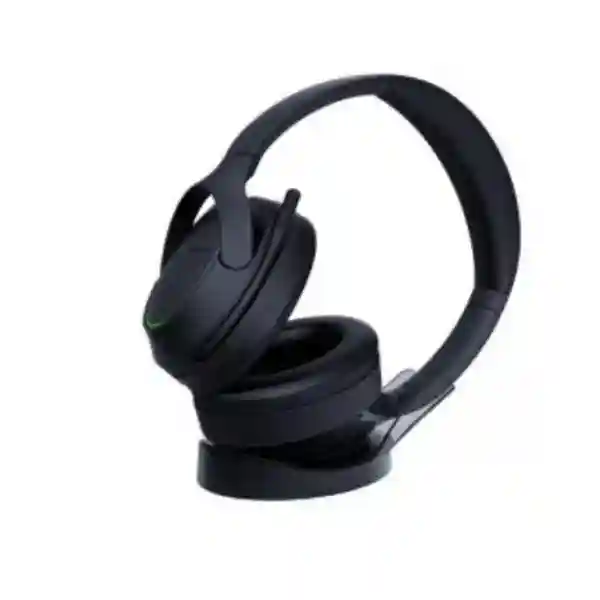
Yealink BH78 with charging stand
Executive, hybrid and mobile work
Bluetooth 5.3, BT51C, USB, 3.5 mm
Up to 50 m / 160 ft
Request current commercial quotation
Confirm regional terms on quotation
The fact rail gives procurement teams a fast way to establish whether the BH78 belongs on a shortlist. It is not a basic consumer headset: its connection choices, charging stand, business call controls, hearing-protection functions, device-management options and long operating time are designed for managed professional use. Exact stock position, lead time, commercial warranty handling and project pricing should be confirmed against the requested quantity because supply conditions can vary by order size and destination.
Operational Architecture and Product Overview
The BH78 architecture is centered on three requirements that frequently conflict in business headsets: strong voice isolation, immersive listening and practical all-day mobility. Yealink addresses these through a six-microphone system, adaptive active noise cancellation, 35 mm speakers, a rechargeable 850 mAh battery and several wired and wireless connection paths. The result is a headset that can serve as a primary communications endpoint rather than an occasional accessory.
Voice pickup is particularly important in open-plan offices and shared spaces. Environmental sounds such as nearby conversations, typing, ventilation and movement can make remote meetings tiring. The BH78 uses its microphone arrangement and voice-processing functions to separate the speaker from surrounding sound. This improves the conditions at the far end of a call and can reduce the need for users to repeat themselves. For a procurement manager, this matters because headset quality affects meeting efficiency, perceived professionalism and employee willingness to use the approved device.
On the listening side, adaptive ANC changes the amount of cancellation according to the environment. This is useful for staff whose workday shifts between a quiet room, a busy office and travel. Instead of treating noise control as a single fixed state, the user can select noise cancellation, ambient listening or other supported modes according to context. The headset also incorporates hearing-protection functions intended to help manage excessive acoustic exposure in business use.
Connectivity is another core architectural advantage. Bluetooth 5.3 supports native wireless connection, while the supplied BT51C dongle offers a predictable computer connection through USB-C with the included C/A adapter. A USB cable provides another connection route, and the supplied USB-C to 3.5 mm cable adds useful flexibility for compatible equipment. The headset can maintain two simultaneous Bluetooth connections and remember pairing information for up to eight devices. This is valuable for users who regularly alternate between a corporate laptop and smartphone.
Wireless reach is specified at up to 50 metres under suitable conditions. Actual usable range in an office depends on walls, radio congestion, building materials and the connected host. Procurement planning should therefore treat the maximum figure as a laboratory-style capability rather than a guarantee that every office floor will provide unobstructed 50-metre coverage. The important operational benefit is that users can gain meaningful mobility around a desk or nearby workspace without remaining physically tethered to the computer.
Battery design supports long work cycles. Yealink specifies up to 38 hours of talk time when ANC and busylights are off, with lower talk time when those functions are active, and up to 120 hours of music playback with ANC off. Charging takes up to approximately 130 minutes, while standby can reach up to 21 days. Actual endurance changes with volume, radio conditions, cancellation settings, call patterns and battery age. The supplied BHC78 wireless charging stand makes top-up charging easier at a fixed desk and encourages users to return the device to a known location.
Physical design also influences adoption. The over-ear format provides broader ear coverage than lightweight mono or on-ear call-center headsets. The hidden boom retracts for a less technical appearance outside meetings, and the headset folds for transport. Wearing detection and direct call controls reduce routine interaction with software windows. For executives, consultants, sales staff and managers who combine calls with travel, these details can be as important as raw acoustic specifications.

Enterprise Business Outcomes and Value Analysis
A professional headset is purchased to make communication more consistent. The BH78 combines a multi-microphone architecture with a retractable boom and noise-suppression processing so the user’s speech can remain intelligible in challenging environments. This supports managers, customer-facing personnel and distributed project teams whose calls often take place outside dedicated meeting rooms. The value is not simply louder sound; it is better control of the acoustic path between user and meeting platform.
Long battery endurance reduces the operational disruption caused by mid-day charging. The charging stand provides a natural storage and replenishment point, while cable connection options give teams alternatives when wireless operation is not preferred. A headset standard with predictable charging behavior can also reduce the number of different chargers and accessories departments need to manage.
The BH78 is appropriate for individual executive use but can also be considered for departmental standardization. Support for Yealink USB Connect, the Yealink Connect mobile application and Yealink device-management services provides a management path beyond manual local controls. Larger deployments should confirm the exact management functions and service entitlements required for their environment before purchase.
Bluetooth accessories are part of the endpoint estate and should be governed accordingly. Organizations can standardize approved dongles, pairing procedures, firmware maintenance and device assignment. The BH78’s support for a dedicated adapter can simplify workstation consistency compared with relying on varying computer Bluetooth implementations. Security teams should align headset deployment with their established peripheral and wireless policies.
A consistent headset model reduces training and support variation. Staff learn one set of controls for mute, volume, ANC and call handling. IT support teams can document one pairing workflow and one firmware-maintenance process for the chosen user group. Standardization is particularly useful when devices are issued during onboarding or as part of a laptop refresh.
The relevant ownership calculation extends beyond purchase price. Consider expected service life, replacement ear cushions where applicable, user downtime, support effort, charging accessories, platform compatibility and the cost of maintaining multiple headset families. Long operating time and a supplied stand can improve daily usability, while broad platform compatibility can protect the investment when collaboration software changes.
Employees increasingly move among office desks, meeting spaces, homes and travel locations. The foldable design, carrying case, dual-device capability and long battery endurance make the BH78 suitable for this pattern. A single approved headset can follow the user rather than requiring separate audio devices at every location.
Key Hardware and Software Highlights
| Component | BH78 implementation | Operational outcome |
|---|---|---|
| Microphone system | Six microphones; four-microphone voice-focused array | Improved speech separation in busy surroundings |
| Noise control | Adaptive hybrid active noise cancellation | Helps create a more controlled listening environment |
| Speakers | 35 mm drivers, 20 Hz–20 kHz response | Supports speech, meetings and media playback |
| Radio | Bluetooth 5.3, up to 50 m stated range | Desk mobility and flexible host connection |
| Battery | 850 mAh rechargeable lithium-ion | Extended work cycles between charges |
| Management | Yealink USB Connect, Connect App, management platform | Configuration and maintenance options for business fleets |
These components work as a system. The microphone array is most valuable when the boom is positioned correctly; ANC affects listening rather than replacing good microphone placement; battery endurance depends on enabled functions; and wireless range depends on the radio environment. Procurement documents should therefore specify the complete use case instead of comparing a single headline number. A team that spends most of the day in calls may prioritize microphone performance and comfort, while traveling executives may place more weight on folding design, battery endurance and multi-device connectivity.
Technical Specifications Ledger
| Category | Specification | Procurement note |
|---|---|---|
| Wearing style | Over-ear | Suitable for extended focused use |
| Headset weight | Approx. 245 g | Consider user preference for over-ear designs |
| Bluetooth | Version 5.3 | Native or adapter-assisted connection |
| Wireless range | Up to 50 m / 160 ft | Real range varies by environment |
| Simultaneous Bluetooth connections | 2 | Useful for PC plus mobile workflows |
| Pairing memory | Up to 8 devices | Reduces repeated pairing across known devices |
| Microphones | 6 total; microphone response 100 Hz–10 kHz | Designed for business voice pickup and noise control |
| Speaker | 35 mm; 20 Hz–20 kHz | Full-range business and media listening |
| Noise cancellation | Adaptive hybrid ANC | Supports concentration in variable environments |
| Battery | Rechargeable lithium-ion, 850 mAh | Battery performance varies with settings and age |
| Talk time | Up to 38 h with ANC and busylight off; up to 27 h with ANC and busylight on | Plan around actual feature use |
| Music playback | Up to 120 h with ANC off | Actual playback depends on volume and conditions |
| Charging time | Up to 130 minutes | Charging stand supports desk-based replenishment |
| Standby | Up to 21 days | Useful for intermittent users |
| Connections | BT51C USB dongle, USB cable, native Bluetooth, USB-C to 3.5 mm cable | Verify target host ports before rollout |
| Hearing protection | Peak protection, EN50332-related protection, AU G616 and daily exposure protection | Align with organizational acoustic policies |
| Included accessories | BT51C, C/A adapter, USB cable, USB-C to 3.5 mm cable, case, BHC78 stand, guide | Confirm exact regional pack before purchase |
Specifications should be read in context. Maximum battery and wireless figures represent supported operating conditions and are not promises of identical performance in every deployment. Dense office radio environments, higher listening volume, enabled ANC, busylight use and frequent reconnection can affect endurance. Likewise, platform controls can vary by operating system and meeting application. FourTeck can help buyers validate the intended combination of laptops, phones, Yealink endpoints and collaboration services before a large quantity is ordered.
Configuration and Sizing Worksheet
Step 1 — Estimate users and workload
Separate users by working pattern rather than ordering one headset for every employee automatically. Identify executives, sales teams, project managers, consultants, hybrid workers and other staff who spend significant time in voice or video meetings. Estimate daily call hours, mobility needs and whether users work in open spaces. The BH78 is strongest where over-ear comfort, active noise control and extended battery operation justify a premium business headset.
Step 2 — Review physical working conditions
Headsets do not require rack space, but the workplace still needs physical planning. Confirm desk space for the BHC78 charging stand, access to an appropriate USB power source, storage arrangements for hot desks and secure transport for mobile users. For shared desks, decide whether the headset follows the employee or remains assigned to a workstation. Personal assignment is generally easier for hygiene, pairing and accountability.
Step 3 — Validate ports, adapters and cabling
Inventory the USB ports available on corporate computers. The package includes a BT51C USB-C dongle and a C/A adapter, which gives useful flexibility across modern and legacy workstation ports. Where direct Bluetooth is permitted, confirm the computer’s radio and driver policy. Where predictable call control is important, the dedicated dongle may provide a more standardized deployment path. Also identify any devices that require the supplied USB-C to 3.5 mm connection.
Step 4 — Confirm software and management expectations
Decide whether users will configure devices locally or whether IT needs centralized visibility and management. Yealink provides USB Connect for computers, a Connect application for mobile platforms and a device-management service. Before rollout, document approved firmware, update responsibility, ANC defaults, sidetone or audio preferences where supported, and the help-desk process for re-pairing or resetting devices.
Step 5 — Prepare the quotation request
A useful quote request should state quantity, city, organization type, target computers or phones, preferred collaboration platform, required delivery date and whether the order is part of a larger Yealink deployment. Mention any requirement for asset labeling, staged configuration, firmware validation or split delivery. This information reduces revisions and allows the proposed bill of materials to be checked before commercial approval.
For pilot projects, select a representative group rather than only technically confident users. Include a heavy caller, an executive, a mobile worker and someone based in an open office. Ask them to evaluate comfort after several hours, microphone clarity, mute behavior, roaming, device switching, charging habits and meeting-platform controls. Pilot feedback is more valuable when it reflects actual working patterns rather than a short demonstration.
Deployment Scenarios and Industry Use Cases
Large Enterprise and Multi-Site Networks
A multi-site organization can standardize the BH78 for leadership teams and high-call-volume mobile staff while using other headset tiers for fixed roles. The important deployment decision is consistency: standard dongles, firmware practices, labeling and support instructions should be defined centrally. Branch offices can then receive pre-checked kits with the same accessories and onboarding guidance. Dual-device connectivity is useful where staff use a corporate laptop and managed smartphone throughout the day.
Financial and Banking Institutions
Banks and financial organizations often require clear calls in offices where confidentiality, customer experience and operational discipline matter. The BH78 can help users focus in shared workspaces, but ANC should never be treated as a confidentiality control; it changes what the wearer hears, not the physical privacy of a conversation. Deployment should follow the institution’s approved wireless-peripheral policy, and staff should use appropriate private areas for sensitive discussions. Dedicated adapters can support a more controlled workstation standard.
Educational and Campus Networks
Universities and large education organizations can deploy the BH78 to administrators, department heads, remote-learning coordinators and staff who participate in frequent online meetings. Campus users often move between offices and buildings, making a foldable headset and carrying case practical. Long battery endurance reduces dependency on charging during teaching or administrative schedules. IT teams should confirm compatibility with managed laptops and the institution’s conferencing environment before fleet purchase.
Government and Public-Sector Procurement
Government procurement typically requires clear model identification, documented specifications, predictable accessories and a defined support route. The BH78 package can be quoted with its charging stand, dongle, cables and carrying case so evaluation teams can compare complete delivered configurations. Any tender-specific compliance, origin, warranty or documentation requirement should be stated before quotation. Wireless peripherals should be approved according to the agency’s own information-security and device-management rules.
Professional Services and Consulting
Consultants and professional-services teams frequently alternate between client sites, offices, airports, hotels and home workspaces. The BH78’s foldable construction, long battery specification and multi-device capability align well with this pattern. A single headset can cover meetings, mobile calls and focused listening. The hidden microphone boom also makes the device less visually intrusive when used for media between calls.
Technical Deep Dive: Audio Processing and Acoustic Architecture
Business headset performance depends on both the outgoing and incoming audio paths. On the outgoing path, the BH78 uses multiple microphones and signal processing to identify the wearer’s voice while suppressing environmental interference. The physical boom places a microphone closer to the mouth than microphones built only into an earcup, giving the system a stronger voice reference. The remaining microphones contribute to environmental analysis and noise-control functions. This architecture is especially valuable when background sound is variable rather than constant.
On the incoming path, the 35 mm drivers cover a stated 20 Hz to 20 kHz response range. This supports both business speech and broader media playback. Adaptive ANC monitors the environment and changes cancellation behavior, while ambient listening provides a way to hear surroundings without fully removing the headset. These modes serve different purposes: ANC supports concentration, while ambient awareness can be safer and more practical when a user needs to hear colleagues or announcements.
The headset’s hearing-protection functions are also relevant in enterprise use because daily acoustic exposure is cumulative. Organizations should still establish sensible volume practices and user education rather than relying on a device feature alone. The best deployment combines appropriate hardware, operating-system settings, meeting-platform configuration and staff guidance.
Technical Deep Dive: Software Ecosystem, Firmware and Operational Control
A modern headset contains firmware and configurable behavior, so lifecycle management should be part of procurement. Yealink USB Connect provides a computer-based route for supported device configuration and maintenance, while the mobile application extends user control to Android and iOS environments. Yealink’s management platform can support broader administration scenarios. Exact capabilities should be validated against the organization’s desired management model and current service offering.
For a fleet rollout, IT should record the approved firmware baseline before devices are distributed. Updates should be tested with the organization’s main operating systems, conferencing clients and endpoint hardware. This is especially important when users depend on hardware buttons for call answer, mute and volume because application behavior can change after client updates. A short regression test can include pairing, inbound and outbound calls, microphone mute, ANC switching, music playback, sleep and wake behavior, and reconnection after restart.
Operational control also includes ownership. Asset records should associate each headset and dongle with a user where the organization tracks peripherals. Spare adapters and cables can be held centrally so a lost accessory does not force replacement of a complete headset. Help-desk documentation should explain how to clear pairings, reconnect a host and distinguish a headset problem from a computer Bluetooth or conferencing-client problem.
Technical Deep Dive: Continuity, Redundancy and Recovery
A headset does not provide infrastructure high availability in the same sense as a server or network switch, but continuity still matters. The BH78 offers several connection methods, which can provide practical fallback paths. If native Bluetooth on a computer is unreliable or prohibited, the BT51C adapter can be used. If wireless operation is temporarily unsuitable, a supported cable path may remain available. Dual-device connectivity also means a user can maintain links to both computer and mobile phone.
Battery planning is another form of continuity. The charging stand encourages regular top-up charging, while the long specified talk time reduces the chance that a normal workday will exhaust the battery. Organizations with mission-critical calling roles should nevertheless keep spare charged headsets or wired alternatives available. No rechargeable peripheral should be treated as a single point of operational continuity for emergency communications.
Recovery procedures should be simple enough for first-line support. Maintain a known-good dongle, cable and computer for fault isolation. If a user reports poor audio, test microphone positioning, meeting-client device selection, radio distance and firmware before replacing hardware. This structured approach prevents unnecessary returns and gives procurement teams better data about actual failure rates.
Pre-Purchase Buyer Gap Checklist
Are there hidden recurring charges? Core headset operation does not inherently require a recurring subscription simply to make Bluetooth calls, but organizations considering centralized management should confirm the current terms of any management service they intend to use. The commercial quote should separate hardware, optional services and project support so buyers can see the complete cost structure.
Will it work with every conferencing platform? Yealink positions the BH78 for broad platform compatibility, but specific hardware-button integration can vary among operating systems and client versions. Buyers with a mandatory platform should state it during quotation and ideally validate a sample before a large deployment. Basic audio compatibility and certified call-control behavior are related but not identical questions.
Does the maximum wireless range apply through walls? The stated range is up to 50 metres. Walls, reinforced concrete, metal partitions, radio interference and host hardware can reduce practical distance. Test mobility in the actual office if roaming range is a decisive requirement.
What happens when ANC is enabled all day? Battery endurance changes with active functions. Yealink lists different talk-time figures depending on ANC and busylight use. Procurement calculations should use the more demanding operating profile if employees are expected to keep those features active continuously.
Is the charging stand included? The BH78 with stand package includes the BHC78 wireless charging stand. Because regional bundles can change, the exact part number and package contents should still appear on the quotation or purchase order. This avoids confusion between headset-only and stand-inclusive variants.
Can it replace a wired call-center headset? Technically it can serve many voice workloads, but role fit matters. A premium over-ear ANC headset is designed differently from a lightweight, continuously shared contact-center model. Evaluate wearing style, cleaning policy, battery workflow, call controls and supervisor requirements before replacing an established call-center standard.
What about future laptop changes? The combination of USB-C dongle, C/A adapter, native Bluetooth and cable options gives the BH78 flexibility across mixed device estates. During a laptop refresh, test the headset against the new image and conferencing clients before mass migration.
Uganda Procurement and Delivery Logistics
FourTeck can prepare commercial quotations for Yealink BH78 requirements in Uganda based on quantity, destination and project scope. A complete request should include the organization name, contact details, required quantity, delivery city, preferred timeline and any technical constraints. For larger projects, include the endpoint environment and whether the headset will be used with laptops, Yealink desk phones, mobile devices or a mixed estate.
Order processing begins after the commercial and technical configuration is agreed. Availability and delivery time should be confirmed at quotation because enterprise hardware supply can change with project quantity and distribution schedules. For planned rollouts, early bill-of-materials confirmation reduces the risk of discovering late that a required adapter, charging arrangement or platform variant differs from the expected bundle.
Pre-configuration support can include compatibility review, firmware baseline checks and deployment guidance where agreed as part of the project. Organizations distributing headsets to multiple branches should provide a site-by-site quantity list so delivery can be structured around rollout phases. Asset labels or internal inventory references can also be discussed where the project requires controlled assignment.
Warranty processing should be based on the terms stated in the final quotation and supplied documentation. Keep purchase records, serial information where applicable and a clear fault description. Before a return is initiated, basic troubleshooting can help establish whether the problem is the headset, dongle, cable, computer, meeting client or local Bluetooth environment.
Local Coverage Matrix
Corporate offices, institutions, integrators and project deployments can request quantity-based quotations and delivery planning.
Suitable for organizations needing executive, travel and hybrid-work headset supply with project coordination.
Business and institutional buyers can request planned delivery for individual or multi-user communications deployments.
Regional offices can consolidate headset requirements with broader Yealink endpoint and communications procurement.
Organizations can coordinate remote-site quantities, accessory requirements and delivery expectations before ordering.
For locations outside these hubs, provide the exact delivery destination when requesting a quote. This allows logistics planning to reflect the actual project rather than assuming Kampala delivery. Multi-site customers should submit a branch matrix showing quantities by location, required delivery sequence and local receiving contacts.
Cross-Border and Regional Supply Chains
Organizations operating across East Africa, the Gulf and broader African markets often benefit from coordinating product standards across countries while handling commercial supply locally. FourTeck regional sites support this approach. Uganda requirements can be coordinated through FourTeck Uganda, Kenyan projects through FourTeck Kenya, broader continental requirements through FourTeck Africa, UAE projects through FourTeck UAE, and Kuwait requirements through FourTeck Kuwait.
For cross-border standardization, define one approved headset model, required bundle and firmware policy, then request country-specific quotations and logistics. Commercial terms, taxes, import processes, warranty routing and lead times can differ by market, so procurement teams should not assume that a quote issued for one country automatically applies in another. A shared technical standard combined with local commercial handling usually produces clearer accountability.
Related Yealink Solutions
The BH78 can form part of a broader Yealink communications environment. Buyers evaluating a headset fleet may also review Yealink business communications solutions in Uganda for compatible desk endpoints and meeting equipment. Teams requiring fixed desk calling can consider Yealink SIP phone families, while users needing different wearing styles may compare other Bluetooth, DECT and USB headset options. Conference rooms can be standardized separately with Yealink meeting-room endpoints, allowing personal audio and shared-room equipment to follow one vendor ecosystem.
Accessory planning should include spare USB adapters, charging cables and approved power sources where operationally necessary. Organizations with hot desks may prefer individual headset assignment while leaving only approved charging infrastructure at shared desks. For reception, call-center or warehouse roles, another Yealink headset style may be more appropriate than an over-ear executive ANC model. FourTeck can help separate user personas so premium features are assigned where they deliver operational value rather than being purchased indiscriminately.
When the BH78 is purchased alongside Yealink phones or meeting solutions, request a combined bill of materials. This creates one view of endpoint quantities, headset compatibility, accessories and deployment assumptions, reducing the risk that each device family is ordered in isolation.
FourTeck Technical Service Capabilities
Enterprise headset projects benefit from basic engineering validation before purchase. FourTeck can review the requested model against the stated endpoint environment and help identify whether adapters, charging stands or alternative headset types should be included. This is particularly useful when an organization has a mixture of USB-A and USB-C computers, mobile users and Yealink desk phones.
Bill-of-materials verification helps ensure the commercial document describes the complete expected bundle rather than only the headset name. For larger deployments, agreed staging activities can include package verification, firmware baseline review and basic deployment preparation. The exact scope should be defined in the quotation so the customer knows which tasks occur before shipment and which remain the responsibility of internal IT.
Post-sales technical support can assist with structured fault isolation, compatibility questions and deployment guidance. Good support depends on useful evidence: device model, firmware version, connected host, operating system, application, connection method and a precise description of the fault. Providing this information accelerates diagnosis and reduces unnecessary hardware replacement.
Extended Technical FAQ
1. What devices can the Yealink BH78 connect to?
The BH78 supports several connection paths: Bluetooth 5.3, the supplied BT51C USB-C adapter with C/A adapter, USB cable and a supplied USB-C to 3.5 mm cable. It can maintain two simultaneous Bluetooth connections and store pairing information for up to eight devices. In practice, this makes it suitable for common laptop-plus-mobile workflows. Compatibility should still be validated for the exact operating system, desk phone or conferencing client when hardware call controls are important, because audio operation and application-specific control integration are separate considerations.
2. How long does the BH78 battery last in business use?
Yealink specifies up to 38 hours of talk time when ANC and busylight are off and up to 27 hours when ANC and busylight are on. Music playback can reach up to 120 hours with ANC off, while standby is specified at up to 21 days. Charging takes up to about 130 minutes. These are maximum figures under defined conditions; actual results depend on volume, radio conditions, active features, call pattern and battery age. Organizations should size charging routines around the feature profile employees will actually use.
3. Does adaptive ANC remove background noise from my microphone?
ANC primarily controls what the wearer hears by reducing environmental sound reaching the ears. Microphone noise reduction addresses the separate outgoing voice path. The BH78 combines adaptive active noise cancellation with a multi-microphone voice system, so it tackles both sides of the conversation through different mechanisms. Buyers should not judge microphone clarity solely from the ANC specification. For the best results, position the boom correctly, select the BH78 as the active microphone in the conferencing application and test in the real environment where calls will occur.
4. Is a software subscription required to use the headset?
Normal headset operation does not require a recurring service merely to pair the device and use it for supported audio. Yealink also provides software and device-management options for configuration and fleet administration. If an organization plans centralized management, it should confirm the current service scope and commercial terms for the desired management functions. Procurement documents should distinguish the physical BH78 package from any optional enterprise service so the customer has a clear view of one-time hardware cost and any separate operational service.
5. Can the BH78 be used across Microsoft Teams and other collaboration services?
Yealink positions the BH78 for broad unified communications compatibility, and the headset can operate as an audio device across many computer and mobile environments. However, platform-specific features such as call-answer buttons, mute synchronization or client integration can depend on the selected variant, dongle, software version and conferencing client. Organizations with a mandatory collaboration platform should state that platform when requesting a quote and should validate a pilot unit before a large rollout. This provides stronger assurance than relying only on generic Bluetooth audio compatibility.
6. Is the BH78 suitable for open offices?
Yes, open and hybrid offices are a primary use case because the BH78 combines an over-ear design, adaptive ANC and microphone noise-control functions. These features can improve concentration and call clarity where there is nearby conversation or general office activity. They do not create acoustic privacy for sensitive discussions, so confidential calls should still take place in an appropriate space. Organizations should also consider whether users need ambient awareness for safety or collaboration and train staff to switch listening modes according to their surroundings.
7. What is included with the BH78 with stand package?
The documented package includes the BH78 headset, carrying case, USB charging/data cable, quick-start guide, BT51C dongle, USB-C to 3.5 mm cable, USB C/A adapter and BHC78 wireless charging stand. This is a comprehensive kit for a mobile professional who also maintains a fixed desk. Regional packaging can change over a product lifecycle, so the final quotation should list the intended bundle or part number. Procurement teams should verify package contents before issuing a purchase order when an accessory is mandatory for the deployment.
8. How should a company manage firmware and configuration?
Treat the headset as a managed peripheral. Establish an approved firmware baseline, test updates with primary conferencing clients, document preferred audio settings and define who is responsible for updates. Yealink USB Connect supports computer-based device management, while the mobile Connect application and Yealink management services provide additional control paths. For a large rollout, test updates on a small group before broad deployment. Help-desk documentation should cover pairing, reset procedures, device selection in the operating system and basic troubleshooting for dongle versus native Bluetooth connections.
9. How is warranty or hardware replacement handled?
Warranty terms should be confirmed on the FourTeck quotation and retained with the organization’s procurement records. If a fault occurs, record the device details and reproduce the issue using a structured test. Check the cable, dongle, computer port, conferencing client and firmware before concluding that the headset hardware has failed. Where replacement is required, follow the stated warranty process and provide purchase evidence and fault information. Larger organizations may choose to hold a small spare pool so users can continue working while a warranty case is processed.
10. What information should I send to FourTeck for an accurate quote?
Provide the quantity of BH78 units required, delivery city, target date, user profile and the main computers, phones or collaboration platforms involved. State whether the BHC78 charging stand is required for every user and whether the deployment needs any staging, asset identification or technical validation. For multi-site projects, include quantities by branch. If the organization is refreshing an existing headset estate, mention the current model and the main reason for replacement, such as battery life, microphone performance, comfort, platform migration or the need for active noise cancellation.
Plan Your Yealink BH78 Deployment in Uganda
A successful headset purchase starts with the user role, endpoint environment and deployment quantity. The Yealink BH78 is a strong fit for organizations that need premium over-ear comfort, adaptive noise control, professional microphone performance, long battery endurance and flexible Bluetooth connectivity. Before ordering, confirm the intended collaboration platform, computer interfaces, user count and delivery locations. FourTeck can then prepare a commercial quotation and help validate the proposed configuration.
For a pilot, request enough units to represent the real workforce rather than evaluating only one desk. For a full rollout, provide branch quantities and technical requirements so accessories and logistics can be aligned from the start. Current stock position, lead time, pricing and warranty terms will be stated through the quotation process.


Reviews
There are no reviews yet.