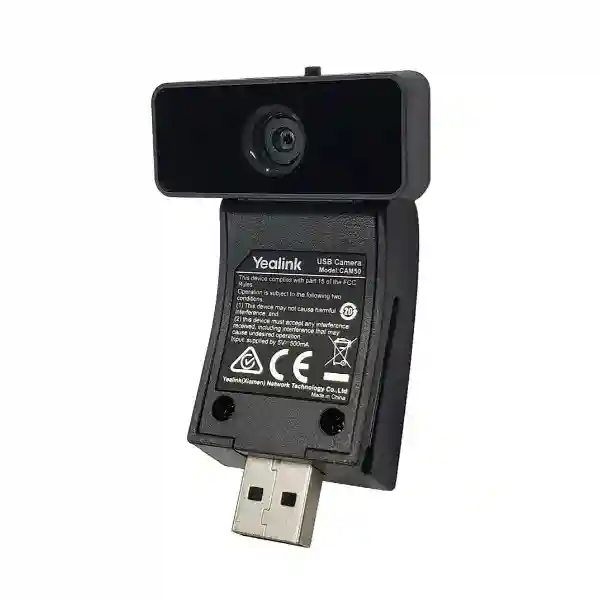
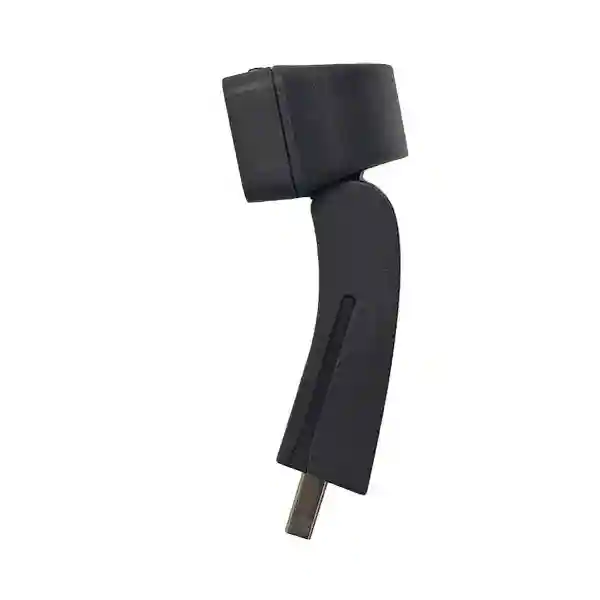
Yealink CAM50 Phone Camera – HD Desktop Video for Compatible Yealink IP Phones
The Yealink CAM50 is a removable USB camera built for compatible Yealink smart media phones where organizations want to extend a desk telephone from voice communications into practical person-to-person video collaboration. Rather than deploying a separate webcam, monitor camera or meeting-room appliance at every desk, the CAM50 connects directly to the supported phone and becomes part of the user’s familiar communications endpoint. Current Yealink information identifies compatibility with SIP-T58W and SIP-T58A phones and specifies a 5-megapixel camera supporting 720p video at 30 frames per second. This makes the CAM50 especially relevant to organizations standardizing executive desks, reception points, consultation stations, branch offices and other locations where users need occasional or regular face-to-face communications without turning every workstation into a full room system.
For procurement teams in Uganda, the important question is not simply whether a camera can produce video. The larger requirement is whether the camera fits the installed phone generation, uses the available interface, operates within the expected power budget, supports the required video formats, provides acceptable user privacy and can be rolled out consistently across many desks. CAM50 addresses these practical requirements through USB 2.0 connectivity, host-powered operation, plug-and-play installation, a visible LED indicator, adjustable positioning and a physical privacy shutter. Its supported video codecs include H.264 High Profile, H.264 and VP8. Automatic exposure and white balance help reduce day-to-day user intervention as lighting conditions change.
FourTeck positions the CAM50 as a component within a complete endpoint bill of materials rather than as an isolated accessory. Buyers can request validation against the intended Yealink phone model, quantity planning, accessory checks, shipment coordination and deployment guidance. This approach is useful when multiple branches or departments have different phone revisions and purchasing teams need to avoid ordering accessories for incompatible endpoints.
Instant Specifications & Procurement Fact Rail
Yealink CAM50
Desktop IP phone video
720p @ 30fps
USB 2.0
5V, under 500mA via USB
Contact FourTeck for current commercial terms
The CAM50 should be treated as a model-specific communications accessory. A purchase request should identify the host phone model and quantity so compatibility can be confirmed before order processing. Current Yealink documentation associates CAM50 with SIP-T58W and SIP-T58A. Older Yealink material also references earlier T58-family variants, which is why procurement teams managing mixed estates should identify the exact phone hardware rather than assuming that every visually similar Yealink endpoint accepts the same camera. The camera draws power from the USB connection, reducing desktop cable clutter. Uganda warranty handling should be confirmed on the commercial quotation because warranty terms can depend on supply channel, project structure and the specific transaction.
Operational Product Architecture & Overview
CAM50 is architecturally simple by design: an imaging module, USB interface, physical adjustment mechanism, status indication and privacy control are combined into a compact accessory that relies on the compatible Yealink phone for the broader communications environment. This division of responsibilities matters. The camera captures the user and provides the supported video stream, while the host phone provides the display, network connection, call control, user interface and communications platform integration. Consequently, buyers do not need to plan a second Ethernet drop solely for the camera, a separate AC adapter or an independent desktop display. This can simplify rollout in offices where desk space and cable management are tightly controlled.
The 720p at 30fps operating profile is intended for desktop communications rather than auditorium capture or large-room optical zoom. A user is normally positioned close to the phone, so the camera’s field of view is suited to a seated individual and immediate desk environment. Current published figures specify approximately 62±3 degrees horizontal, 47±3 degrees vertical and 75±5 degrees diagonal field of view. The adjustable camera angle allows installers and users to compensate for desk height, phone screen tilt and seating position. This is operationally important in reception, management, healthcare administration and service environments where the endpoint may be mounted or positioned differently from a conventional office desk.
Automatic exposure and white balance reduce the burden of manual image setup. They cannot compensate for every difficult lighting environment, so procurement and deployment teams should still consider strong backlighting, direct windows and unusually dark workspaces. A simple site standard—placing the phone so the user faces diffuse room light rather than a bright window—can improve perceived video quality without adding equipment.
The physical privacy shutter is an important design element for enterprises. Software camera controls can be useful, but many users and security-conscious departments prefer a visible physical barrier over the lens when video is not required. The shutter gives the user an immediate privacy state that can be visually verified. The LED indicator provides an additional operational cue. Together, these controls are relevant in executive offices, financial services desks, consultation points and government environments where users may discuss confidential material near the endpoint.

The camera supports H.264 High Profile, H.264 and VP8. Actual call behavior depends on the host phone, firmware, call platform, peer endpoint, network policy and negotiated media settings. Procurement teams therefore should distinguish camera capability from end-to-end service capability. A camera may be physically compatible while a particular communications platform, account configuration or network policy limits video calling. FourTeck can help buyers identify these dependencies during bill-of-materials review.
The most common procurement friction occurs in mixed-generation estates. Organizations may have T58-series phones purchased at different times, replacement units with newer firmware, or departments using different collaboration services. A disciplined rollout starts with an endpoint inventory, records exact model numbers, identifies which desks genuinely require video, then matches camera quantities to confirmed compatible phones. This prevents excess accessories and produces a cleaner support baseline.
Enterprise Business Outcomes & Value Analysis
These outcomes are strongest when the camera is purchased as part of a documented endpoint standard. A standard should record supported phone models, approved firmware baseline, video calling platform, network quality policy, installation position and replacement procedure. Such documentation makes the accessory easier to support across Kampala headquarters and regional branches because technicians can work from a known configuration rather than diagnosing each desk as a unique installation.
Key Hardware & Software Highlights
| Component / Capability | Published Detail | Operational Outcome |
|---|---|---|
| Camera sensor | 5 megapixel on current CAM50 page | Supports the camera’s desktop HD video role. |
| Video output | 720p at 30fps | Smooth individual video calling when network and platform conditions support it. |
| USB | USB 2.0 | Direct attachment to the supported host phone. |
| Privacy | Physical shutter | User-verifiable lens coverage when video is not needed. |
| Image control | Automatic exposure and white balance | Less manual adjustment across changing office light. |
| Video formats | H.264 High Profile, H.264, VP8 | Supports standards used by the compatible endpoint’s video environment. |
The CAM50 is not a standalone network camera and should not be specified as a surveillance device, USB laptop webcam or large-room conferencing camera without documented support for that use. Its value comes from integration with compatible Yealink phones. Buyers should keep this distinction explicit in tender specifications so suppliers quote the intended product class and do not substitute a generic webcam that lacks the same mechanical fit and phone integration.
Technical Specifications Ledger
| Specification | CAM50 Detail |
|---|---|
| Product type | Removable HD camera for compatible Yealink smart IP phones |
| Current stated compatibility | Yealink SIP-T58W / SIP-T58A |
| Camera | 5 megapixel on current Yealink product information |
| Video quality | 720p at 30 frames per second |
| Codecs | H.264 High Profile, H.264, VP8 |
| Horizontal field of view | 62±3° |
| Vertical field of view | 47±3° |
| Diagonal field of view | 75±5° |
| Image functions | White balance and automatic exposure |
| Status | LED indicator |
| Privacy | Adjustable camera with physical privacy shutter |
| Interface | USB 2.0 |
| Power | 5V at less than 500mA through USB |
| Operating temperature | 0–40°C |
| Operating humidity | 10–95% |
Specification references should be tied to the product generation being supplied. Historical Yealink CAM50 documentation described an earlier 2-megapixel version and different field-of-view values, while current Yealink material for the CAM50 and SIP-T58W camera combination states 5 megapixels and the values shown above. This is a significant procurement detail. Buyers replacing older CAM50 units should provide photographs, part labels or the host phone model when exact generation matching matters. FourTeck can incorporate this check into quotation preparation rather than relying solely on a generic product name.
Configuration & Sizing Worksheet
1. Estimate the video-enabled user population
Start with roles rather than total phone count. Identify executives, receptionists, branch managers, remote collaboration users, consultation desks and other staff who genuinely require desktop video. Separate permanent camera requirements from shared or temporary needs. This prevents purchasing a camera for every compatible handset when only a subset of users needs video.
2. Inventory the host phones
Record the exact Yealink model at each target desk. Current compatibility references include SIP-T58W and SIP-T58A. Do not infer compatibility from appearance. Where older T58-family hardware remains installed, record its full model and firmware information for validation.
3. Review desk environment and positioning
Check that the user sits within a natural desktop framing distance and that the phone can be positioned without a bright window directly behind the user. Confirm that shelves, privacy panels or wall arrangements do not obstruct the camera. The adjustable angle helps with normal desk variation but does not replace sensible endpoint placement.
4. Check power and cabling assumptions
CAM50 receives 5V power from the phone’s USB interface at less than 500mA. It does not require a separate camera power feed. However, the host phone itself still needs its normal approved power arrangement, whether that is Power over Ethernet or an appropriate phone power supply according to the endpoint specification. Ensure the network switch and phone power plan remain within budget when designing a new deployment.
5. Validate communications platform and licensing
The camera itself should not be confused with a video service license. Video call availability can depend on the phone edition, firmware, SIP or collaboration platform, user entitlement and remote endpoint. Confirm these elements before assuming that adding the camera alone enables every desired calling workflow.
6. Prepare the quotation request
Provide the CAM50 quantity, exact host phone models, deployment locations, target delivery date, whether phones are existing or new, and whether staging or compatibility review is required. For distributed projects, indicate how many units are destined for Kampala, Entebbe, Jinja, Mbarara, Gulu or other locations so packing and dispatch can be planned appropriately.
Deployment Scenarios & Industry Use Cases
Large enterprise and multi-site networks
A large organization may use CAM50 at executive desks and selected branch-management positions while standard voice phones serve general users. This tiered approach keeps the endpoint estate consistent while controlling accessory cost. Central IT can document which roles receive cameras, standardize the supported T58 phone model and maintain spare CAM50 units for rapid replacement. In multi-site environments, a single deployment standard is especially useful because regional support staff can identify expected hardware without needing a unique design for every branch.
Financial and banking institutions
Banks and financial organizations often need strong privacy discipline at desks. CAM50’s physical shutter is valuable because users can cover the lens when discussing customer information or internal matters. The camera can support face-to-face internal collaboration between branches and central teams where the communications platform permits video. Deployment policy should still govern when video is permitted, how endpoints are configured and how confidential material is handled in camera view.
Educational and campus networks
Universities, colleges and training organizations can use compatible Yealink phones with CAM50 at administration desks, departmental offices, faculty coordination points and support centers. The camera is most appropriate for individual desktop interaction rather than classroom capture. Campus IT teams should inventory phone models carefully because endpoint estates often grow over multiple budget cycles and can contain mixed hardware generations.
Government and public-sector procurement
Government projects frequently require a clear bill of materials, model traceability and consistent rollout. CAM50 can be specified as a dedicated accessory for approved compatible Yealink phones, with quantity and deployment site recorded separately. The physical shutter provides an intuitive privacy measure, while plug-and-play installation can reduce onsite setup time. Tender documentation should state the required camera model, host phone model, video profile, interface and required accessories to minimize ambiguous substitutions.

Technical Deep Dive: Imaging, Encoding & Desktop Framing
The camera’s job begins with image capture but successful enterprise video is an end-to-end process. The CAM50 provides the optical and imaging input; the compatible phone and communications environment handle call control, network transport and user interaction. Its current 5-megapixel sensor specification should not be interpreted as a 5-megapixel transmitted video call. Yealink specifies video quality at 720p and 30fps. This distinction helps buyers compare products correctly: sensor resolution, encoded video resolution and displayed resolution are related but not interchangeable measurements.
At a desk, frame rate contributes to natural motion during conversation, while field of view determines how much of the immediate environment is visible. A roughly 75-degree diagonal field is appropriate for a single user and some surrounding context. It is not intended to replace a wide-angle meeting-room camera covering a long conference table. Buyers planning huddle spaces should therefore evaluate dedicated room systems rather than extending a desktop accessory beyond its intended role.
H.264 High Profile, H.264 and VP8 support gives the compatible endpoint a useful codec foundation. Actual negotiated codec and quality depend on both ends of the call and the platform between them. Network teams should maintain appropriate voice/video quality policies and sufficient WAN capacity. Video traffic is more sensitive than ordinary desk-phone signaling to congestion, packet loss and jitter. A camera upgrade cannot correct an overloaded branch link, so organizations planning many simultaneous video-enabled desks should include network capacity in their rollout assessment.
Technical Deep Dive: Firmware, Platform & Operational Control
CAM50 is intentionally light on standalone administration because management resides primarily in the host phone environment. This simplifies the peripheral but increases the importance of maintaining a supported phone firmware baseline. Before a mass deployment, organizations should test the exact phone firmware, call platform and camera combination with representative internal and external calls. Once validated, that configuration can become the rollout baseline.
Operational control also includes user behavior. Staff should understand the privacy shutter, camera angle adjustment and basic video controls on the phone. A short deployment note can prevent many support tickets: open the shutter when joining video, position the phone so the camera is near eye level, avoid strong backlighting and close the shutter after calls where policy requires it. For large organizations, this simple guidance can be included in endpoint onboarding material.
Security teams should assess the host phone and communications platform according to organizational policy. The camera is one component in that system. Access control, device configuration, network segmentation, encrypted signaling/media capabilities and platform account policy are properties of the wider solution. Procurement documentation should therefore avoid claiming that a camera accessory independently provides network security functions that actually belong to the phone or service.
Technical Deep Dive: Availability, Replacement & Continuity
A removable camera offers a practical continuity advantage: a failed or damaged camera can be replaced without necessarily replacing the entire compatible desk phone. Organizations with critical video-enabled desks can hold a small spare pool sized to their support model. A branch with one camera may rely on central spares, while a large headquarters deployment may justify local spares for faster recovery.
High availability at the communications-service level still depends on the phone, network and call platform. CAM50 does not create call-server redundancy or WAN resilience. Procurement managers should separate accessory replacement planning from service continuity planning. The former covers spare cameras, physical damage and compatibility; the latter covers redundant connectivity, platform availability, power continuity and endpoint configuration recovery.
For disaster recovery, inventory records should associate cameras with compatible phone pools rather than individual users where possible. This makes it easier to reassign equipment during office moves or temporary recovery operations. Labeling storage boxes and spare stock with the supported phone family also reduces the chance that technicians dispatch a camera to an incompatible endpoint.
Pre-Purchase Buyer Gap Checklist
Is a license hidden in the camera price? CAM50 is hardware, but the ability to place video calls depends on the host phone and communications service. Ask separately about any platform or user licensing relevant to your environment. Will it work with every Yealink phone? No. Treat it as a compatibility-specific accessory and validate the exact host model. Does it need another power adapter? The camera is powered through USB at 5V and less than 500mA; the phone still requires its normal power source. Can it replace a meeting-room camera? Its desktop framing and 720p profile are designed for individual endpoint use, not broad room coverage.
What about older CAM50 specifications? Historical Yealink material described a 2-megapixel CAM50, whereas current Yealink product information lists 5 megapixels. If matching an older installed unit, confirm generation details rather than relying only on the name. Does USB 2.0 mean it is a universal PC webcam? USB describes the interface, but Yealink publishes CAM50 specifically for compatible Yealink phones. Do not assume generic PC support unless it is explicitly validated for the intended workflow. Can the lens be physically covered? Yes, a privacy shutter is part of the product design. What environmental conditions are published? Current information states 0–40°C operating temperature and 10–95% operating humidity.
How should a buyer estimate quantity? Count compatible phones assigned to roles requiring video, then add a reasonable spare allowance based on business criticality and branch distance. What should be checked before dispatch? Model, quantity, host phone compatibility, delivery location and any staging requirement. What if the organization has mixed T58 generations? Create a phone inventory first. Mixed-generation environments are exactly where model verification prevents avoidable returns. Does the camera guarantee 720p on every call? The camera supports 720p at 30fps, but actual call quality depends on negotiated media, platform, endpoint and network conditions.
Uganda Procurement & Delivery Logistics
FourTeck can prepare a Uganda quotation around the required CAM50 quantity and the wider Yealink endpoint requirement. For a simple accessory order, buyers should provide the quantity and host phone model. For larger deployments, include site allocation, expected delivery window, whether the phones are already installed and whether accessory-to-phone compatibility validation is required. This information makes the quotation more useful because it connects the camera line item to the actual deployment rather than treating it as an anonymous spare part.
Order processing can include bill-of-materials review before shipment. Where a project includes new Yealink phones as well as CAM50 units, the phone and camera quantities can be reconciled so the buyer understands which endpoints are video enabled. For existing estates, a sample host phone model can be validated before a larger accessory purchase. Delivery timing varies with quantity, stock position, import requirements and destination, so project schedules should use the lead time stated on the formal quotation rather than a generic web estimate.
Technical pre-configuration primarily applies to the compatible phone and communications platform because CAM50 itself is a plug-and-play peripheral. FourTeck can help coordinate endpoint firmware or configuration requirements as part of a broader deployment scope. Buyers should identify such requirements at quotation stage, particularly when equipment will be shipped directly to branches where local technical resources are limited.
Uganda Local Coverage Matrix
Kampala: Suitable for headquarters, financial institutions, enterprise offices and centralized IT teams deploying cameras at executive or collaboration desks. Entebbe: Useful for organizations with airport-area operations, hospitality administration, logistics offices and satellite corporate locations. Jinja: Supports industrial, education and regional office deployments where compatible Yealink endpoints are part of a unified communications standard. Mbarara: Camera quantities can be planned for branch administration, healthcare support, education and commercial offices. Gulu: Distributed organizations can include northern Uganda sites within the same endpoint bill of materials and spare strategy.
For multi-city projects, provide a site-by-site quantity schedule. This allows procurement teams to separate central stock from branch allocation and helps reduce emergency transfers after rollout. Organizations with limited regional technical staff may also choose to keep spare CAM50 units at a central support location while documenting which phone models at each branch are compatible.
Cross-Border & Regional Supply Chains
Organizations operating across East Africa and the Gulf can coordinate Yealink endpoint requirements across multiple markets while keeping local delivery and commercial needs visible. Explore FourTeck Uganda for Uganda requirements, FourTeck Kenya for Kenya projects, FourTeck Africa for broader African deployments, FourTeck UAE for UAE requirements and FourTeck Kuwait for Kuwait procurement.
Cross-border projects benefit from a shared bill of materials that identifies the exact phone and camera models while allowing each country to manage delivery, taxes, lead times and local project conditions. Standardizing the technical specification does not mean assuming identical commercial terms in every country. Ask for location-specific quotations and preserve the same compatibility validation across all sites.
Related Yealink Products & Deployment Paths
CAM50 is normally purchased in the context of a Yealink desk-phone deployment. Buyers evaluating a complete solution can review Yealink solutions in Uganda and request compatible SIP-T58-series endpoints, business desk phones, headsets, expansion accessories and conferencing products through the same procurement discussion. For a direct compatibility review or a consolidated bill of materials, use the FourTeck Uganda contact page.
When replacing an older phone and camera together, consider whether the current user requirement is still individual desktop video or has evolved into a huddle-room or shared-space requirement. Desktop users may be best served by a compatible smart IP phone and CAM50, while shared rooms generally need a purpose-built conferencing endpoint with wider framing and room audio. Headsets may also be relevant for privacy in open offices, while expansion modules can suit reception or attendant roles requiring more line visibility. A single quotation can group these items by user profile so procurement sees why each accessory is included.
FourTeck Technical Service Capabilities
FourTeck can support engineering validation by checking the intended CAM50 deployment against the specified Yealink host phone and broader project requirement. Bill-of-materials verification is particularly valuable where buyers are ordering cameras alongside new phones, because camera quantities can be mapped to video-enabled user roles and compatible models before purchase. For existing estates, buyers can provide the exact phone model and firmware context where necessary.
Staging services for a broader phone project can include agreed endpoint configuration tasks, firmware baseline preparation and shipment organization. Because CAM50 is plug and play, most configuration resides on the host phone and communications platform rather than on the camera itself. Pre-shipment checks can therefore focus on confirming accessory quantities and ensuring the correct camera is paired with the intended phone family.
Post-sales technical support can assist with practical deployment questions such as camera recognition, positioning, host phone checks and isolation of whether a video issue originates with the camera, phone, platform or network. Warranty processing should follow the terms of the relevant FourTeck quotation or invoice. Retaining serial, order and site records helps streamline support for distributed deployments.
Extended Technical FAQ
1. Which Yealink phones are currently listed as compatible with CAM50?
Yealink’s current CAM50 product information lists SIP-T58W and SIP-T58A compatibility. Historical documents also referenced earlier T58-family variants, so buyers with older hardware should not rely on family resemblance alone. Record the complete phone model before ordering. This is especially important for organizations that expanded their phone estate over several years because different generations can remain in service simultaneously. FourTeck can use the host model information during quotation preparation to reduce the risk of ordering a camera for an unsupported endpoint.
2. What video quality does CAM50 provide?
CAM50 supports 720p video at 30 frames per second according to current Yealink information. This profile is suited to individual desktop video calls. The actual quality observed during a call can be affected by the host phone, remote endpoint, collaboration or SIP platform, available bandwidth, packet loss and negotiated codec. The camera specification therefore describes its supported capability, not a guarantee that every call will remain at maximum quality under all network conditions. For branch rollouts, test representative WAN links before enabling large numbers of simultaneous video users.
3. Does CAM50 require a separate power adapter?
No separate camera power adapter is specified. CAM50 uses its USB connection and is rated at 5V with consumption below 500mA. The compatible Yealink phone still requires its own normal power arrangement. In a Power over Ethernet deployment, confirm that the phone and switch design meet the endpoint’s power requirements. Avoid treating the camera’s low USB power requirement as the complete desk power calculation, because the display, phone electronics and other attached accessories belong to the host endpoint’s overall power budget.
4. Does the camera include a privacy feature?
Yes. CAM50 includes a physical privacy shutter as well as an LED indicator. The shutter lets the user cover the lens when video is not required, which provides a clear visual privacy state independent of an on-screen control. This can be useful at executive desks, financial-service positions, consultation areas and other workspaces where sensitive conversations occur. Organizations should still define their own camera-use policy, because a physical shutter is a user control and does not replace broader security, acceptable-use or workspace privacy procedures.
5. Why do some older documents call CAM50 a 2-megapixel camera?
Older Yealink CAM50 datasheets described a 2-megapixel version, while the current Yealink CAM50 page and current SIP-T58W documentation identify CAM50 as 5 megapixels. This indicates that buyers should pay attention to product generation and current supply rather than combining specifications from documents published many years apart. If you are replacing a specific older camera and need like-for-like characteristics, provide the old unit’s details. For new procurement, the quotation should identify the current product being supplied and compatibility with the intended host phone.
6. Can CAM50 be used as a generic laptop webcam?
The product uses USB 2.0, but Yealink positions CAM50 as an HD camera for compatible Yealink IP phones. A USB connector alone does not establish universal webcam compatibility. Enterprise buyers should specify the published use case and avoid assuming support for laptops, desktops or unrelated conferencing appliances unless that combination has been explicitly validated. If the requirement is a PC webcam rather than a phone camera, request a product designed and supported for that role. This avoids driver, mounting, control and warranty ambiguity.
7. What codecs does CAM50 support?
Published CAM50 specifications list H.264 High Profile, H.264 and VP8. Codec support helps the compatible endpoint participate in video communications, but the codec actually used on a call is determined by the wider communications environment and negotiation between endpoints or services. Network and unified communications teams should therefore evaluate the phone and platform as a complete system. When troubleshooting quality, check negotiated media, bandwidth, packet loss and endpoint firmware rather than assuming that the camera itself controls all encoding and transport behavior.
8. What operating environment should be planned?
Current Yealink information states an operating temperature of 0 to 40°C and operating humidity of 10 to 95 percent. Normal climate-controlled offices fall comfortably within the intended usage profile, but buyers should consider local desk conditions, especially near direct sunlight, unusually hot equipment enclosures or areas exposed to moisture. CAM50 is a desktop communications accessory rather than an outdoor camera. In Uganda deployments where rooms can become warm during power or cooling interruptions, place endpoints in suitable indoor environments and follow the host phone’s environmental limits as well.
9. How should organizations plan spares and replacements?
Spare quantity should reflect the number of deployed cameras, criticality of video-enabled roles and distance from central support. A small Kampala office may keep one shared spare, while a multi-branch organization may hold central stock plus limited regional spares. Because the camera is removable, replacement can be simpler than replacing the complete phone when the fault is isolated to the camera. Keep purchase records and label spares by compatible phone family. Before declaring the camera faulty, support staff should reseat the device, verify the host phone and firmware, and isolate platform or network issues.
10. What information should be sent to FourTeck for an accurate quote?
Provide the product name CAM50, required quantity, exact Yealink phone model, deployment city or cities, target schedule and whether the phones are already installed. For a new rollout, include the phone quantities and any headset, expansion or power requirements so the bill of materials can be reviewed as a whole. For mixed estates, a simple inventory showing model and quantity by site is highly useful. Also state whether you need staging, compatibility validation or branch packing. These details allow the commercial response to address the actual project instead of quoting an accessory without deployment context.
Request a Yealink CAM50 Uganda Quotation
For a single replacement camera or a multi-site Yealink video-phone rollout, send FourTeck the required CAM50 quantity and the exact host phone models. The team can review compatibility, structure the bill of materials, coordinate commercial terms and plan delivery around the Uganda deployment. For projects covering several offices, include the quantity required at each location and identify whether cameras are being added to existing phones or supplied with new endpoints. This makes it easier to distinguish user hardware, spares and branch allocations before the order is processed.
A well-prepared camera order is straightforward: verify the phone, confirm the role requires video, check the communications platform, define the quantity and record the destination. That discipline reduces incompatible accessory purchases and creates a cleaner support baseline after installation.



Reviews
There are no reviews yet.