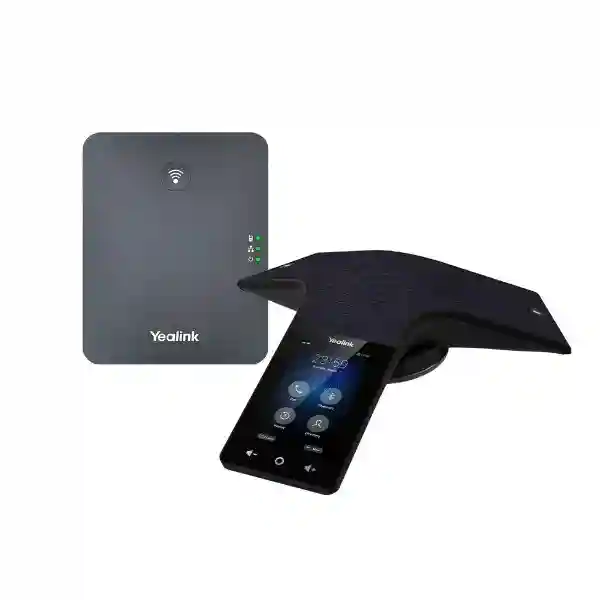
Yealink CP935W-Base DECT Conference Phone for Wireless Business Meetings
The Yealink CP935W-Base is a wireless SIP conference-room communication system built around the CP935W touch conference phone and a DECT base. Its role is simple: give meeting participants a professional, table-centred audio endpoint without forcing the conference unit to sit beside an Ethernet outlet. The phone can operate through DECT or Wi-Fi, while Bluetooth and USB connectivity support hybrid meeting workflows with personal computers and mobile devices. For Ugandan organizations modernizing boardrooms, branch offices, management meeting rooms, training spaces and project rooms, this architecture can reduce cabling constraints while preserving business-grade call control and clear room audio.
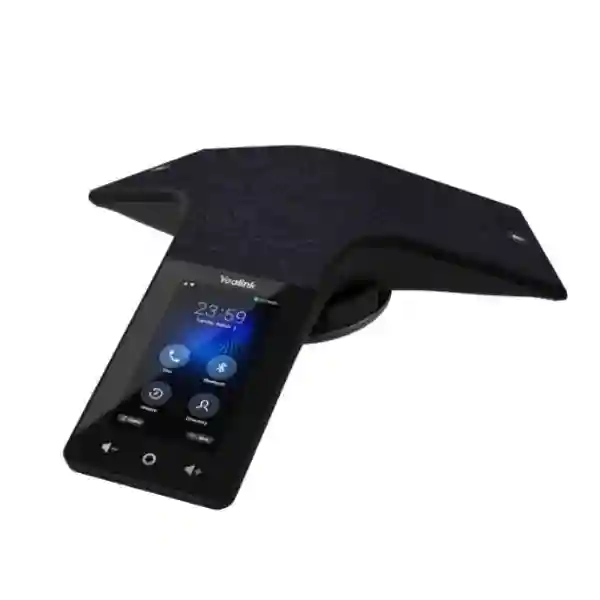
The CP935W uses a six-microphone array to capture voices around the table with 360-degree coverage and a specified pickup radius of up to 6 metres. Yealink combines that array with full-duplex speakerphone operation, acoustic echo cancellation, Smart Noise Filtering, background-noise suppression and its Noise Proof technology. A 4-inch 480 × 800 capacitive touchscreen replaces dense physical key layouts with a visual interface for everyday meeting control. The rechargeable 7800mAh battery is particularly important in rooms where the device may be moved between table positions or stored on its charging cradle between sessions. Yealink specifies up to 15 hours of talk time under ideal conditions and up to 167 hours standby in DECT mode, with an approximately four-hour charge cycle.
Procurement teams should treat the CP935W-Base as a communications endpoint rather than a complete meeting-room platform by itself. Before ordering, validate SIP platform compatibility, DECT base placement, local radio environment, required microphone coverage, USB/Bluetooth workflows and the number of rooms to be standardized. FourTeck can help translate those variables into a consistent bill of materials for one room or a multi-site rollout.
Instant Specifications & Procurement Fact Rail
Yealink CP935W-Base
Small to medium conference rooms
DECT, dual-band Wi-Fi, Bluetooth 4.2
6 microphones, 360°, up to 6 m
7800mAh rechargeable
Business quotation / project supply
The CP935W-Base should be specified according to room acoustics, participant seating pattern and the telephony environment rather than selected only by table size. The conference unit provides one SIP account in its direct operating profile, supports five-way conference calling, and can register through the DECT base when deployed in DECT mode. The package architecture is valuable where a wired network connection can be provided to the base station but the meeting table itself must remain free from permanent network cabling. Warranty terms, lead time and replacement procedure can vary by project and supply batch; request the applicable Uganda quotation and warranty baseline before issuing a purchase order.

Operational Product Architecture & Overview
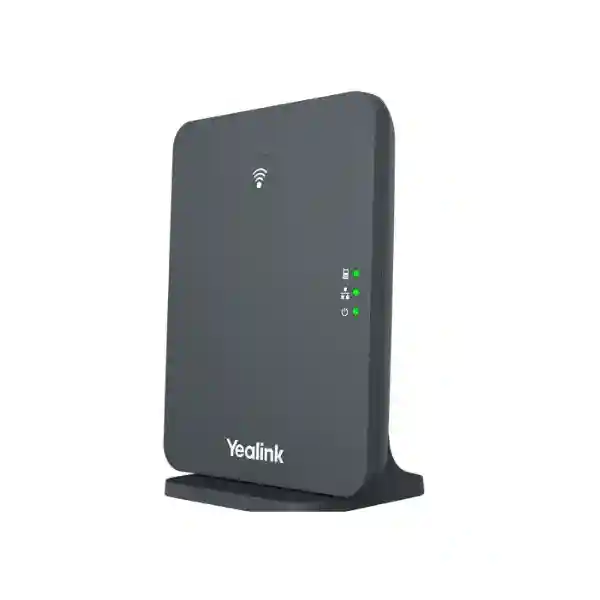
Conference rooms often expose a practical conflict between furniture design and communications infrastructure. The most natural place for a conference phone is usually the centre of the table, but Ethernet and power outlets may be at the wall, floor box or display position. Running visible patch cables across a room creates trip risks, visual clutter and a poor executive-room finish. The CP935W-Base addresses this by separating the table endpoint from the wired network termination. In DECT mode, the CP935W communicates wirelessly with its base while the base provides the network-side connection to the SIP environment. The phone can also use standard Wi-Fi protocols where direct wireless LAN registration is appropriate.
The endpoint itself is designed around voice capture, processing and straightforward user control. Six microphones provide omnidirectional pickup around the conference table. A 56 mm, 5 W loudspeaker supports room playback, and full-duplex operation lets participants speak and hear simultaneously instead of experiencing the clipped conversational rhythm associated with basic speakerphones. Acoustic echo cancellation, automatic gain-related processing, packet-loss concealment, jitter handling and noise-reduction functions work together to maintain intelligibility when network and room conditions are less than ideal.
For call transport, the platform supports common business voice codecs including wideband G.722 and G.722.1C alongside established narrowband codecs. That breadth matters during integration with existing IP-PBX systems, hosted SIP services and mixed endpoint estates. Security capabilities include SRTP voice encryption, TLS transport support, HTTPS administration, certificate management, AES-protected configuration files, secure boot and VPN support. These controls do not replace a properly designed voice-security policy, but they provide the mechanisms administrators expect from a contemporary enterprise endpoint.
The 4-inch capacitive touchscreen gives users a familiar visual surface for call operations. The interface is especially useful in shared rooms because participants do not need to learn a specialized keypad. Local directory and call-history functions, call transfer, hold, mute, do-not-disturb, forwarding and other standard SIP functions allow the device to behave as a fully managed room telephone rather than merely an external speaker and microphone.
The battery changes the deployment model. Rather than tying the phone to continuous table power, users can charge it on its cradle and place it where the meeting requires. In an ideal DECT environment, the specified standby period is substantially longer than a normal working day, while the specified talk duration covers extended workshops and management sessions. Real battery endurance depends on signal strength, call activity, battery age, temperature and configuration, so procurement teams should design charging discipline into shared-room operations.
Hybrid meetings are another procurement driver. Bluetooth and USB Type-C connectivity can bridge personal devices into the room audio workflow, enabling the CP935W to serve as the acoustic endpoint for supported PC or mobile conferencing scenarios. This is useful for organizations that use SIP for normal room calling but occasionally join software-based meetings. It reduces the need to keep a separate portable speakerphone in the same room.
Enterprise Business Outcomes & Value Analysis
Key Hardware & Software Highlights
| Component | Capability | Operational Outcome |
|---|---|---|
| Microphone system | Six-microphone array, 360° pickup, up to 6 m | Coverage around a small-to-medium meeting table. |
| Audio processing | Full duplex, AEC, Noise Proof, Smart Noise Filtering | Clearer two-way conversation and reduced distraction. |
| Display | 4-inch 480 × 800 capacitive touchscreen | Accessible call control for shared-room users. |
| Wireless connectivity | DECT, 2.4/5 GHz Wi-Fi, Bluetooth 4.2 | Multiple room and device connection options. |
| Battery | 7800mAh; approx. 4-hour charging | Untethered tabletop placement during meetings. |
| USB | USB 2.0 Type-C device port | PC-connected hybrid meeting workflows. |
| Provisioning | Web, phone and automatic provisioning | Repeatable enterprise configuration. |
These capabilities work as a system. A strong microphone specification is useful only when the room acoustics, loudspeaker level and remote platform are also appropriate. Wireless freedom is useful only when DECT or Wi-Fi coverage is dependable. Security features are valuable only when administrators actually enable appropriate transport encryption, credentials and certificate controls. For that reason, a successful purchase should include both product selection and deployment validation.

Technical Specifications Ledger
The following ledger consolidates the principal CP935W-Base characteristics relevant to procurement and deployment. Specifications should be validated against the current manufacturer datasheet and the exact regional package at quotation stage, particularly where firmware-dependent functions, optional accessories or base-station capabilities affect the project design.
| Category | Specification |
|---|---|
| Display | 4-inch, 480 × 800 capacitive multi-touch screen |
| Microphones | Built-in six-microphone voice-pickup array |
| Pickup | 360 degrees; up to 20 ft / 6 m specified range |
| Speaker | 56 mm, 5 W; full-duplex speakerphone with acoustic echo cancellation |
| Audio processing | Optimal HD audio, Noise Proof, Smart Noise Filtering, background-noise suppression, AEC |
| Codecs | G.722, G.722.1C, G.726, G.729/G.729A, G.723, iLBC, PCMU/PCMA and AMR as supported by firmware/platform |
| Wi-Fi | 2.4 GHz / 5 GHz, 802.11a/b/g/n |
| Bluetooth | Bluetooth 4.2 |
| DECT | DECT operating mode with SIP registration via compatible supplied base architecture |
| USB | 1 × USB 2.0 Type-C device port |
| Battery | Rechargeable 7800mAh |
| Talk time | Up to 15 hours under ideal conditions |
| DECT standby | Up to 167 hours under ideal conditions |
| Charging | Approximately 4 hours |
| Conference calling | Up to 5-way local conference |
| Security | SRTP, TLS 1.3 support, HTTPS, certificate management, AES configuration encryption, secure boot, OpenVPN/L2TP support |
| Operating temperature | -10°C to +45°C |
| Operating humidity | 10% to 90% |
| Approx. phone dimensions | 288.6 × 285.2 × 63.9 mm |
The CP935W-Base is intentionally different from a conventional PoE desk conference phone. The tabletop unit is battery powered and wireless, so power planning centres on charging-cradle placement while network planning centres on the DECT base or WLAN. For new deployments, confirm that the selected base station can be placed where it has both suitable LAN access and reliable radio coverage to the room. Avoid placing the base behind dense metalwork, inside shielded cabinets or in locations where structural barriers substantially attenuate radio signals.
Configuration & Sizing Worksheet
1. Estimate Room Workload and Scale
Record room capacity, typical active speakers, table dimensions, meeting duration and expected call frequency. The specified 6-metre pickup radius is a technical reference, not a guarantee that every acoustic environment will behave identically. Rooms with hard glass walls, high ceilings, HVAC noise or distant seating should be assessed more carefully. For larger spaces, determine whether an optional compatible expansion microphone or a different room system is more appropriate.
2. Map DECT and Network Placement
Identify where the base can connect to the voice network and where the CP935W will normally sit. Verify that the radio path is reasonable and that the network segment can reach the SIP service. If Wi-Fi mode is planned, validate SSID design, authentication method, 2.4/5 GHz coverage, roaming policy and voice quality under load rather than assuming general office Wi-Fi coverage is sufficient.
3. Plan Charging and Physical Storage
Allocate an accessible AC outlet for the charging cradle and choose a location where users naturally return the phone after meetings. This operational detail protects availability. A wireless endpoint left away from its charger can become a support issue even when the underlying network is perfectly configured.
4. Validate PBX and SIP Requirements
Document the PBX or hosted voice provider, SIP registrar, authentication method, codec policy, VLAN design, firewall/NAT conditions and encryption requirements. Confirm whether the organization requires TLS/SRTP, certificate deployment, VPN connectivity or specific provisioning templates. If the estate uses multiple PBX platforms, test each supported profile before bulk rollout.
5. Define Hybrid Meeting Workflows
List the laptops, mobile devices and conferencing applications that users expect to bring into the room. Decide whether Bluetooth or USB will be the preferred device connection and create simple room instructions. Standardizing the workflow reduces help-desk calls caused by users switching among laptop speakers, room audio and mobile devices.
6. Prepare the Quote Checklist
For an accurate quotation, provide quantity, delivery city, target PBX/service, room count, expected user capacity, required accessories, desired configuration assistance, warranty expectations and rollout schedule. Also identify whether the project needs preconfigured SIP accounts, standardized firmware, asset labels, configuration backups or phased delivery. This information allows the supply package to be evaluated as an operational solution rather than simply a unit price.
Deployment Scenarios & Industry Use Cases
Large Enterprise and Multi-Site Networks
A multi-site organization can standardize the CP935W-Base in management rooms and medium meeting spaces where flexible table placement is valuable. A common endpoint model helps IT teams maintain repeatable firmware, configuration templates, quick-start instructions and spare policies. Branches can use DECT where wired network access is available near the room perimeter and Wi-Fi where the local design makes that more practical. Central provisioning should be tested against the organization’s network segmentation and security controls before deployment at scale.
Financial and Banking Institutions
Banks and financial organizations often need disciplined endpoint administration and clear separation between user convenience and network control. The CP935W-Base offers security mechanisms such as encrypted voice transport, TLS, certificate management and encrypted configuration. Those features should be incorporated into the institution’s approved voice architecture. Meeting-room devices should receive controlled credentials, restricted management access and documented firmware maintenance rather than being treated as unmanaged consumer peripherals.
Educational and Campus Networks
Universities, training centres and institutional campuses frequently reconfigure rooms for seminars, departmental meetings and hybrid instruction. A battery-powered conference phone can be repositioned without moving network cables across tables. IT teams should define which rooms share devices, how charging responsibility is handled and whether DECT or campus Wi-Fi provides the more predictable voice path. For high-use teaching environments, physical handling, storage and asset tracking deserve as much planning as SIP configuration.
Government and Public-Sector Procurement
Government projects may require formal bills of materials, serial-number records, documented warranty routes and controlled configuration. The CP935W-Base can be evaluated against the agency’s SIP, encryption and network policies, while procurement teams can specify staging requirements before dispatch. Where rooms handle sensitive discussions, the broader communications security architecture—including PBX, network, credentials, access control and operational procedures—should be reviewed; endpoint features alone do not define the security posture.
Across all these scenarios, the strongest fit is a room that needs professional voice conferencing, flexible tabletop placement and integration with a managed SIP environment. Very large boardrooms, divisible spaces, auditoriums or rooms requiring integrated video may call for a dedicated room system with distributed microphones and speakers instead.
Technical Deep Dive 1: Audio Processing & Acoustic Architecture
The central technical problem in a conference phone is not simply making sound louder. It is separating useful speech from room noise, echo and simultaneous far-end audio while keeping the conversation natural. The CP935W combines a circular voice-capture strategy with six microphones positioned to hear participants around the device. Its specified 360-degree pickup suits central tabletop placement, where users may speak from multiple directions rather than toward a handset microphone.
Full-duplex processing is essential because business conversation is rarely turn-based. Participants interrupt, acknowledge and respond while another person is still speaking. Acoustic echo cancellation is designed to prevent far-end audio emitted by the local loudspeaker from being sent back through the microphones as echo. Yealink also specifies Noise Proof technology, Smart Noise Filtering and background-noise suppression. These functions are intended to reduce common distractions, but room design still matters: strong reverberation, mechanical noise and poor speaker positioning can degrade any tabletop conference system.
Codec support affects interoperability and perceived voice quality. Wideband codecs such as G.722 can carry a broader speech spectrum when both sides and the network path support them, while traditional narrowband codecs maintain compatibility with older telephony infrastructure. Packet-loss concealment, adaptive jitter handling and gain-related processing help the endpoint cope with network variation. Network teams should still enforce sensible latency, jitter and packet-loss targets because endpoint processing cannot compensate indefinitely for a congested or unstable WAN.
Technical Deep Dive 2: Firmware Security & Operational Control
Enterprise voice endpoints need lifecycle control from initial staging through retirement. The CP935W family supports configuration through the phone, browser interfaces and automatic provisioning mechanisms. In a multi-room deployment, automated configuration is normally preferable because it reduces manual variance. Administrators can standardize SIP parameters, time settings, codec preferences, directory behavior and security policies, then retain a controlled configuration baseline for troubleshooting.
Transport security is another layer. SRTP can protect voice media while TLS can secure SIP signaling where the call platform supports compatible configuration. HTTPS helps protect administrative sessions, and certificate-management capabilities allow organizations to align endpoints with certificate policy. AES-protected configuration and secure boot further strengthen device integrity. These mechanisms require correct implementation: certificates need valid trust chains, credentials should be unique and protected, management access should be limited, and firmware should come from an approved source.
Firmware governance should be part of the procurement plan. A project team should document the validated firmware release, test upgrades on a small number of units, preserve rollback or recovery procedures where supported, and schedule fleet updates according to operational risk. Automatic provisioning can accelerate deployment, but configuration servers must themselves be secured. Device-management capability is most valuable when paired with ownership: someone must be responsible for inventory, policy, change control and retirement.
Technical Deep Dive 3: Availability, Wireless Resilience & Recovery
The CP935W-Base improves physical flexibility, but wireless design introduces dependencies that differ from a fully wired conference phone. In DECT mode, call availability depends on the conference unit, its battery, the DECT radio link, the base station, LAN connectivity and the upstream SIP service. A resilient deployment therefore considers each link. Keep the phone charged, place the base where radio propagation is strong, provide reliable network switching and power to the base, and use PBX-side redundancy where the voice platform supports it.
Wi-Fi mode has a different risk profile. Coverage must be evaluated for both signal strength and airtime quality. A room can show a strong wireless signal yet still experience poor real-time media if the channel is congested. Voice traffic should be considered during WLAN capacity planning, and organizations with strict availability requirements may prefer the predictability of a carefully placed DECT base for the room endpoint while retaining Wi-Fi as a deployment alternative.
Recovery planning should include simple user procedures. Staff should know where the charging cradle is, how to confirm the active wireless mode, whom to contact if registration is lost and whether a backup dial-in method exists. IT teams should maintain configuration records and, for larger estates, consider keeping a tested spare unit. SIP server redundancy support can contribute to service continuity when implemented with a compatible voice platform. Disaster recovery remains an end-to-end design issue: the conference phone cannot maintain service if the site loses all network and voice-platform connectivity.
Pre-Purchase Buyer Gap Checklist
Is a recurring software subscription required? The conference phone is fundamentally a SIP endpoint, but the complete service may depend on your PBX, hosted voice provider, management platform or conferencing applications. Ask for the full commercial stack rather than assuming the hardware price represents every service cost.
What exactly is included in the regional package? Confirm the CP935W unit, DECT base, charging components, power adapters, Ethernet accessories and documentation included in the quoted bundle. Package contents can matter greatly during a multi-room rollout.
Will it work with the existing PBX? SIP standards provide broad interoperability, but platform-specific features and provisioning vary. State the exact PBX or hosted provider during quotation and request compatibility validation when the environment is business critical.
Is the room too large? The specified pickup radius is up to 6 metres and the product is positioned for small-to-medium conference rooms. Seating geometry and acoustics matter. If participants regularly sit outside the practical pickup zone, assess an expansion microphone or a larger-room system.
Where will the DECT base go? This is easy to overlook. The base needs a suitable network location and a dependable radio path to the conference unit. Confirm wall, desk or communications-area placement before installation day.
How will the battery be managed? Nominal endurance assumes ideal conditions. Create a simple charging routine and ensure the cradle is not disconnected or hidden in a cabinet. Battery capacity naturally changes over lifecycle, so replacement planning should be considered for long-term estates.
Can users join laptop meetings? Bluetooth and USB Type-C enable useful device-connected workflows. Validate the intended operating systems and meeting applications during staging, then publish one supported connection method for users.
What about optional microphones? Yealink identifies the CPW25 Bluetooth expansion microphone as a compatible expansion path for supported configurations. Confirm current firmware and accessory availability before making it a mandatory design element.
What are the security prerequisites? Decide whether TLS/SRTP, certificates, VPN, restricted web administration and centralized provisioning are mandatory. Security should be configured before deployment rather than added after endpoints are distributed.
What happens after delivery? Establish who owns registration, firmware, user support, warranty claims and replacement. A conference phone is most reliable when it is managed as part of the voice estate, not as an anonymous room accessory.
Uganda Procurement & Delivery Logistics
FourTeck can structure a Uganda quotation around the number of conference rooms, target communication platform, accessory requirements and delivery destination. For a straightforward single-room order, provide the product model, quantity and city. For a larger rollout, include a room schedule and identify any branches that require different network or installation conditions. This reduces the risk of ordering a uniform package for rooms that are operationally different.
Before order confirmation, the bill of materials can be reviewed for the conference unit, DECT base, charging equipment, required power accessories and any approved microphone expansion. Where requested, configuration requirements can be documented so that staging follows a repeatable baseline. Organizations with change-control procedures should provide their desired firmware level, SIP parameters and security policy early enough for validation.
Delivery timing depends on confirmed stock position, quantity, project staging and destination. Rather than relying on a generic delivery promise, request a dated commercial quotation for the specific project. For branch deployments, consolidated delivery to a central IT team may simplify asset recording and configuration; direct branch distribution can be planned where the project requires it. Serial tracking, labeling and acceptance requirements should be stated before dispatch.
Technical pre-configuration can be particularly useful when several rooms need identical behavior. A controlled profile can reduce on-site setup time and make support more consistent. Final SIP credentials and network-specific settings should be handled according to the customer’s security procedures.
Local Coverage Matrix
Corporate offices, financial institutions, headquarters, hotels and multi-room deployments.
Airport-area organizations, hospitality, project offices and institutional meeting spaces.
Industrial, education, commercial and branch-office communication requirements.
Regional offices, healthcare, education and distributed enterprise sites.
Government, NGO, education and northern-region branch deployments.
For organizations operating beyond these hubs, the same procurement process can be used with delivery planning adapted to the destination. A multi-city order should identify quantities by location and whether equipment will be configured centrally or independently at each site. That information helps align packing, labeling and rollout documentation with the actual deployment plan.
Cross-Border & Regional Supply Chains
Organizations with offices across East Africa, the Gulf and wider African markets can coordinate comparable communications hardware through regional FourTeck channels. Uganda requirements can be handled through FourTeck Uganda, Kenyan projects through FourTeck Kenya, and broader continental requirements through FourTeck Africa. UAE requirements can be coordinated through FourTeck UAE, while Kuwait projects can use FourTeck Kuwait.
For cross-border standardization, keep the technical baseline consistent while allowing for regional power accessories, regulatory requirements, stock positions, taxes, freight and warranty procedures. A central bill of materials with site-specific delivery schedules is usually easier to govern than independent model selection by each branch. Where voice platforms differ by country, document the supported SIP profile for each region before mass staging.
Related Yealink Solutions & Internal Paths
A conference phone is usually one component of a wider voice environment. Explore Yealink solutions in Uganda for compatible endpoint families and deployment options. Organizations standardizing executive and office telephony can also review the wider FourTeck Uganda enterprise technology portfolio. For rooms that need a different scale or feature profile, request guidance on alternative Yealink conference phones, room collaboration systems, SIP desk phones, cordless DECT handsets, headsets and approved accessories.
When comparing related models, do not select purely on display size or microphone count. Match the endpoint to room dimensions, meeting style, PBX integration, cabling availability and management policy. A room that requires video, content sharing and distributed microphones may need a different collaboration architecture, while a compact voice-first meeting room may benefit from the simplicity of the CP935W-Base. For accessory selection, confirm compatibility by exact model and firmware rather than assuming all Yealink wireless microphones or bases are interchangeable.
FourTeck Technical Service Capabilities
Enterprise supply benefits from engineering checks before equipment reaches the meeting room. FourTeck can assist with bill-of-materials validation by reviewing the requested endpoint, DECT base requirements, room count and accessory list against the intended deployment. This is particularly useful where a tender description uses a family name but the project requires a specific bundle or accessory combination.
Staging requirements can include firmware alignment, configuration review, basic registration preparation and labeling according to the agreed project scope. Pre-shipment firmware validation helps reduce the chance that units arrive with inconsistent software revisions. For managed estates, configuration templates can be prepared around approved SIP, network and security settings, subject to customer credential-handling procedures.
Post-sales support can focus on deployment troubleshooting, registration issues, configuration review and warranty routing within the applicable supply terms. The most efficient support process begins with documented serial numbers, firmware versions, network topology and SIP platform details. Customers should retain configuration records and change history for business-critical rooms so that faults can be isolated between endpoint, radio, LAN, WAN and call-platform layers.
Extended Technical FAQ
1. What is the main difference between the CP935W-Base package and using a CP935W only?
The CP935W-Base package is intended to add DECT-based deployment through a compatible base station, allowing the conference phone to register a SIP account via the DECT base. This is useful when the table needs to remain wireless while the base can be connected to the network elsewhere in or near the room. The CP935W itself also supports Wi-Fi operation. For procurement, confirm the exact bundle contents because the base, charging equipment and regional power components are important parts of the intended deployment.
2. How large a room can the Yealink CP935W-Base serve?
Yealink specifies a 20-foot, approximately 6-metre microphone pickup range with 360-degree coverage and positions the platform for small-to-medium conference rooms. Actual performance depends on table geometry, participant distance, room reverberation, HVAC noise and speaking volume. A long narrow boardroom can behave differently from a compact square room even when floor area is similar. For critical rooms, provide room dimensions and seating count during quotation so microphone coverage can be reviewed rather than relying only on the maximum published radius.
3. Does the phone need an Ethernet cable at the conference table?
No fixed Ethernet cable is required at the CP935W tabletop unit when it is operating through its supported wireless modes. In DECT deployment, the network connection is handled at the base station, while the conference phone communicates wirelessly with that base. Wi-Fi mode provides another wireless network path. This is one of the model’s key deployment advantages in finished meeting rooms. The charging cradle still needs suitable power, and the DECT base needs the appropriate network and power arrangement for the project.
4. Can the CP935W-Base work with an existing SIP PBX?
The platform uses SIP and supports standard business telephony functions, but exact interoperability depends on the PBX, hosted provider, firmware and desired features. Basic registration may be straightforward while advanced functions can require platform-specific provisioning. Before a bulk order, identify the exact PBX or service and validate registration, codecs, transfer, conference behavior, directories, TLS/SRTP and any required provisioning. A pilot unit is sensible when the voice platform is uncommon or when the deployment has strict security and availability requirements.
5. Is a license or subscription needed to use the conference phone?
The hardware itself is a SIP endpoint, but the organization normally needs an active voice service or PBX account to place SIP calls. Hosted PBX services can charge recurring user, device or feature fees, and management platforms may have their own commercial terms. Hybrid meetings may also rely on third-party conferencing subscriptions running on a connected PC or mobile device. For budgeting, separate hardware cost, voice-service cost, optional management services and any collaboration-platform subscriptions so the total operating cost is visible before purchase.
6. How long does the battery last and how should rooms manage charging?
Yealink specifies up to 15 hours of talk time under ideal conditions and up to 167 hours of standby time in DECT mode, with an approximately four-hour charging time. Actual endurance varies with battery age, radio conditions, use pattern, temperature and configuration. Shared meeting rooms should have a simple rule that the phone returns to its charging cradle after use. For large estates, include battery condition in periodic endpoint checks and plan for lifecycle replacement rather than expecting rechargeable capacity to remain unchanged indefinitely.
7. Can it be used for laptop or mobile conferencing applications?
The CP935W supports Bluetooth and USB Type-C connectivity that can be used for hybrid meeting scenarios with compatible personal devices. This allows organizations to use the conference phone’s room audio hardware when joining supported meetings from a laptop or mobile device. The exact user workflow depends on the operating system and application, so IT teams should test their approved conferencing applications and publish a short room guide. Standardizing one preferred USB or Bluetooth workflow reduces confusion when users arrive shortly before a meeting.
8. What security controls are available?
The platform supports mechanisms including SRTP for voice encryption, TLS for signaling, HTTPS administration, certificate management, AES-protected configuration, secure boot and VPN capabilities. Security is an end-to-end configuration task: the PBX and network must support the selected encryption methods, certificates must be managed correctly, credentials must be protected and management access should be restricted. Organizations should apply their normal endpoint hardening, VLAN, firewall, logging and firmware policies rather than assuming factory defaults meet every institutional requirement.
9. Can microphone coverage be expanded?
Yealink identifies support for the CPW25 Bluetooth expansion microphone in the CP935W-Base feature set. An expansion microphone can help when participant seating extends beyond the ideal pickup area or when room geometry creates difficult coverage. Compatibility and feature availability can depend on current firmware and regional accessory supply, so confirm the exact accessory and supported software level before purchase. If the room is substantially larger than the intended product class, a purpose-built larger-room audio or video collaboration system may provide a more predictable result.
10. How should warranty replacement and configuration support be planned?
Request the applicable warranty terms on the commercial quotation and retain serial numbers, purchase records and deployment locations. If a fault occurs, first determine whether it follows the endpoint or remains with the room, network or SIP account. Maintaining a known-good spare can speed diagnosis in larger deployments. Configuration support is easier when the IT team retains firmware versions, provisioning templates, network details and call-platform information. Where FourTeck has supplied staging or configuration services, provide the original project reference when requesting support so the deployed baseline can be identified efficiently.
Plan Your Yealink CP935W-Base Deployment in Uganda
For a useful procurement response, send the number of rooms, participant capacity, city or branch locations, existing PBX or hosted SIP service, preferred DECT or Wi-Fi deployment, security requirements and any need for CPW25 microphone expansion. FourTeck can use those details to align the hardware bundle, configuration approach and delivery plan with the actual meeting environment. For multi-site projects, include a location-by-location quantity schedule so equipment can be labeled, staged and distributed according to the rollout sequence.
The CP935W-Base is particularly well suited to organizations that want a clean tabletop, wireless room placement, professional SIP voice and the flexibility to support device-connected hybrid meetings. Proper planning around radio coverage, charging, PBX compatibility and lifecycle management turns those capabilities into a reliable business-room standard.



Reviews
There are no reviews yet.