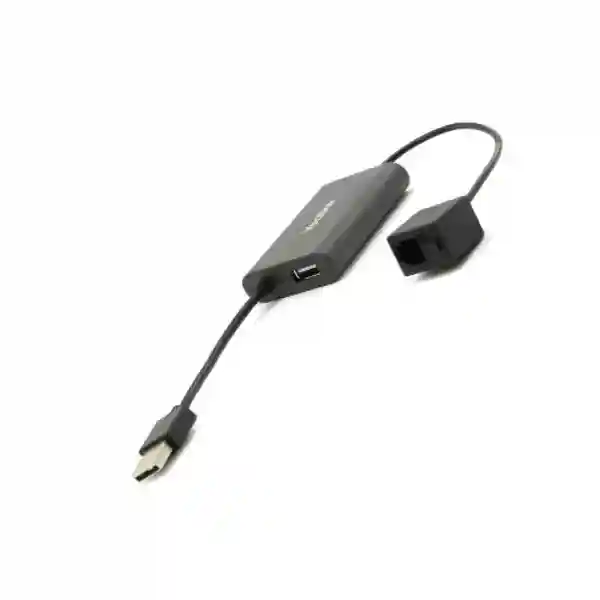
Yealink CPN10 PSTN Box – Analog PSTN Connectivity for Compatible Yealink IP Phones
The Yealink CPN10 PSTN Box is a compact telephony accessory created for organizations that need to preserve access to a traditional analog public switched telephone network line while operating compatible Yealink IP conference phones or desk phones. In practical terms, it provides a bridge between an existing PSTN wall outlet or analog service and a supported Yealink endpoint, allowing businesses to combine modern SIP-based communications with a conventional telephone line where that line is still required. This can be important for offices undergoing phased migration to IP telephony, branches where analog carrier services remain in use, meeting rooms that need an alternate calling path, or organizations that have operational reasons to keep a legacy line available.
The CPN10 is deliberately simple. It provides an RJ11 connection for the PSTN side and a USB connection for integration with the supported Yealink phone. No separate power adapter is required, which reduces cabling and avoids consuming another power socket at the desk or meeting table. Yealink also documents USB call recording support when an appropriate USB storage device is connected through the supported arrangement. Up to two CPN10 units can be cascaded on supported configurations, providing additional flexibility for deployments that need more than one analog line path.
For Uganda procurement teams, the key purchasing question is not simply whether an analog adapter is required; it is whether the exact Yealink endpoint, line service and desired calling workflow are compatible. FourTeck therefore recommends identifying the phone model, firmware level, number of analog lines and intended call-handling requirement before order confirmation. This avoids buying a generic analog gateway when the requirement is specifically for Yealink endpoint integration.
Instant Specifications & Procurement Fact Rail
CPN10 PSTN Box
USB 2.0 + RJ11
No additional power required
73 × 48 × 15 mm
Compatible Yealink phones
Quote-based procurement
This fact rail highlights what matters most during initial purchasing. The CPN10 is an endpoint accessory rather than a rack-mounted gateway, switch or PBX. It does not need a separate AC power feed, licensing subscription or rack allocation. Procurement should instead focus on the analog service presented at the site, the exact supported Yealink phone, USB availability, line quantity, installation position and whether recording is required. Warranty terms and delivery timing should be confirmed on the commercial quotation because they may vary by supply batch and project arrangement.
Operational Architecture and Product Overview
The architecture of the CPN10 is best understood as a purpose-built analog line interface for supported Yealink endpoints. Traditional PSTN service arrives as an analog line, while a modern Yealink IP phone normally handles packet-based voice through SIP. The CPN10 allows the supported endpoint to recognize and use the analog line without forcing the customer to replace the entire communications environment. This is particularly useful during staged migration projects where an organization has invested in IP endpoints but still has active analog services at selected locations.
On the physical side, the CPN10 has one RJ11 port and one USB 2.0 port. The RJ11 side is used for the PSTN line, while the USB connection integrates the adapter with the phone. Yealink states that the unit is plug and play and requires no additional power. That matters operationally because a meeting room or executive desk often already has power, network and display cabling. Eliminating another external power supply reduces installation complexity and removes another component that could be disconnected accidentally.

The supported-phone list in current Yealink material includes conference models such as CP860, CP920, CP960, CP925 and CP965 and selected desk phones including T67LTE, VP59, T58A, T58W, T57W, T54W, T53W and T53. Compatibility should still be checked against the actual endpoint and firmware before procurement, particularly where a customer has mixed generations of Yealink hardware. A model name that appears similar is not sufficient evidence that every phone in a family supports the accessory.
The CPN10 can support both SIP and PSTN calling workflows through the compatible endpoint. This hybrid capability addresses a common migration problem: the organization wants the management and functionality of an IP phone but cannot immediately discontinue the analog line. In a meeting room, the analog line may serve as a familiar local calling path. In a branch, it may remain tied to an established telephone number. In other situations, the analog line may be retained during a carrier transition or until a new SIP service has been fully accepted.
Yealink also documents local three-way conferencing behavior and USB call recording in supported arrangements. These functions depend on the phone and configuration rather than turning the CPN10 into a standalone conference device. Buyers should therefore view it as an enabling interface. Audio processing, microphones, speaker performance, user interface and most call control remain functions of the connected Yealink phone.
Enterprise Business Outcomes and Value Analysis
Key Hardware and Software Highlights
The hardware design is intentionally minimal. The RJ11 interface terminates the analog telephone line. The USB 2.0 interface links the adapter to the compatible Yealink phone and participates in the supported recording arrangement. Because the unit does not require a separate power adapter, there is no independent power brick to inventory or replace. Its 73 × 48 × 15 mm dimensions make it suitable for placement on a conference table, under a desk or close to the telephone outlet, subject to sensible cable management.
At the functional level, the CPN10 enables the connected phone to work with PSTN service while preserving SIP-based calling on the endpoint. This is not a general-purpose analog telephone adapter intended for arbitrary third-party phones. Its value comes from Yealink integration. Procurement teams should therefore avoid evaluating it only by port count; compatibility and the required calling workflow are more important.
The accessory supports up to two cascaded CPN10 units in supported deployments. This provides a defined growth path for small analog requirements. If a project needs many analog trunks, extensive routing policies, centralized survivability or integration with multiple vendors, a dedicated voice gateway may be more appropriate. FourTeck can help separate those two requirement types during bill-of-materials validation.
Technical Specifications Ledger
| Item | Specification | Procurement Relevance |
|---|---|---|
| Product | Yealink CPN10 PSTN Box | Purpose-built PSTN accessory for supported Yealink endpoints. |
| USB | 1 × USB 2.0 | Endpoint integration and supported USB recording workflow. |
| Analog interface | 1 × RJ11 | Connects the analog PSTN service. |
| Dimensions | 73 × 48 × 15 mm | Compact desktop or meeting-room placement. |
| Operating humidity | 10–95% | Use within documented environmental conditions. |
| Operating temperature | -10°C to +45°C in current datasheet | Plan indoor deployment away from excessive heat sources. |
| Storage temperature | -30°C to +70°C in current datasheet | Relevant to warehousing and transport handling. |
| Power | No additional power needed | No separate AC adapter or outlet allocation. |
| Cascading | Up to 2 CPN10 units | Useful where supported deployments need more than one PSTN interface. |
| Package | CPN10, 3 m PSTN cable, double-sided tape, quick start guide | Confirm package contents against the supplied batch and quotation. |
Technical specifications can change by hardware revision or documentation update. For project procurement, the commercial quotation and manufacturer documentation supplied for the proposed unit should be treated as the final reference. Environmental figures above follow Yealink’s current CPN10 datasheet rather than older archived sheets, which show different temperature ranges.
Configuration and Sizing Worksheet
Step 1 – Identify every analog line. Record the number of PSTN lines that must remain active at each site, the telephone numbers associated with them and whether each line terminates close to the intended Yealink phone. A single CPN10 should not be assumed to solve a multi-line branch requirement without checking the topology.
Step 2 – Record the exact Yealink endpoint. Note the model and firmware version. Current manufacturer material lists CP860, CP920, CP960, CP925, CP965, T67LTE, VP59, T58A, T58W, T57W, T54W, T53W and T53 among supported products. Compatibility should be confirmed for the actual hardware before purchase.
Step 3 – Define the call workflow. Decide whether PSTN will be the primary path, an alternate path or a retained legacy service. Determine whether users need local three-way conference behavior and whether USB recording is required. This prevents installation teams from discovering after delivery that expectations concern phone features rather than the adapter itself.
Step 4 – Check physical placement. Measure the distance from the analog outlet to the phone and plan cable routing. The package is documented with a 3 m PSTN cable. Avoid routing telephone leads where they can be pulled, crushed or confused with Ethernet patch leads.
Step 5 – Review recording policy. If USB recording will be used, identify approved storage media and establish who may record, where recordings are stored and how long they are retained. Recording governance is an organizational requirement and should not be treated as a hardware-only decision.
Step 6 – Prepare the quote request. Provide the Yealink phone model, quantity of CPN10 units, site city, required delivery date, analog line count and any need for staging or configuration support. This gives the supplier enough information to validate the accessory against the deployment rather than simply quoting an isolated SKU.
Deployment Scenarios and Industry Use Cases

Large Enterprise and Multi-Site Networks
A multi-site organization may have completed SIP migration at headquarters while selected branches still receive analog services. The CPN10 can be considered where a compatible Yealink phone at a branch needs access to that local PSTN line. This allows the organization to standardize user endpoints without demanding that every carrier service be migrated simultaneously. For larger analog requirements, centralized voice gateways should be evaluated instead of multiplying endpoint accessories without design review.
Financial and Banking Institutions
Banks and financial organizations often use controlled change procedures and may retain legacy lines during transitions. A CPN10 can provide a simple endpoint-level connection where a supported Yealink phone must use an existing analog service. The deployment should still follow the institution’s security, recording, change-management and business-continuity policies. The accessory itself should not be represented as a complete resilience architecture.
Educational and Campus Networks
Universities and schools frequently operate mixed-generation communications infrastructure across administration blocks, meeting rooms, residences and remote campuses. Where a supported Yealink phone is installed in a location with a retained PSTN line, the CPN10 can help avoid unnecessary replacement of that service. IT teams should inventory line ownership and telephone numbers before migration so legacy lines do not become undocumented dependencies.
Government and Public-Sector Procurement
Public-sector environments may require long procurement cycles and staged modernization. The CPN10 can support a controlled transition when a compatible Yealink endpoint is required to coexist with analog telephony. Procurement documentation should specify the exact endpoint, line count, required accessories, delivery location and support scope so suppliers are evaluated against the same bill of materials.
Technical Deep Dive: Signal Integration and Endpoint Architecture
Unlike an enterprise session border controller or multi-port analog gateway, the CPN10 has a tightly defined role. It brings an analog PSTN connection into the operating environment of a supported Yealink phone. The phone remains the user-facing communications device, providing the display, keypad or touch interface, speaker, microphones and SIP account behavior. The CPN10 contributes the physical analog line interface and the integration path needed for the phone to expose PSTN functionality.
This distinction is important when sizing a project. There is no meaningful Ethernet switching throughput, rack backplane or packet-forwarding capacity to compare. Those measures apply to network infrastructure, not to this accessory. Instead, the engineering questions are compatibility, number of analog lines, endpoint USB availability, firmware support and the desired PSTN call workflow. Buyers who compare the CPN10 with a multi-port gateway should first determine whether they need one analog line at a phone or centralized conversion of many analog circuits.
Technical Deep Dive: Firmware, Configuration and Operational Control
The CPN10 is designed for plug-and-play use, but the connected phone determines much of the operational experience. Yealink support documentation describes connecting the expansion PSTN box and configuring a PSTN account on supported phones. Depending on the phone, the account can be enabled, labelled and selected as an active line. Administrators should review the endpoint firmware and applicable Yealink documentation before deployment, particularly in standardized environments where configuration changes are controlled.
There is no separate subscription tier documented for the CPN10 itself. This simplifies procurement, but customers may still have carrier charges for the PSTN service and separate licensing or subscription requirements for their broader IP telephony platform. Those external costs should not be confused with the accessory. A complete budget should therefore distinguish hardware, analog carrier service, SIP service, phone platform licensing, installation and support.
Technical Deep Dive: Availability, Redundancy and Recovery Planning
The presence of both SIP and PSTN capability on a supported phone can add useful communications flexibility, but the CPN10 should not automatically be described as a disaster-recovery system. Resilience depends on the independence of the carrier paths, endpoint power, local infrastructure, PBX design and operating procedures. If the phone itself is unavailable, attaching an analog line to it does not create independent service. Organizations requiring formal voice continuity should map failure domains and determine whether an independent analog handset, cellular service, secondary SIP carrier or dedicated gateway is also necessary.
Where two CPN10 units are cascaded, the design should be tested with the intended phone and call workflow before broad rollout. Pilot deployment is particularly useful in regulated or high-availability environments because it confirms line presentation, dial behavior, conferencing and recording under the customer’s actual carrier conditions.
Pre-Purchase Buyer Gap Checklist
Is a license required? Yealink presents the CPN10 as a hardware accessory and does not document a separate recurring license for the box. However, the connected IP phone, PBX or hosted voice platform may have its own licensing requirements, while the analog line remains subject to carrier billing.
Will it work with any Yealink phone? No such assumption should be made. Use the manufacturer’s supported model list and confirm the exact endpoint and firmware. Current documentation names specific CP, T-series and VP models.
Will it work with third-party phones? The CPN10 is positioned as a Yealink accessory. If the requirement is cross-vendor analog integration, request a gateway design rather than assuming interoperability.
Does it need rack space? No. The unit measures only 73 × 48 × 15 mm and is intended as a compact endpoint accessory. Rack planning is therefore not relevant unless other project equipment is being installed.
Does it require an external power adapter? Yealink states that no additional power is needed. This simplifies installation and reduces spare-power-adapter requirements.
What is hidden in the recording requirement? Hardware support is only one part of recording. The organization must also consider approved USB media, storage capacity, access control, consent or notification requirements, retention and secure handling of recorded calls.
Can it replace a large analog gateway? Usually that is the wrong comparison. The CPN10 is well suited to endpoint-level analog integration. Projects with many lines, centralized routing, survivability or cross-vendor requirements should be assessed for a dedicated gateway.
What should be validated before purchase? Phone model, firmware, line count, analog service type, physical cabling, required call behavior, recording requirement, delivery location and quantity. Supplying these details with the request for quotation reduces avoidable compatibility risk.
Uganda Procurement and Delivery Logistics
FourTeck supplies enterprise communications products for project and replacement requirements in Uganda. For a Yealink CPN10 request, the most useful quotation information is the required quantity, connected Yealink phone model, deployment city, desired delivery date and whether technical validation is needed. Where the CPN10 forms part of a larger Yealink deployment, buyers should submit the complete phone and accessory requirement so the bill of materials can be checked as one system.
Order processing normally begins with technical and commercial confirmation. Availability, lead time, warranty baseline and final delivery arrangements should be stated on the quotation rather than assumed from generic web content. For larger projects, staged delivery may be useful when endpoints are being rolled out branch by branch. Pre-shipment checks can also reduce site delays by confirming model references and accessory quantities before dispatch.
Customers in Kampala can request direct project coordination, while deliveries to other Uganda locations can be planned according to order size and destination. For installations where analog lines are already active, site teams should label the line termination and confirm it before the equipment arrives. This simple preparation can prevent confusion between PSTN, Ethernet and other low-voltage cabling during deployment.
Local Coverage Matrix
Kampala: suitable for headquarters, meeting rooms, offices, hospitality and professional-services deployments requiring Yealink endpoint accessories. Entebbe: procurement support can cover offices, logistics operations, hospitality properties and institutional sites retaining analog services. Jinja: organizations modernizing branch communications can request CPN10 units alongside compatible Yealink phones. Mbarara: regional businesses, education facilities and administrative offices can source project quantities subject to quotation. Gulu: remote and regional deployments can be planned with attention to delivery timing, endpoint compatibility and on-site line readiness.
For every location, buyers should provide the deployment address or city at quotation stage, particularly when multiple branches are involved. A site-by-site quantity schedule is preferable to a single aggregate quantity because it helps organize packing, delivery and installation sequencing.
Cross-Border and Regional Supply Chains
Organizations operating across East Africa and the Gulf often prefer consistent endpoint standards and coordinated sourcing. FourTeck regional portals support procurement conversations across Uganda, Kenya, the broader African market, the UAE and Kuwait. For multi-country projects, prepare a country-by-country quantity schedule because local carrier services, delivery requirements and warranty processes can differ.
The CPN10 is particularly relevant in mixed telephony environments because analog service availability and migration timing can vary between countries and even between branches in the same country. Standardizing the supported Yealink endpoint while validating local PSTN requirements can make rollout planning more consistent without pretending every site has identical carrier infrastructure.
Related Yealink Products and Solutions
The CPN10 is normally purchased as part of a broader communications requirement rather than as an isolated device. Buyers may also review Yealink CP965 conference phones, Yealink CP925 conference phones, Yealink T54W desk phones, Yealink T57W desk phones, Yealink T58W smart business phones, and the wider Yealink portfolio. Compatibility must be confirmed for the exact model rather than inferred from a category page.
When requesting a complete solution, include any conference phones, desk phones, expansion microphones, power accessories, headsets and network requirements in the same bill of materials. This gives the engineering and procurement teams a clearer picture of the intended deployment and reduces the risk of missing small but essential accessories.
FourTeck Technical Service Capabilities
FourTeck can support the procurement process with engineering validation and bill-of-materials review. For the CPN10, this means checking whether the specified Yealink phone is listed for support, confirming the requested quantity against the number of analog lines and identifying whether the requirement would be better served by an endpoint accessory or a larger voice gateway. This validation is especially valuable when a project combines older and newer Yealink endpoints.
For larger deployments, staging can include model verification, accessory count checks and coordination of endpoint configuration requirements before shipment. Where applicable, firmware planning can be aligned with the customer’s approved version and change-management process. Post-sales support can assist with product identification, connection guidance and escalation of manufacturer-related technical issues within the agreed support scope.
Customers should distinguish configuration support from carrier troubleshooting. The CPN10 can connect a supported endpoint to a PSTN service, but analog line faults, carrier signaling issues or number provisioning may require action by the telecom operator. Clear fault isolation between the endpoint, CPN10, cabling and carrier line helps resolve incidents efficiently.
Extended Technical FAQ
1. What exactly does the Yealink CPN10 do?
The CPN10 is a PSTN box that allows compatible Yealink conference phones and selected desk IP phones to use an analog public switched telephone network line. It connects the analog line through RJ11 and integrates with the supported phone through USB. The phone remains the main user interface and communications endpoint. The CPN10 is therefore best viewed as an analog-line expansion accessory, not as a standalone telephone, PBX or general-purpose network gateway. It is useful when a business wants to retain a traditional line while continuing to use a compatible Yealink IP endpoint.
2. Which Yealink phones are compatible?
Current Yealink product documentation lists CP860, CP920, CP960, CP925, CP965, T67LTE, VP59, T58A, T58W, T57W, T54W, T53W and T53 among supported models. Because endpoint firmware and product revisions can change over time, procurement teams should provide the exact phone model and preferably the firmware version when requesting a quotation. Do not assume that every Yealink phone with a USB port supports the CPN10. Compatibility should be based on the manufacturer’s documentation for the intended endpoint.
3. Does the CPN10 need its own power supply?
No separate power supply is documented as necessary. Yealink specifically describes the CPN10 as requiring no additional power. This is useful in meeting rooms and desk environments because it avoids another AC adapter and another occupied wall socket. It also simplifies spare-parts planning. The connected Yealink phone must, of course, have its own appropriate power arrangement, which may be Power over Ethernet or another supported method depending on the phone model. The CPN10’s lack of a separate adapter should not be confused with the power requirements of the phone itself.
4. Can the CPN10 record PSTN calls?
Yealink documents USB call recording as a supported CPN10 feature in compatible configurations. A suitable USB flash drive is used for the recording workflow on supported phones. Before enabling recording, an organization should establish internal rules for authorization, notification, access, retention and secure storage. Recording requirements can be operationally and legally sensitive, so buyers should not treat the presence of a recording feature as permission to record every call. The phone model, firmware and storage arrangement should also be tested before a large rollout.
5. Can two CPN10 boxes be used together?
Yealink states that up to two CPN10 units can be cascaded in supported configurations. This can help where an endpoint deployment needs additional PSTN capability beyond a single unit. However, a two-unit cascade should not be extrapolated into a design for many analog trunks. If the project involves numerous analog lines, centralized routing, multiple branches or complex failover, FourTeck recommends evaluating a dedicated voice gateway architecture. The right choice depends on whether the requirement is local endpoint expansion or centralized analog integration.
6. Does the CPN10 require a recurring software subscription?
The CPN10 itself is presented by Yealink as a hardware accessory and no separate recurring subscription for the box is documented. That does not mean the entire communications environment is free of recurring charges. The PSTN line will normally have carrier costs, and the SIP account, hosted PBX, on-premises call platform or management service associated with the Yealink phone may have separate licensing or subscription requirements. A procurement budget should therefore separate the CPN10 hardware cost from carrier and communications-platform charges.
7. Is the CPN10 suitable as an emergency backup line?
It can provide access to an analog line on a supported phone and may form one part of a continuity design, but it should not automatically be treated as an independent emergency system. If the Yealink phone loses power or becomes unavailable, the analog line connected through that phone may not provide the independence expected from a separate emergency handset. Organizations with formal continuity requirements should analyze power, endpoint, carrier and network failure modes and decide whether a physically independent analog phone, cellular path or other backup method is also required.
8. What comes in the package?
Current Yealink documentation lists one CPN10 PSTN Box, one 3 m PSTN cable, double-sided tape and a quick start guide. Packaging and included items should still be checked against the quotation and supplied batch, particularly for project orders placed long after a manufacturer documentation revision. If the installation needs longer cabling, specialized line termination or approved USB storage for recording, those items should be identified separately rather than assumed to be included with the standard accessory.
9. What should be checked before ordering for Uganda?
Start with the exact Yealink phone model and firmware, the number of analog PSTN lines, the physical location of each line, required quantity, delivery city and whether USB recording or multi-line operation is expected. Confirm that the analog service is active and that its termination is accessible near the intended phone. For branch rollouts, provide a site schedule rather than only a total quantity. FourTeck can then review the bill of materials and flag obvious compatibility or sizing concerns before the order proceeds.
10. How is warranty or replacement handled?
Warranty terms should be confirmed on the FourTeck quotation because the applicable process can depend on supply channel, project agreement and product status. If a suspected hardware fault occurs, basic isolation normally includes checking the PSTN line, cable, USB connection, phone firmware and behavior with the accessory connected. Keeping the product reference, purchase documentation and fault details available helps speed technical assessment. Where a manufacturer return or replacement is applicable, the support team can guide the customer through the agreed process.
Request a Yealink CPN10 Quote for Uganda
For accurate procurement, send FourTeck the Yealink endpoint model, required CPN10 quantity, number of analog lines, delivery location and target project date. If the accessory is part of a wider meeting-room or desk-phone rollout, include the complete equipment list so compatibility and quantities can be reviewed together. FourTeck can assist with bill-of-materials validation, supply coordination and technical guidance for supported deployments in Kampala and across Uganda. Commercial availability, warranty terms and delivery schedules are confirmed at quotation stage, giving procurement teams a clear basis for approval rather than relying on assumptions.




Reviews
There are no reviews yet.