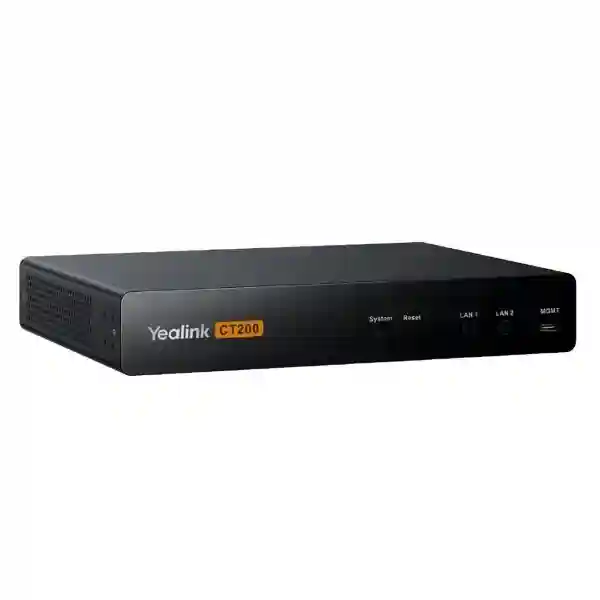
Yealink CT200 Room Device Navigator for Centralized AV Room Control
The Yealink CT200 is a dedicated room device navigator designed to bring monitoring, control and automation functions together for professional meeting environments. Rather than treating cameras, audio devices, AVoIP endpoints and displays as isolated components, the CT200 provides a central operational layer that helps an AV or IT team manage the room as a coordinated system. Its role is especially relevant in boardrooms, training spaces, executive meeting rooms and larger collaboration environments where signal routing, display power behavior and multiple connected devices must operate predictably.
For procurement teams in Uganda, the practical value of the CT200 is not simply another network-connected box. It is the control point that can reduce operational complexity when a room contains multiple AV elements and must support repeatable meeting workflows. The platform is designed for management and monitoring of room devices including AVoIP, cameras and audio equipment, and Yealink documents advanced room-control functions such as AV signal routing and display power management. Open API capabilities also support integration of suitable third-party devices, helping integrators create room experiences around the actual equipment and workflow requirements of a project.
FourTeck can support project teams with bill-of-materials validation, deployment planning and quotation for Uganda installations. Before ordering, provide the room count, number of sources and displays, network architecture, preferred mounting location and the other Yealink or third-party components intended for integration. This allows the proposed topology to be reviewed before procurement and helps avoid missing infrastructure items.
Instant Specifications & Procurement Fact Rail
Yealink CT200
Room Device Navigator
802.3af PoE or DC 12V/2A
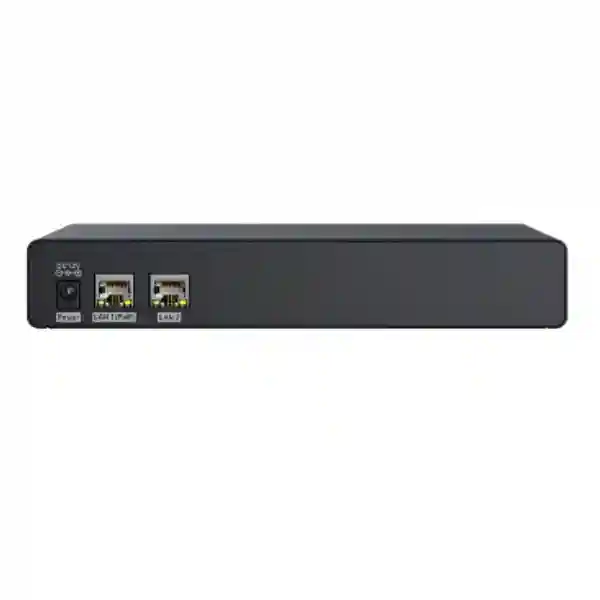
PoE, RJ45, MGMT, DC power
Rack, wall or flat surface
Project quotation on request
The CT200 is compact enough for AV furniture and equipment locations while offering flexible mounting choices. Its dual-network design is important for projects that want management and device-control traffic handled in a structured manner. Procurement should therefore consider not only the CT200 itself but also switch capacity, VLAN design where applicable, PoE availability, rack or surface mounting position and access for service work. Regional warranty terms should be confirmed on the quotation for the exact supplied unit and project.
Operational Product Architecture & Overview
Modern meeting rooms increasingly behave like small AV networks. A single space may include one or more displays, conferencing compute, cameras, microphones, loudspeakers, encoders, decoders and user-control interfaces. The operational challenge is coordination: a room can contain excellent individual devices and still deliver a poor user experience if sources are routed incorrectly, displays remain in the wrong power state, or administrators lack a clear way to monitor and configure the environment. The CT200 is positioned as the navigator for this device layer.
Yealink specifies two network ports and describes their benefit as separation of management and device control. For an enterprise deployment, this matters because AV administration is easier to structure when management access does not have to be treated identically to every control path. The exact network segmentation policy remains a customer design decision, but the hardware gives integrators a foundation for cleaner traffic organization. The device also provides a dedicated management interface and supports a 12V/2A power connection in addition to PoE.
Within Yealink’s wider professional AV architecture, the CT200 can serve alongside AVoIP components such as EN300 encoders and DE300 decoders. Yealink documentation describes centralized management functions for AVoIP ecosystems, including device routing, configuration and batch firmware operations. In practical terms, this architecture is useful when a room has several content sources or display destinations and the installation needs predictable switching rather than ad-hoc cable changes.
Open API support is another architectural consideration. Many enterprise rooms contain equipment from more than one manufacturer. Displays, control interfaces or specialist AV devices may already be standardized by the customer. An integration-capable navigator gives the project designer a route to build control around the room rather than requiring every existing component to be replaced. Compatibility must still be validated device by device, particularly where a project depends on specific commands, drivers or control behavior.

From a lifecycle perspective, centralized room control can also simplify fault isolation. Instead of troubleshooting only from the user’s symptom—such as a display not showing the intended source—the support team can examine the system as an interconnected workflow. This does not eliminate the need for sound network engineering, certified cabling or disciplined configuration, but it creates a more coherent operational model for sophisticated rooms.
Enterprise Business Outcomes & Value Analysis
The CT200 helps coordinate AV routing and room-device behavior rather than forcing operators to manage each endpoint independently. In an AVoIP environment, that centralized approach is valuable when several sources and destinations must be mapped consistently. Performance planning should still account for the capabilities of encoders, decoders, switches and the underlying network, because the navigator is part of a complete signal architecture rather than a replacement for transport infrastructure.
Predictable meeting-room operation depends on repeatable configuration. Centralized monitoring and room-control logic can reduce reliance on manual switching and help administrators maintain known device states. Buyers should document fallback procedures, spare strategy and network dependencies for mission-critical rooms.
The CT200 is relevant when a room design is expected to grow from a basic conferencing space into a more sophisticated AV environment. AVoIP architectures can scale by adjusting endpoint quantities to match sources and displays, while centralized navigation helps preserve a manageable operational model as the topology expands.
Dual network connectivity can support separation between management and control functions. Organizations should align the final design with internal VLAN, authentication, firewall, change-management and firmware policies. No control appliance should be deployed as an isolated security decision; it belongs inside the customer’s broader network governance framework.
A central navigator gives AV and IT teams a consistent place in the room architecture for management and automation. This is particularly valuable for organizations standardizing boardrooms, training rooms or high-value collaboration spaces across several sites.
The device itself has modest documented power consumption—about 2W average, 3.5W peak and 1.7W standby. More important to ownership cost is the potential to simplify support, standardize deployment and reduce avoidable site visits caused by inconsistent room behavior. Those savings depend on disciplined design and support processes rather than hardware alone.
Key Hardware & Software Highlights
| Component / Capability | Operational Value |
|---|---|
| Dual network connectivity | Supports separation of management and device-control traffic for structured room networks. |
| Open API | Enables integrators to plan customized control and suitable third-party device integration. |
| PoE 802.3af | Allows network and power planning around a compatible PoE switch, reducing the need for a local power outlet in suitable installations. |
| DC 12V/2A input | Provides an alternative power method when PoE is not the chosen deployment model. |
| Flexible mounting kit | Supports wall, flat-surface and rack-oriented installation planning. |
| Room Designer ecosystem | Supports room design, deployment and control-interface workflows within the Yealink professional AV environment. |
Technical Specifications Ledger
| Specification | Confirmed Detail |
|---|---|
| Product type | Room Device Navigator |
| Installation | Rack installation or flat installation; supplied mounting kit supports wall, flat surface or rack installation. |
| Hardware interfaces | 1 × PoE port, 1 × RJ45 port, 1 × MGMT port, 1 × 12V/2A power port. |
| PoE | 802.3af |
| DC power | 12V/2A adapter |
| Power consumption | Average 2W; peak 3.5W; standby 1.7W. |
| Operating humidity | 10–95% |
| Operating temperature | -10 to +45°C |
| Storage temperature | -30 to 70°C |
| Device dimensions | 216 × 160 × 36 mm |
| Device weight | 1.46 kg |
| Package dimensions | 259 × 193 × 124 mm |
| Carton quantity | 5 units |
| Included items | CT200, 3 m Cat5e cable, 1 m USB 3.0 Type-C to Type-A cable for management, 12V/2A power adapter, mounting kit and quick-start guide. |
Specifications should be read in the context of the complete AV system. The CT200 coordinates and manages room devices; source resolution, transport latency, audio protocols and display behavior can also depend on the endpoints and network components selected for the project. Confirm the complete bill of materials when performance requirements are contractual.
Configuration & Sizing Worksheet
1. Estimate the room workload
List every source, destination and controllable device. Include conferencing compute, laptops, presentation sources, cameras, microphones, speakers, displays, projectors, AVoIP encoders and decoders. Identify which sources must reach which displays and whether routes change by meeting mode. This produces a signal-flow map before hardware is ordered.
2. Define network architecture
Document the switching environment, PoE availability, addressing plan and any separation required between management and control networks. Confirm that the network design supports the wider AV endpoints selected. Where corporate security standards require VLANs or restricted management access, include those requirements in the deployment document rather than applying them after commissioning.
3. Check mounting and environmental conditions
The CT200 measures 216 × 160 × 36 mm and weighs 1.46 kg. Choose a location with suitable service access and ambient conditions within the documented -10 to +45°C operating range and 10–95% operating humidity. Rack, wall or flat-surface placement should allow cable bend radius and connector access.
4. Choose power method
Decide whether the installation will use 802.3af PoE or the supplied 12V/2A adapter. PoE can simplify cabling, but switch power budgets should be checked across all powered AV endpoints. Where power continuity is essential, include the relevant network switch or local power infrastructure in the UPS design.
5. Validate integration and software requirements
Create a compatibility list for every third-party device expected to be controlled. Open API capability creates integration flexibility, but it does not mean every product automatically exposes every desired command. Verify drivers, APIs, firmware versions and control functions before committing to a final room workflow.
6. Prepare the quote request
Provide project location, room quantity, target commissioning date, source and display count, existing equipment, preferred Yealink endpoints, network switch information and any required staging services. A detailed request reduces quotation revisions and helps identify accessories early.
Deployment Scenarios & Industry Use Cases
Large Enterprise & Multi-Site Networks
Enterprises standardizing collaboration rooms can use a consistent CT200-centered control approach for selected complex spaces. Standardization helps support teams document the same control logic, mounting practices and network requirements across sites. For multi-site procurement, room templates should still be validated against each location because display counts, source requirements and legacy equipment may differ.
Financial & Banking Institutions
Executive boardrooms, operations meeting spaces and training rooms in financial organizations often require tightly managed technology and clear support ownership. The CT200’s management/control separation capabilities can fit structured network designs, while centralized room behavior can help reduce user interaction with underlying AV complexity. Final deployment should follow the institution’s internal network and change-control policies.
Educational & Campus Networks
Universities and training institutions may need flexible routing between lecturer sources, conferencing platforms and multiple displays. In larger teaching rooms, AVoIP architectures can provide scalable signal distribution while the navigator coordinates room behavior. Campus IT teams should plan for standardized firmware, naming conventions and support documentation across rooms.
Government & Public-Sector Procurement
Government meeting facilities often require formal bills of materials, predictable installation scope and long-term maintainability. CT200 procurement should therefore include documented topology, mounting accessories, power method, compatible endpoints and commissioning responsibilities. Security-sensitive environments should validate all network and integration requirements under the organization’s approved architecture before deployment.

Technical Deep Dive: Control Processing & Room Architecture
The most useful way to understand the CT200 is as an orchestration appliance rather than a media endpoint that should be evaluated by conventional switch throughput figures. Its job is to manage and monitor room devices and coordinate control actions such as AV signal routing and display power behavior. In a Yealink AVoIP topology, media transport functions are handled by the appropriate AV endpoints and network infrastructure, while the CT200 provides the management layer needed to make the environment easier to operate.
This distinction matters during procurement. A buyer should not size the CT200 by asking only how many gigabits of video it forwards. Instead, the project should map the number and type of devices that require control, the routing workflows users need, the management topology and the integration points with the rest of the room. The navigator then becomes part of an engineered control plane. This approach also helps prevent a common design error: purchasing control hardware before documenting the room’s signal flow.
Technical Deep Dive: Software Ecosystem, Firmware & Operational Control
Yealink’s professional AV environment includes Room Designer workflows and centralized device management concepts. CT200 documentation also describes a control UI deployment workflow in which a room control interface can be generated and presented through compatible touch interfaces. For operational teams, this means room design should include both the physical topology and the user-control experience. Buttons, source names and room modes should reflect the customer’s terminology so users do not need to understand the underlying signal paths.
Firmware governance should be treated as an enterprise process. Record the commissioned firmware baseline, test significant updates against the room configuration, schedule changes during maintenance windows and retain configuration documentation. Where third-party integrations are used, verify that an update does not alter required API behavior. These practices are particularly important in high-use boardrooms where an unexpected change can have an outsized operational impact.
Technical Deep Dive: Availability, Power & Recovery Planning
High availability in a meeting room is broader than one appliance. The CT200 can be powered by PoE or DC, but the chosen upstream power source, network switch, AVoIP endpoints and displays all contribute to service continuity. If the room is business-critical, identify which devices need UPS-backed power and whether the PoE switch itself is protected. Document restart order and recovery procedures so support staff can restore service methodically.
Configuration backups, topology drawings and labeled cabling are practical resilience tools. A replacement appliance is much easier to commission when the original deployment has clear records. Organizations operating multiple identical rooms may also consider a spare strategy based on business impact and replacement lead time. Availability planning is therefore a combination of hardware, documentation, support capability and disciplined change control.
Pre-Purchase Buyer Gap Checklist
Does the CT200 replace an encoder or decoder? No. It is a room device navigator and management/control component. In AVoIP deployments, appropriate encoder and decoder endpoints are selected separately according to sources and displays.
Are all third-party products automatically compatible? Open API capability enables integration, but specific devices and functions should be validated. Ask what must be controlled—power, input selection, routing, volume or another function—and verify support for those commands.
What network preparation is needed? Plan addressing, switch ports, PoE budget if used, management access and any VLAN or security requirements. Dual network connectivity provides useful architectural flexibility, but the final segmentation model belongs to the project design.
Are there hidden room-space requirements? The chassis is compact, but allow clearance for connectors, cable bends and servicing. Confirm whether wall, flat-surface or rack placement best suits the AV furniture and maintenance process.
What is the real power demand? Yealink documents average consumption of 2W, peak 3.5W and standby 1.7W for the CT200. The larger project power budget must include all endpoints, switches, displays and conferencing equipment.
What should be confirmed before purchase? Validate the current hardware revision, firmware expectations, exact included accessories, warranty terms, lead time and compatibility with the planned Yealink and third-party devices. For tendered projects, capture these items in the quotation or bill of materials.
How should lifecycle planning be handled? Treat the room as a supported system rather than a collection of boxes. Keep topology drawings, configuration records, firmware baselines and a replacement plan. When expanding to additional rooms, reuse validated standards but re-check room-specific signal and display requirements.
Uganda Procurement & Delivery Logistics
FourTeck can prepare a project quotation for Yealink CT200 requirements in Uganda based on quantity, destination and the surrounding AV bill of materials. A useful request includes the number of rooms, room type, expected source and display count, whether AVoIP endpoints are required, preferred power method and any third-party equipment that needs integration. For larger projects, sharing a room schedule or equipment list helps the technical team review the proposal before commercial processing.
Order processing and delivery timing depend on quantity, current supply position, project configuration and destination. Buyers should request a dated quotation for current lead-time and warranty information rather than relying on generic availability assumptions. Where pre-configuration or staging is part of the scope, allow time for device validation and labeling before dispatch.
For deployments outside Kampala, logistics planning should include secure transport, receiving contacts and the intended installation schedule. Projects with commissioning dependencies should avoid scheduling installers before the complete bill of materials has been received and checked. This is particularly important for AV systems where one missing endpoint, cable or mounting item can delay room handover.
Local Coverage Matrix
In Kampala, the CT200 is suited to corporate headquarters, financial institutions, government offices, hotels and large meeting facilities requiring managed AV rooms. Entebbe projects can include conference venues, institutional facilities and distributed enterprise sites. Jinja deployments may support industrial, educational and commercial meeting environments, while Mbarara and Gulu projects can use the same structured procurement process for regional offices, training facilities and public-sector collaboration spaces.
For every location, the core preparation remains the same: identify the room topology, validate network and power requirements, confirm device compatibility and establish who will commission and support the system. Delivery arrangements and project timing should be confirmed in the quotation based on the final destination and scope.
Cross-Border & Regional Supply Chains
Organizations with operations across East Africa, the Gulf and wider African markets can coordinate similar Yealink room-system requirements through FourTeck’s regional sites. Visit FourTeck Uganda, FourTeck Kenya, FourTeck Africa, FourTeck UAE and FourTeck Kuwait for the appropriate regional contact path.
Cross-border projects benefit from a standardized room specification and naming convention. Even when procurement is handled in different countries, maintaining a common topology, approved device list and commissioning checklist can reduce support variation. Commercial terms, delivery arrangements, taxes, warranty processing and local availability should be confirmed separately for each destination.
Related Yealink AV Components & Planning Paths
A CT200 project is often part of a wider professional AV design. Buyers evaluating network-based video distribution should also consider the required AVoIP encoder and decoder endpoints, managed PoE switching, room cameras, conferencing audio and touch-control interfaces. The exact combination depends on the room topology rather than a fixed bundle.
Explore Yealink solutions in Uganda or send the room bill of materials for validation. For complex designs, ask about Yealink EN300 AVoIP encoders, DE300 AVoIP decoders, compatible managed AV switches, conferencing cameras, ceiling audio solutions and touch-control options. Where an existing room contains third-party displays or AV equipment, include manufacturer and model numbers so control compatibility can be assessed before final quotation.
FourTeck Technical Service Capabilities
Enterprise AV procurement is more reliable when the proposed bill of materials is reviewed as a system. FourTeck can assist with engineering validation around room quantities, signal sources, display destinations, network ports, PoE requirements, mounting and compatible Yealink components. This review is intended to identify obvious scope gaps before equipment is dispatched.
For projects that require staging, the scope can be discussed during quotation. Typical preparation may include inventory verification, labeling, firmware-baseline checks and confirmation that the ordered components match the approved bill of materials. Exact services depend on the project and should be listed commercially rather than assumed.
Post-sales support is most effective when the customer retains the final topology, device list, configuration records and commissioning notes. When raising a support case, provide the affected room, device model, firmware version, network context and a clear description of the failure condition. This shortens diagnosis and helps distinguish configuration, network, endpoint and control issues.
Extended Technical FAQ
What exactly does the Yealink CT200 do?
The CT200 is a room device navigator designed to manage and monitor devices in professional AV environments. Yealink describes support for room devices including AVoIP components, cameras and audio equipment, together with advanced control functions such as AV signal routing and display power management. It is therefore best understood as a centralized control and management component. It does not replace every endpoint in the room; cameras, audio devices, displays, encoders, decoders and conferencing systems still perform their respective functions. During design, define the control workflow first, then determine which devices the CT200 must coordinate.
Can the CT200 be used with third-party AV equipment?
Yealink provides Open API capability for third-party integration, which gives system integrators flexibility to create customized room solutions. However, Open API support should not be interpreted as universal automatic compatibility. The project team should list each third-party model and the specific actions required from it. For example, a display might need power control and input selection, while another device may need a different command set. Validate the required driver or API behavior before procurement, especially when the room depends on automated workflows.
Does the CT200 support Power over Ethernet?
Yes. Yealink specifies 802.3af PoE support. The CT200 can also use a DC 12V/2A power adapter. This gives installers flexibility to power the device from a compatible PoE switch or through local DC power. When PoE is selected, calculate the switch power budget for the complete room rather than considering the CT200 alone. Other AV endpoints may also consume PoE, and the switch itself may need UPS protection if the meeting space has a business-continuity requirement.
Why does the CT200 have dual network connectivity?
Yealink highlights dual network ports as a way to separate management and device control, supporting more structured and efficient network traffic. In enterprise environments, this can help align the AV design with a deliberate management architecture. The exact configuration depends on the customer’s network standards. IT teams should decide addressing, VLAN use, access rules and monitoring practices during design, not after installation. The physical capability provides flexibility, but it does not replace a documented network-security policy.
How can the CT200 be mounted?
The CT200 supports rack and flat installation, and Yealink’s supplied mounting kit is described for wall, flat-surface or rack installation. This makes the unit suitable for different AV furniture and equipment-room layouts. The chassis measures 216 × 160 × 36 mm and weighs 1.46 kg. During site planning, allow space for cable connections and service access rather than sizing the enclosure only around the chassis dimensions. Confirm the final mounting method before installation so brackets, rack position and cable routes are ready.
What are the operating environment limits?
Yealink specifies an operating temperature from -10 to +45°C and operating humidity from 10% to 95%. Storage temperature is listed from -30 to 70°C. These figures are useful for AV racks and equipment spaces where heat can accumulate. Good installation practice still requires adequate ventilation and consideration of neighboring equipment, because the room or cabinet environment can differ from the general building temperature. Avoid placing the unit where connectors are obstructed or where maintenance requires disturbing other critical AV cabling.
Does the CT200 require separate licensing?
Licensing and software entitlement requirements should be confirmed for the exact project configuration at quotation, particularly when the room uses broader Yealink platforms, integrations or features beyond the base device. The core hardware specifications alone do not provide enough information to promise that every desired workflow is license-free. Give the supplier a description of the intended room functions, management requirements and integration scope. This allows commercial dependencies to be identified before purchase rather than discovered during commissioning.
How should firmware updates be managed?
Treat firmware as a controlled operational change. Record the version used at commissioning, review release information, test important updates against the room workflow and schedule production changes during an approved maintenance period. This is particularly important when third-party integrations or custom control behavior are involved. For multi-room estates, a pilot room can be used to validate updates before broader deployment. Keep topology and configuration records current so a support engineer can correlate a new symptom with a recent change.
What information is needed for a Uganda quotation?
Provide the required CT200 quantity, delivery location, room count and target project schedule. For a more useful technical quotation, also share the number of video sources and displays, planned AVoIP endpoints, cameras and audio devices, preferred mounting method, network switch environment and any third-party products that need control. If you already have a consultant’s bill of materials, send it for review. For deployments in Kampala, Entebbe, Jinja, Mbarara, Gulu or other Uganda locations, include the final destination so logistics can be considered in the commercial response.
What should an organization plan for replacement and warranty support?
Confirm warranty terms and replacement procedures on the project quotation because commercial coverage can vary by supply arrangement and region. For business-critical rooms, keep the serial number, purchase documentation, firmware baseline, topology and configuration information accessible to the support team. Organizations with many standardized rooms may evaluate whether holding a spare is justified by downtime impact and lead time. A replacement strategy is strongest when configuration and cabling are documented, because the support team can restore a known design rather than reverse-engineering the room during an outage.
Plan Your Yealink CT200 Deployment in Uganda
A successful CT200 purchase starts with the room architecture. Share your room count, sources, displays, network environment, existing AV equipment and desired control workflow with FourTeck. The team can use this information to prepare a quotation and help validate whether the surrounding Yealink AVoIP, switching, camera, audio and control components match the intended deployment.
For tenders and multi-room projects, include the required delivery location and schedule together with any mandatory warranty, staging or technical documentation requirements. This creates a clearer commercial scope and reduces last-minute changes during installation.



Reviews
There are no reviews yet.