Professional Meeting Room Control • Uganda
Yealink CTP25 Touch Panel – Enterprise Meeting Room Control Console
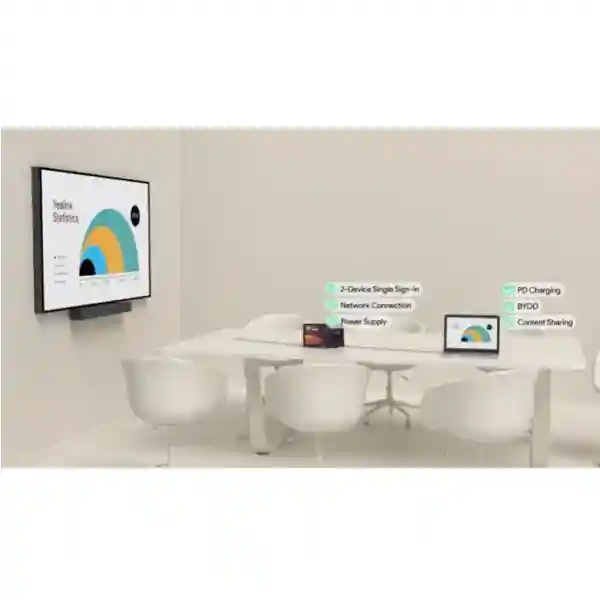
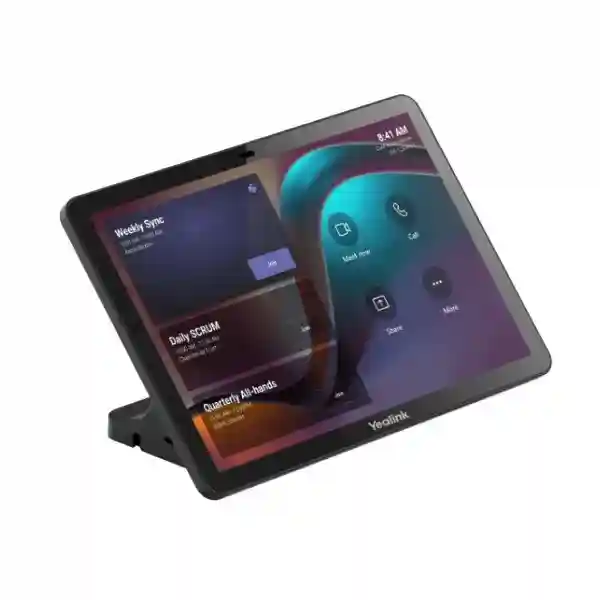
The Yealink CTP25 is a purpose-built 10.1-inch touch console that gives meeting-room users a dedicated interface for joining and controlling compatible collaboration sessions, sharing content and supporting wired BYOD workflows. Rather than asking employees to operate conferencing functions from a distant display, keyboard or personal device, the CTP25 places essential room controls directly on the meeting table or at another convenient mounting point.
For Ugandan organizations standardizing collaboration rooms, the practical value is consistency. A familiar control surface can reduce uncertainty when users enter a boardroom, training room or executive meeting space. The panel runs Android 13 and uses a 1280 × 800 IPS display with capacitive multi-touch, anti-glare and anti-fingerprint characteristics. Connectivity includes Wi-Fi 6, Bluetooth 5.0, an RJ45 network port with IEEE 802.3af PoE support, one USB-A port and two USB-C ports. Yealink also specifies support for USB-C wired content sharing, BYOD and power-delivery workflows, subject to the complete room-system design.
The CTP25 can be placed on a table, secured using a table mounting approach or wall mounted. This flexibility is important when the same organization has several room types. A small meeting room may prioritize a clean tabletop arrangement, while an executive room may need controlled cable routing and a fixed mounting position. FourTeck can help procurement teams align the panel with room-system compatibility, network policy, mounting requirements, cabling and deployment quantities before order confirmation.
Instant Specifications & Procurement Fact Rail
Yealink CTP25
10.1-inch IPS, 1280 × 800
Android 13
IEEE 802.3af PoE and above
Wi-Fi 6 / Bluetooth 5.0
Quote-based procurement
A CTP25 purchase should be treated as part of a meeting-room solution rather than as an isolated touchscreen. The room platform, associated Yealink conferencing equipment, network segmentation, PoE availability, USB-C workflow and physical installation method all affect the final bill of materials. Warranty terms should be confirmed on the commercial quotation because regional supply route, project quantity and associated system components can influence the applicable support arrangement.
Operational Product Architecture & Overview
The CTP25 sits at the human-control layer of a professional collaboration environment. Its job is not to replace the camera, microphone, codec or room display; instead, it creates an accessible control surface that connects the people in the room to the conferencing system. This distinction matters in procurement. Buyers often compare touch panels by screen size alone, but the more important questions concern platform integration, control behavior, content-sharing paths, network security, mounting and ongoing administration.
At the front of the device is a 10.1-inch IPS screen with 1280 × 800 resolution, a typical brightness of 350 cd/m², 1000:1 contrast ratio and 178-degree horizontal and vertical viewing angles. Capacitive multi-touch supports direct interaction, while anti-glare and anti-fingerprint characteristics help maintain usability in shared rooms. A motion sensor can support room-oriented behavior, and Yealink includes an ultrasonic unit as part of the device architecture.

On the network side, the panel supports VLAN, 802.1P/Q, Diffserv, 802.1X, LLDP-MED and HTTPS. Those capabilities are relevant in managed enterprise networks where collaboration endpoints need predictable segmentation, admission control, traffic policy and encrypted administration. The RJ45 interface supports IEEE 802.3af PoE, allowing network and power planning to be consolidated where the switching environment provides suitable PoE. Wireless connectivity includes Wi-Fi 6 across 802.11a/b/g/n/ac/ax and Bluetooth 5.0.
Physical connectivity includes one USB-A and two USB-C ports. Yealink positions USB-C as a multi-purpose path for wired content sharing, BYOD and power. Its published documentation states that the supplied USB-C workflow can support 4K content sharing, wired BYOD and up to 45 W PD 2.0 laptop charging, with up to 60 W possible when an appropriate adapter is used. Buyers should validate the exact room-system topology and host-device compatibility before treating these figures as universal across every deployment.
Administration is another architectural consideration. Yealink identifies its web portal and device management platform as management options, together with Teams Admin Center and Zoom Device Management in corresponding deployments. For an IT department operating multiple rooms, centralized visibility can reduce the need for technicians to visit every room for routine checks. The intended management path should be agreed during solution design so that account ownership, firmware governance and room naming follow internal policy.
Enterprise Business Outcomes & Value Analysis
A dedicated console keeps meeting controls within easy reach. Users can focus on the discussion instead of switching repeatedly between personal devices and room hardware. The responsive capacitive interface, wide viewing angles and purpose-built room design support predictable interaction in shared spaces.
The option to use wired Ethernet with PoE gives infrastructure teams a straightforward way to avoid dependence on a separate local power outlet at the panel position. Where network design allows it, this can simplify cabling and help standardize room deployment.
Table placement, table mounting and wall mounting let the same panel concept be applied across multiple room layouts. Standardization can simplify documentation, spares planning, user training and support processes when an organization rolls out collaboration spaces across branches.
Support for VLAN, 802.1X, LLDP-MED and HTTPS gives network teams useful building blocks for integrating the panel into managed infrastructure. Security still depends on correct configuration, credential governance, firmware policy and segmentation across the complete meeting-room environment.
Management through Yealink tools and supported collaboration administration platforms can improve operational consistency. This is particularly useful where IT teams maintain numerous rooms and need a repeatable approach to device inventory, policy and lifecycle operations.
Published consumption is 5 W standby, 7.3 W average and 15.2 W peak for the panel. These figures allow facilities and IT teams to estimate the panel’s contribution to room power demand and PoE budgets rather than relying on guesswork.
USB-C content sharing and wired BYOD capabilities can reduce the number of separate adapters and interaction steps in an appropriately designed room. Procurement teams should document supported laptop types and required cables so users receive a consistent experience.
Key Hardware & Software Highlights
10.1-inch IPS Control Surface
The display combines 1280 × 800 resolution, wide 178-degree viewing angles, capacitive multi-touch and surface treatments intended for shared-room use. The result is a compact console that can remain readable from common seated positions.
Android 13 Platform
The current published specification identifies Android 13 as the operating system. Firmware planning should remain part of the organization’s device lifecycle process, with updates assessed and deployed according to the selected management environment.
USB-C Collaboration Path
Dual USB-C interfaces support the CTP25’s broader content-sharing, BYOD and power-delivery design. This can help create a cleaner meeting table when the complete system is engineered around a defined cable path.
Enterprise Networking
RJ45, PoE, VLAN, traffic-priority functions, 802.1X, LLDP-MED and HTTPS make the panel suitable for consideration in structured corporate networks rather than treating it as an unmanaged consumer accessory.
Technical Specifications Ledger
| Category | Specification |
|---|---|
| Operating system | Android 13.0 |
| Display | 10.1-inch IPS; 1280 × 800; 1000:1 contrast; 350 cd/m² typical brightness; 178° H/V viewing; multi-point capacitive touch; anti-glare; anti-fingerprint |
| Audio | Built-in ultrasonic unit |
| Wireless | Wi-Fi 6 802.11a/b/g/n/ac/ax; Bluetooth 5.0 |
| Network features | VLAN, 802.1P/Q, Diffserv, 802.1X, LLDP-MED, HTTPS |
| Interfaces | 1 × USB-A; 2 × USB-C; 1 × RJ45 with PoE; reset hole; motion sensor |
| Installation | Table placement, table mounting or wall mounting |
| Power consumption | 5 W standby; 7.3 W average; 15.2 W peak |
| Power | 65 W PD power adapter; IEEE 802.3af PoE and above |
| Operating temperature | -10°C to +45°C |
| Storage temperature | -30°C to +70°C |
| Device dimensions | 242.95 × 27.50 × 161.95 mm |
| Device weight | 0.683 kg |
| Standard package highlights | CTP25, 7.5 m Ethernet cable, 1.8 m USB-C cable, 65 W PD adapter, screwdriver, high stand, cable-management cover, M3 screws, cable ties and quick-start guide |
Specifications above are based on Yealink’s published CTP25 documentation. A procurement specification should distinguish confirmed device characteristics from project-dependent behavior. For example, the presence of USB-C does not by itself establish that every laptop, meeting platform and room-system combination will expose identical BYOD, charging or content-sharing behavior. Likewise, PoE support does not remove the need to check switch standards, port power budget, cable condition and network policy. FourTeck can use the planned room topology to help identify these dependencies before deployment.
Interactive Configuration & Sizing Worksheet
Step 1 — Define room count and room type. Record every space that will receive a panel and classify it as huddle room, standard meeting room, boardroom, training space or another collaboration environment. Note whether the organization wants one common user experience across all sites.
Step 2 — Confirm the conferencing ecosystem. Document the Yealink room system associated with each CTP25 and the intended collaboration platform. This prevents a touchscreen from being procured before compatibility and management expectations are agreed.
Step 3 — Map physical placement. Decide whether the panel will sit freely on a table, use a secured table mount or use a wall mount. Check sight lines, user reach, cable exits, furniture penetrations and the possibility of accidental cable strain.
Step 4 — Validate network and power. Identify the switch port, VLAN, 802.1X policy and PoE capability. Confirm that the port can supply the required standard and that the cable path is within structured cabling rules. If the supplied PD adapter is preferred, ensure a suitable electrical outlet and cable route are available.
Step 5 — Define USB-C expectations. List whether users need content sharing, wired BYOD, laptop charging or a combination. Capture the common laptop models used by employees and guests. This is essential because host-device capabilities and complete system design affect the final experience.
Step 6 — Set management ownership. Choose the approved device-management route and identify the team responsible for firmware, credentials, monitoring and support. Standard naming conventions should be created before a multi-room rollout.
Step 7 — Prepare the quote. Send FourTeck the CTP25 quantity, associated room-system models, platform, mounting preference, PoE availability, cable lengths, installation location, desired accessories and delivery destination. Include any commissioning or pre-configuration requirement so it can be considered before commercial approval.
Deployment Scenarios & Industry Use Cases
Large Enterprise & Multi-Site Networks
For companies operating several offices, the CTP25 can form part of a standardized room blueprint. Standardization is valuable because support teams can document a common panel position, cable layout, VLAN policy and user workflow. A branch office in another city can then receive a room configuration that resembles the headquarters experience, reducing the learning curve for traveling staff. Central management options should be aligned with the chosen platform and internal administration model.
Financial & Banking Institutions
Banks and financial organizations often apply stricter controls to endpoint connectivity. The CTP25’s support for 802.1X, VLAN, HTTPS and LLDP-MED gives network architects relevant capabilities for a managed deployment. These functions must still be implemented under the institution’s security policy, including certificate or credential handling, firmware governance and appropriate separation of collaboration traffic.

Educational & Campus Networks
Universities, colleges and training institutions may use dedicated touch control to make hybrid teaching rooms easier for lecturers and visiting presenters. Fixed mounting can be useful where equipment must remain in a defined position. IT teams should validate access-control policy, mounting security, cable protection and user workflow before deploying panels in high-traffic rooms.
Government & Public-Sector Procurement
Government meeting spaces frequently require documented specifications, predictable installation and auditable bills of materials. The CTP25’s published dimensions, environmental range, interface set and power characteristics allow project teams to prepare structured schedules. Procurement should additionally document platform compatibility, warranty route, firmware responsibility, mounting accessories and acceptance-testing criteria.
Technical Deep Dive 1: Processing, Interaction & Hardware Architecture
A meeting control panel is successful when its hardware disappears into the workflow. Users should be able to approach the console, understand the available controls and perform common actions without learning the underlying infrastructure. The CTP25 combines its Android 13 software environment with a dedicated IPS touch interface, network connectivity, wireless radios, motion sensing and an ultrasonic unit. This integration allows the panel to behave as a purpose-designed room endpoint rather than a repurposed general tablet.
The 10.1-inch screen balances usable control area against tabletop footprint. A 178-degree viewing angle is useful where multiple participants may glance at the panel from different positions. Anti-glare treatment helps in rooms with ceiling lighting or windows, while anti-fingerprint treatment is particularly relevant for a shared touch surface. The device dimensions—242.95 mm wide, 27.50 mm deep and 161.95 mm high as published—should be considered together with its stand and cable routing rather than evaluated in isolation.
The physical interfaces create several deployment paths. Ethernet can provide a wired network connection and PoE. USB-C supports the richer content-sharing and BYOD workflow. USB-A provides an additional physical interface. The engineering task is to choose a topology that is simple for users while still complying with IT policy. Adding every possible cable is rarely the best outcome; a well-designed room exposes only the connections users actually need.
Technical Deep Dive 2: Software Ecosystem, Firmware Security & Operational Control
Yealink lists the web portal, Yealink Device Management Platform, Teams Admin Center and Zoom Device Management among the management options for the CTP25. Which interface is relevant depends on the deployed room ecosystem. Organizations should define a single source of operational ownership wherever possible. That means deciding who can change device settings, who approves firmware updates, how room names map to asset registers and what process is followed when a panel is replaced.
Network controls should be implemented as part of this governance. 802.1X can help align endpoint access with enterprise network admission policy, while VLAN and 802.1P/Q functions can support segmentation and traffic treatment. HTTPS provides an encrypted management path where applicable. These capabilities are ingredients, not an automatic security guarantee. Secure deployment still requires controlled administrator credentials, restricted management access, timely software maintenance and monitoring appropriate to the organization’s risk profile.
For larger fleets, configuration consistency becomes more important than individual device tuning. A documented baseline should specify network settings, approved firmware, naming conventions, platform association and support contacts. Changes should be tested in a representative room before a broad rollout whenever operational risk warrants it.
Technical Deep Dive 3: Availability, Power & Recovery Planning
The CTP25 is a room-control endpoint, so availability planning focuses on ensuring that users retain a practical way to operate meetings when an individual component, cable or network service has a problem. Start with power. The panel supports IEEE 802.3af PoE and above and is also supplied with a 65 W PD power adapter according to Yealink’s documentation. The selected power method should match the room design and support model.
Where PoE is used, the upstream switch becomes part of the room’s power chain. A resilient enterprise design may place collaboration switching on protected power, monitor PoE budgets and maintain spare ports or switches according to business criticality. Where the local adapter is used, facilities teams should protect the outlet from accidental disconnection and keep cabling organized.
Recovery planning should also include configuration and replacement procedures. IT should know how to identify the affected room, verify network reachability, inspect cabling, restart or reset under approved procedures and replace the unit if hardware service is required. For multi-site estates, holding an appropriate spare strategy can reduce disruption. The exact spare quantity should reflect room count, criticality, replacement lead time and internal service targets rather than a fixed universal percentage.
Pre-Purchase Buyer Gap Checklist
Is the CTP25 a complete video conferencing system? No. It is a touch console intended to operate within a compatible meeting-room environment. Confirm the associated camera, audio, compute or codec components required by the planned solution.
Will it work with every Yealink room product? Compatibility should be verified for the exact room-system model and software version before ordering. A shared brand name does not make every accessory universally interchangeable.
Are there hidden platform costs? The panel’s hardware purchase and the conferencing platform’s service licensing are separate commercial considerations. Confirm Microsoft Teams, Zoom or other service licensing requirements for the complete room, along with any management subscriptions relevant to your deployment.
Does USB-C guarantee 60 W laptop charging? Yealink documents up to 45 W PD 2.0 in the standard described workflow and notes up to 60 W when the adapter is replaced appropriately. Validate the adapter, cable, laptop and room-system topology before promising a particular charging rate to users.
Can existing PoE switching be reused? Potentially, because the CTP25 supports IEEE 802.3af and above. The actual switch model, available port budget, cabling, network authentication and VLAN configuration still need to be checked.
What clearance is required? The device itself measures 242.95 × 27.50 × 161.95 mm and weighs 0.683 kg. Allow additional space for the stand, user reach, cable bend radius and any optional mount.
What happens when hardware generations change? Treat room-control devices as lifecycle-managed infrastructure. Keep a record of purchase dates, firmware baselines, compatible room-system versions and replacement paths. For phased projects, confirm current supply before each procurement wave.
What should be tested before acceptance? Verify meeting join/control, content sharing, intended BYOD behavior, laptop charging where required, network authentication, management visibility, mounting stability and cable labeling. Acceptance criteria should be written before deployment begins.
Uganda Regional Procurement & Delivery Logistics
FourTeck can prepare a Uganda quotation around the required CTP25 quantity and the broader meeting-room bill of materials. For a single replacement panel, provide the existing Yealink room-system model and deployment details. For a new project, provide room count, room sizes, conferencing platform, mounting preference, network availability, PoE capability and any required accessories. This reduces the risk of quoting a panel without the infrastructure needed to use it effectively.
Order processing and delivery timing depend on confirmed stock position, quantity, project configuration and supply route at the time of quotation. For that reason, project teams should request current lead-time information rather than planning around an assumed delivery window. Large deployments are easier to manage when room schedules are divided into logical batches and installation dependencies are identified before shipment.
Pre-configuration requirements can also be discussed before dispatch. Depending on the project scope, engineering preparation may include bill-of-materials review, firmware planning, device naming, network requirements documentation and deployment checklists. Credentials and tenant-specific settings should be handled according to the customer’s security process.
Local Coverage Matrix
Corporate offices, financial institutions, government facilities and multi-room headquarters projects.
Hospitality, aviation-linked offices, conference facilities and professional meeting spaces.
Industrial, education and regional business deployments requiring standardized collaboration rooms.
Branch-office, institutional and campus requirements with centralized procurement coordination.
Regional offices, education, public-sector and development-sector collaboration environments.
Coverage planning should include the destination, site access requirements, room readiness and whether installation support is required. For multi-city projects, consolidating equipment standards and documentation before rollout can simplify acceptance and later support.
Cross-Border & Regional Supply Chains
Organizations operating beyond Uganda can coordinate procurement requirements across regional FourTeck channels. Visit FourTeck Uganda for Uganda requirements, FourTeck Kenya for Kenyan projects, FourTeck Africa for broader African enterprise supply, FourTeck UAE for UAE requirements and FourTeck Kuwait for Kuwait procurement.
Cross-border projects benefit from a shared equipment schedule that identifies room type, model, quantity, mounting accessories, cable requirements, destination and local implementation responsibility. Import procedures, taxes, delivery terms and warranty routing can vary by destination, so commercial documentation should define the supply route rather than assuming that one country’s terms automatically apply everywhere.
Related Products & Internal Procurement Paths
A CTP25 is normally selected alongside other collaboration components. Buyers planning a complete room can review the FourTeck Uganda technology portfolio and use the project contact desk to request compatible Yealink meeting-room systems, cameras, microphones, speakers, network switching, PoE infrastructure, structured cabling and mounting accessories. The correct related equipment depends on the selected Yealink room architecture rather than a generic accessory list.
For replacement projects, provide the model numbers already installed. For new rooms, provide the room dimensions, seating capacity, display count, preferred collaboration platform and desired content-sharing workflow. FourTeck can then build a more coherent bill of materials instead of treating each component as an independent purchase.
FourTeck Technical Service Capabilities
Enterprise meeting-room procurement often fails at the interfaces between products rather than at the products themselves. FourTeck’s project approach can include engineering validation of the proposed room design, bill-of-materials checking, cabling review, power and PoE considerations, mounting coordination and documentation of the intended collaboration workflow. These checks are particularly useful when a customer is standardizing multiple rooms or replacing an older generation of conferencing hardware.
Staging requirements can be agreed before shipment where project scope allows. This may include confirming hardware quantities, checking accessory completeness, reviewing current firmware requirements and preparing deployment records. Tenant credentials and sensitive customer configuration should remain governed by the customer’s access-control process.
After deployment, support planning should identify the first-line helpdesk, escalation path, warranty documentation and spare strategy. A room inventory that records device serials, room names, purchase details and software baselines makes future troubleshooting and replacement substantially easier than relying on informal records.
Extended Technical FAQ
1. What is the Yealink CTP25 primarily used for?
The CTP25 is a dedicated touch console for controlling compatible meeting-room systems. It gives users a 10.1-inch touchscreen interface for meeting interaction and is designed to participate in broader collaboration workflows that can include content sharing, wired BYOD and laptop power delivery. It should not be confused with a complete conferencing appliance: the camera, microphones, speakers, displays and room compute or codec requirements depend on the associated Yealink solution. Before ordering, confirm the room-system model, collaboration platform and desired user workflow so the panel is matched to a supported architecture.
2. Can the CTP25 be powered by PoE?
Yes. Yealink specifies an RJ45 port with IEEE 802.3af PoE support and states PoE 802.3af and above in the power specifications. This can simplify room installation because network and power can share the Ethernet path. However, the network switch must have suitable PoE capability and available budget, and the structured cabling must be in appropriate condition. If enterprise 802.1X or VLAN policies apply, those settings also need to be considered. The package specification additionally includes a 65 W PD power adapter, giving the project team another power-planning option.
3. What USB-C capabilities does the CTP25 provide?
Yealink positions the USB-C connection for wired content sharing, BYOD and power. Its published datasheet states support for 4K content sharing, wired BYOD and up to 45 W PD 2.0 laptop charging in the described standard workflow, with a maximum of 60 W possible when the adapter is replaced appropriately. These capabilities should be validated against the complete room system and the user’s laptop fleet. USB-C connectors can support different functions depending on host hardware, cables and system design, so procurement documents should state the required workflow rather than assuming every USB-C device behaves identically.
4. Does the panel support enterprise network controls?
The published network specification includes VLAN, 802.1P/Q, Diffserv, 802.1X, LLDP-MED and HTTPS. These functions are useful for organizations that need meeting-room endpoints to follow managed network policies. A secure deployment still requires correct configuration. Network teams should determine the appropriate VLAN, authentication method, certificate or credential process, management access rules and monitoring approach. It is also wise to test the intended policy on a representative room before a large rollout, particularly when access-control rules are strict or collaboration traffic traverses several network segments.
5. Can the CTP25 be wall mounted?
Yes. Yealink lists table placement, table mounting and wall mounting as installation approaches. The standard package includes a high stand, while Yealink also identifies optional mounting choices including a rotatable desktop mount and wall mount. Before choosing the physical method, check user reach, viewing angle, furniture design, cable exits and service access. In public or high-traffic spaces, a fixed mount may reduce accidental movement. In executive boardrooms, cable concealment and table aesthetics may have greater priority. The mounting accessory requirement should be included explicitly in the quotation.
6. How large is the CTP25 and what does it weigh?
Yealink publishes CTP25 device dimensions of 242.95 × 27.50 × 161.95 mm and a device weight of 0.683 kg. Those figures help furniture designers and installers understand the basic physical footprint, but a room drawing should also allow for the selected stand or mount, cable bend radius and comfortable user reach. When the panel is placed on a table, avoid positions where laptops, microphones or documents routinely obstruct it. For fixed installations, confirm that drilling, cable pathways and mounting surfaces are suitable before equipment arrives on site.
7. What are the operating temperature limits?
The specified operating range is -10°C to +45°C, while the storage range is -30°C to +70°C. Normal air-conditioned meeting rooms fall comfortably within the operating range, but installers should still avoid placing electronics where direct sunlight, localized heat sources, moisture or poorly ventilated enclosures could create adverse conditions. Storage conditions matter during warehousing and transport as well. For large projects, equipment should remain in appropriate storage until rooms are ready, rather than being left for long periods in unfinished spaces where dust, construction activity or uncontrolled environmental conditions could affect the deployment.
8. What management tools are available?
Yealink lists the Yealink Web Portal, Yealink Device Management Platform, Teams Admin Center and Zoom Device Management as management options. The relevant path depends on the conferencing environment and how the room is provisioned. Organizations should decide which team owns device administration and establish a repeatable naming, firmware and support process. For a large room estate, centralized management can improve visibility and consistency, but it should be accompanied by proper administrator access controls and change management. Confirm the intended management architecture during solution design rather than after dozens of rooms have already been deployed.
9. Does the CTP25 require separate collaboration licensing?
Hardware and collaboration service licensing should be evaluated separately. The CTP25 itself is a physical room-control component; the complete meeting room may require platform accounts, room licenses or other service entitlements depending on whether the solution is built around Microsoft Teams, Zoom or another supported workflow. Licensing rules can change and can depend on the associated room system, so procurement teams should confirm current platform requirements for the exact deployment. The quotation should distinguish hardware, accessories, installation services and any separately sourced service subscriptions so lifecycle costs are clear.
10. What information should I provide for a Uganda quotation?
Provide the required quantity, delivery location, associated Yealink room-system model, collaboration platform, number and type of rooms, preferred mounting method, PoE availability, desired USB-C workflow and any installation or pre-configuration requirements. For an existing deployment, photographs or room drawings and current equipment model numbers can help clarify the requirement. For a new build, include furniture and cable-route information where available. A detailed request lets FourTeck identify likely accessories and dependencies early, reducing the chance that installation is delayed by a missing mount, cable, power arrangement or compatibility assumption.
Prepare Your Yealink CTP25 Procurement Request
For a reliable quotation, specify how the CTP25 will be used rather than sending only a quantity. Include the room-system model, meeting platform, room count, mounting choice, PoE availability, USB-C content-sharing or BYOD requirement, delivery city and expected project schedule. FourTeck can then review the requirement as a complete collaboration-room component instead of treating the touch panel as an isolated accessory.
This approach is especially important for multi-room projects in Kampala and other Ugandan locations, where standardized bills of materials, consistent network policy and repeatable mounting can reduce deployment variation. Current stock position, commercial terms, warranty route and delivery timing should be confirmed on the project quotation.



Reviews
There are no reviews yet.