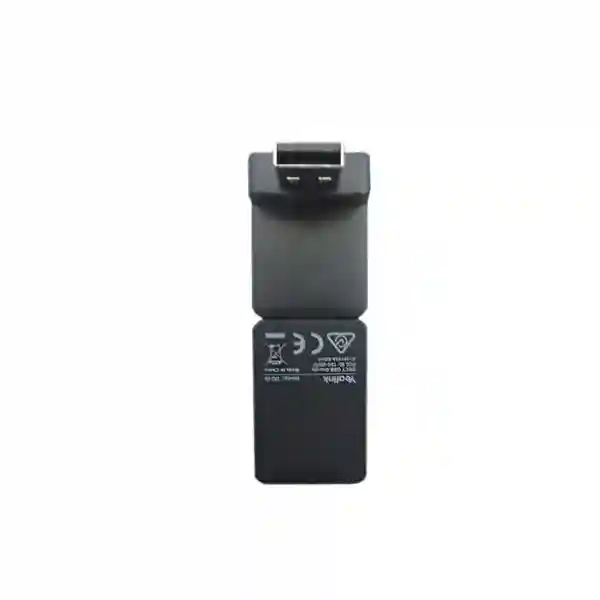
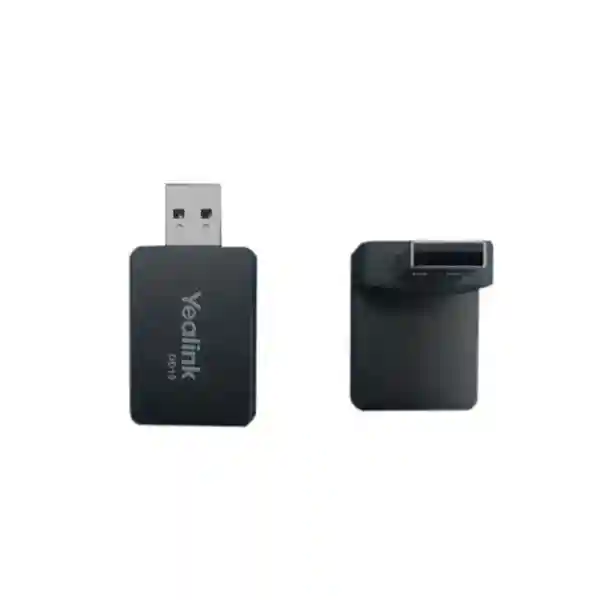
Yealink DD10K DECT USB Dongle for Enterprise Desk-Phone DECT Integration
The Yealink DD10K is a compact USB DECT interface for organisations that need to extend selected Yealink IP desk phones into a DECT communications environment. Rather than replacing a suitable desk phone simply because a site requires DECT connectivity, the DD10K provides a practical bridge between supported Yealink desk endpoints and compatible Yealink DECT infrastructure. In supported configurations, a desk phone can operate as a DECT desk phone registered to a compatible base or multi-cell system; on other supported models, the phone can provide a base role for compatible Yealink cordless handsets. This makes the DD10K particularly relevant to Uganda deployments where fixed-position staff need the familiar controls and visibility of a desk phone while the communications design benefits from DECT flexibility.
The adapter connects through USB 2.0, has a specified DECT transmission rate of 1152 kbps, incorporates two internal omnidirectional antennas, consumes approximately 815 mW, measures 73 × 27 × 8 mm and weighs about 2 g. Manufacturer specifications state an indoor DECT range of roughly 20–50 m, with 50 m as the maximum stated indoor distance, and up to 300 m outdoors in clear-view ideal conditions. Actual coverage is influenced by walls, shelving, reinforced concrete, metal structures, interference and the selected base architecture. For that reason, procurement should treat range figures as planning references rather than guaranteed building-wide coverage.
FourTeck supports organisations in Kampala and across Uganda with compatibility validation, quantity planning, quotation, staging and regional supply coordination. The most important purchasing step is confirming the exact Yealink phone model, its firmware branch, the intended DECT base or multi-cell platform and any cordless handset models that must interoperate. That validation reduces the risk of ordering an accessory that physically fits a USB port but is not supported by the endpoint firmware.
Instant Specifications & Procurement Fact Rail
Yealink DD10K
USB 2.0
1152 kbps
815 mW
73 × 27 × 8 mm
Quote-based Uganda supply
For procurement teams, the DD10K should be treated as a compatibility-dependent communications accessory rather than a universal USB peripheral. Current Yealink compatibility guidance includes selected T5 and T8 family endpoints and certain legacy models, while many other Yealink phones are explicitly unsupported. Firmware requirements also matter. The final bill of materials should therefore identify every host phone by exact model and firmware before quantities are approved. Regional warranty terms, lead time and stock position should be confirmed on the formal FourTeck quotation because these can vary by supply batch and project.
Operational Product Architecture & Overview
The DD10K solves a specific infrastructure problem: how to introduce DECT functionality at a supported Yealink desk endpoint without redesigning the entire user position. In a conventional wired desk-phone installation, the endpoint depends on Ethernet for its network connection and remains physically tied to that network location. A DECT architecture separates the radio access layer from the fixed workstation. With the DD10K and a supported deployment mode, organisations can use selected Yealink desk phones within the DECT ecosystem while retaining the ergonomic benefits of a full desk endpoint.
One deployment pattern turns a supported desk phone into a DECT desk phone. Yealink documents the T54W with DD10K as capable of registering to supported DECT base or multi-cell infrastructure, including W70B and selected multi-cell systems. This is useful in warehouses, supermarkets, restaurants, service counters and other locations where a fixed employee needs a substantial desktop interface but Ethernet cabling to every final position may be inconvenient. Another supported pattern allows selected Yealink desk phones to act as a base for compatible cordless handsets. The exact capability depends on the host model, so the intended role must be decided before purchase.

The radio subsystem uses two internal QWL omnidirectional antennas. The published DECT frequency allocation includes 1880–1900 MHz for Europe and 1920–1930 MHz for the United States, with additional regional variants documented by the manufacturer. Uganda buyers should ensure that the supplied regional version and deployment design are appropriate for local regulatory requirements. FourTeck can align the quoted unit with the intended market and system design.
Operationally, the adapter is intentionally simple. It draws low power from the host USB interface and avoids a separate power brick. Yet the system around it still needs deliberate engineering. A desk phone converted into DECT mode must have supported firmware; the base system must have capacity for the intended endpoint count; radio coverage must be planned; and any cordless handsets must be confirmed against the supported list. These dependencies explain why the best procurement approach is to quote the DD10K alongside the existing or proposed Yealink environment rather than as an isolated component.
Enterprise Business Outcomes & Value Analysis
Key Hardware & Software Highlights
The DD10K is built around a compact USB form factor rather than a large external radio appliance. Its USB 2.0 interface supplies connectivity and power, while two internal omnidirectional antennas handle the DECT radio function. The device’s 73 × 27 × 8 mm body keeps the physical footprint small around a compatible desk phone. At approximately 2 g, it adds negligible mechanical load. The absence of a separate power supply simplifies staging and reduces the number of components that installers must track.
Software and firmware compatibility is equally important. Yealink’s current support matrix identifies compatible and incompatible phone families explicitly. Supported examples include T53, T53W, T54W, T57W, T58W, VP59 and selected T8-series phones, alongside some older supported endpoints. Conversely, many T3, T4U and T7 models are not supported. Buyers should not infer support from physical USB availability. The host phone’s firmware determines whether the required DD Phone or corded-cordless function is available.

In a T54W DD Phone implementation, Yealink guidance explains that the phone can switch to DD Phone mode and register to a supported DECT base or multi-cell system. The host can also reconcile DD10K firmware during insertion when versions differ. This highlights an important staging practice: upgrade and validate the host endpoint before field deployment, then test registration, calling and expected features against the chosen DECT platform.
Technical Specifications Ledger
| Specification | Confirmed Detail | Procurement Relevance |
|---|---|---|
| Product | Yealink DD10K DECT USB Dongle | DECT accessory for selected Yealink phones |
| Interface | USB 2.0 | Uses supported host phone USB port |
| Transmission | 1152 kbps | Published DECT transmission rate |
| Antennas | 2 internal QWL omnidirectional antennas | Integrated radio hardware |
| Power consumption | 815 mW | Low accessory power overhead |
| Frequency bands | 1880–1900 MHz Europe; 1920–1930 MHz US; other regional bands documented | Confirm correct regional unit |
| Indoor range | 20–50 m; stated maximum 50 m | Site conditions can reduce coverage |
| Outdoor range | Up to 300 m in clear view and ideal conditions | Not a guaranteed real-site radius |
| Dimensions | 73 × 27 × 8 mm | Compact endpoint accessory |
| Weight | 2 g | Negligible physical load |
| Package | DD10K and quick-start guide | Host phone/base sold separately unless quoted |
| Compliance | Manufacturer datasheet lists CE, FCC and C-Tick markings | Confirm project/regional requirements before order |
The specifications above should be read together with the current compatibility matrix. Physical fit and electrical USB compatibility do not establish functional support. This is especially important for mixed-generation Yealink estates, where phones may look similar or belong to adjacent product families but have different DD10K support status. For a project order, provide FourTeck with an endpoint inventory or at minimum the exact models planned for conversion. Where firmware versions are known, include them in the quote request so staging requirements can be identified early.
Configuration & Sizing Worksheet
Step 1 — Define the role. Decide whether each DD10K-equipped phone needs to become a DECT desk phone registered to a Yealink base/multi-cell environment, or whether the intended supported host phone will provide a corded-cordless arrangement for compatible handsets. This single decision determines much of the remaining design.
Step 2 — Inventory host endpoints. Record exact phone models, hardware variants where applicable and firmware versions. Compare them with the current Yealink DD10K compatibility matrix. Do not order by phone family name alone.
Step 3 — Size radio coverage. Map user positions, walls, lifts, metal shelving, plant rooms and other obstacles. The manufacturer’s 20–50 m indoor and 300 m ideal outdoor figures are useful references, but a warehouse with steel racking and a partitioned office floor can behave very differently. Multi-cell designs should be engineered around actual coverage and roaming requirements.
Step 4 — Validate DECT capacity. Identify the base or multi-cell system and verify endpoint registration capacity, concurrent call requirements and handset mix. A DD Phone consumes system capacity just as another registered DECT endpoint does. Capacity planning should therefore include desk phones, mobile handsets and other compatible DECT devices.
Step 5 — Check power and cabling. The DD10K itself uses USB power and is specified at 815 mW. The host phone still requires its normal power arrangement, commonly PoE or an appropriate power adapter depending on the model and deployment. Confirm that using the USB port for DD10K does not conflict with another required USB accessory.
Step 6 — Review firmware and licensing. DD10K operation depends on supported firmware. Yealink documentation for T54W DD Phone deployments specifies relevant firmware requirements and mode changes. The DD10K is primarily a hardware accessory; any PBX, calling platform, endpoint management or service licensing remains dependent on the wider solution and should be quoted separately where required.
Step 7 — Prepare the quote. Provide quantity, phone models, base/multi-cell model, cordless handset models, site locations, required delivery date and whether pre-staging is desired. For multi-site projects, split quantities by branch to simplify logistics and deployment control.
Deployment Scenarios & Industry Use Cases
Large enterprise and multi-site networks
Large organisations often have a mixture of conventional office floors and operational areas where fixed Ethernet outlets are less convenient. DD10K can help standardise selected Yealink user experiences across those environments. A compatible desk phone at a reception point, warehouse station or service desk can participate in an appropriate DECT design while central teams maintain a controlled endpoint standard. Multi-site procurement should use a model-by-model compatibility schedule because inherited branches may contain different Yealink generations.
Financial and banking institutions
Banks and financial organisations value predictable endpoint placement, controlled change and clear support ownership. DD10K can be considered for supported fixed workstations where DECT architecture is operationally appropriate. The project should document radio coverage, endpoint registration, firmware baselines and replacement procedures. Security policy remains a whole-system responsibility covering the IP phone, call platform, network and administrative controls rather than the dongle alone.
Educational and campus networks
Campuses may combine offices, libraries, stores, maintenance zones and reception desks. A DECT system can provide a useful communications layer across areas where users require both fixed and mobile endpoints. DD10K gives compatible Yealink desk phones a role within that architecture, potentially reducing the need for parallel device types. Campus teams should survey coverage and consider multi-cell architecture where roaming or broader radio footprints are required.
Government and public-sector procurement
Government projects frequently require precise bill-of-materials control, compliance documentation and predictable support processes. FourTeck can prepare a quote identifying the DD10K, compatible host endpoints and associated DECT components as separate line items. Buyers should specify any mandatory regional certification, warranty, delivery or acceptance-testing conditions at enquiry stage so they can be addressed before purchase order issuance.
Technical Deep Dive: Radio Processing & Hardware Engine
The DD10K is not intended to perform the duties of a general network adapter. Its architecture is focused on providing the radio interface needed for supported Yealink DECT functions. The 1152 kbps DECT transmission rate reflects the dedicated communications link, while two internal omnidirectional antennas provide integrated radio coverage without an external antenna assembly. This compact design keeps deployment unobtrusive at the desk.
Radio performance must still be understood in context. Indoor range varies because DECT signals interact with building materials and site geometry. Reinforced walls, dense storage, metal racks and machinery can create attenuation or shadowing. A procurement specification should therefore distinguish between the dongle’s published radio capability and the coverage delivered by the complete base/multi-cell design. For critical sites, a survey and pilot installation are stronger controls than simply multiplying the nominal range by the number of bases.
Technical Deep Dive: Firmware Security & Operational Control
Firmware is central to DD10K compatibility. Yealink publishes model-specific support information and installation guidance. In supported DD Phone workflows, inserting the adapter can trigger the phone to reconcile dongle firmware when versions differ. This makes controlled endpoint firmware management important. Before mass deployment, administrators should establish an approved phone firmware baseline, test the DD10K function on representative hardware and confirm calling behaviour against the production DECT platform.
Operational control should include configuration backup, change records and a rollback plan for endpoint updates. The accessory itself does not replace normal network or voice security practices. Organisations should maintain access controls on phone administration, secure the voice platform, restrict management interfaces appropriately and follow vendor update guidance. Where devices are staged before shipment, recording serials, endpoint assignments and firmware state can shorten on-site troubleshooting.
Technical Deep Dive: Availability, Redundancy & Recovery
The DD10K is a single endpoint accessory, so high availability is primarily delivered by the architecture around it. In a simple single-base environment, the base station can become a service dependency. Larger sites that require wider coverage or resilient communications should evaluate supported Yealink multi-cell designs, network resilience, power continuity and voice-platform availability. The adapter enables endpoint participation but does not itself create redundancy.
Recovery planning should include spare DD10K units, documented pairing or registration procedures and a tested replacement workflow. Because the device is compact and inexpensive relative to the broader communications platform, maintaining project-appropriate spares can reduce restoration time. For remote branches, keeping a small local spare pool may be more efficient than emergency shipment from a central location. Firmware and compatibility records should accompany the spare policy so a replacement can be brought into service without uncertainty.
Pre-Purchase Buyer Gap Checklist
Will it work with every Yealink USB-equipped phone? No. Current Yealink support documentation contains a specific compatibility matrix, and many models are marked unsupported. Exact model validation is mandatory.
Does it include a DECT base station? No. The DD10K package is the dongle plus quick-start documentation. A compatible base, multi-cell system, phone or handset must be available as required by the chosen topology.
Are there hidden licenses inside the dongle? The DD10K is a hardware accessory. However, the surrounding PBX, hosted calling service, endpoint management platform or other solution components may have their own licenses or subscriptions. These should be identified separately in the project quote.
Can published range be used as a guaranteed site design? No. The 20–50 m indoor and up-to-300 m ideal outdoor figures are manufacturer references. Building construction and radio conditions can materially reduce practical coverage.
Does the USB connector mean plug-and-play in every case? Physical installation is simple, but functional deployment can require compatible firmware, a mode change, base registration and account configuration. Pilot testing is recommended for large rollouts.
Will it consume the phone’s USB port? Yes, it attaches through USB. If another accessory is planned for that port, check the host model’s available interfaces and supported accessory combinations before finalising the design.
How should lifecycle risk be managed? Record the exact supported phone models in the bill of materials, standardise firmware, retain suitable spares and re-check the vendor compatibility matrix before expanding the deployment with newer phone generations.
What about regional radio versions? DECT frequency allocations vary by region. Ensure the supplied unit is appropriate for the intended country and any applicable regulatory requirements. Cross-border projects should not automatically assume that the same regional variant can be moved between every market.
Uganda Procurement & Delivery Logistics
FourTeck supplies enterprise communications equipment for Uganda projects through a quote-led procurement process. For Yealink DD10K requirements, the fastest path to an accurate quotation is to provide the quantity and the exact Yealink phone models that will host the dongles. If the project includes a W70B, W75, W80 or W90 environment, include the relevant base or device-manager details and the handset mix. This allows the quotation to be reviewed as a working system rather than as isolated part numbers.
After commercial approval, order processing can be coordinated around available stock, incoming supply or project-specific sourcing. Delivery timing varies with quantity, regional inventory and logistics conditions, so the formal quote should be used as the authoritative lead-time reference. For rollout projects, units can be grouped by site or deployment phase to simplify receiving and installation.
Technical pre-configuration can include firmware baseline checks, compatibility review and staging guidance where agreed in the project scope. Buyers should communicate any acceptance-test requirements before shipment. This is particularly valuable for distributed organisations that need consistent deployment instructions across multiple branches.
Uganda Coverage Matrix
Head offices, retail, hospitality, finance and enterprise voice deployments.
Hospitality, logistics, institutional and service-sector communications.
Industrial, education, branch-office and commercial requirements.
Regional enterprise, healthcare, education and distributed branch deployments.
Public sector, NGO, education and regional business communications.
Project supply can be planned for a single site or distributed destinations. For multi-branch orders, buyers should provide a site-by-site quantity schedule and preferred delivery sequence. This enables clearer packing, deployment control and spare allocation. Technical requirements can also differ by location because existing phone models and DECT infrastructure may not be identical across branches.
Cross-Border & Regional Supply Chains
Regional organisations often standardise Yealink communications across more than one country. FourTeck supports procurement coordination through Uganda, Kenya, broader African markets, UAE and Kuwait. Cross-border projects should explicitly verify regional DECT frequency variants, warranty handling and local import requirements rather than treating a radio accessory as universally interchangeable.
A consolidated bill of materials can still be maintained while country-specific variants and delivery schedules are separated. This gives central procurement teams a common model standard while allowing local implementation to respect regulatory and logistics requirements. For phased deployments, FourTeck can structure quotations by destination and quantity so project managers can compare lead times and coordinate installation windows.
Related Yealink Solutions
The DD10K normally forms part of a wider Yealink communications design. Explore FourTeck Uganda enterprise communications for related sourcing. Typical companion requirements include compatible Yealink T5-series desk phones, Yealink W70B single-cell DECT bases, W80/W90 multi-cell infrastructure, supported W-series cordless handsets, PoE switching and voice-platform integration. Because DD10K compatibility differs by endpoint, related models should be selected as a system rather than by appearance or connector type.
For office refresh projects, buyers may combine DD10K units with new compatible desk phones and retain mobile DECT handsets for staff who move between work zones. Warehouses can mix fixed desk stations with rugged or standard compatible cordless handsets. Hospitality and retail deployments can use fixed reception or service positions alongside mobile operational users. Contact FourTeck for current category and model links appropriate to the exact bill of materials, as product ranges and supported generations change over time.
FourTeck Technical Service Capabilities
A small accessory can create a disproportionate deployment problem when compatibility is assumed rather than checked. FourTeck’s project support focuses first on engineering validation: matching the DD10K to the proposed Yealink phone model, firmware branch, DECT base architecture and handset population. For larger projects, bill-of-materials verification can identify missing bases, incompatible endpoints, USB-port conflicts or unclear regional variants before the purchase order is finalised.
Staging services can be scoped around the deployment requirement. This may include firmware review, pre-shipment update planning, lab validation of a representative configuration and documentation for field installers. Where customers manage their own voice platform, FourTeck can coordinate hardware readiness while the customer’s administrator applies platform-specific accounts and policies.
Post-sales support can assist with hardware troubleshooting, compatibility questions and warranty coordination according to the commercial terms of the order. Maintaining accurate serial, site and configuration records is recommended for enterprise rollouts because it makes replacement and escalation faster. Customers should retain the approved bill of materials and firmware baseline as part of their operational documentation.
Extended Technical FAQ
1. What exactly does the Yealink DD10K do?
The DD10K adds supported DECT functionality to selected Yealink IP desk phones through USB. Its role depends on the host model and firmware. In one design, a supported desk phone such as a properly configured T54W can operate as a DECT desk phone and register to compatible Yealink base or multi-cell infrastructure. In another supported design, selected desk phones can provide a corded-cordless arrangement for compatible Yealink DECT handsets. It is therefore more than a generic radio adapter, but it is not universal. Before purchase, identify the host phone and intended DECT role so compatibility can be verified against current Yealink documentation.
2. Which Yealink phones are compatible?
Compatibility is model-specific. Current Yealink support information identifies supported models including T53, T53W, T54W, T57W, T58W, VP59 and selected T8-series phones such as T85W, T87W and T88-family variants, along with certain older supported endpoints. Many other models, including numerous T3, T4U and T7 devices, are marked unsupported. The safest purchasing rule is never to infer DD10K support from the presence of a USB port. Send FourTeck the exact model list and, where possible, firmware versions so the intended configuration can be checked before quantities are ordered.
3. What range should we expect?
Yealink specifies an indoor DECT range of approximately 20–50 metres, with 50 metres stated as the maximum, and an outdoor range up to 300 metres in clear view and ideal conditions. These figures are useful for initial planning but should not be interpreted as guaranteed site coverage. Concrete walls, metal racking, lifts, machinery, floor slabs and building geometry can reduce practical range. A multi-cell design may be necessary for larger facilities or roaming requirements. For business-critical deployments, conduct a site survey or pilot test in representative areas before using nominal range figures to finalise the base-station count.
4. Does DD10K require a separate power supply?
No separate DD10K power brick is specified. The dongle connects to the compatible host phone using USB 2.0 and has a published power consumption of approximately 815 mW. The host phone still needs its normal power source, such as PoE or a compatible external adapter depending on the phone model and installation. Procurement teams should also check whether the host phone’s USB interface is required by any other accessory. Where multiple USB peripherals are part of the desired workstation, verify the phone’s port availability and supported accessory combination before ordering.
5. Are additional licenses required?
The DD10K itself is supplied as a hardware DECT USB accessory. However, a working enterprise calling solution may include separate commercial elements such as SIP accounts, hosted voice subscriptions, PBX licenses, endpoint-management services or support contracts. Those costs belong to the wider communications platform rather than being an inherent license inside the dongle. When requesting a quote, explain whether you already operate a Yealink-compatible voice platform and DECT system or whether the requirement is for a complete new solution. FourTeck can then separate accessory hardware from any other required infrastructure and services.
6. Can DD10K be used with W70B, W80 or W90 systems?
Yealink documents supported DD Phone configurations with its DECT base and multi-cell portfolio. For example, current T54W DD Phone guidance describes registration to W70B and selected multi-cell systems including W75, W80 and W90 environments. Compatibility still depends on the phone model, firmware and selected operating mode, so the presence of a supported DECT system alone does not guarantee that every desk phone can join it through DD10K. Provide the complete topology when requesting a project quote, including the base/device-manager model, phone model, handset mix and expected number of registered endpoints.
7. What firmware preparation is needed?
Firmware requirements vary by host endpoint. Yealink documentation identifies minimum or supported firmware for DD10K functions, and current T54W DD Phone guidance describes a supported firmware baseline and the process of switching the phone into DD Phone mode. During supported workflows, the phone can also update or downgrade DD10K firmware when versions do not match. For an enterprise rollout, test the intended phone firmware, DD10K and DECT infrastructure together before mass deployment. Record the validated firmware version so replacement devices and later site expansions can be brought to the same known configuration.
8. What is included in the package?
The manufacturer’s datasheet lists the DD10K DECT USB Dongle and a quick-start guide as the package contents. A host IP phone, DECT base station, multi-cell manager, cordless handsets, PoE switch and voice service are not implied as part of the standard dongle package unless they are separately listed on a FourTeck quotation. This distinction matters when preparing purchase orders: a DD10K line item may be only one component in the required solution. Ask for a complete bill-of-materials review if the organisation is building a new DECT environment rather than adding dongles to an existing compatible system.
9. How should we handle warranty and replacement?
Warranty terms should be taken from the formal FourTeck quotation and applicable supply conditions because coverage can vary by sourcing route and project. For operational continuity, organisations with many DD10K-equipped positions may choose to hold a small number of spare units. A replacement process should include confirming the host phone’s firmware, inserting the replacement adapter, checking the required DD Phone or corded-cordless mode and validating registration and calling. Keep serial and site records for managed deployments so troubleshooting and any warranty escalation can be linked to the correct order and installation location.
10. Can FourTeck help validate our configuration before we buy?
Yes. Configuration validation is particularly useful for DD10K because support depends on the interaction between the accessory, exact phone model, firmware and DECT environment. Send the planned quantity, phone inventory, base or multi-cell system, cordless handset models, voice platform and deployment locations. FourTeck can review the proposed bill of materials, flag obvious compatibility gaps and structure the quotation around the actual topology. For larger rollouts, a representative pilot can further reduce risk by confirming registration, calling behaviour, radio coverage and operational procedures before the remaining units are deployed.
Plan Your Yealink DD10K Deployment in Uganda
For a reliable quotation, send FourTeck your DD10K quantity together with the exact Yealink desk-phone models, firmware information if available, DECT base or multi-cell platform, handset models and deployment cities. This allows the project team to review compatibility before commercial processing and helps avoid incorrect accessory purchases. Whether the requirement is a small Kampala office, a warehouse communications upgrade, a national branch rollout or a regional East African standardisation project, the procurement process can be structured around validated components, realistic delivery planning and clear deployment responsibilities.
If you are replacing or expanding an existing Yealink environment, include photographs or an inventory export showing model numbers where practical. For new deployments, describe the number of fixed desk positions, mobile users, simultaneous call expectations and approximate site layout. FourTeck can then help frame the hardware bill of materials and identify where additional DECT infrastructure may be required.




Reviews
There are no reviews yet.