Yealink EHS60 Headset Adapter – Wireless Desk Phone Call Control for Uganda
The Yealink EHS60 is a purpose-built electronic headset interface that bridges supported Yealink WH62 and WH63 DECT wireless headset systems with compatible third-party desk phones. In practical business terms, it gives a supported wireless headset the signalling path required to interact with the desk phone so users can handle core call actions without repeatedly returning to the telephone handset. This is particularly valuable at reception counters, service desks, contact centres, administrative offices and operational workstations where mobility and fast call handling directly affect staff efficiency.
Rather than being a general-purpose USB audio accessory, the EHS60 is part of a defined desk-phone integration architecture. Yealink documents compatibility with selected Cisco, Avaya, Poly, Grandstream and Fanvil desk-phone families, while the headset side is intended for supported Yealink wireless headset hardware. Procurement therefore starts with compatibility validation: identify the exact phone manufacturer and model, confirm the WH62 or WH63 hardware generation, determine the required cable from the EHS60 package, and verify any electronic hookswitch settings required on the phone. FourTeck can assist Uganda organisations with this validation before a commercial quotation is issued.
For organisations standardising wireless call handling across mixed estates, the adapter can reduce the need to source a different interface package for each supported phone brand because Yealink supplies multiple connection cables with the EHS60. This makes it relevant to businesses upgrading headsets while retaining an existing IP telephony estate.
Procurement Fact Rail
EHS60 Wireless Headset Adapter
Supported Yealink WH62 / WH63 hardware
Selected Cisco, Avaya, Poly, Grandstream and Fanvil models
Micro-USB, RJ45 (8P8C), RJ9 (4P4C)
Quote-based supply; confirm availability at order time
Regional terms confirmed on quotation
The fact rail should be treated as a procurement starting point rather than a substitute for model-level compatibility checking. Electronic hookswitch integrations depend on the signalling implementation of the desk phone as well as the headset hardware revision. Yealink documentation also notes that newer WH62 and WH63 hardware supports EHS60, so buyers with an existing headset fleet should inspect the product package or base markings before assuming compatibility. This check is especially important for phased deployments where older and newer headset batches may coexist.
Operational Architecture and Product Overview
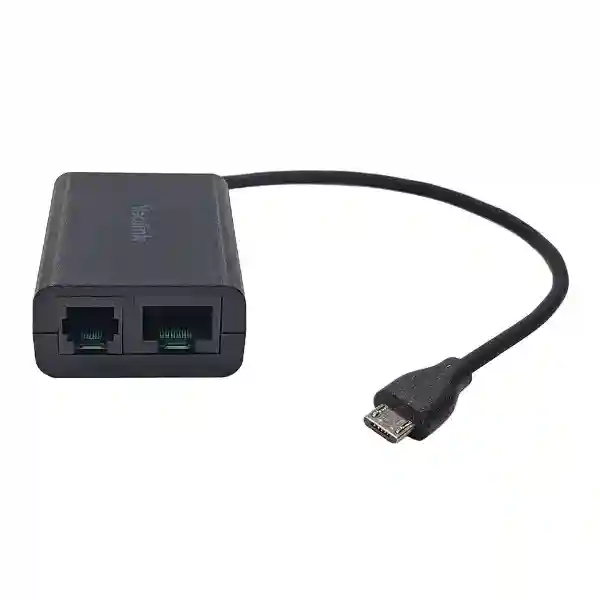
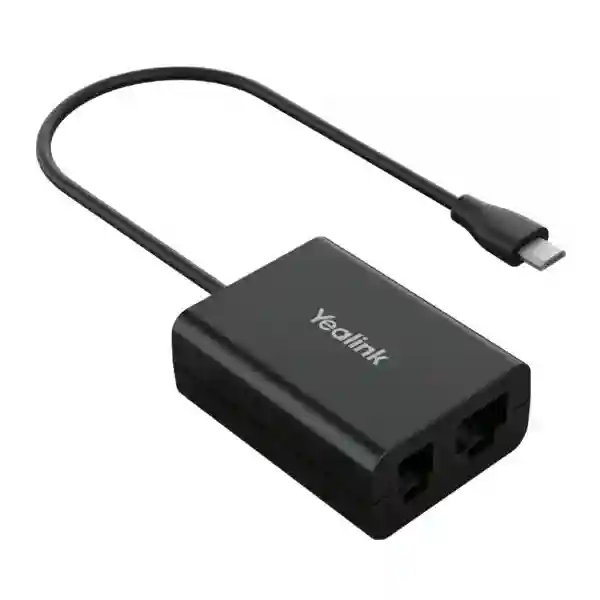
The EHS60 sits between the wireless headset base and a compatible desk phone. Its job is not to replace the phone, PBX, SIP service or headset base; instead, it carries the control interface that allows the supported Yealink DECT headset solution to work with selected non-Yealink phones. The physical architecture is intentionally compact. A 20 cm Micro-USB lead serves the supported Yealink wireless headset connection, while RJ45 and RJ9 interfaces participate in the phone-side connection through the supplied cable set.
This architecture addresses a common enterprise problem. A company may already have hundreds of Cisco, Avaya, Poly, Grandstream or Fanvil desk phones but want to introduce Yealink wireless headsets. Replacing the telephones solely to gain wireless call control would create unnecessary capital expenditure, provisioning work and user disruption. The EHS60 enables a supported integration path while preserving the existing desk-phone investment. Users can receive an incoming-call indication through the headset and, subject to the supported phone configuration, answer and end calls from the wireless headset. Yealink documentation also identifies volume control and notes that microphone mute support is phone-dependent, with current documentation specifically identifying Cisco support for that function.
The key technical distinction is that physical connector fit does not by itself prove operational compatibility. The desk phone must expose the expected headset signalling behaviour. Cisco deployments can require Wireless Headset Hookswitch Control to be enabled. Avaya deployments can require switch-hook and alert signalling to be turned on. Grandstream installations may require the headset key mode, headset type and speaker ringing options to be configured. Poly phones can require the appropriate hookswitch mode. A successful rollout therefore combines the correct hardware, correct cable and correct phone setting.
For procurement teams, this configuration dependency is manageable when handled before dispatch. FourTeck can collect the phone model list, headset model and hardware marking, branch quantities and intended user profile. That information supports bill-of-materials verification and reduces the risk of receiving an adapter that physically connects but cannot deliver the desired remote call-control behaviour on a particular phone revision.
Enterprise Business Outcomes and Value Analysis
Wireless answer and hang-up capability reduces unnecessary movement back to the desk phone. Receptionists and service agents can remain productive while retrieving files, consulting nearby colleagues or moving within the working range of their headset system.
Where the installed desk phones are supported, organisations can introduce compatible Yealink wireless headsets without automatically replacing the phone estate. This can make a headset modernisation project easier to stage across departments and branches.
The included cable approach supports several major desk-phone ecosystems. This is useful after mergers, branch acquisitions or phased communications projects where a company operates more than one phone brand.
The adapter has a clearly defined purpose and supported headset family. Procurement teams can validate exact combinations instead of relying on generic analogue headset assumptions, improving deployment predictability.
The EHS60 does not introduce a separate user application or subscription tier. Once the supported hardware and desk-phone hookswitch configuration are in place, the user interacts primarily through the headset and phone.
Standardising the correct adapter and cable assignment can simplify support documentation, spares planning and help-desk troubleshooting for reception, customer care and administrative teams.
The strongest commercial value comes from avoiding mismatched accessories and preserving useful endpoint assets. A low-cost accessory can still create substantial support overhead if ordered without checking the phone firmware, headset hardware generation or signalling mode. For that reason, a structured compatibility schedule should be attached to larger orders. It can list site, phone model, quantity, headset model, EHS setting, cable assignment and acceptance-test owner. This turns an accessory purchase into a controlled deployment rather than an informal desk-by-desk installation.
Key Hardware and Software Highlights
| Component / Function | Technical Detail | Operational Outcome |
|---|---|---|
| Headset connection | Micro-USB connection, integrated cable approximately 20 cm | Links the EHS60 to supported WH62/WH63 headset hardware. |
| Phone interfaces | RJ45 (8P8C) and RJ9 (4P4C) | Supports the required phone-side signalling path with the supplied cable set. |
| Cable A | For supported Avaya, Grandstream and Fanvil deployments | Reduces accessory ambiguity across compatible phone brands. |
| Cable B | For supported Cisco deployments | Provides the documented Cisco connection path. |
| Cable C | Used with Cable A for supported Poly deployment | Supports the documented Poly interface arrangement. |
| Call control | Remote answer/end and volume functions on supported combinations | Lets users manage routine calls away from the handset. |
Technical Specifications Ledger
| Product type | Wireless headset / electronic hookswitch adapter |
| Model | Yealink EHS60 |
| Supported headset family | Compatible EHS60-supported hardware versions of Yealink WH62 and WH63 |
| Documented phone brands | Cisco, Avaya, Poly, Grandstream and Fanvil; verify exact phone model |
| Headset interface | 1 × Micro-USB, approximately 20 cm cable |
| Phone-side interfaces | 1 × RJ45 (8P8C), 1 × RJ9 (4P4C) |
| Package cables | Cable A, Cable B, Cable C |
| Gift box | 141 × 102 × 46 mm |
| Carton quantity | 40 pieces |
| Carton size | 430 × 243 × 297 mm |
| Carton net / gross weight | 3.672 kg / 4.204 kg |
| Operating temperature | -10°C to 45°C |
| Relative humidity | 5% to 90%, non-condensing |
| Storage temperature | -30°C to 70°C |
| Compliance documented by manufacturer | RoHS, WEEE, REACH; EMC and safety declarations in manufacturer documentation |
The EHS60 is a signalling accessory rather than a network-processing device, so conventional specifications such as Ethernet throughput, switching capacity, rack units and independent AC power draw do not apply in the way they would to a switch or server. Procurement should instead focus on connector topology, headset revision, phone model, electronic hookswitch support, environmental conditions and cable assignment. This distinction prevents inappropriate comparisons with USB audio dongles or network appliances.
Configuration and Sizing Worksheet
Step 1 – Inventory the desk phones
Record manufacturer, exact model, firmware level and quantity at every site. Do not group all Cisco, Avaya, Poly, Grandstream or Fanvil devices together without model numbers because support can vary within a manufacturer portfolio. For mixed estates, prepare separate line items for each phone family.
Step 2 – Verify the headset hardware
Confirm that the intended WH62 or WH63 hardware is an EHS60-supported revision. Yealink documentation indicates that newer hardware carries EHS60 support markings. Existing customers should check the packaging or headset base marking rather than assuming every historical WH62/WH63 unit is equivalent.
Step 3 – Map the cable
Assign the documented EHS60 cable arrangement to each phone family. Cable B is used for the documented Cisco connection. Cable A covers documented Avaya, Grandstream and Fanvil scenarios. Supported Poly deployment uses the documented Cable A/C arrangement. Keep these assignments in the rollout sheet so installers do not improvise.
Step 4 – Plan phone configuration
Identify who controls phone provisioning. Cisco may require wireless headset hookswitch control to be enabled. Avaya can require switch-hook and alert signalling. Grandstream can require headset-mode parameters and speaker ringing. Poly can require an appropriate hookswitch mode. Where settings are centrally provisioned, involve the telephony administrator before the physical installation window.
Step 5 – Prepare the quote
Provide company name, delivery city, phone models, headset models, adapter quantity, required delivery date and whether staging or compatibility assistance is needed. For branch deployments, include quantities by location. This gives the commercial team enough information to validate the bill of materials and prepare a clearer quotation.
Deployment Scenarios and Industry Use Cases
Large enterprise and multi-site offices: Enterprises frequently retain different phone generations across headquarters and branches. The EHS60 can form part of a standard wireless-headset deployment where the specific installed phones are compatible. A central rollout schedule can document each site’s phone family and cable assignment, while a small spare pool can be held at the main IT office. This is particularly useful when the business wants a consistent Yealink WH62/WH63 user experience without forcing a simultaneous replacement of all third-party phones.
Financial institutions: Branch service teams, relationship managers and operational desks often need to move between screens, documents and nearby colleagues while maintaining a call. A validated EHS60 deployment can support wireless call handling while retaining approved desk-phone infrastructure. Banks and financial organisations should include endpoint compatibility and configuration evidence in their internal change-control documentation.
Education and campus networks: Administrative offices, admissions teams, finance departments and help desks can benefit from wireless call control where staff routinely move within a workspace. Campus IT teams can standardise adapter installation instructions and verify phone models building by building before bulk purchasing.
Government and public-sector procurement: The EHS60 can be specified as an accessory within a wider headset requirement, with the phone compatibility schedule forming part of the technical compliance matrix. Procurement officers should request manufacturer part identification, warranty terms, delivery lead time and exact supported endpoint combinations on the quotation.

Technical Deep Dive: Signalling and Interface Architecture
Electronic hookswitch integration exists to reproduce call-control actions that would otherwise require physical interaction with the telephone. In the EHS60 architecture, the wireless headset remains the user-facing device while the adapter participates in the signalling path to the desk phone. This is why the EHS60 should not be evaluated solely by connector count. Its value comes from the supported relationship among the phone, adapter and headset base.
The supplied multi-cable approach reflects the fact that major desk-phone manufacturers expose headset control through different physical pinouts and configuration conventions. The adapter package is therefore designed to cover several documented ecosystems while maintaining a single EHS60 product identity. From an operations perspective, this makes inventory easier, but only when the deployment team preserves the correct cable mapping. Labelling installed cables or keeping the unused cables with the site spares can simplify later moves and changes.
Technical Deep Dive: Phone Configuration and Operational Control
A desk phone can have the correct physical port but still fail to provide remote hookswitch behaviour until the appropriate setting is enabled. This is an important pre-deployment issue. On supported Cisco phones, Yealink guidance notes that Wireless Headset Hookswitch Control may need to be enabled. Avaya guidance references switch-hook and alert signalling. Grandstream guidance includes headset key mode, Plantronics EHS selection and speaker ringing configuration. Poly guidance references the headset hookswitch mode. Exact menu wording can vary with phone firmware, so administrators should use current phone-vendor documentation when implementing settings.
For managed estates, settings should ideally be incorporated into the organisation’s normal provisioning process rather than configured manually on every desk. A pilot of several representative phone models is advisable before a large rollout. The acceptance test should include incoming ring indication, answer, audio path, volume, hang-up and any phone-specific mute requirement.
Technical Deep Dive: Availability, Resilience and Supportability
The EHS60 is not a high-availability appliance, but accessory reliability still matters because a failed interface can interrupt the user’s preferred call workflow. Organisations with high-volume service desks can mitigate this by keeping a small quantity of validated spare adapters and headset components. Because the adapter is compact, spare holding is straightforward compared with keeping complete phone systems.
Troubleshooting should follow a controlled sequence: confirm the phone is operational, confirm the headset is paired and working, inspect cable seating, verify the correct EHS60 cable, confirm the phone’s hookswitch setting, and test the adapter with a known-good compatible endpoint where possible. This method separates phone, headset, cable and adapter faults instead of replacing components at random.
Pre-Purchase Buyer Gap Checklist
Does it work with every WH62 and WH63? Buyers should verify hardware revision. Manufacturer documentation states that newer WH62/WH63 hardware supports EHS60 and identifies support markings on compatible hardware. This is especially important when reusing headsets purchased in earlier years.
Does it work with every phone from the named brands? No blanket assumption should be made. Confirm the exact phone model against current compatibility guidance. Brand-level compatibility is useful for narrowing the solution, but model-level validation is the correct procurement standard.
Are subscriptions required? The EHS60 itself is a hardware adapter and does not introduce a separate subscription. The underlying phone system, PBX, hosted calling platform or headset ecosystem may have its own commercial requirements, which are outside the adapter.
Does it need mains power? It is not specified as a standalone mains-powered appliance. Its architecture uses the documented headset/phone connection path. Buyers should focus on compatible interfaces and cabling rather than planning an extra AC outlet specifically for the adapter.
Will mute work identically on every phone? Feature behaviour can differ. Current Yealink documentation specifically notes microphone mute support for Cisco in the EHS60 context. Procurement specifications should distinguish essential requirements such as answer/end from phone-dependent secondary controls.
What should be tested in a pilot? Validate incoming call indication, answer, two-way audio, volume, hang-up, mute where required, cable stability and phone recovery after restart. Test representative firmware versions before mass deployment.
What is in the box? Manufacturer documentation lists the EHS60, Cable A, Cable B, Cable C and user guide. Confirm package contents on the commercial quotation where project documentation requires explicit accessory listing.
Uganda Procurement and Delivery Logistics
FourTeck supports Uganda organisations that need Yealink EHS60 adapters for individual offices, service desks, contact centres or distributed branch projects. A useful request for quotation should identify the end-user organisation, delivery destination, required quantity, target deployment date, exact desk-phone models and the Yealink headset models already installed or being purchased. Providing these details early helps the technical and commercial teams identify compatibility questions before order confirmation.
Order processing can include bill-of-materials review, confirmation of adapter quantity, accessory verification and coordination of dispatch. Delivery lead time depends on confirmed stock position, quantity and project logistics at the time of quotation; buyers should therefore request the required date rather than relying on a generic delivery estimate. For larger deployments, staged delivery can be discussed where branches have different installation schedules.
Technical pre-configuration on an EHS accessory is primarily about validating the endpoint combination and documenting the correct phone-side settings. Where customers provide their phone inventory, FourTeck can help identify items that require additional validation before deployment. This approach is particularly useful for mixed-brand estates and older headset fleets.
Uganda Coverage Matrix
Head-office, contact-centre and enterprise procurement support.
Business, hospitality and institutional communications requirements.
Industrial, education and branch-office headset deployments.
Regional office and multi-site communications procurement.
Public-sector, education, NGO and business deployment requirements.
Projects outside these hubs can also be quoted. For nationwide rollouts, customers should provide a site list and quantity split so logistics can be planned around the actual deployment sequence. Central purchasing teams can request consolidated quotations while retaining branch-level delivery detail.
Cross-Border and Regional Supply
FourTeck supports regional enterprise procurement through dedicated market portals. Uganda requirements can be coordinated through FourTeck Uganda, while projects involving neighbouring or multi-country operations can reference FourTeck Kenya and FourTeck Africa. Organisations with Gulf procurement structures can also coordinate requirements through FourTeck UAE and FourTeck Kuwait.
For cross-border projects, the most useful approach is to establish one technical bill of materials and then map quantities, delivery destinations and commercial requirements by country. This reduces the chance that branches order different accessories for the same endpoint combination and makes compatibility documentation easier to maintain.
Related Yealink Solutions and Internal Resources
The EHS60 normally sits within a broader endpoint solution rather than being purchased in isolation. Buyers evaluating a new wireless call-handling environment should also review Yealink WH62 options and Yealink WH63 options. Organisations refreshing their complete voice estate can explore Yealink IP phones, Yealink business headsets, and Yealink accessories.
If the installed phone brand falls outside the EHS60 scope, the correct next step is not to force a cable fit. Review the appropriate Yealink adapter family and current compatibility information. For example, other EHS models address different phone ecosystems. A compatibility-led selection process protects the user experience and reduces return or rework risk.
FourTeck Technical Service Capabilities
FourTeck can support the accessory procurement lifecycle from requirement definition through delivery. Engineering validation begins with the actual endpoint inventory: phone manufacturer and model, headset model and hardware marking, required user functions and quantity. Bill-of-materials verification checks that the adapter choice and accessory quantities align with that inventory. For larger deployments, the team can help structure a pilot checklist so customer IT staff can confirm expected call-control behaviour before wide rollout.
Where a project includes phones or other managed endpoints, firmware and configuration considerations can be reviewed before shipment as part of the broader solution. For the EHS60 specifically, the critical staging task is documenting the correct cable and phone-side electronic hookswitch setting. Post-sales support can then work from the same validated deployment record if a site reports unexpected behaviour.
This service model is valuable because accessory issues are often caused by combination mismatches rather than a defective component. Capturing the phone model, headset revision and cable path at purchase time gives support teams a much stronger starting point.
Extended Technical FAQ
1. What is the Yealink EHS60 used for?
The EHS60 is a wireless headset adapter that provides an electronic control interface between supported Yealink WH62/WH63 DECT headset hardware and compatible third-party desk phones. Its main purpose is to enable remote call handling so a user can answer or end supported desk-phone calls from the wireless headset instead of physically lifting or operating the handset each time. This makes it especially useful for receptionists, service agents, administrative teams and other users who need to move around their immediate workspace while remaining responsive to calls.
2. Which desk-phone brands are supported?
Yealink documentation identifies compatible models within Cisco, Avaya, Poly, Grandstream and Fanvil desk-phone ecosystems. Buyers should not interpret this as a guarantee that every historical or current phone from those manufacturers works identically. The correct process is to provide the exact phone model and, where relevant, firmware version for compatibility validation. Different brands also use different supplied cable arrangements and may require different phone settings. Model-level checking is particularly important in enterprises where several phone generations remain in service.
3. Will the EHS60 work with any Yealink WH62 or WH63?
Compatibility depends on the headset hardware generation. Yealink documentation states that newer WH62 and WH63 hardware supports EHS60 and describes EHS60 support markings that can be checked on the package or base. If your organisation already owns WH62 or WH63 units, inspect those markings and provide the hardware details during quotation. For a new combined purchase, request that the headset and adapter combination be validated together. This prevents older stock or mixed hardware revisions from creating inconsistent results across desks.
4. Does installation require phone configuration?
Often, yes. The physical connection is straightforward, but the phone must expose the appropriate electronic hookswitch behaviour. Yealink guidance notes configuration steps for supported Cisco, Avaya, Grandstream and Poly phones. Cisco can require Wireless Headset Hookswitch Control to be enabled. Avaya can require switch-hook and alert signalling. Grandstream can require specific headset mode and ringing parameters, while Poly can require the relevant hookswitch mode. Your telephony administrator should verify current settings and phone-vendor documentation before a large rollout.
5. What cables are supplied with the EHS60?
Manufacturer documentation lists three phone connection cables: Cable A, Cable B and Cable C, together with the EHS60 and user guide. The cables support different documented phone-brand connection paths. Cisco uses the documented Cable B arrangement. Avaya, Grandstream and Fanvil use Cable A in the manufacturer’s current material, while Poly uses the documented Cable A and Cable C arrangement. Installers should retain the unused cables as labelled spares rather than discarding them, especially where users may later move to another supported phone type.
6. Does the EHS60 require a software licence or subscription?
The EHS60 itself is a hardware interface and does not introduce a separate recurring licence or subscription. It operates as part of the physical headset-to-phone integration. However, the desk phone and calling environment may be connected to a PBX, hosted voice platform or enterprise communications service that has its own licensing. Those service licences are separate from the EHS60. When preparing a project budget, distinguish the one-time accessory requirement from any existing voice-platform commercial costs.
7. Can the EHS60 be used in call centres and reception areas?
Yes, those are strong use cases when the installed phones and headset hardware are supported. Reception and contact-centre users frequently benefit from answering calls while away from the handset, particularly when they need to access files, printers, counters or nearby colleagues. For high-volume environments, conduct a pilot on representative phones and test ring indication, answer, audio, volume and hang-up behaviour. Keep a small spare pool for operational continuity and document each workstation’s phone model and cable arrangement so support teams can troubleshoot consistently.
8. How should warranty or replacement cases be handled?
Warranty terms should be confirmed on the FourTeck quotation because regional commercial conditions can vary. If a deployed adapter appears faulty, first verify the supported phone/headset combination, correct cable, physical seating and phone hookswitch configuration. This helps distinguish an adapter fault from a configuration or compatibility issue. For replacement processing, retain purchase records, product identification and a concise fault description. Where possible, note whether the adapter was tested against a known-good supported endpoint, as this can accelerate technical assessment.
9. Can FourTeck help confirm compatibility before we buy?
Yes. Provide the exact desk-phone manufacturer and model, Yealink headset model, available hardware marking or revision information, required quantity and the call-control functions that matter to your users. For mixed estates, a spreadsheet grouped by site is ideal. FourTeck can use this information to review the intended bill of materials and identify combinations that need further validation. This is strongly recommended for bulk orders because a short pre-purchase technical check can prevent significant installation rework across dozens or hundreds of desks.
10. What information should be included in a Uganda quotation request?
Include your organisation name, delivery city, required quantity, exact desk-phone models, WH62/WH63 details, desired delivery date and whether you need compatibility assistance. For a multi-site deployment, list quantities for Kampala, Entebbe, Jinja, Mbarara, Gulu or other destinations separately. If the project has an installation deadline, mention it at the start so lead-time planning can be considered. If the headset hardware is already installed, photographs of the model and support markings can also help the technical team identify the relevant revision.
Request a Yealink EHS60 Procurement Quote
For the most reliable deployment, order the EHS60 against a verified phone and headset inventory rather than selecting the adapter from brand names alone. FourTeck can review your endpoint combination, quantity, delivery location and rollout requirements before quotation. Whether you need a small number of adapters for a reception desk or a structured rollout across multiple Uganda branches, provide the phone models and headset hardware details so the correct solution can be documented from the start.
Contact the FourTeck Uganda team for commercial pricing, current availability, warranty terms, delivery planning and technical compatibility guidance. Project quotations can cover adapter quantities, related Yealink headset requirements and other communications accessories under one procurement request.



Reviews
There are no reviews yet.