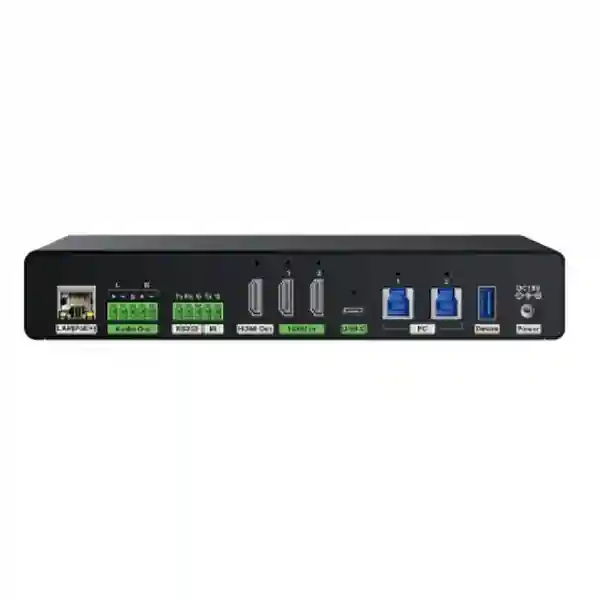
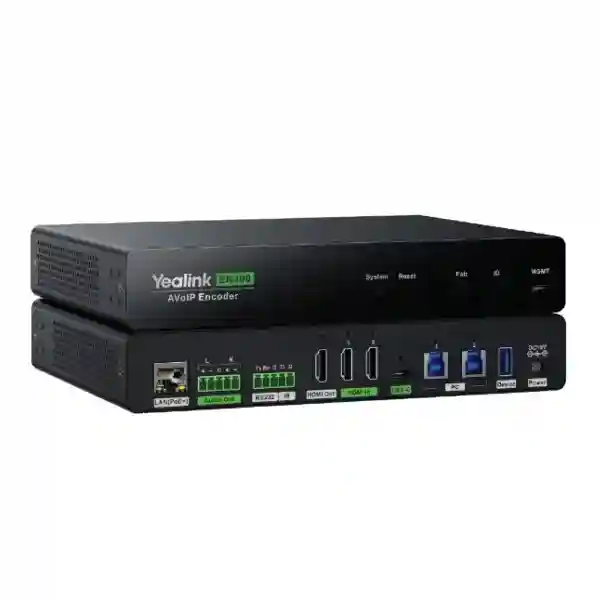
Yealink EN300 AV over IP Encoder for Enterprise 4K AV Distribution
The Yealink EN300 is a professional AV over IP encoder engineered to move high-quality presentation video, audio and USB workflows across standard Gigabit Ethernet infrastructure. In practical enterprise deployments, it replaces the limitations of long point-to-point AV cabling with a network-oriented architecture that can scale as rooms, sources and displays change. The platform supports video encoding up to 4K at 60Hz with 4:4:4 chroma sampling, 8-bit color depth and a stream bitrate below 1Gbps. Yealink positions the EN300 and companion DE300 decoder as core endpoints in its AVoIP solution, with transmission latency below one video frame. This makes the platform suitable for meeting rooms, boardrooms, training environments, divisible rooms and other professional spaces where users expect sharp text, accurate color and responsive presentation switching.
For Uganda projects, the key procurement advantage is architectural flexibility. One EN300 can accept multiple local sources through USB-C and HDMI interfaces, while additional encoders can be added when a design requires independent network streams from more source devices. Decoders can then be placed at displays, projectors or downstream meeting systems according to the room topology. This modular approach allows an integrator to size the installation around the actual number of sources and destinations instead of forcing every project into a fixed matrix size.
The EN300 also addresses modern collaboration requirements beyond video transport. Its USB capabilities support local control, USB over IP and wired BYOD/BYOM scenarios. Full-featured USB-C can carry presentation content and provide laptop charging, while control interfaces such as RS232 and IR help integrate room displays and automation workflows. HDCP 2.3 support enables secure transport of protected UHD content where compatible source and display devices are used.
Instant Specifications & Procurement Fact Rail
Yealink EN300
AV over IP Encoder
Up to 4K@60Hz 4:4:4
Gigabit Ethernet
802.3at Class 4 PoE+ / DC adapter
Project quotation on request
A complete quotation should be based on the room design rather than the encoder alone. Buyers should identify how many independent video sources must be available simultaneously, how many displays need routed content, whether BYOM is required, whether USB peripherals must be extended over the network, and whether control integration is expected. Yealink guidance recommends considering one encoder per independent video input source when maximum routing flexibility is required, although the EN300 can handle up to three local source connections through one USB-C and two HDMI inputs when independent simultaneous network encoding is not required. Display counts typically drive decoder quantities. FourTeck can review these variables before order confirmation and align the bill of materials with the intended room topology.
Operational Product Architecture & Overview
The EN300 sits at the source side of a Yealink AVoIP deployment. It receives local content, encodes the selected stream and places that content onto a Gigabit Ethernet network for routing to compatible receiving endpoints. This architecture separates physical source location from display location. A presentation computer can therefore remain at a lectern, rack or conference table while the destination display is positioned elsewhere in the room or across an appropriately designed network segment.
Video quality is central to the platform. The encoder supports up to 4K@60Hz, 4:4:4 chroma sampling and 8-bit color. For business presentation environments, 4:4:4 is particularly useful because fine text, spreadsheets, engineering drawings and interface elements retain clarity instead of suffering the color-detail reduction common with heavier chroma subsampling. The low-compression architecture keeps the stream below the 1Gbps network ceiling while maintaining visually lossless presentation quality. Latency below one frame helps preserve the natural response expected when a presenter changes slides, moves a pointer or works interactively with content.
Input flexibility reduces table clutter and switching complexity. The EN300 provides two HDMI inputs and a full-featured USB-C presentation input. Yealink supports automatic source detection so the most recently connected source can be routed without requiring users to understand a complex matrix interface. The device also provides HDMI output for local routing. This makes it possible to design rooms where local and network destinations coexist.
USB functionality expands the encoder from a video transmitter into a collaboration endpoint. Local USB switching can support keyboard and mouse workflows, while USB over IP can extend control between encoder and decoder locations. In BYOD and BYOM designs, network-connected room cameras and audio devices can be made available to a user’s computer through the planned Yealink architecture. This is valuable in rooms where users bring laptops but still need access to installed microphones, speakers and cameras.
Audio integration is similarly flexible. Yealink’s design documentation describes interoperability options including AES67, Dante-oriented workflows, standard AVoIP audio streams and proprietary Yealink audio integration depending on the project architecture and activated capabilities. Procurement teams should confirm the required audio protocol and any related activation or licensing before finalizing the order, particularly where third-party DSPs, network speakers or mixing systems form part of the design.

At the network layer, the EN300 is designed for Gigabit Ethernet. AV traffic can be demanding, so the switch architecture, VLAN design, multicast handling and uplink capacity should be reviewed as part of deployment planning. A device being compatible with 1Gbps Ethernet does not mean an unmanaged or oversubscribed network is automatically suitable for a multi-endpoint AV system. For larger deployments, the aggregate traffic pattern, switch features and segmentation strategy should be validated by the project engineer.
Enterprise Business Outcomes & Value Analysis
Key Hardware & Software Highlights
| Capability | EN300 implementation | Operational value |
|---|---|---|
| Video encoding | Up to 4K60, 4:4:4, 8-bit | Sharp enterprise presentation content |
| HDMI | 2 HDMI inputs, 1 HDMI output | Multiple local sources and local output routing |
| USB-C | Full-featured presentation/BYOM connection with laptop charging | Single-cable meeting workflow |
| USB | Local switching and USB over IP workflows | Flexible KVM and peripheral access |
| Control | RS232 and IR | Display and room-control integration |
| Network | 1Gbps Ethernet, PoE+ | Structured AV transport and simplified powering |
Technical Specifications Ledger
| Specification | Details |
|---|---|
| Product type | Professional AV over IP encoder |
| Maximum encoding resolution | Up to 4K Ultra HD at 60Hz |
| Chroma sampling | 4:4:4 |
| Color depth | 8-bit |
| Encoded bitrate | Below 1Gbps |
| Latency | Ultra-low, below one frame in Yealink AVoIP architecture |
| HDMI inputs | 2 |
| HDMI output | 1 |
| USB connectivity | USB-A, USB-B and USB-C interfaces; management USB-C included in published specifications |
| Ethernet | Gigabit RJ45 |
| PoE | IEEE 802.3at Class 4 PoE+ |
| Content protection | HDCP 2.3 |
| Control interfaces | RS232 and IR output |
| Typical ecosystem | Yealink DE300 decoder, AVoIP management and compatible Yealink meeting-room components |
Specifications should be checked against the shipping-region datasheet and approved bill of materials at quotation stage. Features involving third-party protocols, activation, firmware or interoperability may depend on project configuration. This is especially important for Dante-oriented deployments, protected-content chains and USB/BYOM designs, where every connected component influences the final user experience.
Configuration & Sizing Worksheet
1. Count independent source streams
List every fixed PC, guest laptop, media player, signage source, document camera and conferencing host that may need independent network routing. If only one source needs to be encoded at a time, the EN300’s multiple local inputs can reduce endpoint count. If multiple sources must be independently available to different destinations at the same time, plan additional encoders.
2. Count destinations
Record every display, projector, confidence monitor or conferencing input that requires independently routed network content. Decoder quantities normally follow destination requirements. Consider whether two displays always show identical content or need independent routing.
3. Validate network capacity
Identify access switches, uplinks, VLANs and multicast requirements. Confirm Gigabit access ports at endpoints and adequate aggregate bandwidth through the switching fabric. Large rooms and multi-room deployments deserve explicit network review before equipment is ordered.
4. Plan power and mounting
Decide whether endpoints will use PoE+ or local power. Confirm the PoE budget of the switch and account for all powered endpoints. Verify rack, furniture, under-table or wall-mount positions, service clearance and cable strain relief.
5. Define collaboration workflows
State whether users need presentation only, wired BYOM, USB peripheral extension, KVM-style control, network audio integration, room automation or protected content. These requirements determine the complete device combination and configuration effort.
6. Prepare the quotation
For an accurate FourTeck quote, provide site city, room quantity, room type, number of sources, number of displays, switch model if already selected, desired conferencing platform, USB peripherals, audio DSP requirements, control requirements, mounting constraints and target installation date. This information allows the commercial and technical teams to distinguish a simple encoder purchase from a complete AVoIP deployment.
Deployment Scenarios & Industry Use Cases
Large Enterprise & Multi-Site Networks
Enterprise headquarters often contain different room classes: standard meeting rooms, executive boardrooms, training areas, town-hall spaces and divisible conference rooms. The EN300 allows the AV architecture to use a consistent source-encoding approach across these environments. Standard rooms may use one encoder and one decoder, while larger spaces can add endpoints according to source and display counts. This consistency simplifies spares planning, technician training and future expansion.
Financial & Banking Institutions
Banks and financial organizations frequently display high-density dashboards, transaction information, presentations and remote-meeting content. 4:4:4 chroma sampling helps preserve fine text and numerical detail. HDCP 2.3 support can also matter when protected media forms part of executive or training-room workflows. Network segmentation, access policy and change control should be designed according to the institution’s internal governance requirements.
Educational & Campus Networks
Lecture halls and training rooms can benefit from source flexibility and network-based distribution. A lecturer’s laptop, fixed teaching PC and specialist content source can be connected to the encoder, while displays or projectors receive content through the planned decoder topology. USB over IP can support remote keyboard and mouse control in selected designs. Campus IT teams should ensure that AV traffic is engineered rather than simply added to a congested general-purpose network.
Government & Public-Sector Procurement
Government meeting rooms, briefing spaces and training facilities often require documented bills of materials, controlled firmware, repeatable configuration and clear replacement procedures. The EN300’s standardized endpoint architecture supports structured project documentation. FourTeck can assist with model validation, accessories, staging requirements and delivery planning, while the customer retains responsibility for internal security accreditation and network policy approval.

Technical Deep Dive: Processing & AV Transport
The design objective of the EN300 is to preserve the visual fidelity expected from a direct local connection while gaining the routing flexibility of IP transport. Supporting 4K60 4:4:4 means the encoder is aimed at professional presentation rather than low-bandwidth monitoring. The stream is engineered to remain within Gigabit Ethernet constraints, allowing organizations to use appropriately specified enterprise switching instead of a proprietary high-bandwidth transport fabric. This balance matters because it makes endpoint scaling practical while retaining the detail required for business content.
Low latency is equally important. In a meeting room, even modest delay becomes noticeable when a presenter moves a cursor, operates a touch interface or changes content while watching the remote display. Yealink specifies latency below one frame in its AVoIP solution. The result is an architecture suitable not only for passive video playback but also for interactive collaboration. Correct switch configuration remains essential because congestion, packet loss or unsuitable multicast behavior elsewhere in the network can undermine endpoint performance.
Technical Deep Dive: Software, Firmware & Control
AV over IP endpoints should be managed as infrastructure, not as isolated adapters. Firmware versions, endpoint naming, routing logic and control integrations should be documented during commissioning. Yealink’s AVoIP ecosystem includes centralized management functions for monitoring, configuration, firmware updates and diagnostics. This helps technicians understand device state and maintain consistency across larger deployments. For production environments, firmware changes should be staged and validated before broad rollout, especially when the system integrates third-party DSPs, conferencing hosts or control processors.
RS232 and IR interfaces give system designers options for display control, while APIs and room-control integrations can be used in more complex Yealink designs. Buyers should define the intended control ownership early: whether displays are controlled by the AVoIP system, a room controller, a conferencing platform or a third-party automation processor. Clear ownership prevents conflicting commands and simplifies support.
Technical Deep Dive: Availability & Recovery Planning
High availability in an AV environment begins with topology. Critical rooms should have documented switch ports, spare patching, saved configuration and an agreed replacement path for encoders and decoders. Where the room is business-critical, organizations can keep spare endpoints or define rapid replacement procedures. PoE+ can simplify recovery by reducing dependency on local power adapters, provided the network switching layer itself has adequate power resilience.
Disaster recovery also means preserving configuration knowledge. Record endpoint addresses, logical names, source mappings, display mappings, firmware versions, cable labels and room-control dependencies. A replacement unit can then be commissioned against a known baseline rather than reverse-engineering the room under outage pressure. FourTeck can support staging and bill-of-material verification so project teams receive the correct endpoint mix before site deployment.
Pre-Purchase Buyer Gap Checklist
Before approving an EN300 order, confirm more than the headline resolution. First, determine whether any desired audio or third-party ecosystem feature requires separate activation or licensing. Dante-related workflows, for example, should be confirmed against the exact project requirement rather than assumed from basic network audio support. Second, check firmware compatibility across EN300 encoders, DE300 decoders and management components. Third, verify that the switching infrastructure supports the traffic pattern and PoE budget of the planned endpoint count.
Physical installation deserves equal attention. Confirm where each encoder will sit, whether the supplied mounting accessories suit the furniture or rack arrangement, and whether HDMI, USB-C, USB and Ethernet cables can be routed without exceeding practical cable limits or blocking service access. A compact endpoint installed behind a display still needs ventilation, cable bend radius and a path for technician access.
USB-C expectations should also be documented. Users may assume every USB-C cable supports video, data and charging, but cable capability varies. Use validated full-featured cables for the required distance and workflow. Where laptop charging is important, confirm the power-delivery requirement of the laptops being deployed. Where BYOM is required, identify the exact camera, microphone, speaker or DSP path and test the intended operating systems and conferencing applications.
For protected content, HDCP compatibility must exist across the complete chain. For cross-vendor audio, validate protocol support and configuration. For large systems, confirm whether network switches are dedicated to AV or shared with enterprise traffic, and ensure the network team approves the design. Finally, ask about product lifecycle, warranty handling, replacement lead times and availability of compatible decoders and management components. These checks turn a device purchase into a supportable system.
Uganda Procurement & Delivery Logistics
FourTeck supports Yealink EN300 procurement for organizations in Uganda that need either a single encoder or a complete AVoIP bill of materials. The quotation process is most effective when the customer shares the room topology and deployment requirements at the beginning. For a simple replacement, provide the exact model and quantity. For a new design, provide source counts, display counts, meeting-platform details, network-switch information and any USB, audio or control requirements.
After technical validation, the quotation can align encoders, decoders, management components, cables, mounting accessories and related Yealink room equipment. Delivery timing depends on confirmed stock position, order quantity, import routing and project schedule, so customers with fixed commissioning dates should request lead-time confirmation before issuing a purchase order. Pre-configuration requirements should also be stated before dispatch so staging can be incorporated into the project workflow where applicable.
Local Coverage Matrix
Projects can be coordinated for Kampala, Entebbe, Jinja, Mbarara and Gulu, as well as other Ugandan locations subject to logistics planning. Kampala deployments may include corporate offices, financial institutions, government facilities and hospitality meeting spaces. Entebbe projects often require careful scheduling around institutional or travel-related operations. Jinja, Mbarara and Gulu customers can request project-based delivery planning with quantities and required dates stated in advance. For multi-branch organizations, consolidating requirements into one bill of materials helps standardize room design and simplify future support.
Cross-Border & Regional Supply Chains
Organizations operating across East Africa, the Gulf and wider African markets can coordinate related requirements through FourTeck regional channels. Visit FourTeck Uganda, FourTeck Kenya, FourTeck Africa, FourTeck UAE or FourTeck Kuwait. Regional planning is useful when a customer wants consistent room standards, model selections and documentation across multiple countries while still accounting for local delivery, warranty and implementation conditions.
Related Yealink Components & Solution Planning
A complete AVoIP deployment may require more than the EN300. The companion DE300 decoder is the natural receiving endpoint for display-side routing. Larger rooms can incorporate Yealink management and control components, while conferencing spaces may also require cameras, microphones, speakers, DSPs and Microsoft Teams Rooms or BYOM hardware. Browse Yealink solutions in Uganda, review enterprise communication solutions, or request a designed bill of materials. Because room requirements vary, related products should be selected from the approved topology rather than added only by model similarity.
FourTeck Technical Service Capabilities
FourTeck can assist procurement teams with engineering validation before purchase. This includes checking the requested model against the intended application, reviewing source and display quantities, validating the encoder/decoder ratio, identifying power and cabling requirements and checking whether the planned network environment is appropriate for AVoIP traffic. For larger deployments, bill-of-material verification can reduce site delays caused by missing decoders, incompatible cables, insufficient PoE capacity or overlooked control accessories.
Where agreed as part of the project, staging can include firmware review, labeling and pre-shipment preparation. Post-sales support can then work from documented device identities and deployment assumptions. Customers should provide network diagrams and room schematics where available, particularly for divisible rooms, multi-display boardrooms and installations involving third-party DSP or automation systems.
Extended Technical FAQ
Does the Yealink EN300 support 4K at 60Hz?
Yes. Published Yealink documentation specifies encoding up to 4K at 60Hz with 4:4:4 chroma sampling and 8-bit color depth. This is well suited to professional presentation environments where fine text and detailed graphics need to remain clear. The end-to-end result still depends on the source, display, decoder, cabling and network being correctly specified for the target format. When planning protected UHD content, confirm HDCP compatibility across the complete signal chain.
What network does the EN300 require?
The EN300 is designed around Gigabit Ethernet and Yealink’s AVoIP endpoints keep encoded video below the 1Gbps link rate. For a single pair, this simplifies infrastructure requirements, but multi-endpoint projects still need proper network design. Aggregate bandwidth, multicast behavior, VLAN design, switch backplane capacity, uplink capacity and PoE budget should all be reviewed. A large AVoIP installation should not be treated as a collection of ordinary low-bandwidth office devices.
Can one EN300 accept several source devices?
Yes. The encoder provides one full-featured USB-C input and two HDMI inputs. Yealink documentation describes local switching and automatic detection of the most recently connected source. One EN300 can therefore be practical when several local devices share a single encoded network output. If different sources must be transmitted independently and simultaneously to different destinations, additional encoders should be planned so each required independent stream has an appropriate source endpoint.
Can the EN300 be used for BYOM?
Yes, BYOD/BYOM is one of the important collaboration scenarios in Yealink’s AVoIP architecture. USB-C can be used for presentation and wired meeting workflows, while USB networking can make compatible room camera and audio resources available to a connected user computer. The exact design depends on the Yealink and third-party peripherals involved, so the camera, audio path, conferencing application and laptop operating environment should be validated as a complete workflow before rollout.
Does the EN300 support PoE?
Yes. Published specifications identify IEEE 802.3at Class 4 PoE+ support, allowing the endpoint to receive power through a suitable Ethernet switch or injector. PoE can simplify installation by reducing local power-adapter requirements. For multi-device rooms, calculate the total switch PoE budget rather than checking only whether each port supports PoE+. Critical rooms should also consider the resilience of the switch power supply and UPS architecture.
Does it support protected commercial content?
The Yealink AVoIP series supports HDCP 2.3, which is relevant for protected UHD content. Successful playback still depends on every component in the chain, including the source, encoder, decoder, display and any intermediate processing. If protected media is a formal requirement, specify that during design and test the exact source and display combination. HDCP problems are often system-chain issues rather than a fault in one endpoint.
Can the EN300 integrate with Dante or AES67 environments?
Yealink’s AVoIP design documentation describes audio integration options that include Dante-oriented operation and AES67 alongside standard AVoIP audio and Yealink audio workflows. The required protocol, feature activation and third-party compatibility should be confirmed for the exact project before purchase. If the room already uses a network DSP, mixer or speakers, provide the manufacturer and model numbers so the integration path can be reviewed rather than assumed.
What decoder should be used with the EN300?
The Yealink DE300 is the companion decoder identified in Yealink’s AVoIP solution. A typical design uses encoders at source locations and decoders at display destinations. The number of decoders depends on how many displays or downstream destinations need independent network content. Standard rooms may use a simple one-to-one combination, while boardrooms, training rooms and divisible spaces can use multiple encoders and decoders controlled as a larger routing system.
Is special licensing required?
Core device operation and any optional ecosystem features should be separated during procurement. Some protocol-oriented capabilities can involve activation or project-specific entitlement, so buyers should state whether they need Dante-related functionality, centralized management, third-party control or other advanced integration. FourTeck can include the required items in the bill-of-material review. This avoids discovering after installation that an optional capability was assumed but not specified in the purchase scope.
How should warranty and replacement be planned?
Warranty terms should be confirmed on the formal quotation for the supplied region and project. For business-critical rooms, organizations should also plan beyond standard warranty by documenting configurations and considering spare endpoints or agreed replacement procedures. Keep serial numbers, firmware versions, network settings and logical device names in the project record. When a replacement is required, this documentation helps technicians restore the endpoint to the intended room configuration quickly and consistently.
Plan Your Yealink EN300 Deployment in Uganda
Whether you are upgrading one executive meeting room or standardizing AVoIP across multiple sites, start with a validated topology. Share the number of source devices, displays, rooms, conferencing platforms and required USB or audio integrations. FourTeck can use those details to prepare a practical bill of materials covering Yealink EN300 encoders, compatible receiving endpoints and supporting components. This reduces procurement uncertainty and gives technical teams a clearer installation baseline before equipment reaches site.
For quotation planning, include your organization name, deployment city, expected quantity and target installation date. If the project involves an existing network, provide the switch model and available PoE capacity. If it involves a new room, include the room drawing or a simple source-to-display description. A few accurate project details at quotation stage can prevent expensive redesign later.



Reviews
There are no reviews yet.