Yealink EXP43 Expansion Module – Enterprise Programmable Call-Control Console
The Yealink EXP43 is a color-screen expansion module that adds a large bank of programmable, status-aware keys to compatible Yealink T4U business phones. Its purpose is straightforward: give users who manage many extensions, queues, shared lines and call-handling actions a faster visual workspace than the desk phone alone can provide. The module presents 20 physical keys beside a 4.3-inch display and uses three page views to expose as many as 60 programmable functions. For receptionists, administrative teams and contact-center staff, that can reduce repeated menu navigation and make frequently used call actions available at a glance.
The EXP43 is particularly relevant when a deployment has outgrown the number of immediately accessible DSS keys on the host phone but replacing the entire handset estate would be unnecessary. It extends the user interface while keeping the established Yealink endpoint, SIP account configuration and PBX workflow. Depending on the host phone and PBX feature support, keys can be assigned to BLF monitoring, shared lines, speed dial, call park, conference, forwarding, group pickup, group listening, LDAP, XML Browser and other supported functions.
FourTeck supplies the Yealink EXP43 for business deployments in Uganda and can help buyers validate the host handset model, module quantity, USB and power requirements, desk layout and intended call-control workflow before purchase. This matters because expansion-module procurement should be based on the complete workstation design rather than the accessory model alone. A receptionist monitoring 35 extensions has different requirements from an executive assistant supervising several shared lines, and a deployment using two or three modules needs additional power planning.
For a precise quotation, provide the number of workstations, existing or proposed Yealink phone model, required number of monitored extensions or programmable actions, PBX or hosted voice platform, and delivery location. FourTeck can then prepare a compatible bill of materials rather than treating the EXP43 as an isolated accessory.
Instant Specifications & Procurement Fact Rail
Yealink EXP43 Color Expansion Module
4.3-inch, 272 × 480 pixels, backlit
20 physical keys; up to 60 functions across 3 pages
Compatible Yealink T4U desk phones
USB 2.0 compliant data connection
Contact FourTeck for current Uganda supply and project pricing
The EXP43 should be specified as part of the user workstation. Yealink documents direct applicability to T43U, T46U and T48U, while current Yealink product information also lists support with newer T44U/T44W models. Buyers should therefore identify the exact host-phone hardware and firmware before ordering. One module gives up to 60 programmable positions. Up to three EXP43 modules can be attached to T43U/T46U/T48U phones, creating up to 180 additional programmable positions. When two or three modules are used, Yealink specifies an external 5V/2A power adapter. Warranty terms, local stock position and replacement process should be confirmed on the project quotation because these can vary by supply channel and order structure.
Operational Product Architecture & Overview

An expansion module is not a separate telephone and does not independently register a SIP account. It operates as an extension of the host desk phone’s user interface. That distinction is central to procurement. The phone remains responsible for registration, call processing, network connectivity and PBX interaction; the EXP43 provides additional visual labels, status indicators and physical controls through which the user invokes supported phone and PBX functions.
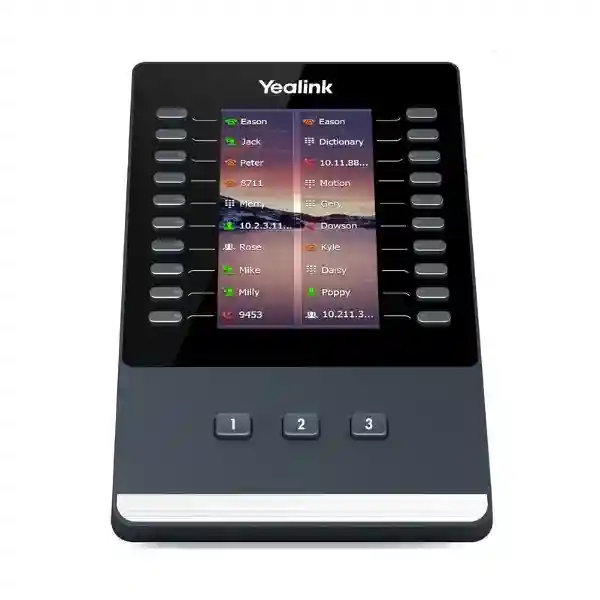
The front panel combines a 4.3-inch 272 × 480-pixel display with 20 physical keys, each associated with a dual-color LED. The screen can show different icons for assigned functions, while three dedicated illuminated page-control keys move between three views. Twenty visible key positions multiplied across three pages produces up to 60 programmable assignments on one module. This architecture is valuable because it gives a receptionist or assistant a consistent physical key location while allowing substantially more logical assignments than a single page could accommodate.
Typical procurement pain begins when staff are handling enough extensions that the base phone’s DSS capacity becomes operationally restrictive. A receptionist may need to see whether colleagues are busy before transferring a caller. An executive assistant may need one-touch access to principals, shared lines, parking positions and pickup groups. A service desk may need rapid access to queues, supervisors and escalation contacts. In these cases, the EXP43 creates a dedicated call-control surface without requiring a computer-based attendant console for every user.
BLF is one of the most common assignments. When the PBX, SIP service and phone configuration support it, a programmed key can represent another extension and its LED can provide a visual state indication. The user can then combine presence awareness with one-touch dialing or call handling. However, the module itself does not create PBX features. BLF subscriptions, pickup codes, shared-line behavior and other functions depend on the host phone configuration and telephony platform. Procurement teams should therefore validate the intended feature map against their PBX before rollout.
USB is also part of the workstation architecture. Yealink lists USB 2.0 compliant connectivity for data in and out, and the module can participate in the T4U USB accessory environment. When designing a workstation that may also use USB headsets, Wi-Fi adapters or recording media, administrators should review the exact phone model, available USB ports, accessory combination and power budget. This avoids discovering after delivery that the intended accessory stack needs an extra adapter, different connection order or revised workstation layout.
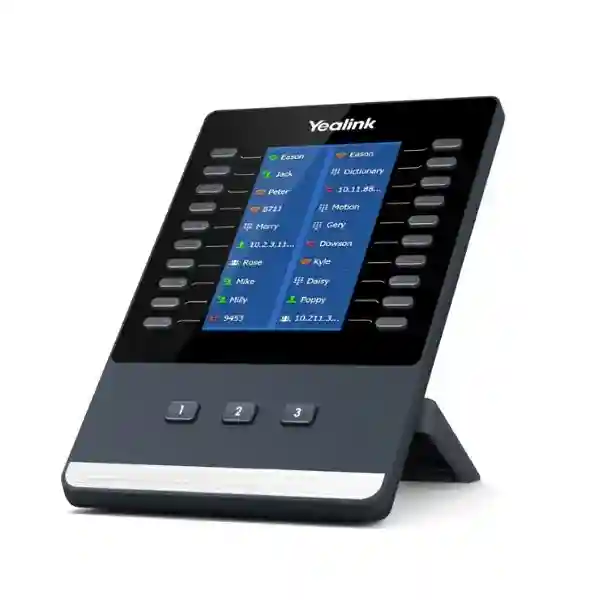
Physically, the EXP43 measures approximately 196.5 × 124.0 × 137.5 × 42.6 mm using Yealink’s W × D × H × T notation and includes a stand with two adjustable angles. Desk-space planning is therefore important in dense reception counters and trading-style work areas. Multiple modules extend laterally from the phone and need stable desk depth, cable clearance and a comfortable viewing angle. A paper-based bill of materials should consequently include not only module count but also the desk environment and cable route.
Power consumption for the module is specified at a maximum 1.5 W with PSU. A single-module configuration is comparatively simple, but Yealink specifically calls for an external 5V/2A adapter when supporting two or three expansion modules. This is an easy detail to miss when a buyer focuses only on the number of programmable keys. FourTeck can validate the workstation combination before quoting so that power accessories are considered with the endpoint rather than added reactively during installation.
Enterprise Business Outcomes & Value Analysis
The practical performance benefit of EXP43 is human workflow speed rather than network throughput. Frequently used destinations and functions can be exposed as labeled keys, reducing navigation through directories and on-screen menus. In high-volume reception environments, small reductions in handling steps can make transfer, pickup and parking routines more consistent. The visual state provided by dual-color LEDs can also help a user decide whether to transfer immediately, use another destination or park a call, subject to PBX feature support.
Because the EXP43 extends a supported Yealink phone instead of introducing a separate desktop application, organizations can preserve familiar endpoint workflows. This can reduce the number of distinct tools a front-desk operator must manage. Reliability still depends on the host phone, network, SIP platform and correct power design. Two- and three-module configurations should include the specified external power arrangement to avoid an under-designed workstation.
One EXP43 supports up to 60 programmable functions. Up to three modules on documented T43U/T46U/T48U deployments can expand this to as many as 180 positions. That lets a business start with a smaller console and add capacity when the number of staff, departments, branches or shared call functions grows. The scalable approach is useful where a receptionist role evolves over time and a full software attendant console is not yet justified.
The EXP43 does not independently alter security policy; assignments inherit the capabilities and permissions available through the host phone and PBX. This can be an advantage because administrators retain centralized control over what features are provisioned. A procurement specification should distinguish between desired buttons and authorized telephony functions, particularly for shared lines, call pickup, recording-related workflows and directory access.
Key assignments can be managed as part of the supported Yealink phone configuration and provisioning strategy. For larger estates, administrators should build repeatable templates by role—for example reception, executive assistant and service desk—rather than manually inventing every workstation. Standardized key maps simplify training, replacement and support because users in the same role see a predictable control layout.
An expansion module can extend an existing compatible phone rather than forcing a move to a larger endpoint or PC attendant application solely for additional keys. The maximum stated module power consumption is modest at 1.5 W with PSU, although multi-module workstations need the specified external power adapter. TCO analysis should include host-phone compatibility, adapter requirements, installation time, user training and spare strategy—not merely the accessory purchase price.
Key Hardware & Software Highlights
| Component / Capability | Technical Detail | Operational Outcome |
|---|---|---|
| Display | 4.3-inch, 272 × 480, backlit, 16-bit color | Clear labels and visual function identification on supported color hosts; interface may adapt on grayscale host models. |
| Physical Keys | 20 keys with dual-color LEDs | Fast tactile access and visual status for frequently used assignments. |
| Page Architecture | Three page views with three illuminated control keys | Up to 60 programmable functions without making the module excessively wide. |
| Expansion | Up to three modules on T43U/T46U/T48U | Scales to as many as 180 additional programmable positions. |
| Stand | Two adjustable angles | Helps align display angle with the host phone and user seating position. |
| Function Mapping | Shared line, BLF List, call park, conference, forward, group pickup, group listening, LDAP, XML Browser and more | Allows role-specific call-control layouts when corresponding PBX features are available. |
The important distinction is that these hardware elements work together as a user-interface system. A larger display alone would not solve the front-desk problem without tactile keys, and many keys without dynamic labels would be difficult to administer. The EXP43 combines screen-based labeling, LEDs and page controls so the same physical module can represent different functions according to role. That makes it suitable for repeatable enterprise templates as well as individualized executive-assistant desks.
Technical Specifications Ledger
| Specification | Confirmed Detail | Procurement Note |
|---|---|---|
| Product type | Color expansion module | Accessory; requires a compatible Yealink host phone. |
| LCD | 4.3-inch, 272 × 480-pixel backlit display | Designed for visual labels and status information. |
| Color depth | 16-bit color | Color behavior depends on host; T43U presents a unified grayscale interface. |
| Page views | 3 | Page controls provide fast movement between key banks. |
| Physical programmable keys | 20, each with dual-color LED | 60 total logical assignments across pages. |
| Additional keys by page switch | 40 | Combined with first page for 60 positions. |
| Page control keys | 3 independent illuminated keys | Supports rapid page selection. |
| Interface | USB 2.0 compliant, data in/out | Review complete USB accessory plan on the host phone. |
| Module scalability | Up to 3 on T43U/T46U/T48U | Two or three modules require external Yealink 5V/2A adapter. |
| Max power consumption | 1.5 W (PSU) | Include multi-module power requirement in BOM. |
| Dimensions | 196.5 × 124.0 × 137.5 × 42.6 mm (W × D × H × T) | Check lateral desk clearance for multiple modules. |
| Operating temperature | 0–40°C | Use in controlled office environments within specification. |
| Operating humidity | 10–95% | Avoid condensation and unsuitable exposed environments. |
| Stand | 2 adjustable angles | Useful for matching phone viewing angle. |
| Package | Module, stand, connecting sheet, USB cable, screwdriver, screws, quick-start guide | Power adapter requirements should be quoted separately where applicable. |
| Giftbox | 212 × 148 × 90 mm | Useful for storage and logistics planning. |
Specifications should be read in the context of the complete phone workstation. The module does not have an Ethernet throughput specification because it is not a standalone network endpoint. Likewise, SIP security, VLAN, codec and network-registration capabilities are properties of the compatible host phone and PBX environment rather than the EXP43 itself. Buyers comparing expansion modules should avoid attributing host-phone network specifications directly to this accessory.
Configuration & Sizing Worksheet
Step 1 – Count the required monitored destinations and actions
List every extension, shared line, parking position, pickup group, speed dial and function that the user genuinely needs at hand. Do not simply count employees. A 30-person office may need fewer than 20 keys if the receptionist only monitors departments, while a smaller executive office may need many individual BLF positions. One EXP43 offers 20 visible physical keys per page and up to 60 assignments over three pages.
Step 2 – Choose the right number of modules
For up to 60 assignments, one module may be sufficient. Larger key maps can use additional modules on documented compatible phones. Consider usability as well as capacity: a user may prefer important functions always visible on the first module while lower-priority destinations live on later pages or modules. Three EXP43 units can provide up to 180 additional positions on supported T43U/T46U/T48U workstations.
Step 3 – Validate host-phone compatibility
Record the exact Yealink phone model and, for an existing estate, current firmware branch. Yealink’s EXP43 documentation names T43U, T46U and T48U, and current product information extends the family relationship to newer T44U/T44W devices. Compatibility should be validated against the intended host model rather than assumed because two phones look similar.
Step 4 – Review power, USB and desk space
Two or three modules require an external Yealink 5V/2A power adapter according to the EXP43 datasheet. Also identify other USB accessories planned for the phone, such as a headset, wireless adapter or recording storage. Measure the physical desk area, especially where several modules will sit beside a handset. Reception counters with limited width can turn a technically compatible configuration into an ergonomically poor one.
Step 5 – Confirm PBX features and licensing
EXP43 itself provides programmable controls; it does not grant PBX subscriptions or features. Verify that the telephony platform supports the required BLF, shared-line, pickup, park or directory functions and determine whether the service provider charges separately for them. Hosted platforms can differ in the number of BLF subscriptions permitted per user or device. This check prevents purchasing key capacity that the service configuration cannot use.
Step 6 – Prepare the quotation package
A useful quote request should state quantity of EXP43 modules, host phone model and quantity, PBX or hosted service, desired functions, number of monitored extensions, delivery city, whether installation or pre-configuration is required, and any need for spare units. For multi-module stations, explicitly request the required power accessories. This produces a clearer bill of materials and reduces back-and-forth during procurement.
Deployment Scenarios & Industry Use Cases

Large Enterprise and Multi-Site Networks
A headquarters receptionist may handle calls for multiple departments or branches. With properly configured BLF and transfer workflows, the EXP43 can organize extensions by business unit, location or priority. Page one might hold executive and reception-critical contacts, page two departmental destinations, and page three frequently used external or service numbers. Multi-site organizations should confirm that the PBX exposes remote extension status across locations and that WAN or hosted-service design supports the desired presence behavior.
Financial and Banking Institutions
Front-office and administrative teams in financial organizations often need disciplined call routing and predictable escalation paths. Programmable keys can provide direct access to approved departments, branch contacts, supervisors or call-parking positions. The module should be treated as part of the controlled endpoint configuration: administrators determine assignments centrally and ensure that call features correspond to organizational policy. Where privacy requirements are strict, the key map should avoid exposing labels or functions that are inappropriate for shared desks.
Educational and Campus Networks
A university or school reception point may need one-touch access to admissions, finance, security, administration, residences, clinics and faculty offices. The EXP43 can create a structured console on a compatible Yealink handset without requiring staff to memorize extension numbers. Campus telephony teams can create role-based templates for reception desks across buildings, then adjust only the local contacts. This approach can simplify staff changes because the operational layout remains tied to the role rather than to one individual’s memory.
Government and Public-Sector Procurement
Public-sector deployments benefit from a clear bill of materials and documented compatibility. The EXP43 can be specified alongside compatible phones for switchboards, departmental assistants and service counters that need many direct-access keys. Tender documentation should state the required host model, number of programmable positions, power accessories for multi-module configurations, installation scope and PBX integration responsibility. This avoids ambiguous bids where a module is offered without the hardware or configuration needed to make it operational.
Contact Centers and Service Desks
Not every service desk requires a full software console. For smaller teams where agents or supervisors remain phone-centric, an EXP43 can expose colleagues, queues or escalation contacts. Buyers should compare this physical-key workflow with the reporting, queue control and screen-pop capabilities of their contact-center application. The EXP43 is strongest as a rapid telephony control surface; it is not a replacement for analytics, workforce management or CRM functions.
Technical Deep Dive 1: Display, Key Engine & Interaction Architecture
The EXP43’s architecture is designed around a simple productivity problem: a telephone can support many telephony features, but those features lose practical value if a high-volume user cannot reach them quickly. The module solves this by separating physical key count from logical assignment count. Twenty physical keys form the tactile layer. Three page views form the logical layer. The 4.3-inch display forms the labeling layer, while dual-color LEDs provide state feedback. Together these elements create up to 60 assignable positions without requiring 60 permanent mechanical keys.
For BLF-centric deployments, the LED and label relationship is particularly important. A receptionist can associate a key with an extension and use the visual state to inform call handling. The exact indication and action depend on phone/PBX configuration, so administrators should test their chosen platform before large-scale rollout. Labels should also be designed for rapid recognition. Consistent naming such as department plus short name can be more useful than long formal titles that are difficult to scan.
Page design deserves operational attention. It is technically possible to populate all 60 positions, but an effective console should place the most time-sensitive functions on the first page. Page two can hold secondary departments, while page three can contain infrequent destinations. This reduces page switching during peak periods. When more than one physical module is used, designers gain another dimension: permanent visibility across modules. A high-priority BLF bank can remain visible while secondary functions occupy page-switched positions elsewhere.
Technical Deep Dive 2: Software Ecosystem, Firmware & Operational Control
The EXP43 relies on the compatible Yealink phone for software behavior. This means the procurement team should treat host-phone firmware and PBX interoperability as part of expansion-module readiness. In managed estates, administrators typically define DSS or expansion-key assignments through the phone’s supported configuration and provisioning mechanisms. The benefit is repeatability: instead of configuring every receptionist desk manually, a role-based configuration can establish standard positions and labels, with site-specific values applied where necessary.
The module can expose functions including shared line, BLF List, call park, conference, forwarding, group pickup, group listening, LDAP and XML Browser where supported. These names can sound universal, but their implementation can differ across PBX platforms. A call-park key may require a particular code or server feature; BLF may depend on SIP subscriptions; directory behavior may rely on LDAP or XML services already configured on the phone. Therefore, a proof-of-concept workstation is advisable when the project involves a new PBX, unusual feature mapping or large numbers of monitored endpoints.
Firmware governance belongs to the host phone. Before deployment, administrators should confirm the recommended firmware for the phone model and telephony platform, back up or document configuration standards, and stage updates in a controlled manner. The module should then be tested with the exact production-like combination. This approach is more reliable than treating the EXP43 as a generic USB keypad whose behavior is independent of phone software.
Technical Deep Dive 3: Resilience, Power & Workstation Recovery
Expansion-module resilience is best considered at workstation level. The EXP43 is dependent on the host phone; if the phone loses power, network connectivity or SIP registration, the expansion module cannot independently maintain calling service. For critical reception positions, continuity planning should therefore address PoE or phone power, network-switch resilience, PBX availability and the module power requirement as a combined system.
Power becomes especially important when multiple EXP43 units are attached. Yealink specifies an external 5V/2A power adapter for two or three expansion modules. In an environment with UPS-backed network switching, procurement teams should decide whether the workstation’s external adapter is also connected to protected power. Otherwise, a power interruption could leave the phone operating through PoE while the multi-module expansion arrangement loses its required auxiliary supply. The correct design depends on the host phone and deployment, but the dependency should be documented.
Recovery planning should include configuration reproducibility. If a phone or module is replaced, the goal should be to restore the user’s key layout quickly. Centrally maintained provisioning templates, clear device inventories and documented PBX assignments can reduce recovery time. Keeping an appropriate spare module may be sensible for reception desks where loss of the extended key surface would materially slow operations. The spare strategy should be proportional to fleet size, lead time and business criticality rather than automatically purchasing a fixed percentage.
Pre-Purchase Buyer Gap Checklist
Does the module include a phone? No. EXP43 is an expansion accessory and requires a compatible Yealink desk phone. A quote should clearly separate host phone and expansion module quantities.
Are all 60 keys physically present at once? The module has 20 physical keys. Three page views provide 40 additional logical assignments, giving up to 60 programmable functions. Buyers who require many functions visible simultaneously should consider whether multiple modules are operationally preferable.
Are there hidden PBX costs? The module itself does not determine PBX licensing. Some hosted or enterprise telephony platforms may impose licensing, BLF subscription or feature limits. Confirm these with the voice-platform administrator or service provider before finalizing quantity.
Will one power arrangement cover three modules? Yealink specifies an external 5V/2A adapter for configurations using two or three EXP43 modules. Include the correct power accessory in the bill of materials and consider protected power for critical desks.
How much desk space is required? One module is approximately 196.5 mm wide. Multiple modules materially increase the lateral footprint of the phone station. Measure counters, monitor stands, cable openings and writing space before specifying a large console.
Does it work with any SIP phone? No. It is designed for compatible Yealink phones. Do not assume USB connectivity makes it a generic expansion keypad. Confirm the exact host model.
Can it replace a PC attendant console? Sometimes it can meet the call-control requirement, but the products solve different problems. EXP43 offers physical programmable keys and visual status. A software attendant console may provide advanced directories, search, reporting, drag-and-drop transfer or CRM integration. Define the operator workflow before choosing.
What happens when staff change? The value of screen-based labeling is that assignments can be reconfigured without replacing paper labels. Organizations should maintain role-based templates and naming conventions so a workstation can be updated systematically.
Will every programmable function work on every PBX? Not necessarily. The host phone can expose numerous functions, but the PBX must support the underlying service and be configured appropriately. Test critical functions such as BLF, park, pickup and shared-line behavior against the production platform.
Uganda Procurement & Delivery Logistics
FourTeck can prepare Uganda quotations for single-site requirements, branch rollouts and larger enterprise voice projects. For the fastest bill-of-materials validation, buyers should provide the exact host-phone model, number of users requiring expansion modules, number of keys or monitored extensions per user, PBX platform, delivery destination and whether installation or pre-configuration support is required. This lets the quotation address the complete workstation instead of listing an accessory without the surrounding requirements.
Order processing can include compatibility review, quantity confirmation, accessory checks and project-specific commercial terms. Current stock position and delivery lead time should be confirmed at quotation stage because they can vary with order quantity and supply cycle. For multi-module installations, the power requirement should be explicitly included. For new phone deployments, FourTeck can also help align the expansion-module quantity with compatible Yealink endpoints.
Pre-configuration planning can cover proposed DSS layouts, BLF naming, call-park positions and other supported functions where the customer’s PBX information and deployment scope are available. Final behavior remains dependent on the voice platform and its permissions. A staged pilot is recommended for large estates so the customer can approve key layout, page organization and operator workflow before wider deployment.
Local Coverage Matrix
Corporate offices, reception desks, contact centers and multi-floor voice deployments.
Hospitality, aviation-linked offices, administration and customer-service workstations.
Industrial, commercial and branch-office communication requirements.
Regional offices, education, healthcare and distributed enterprise deployments.
Public-sector, institutional, NGO and regional branch communication projects.
For deployments outside these hubs, procurement planning can be coordinated according to destination, project size and installation scope. Buyers should state the final delivery point and whether equipment is being delivered to a central IT team or directly to branches. Central staging can be useful where standardized phone and EXP43 configurations need to be verified before distribution.
Cross-Border & Regional Supply Chains
Organizations operating across East Africa, the Gulf and broader African markets often benefit from coordinating model standards centrally. The same EXP43 requirement may appear in Uganda headquarters, Kenya branches or UAE regional offices, but local commercial terms, logistics and support scope can differ. FourTeck’s regional sites provide starting points for country and regional enquiries: FourTeck Uganda, FourTeck Kenya, FourTeck Africa, FourTeck UAE and FourTeck Kuwait.
For cross-border projects, standardize the technical bill of materials first: host phone, EXP43 quantity, required power accessories, firmware policy and key-layout template. Then address local delivery, taxes, lead time and installation separately. This helps prevent regional teams from buying superficially similar but operationally different workstation combinations.
Related Yealink Solutions
The EXP43 is most useful when specified with the correct endpoint and user role. Organizations building a reception or administrative workstation can explore Yealink business communication solutions in Uganda and request compatible T4U-series phone options. A T43U workstation can suit users who prefer a straightforward business handset while still needing EXP43 support. T46U and T48U configurations provide different host-phone interfaces and can be paired with the expansion module for high-volume call control. Buyers should select the host phone on its own requirements—screen, line capacity, USB accessories and user experience—then size the EXP43 layer separately.
For reception environments, related requirements frequently include headset and phone accessory quotation, power adapters for multi-module configurations, compatible USB headsets, Wi-Fi or Bluetooth accessories where supported by the host phone, and spare endpoint planning. Contact-center teams may also need to evaluate whether physical expansion keys or a software attendant workflow better matches queue handling and reporting needs.
A complete request can therefore combine desk phones, EXP43 modules, headsets, power accessories, provisioning support and branch delivery. Consolidating these items into one compatibility-reviewed bill of materials is safer than purchasing each accessory independently.
FourTeck Technical Service Capabilities
FourTeck can support the procurement process with engineering validation before shipment. This can include confirming that the requested EXP43 quantity matches the proposed host-phone model, identifying the need for the 5V/2A adapter in multi-module workstations, reviewing USB accessory combinations and checking that the desired key count aligns with the operator workflow. For projects involving many desks, a standardized bill of materials can reduce variation between branches and purchasing batches.
Staging requirements can be discussed for projects that need phones and expansion modules prepared before delivery. Depending on project scope and access to the customer’s telephony environment, this may include firmware preparation on host phones, role-based key-map planning, device labeling and configuration verification. Final PBX registration and feature operation depend on the customer’s platform, credentials, network and security policy.
Post-sales support can focus on hardware integration, compatibility troubleshooting and configuration guidance within the agreed project scope. Maintaining a record of host phone models, module counts and key-layout templates also makes later expansion easier. When new staff, branches or departments are added, the organization can extend an existing design instead of rediscovering the workstation architecture from scratch.
Extended Technical FAQ
1. What is the Yealink EXP43 used for?
The Yealink EXP43 is used to add programmable call-control keys and visual status capacity to compatible Yealink business phones. It is particularly useful for receptionists, administrative assistants, supervisors and other users who regularly monitor extensions or perform repetitive actions such as speed dialing, transfer-related workflows, call park, pickup or shared-line handling. The module has 20 physical keys with dual-color LEDs and three page views, enabling up to 60 programmable functions. It does not operate as a standalone SIP phone. The connected Yealink handset remains responsible for network connectivity, SIP registration and call processing, while the EXP43 extends the user’s physical interface.
2. How many programmable keys does EXP43 provide?
One EXP43 provides 20 physical programmable keys. Through three page views, those physical positions can represent 40 additional assignments, for a maximum of 60 programmable functions per module. Three illuminated page-control keys allow the user to move quickly between the views. When planning a key map, capacity should not be the only consideration. High-priority extensions and functions should be placed on the first page or on permanently visible positions, while less frequently used destinations can be placed on later pages. Supported T43U/T46U/T48U deployments can use up to three modules, providing as many as 180 additional positions.
3. Which Yealink phones are compatible with EXP43?
Yealink’s EXP43 datasheet identifies the T43U, T46U and T48U as applicable host phones, and current Yealink product information also associates EXP43 with newer T44U/T44W models. Compatibility should still be checked against the exact phone model and current firmware used in the project. Similar appearance or a USB port is not sufficient evidence that another handset supports the module. For existing estates, provide FourTeck with the exact model numbers before ordering. For new deployments, the phone and expansion module can be quoted as a matched workstation so power, USB accessories and intended programmable-key capacity are reviewed together.
4. Does EXP43 require a separate power adapter?
The power requirement depends on the number of modules and host-phone arrangement. Yealink specifically states that configurations supporting two or three expansion modules require an external Yealink 5V/2A power adapter. The EXP43’s maximum power consumption is listed at 1.5 W with PSU. This is why a procurement request should state the number of modules per phone, not merely the total module quantity. For critical reception workstations, also consider whether any required external adapter should be connected to UPS-backed power so the complete workstation remains available during a mains interruption while the phone’s network infrastructure is protected.
5. Can EXP43 monitor extensions using BLF?
Yes, BLF and BLF List are among the programmable functions documented for the EXP43 environment, but successful monitoring depends on the compatible host phone, PBX or hosted SIP service, permissions and configuration. The module does not create BLF capability independently. Some platforms may impose limits or licensing rules on the number of monitored resources. Before purchasing a large number of modules specifically for BLF, confirm the telephony platform’s supported subscription count and test the intended behavior. A pilot can verify LED states, labels, pickup behavior and transfer workflow so the final key layout matches how reception or administrative staff actually work.
6. Can the EXP43 be used with third-party SIP phones?
The EXP43 should not be treated as a generic USB keypad for arbitrary SIP phones. It is designed as an expansion module for supported Yealink endpoints, and its key mapping, display behavior and status functions depend on the Yealink host-phone software ecosystem. Even if another device has a USB interface, that does not imply compatibility. Procurement teams using mixed-vendor phone estates should identify which desks use compatible Yealink models and allocate EXP43 units only to those workstations. If cross-vendor standardization is a requirement, evaluate the attendant-console strategy at the PBX or software layer rather than assuming a physical expansion module can move freely between phone brands.
7. What is included in the EXP43 package?
Yealink lists the EXP43 Color Expansion Module, stand, connecting sheet, USB cable, screwdriver, screws and quick-start guide in the package. The stand supports two adjustable angles so the display can be aligned with the connected phone and user’s viewing position. Buyers planning two or three modules should pay special attention to the separately required external 5V/2A power arrangement specified by Yealink. A complete commercial quote should therefore identify not only what comes in each module box but also any additional accessories required for the proposed workstation. This avoids discovering a missing power component during installation.
8. How should we size EXP43 for a reception desk?
Start by counting the functions the receptionist needs, not simply the number of employees. Include monitored extensions, shared lines, park positions, pickup groups, priority speed dials and other recurring actions. Then categorize them by frequency and visibility requirement. Up to 60 assignments can fit on one module across three pages, but only 20 physical positions are presented on each page. If the receptionist needs more information visible simultaneously, multiple modules may offer a better workflow than heavy page switching. Confirm desk width, host-phone compatibility, PBX feature support and the external power requirement before finalizing the number of modules.
9. Does the EXP43 need a separate software license?
The hardware itself is an accessory, but the overall telephony solution may have licensing or service requirements that are independent of the module. For example, a hosted PBX may control whether BLF, shared-line appearance, call recording, advanced pickup or other functions are available to a user. It may also limit the number of monitored resources. These commercial and technical rules vary by platform. Buyers should therefore ask the PBX administrator or service provider to confirm feature entitlement before designing a large key map. FourTeck can help validate the hardware bill of materials, while PBX licensing should be verified against the customer’s specific service agreement.
10. Can FourTeck assist with configuration and deployment?
FourTeck can discuss compatibility validation, bill-of-materials review, staging and configuration support according to project scope. Useful inputs include the host Yealink phone model, PBX platform, number of modules per desk, desired key assignments, branch locations and any headset or wireless accessories that share the phone’s USB environment. For larger rollouts, a pilot workstation is a sensible first step. It allows the customer to approve labels, BLF behavior, page organization, power arrangement and desk ergonomics before replication. After the design is agreed, a standardized configuration approach can make deployment and future replacement more predictable.
Request a Yealink EXP43 Procurement Quote
Send FourTeck the quantity required, host Yealink phone model, number of modules per workstation, PBX or hosted voice platform, delivery location and intended programmable-key use. For reception and administrative deployments, include the approximate number of extensions or functions that need to be monitored. FourTeck can review the proposed workstation, identify multi-module power requirements, align accessories and prepare a project quotation for Uganda. If the EXP43 is being purchased with new phones, request the complete endpoint bill of materials so compatibility is validated as one system.
For larger deployments, consider starting with a representative pilot desk. Confirm the physical layout, viewing angle, page organization, PBX behavior and operator workflow before rolling the design across branches or departments. This reduces deployment risk and produces a repeatable standard for future additions.




Reviews
There are no reviews yet.