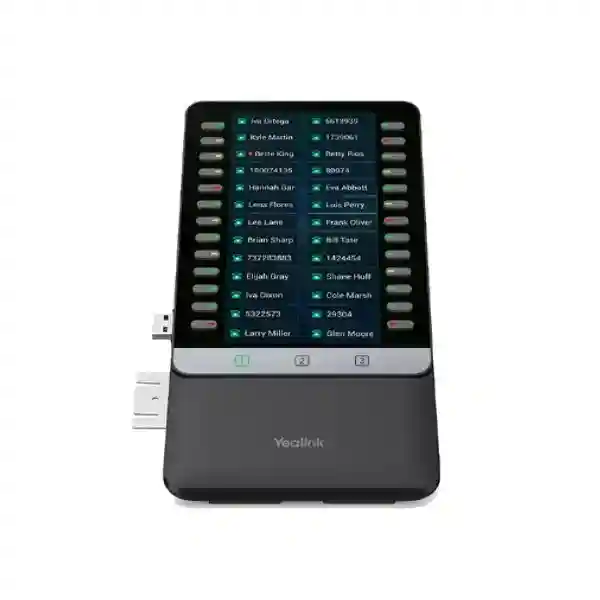
Yealink EXP55 Expansion Module for Enterprise Call Control
The Yealink EXP55 is a dedicated color-screen sidecar for compatible Yealink T7 and T8 Series SIP desk phones. It is built for users who handle enough calls, extensions, shared lines or monitored colleagues that the programmable keys on the telephone itself are no longer sufficient. Reception desks, executive assistants, contact-center supervisors, operations coordinators, security desks and administrative teams can use the EXP55 to turn a compatible Yealink phone into a much larger visual call-control station. The module presents 26 DSS keys on each screen page and provides three pages, allowing up to 78 programmable assignments. Those assignments can be used for supported functions such as BLF monitoring, speed dial, transfer, call forwarding, call park and call pickup.
For Uganda organizations, the purchasing decision is less about adding another display and more about reducing the number of steps required to see colleague status and route calls correctly. A receptionist who repeatedly searches directories, remembers extension numbers or navigates menus loses time on every interaction. The EXP55 places frequently used functions beside the phone in a consistent visual layout. This can improve handling discipline at busy front desks and make a large extension plan easier to operate.
The EXP55 is designed for current compatible Yealink T7 and T8 Series models rather than older T5 phones, which generally use the EXP50. Compatibility should therefore be validated against the exact handset model before purchase. Yealink states that compatible T7/T8 phones can support up to three EXP55 modules. When more than one module is installed, an additional Yealink 5V/2A power adapter is required and should be included in the bill of materials.
Instant Specifications & Procurement Fact Rail
Yealink EXP55
5.5-inch color LCD
26 keys per page, 78 total
Up to 3 modules on compatible phones
Direct module-to-phone USB connection
5V/2A adapter required when using more than one
Procurement teams should treat the phone model, number of modules, required monitored extensions and power arrangement as a single configuration. The EXP55 is not a standalone telephone and does not register independently to a PBX. It extends the controls of the attached compatible Yealink phone. Stock, commercial warranty and delivery timing should be confirmed on the formal quotation because these can vary by shipment and sourcing route.
Operational Product Architecture & Overview
The EXP55 follows a simple architecture: the primary SIP phone remains responsible for account registration, signaling, media, network connectivity and call features, while the expansion module adds a larger physical and visual control surface. This distinction matters when planning a deployment. Adding an EXP55 does not increase the number of SIP accounts supported by a handset, change PBX capacity or add network ports. Instead, it makes existing supported phone functions easier to reach and monitor. The value is therefore strongest where operators already have a capable Yealink phone but need more direct keys.

Each of the three screen pages presents 26 DSS positions. Administrators can map frequently used extensions or features to these positions and organize them by department, priority, building, function or workflow. A front desk might place executive offices and emergency contacts on the first page, departments and meeting rooms on the second, and frequently transferred external destinations on the third. A supervisor might instead group agents by team. Because the module uses a color display, the operator receives a more legible interface than traditional paper-label sidecars.
The physical design also supports two stand angles, allowing the module to be aligned with the desk-phone viewing position. Modules attach mechanically and connect directly in sequence. For installations with two or three modules, planners should reserve sufficient horizontal desk space and include the specified power adapter. This sounds minor, but desk clearance, cable routing and available mains outlets are common causes of installation friction in reception counters and shared administrative stations.
The central procurement question is compatibility. Yealink’s current compatibility information assigns EXP55 to T7 Series models including T73U, T73W, T74U, T74W and T77U, and T8 Series models including T85W, T87W, T88W variants and T88V variants. Exact compatibility should still be validated against the deployed phone firmware and model before ordering. Organizations operating mixed generations should not assume that an EXP55 replaces EXP50 across every desk.
Enterprise Business Outcomes & Value Analysis
The EXP55 delivers the most value when its key layout reflects a documented call flow. Simply filling all 78 positions is not automatically efficient. A carefully planned first page should contain the people and functions used most often, while secondary pages can hold lower-frequency destinations. This hierarchy shortens operator decision time and makes handover between shifts easier. For multi-site businesses, standardized naming and page structure can also reduce configuration differences between branches.
Reliability depends partly on keeping the architecture simple. The module does not create a separate network endpoint, so there is no additional switch port, IP address or SIP registration to manage. The attached phone remains the managed endpoint. For IT teams, this keeps troubleshooting focused: confirm phone compatibility, module connection, firmware alignment, key provisioning and, in multi-module installations, adequate external power.
Key Hardware & Software Highlights
| Feature | Design | Operational Outcome |
|---|---|---|
| Color display | 5.5-inch LCD | Readable labels and visual status at operator desks |
| DSS layout | 26 positions per page | Dense access to extensions and call functions |
| Page capacity | 3 pages / 78 assignments | Supports larger departments without paper directories |
| Chaining | Up to 3 supported modules | Growth path for large attendant stations |
| Stand | Two installation angles | Better alignment with user viewing position |
Technical Specifications Ledger
| Product type | Color-screen desk-phone expansion module |
| Display | 5.5-inch color LCD |
| DSS keys | 78 across three pages; 26 displayed per page |
| Example functions | BLF, speed dial, call forward, transfer, call park, call pickup and other supported assignments |
| Compatible family | Selected Yealink T7 and T8 Series SIP phones; validate exact model |
| Maximum modules | Up to 3 on supported T7/T8 phones |
| Connection method | Direct physical/USB connection to phone and subsequent modules |
| Power note | For more than one EXP55, Yealink specifies an additional 5V/2A adapter purchased separately |
| Stand angles | Two supported positions |
| Network role | Accessory to host SIP phone; not a standalone SIP endpoint |
Specifications relevant to the final bill of materials should be checked against the current regional datasheet and the exact phone revision. Buyers should avoid assuming compatibility from physical appearance alone. The EXP55 is a generation-specific accessory, and the host phone determines the supported telephony functions, provisioning behavior and account capacity.
Configuration & Sizing Worksheet
Step 1: Count monitored destinations
List the extensions, shared lines, park positions and speed-dial destinations the operator needs every day. Separate essential first-page entries from secondary entries. One EXP55 offers 78 assignments over three pages, but usability is usually better when the first 26 positions are deliberately prioritized.
Step 2: Confirm the host phone
Record the complete Yealink model number and firmware family. EXP55 is intended for supported T7/T8 models. If the installed fleet contains T5 phones, those desks may require a different expansion module rather than EXP55.
Step 3: Size physical workspace
Confirm sufficient desk width beside the phone. Two or three modules create a wider attendant console. Check monitor stands, reception counter edges, cable apertures and the preferred left/right working arrangement before deployment.
Step 4: Plan power
A single-module installation follows the supported phone/module arrangement. Where more than one EXP55 is used, include a Yealink 5V/2A adapter and a suitable mains outlet. This should be included at quotation stage rather than discovered during installation.
Step 5: Define provisioning
Agree on labels, BLF targets and function assignments. For repeated deployments, create a standard key-map template so that receptionists and support staff encounter the same layout across sites.
Quote checklist
Provide host phone model, quantity of phones requiring modules, number of EXP55 units per phone, required power adapters, delivery city, preferred warranty arrangement and whether configuration assistance is required. This information allows a cleaner quotation and reduces the chance of incompatible accessories being ordered.
Deployment Scenarios & Industry Use Cases

Large Enterprise and Multi-Site Networks
Head-office reception and executive administration often need visibility across many departments. EXP55 keys can be organized by floor, business unit or priority group, making transfers more predictable. Multi-site organizations can standardize page layouts and naming conventions while allowing branch-specific entries where required.
Financial and Banking Institutions
Branch reception, executive support and internal service desks may route frequent calls among controlled teams. A well-designed BLF and speed-dial layout can reduce misdirected calls and shorten internal transfers. The expansion module does not replace access-control policy; permissions and call routing remain governed by the phone system.
Educational and Campus Networks
Universities, schools and training institutions often have many offices, departments and service points. An attendant can group administration, admissions, finance, security, faculties and facilities contacts across EXP55 pages, creating a practical console without requiring operators to memorize a large extension plan.
Government and Public-Sector Procurement
Government offices commonly require documented compatibility and consistent bills of materials. Procurement teams should specify the exact host phone model, module count, power accessories and warranty expectations. Standardized key templates can then be deployed to selected front desks, administrative offices and control points.
Technical Deep Dive: Control Surface Architecture
The EXP55 should be understood as an extension of the host phone’s user interface. Call processing remains on the Yealink handset and upstream communications platform. This architecture avoids creating another independently managed endpoint. The module’s role is to expose a larger number of programmable actions and statuses in a dedicated visual field. For support teams, that means troubleshooting begins with the host phone: confirm that the phone model supports EXP55, verify firmware, inspect the physical connection, confirm provisioning and validate the assigned DSS functions.
The three-page design balances physical footprint against key capacity. Instead of requiring 78 physical buttons at once, the display presents 26 assignments and allows page switching. This arrangement supports a large contact set while keeping the accessory manageable on a desk. For best results, the organization should treat page design as part of the communications workflow, not merely an installation detail.
Technical Deep Dive: Firmware & Operational Control
The available functions depend on the host phone, firmware and telephony platform. DSS assignments can include common attendant functions such as BLF and speed dial, but administrators should confirm that the PBX or hosted service supports the desired behavior. A button labelled for call park, for example, still depends on the call platform’s configured park mechanism. Before mass deployment, test a representative phone with the intended firmware and provisioning template.
Organizations using centralized provisioning should document the EXP55 key map alongside the handset configuration. This improves replacement procedures: when a phone or module is swapped, support staff know exactly which labels and functions belong on each page. Change control is especially useful for reception desks because ad-hoc edits can create inconsistent transfer behavior across shifts.
Technical Deep Dive: Availability, Redundancy & Recovery
An expansion module does not provide telephony redundancy by itself. Service availability still depends on the host phone, LAN, power, PBX or cloud service and upstream connectivity. The practical resilience benefit comes from operational visibility: a receptionist can monitor and select alternative extensions more quickly when the configured BLF state indicates a colleague is unavailable. For continuity planning, keep a documented key map and, where the desk is business-critical, consider spare accessories consistent with the organization’s support policy.
For multi-module installations, external power is an important dependency. Include the specified adapter in spares planning and label it so it is not removed from the desk inadvertently. During recovery after desk relocation or maintenance, reconnect modules in the approved sequence and verify page assignments before returning the station to service.
Pre-Purchase Buyer Gap Checklist
Does it work with every Yealink phone? No. EXP55 is designed for compatible T7/T8 Series phones. Confirm the exact model before ordering. Older T5 Series deployments commonly use EXP50 instead.
Does it add SIP accounts? No. The module expands programmable controls; the host phone determines account capacity and network behavior.
Can several modules be connected? Yealink supports up to three EXP55 modules on compatible T7/T8 phones. More than one module requires an additional 5V/2A adapter.
Are all 78 keys visible simultaneously? The module provides three pages, each displaying 26 DSS keys. Operators switch pages to reach all assignments.
Are there hidden licenses? The EXP55 itself is an accessory, but some PBX or hosted-service features assigned to DSS keys can depend on the communications platform’s service plan. Confirm platform entitlements separately.
Will it solve transfer problems automatically? It can make transfer targets and monitored extensions easier to access, but correct routing still depends on PBX configuration, staff training and a logical key layout.
What should be included in the quote? Include EXP55 quantity, compatible host phone model, required 5V/2A adapter for multi-module desks, warranty, delivery and any staging or configuration service.
Uganda Procurement & Delivery Logistics
FourTeck can prepare Uganda quotations around the complete operator-station requirement rather than quoting the sidecar in isolation. Buyers should submit the Yealink host phone model, number of desks, desired module count per desk and delivery location. For existing installations, sharing the deployed phone models is particularly important because expansion-module compatibility differs between Yealink generations.
Order processing can include bill-of-materials review, accessory validation and configuration planning before dispatch. Delivery timing depends on stock position, quantity and sourcing route and should be confirmed on the commercial quotation. Where deployment is time-sensitive, procurement teams should identify the required installation date and whether all units must arrive in one batch.
Pre-configuration support can focus on DSS planning, labeling conventions and validation of common attendant functions. For larger projects, a pilot desk is advisable before rolling the same template across multiple sites. This allows the organization to test the first-page priorities, page naming and PBX behavior with actual users.
Uganda Coverage Matrix
In Kampala, EXP55 deployments are well suited to corporate reception, headquarters administration, hotels, financial offices and service desks with high internal transfer volumes. Entebbe organizations can use the same architecture for hospitality, logistics, aviation-support administration and branch operations. Jinja deployments can support industrial offices, education, healthcare administration and growing commercial teams. Mbarara buyers can standardize operator desks across regional branches and institutional environments, while Gulu organizations can apply the same configuration approach to government, education, NGO and enterprise offices. Delivery schedules, site requirements and configuration scope should be confirmed per quotation because project conditions differ by location and order quantity.
Cross-Border & Regional Supply Chains
Organizations operating across East Africa and the Gulf can coordinate related communications procurement through regional FourTeck channels. Uganda requirements can be handled through FourTeck Uganda, Kenya requirements through FourTeck Kenya, broader African requirements through FourTeck Africa, UAE projects through FourTeck UAE, and Kuwait projects through FourTeck Kuwait. For multi-country projects, keep the approved phone model, EXP55 quantity, power accessories and key-map standards consistent wherever practical, while allowing for regional stock, warranty and electrical requirements.
Related Yealink Solutions
A complete deployment may include the host Yealink SIP phone portfolio, receptionist-oriented desk phones, executive communication endpoints, office communication systems and accessories. Buyers replacing older T5 Series phones should evaluate the handset and expansion-module generation together rather than purchasing sidecars independently. For busy reception areas, consider the number of monitored users, headset requirements, handset screen size and network/power design as part of one workstation specification. Browse FourTeck Uganda for related Yealink business communications options or use the contact team to request a matched bill of materials.
FourTeck Technical Service Capabilities
FourTeck can support procurement teams with engineering validation before supply. This includes checking the host phone family against the requested expansion module, confirming the required number of modules, identifying additional power-adapter requirements and reviewing the proposed operator workflow. Bill-of-materials verification is useful when a project combines phones, modules, headsets, power accessories and network components.
For staged deployments, configuration planning can establish a repeatable DSS layout and labeling convention. Firmware and provisioning considerations can be reviewed before shipment where included in the agreed service scope. Post-sales support can then work from the documented configuration rather than reconstructing the operator layout after installation. This is especially valuable for multi-site rollouts where consistency reduces training and troubleshooting time.
Extended Technical FAQ
1. What is the Yealink EXP55 used for?
The EXP55 expands the programmable key capacity of compatible Yealink T7 and T8 Series SIP phones. It is intended for users who need fast access to many extensions and call functions, such as receptionists, executive assistants, supervisors and dispatch staff. The module has a 5.5-inch color display and presents 26 DSS keys per page across three pages, providing up to 78 assignments. Typical assignments include BLF, speed dial, transfer, forwarding, call park and pickup. It does not replace the phone or register separately to the PBX.
2. Which phones are compatible with EXP55?
Yealink positions EXP55 for compatible T7 and T8 Series phones. Current compatibility information includes T73U/T73W, T74U/T74W, T77U and several T8 models such as T85W, T87W and T88 variants. Exact compatibility should be confirmed for the specific phone model and firmware before ordering. Do not assume that a phone using an older expansion module can automatically use EXP55. T5 Series phones commonly pair with EXP50 rather than EXP55.
3. How many programmable keys does one EXP55 provide?
One EXP55 supports 78 DSS assignments arranged over three screen pages. Each page displays 26 DSS keys. This lets an operator keep the highest-priority extensions on the first page and move secondary departments or functions to the remaining pages. A sensible layout is more important than filling every position. For reception deployments, organize keys according to actual call volume, transfer frequency and escalation paths so the operator can reach the most important destinations with minimal page switching.
4. Can I connect more than one EXP55?
Yes, compatible T7 and T8 phones can support up to three EXP55 modules. Yealink specifies that when more than one expansion module is used, an additional 5V/2A power adapter must be connected to one of the expansion modules. The adapter is purchased separately. Multi-module installations also need enough desk width and careful cable routing. Before selecting two or three modules, compare the actual number of required monitored destinations with the 78 assignments already available on a single EXP55.
5. Does EXP55 require a separate network connection?
No separate LAN connection is normally required for the EXP55 because it operates as an accessory to the compatible Yealink host phone. The phone remains the network and SIP endpoint. This simplifies network planning because the module does not need its own switch port, IP address or SIP account. However, the phone itself must still have the correct network, power and communications-platform configuration. If functions on the EXP55 do not behave as expected, administrators should check the host phone and PBX configuration as well as the module connection.
6. Does the EXP55 need additional licenses?
The hardware module itself is an accessory, but the functions assigned to its keys depend on the host phone and communications platform. Some hosted PBX services may license particular call features, shared lines or monitoring capabilities at the service level. For that reason, buyers should separate the hardware question from the platform-entitlement question. Confirm that the intended BLF, shared-line, park or pickup behavior is supported by the deployed PBX or hosted service before standardizing a large EXP55 key map.
7. Can FourTeck help configure the DSS keys?
Configuration assistance can be scoped as part of the project. The most useful starting point is a spreadsheet or list containing extension names, numbers, departments and desired functions. From that, the operator layout can be organized into priority groups and pages. For larger rollouts, FourTeck can help review the bill of materials and configuration approach so that each desk receives the correct module and power accessories. The final behavior remains dependent on the compatible Yealink phone and the organization’s PBX or hosted communications platform.
8. What should we check before ordering for an existing Yealink deployment?
Record the exact phone model at every desk that will receive an expansion module. Mixed fleets are common, and different Yealink generations use different expansion accessories. Next, count the required DSS assignments, decide whether one module is enough, check desk space and identify whether multi-module stations require the 5V/2A adapter. Finally, document the desired key functions and verify that the PBX supports them. This process prevents a purchase based only on brand compatibility and creates a complete, installation-ready bill of materials.
9. How is warranty or replacement handled?
Commercial warranty terms and replacement procedures should be confirmed on the FourTeck quotation for the specific shipment. Keep the purchase documentation, model information and serial details required by the applicable process. When troubleshooting, support teams should first confirm the module-to-phone connection, host-phone compatibility, firmware and power arrangement. If a hardware replacement is required, having the documented DSS layout and host phone details helps restore the operator station quickly after the replacement module is installed.
10. Is EXP55 suitable for a reception desk in Uganda?
Yes, where the reception desk uses a compatible Yealink T7 or T8 phone and needs direct access to many extensions or call-control functions. It is particularly useful when receptionists repeatedly transfer calls among departments and need visible BLF status. The purchasing team should size the number of modules based on actual extension requirements, reserve sufficient desk space and include external power when using more than one module. For Uganda supply, request a quotation with the phone model, module quantity and delivery city so compatibility and logistics can be validated.
Build the Right Yealink EXP55 Operator Station
A reliable EXP55 deployment starts with the exact host phone model and a clear picture of how the operator handles calls. FourTeck can review the requested module count, compatible phone family, power requirements and key-layout objectives before quotation. For a single reception desk, provide the handset model and number of monitored extensions. For multi-site projects, include quantities by location and identify whether you want standardized DSS templates across all sites. This allows the bill of materials to be prepared around the real deployment rather than a standalone accessory part number.
Request pricing, availability, warranty details and Uganda delivery information for the Yealink EXP55. Where required, ask for related compatible Yealink phones and power accessories in the same quotation.


Reviews
There are no reviews yet.