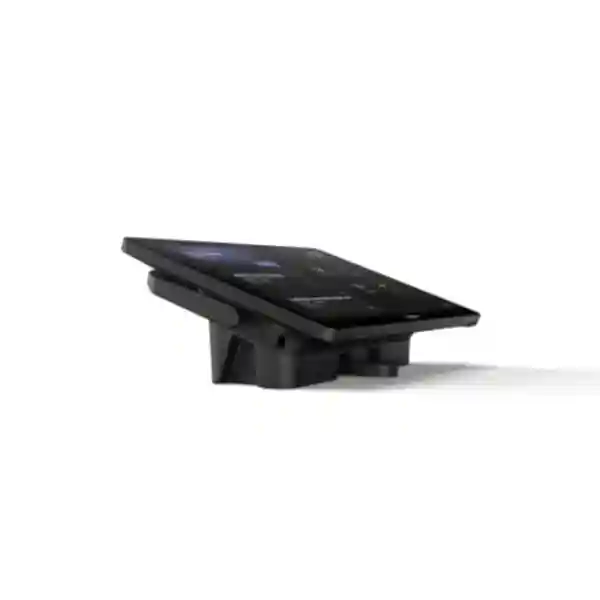
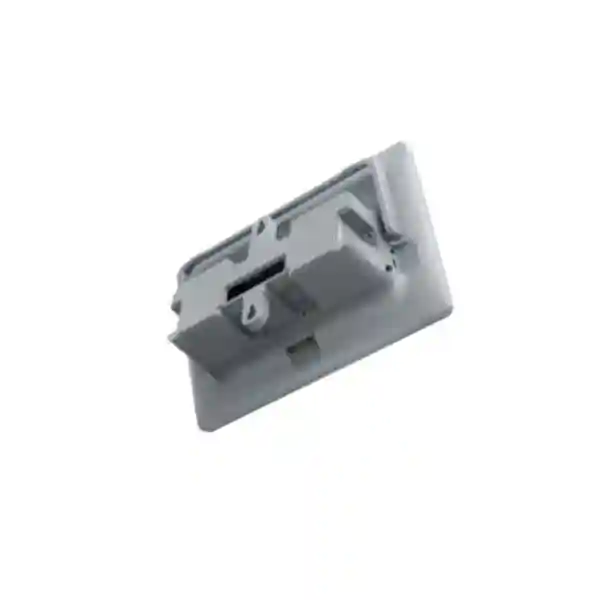
Yealink MTouch Plus-EXT Multi-Panel Meeting Room Control Extension
Yealink MTouch Plus-EXT is a dedicated extension screen for the Yealink MTouch Plus meeting-room control platform. It gives enterprises a practical way to place additional touch control points around larger tables, executive boardrooms, training rooms, divisible meeting spaces and other collaboration environments where one console may be inconvenient for every participant. The extension uses an 11.6-inch capacitive 1920 × 1080 display with a narrow-bezel design and is intended to preserve the same visual and interaction experience as the primary MTouch Plus. One MTouch Plus can support as many as four MTouch Plus-EXT units, allowing a room to provide up to five touch-control positions when the complete supported arrangement is deployed.
For procurement teams, the key value is not simply another screen. The product addresses room ergonomics, control accessibility and installation flexibility. In a long boardroom, participants at the far end should not need to walk to a single console to change a camera view or operate supported meeting controls. In a divisible room, the physical placement of controls can be planned around the room layout. In executive spaces, the matching industrial design helps avoid the improvised appearance created by unrelated tablets or generic touch displays.
The extension includes a PoE power port, a Type-C debug port, mounting bracket, double-coated tape, a YL PoE30 unit supporting IEEE 802.3af, and Ethernet cables listed by Yealink at 7.5 m and 3 m. Deployment can be wall-mounted, fixed on a desktop or positioned flexibly on a desktop. Because the extension works with MTouch Plus through the supported network arrangement, room designers gain more freedom than a short direct peripheral cable would normally allow. Exact compatibility should still be validated against the complete Yealink room solution and current firmware before purchase.
Procurement Fact Rail
MTouch Plus-EXT
MTouch Plus extension screen
11.6-inch capacitive, 1920 × 1080
Up to 4 extensions with 1 MTouch Plus
PoE port; YL PoE30, IEEE 802.3af listed
Project quote and availability confirmation
The fact rail is deliberately focused on purchasing decisions. MTouch Plus-EXT is an accessory rather than a standalone replacement for the primary MTouch Plus. Buyers should therefore treat the base controller, extension quantity, room-system compatibility, PoE design and mounting arrangement as one bill of materials. Warranty terms, lead time and stock status should be confirmed on the issued FourTeck quotation because they can vary with sourcing route, project quantity and manufacturer channel conditions.
Operational Architecture and Room Design
Meeting-room control often becomes an ergonomic problem before it becomes a technology problem. A system may have excellent cameras, microphones and displays, yet users can still experience friction if the control surface is inaccessible from their seat. The MTouch Plus-EXT is designed around this issue. It extends the supported MTouch Plus control experience to additional physical positions while maintaining a consistent screen format and industrial design. In large conference rooms, this can reduce unnecessary movement during meetings and make supported controls accessible to participants seated at different ends of a table.
The architecture is especially relevant where multiple participants may need to interact with room controls. Yealink specifies support for as many as four MTouch Plus-EXT units working with one MTouch Plus. In practical terms, that creates a five-panel control topology. The number of extensions actually required should be determined from seating geometry rather than simply purchasing the maximum. A twelve-seat room with a compact table may need only one primary console. A long twenty-seat boardroom could benefit from strategically placed extensions. A divisible training room may require a different placement philosophy based on partition positions and operational modes.
The 11.6-inch full-HD screen gives the extension a substantial control surface. Yealink describes the panel as an IPS screen with anti-fingerprint and anti-glare characteristics in the MTouch Plus family experience. The narrow-frame design and approximately 80 percent screen-to-body ratio help keep the console visually restrained on a boardroom table. These details matter in customer-facing meeting rooms, executive suites and formal government environments where equipment should support the space without dominating it.
PoE-based connectivity is another important design consideration. Power and network planning can be coordinated through structured cabling rather than relying on a local wall adapter at every tabletop position. This can reduce visible cabling and make fixed installations easier to document. The package information published by Yealink lists 7.5 m and 3 m Ethernet cables and a YL PoE30 supporting IEEE 802.3af. Installers should nevertheless validate the intended network topology, cable category, switch configuration, pathway length and power source before site deployment.
The Type-C interface is identified as a debug port and should not be assumed to provide general-purpose content sharing or arbitrary peripheral connectivity. Procurement specifications should preserve this distinction. Buyers comparing the MTouch Plus-EXT with a primary MTouch Plus, a content-sharing accessory or a generic USB touch display should focus on the intended role: this is an extension control surface for a compatible MTouch Plus environment.

Room planning should begin with a floor plan. Mark the primary display wall, camera position, table footprint, participant seats, cable floor boxes, network outlets and partitions. Then identify where a participant would naturally reach for meeting controls. The goal is not to saturate the room with screens; it is to eliminate awkward control zones. In formal rooms, fixed desktop mounting can improve consistency. In adaptable rooms, flexible desktop positioning may be more appropriate. Wall mounting can suit lecterns, side walls or spaces where tabletop equipment must be minimized.
Enterprise Business Outcomes
Additional touch points reduce dependence on a single console and can make supported meeting controls reachable from multiple seating zones. This is valuable in long tables and large rooms where moving to the central controller interrupts the meeting.
Using a purpose-built extension from the same product family keeps interface placement and physical design consistent. Staff moving between seats encounter a familiar control surface rather than a collection of unrelated devices.
A single MTouch Plus can be extended with up to four MTouch Plus-EXT units. Procurement can therefore size control coverage according to room geometry instead of replacing the complete control architecture when more positions are required.
PoE-oriented deployment supports cleaner infrastructure planning. Network and power can be considered together, helping integrators design fixed routes and avoid unnecessary power adapters around high-value furniture.
Wall mounting, fixed desktop installation and flexible desktop placement allow the same extension concept to fit executive rooms, training rooms, council chambers and other collaboration spaces.
Standardizing on a defined Yealink control accessory can simplify spares, support documentation and future room replication compared with improvised third-party tablets whose operating systems and charging requirements may vary.
The financial case should be assessed at room-system level. The extension itself does not increase camera resolution or microphone pickup range; its value is operational. If a poorly located controller causes repeated user frustration, support calls or meeting delays, an additional control point may be a more economical intervention than redesigning the entire audiovisual system. Conversely, a small huddle room may gain little from multiple panels. Good procurement therefore connects quantity to actual room behavior.
Hardware and Software Highlights
| Component | Confirmed Detail | Operational Meaning |
|---|---|---|
| Touch display | 11.6-inch capacitive screen | Large, dedicated surface for room controls. |
| Resolution | 1920 × 1080 | Full-HD control display. |
| Multi-panel scale | Maximum four EXT units with one MTouch Plus | Up to five supported touch positions in the combined arrangement. |
| PoE | PoE power port; YL PoE30, IEEE 802.3af listed | Supports structured power/network deployment. |
| Service interface | Type-C debug port | Service/debug role; do not specify as general content-sharing USB. |
| Mounting | Wall, fixed desktop, flexible desktop | Adapts to different furniture and room layouts. |
Technical Specifications Ledger
| Specification | Yealink MTouch Plus-EXT | Procurement Note |
|---|---|---|
| Product class | MTouch Plus extension screen | Requires compatible MTouch Plus environment. |
| Screen size | 11.6 inches | Plan tabletop clearance before drilling or fixing. |
| Resolution | 1920 × 1080 | Full-HD panel. |
| Panel technology | Capacitive touch; IPS described by manufacturer | Designed for direct meeting interaction. |
| Screen-to-body ratio | Approximately 80% | Narrow-bezel appearance. |
| Maximum extension count | 4 MTouch Plus-EXT per 1 MTouch Plus | Combined topology can provide five touch panels. |
| Network/power interface | 1 × PoE power port | Validate switch/injector and network design. |
| Debug interface | 1 × Type-C debug port | Reserved for its documented role. |
| Included network cables | 1 × 7.5 m and 1 × 3 m Ethernet cable | Confirm final route lengths during survey. |
| PoE accessory | YL PoE30, IEEE 802.3af listed | Confirm package version on quotation. |
| Mounting accessories | Mounting bracket and double-coated tape listed | Choose mounting method before installation. |
| Deployment styles | Wall, desktop fixed, desktop flexible | Supports varied room furniture. |
Specifications not explicitly published in the referenced manufacturer material, such as exact chassis dimensions, weight, environmental limits and maximum electrical draw, should be confirmed from the current regional datasheet or manufacturer documentation before they are inserted into a tender as contractual values. This avoids turning assumptions into procurement requirements.
Configuration and Sizing Worksheet
Step 1 — Map control zones
Count the seating zones that need convenient access to room controls. Do not automatically map one panel to one person. A practical control zone may cover several adjacent seats. For a long table, begin with the primary MTouch Plus and identify positions where reaching that console becomes inconvenient. Add extension positions only where they improve usability.
Step 2 — Validate the base platform
Confirm that the proposed or installed room solution uses the compatible MTouch Plus architecture. MTouch Plus-EXT should be procured as part of that ecosystem rather than treated as an independent room controller. Record the room-system model, current firmware and collaboration platform so compatibility can be checked before dispatch.
Step 3 — Survey network and power
Identify available Ethernet pathways, floor boxes, wall outlets, PoE resources and switch ports. Decide whether the supplied cable lengths suit the route. Structured cabling may require patch leads and permanent links beyond the included cables. Document VLAN, port security and any network access policies that could affect room devices.
Step 4 — Select mounting
Choose wall mounting when the panel must remain at a fixed vertical location, fixed desktop mounting when furniture position is permanent, or flexible desktop placement where room layouts change. For premium tables, coordinate drilling and cable exits with the furniture contractor before installation.
Step 5 — Prepare the quote request
Provide room count, required extension quantity per room, existing Yealink equipment, desired mounting style, site city, installation requirement and delivery deadline. Include photographs or drawings where possible. A complete request reduces revision cycles and helps FourTeck validate the bill of materials before commercial approval.

Deployment Scenarios and Industry Use Cases
Large Enterprise and Multi-Site Rooms
Enterprises standardizing meeting rooms across multiple offices can use the MTouch Plus-EXT to create repeatable control-zone designs. A flagship boardroom may use several extension panels, while medium rooms use only the primary console. The benefit is a common family of controls with room-specific scaling. Standard room drawings should identify extension locations, network outlets, mounting method and labeling so facilities and support teams can reproduce the deployment consistently.
Financial and Banking Institutions
Banks often operate formal boardrooms, risk committee rooms, training centers and executive collaboration suites. In these spaces, tidy cabling and predictable operation are important. Fixed extension panels can give designated seating areas access to meeting controls without introducing personal tablets or loosely managed consumer devices. Procurement teams should coordinate the room-device network with internal security policies and change-control procedures.
Education and Campus Environments
Universities and training organizations can use distributed controls in larger teaching or hybrid-learning rooms where instructors, moderators and technical staff occupy different positions. The extension approach is particularly useful where a room has a teaching station plus additional facilitator positions. Mounting should account for heavy shared use, furniture movement and cable protection.
Government and Public-Sector Procurement
Government meeting rooms may require formal bills of materials, predictable model identification and documented installation. MTouch Plus-EXT provides a clearly defined accessory role within the Yealink MTouch Plus environment. Tender documents should specify the exact model, quantity, compatibility requirement and mounting scope while leaving unconfirmed electrical or environmental values subject to current manufacturer documentation.
Technical Deep Dive: Control Architecture
The most important architectural fact is that MTouch Plus-EXT extends a primary control environment. It is not purchased for packet forwarding, audiovisual signal processing or standalone conferencing. Its purpose is human interaction. This distinction shapes the entire design. Camera processing remains with the relevant room-system components; audio capture remains with microphones and audio devices; video rendering remains with room displays and system hardware. The extension provides another physical place from which users can operate supported meeting functions.
A multi-panel arrangement can improve operational flow because control no longer depends on a single seat. Yealink states that multiple panels can be used in the same room and that one MTouch Plus can extend to four MTouch Plus-EXT units. This supports simultaneous access from different room areas. For a technical architect, the design question is therefore about endpoint placement and network reach rather than adding compute throughput.
Technical Deep Dive: Firmware and Operational Control
Firmware consistency matters whenever a room contains several coordinated endpoints. Before commissioning, document the firmware state of the room system and follow Yealink-supported upgrade guidance for the complete solution. Avoid treating the extension as an isolated consumer display. Change windows should consider the room as one collaboration service, with testing after updates to verify that all control positions behave as expected.
Operational teams should maintain a room inventory that records serial numbers, physical positions, switch ports, mounting method and support status. This makes fault isolation easier. If one extension becomes unavailable while other controls remain functional, support staff can distinguish a local endpoint or cabling issue from a broader room-system incident.
Technical Deep Dive: Availability and Recovery
Multiple control panels can provide practical operational resilience at the user-interface layer. If one physical position is temporarily inaccessible, another supported panel in the room may remain available. This should not be confused with full system redundancy: the extensions still belong to the same room-control architecture. True meeting-room continuity also depends on the compute system, network, cameras, microphones, displays, power and collaboration service.
For critical rooms, consider UPS-backed network infrastructure, documented spare-cable paths and an agreed replacement procedure. A spare unit strategy may be appropriate across a large estate, but it should be based on fleet size and business criticality. Recovery documentation should state how an extension is replaced, how compatibility is validated and who has authority to perform firmware or configuration changes.
Pre-Purchase Buyer Gap Checklist
Is it standalone? No. Treat MTouch Plus-EXT as an extension for MTouch Plus. The commercial bill should identify the compatible base system rather than assuming the extension alone creates a meeting controller.
How many can be deployed? Yealink states that one MTouch Plus supports a maximum of four MTouch Plus-EXT units. Buyers should still purchase according to room ergonomics, not the maximum supported count.
Does the Type-C port mean laptop sharing? The published specification identifies it as a debug port. Do not write a tender that assumes general-purpose USB-C content sharing from this connector.
What about hidden subscriptions? The extension is part of a broader conferencing solution, so any collaboration-platform licensing belongs to the room-system design rather than being inferred from the panel alone. Confirm Microsoft Teams Rooms, Zoom Rooms or other applicable service licensing separately for the chosen room solution.
Will included cables reach? Yealink lists 7.5 m and 3 m Ethernet cables. Real installations may route cables through floors, walls, trays or furniture, making pathway distance longer than straight-line distance. Survey before ordering additional structured cabling.
Can it be wall mounted? Yealink describes wall mounting, desktop fixation and flexible desktop deployment. Confirm the chosen bracket arrangement and substrate before installation.
What is the warranty? Warranty should be stated on the FourTeck quotation for the specific supply route. Avoid assuming a term from another country or reseller.
What about lifecycle? For multi-room rollouts, request current product status and lead-time confirmation at quotation. Large projects should also define acceptable substitutions only after technical review rather than permitting uncontrolled model changes.
Uganda Procurement and Delivery Logistics
FourTeck supports Uganda organizations that need a structured quotation rather than an isolated online purchase. A useful request identifies the Yealink room system, number of rooms, extension quantity, installation city and target deployment date. For projects involving new meeting rooms, provide room drawings and desired control locations so the bill of materials can be checked before ordering.
Commercial processing normally begins with requirement validation and quotation. Availability and delivery timing depend on current stock, project quantity and sourcing route, so these details should be confirmed on the live quote rather than assumed from a static product page. For imported project quantities, procurement teams should allow time for order processing, regional logistics and final delivery scheduling.
Pre-configuration planning can include model verification, firmware considerations, labeling requirements and coordination with the wider Yealink meeting-room bill. On-site installation requirements should be discussed separately because mounting, structured cabling and network configuration may depend on building conditions.
Uganda Coverage Matrix
Kampala: enterprise headquarters, boardrooms, conference facilities and multi-room rollouts can be quoted with delivery and technical coordination. Entebbe: hospitality, aviation-linked offices, institutional facilities and corporate sites can request project supply. Jinja: industrial, education and commercial organizations can source meeting-room control equipment through project quotation. Mbarara: regional offices, universities, healthcare administration and enterprises can request Yealink collaboration equipment. Gulu: public-sector, education, NGO and commercial deployments can be supported through planned regional supply. For every city, delivery timing, installation scope and warranty terms should be confirmed in the project quotation.
Cross-Border and Regional Supply
Organizations operating across several countries can coordinate compatible Yealink procurement through FourTeck regional channels. Visit FourTeck Uganda for Uganda projects, FourTeck Kenya for Kenya requirements, FourTeck Africa for broader African opportunities, FourTeck UAE for UAE procurement, and FourTeck Kuwait for Kuwait requirements. Multi-country buyers should align model numbers, room standards and support documentation while allowing each destination to follow its own commercial, logistics and regulatory process.
Related Yealink Solutions
A complete room may require more than the extension console. Buyers can explore the Yealink MTouch Plus range, Yealink MVC room systems, Yealink AVHub solutions, Yealink conference cameras, Yealink conference microphones, and Yealink room accessories. Related equipment should be selected as a validated room architecture rather than assembled only because individual components carry the same brand.
FourTeck Technical Service Capabilities
FourTeck can help procurement teams validate the proposed bill of materials before order placement. This is particularly important for extension products because the accessory must fit the intended base platform. Engineering review can cover model matching, extension quantities, cable planning, mounting assumptions and the relationship between the touch panels and the wider room system.
For larger deployments, staging considerations can include asset labeling, serial-number recording, firmware review and room-by-room packing logic where commercially agreed. Pre-shipment checks reduce the risk of a site team receiving the right quantity but the wrong room allocation. Post-sales support can assist with fault description, warranty coordination and escalation using the serial and project records available for the supplied equipment.
The strongest support process starts before purchase. Share the room topology, current equipment and project constraints early. That enables compatibility questions to be resolved while the quotation is still being prepared rather than during installation.
Extended Technical FAQ
1. What exactly does the Yealink MTouch Plus-EXT do?
It is an extension touch screen for Yealink MTouch Plus. Its purpose is to add another physical meeting-control position within a compatible room. Yealink specifies an 11.6-inch capacitive 1920 × 1080 display and supports multiple extension panels in the same room. This is useful when participants are spread around a large table or room and a single primary console is not conveniently reachable. It should not be specified as a standalone conferencing endpoint, camera processor or generic touch monitor.
2. How many MTouch Plus-EXT panels can work with one MTouch Plus?
Yealink states that one MTouch Plus can support a maximum of four MTouch Plus-EXT units. That creates a combined arrangement of up to five touch panels when the primary console is included. The maximum is not necessarily the recommended quantity for every room. Determine the actual count from seating positions, table length, partition layout and the number of locations where users genuinely need control access.
3. Is PoE supported?
The published product information lists a PoE power port and a YL PoE30 supporting IEEE 802.3af. PoE can simplify room deployment by reducing the need for separate local power connections at every control position. However, the complete cabling and switch design should be reviewed before installation. Confirm port availability, structured-cable paths, network policy and the exact package contents supplied with the project quotation.
4. Can the extension be installed on a wall?
Yes. Yealink describes three flexible deployment approaches: wall mounting, desktop fixation and flexible desktop placement. The right method depends on how the room is used. Wall mounting can suit side controls or lectern areas; fixed desktop installation can suit formal boardrooms; flexible placement can suit adaptable spaces. Check the mounting surface, cable exit and furniture requirements before the installer drills or permanently fixes equipment.
5. Does MTouch Plus-EXT provide USB-C content sharing?
Do not assume that function from the connector shape. Yealink identifies the Type-C connector on MTouch Plus-EXT as a debug port. Content-sharing requirements should be addressed using the functions and accessories supported by the complete Yealink room solution. During procurement, separate the control-panel requirement from the presentation-input requirement so the bill of materials includes the correct device for each job.
6. Is special collaboration licensing required for the extension itself?
Licensing should be evaluated at the complete room-system level. MTouch Plus-EXT is a hardware extension for the control environment; the room may separately depend on Microsoft Teams Rooms, Zoom Rooms or another supported service and its associated commercial terms. Buyers should list the existing or intended collaboration platform when requesting a quote so hardware compatibility and service licensing can be treated as separate, clearly documented requirements.
7. What should be checked before adding MTouch Plus-EXT to an existing room?
Record the existing Yealink room-system model, primary MTouch Plus, firmware state, available network ports, PoE design, cable route and desired extension location. Also check whether the room furniture allows a fixed mount or requires flexible placement. Providing this information to FourTeck before purchase helps determine whether the extension is appropriate and whether additional cabling or installation accessories should be included in the project scope.
8. What happens if one extension panel fails?
A multi-panel room may retain access through another functioning control position, but this is not the same as complete system redundancy. Troubleshooting should first distinguish a panel issue from a network, cabling, PoE or wider room-system issue. Maintain records of switch ports and device locations. For supplied equipment under applicable warranty, FourTeck can coordinate the support process according to the warranty terms stated for the project.
9. Can FourTeck help size a multi-panel deployment?
Yes. Useful sizing information includes room dimensions, table shape, seat count, display wall, partition locations, primary controller position and intended user roles. From there, control zones can be identified and unnecessary panels avoided. The objective is convenient reach and predictable operation, not simply deploying the maximum number supported. A room drawing or clear photographs can make this review more accurate.
10. How do Uganda buyers request pricing and delivery information?
Send the required quantity, delivery city, existing or proposed Yealink room system, preferred mounting method, installation requirement and target project date through the FourTeck Uganda contact channel. Because enterprise hardware pricing, stock and logistics can change, the issued quotation should be treated as the authoritative commercial reference. For multi-room projects, provide a room schedule so quantities and accessories can be organized by room type.
Plan Your Yealink MTouch Plus-EXT Deployment
A successful purchase starts with the room layout, not the accessory count. Tell FourTeck how many rooms you are equipping, which Yealink system is installed or proposed, where users need control access and how the panels should be mounted. The team can use those details to prepare a project quotation, review the bill of materials and coordinate Uganda delivery. For larger rollouts, include room drawings, network information and deployment deadlines so technical and commercial planning can proceed together.




Reviews
There are no reviews yet.