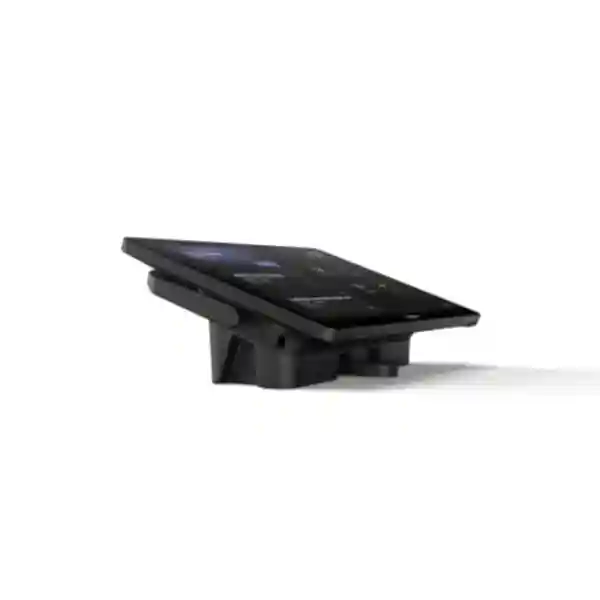
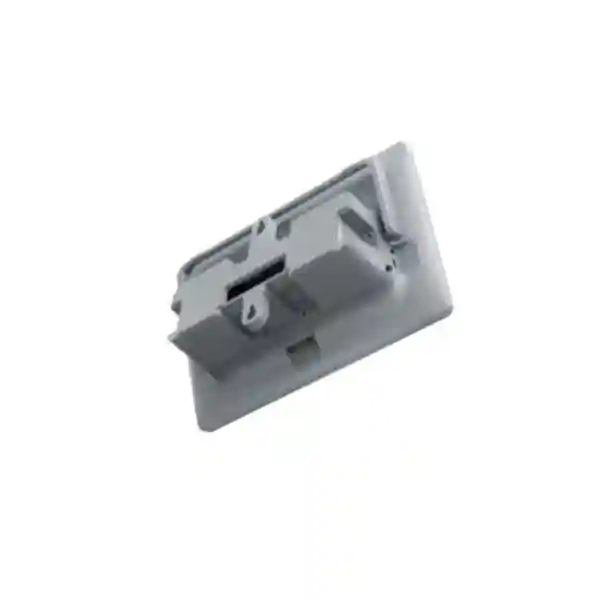
Yealink MTouch Plus Meeting Room Touch Control Panel
Yealink MTouch Plus is a purpose-built third-generation touch console for professional meeting rooms where users need a clear, consistent control point for joining meetings, managing sessions and sharing content. Rather than asking participants to operate a room computer directly, the console places the essential meeting workflow on an 11.6-inch anti-fingerprint and anti-glare IPS screen. Its Full HD 1920 × 1080 resolution and 10-point multi-touch capability make it suitable for boardrooms, executive collaboration rooms, training facilities and larger spaces where reliable touch control matters.
For procurement teams in Uganda, the important point is that MTouch Plus should be treated as part of a room solution rather than as an isolated consumer tablet. Correct specification depends on the Yealink room-computing platform, room layout, cable path, presentation method, sensor requirements and the number of control positions required. It includes interfaces for MCore Pro/VCH connectivity, USB Type-C, USB Type-C PD, USB Type-A, a 3.5 mm headset connection and an RJ-45 external touch interface. Wireless connectivity includes IEEE 802.11 a/b/g/n/ac/ax Wi-Fi and Bluetooth 5.2. This combination supports a flexible meeting-room architecture while keeping the user experience centered on a dedicated console.
MTouch Plus can be placed flat, fixed on a desktop or mounted on a wall. That flexibility is valuable in rooms where table geometry, cable access or furniture standards make a single installation style impractical. It can also participate in multi-panel control designs, allowing users in larger rooms to reach a meeting controller without walking to a single fixed location. When paired with compatible Yealink room components, the result is a cleaner, more predictable collaboration environment.
Procurement Fact Rail
Yealink MTouch Plus
Professional meeting rooms
11.6-inch IPS, 1920 × 1080
10-point multi-touch
Request current Uganda availability
Confirm regional terms on quotation
The procurement fact rail should be read as a starting point for system design. A complete room may require an MCore Pro-based room system, compatible camera and audio devices, display hardware, network connectivity, room sensor, presentation accessories and appropriate cable routing. Optional items listed by Yealink include the WPP30 and a 65W PD power supply. FourTeck can validate these dependencies before a purchase order is finalized, reducing the chance that a room arrives with an incomplete accessory set.
Operational Architecture and Meeting-Room Role
A meeting-room control panel has a deceptively simple job: it must make a complex collection of room devices feel like one coherent system. MTouch Plus addresses that role through a dedicated touch interface, wired room-system connectivity, local presentation interfaces and wireless communications. The panel is not purchased for packet forwarding or general desktop computing. Its value comes from reducing the operational distance between a participant and the conferencing system. Users can approach the room, start or control a meeting, manage supported room functions and present content without navigating the underlying room computer.
The 11.6-inch IPS screen is large enough to present meeting controls clearly while remaining compact enough for a conference table. Anti-glare treatment helps in rooms with ceiling lighting or daylight, while the anti-fingerprint surface is useful on a device expected to be touched by many users throughout the day. The 1920 × 1080 resolution provides a crisp interface and the 10-point touch layer supports responsive multi-touch interaction. Screen brightness is specified at 290 cd/m² and contrast at 1000, providing a practical visual baseline for indoor collaboration environments.
Connectivity is equally important. Yealink specifies an MCore Pro/VCH port, USB 2.0 Type-C, USB 2.0 Type-C PD, two USB Type-A connections including one identified for WPP30 use, a 3.5 mm headset port and an RJ-45 external touch connection. HDMI 2.0 ingest supports content-input workflows. The Type-C PD path can provide power to a connected computer during supported content-sharing workflows when the appropriate power arrangement is present. Wi-Fi supporting 802.11 a/b/g/n/ac/ax and Bluetooth 5.2 broaden the integration options around the room system.

A frequent buyer concern is placement. In a compact room, a controller can sit near the primary participants. In a long boardroom, a single controller may create friction because people at the opposite end of the table cannot reach it. MTouch Plus supports multi-panel control architectures, and Yealink offers the MTouch Plus-EXT for designs that need additional control positions. This lets an integrator plan control around the room rather than forcing the room around one controller.
Another concern is wake-up behavior and room readiness. Yealink describes operation with RoomSensor, enabling participant detection and system wake-up in compatible deployments. This can reduce the awkward startup period in which users search for a remote, wake displays manually or wait for room components to become ready. Procurement teams should still validate the exact room-system bundle, firmware level and desired behavior because features depend on the complete solution rather than the panel alone.
Enterprise Business Outcomes
A dedicated touch console gives users a predictable place to start and manage room meetings. Standardizing this interaction across multiple rooms can reduce variation between spaces and lower the learning burden for staff who move between meeting rooms.
Purpose-built room hardware avoids dependence on a participant’s personal device for core meeting control. Properly staged systems can be tested as a complete room before deployment, helping facilities and IT teams identify cable, firmware and peripheral issues before handover.
Multi-panel support is useful when the physical size or seating plan of a room makes one control point inconvenient. Expansion can be designed around participant reach, room divisions and presenter locations.
A dedicated console keeps users focused on meeting functions instead of exposing a general-purpose room PC desktop. Administrators can design a standardized conferencing environment with fewer ad-hoc user interactions at the compute layer.
When MTouch Plus is deployed as part of a standardized Yealink room design, IT teams can document one room pattern, one cable map and one accessory set, then repeat it across compatible spaces. Standardization improves supportability and spare planning.
The strongest cost benefit comes from specifying the complete room correctly at the start. Validating mounting, cables, content sharing, sensors and accessories before procurement reduces emergency purchases, return logistics and technician revisits.
Key Hardware and Software Highlights
The core hardware feature is the 11.6-inch IPS touch display. Its anti-glare and anti-fingerprint treatments are operational details rather than cosmetic additions: shared meeting-room controllers are repeatedly touched and are often installed directly under office lighting. The Full HD panel provides ample interface detail, while ten-point multi-touch supports natural interaction.
The physical interface set is designed around meeting-room integration. The MCore Pro/VCH connection links the controller into compatible Yealink room architectures. USB Type-C and Type-C PD interfaces support modern wired workflows, while USB Type-A ports accommodate accessories such as the optional WPP30. HDMI 2.0 ingest provides a familiar route for presentation content. The external touch RJ-45 interface supports expansion scenarios. A 3.5 mm headset interface is also provided.
Wireless hardware includes Wi-Fi across 802.11 a/b/g/n/ac/ax standards and Bluetooth 5.2. These radios support room-system functions and compatible accessory interaction, but network architects should still determine whether the installed room design requires wireless connectivity and apply organizational WLAN policies accordingly. Conference-room equipment should be placed on appropriately governed network segments, with firmware maintenance and access policies handled under the organization’s collaboration-device standards.

Technical Specifications Ledger
| Parameter | Confirmed Detail | Procurement Relevance |
|---|---|---|
| Display | 11.6-inch anti-fingerprint, anti-glare IPS | Designed for frequent shared-room interaction. |
| Resolution | 1920 × 1080 | Full HD control interface. |
| Touch | 10-point multi-touch | Responsive multi-touch meeting control. |
| Brightness | 290 cd/m² | Indoor meeting-room visibility baseline. |
| Contrast | 1000 | Supports clear interface differentiation. |
| Content Input | HDMI 2.0 ingest | Supports wired presentation workflows. |
| Room Port | 1 × MCore Pro/VCH port | Validate compatibility with room compute bundle. |
| USB-C | 1 × USB 2.0 Type-C; 1 × USB 2.0 Type-C PD | Content and power-related room workflows. |
| USB-A | 2 × USB 2.0 Type-A, one for WPP30 | Accessory planning. |
| Expansion | 1 × Ext Touch RJ-45 | Useful for multi-control-point rooms. |
| Audio Interface | 1 × 3.5 mm headset port | Physical audio interface availability. |
| Wi-Fi | IEEE 802.11 a/b/g/n/ac/ax | Supports modern enterprise WLAN generations. |
| Bluetooth | 5.2 | Supports compatible room accessory functions. |
| Unit Weight | 0.967 kg | Useful for mounting and logistics planning. |
| Gift Box | 327 × 220 × 105 mm | Storage and shipment planning. |
Published package contents include the MTouch Plus panel, mounting bracket, double-coating tape, a USB Type-C cable with HDMI adapter and a 7.5 m Ethernet cable. WPP30 and a 65W PD power supply are identified as optional. Packaging details can change by regional bundle or revision, so buyers should use the final FourTeck quotation and bill of materials as the commercial reference for what is included.
Configuration and Sizing Worksheet
1. Define the room workload
Start with the room type, not the controller. Record whether the space is a huddle room, standard conference room, long boardroom, training room, divisible room or executive suite. Count typical and maximum participants. Identify where users sit and whether a single central controller is reachable from the primary seats. In long rooms, document whether additional touch positions are needed.
2. Map the physical environment
Measure the table, display wall and cable paths. Decide whether MTouch Plus will sit flat, use a desktop fixing arrangement or be wall mounted. Confirm that the selected position does not conflict with microphones, cable cubbies, power modules or laptop work areas. The controller weighs approximately 0.967 kg, but mounting surfaces should still be assessed for secure installation.
3. Plan power and cabling
Confirm the route between MTouch Plus and the room-system components. The standard package documentation identifies a 7.5 m Ethernet cable and a USB Type-C cable with HDMI adapter. Do not assume those lengths fit every custom table. For large boardrooms, floor boxes, under-table raceways and furniture channels should be checked before ordering. If laptop power delivery is part of the content-sharing plan, confirm the optional 65W PD power supply requirement and the intended laptop compatibility.
4. Confirm platform and accessory compatibility
List the exact Yealink room compute, camera, audio devices, display count, RoomSensor requirements and wireless presentation requirements. If WPP30 is planned, include it explicitly. If multiple control points are required, define the number and locations before finalizing the bill of materials. Compatibility should be validated against the selected room-system generation and current supported firmware.
5. Prepare the quotation brief
A useful quotation request includes organization name, delivery city, room count, room dimensions, conferencing platform, existing equipment, required installation date, mounting preference, display count, content-sharing preference, network constraints and whether installation or pre-configuration is required. This information helps FourTeck distinguish a simple component supply from a complete meeting-room deployment.
Deployment Scenarios and Industry Use Cases
Large Enterprise and Multi-Site Networks
Enterprises with many meeting rooms benefit from repeating a known room standard. MTouch Plus can serve as the familiar control surface across compatible Yealink room designs, while room-specific differences are handled in cameras, microphones, displays and expansion hardware. A standard controller experience means staff moving from Kampala headquarters to a branch office can encounter a similar meeting workflow. IT teams can maintain consistent installation diagrams, cable labels and handover documentation.
Financial and Banking Institutions
Banks and financial institutions often need dependable executive meeting spaces and controlled collaboration environments. The panel’s dedicated role helps keep the user interaction focused on conferencing rather than the underlying room computer. Network segmentation, account governance, firmware policy and physical room access remain organizational responsibilities. FourTeck can help validate the room bill of materials and prepare hardware for deployment under the customer’s security standards.
Education and Campus Networks
Universities, colleges and training organizations can use dedicated room controllers in lecture-support rooms, hybrid classrooms and administrative boardrooms. The anti-glare display is helpful in brightly lit teaching spaces, while multiple deployment methods give AV teams more freedom around lecterns, teaching desks and wall-mounted control points. For training rooms, content-sharing workflow and cable durability should be considered carefully because guest presenters may use a wide variety of laptops.
Government and Institutional Procurement
Government deployments commonly require formal bills of materials, delivery documentation, serial-number tracking and a clear acceptance process. Buyers should specify whether the requirement is supply-only or includes staging, firmware preparation, installation and post-deployment support. Where procurement spans multiple sites, the room standard should be documented before volume ordering so accessories and mounting hardware remain consistent.
Technical Deep Dive: Touch, Connectivity and Room Control
MTouch Plus is best understood as an interaction endpoint inside a broader conferencing architecture. Its screen and touch layer translate participant actions into room-system commands, while its wired interfaces connect it to the Yealink room ecosystem. Because the console is dedicated to meeting control, the design objective differs from a general tablet: predictable placement, persistent room availability, accessory integration and cable management matter more than mobile computing features.
The 1920 × 1080 IPS panel balances visual clarity with a practical 11.6-inch footprint. Ten-point multi-touch provides a modern interaction model, while the scratch-resistant, anti-glare and anti-fingerprint characteristics are well suited to a shared device. The HDMI 2.0 ingest path and USB interfaces allow the console to participate in presentation workflows. A Type-C PD interface can support charging for a connected device in the intended configuration, which can reduce the need for a presenter to find a separate laptop charger during a meeting.
The external touch RJ-45 connection is strategically important for large rooms. Yealink’s MTouch Plus-EXT accessory can extend control to additional positions, with Yealink specifying support for up to four MTouch Plus-EXT units working with one MTouch Plus in the applicable solution. That means a long boardroom or large collaboration room can be designed with multiple reachable control points rather than one controller at a fixed seat.
Technical Deep Dive: Firmware, Platform and Operational Control
Meeting-room reliability depends on the software ecosystem around the hardware. Before deployment, the room compute, controller, camera, audio devices and accessories should be brought to compatible firmware levels according to the supported Yealink room solution. Updates should be planned rather than applied casually immediately before an important meeting. For larger estates, IT teams should maintain an inventory that records room name, device model, serial number, firmware state and support entitlement.
Network teams should decide how collaboration devices are segmented and how outbound services are permitted. Wi-Fi capability does not automatically mean Wi-Fi is the preferred production path for every room. Wired architecture is often desirable where predictable infrastructure is available, while wireless functions can be enabled where they serve an approved room feature. Bluetooth 5.2 supports compatible interactions, including RoomSensor-related operation in supported deployments.
Operational control also includes physical decisions. A loose tabletop controller with exposed cables can become a support problem even when the electronics are functioning perfectly. Mounting, strain relief, under-table cable routing and user reach should therefore be part of the technical design. FourTeck can stage and label room components so installers can follow a repeatable connection plan.
Technical Deep Dive: Availability, Redundancy and Recovery
MTouch Plus itself is not a high-availability server, so resilience should be planned at the room-service level. The first objective is rapid fault isolation. If a room stops responding, support staff should be able to determine whether the issue is the controller, room compute, network, display, camera, audio chain or conferencing service. Clear cable labels and documented port mappings materially shorten diagnosis.
For critical executive rooms, organizations may hold strategic spares for common field-replaceable components and maintain a tested recovery procedure. A spare controller is useful only if the support team knows the pairing, firmware and configuration process required to restore the room. Similarly, a replacement cable should match the required type and length rather than being an unverified consumer cable pulled from storage.
Multi-panel control can improve usability in large spaces, but it should not be confused with complete service redundancy. Resilience requires attention to the entire chain, including room compute, network access, displays, audio/video peripherals, power and cloud service dependencies. FourTeck can help customers define spare strategy and acceptance testing appropriate to the importance of each room.
Pre-Purchase Buyer Gap Checklist
Is MTouch Plus a complete conferencing system? No. It is a meeting-room touch controller designed to work within compatible Yealink room solutions. Buyers should identify the room compute, camera, audio system and displays separately or request a complete bundle.
Are all accessories included? Do not assume so. Yealink identifies WPP30 and the 65W PD power supply as optional. The final quotation should state every included and optional item. This is especially important for projects where installers arrive on site after equipment has already been delivered.
Will the standard cables reach? Measure first. Published package information identifies a 7.5 m Ethernet cable and a USB Type-C cable with HDMI adapter. Custom furniture and floor-box routes can consume more cable length than straight-line room measurements suggest.
Does it support multiple control panels? Yes, MTouch Plus is designed for multi-panel control scenarios. For expansion, validate the MTouch Plus-EXT architecture and the number of required control points against the exact room solution.
Can it charge a laptop during content sharing? The Type-C PD design supports power supply for a connected computer in the intended configuration. Confirm the optional 65W PD supply and the laptop’s USB-C charging requirements before promising this behavior to users.
Will it work with existing third-party room equipment? Some presentation functions and standard interfaces can interact with broader room workflows, but compatibility should never be assumed from connector shape alone. Provide the exact make and model of existing cameras, DSPs, displays, switches and conferencing components for validation.
What about product lifecycle? For multi-room rollouts, ask for current supply status, supported room-system generation and a consistent bill of materials. Large projects should avoid mixing hardware revisions without documentation because future support becomes harder when every room is different.
What should be tested before acceptance? Test meeting join, touch responsiveness, content sharing, laptop connection, display wake behavior, camera and microphone operation, speaker output, sensor behavior if deployed, cable strain relief and recovery after reboot. Record the successful configuration for support teams.
Uganda Procurement and Delivery Logistics
FourTeck Uganda can prepare a quotation for MTouch Plus as a component or as part of a complete meeting-room bill of materials. For the fastest commercial review, provide the quantity, delivery city, room type, conferencing platform, target installation date and whether the project requires supply only, staging or installation support. Where a tender or internal procurement process requires formal technical documentation, include the requested format and submission deadline with the enquiry.
Order processing should begin only after the final bill of materials has been checked against the room design. This is particularly important when WPP30, RoomSensor, MTouch Plus-EXT, PD power, custom cabling or mounting work is required. Delivery timing depends on current stock position, quantity and project sourcing route, so lead time should be confirmed on the quotation rather than assumed from a generic product listing.
Pre-configuration can reduce site time. For repeat room designs, equipment can be labeled by room, firmware can be prepared to an agreed level and packing can be organized around installation batches. Customers should provide network and tenant requirements through an approved project process rather than placing credentials in an ordinary purchase request.
Local Coverage
Projects in Kampala can be planned for corporate headquarters, hotels, financial institutions, government offices and education facilities. Entebbe deployments may include hospitality, aviation-adjacent offices and regional organizations. Jinja customers can request meeting-room systems for industrial, education and administrative sites, while Mbarara and Gulu projects can be quoted for branch offices, institutions and growing regional operations. Delivery and technical service scope varies by project, so the quotation should identify the site, room count and expected installation responsibilities.
Cross-Border and Regional Supply
Organizations operating across East Africa and the Gulf often need the same collaboration standard in several countries. FourTeck can support procurement planning across Uganda, Kenya, the wider African market, the UAE and Kuwait. Regional projects should standardize model numbers, room bundles and acceptance tests while allowing for local power, logistics, warranty and installation conditions.
For cross-border rollouts, create a master room bill of materials and then issue country-specific commercial schedules. This approach makes technical comparison easier and helps prevent one office from receiving a different accessory set simply because sourcing occurred at a different time. Serial-number capture, packing lists and room labels can further simplify handover across distributed sites.
Related Yealink Room Components
A complete collaboration design may include Yealink MCore Pro room compute, MTouch Plus-EXT expansion controllers, RoomSensor occupancy sensing, WPP30 wireless presentation hardware, compatible Yealink cameras, microphone systems and room audio components. Explore the FourTeck Uganda technology portfolio or contact the team for a room-specific component list. Related purchases should be selected as a system rather than by model popularity. Camera field of view, microphone pickup, speaker coverage, display count, table dimensions and content-sharing policy all influence the final room design.
FourTeck Technical Service Capabilities
FourTeck can support engineering validation before ordering by checking the proposed room architecture against the required conferencing workflow. Bill-of-materials verification is especially valuable when a project includes optional presentation accessories, multiple touch panels, room sensors or custom cabling. The objective is to make sure each quoted item has a defined role and that dependencies are identified before equipment reaches site.
Staging can include physical inspection, asset labeling, agreed firmware preparation and basic component organization by room. For multi-room deployments, consistent labels and packing reduce installer confusion. Pre-shipment checks can also identify obvious accessory omissions while there is still time to correct the bill of materials.
Post-sales support can assist with fault isolation, warranty coordination and configuration guidance within the agreed service scope. Customers should retain purchase records, serial numbers, room diagrams and configuration notes. When a fault occurs, these records help distinguish a hardware issue from a cable, network, account or platform problem and make escalation more efficient.
Extended Technical FAQ
What is the Yealink MTouch Plus used for?
MTouch Plus is a dedicated touch console for compatible Yealink professional meeting-room systems. It gives participants a fixed interface for controlling meetings and participating in supported content-sharing workflows. Its 11.6-inch IPS display, Full HD resolution and 10-point touch layer are designed for shared-room use. It should be specified as part of a room architecture that also considers compute, camera, microphones, speakers, displays and network services. If you are replacing an older controller, provide the exact room-system model before ordering so compatibility can be checked rather than inferred from appearance or connector type.
Does MTouch Plus work with Microsoft Teams Rooms?
MTouch Plus is used in Yealink room-system solutions associated with Microsoft Teams Rooms on Windows configurations. Compatibility depends on the complete Yealink system generation and supported component combination, so buyers should identify the MCore Pro or other room-system bundle being deployed. A controller purchase by itself does not create a Teams Room; the room also needs the appropriate compute, account, licensing, audio/video devices and displays. FourTeck can review the planned bill of materials before quotation and help identify missing physical components.
Can more than one touch panel control the same room?
Yes. Multi-panel control is one of the notable design features around MTouch Plus. Yealink also offers MTouch Plus-EXT for expanded control positions and specifies support for up to four MTouch Plus-EXT units with one MTouch Plus in the applicable architecture. This is useful in long boardrooms, large conference tables and spaces where presenters and participants need controls at different positions. The number of panels should be planned alongside cable routes, mounting positions and the supported room-system design rather than added informally after installation.
What is included in the MTouch Plus package?
Yealink documentation lists the MTouch Plus touch panel, mounting bracket, double-coating tape, USB Type-C cable with HDMI adapter and a 7.5 m Ethernet cable. WPP30 and a 65W PD power supply are listed as optional items. Commercial bundles can vary, so the purchase quotation should be treated as the definitive list of supplied items. For a project installation, ask for a line-by-line bill of materials showing every controller, cable, power accessory, sensor, mounting component and presentation device needed for each room.
Does it support laptop content sharing and charging?
MTouch Plus includes HDMI 2.0 ingest and USB Type-C connectivity for supported presentation workflows. Yealink also describes power supply for a connected computer through the USB Type-C PD arrangement. If laptop charging is important, confirm the optional 65W PD power supply, the cable path and the laptop’s USB-C charging requirements. A USB-C connector alone does not guarantee that every laptop will accept the same charging profile or presentation mode. For mixed-device environments, test representative Windows and macOS laptops before broad room rollout.
How should MTouch Plus be mounted?
Yealink supports three practical placement approaches: wall mounting, flat placement and desktop fixing through the designed bracket arrangement. Selection should depend on user reach, table design, cable management and room usage. A fixed desktop position can keep the controller consistently oriented, while wall mounting may be better in standing collaboration spaces or where table space is limited. Flat placement offers flexibility but should still account for cable strain and accidental movement. Before drilling or fixing hardware, installers should verify sightlines and ensure the controller does not obstruct microphones or laptop work areas.
What network capabilities are built in?
The published specification includes Wi-Fi supporting IEEE 802.11 a/b/g/n/ac/ax and Bluetooth 5.2. These capabilities support the broader meeting-room design, but organizations should decide how collaboration endpoints fit their network security policy. Where wired connectivity is part of the room architecture, cable routes and switch connectivity should be prepared before installation. Wireless credentials, VLAN design, firewall policy and device management are customer-environment decisions and should be handled under approved IT procedures. Do not treat consumer guest Wi-Fi as the default production network for a managed enterprise meeting room.
Does the product require separate licensing?
The physical MTouch Plus panel is a hardware component, while conferencing-service licensing is determined by the platform and room solution in which it is deployed. A Microsoft Teams Room, for example, has service and account requirements beyond the controller itself. Buyers should separate hardware cost from conferencing subscriptions, management services and any installation or support agreements. Before issuing a purchase order, ask for a commercial schedule that distinguishes one-time hardware, optional accessories, implementation services and recurring platform charges. This avoids surprises when the room is physically installed but still requires tenant-side licensing or account preparation.
How are warranty and hardware replacement handled?
Warranty handling depends on the supplied product, regional terms and the commercial agreement shown on the quotation or invoice. Keep the serial number, purchase record and deployment location for each unit. If a suspected hardware fault occurs, first isolate the problem by checking power, cables, room compute, network and known-good components where appropriate. FourTeck can assist with support triage and warranty coordination within the applicable terms. For business-critical rooms, organizations may choose to hold a spare unit or define a rapid replacement strategy rather than relying solely on standard repair turnaround.
Can FourTeck help configure and deploy the room?
Yes, project scope can include design validation, bill-of-materials review, staging and deployment assistance where agreed. The most effective starting point is a room brief containing dimensions, table layout, displays, participant capacity, conferencing platform, existing network and AV equipment, content-sharing expectations and target go-live date. For multiple rooms, provide a room schedule so standard designs can be grouped. Configuration support is most efficient when customer IT teams also prepare required accounts, network access and organizational policies before the installation window.
Plan Your Yealink MTouch Plus Deployment
A successful meeting-room purchase starts with a complete room design. Send FourTeck Uganda your room count, conferencing platform, room dimensions, display configuration, preferred mounting position and content-sharing requirements. The team can prepare a practical bill of materials covering the MTouch Plus controller and the compatible room components needed around it. For large boardrooms, include the seating layout so additional touch-control positions can be evaluated. For multi-site projects, include each delivery location and target installation phase so commercial and logistics planning can be aligned.
Request current availability, regional warranty terms, project lead time and installation scope on the same quotation. This creates a clearer procurement record and helps avoid hidden assumptions about optional accessories, cables or services.



Reviews
There are no reviews yet.