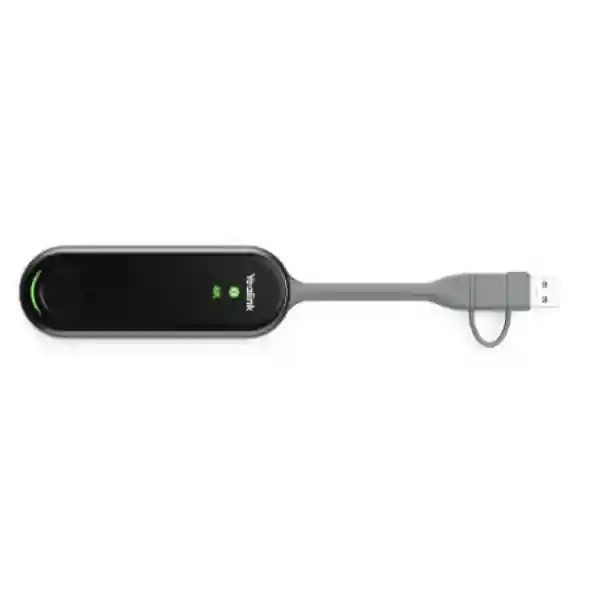
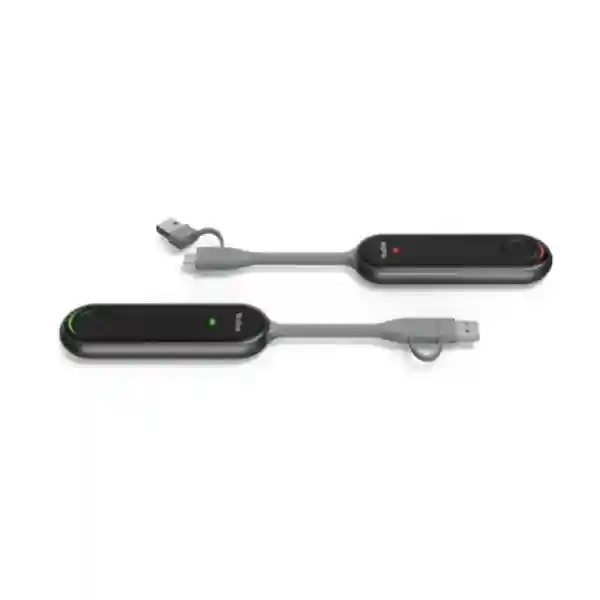
Yealink PA20 4K Content Sharing IP BYOD Device for Meeting Rooms
The Yealink PA20 is a compact business presentation accessory built to simplify the connection between a user’s laptop and a compatible Yealink meeting-room environment. Its core role is straightforward: help a presenter share high-resolution desktop content and, where the room-system combination supports it, enable IP BYOD workflows without turning every meeting into a cable, driver and software troubleshooting exercise. Yealink specifies up to 4K at 30 frames per second for presentation, a 2×2 MIMO Wi-Fi 6 module, dual-band 2.4GHz and 5GHz operation, hardware encoding, a full-featured USB Type-C interface and a USB-C to USB-A adapter. This combination makes the PA20 especially relevant to boardrooms, management meeting rooms, training rooms and collaborative spaces where users arrive with different business laptops and need a repeatable method of presenting.
For procurement teams, the value of the PA20 is not simply that it is a small accessory. The more important consideration is whether it fits the room endpoint, user-device policy and collaboration workflow already deployed. FourTeck therefore recommends validating the exact Yealink room device, current firmware, laptop operating systems, USB capabilities and expected sharing mode before ordering a fleet quantity. That validation can reduce avoidable incompatibility, simplify rollout and make the purchasing decision easier to defend internally.
The PA20 uses hardware-assisted encoding so presentation processing does not depend solely on the laptop CPU. Its self-built wireless connection and physical START/STOP control are designed for a direct user experience: connect the device, establish the supported room connection and begin or end sharing from the button. LED indicators provide immediate feedback for 4K/UHD status, system condition and sharing state. For organizations standardizing meeting spaces across Uganda, this creates a consistent accessory that can be documented, staged and issued with clear operating instructions.
Instant Specifications & Procurement Fact Rail
Yealink PA20
4K content sharing and IP BYOD accessory
Full-featured USB Type-C; USB-C to USB-A adapter supplied
Wi-Fi 6, 2.4GHz/5GHz, 2×2 MIMO
2.2W; 5V/600mA input
Quote and availability on request
The fact rail gives procurement staff a rapid qualification view, but it should not replace compatibility validation. The PA20 is not a generic wireless display dongle intended to be treated independently of the meeting-room endpoint. Functions can vary according to the Yealink endpoint with which it is paired. For that reason, buyers should include the room-system model and current deployment architecture in the request for quotation. Warranty terms, lead time and stock position should also be confirmed on the issued commercial quotation because they can depend on supply batch and procurement route.
Operational Product Architecture & Overview
Meeting rooms often fail at the first two minutes of a session rather than during the call itself. A guest cannot find the right cable, a laptop blocks software installation, the presenter has insufficient privileges to load a utility, or a high-resolution presentation stutters because the host device is doing too much work. The PA20 addresses this class of friction through a purpose-built presentation architecture. Yealink combines a hardware encoding approach with Wi-Fi 6 connectivity and an embedded meeting assistant environment. The design is intended to reduce setup steps and keep presentation handling predictable.
At the user side, the principal physical connection is full-featured USB Type-C. A USB-C to USB-A adapter broadens practical laptop connectivity. The START/STOP button gives the presenter a clear physical control point, which is useful in shared rooms where users may not be familiar with the installed conferencing platform. Three indicator functions communicate whether a 4K/UHD sharing state has been achieved, whether the system has encountered a connection error and whether the unit is waiting, actively sharing, updating or pairing. These simple visual states reduce the amount of explanation required on laminated room guides and service-desk instructions.

On the wireless side, Yealink specifies 802.11 a/b/g/n/ac/ax support with operation across 2.4GHz and 5GHz bands. The Wi-Fi 6 2×2 MIMO implementation is significant in meeting spaces because presentation traffic benefits from stable throughput and low latency. In offices with dense wireless deployments, however, procurement and IT teams should still consider channel planning, local radio conditions, endpoint placement and corporate wireless policy. A capable radio does not remove the need for good room design.
The PA20 can provide duplicated desktop and extended desktop presentation modes. Duplicate mode is useful when the presenter wants the room display to mirror the laptop. Extended mode is valuable when the presenter wants a second workspace, such as keeping notes or controls on the laptop while showing the main presentation to the room. Supported collaboration functions can include annotation, remote control and multiple-screen sharing when paired with appropriate Yealink products such as MeetingBoard or RoomCast. Exact functionality should be checked against the intended endpoint rather than assumed across every installation.
IP BYOD adds another architectural consideration. In the supported workflow, the laptop and room device need to be on the same local network, and BYOD audio/video media is carried over that local network between the laptop and room device. This makes LAN design, segmentation and access policy part of the deployment conversation. A security team may need to confirm whether meeting-room endpoints and user laptops are allowed to communicate as required. Doing this review before purchasing multiple units avoids discovering after installation that network isolation rules prevent the intended workflow.
Enterprise Business Outcomes & Value Analysis
Key Hardware & Software Highlights
The PA20’s feature set is deliberately focused. Its built-in hardware encoding engine handles presentation processing, while the Wi-Fi 6 radio provides the wireless transport foundation. The full-featured USB Type-C connection is the principal host interface, and the supplied Type-A adapter offers flexibility for computers without the preferred connector. A single physical START/STOP button keeps the user interaction direct. Status indicators report UHD operation, connection errors and general system state.
| Component | Technical Role | Operational Outcome |
|---|---|---|
| Hardware encoder | Processes presentation stream in dedicated hardware | Reduces dependence on laptop CPU and avoids separate driver installation |
| Wi-Fi 6 2×2 MIMO | Dual-band wireless transport | Supports responsive, high-resolution sharing in properly designed rooms |
| USB Type-C | Host connection | Straightforward connection to modern business laptops |
| USB-A adapter | Legacy connector accommodation | Broadens practical laptop fleet support |
| START/STOP button | Physical sharing control | Reduces user uncertainty in shared rooms |

Technical Specifications Ledger
The following ledger consolidates manufacturer-published PA20 specifications useful during technical review. Environmental and compatibility values should be checked against the current firmware and endpoint documentation when preparing a controlled deployment, particularly where older operating systems or specialized room endpoints remain in service.
| Area | Specification |
|---|---|
| Presentation | Up to 4K/30fps |
| Input power | 5V/600mA |
| Typical consumption | 2.2W |
| Host interface | 1 × full-featured USB Type-C |
| Included adapter | USB-C to USB-A adapter |
| Control | 1 × START/STOP button |
| Indicators | 4K/UHD, system error and system status indicators |
| Wireless standards | 802.11 a/b/g/n/ac/ax |
| Wireless bands | 2.4GHz and 5GHz |
| Wireless security | WPA-PSK/WPA2-PSK |
| Desktop modes | Duplicated desktop and extended desktop |
| Advanced workflow | IP BYOD with compatible deployment |
| Operating systems | Windows 7/8/10/11 and macOS 10.10 or later; firmware limitations apply to Windows 7/8 |
| Temperature | -10°C to 40°C |
| Humidity | 0–90% non-condensing per current online datasheet |
| Weight | 75g |
| Dimensions | 220 × 38 × 16mm |
A specification table is most useful when it is connected to deployment decisions. The 220mm body length and low weight make the PA20 easy to keep at a conference table, but room designers should still decide how it will be stored and protected from accidental removal. The operating-temperature specification is broad for a typical conditioned office, yet the device should not be treated as an outdoor accessory. Likewise, wireless capability should be assessed in the actual room environment, especially in high-density offices where many access points, personal hotspots and wireless presentation systems share spectrum.
Configuration & Sizing Worksheet
Step 1 — Count rooms and concurrent users. Start with the number of meeting spaces that require presentation or BYOD functionality. Decide whether every compatible room needs a dedicated PA20 or whether a controlled pool is acceptable. Dedicated deployment generally creates a more predictable user experience, while pooled accessories require asset tracking and may create availability issues at peak meeting times.
Step 2 — Record every room endpoint. Build a worksheet listing room name, Yealink endpoint model, current firmware, display arrangement and installed conferencing platform. PA20 capabilities can differ according to the endpoint, so this step is central to procurement accuracy. Include MeetingBoard, RoomCast or other relevant room components where applicable.
Step 3 — Audit laptop interfaces. Identify the proportion of users with full-featured USB-C and the proportion likely to rely on USB-A. Check corporate laptop policies, guest-user patterns and whether USB ports are restricted. Do not assume that the physical presence of a USB-C connector guarantees every required function.
Step 4 — Review network policy for IP BYOD. The supported IP BYOD workflow requires the laptop and room device to be on the same LAN, with media transmitted locally between them. Ask the network team whether client isolation, VLAN boundaries, firewall policy or guest-network restrictions could prevent the required communication. Document the approved topology before deployment.
Step 5 — Review radio conditions. Note nearby access points, other wireless presentation systems and high-density areas. The PA20 supports both 2.4GHz and 5GHz, but a well-planned 5GHz environment can often be preferable for busy collaboration areas. Local spectrum and channel conditions remain an infrastructure consideration.
Step 6 — Confirm software and firmware policy. Although the PA20 is designed to avoid separate driver installation, endpoint firmware still matters. Organizations with strict change control should include room-system firmware validation and a staged pilot in the deployment plan.
Step 7 — Prepare the quote request. Provide quantity, delivery city, room endpoint models, laptop operating systems, expected BYOD requirement, required delivery date and any installation or staging needs. Ask for commercial validity, warranty terms, lead time and taxes to be shown clearly on the formal quotation.
Deployment Scenarios & Industry Use Cases
Large Enterprise & Multi-Site Networks
A large organization may have dozens of meeting spaces spread across headquarters, branches and regional offices. The challenge is consistency. Users should not need a different presentation method in every room. Where compatible Yealink room systems are standardized, the PA20 can become part of the room baseline. IT can publish one connection guide, train service-desk personnel on one status-light pattern and hold a small number of spares. Before scaling, a pilot should test representative laptops, network segments and room endpoints. Once the pilot is approved, procurement can map quantities to room inventory and deployment waves.
Financial & Banking Institutions
Banks and financial organizations commonly operate tightly controlled endpoints, segmented networks and restrictive software policies. A presentation accessory that does not require a separate driver can reduce one source of friction, but security validation remains essential. The institution should verify how PA20 wireless security and IP BYOD traffic align with internal controls, whether user laptops can communicate with the room endpoint on the required LAN and whether guest devices should be permitted. A staged technical review can be documented as part of the change-control process before branch or headquarters rollout.
Educational & Campus Networks
Universities, colleges and training centers need quick transitions between lecturers, visiting speakers and administrative users. Extended desktop mode can be especially useful for keeping speaker notes on a laptop while displaying course content to the room. In campuses with dense wireless coverage, radio planning and endpoint compatibility should be reviewed carefully. The procurement worksheet should distinguish lecture halls, seminar rooms, executive meeting rooms and smaller collaboration spaces because each may use a different room endpoint or network segment.
Government & Controlled Procurement
Public-sector buyers often require a clear bill of materials, formal quotation, technical compliance response and defined delivery destination. The PA20 can be specified by exact model with manufacturer-published interface, power, wireless and environmental values. Where tender documentation asks for warranty, delivery or support commitments, these should be taken from the supplier’s formal commercial response rather than assumed from generic product literature. For deployments with strict network controls, technical acceptance testing should include the intended IP BYOD topology and representative government-issued laptops.
Technical Deep Dive 1: Processing, Acceleration & Hardware Engine Architecture
The most important architectural distinction of the PA20 is its hardware encoding approach. In a conventional software-heavy sharing workflow, the laptop may need to install a client, capture the screen, encode the presentation and transmit it while simultaneously running the user’s conferencing and productivity applications. This can create variable performance across laptop generations and can conflict with restrictive endpoint-management policies. The PA20 moves key presentation processing into dedicated hardware. Yealink describes the unit as capable of up to 4K/30fps UHD hardware encode streaming output, with no separate driver installation required.
For procurement, this matters because performance is not being specified only as a connector feature. It is a workflow feature. Detailed spreadsheets, architecture drawings and visual presentations can benefit from higher resolution, while the 30fps ceiling is appropriate for business presentation rather than being positioned as a high-frame-rate gaming transport. The device’s 2.2W typical power consumption also indicates that this processing is delivered within a small accessory power envelope. Buyers should match expectations to the use case: the PA20 is designed to improve business collaboration and content sharing, not replace specialist broadcast or production video hardware.
Technical Deep Dive 2: Software Ecosystem, Firmware Security & Operational Control
Plug-and-play does not mean firmware can be ignored. The PA20 sits within a broader Yealink room ecosystem, and compatibility can depend on the endpoint and software release. Organizations should record firmware versions during deployment, test planned updates in a representative room and maintain a basic rollback or support escalation process. Manufacturer documentation notes operating-system support for Windows and macOS while also identifying limitations for older Windows releases on later firmware. This is precisely why fleet buyers should not rely only on a generic compatibility statement.
Operational control is intentionally simple at the user surface. The START/STOP button controls sharing, while LEDs provide clear state information. A slowly flashing green system status indicates a completed connection waiting for sharing, solid green indicates active sharing, solid orange is associated with updating or pairing, and solid red on the error indicator signals failure to connect to the endpoint. These states can be incorporated into room instructions so users can resolve simple situations without immediately opening a support ticket.
Technical Deep Dive 3: Availability, Resilience & Recovery Planning
The PA20 itself is a compact accessory rather than a redundant infrastructure appliance, so high availability must be planned at the room-service level. For business-critical boardrooms, executive meeting spaces or operations centers, the practical resilience strategy is to maintain a validated spare and an alternate presentation path. A spare PA20 should be paired or prepared according to the room-system procedure and stored where support staff can reach it quickly. The alternate path might be a direct cable or another supported room sharing method.
Recovery planning should also include the network. If an organization depends on IP BYOD, a LAN policy change can affect the workflow even when the PA20 hardware is healthy. Network teams should therefore document required communication paths and include representative room testing after major segmentation, wireless or firewall changes. This transforms resilience from a single-device question into a complete service design covering accessory, room endpoint, network, display and user laptop.
Pre-Purchase Buyer Gap Checklist
Is there a hidden recurring licence? The published PA20 hardware specifications focus on the device and supported room functions rather than presenting the accessory as a standalone subscription product. However, the wider meeting platform or room system may have its own service or licensing requirements. Buyers should separate PA20 hardware cost from Microsoft Teams, Zoom or other room-service licensing in the bill of materials.
Will it work with every Yealink room product? Do not assume universal feature parity. Functions vary by endpoint. Provide the exact room model to FourTeck for compatibility review and verify the manufacturer’s current compatibility documentation before bulk purchase.
Does USB-C automatically mean compatibility? No. The manufacturer calls for a full-featured USB Type-C connection for the relevant workflow. Laptop hardware and corporate USB policy should be checked. The supplied USB-C to USB-A adapter is useful for mixed fleets, but the intended host configuration still deserves validation.
What happens on an isolated guest network? For IP BYOD, Yealink states that the laptop and room device should be on the same LAN and that audio/video media travels locally between them. Client isolation or network segmentation may therefore require policy changes or a different workflow.
Is 4K guaranteed in every meeting? The device supports up to 4K/30fps, but actual operation depends on the full environment, including endpoint, display, content path and configuration. The UHD indicator gives a visual confirmation when the hard-coded sharing resolution reaches 4K.
How much physical space is needed? The PA20 measures approximately 220 × 38 × 16mm and weighs 75g. It is not a rack-mounted product. Plan table storage, cable management and asset control rather than rack clearance.
What about power? Yealink specifies 5V/600mA input and 2.2W typical consumption. Procurement teams should consider the device as part of the room’s endpoint/accessory design rather than budget for a high-power standalone appliance.
Can we buy before confirming stock? Stock and lead time are commercial variables. Request a dated quotation for the required quantity and destination. This is especially important for project rollouts where room commissioning depends on all components arriving together.
Uganda Procurement & Delivery Logistics
For Uganda projects, a useful procurement request contains more than the model name. Include the required PA20 quantity, delivery location, target date, existing Yealink room endpoint, laptop environment and whether the requirement includes only supply or also configuration guidance and staging. This allows the commercial and technical review to happen together instead of discovering compatibility questions after purchase approval.
A formal quotation should be used to confirm current stock position, lead time, applicable taxes, warranty terms, payment conditions and delivery scope. For multi-room projects, buyers can request that units be organized by site or deployment phase. Where technical pre-configuration is available for the chosen room solution, staging before dispatch can reduce work at the customer site. Project teams should also identify a receiving contact and verify whether delivery is to a central Kampala store, a branch location or multiple regional destinations.
For controlled environments, an acceptance plan can be agreed before rollout. A representative room can be used to validate connection behavior, screen-sharing resolution, laptop compatibility, network access and user instructions. Once accepted, the same documented baseline can guide deployment to remaining rooms. This is particularly valuable for banks, government agencies, universities and large enterprises where changes are governed by formal technical processes.
Uganda Local Coverage Matrix
Head-office, enterprise, hospitality and institutional meeting-room projects.
Corporate offices, hospitality sites and organizations requiring planned delivery.
Business, education and industrial collaboration environments.
Regional offices, institutions and multi-site deployment requirements.
Regional organizations requiring coordinated supply and technical validation.
Coverage planning should be tied to the actual project scope. A single-unit requirement can follow a straightforward quotation and delivery process, while a national rollout benefits from site lists, phased quantities and named receiving contacts. Buyers outside these hubs can still submit their delivery location for logistics review and quotation.
Cross-Border & Regional Supply Chains
Organizations operating across East Africa, the Gulf and wider African markets may prefer to standardize meeting-room equipment across subsidiaries. FourTeck regional web properties can support procurement conversations in Uganda, Kenya, the broader African market, the United Arab Emirates and Kuwait. Cross-border projects should still be quoted per destination because taxes, import arrangements, lead times, warranty processing and local delivery conditions can differ.
For a multi-country rollout, prepare a common technical standard first: approved room endpoint, PA20 quantity per room, laptop assumptions, firmware baseline and acceptance test. Commercial teams can then map that standard to each country. This approach preserves technical consistency while allowing local procurement requirements to be handled correctly.
Related Yealink Solutions & Internal Navigation
The PA20 is most effective when evaluated as part of the wider meeting-room design. Depending on the room size and collaboration platform, buyers may also need Yealink room systems, cameras, audio devices, interactive meeting boards or presentation receivers. Browse the Yealink product range or contact FourTeck for a validated room bill of materials. For organizations refreshing broader communications infrastructure, the FourTeck Uganda technology portfolio can be used as the starting point for coordinated procurement.
Related solution families commonly considered alongside a PA20 include Yealink MeetingBoard environments for interactive collaboration, RoomCast for presentation workflows, UVC conference cameras for video capture, room audio accessories and Microsoft Teams or Zoom room components. Selection should follow the room’s dimensions, seating layout, platform standard and expected meeting type. Avoid adding accessories solely because they share a brand; every item should have a defined role in the approved design.
FourTeck Technical Service Capabilities
Enterprise supply is more dependable when the bill of materials is checked before purchase. FourTeck can use the information supplied with the enquiry to review the proposed PA20 deployment against the stated room environment. This can include confirming the exact model requested, checking the intended Yealink endpoint relationship, reviewing laptop connector assumptions and identifying obvious missing room components before the quotation is finalized.
For project quantities, staging requirements can be discussed as part of the order. A controlled staging process may include asset organization, firmware review where applicable, labeling, packaging by site and preparation of deployment notes. The exact service scope should be agreed commercially because customer environments and project requirements differ. Pre-shipment review is especially useful when units will be sent to multiple branches where onsite technical resources are limited.
Post-sales support begins with good records. Keep the invoice, serial details, room assignment and firmware baseline with the project documentation. If a fault or compatibility issue arises, this information helps technical teams distinguish hardware failure from endpoint, network or configuration problems. Warranty processing should follow the terms stated on the relevant quotation or invoice.
Extended Technical FAQ
1. What is the Yealink PA20 primarily used for?
The PA20 is a 4K content-sharing and IP BYOD accessory for compatible Yealink meeting environments. A user connects it to a supported laptop through full-featured USB Type-C or the supplied USB-A adapter, and the device provides a simplified route to sharing desktop content. Yealink specifies up to 4K/30fps presentation, hardware encoding and Wi-Fi 6 connectivity. It is most useful where organizations want a consistent meeting-room presentation method without requiring every presenter to install a separate sharing driver. Exact functions depend on the paired room endpoint, so the room model should be checked before purchase.
2. Does the PA20 require software or a driver to be installed on the laptop?
Yealink positions the PA20 as a plug-and-play device with embedded meeting-assistant capability and hardware encoding, so a separate driver is not required for the core supported workflow. This is valuable in managed business environments where users may lack administrator rights or where software installation is restricted. It also reduces friction for visitors who need to present quickly. Nevertheless, the room endpoint and PA20 firmware remain part of the overall solution, and organizations should validate their standard laptop images and security policies during a pilot before deploying a large number of units.
3. Can the Yealink PA20 share content in 4K?
Yes. Manufacturer specifications state support for up to 4K at 30 frames per second. The device includes a dedicated 4K/UHD indicator, which shows solid green when the hard-coded content-sharing resolution reaches 4K. The phrase “up to” is important: final resolution depends on the complete environment, including the compatible room endpoint, display path and configuration. A buyer specifying 4K as a mandatory acceptance criterion should test the exact room design and laptop combination rather than assume that every installation condition will automatically negotiate the maximum mode.
4. What does IP BYOD mean on the PA20?
In Yealink’s PA20 IP BYOD workflow, the laptop and room device are connected to the same local area network. Audio and video media for the BYOD session is transmitted directly over that local network between the laptop and the room device. This is operationally useful but makes network architecture relevant. If the laptop is on an isolated guest network while the room system is on a protected corporate VLAN, required communication may be blocked. Network and security teams should therefore validate segmentation, firewall and client-isolation rules before depending on IP BYOD across a fleet of rooms.
5. Which laptop operating systems are supported?
Yealink’s current PA20 documentation lists Windows 7, Windows 8, Windows 10, Windows 11 and macOS 10.10 or later, while also noting that later PA20 versions have limitations with Windows 7 and Windows 8. For new enterprise deployments, the practical approach is to provide FourTeck with the organization’s actual operating-system baseline and test representative laptops. Legacy operating systems should receive particular attention because manufacturer firmware evolves over time and older platforms may not remain suitable for every new software release.
6. Does the PA20 work over both 2.4GHz and 5GHz Wi-Fi?
Yes. The PA20 supports dual-band 2.4GHz and 5GHz wireless operation and 802.11 a/b/g/n/ac/ax standards, with a Wi-Fi 6 2×2 MIMO implementation. This gives deployment teams flexibility, but wireless performance still depends on the room’s radio environment. Dense offices can have significant interference from access points, personal hotspots and other presentation systems. For a multi-room project, the network team should review channel use and room conditions, especially if high-resolution sharing is a core requirement. Wireless capability should be treated as part of the room design rather than evaluated only from the specification sheet.
7. Can users duplicate or extend their desktop?
The PA20 supports both duplicated desktop and extended desktop modes. Duplicate mode mirrors the presenter’s screen and is convenient for straightforward slides, demonstrations and training. Extended mode gives the presenter a second workspace, which can be useful for keeping notes, conferencing controls or private reference material on the laptop while showing the main presentation on the room display. The organization should test its preferred mode with standard laptop builds and the intended room endpoint. User guides can then describe one recommended workflow, reducing confusion when different staff members use the same meeting space.
8. What should be checked before ordering PA20 units for multiple rooms?
Create a room inventory first. Record each Yealink endpoint model, firmware level, display arrangement, collaboration platform, laptop operating systems, USB connector types and network segment. Decide whether IP BYOD is required or whether the main need is content sharing. Confirm quantities and identify any rooms that differ from the standard design. For critical rooms, include a spare-unit strategy. Send this information with the quotation request so compatibility questions can be addressed before purchasing. This is more reliable than ordering by room count alone and discovering later that some rooms use a different endpoint generation or network policy.
9. What warranty and replacement terms apply in Uganda?
Warranty and replacement conditions should be confirmed on the FourTeck quotation or invoice for the specific order. Commercial terms can vary according to supply route, project agreement and product batch, so a generic duration should not be assumed. Procurement teams should request written confirmation of warranty coverage, return procedure and any applicable exclusions before issuing a purchase order. Keep serial numbers and room assignments in the asset register after deployment. If a fault occurs, provide the order reference, serial details, observed LED state, room endpoint model and troubleshooting history to speed technical assessment and any authorized replacement process.
10. Can FourTeck help validate configuration before delivery?
Configuration and staging requirements can be discussed during quotation. The most useful starting information is the exact Yealink room endpoint, firmware baseline, collaboration platform, laptop environment, network design and number of rooms. For larger deployments, a pilot room can be used to establish an approved baseline before the remaining units are rolled out. This approach helps identify compatibility or policy issues early and produces a repeatable installation standard. Any requested staging, labeling, firmware review or multi-site packaging should be included in the commercial scope so responsibilities are clear before dispatch.
Request a Yealink PA20 Procurement Quote for Uganda
For a useful quotation, send the required quantity, delivery city, existing Yealink room-system model, laptop operating systems and whether you need content sharing only or an IP BYOD workflow. FourTeck can use those details to frame the supply request around the actual meeting-room environment rather than treating the PA20 as an isolated accessory. For multi-site projects, include a room list or deployment phases so quantities and logistics can be organized accordingly.
Current stock, delivery lead time, warranty terms, taxes and any requested staging services should be confirmed in the formal commercial offer. If your project is still at design stage, include the room size, conferencing platform and existing audio/video components so the accessory can be reviewed in context.



Reviews
There are no reviews yet.