Professional AV Network Infrastructure • Uganda
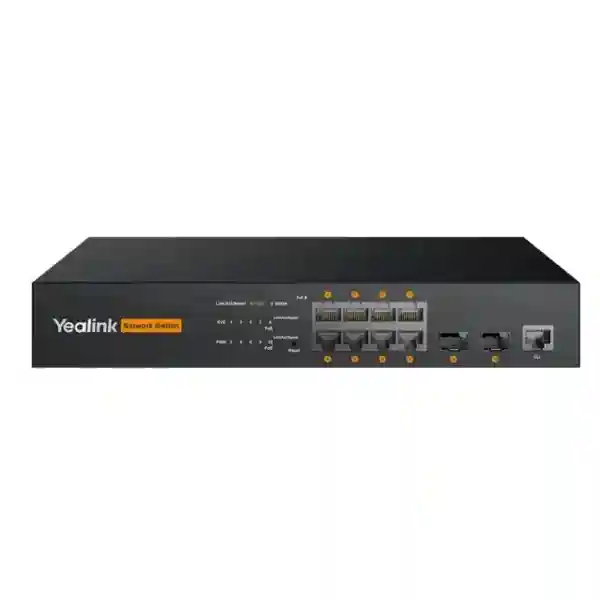
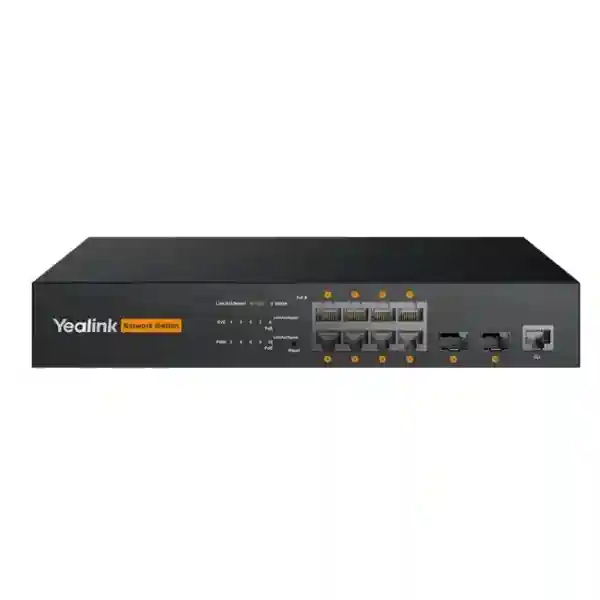
Yealink RCH80 Managed PoE AV Switch for Professional AV Networks
The Yealink RCH80 is an eight-port L2+ Gigabit managed switch engineered for professional audio, video and meeting-room networks where ordinary access switching can become a source of multicast congestion, power uncertainty and difficult troubleshooting. It combines eight Gigabit PoE/PoE+ device ports with two SFP uplinks, web-based administration and AV-oriented multicast controls. For organisations deploying Yealink AVONE components, meeting-room cameras, audio endpoints, encoders, decoders and related devices, the RCH80 creates a compact managed network layer that can carry data and deliver power while giving the technical team direct control over VLAN, QoS, multicast and access policies.
The practical procurement value is straightforward: instead of treating the meeting room as a collection of unrelated endpoints connected to a generic unmanaged switch, the RCH80 gives the AV integrator a controllable network foundation. IGMP Snooping and Fast Leave are especially important when streams use multicast because they help prevent unnecessary replication of traffic to ports that do not need it. The unit also supports enterprise functions including VLANs, QoS, DHCP-related controls, access control and 802.1X authentication. Its metal enclosure, internal power supply and fanless design suit quiet collaboration spaces where acoustic distraction and equipment clutter matter.
FourTeck supplies the RCH80 for Ugandan business projects with pre-sales assistance covering endpoint counts, PoE calculations, copper and fibre uplink planning, compatible Yealink equipment and deployment documentation. Buyers should provide a room schedule and connected-device list before finalising quantity. This allows the proposed topology to be checked against the eight access ports and the available PoE budget rather than relying only on a switch count.
Instant Specifications & Procurement Fact Rail
Yealink RCH80
L2+ managed AV switch
8 × Gigabit PoE/PoE+
2 × SFP
Up to 130 W total
Web-based
The fact rail should be read as a sizing starting point rather than a substitute for design validation. Eight powered access interfaces can be sufficient for a focused meeting-room AV network, but the power requirement of each connected device must be added together and reasonable headroom retained. Yealink guidance recommends keeping power reserve rather than designing directly to the maximum output. The two SFP interfaces provide useful flexibility when the room network needs a fibre path to an equipment room, aggregation layer or another supported network segment. Stock, lead time and warranty terms can vary by order batch, so FourTeck confirms those commercial details on the project quotation.
Operational Product Architecture & Overview
Professional AV networks behave differently from conventional office endpoint networks. A normal desktop switch may carry intermittent web traffic, file transfers and cloud sessions without needing special multicast treatment. A room equipped with networked microphones, cameras, speakers, presentation devices, encoders and decoders can generate continuous real-time flows that are sensitive to delay, packet loss and unintended replication. The RCH80 addresses this environment by combining Gigabit Ethernet access, PoE delivery and managed traffic controls in one AV-oriented platform.
At the physical layer, the eight Gigabit PoE ports are intended to connect powered AV devices while the SFP interfaces provide uplink flexibility. This arrangement lets designers separate the room-facing access layer from the upstream network. Where fibre is preferred because of distance, electrical isolation or building distribution practice, an appropriate SFP can be selected according to the wider design. SFP module type, fibre mode and optical budget should be confirmed before purchase because those items depend on the actual path rather than the switch alone.
At the traffic-control layer, multicast handling is a central part of the RCH80 proposition. IGMP Snooping allows the switch to observe multicast group membership and forward streams toward interested receivers rather than flooding them indiscriminately. Fast Leave can shorten the time required to stop forwarding a stream after a receiver leaves a group. In AV-over-IP designs, this matters because uncontrolled multicast can consume bandwidth on unrelated links and complicate fault isolation. An integrator should still validate the complete multicast design, including querier placement, VLAN boundaries and upstream switching behaviour.
VLAN capability provides another important control point. AV endpoints can be placed in a defined broadcast domain rather than mixed casually with user computers, printers and other building systems. QoS can then be used according to the approved network policy to prioritise time-sensitive traffic classes. Access-control and 802.1X functions can contribute to enterprise admission policy where the organisation requires authenticated network attachment. DHCP features support controlled address allocation workflows, while web management gives technicians a practical interface for configuration and diagnostics.
The built-in power supply reduces the need for a separate external switch power brick, and the fanless chassis helps keep equipment noise low. That is relevant when the switch is located in a credenza, meeting-room cabinet or nearby technical enclosure rather than a distant data centre. Fanless operation also removes a moving component, although normal thermal planning remains necessary: the enclosure still requires adequate airflow and should not be buried under cables or placed against heat-producing equipment.

Procurement teams often reach the RCH80 after encountering one of four problems: a room design has more PoE devices than convenient local power outlets; multicast AV traffic is unstable on an unmanaged network; fibre uplink is required between the room and a central rack; or the project needs a switch whose behaviour can be documented and managed by the technical team. The RCH80 addresses those needs in a compact form, but correct results still depend on topology, cabling, endpoint firmware and configuration discipline.
Enterprise Business Outcomes & Value Analysis
Gigabit access links provide the baseline transport expected by modern professional AV endpoints. Managed multicast controls help preserve useful bandwidth by limiting unnecessary stream replication. The benefit is not an abstract speed figure; it is a more predictable path for real-time media when the network has been configured according to the room design.
A managed switch gives engineers visibility and configuration control that an unmanaged device cannot provide. The fanless metal platform is suited to quiet AV spaces. Reliability should still be considered end to end, including UPS coverage, upstream redundancy, cable quality, firmware policy and spare-unit strategy for critical rooms.
Eight access ports make the RCH80 suitable for focused room or zone deployments. Multiple rooms can use separate switches or a larger architecture can be designed around higher-capacity switching. The two SFP uplinks allow the access layer to fit into structured fibre designs where required. Scaling should be based on endpoint and stream counts, not only room count.
VLANs, access-control functions and 802.1X support allow the RCH80 to participate in a more disciplined enterprise network. These features do not replace firewalling or organisational security policy, but they provide useful controls at the access layer and can reduce the risks associated with an unmanaged AV island.
Web administration enables technicians to review and change switch configuration from a browser-based interface. Standardising room switching around a defined model can also simplify documentation, support procedures, spare holdings and commissioning checklists across multiple sites.
PoE can reduce local adapters and power cabling for compatible devices. A single managed switching layer also reduces the operational ambiguity that comes from mixing small unmanaged switches. Buyers should calculate lifecycle value using purchase cost, SFPs, structured cabling, UPS capacity, support effort and expected refresh cycle.
Key Hardware & Software Highlights
| Element | Capability | Operational Outcome |
|---|---|---|
| 8 Gigabit PoE ports | Data and power on compatible endpoints | Cleaner room deployments and fewer endpoint adapters |
| 2 SFP uplinks | Fibre-capable uplink architecture | Flexible connection to aggregation or remote racks |
| IGMP Snooping / Fast Leave | Multicast membership-aware forwarding | Reduced unwanted multicast distribution |
| VLAN and QoS | Segmentation and traffic policy | Better operational separation of AV services |
| 802.1X / access control | Network admission controls | Alignment with enterprise access policies |
| Fanless metal chassis | Quiet physical design | Suitable for noise-sensitive meeting spaces |
The combination is valuable because AV networking is a system problem. Port count alone does not guarantee a successful room, and PoE wattage alone does not guarantee stream stability. The RCH80 combines the physical interfaces with the management features needed to shape how those interfaces behave. During commissioning, FourTeck recommends documenting VLAN IDs, management addressing, multicast settings, uplink configuration, endpoint addresses, cable identifiers and firmware versions. That record becomes particularly useful when a room is handed from an installation team to internal IT operations.
Technical Specifications Ledger
| Product | Yealink RCH80 |
| Product type | L2+ web-managed AV switch |
| Access interfaces | 8 × Gigabit Ethernet PoE/PoE+ ports |
| Uplink interfaces | 2 × SFP |
| PoE budget | Up to 130 W total |
| AV protocols / ecosystems | Optimised for Yealink AV protocols and professional workflows including Dante and AES67 support stated by Yealink |
| Multicast | IGMP Snooping, Fast Leave; configuration guidance also covers IGMP querier and query interval |
| Network controls | VLAN, QoS, access control, DHCP functions and 802.1X authentication |
| Management | Web-based switch management |
| Construction | Metal chassis with built-in power supply |
| Cooling | Fanless |
| Primary application | Meeting-room and professional AV-over-IP connectivity |
| Compatible Yealink examples | UVC86, SmartVision 80, AVHUB, MSpeaker II, MSpeaker Pro, AP08, AVBridge, CM50, CM20, CS10/CS10-D, CT200, CT300, EN300 and DE300, subject to current solution guidance |
| Dimensions / environmental values | Confirm against the current Yealink regional datasheet before cabinet fabrication or environmental sign-off |
| Warranty | Project quotation to state applicable regional warranty and support terms |
Specifications should be interpreted conservatively during procurement. A PoE budget describes the total power available to powered devices; it does not mean every port can simultaneously deliver an arbitrary maximum without regard to the total. Likewise, an SFP slot does not determine the optical module required. Fibre type, connector plan, distance and upstream equipment determine the correct transceiver. FourTeck can include compatible optics and patching components in the bill of materials after the physical path is known.
Configuration & Sizing Worksheet
Step 1 — Count endpoints and traffic roles
List every device expected to connect directly to the RCH80. Separate cameras, microphones, speakers, encoders, decoders, control devices and upstream connections. Record whether each device sends unicast, multicast or both. An eight-port switch can appear sufficient until control interfaces, service laptops or additional AV endpoints are included. Reserve capacity where future expansion is likely.
Step 2 — Build the PoE budget
Record the rated PoE requirement of every powered device and total the values. Do not design to exactly 130 W. Yealink recommends retaining headroom, with 10 percent as a recommended reserve and 20 percent providing a stronger safety margin. Devices that can use external DC power may offer design flexibility, but the final method should be documented so future service staff understand which source is expected.
Step 3 — Validate room environment and placement
Decide whether the switch will sit in a room cabinet, equipment credenza, wall enclosure or central rack. Confirm ventilation, service access, cable bend radius and access to conditioned power. Fanless operation helps acoustically, but passive cooling still requires free airflow. Where the room is business critical, place the switch and associated AV controllers on suitable UPS-backed power according to organisational policy.
Step 4 — Select copper and fibre media
Check every copper cable route against the installed cabling standard and endpoint requirement. For SFP uplinks, identify multimode or single-mode fibre, connector type, distance and upstream switch compatibility. Optics should be selected as a matched network component rather than as a generic accessory. Label both ends and document patch-panel positions.
Step 5 — Define management and service policy
Agree the management IP plan, administrator credential process, VLAN structure, QoS policy, multicast configuration, authentication requirements and change-control ownership. The default credential should be changed during commissioning. Decide who is permitted to administer the switch after handover and where the configuration record will be stored.
Step 6 — Prepare the quotation request
For an accurate FourTeck quotation, provide site city, room quantity, RCH80 quantity if already known, endpoint models and counts, fibre requirements, SFP requirements, desired delivery date, warranty expectations, installation scope and any need for pre-configuration. For tender work, include required manufacturer documentation and commercial submission format. This reduces revision cycles and makes it easier to identify missing accessories before purchase approval.
Deployment Scenarios & Industry Use Cases
Large enterprise and multi-site collaboration
A corporate estate may standardise the RCH80 as the room-level AV access switch for selected medium and large meeting spaces. Each room can be documented with the same port map, management convention and multicast policy while upstream fibre or copper connects back to the site network. Standardisation simplifies support because engineers encounter a familiar switching layer across offices. It also allows spares to be planned around a known model rather than many unmanaged devices. Multi-site design must still respect each building’s addressing, VLAN, security and uplink architecture.
Financial and banking institutions
Banks often require tighter change control and network segmentation than ordinary meeting-room deployments. The RCH80’s managed feature set can support a defined AV segment with controlled access rather than an isolated unmanaged switch hidden in furniture. 802.1X capability, VLANs and access controls can be incorporated where appropriate. The organisation’s security team should approve the exact configuration, and management access should follow internal credential, logging and network administration policy.
Educational and campus networks
Lecture rooms and hybrid teaching spaces can include cameras, microphones, speakers and AV-over-IP endpoints whose traffic must coexist with campus infrastructure. The RCH80 can form the local managed layer for a room or teaching zone. SFP uplinks are useful where building distribution is fibre based. Campus teams should coordinate multicast boundaries carefully because a local AV design can interact with a much larger routed network if upstream policies are not defined.

Government and regulated procurement
Public-sector meeting rooms frequently require documented bills of materials, traceable model references and clear warranty processes. FourTeck can prepare commercial quotations around the RCH80 with associated Yealink endpoints, optics and cabling accessories. Technical acceptance should include port mapping, configuration backup, credential handover, firmware records and physical labelling. Where a tender specifies compliance certificates or exact environmental limits, those documents should be confirmed against the current manufacturer datasheet before submission.
Technical Deep Dive 1: Processing, Multicast & AV Transport
The defining networking challenge in many AV-over-IP systems is not simply raw link speed; it is controlling where continuous media flows are forwarded. Multicast allows one source to serve multiple receivers efficiently, but a switch that treats multicast like unknown broadcast traffic can distribute streams to ports that have no interest in them. This wastes bandwidth and can expose endpoints to traffic they were never meant to process. IGMP Snooping addresses this by observing group membership information and building forwarding behaviour around receivers that have joined a multicast group.
Fast Leave complements this behaviour when receivers change streams or disconnect. In a dynamic AV environment, rapid removal of an unnecessary forwarding state can help keep the network cleaner. The overall multicast domain also needs a correctly planned querier and upstream design. The switch should therefore be configured as part of the complete network, not in isolation. The RCH80’s Gigabit interfaces provide the transport layer, while VLAN and QoS controls give the administrator additional ways to organise traffic and apply policy. For a design with many simultaneous high-bandwidth streams, calculate aggregate flows across uplinks and verify that the chosen topology leaves sufficient margin.
Technical Deep Dive 2: Management, Firmware Security & Operational Control
Web management changes the operational character of the room switch. Instead of an opaque device with fixed behaviour, the RCH80 can be incorporated into commissioning and support procedures. Yealink’s support guidance describes browser access to the management interface and requires changing the login password on first access. That first-login action should be treated as a mandatory commissioning task. The final credential should follow the customer’s secure administration policy rather than being left as an installer convenience.
Configuration ownership is equally important. VLAN assignments, multicast settings and access policies should not be changed casually after the room has been validated. Maintain a configuration record and record firmware versions during handover. Before applying future firmware updates, review manufacturer release information and coordinate the maintenance window with room operations. Where the switch is connected to a corporate management network, restrict administrative reachability according to the organisation’s network design. Security is achieved through disciplined configuration and lifecycle management, not merely by purchasing a managed switch.
Technical Deep Dive 3: Availability, Redundancy & Recovery Planning
A single RCH80 is a compact room access switch, so availability planning must consider what happens if that room-level device, its power source or its upstream link becomes unavailable. Critical boardrooms may justify keeping a configured spare switch, maintaining documented port maps and using UPS-backed power. Recovery time can be reduced substantially when the replacement process is known in advance and technicians have a current configuration record.
The two SFP interfaces provide architectural flexibility, but redundancy should never be assumed solely from the presence of two uplink ports. The actual high-availability behaviour depends on the configured network design and supported protocols. If a project requires dual-path resilience, state that requirement explicitly during design so the topology can be validated. Disaster recovery also includes practical matters: spare optics, labelled patch leads, stored configuration, endpoint documentation and access to current firmware. For multi-site organisations, a standard room template can make restoration faster because technicians can compare a failed room with a known-good deployment elsewhere.
Pre-Purchase Buyer Gap Checklist
Are there hidden recurring licences? Buyers should distinguish switch functionality from licences or subscriptions associated with other collaboration platforms and endpoints. Request the quotation to identify every recurring item separately. Do not assume that a switch purchase includes unrelated conferencing service subscriptions.
Will eight ports be enough after commissioning? Count actual physical connections, not just major devices. Include control equipment and any planned expansion. If the room is already close to eight ports, consider whether a larger switching design is more appropriate rather than creating a chain of small switches later.
Is 130 W enough for all endpoints? Add the rated PoE draw of each connected device and retain margin. A reference room with several powered audio devices and a camera can consume a meaningful share of the budget. If the calculation is too close to the limit, revise the power method or switching architecture before purchase.
Do SFP modules come automatically? Treat optics as design-specific accessories unless the commercial quotation explicitly states otherwise. Confirm fibre type, distance, connector path and upstream compatibility before selecting modules.
Can it connect to non-Yealink networks? The RCH80 uses standard Ethernet switching concepts and supports professional AV standards cited by Yealink, but interoperability is a system-level question. Validate the required endpoint, multicast and uplink behaviour with the complete vendor mix before deployment.
What about rack and cabinet clearance? Do not fabricate furniture or finalise dense rack layouts using an assumed chassis size. Confirm current physical dimensions and connector clearance from the latest datasheet, then allow ventilation and cable bend space.
What happens at full PoE load? Thermal and power planning should account for the intended operating condition. Maintain airflow around the fanless chassis, use appropriate conditioned power and avoid stacking heat-producing equipment directly around it.
How should the product lifecycle be handled? For multi-year rollouts, ask FourTeck to confirm current availability, regional warranty and any manufacturer lifecycle notices at the time of each procurement phase. Standardise documentation so later hardware revisions can be assessed against the original design.
Uganda Procurement & Delivery Logistics
FourTeck supports Ugandan organisations that need the RCH80 as a standalone switch or as part of a broader Yealink meeting-room bill of materials. The quotation process can include switch quantities, compatible endpoints, SFP optics, patching accessories and agreed technical services. For project work, provide the required delivery location, room count, desired installation window and any tender reference so the commercial response can be structured appropriately.
Order processing begins after commercial approval under the agreed terms. Availability and delivery time depend on current stock position, project quantity and inbound supply conditions, so lead time should be confirmed on the quotation rather than assumed from a general product page. Large rollouts benefit from phased delivery planning because switches, AV endpoints and site readiness may follow different schedules.
Pre-configuration can be discussed where the customer supplies an approved addressing and VLAN plan. Staging can include basic visual inspection, bill-of-materials checks, firmware review and agreed configuration tasks before dispatch. Site teams should still perform final network validation after installation because multicast behaviour, upstream routing and endpoint operation depend on the live environment.
Local Coverage Matrix
Corporate offices, boardrooms, hospitality and public-sector deployments.
Enterprise, hospitality and institutional collaboration projects.
Business, education and distributed site requirements.
Regional offices, campuses and meeting-room infrastructure.
Institutional and multi-site enterprise procurement support.
Coverage planning is based on the actual delivery and service scope. Buyers outside these hubs can still request supply and project coordination. Include the exact destination and whether the requirement is delivery only, remote configuration assistance or a broader installation package so logistics can be priced correctly.
Cross-Border & Regional Supply Chains
Organisations operating across East Africa and the Gulf often prefer consistent product references and documentation across branches. FourTeck supports regional sourcing through Uganda, Kenya, broader African markets, UAE and Kuwait. Cross-border projects should be quoted by destination because freight, tax treatment, warranty routing and lead times can differ.
For multi-country standards, create a master room bill of materials and then validate local power, cabling, optical and support requirements in each market. Consistent model selection can simplify engineering, but regional commercial conditions should remain explicit. FourTeck can coordinate the product reference while keeping country-specific delivery terms visible to procurement teams.
Related Yealink Products & Solution Paths
The RCH80 is normally purchased as part of an AV system rather than as an isolated network appliance. Buyers may combine it with Yealink cameras, microphones, speakers, AV bridges, AVONE encoders and decoders according to room architecture. Explore Yealink solutions in Uganda, review the FourTeck Uganda catalogue, or contact the engineering team for a model-specific bill of materials. Where a deployment needs more ports or a substantially larger PoE budget, ask about the Yealink RCH240 and whether it better fits the endpoint count.
Accessories should be selected from the topology outward. Start with endpoint models, then calculate PoE, determine copper runs, decide whether fibre uplinks are required, and only then finalise optics and patching. This prevents the common mistake of ordering generic SFPs before the building fibre path has been identified. The same method applies to UPS sizing and rack accessories: size them from the actual equipment list and service requirements.
FourTeck Technical Service Capabilities
FourTeck can support the RCH80 procurement lifecycle from design validation through handover. Engineering review can compare the proposed endpoint count with available ports, calculate PoE demand, identify likely fibre requirements and flag missing accessories. Bill-of-materials verification is particularly valuable on multi-room projects where a small omission repeated across many rooms can create installation delays.
Staging services can be agreed for projects that require equipment inspection, asset recording, firmware review or basic pre-configuration before shipment. The exact configuration scope should be documented and approved because production VLANs, addresses and security credentials belong to the customer’s network policy. Firmware updates should be performed against an approved version and maintenance plan rather than automatically changing every unit without compatibility review.
Post-sales support can assist with product-level troubleshooting, configuration review and warranty coordination under the applicable commercial terms. Effective support is faster when the customer retains serial information, configuration backups, port maps, firmware versions and a simple network diagram. These records turn a meeting room from an undocumented appliance cluster into a maintainable infrastructure component.
Extended Technical FAQ
1. What is the Yealink RCH80 designed to do?
The RCH80 is designed as a managed network and power layer for professional AV environments. It offers eight Gigabit PoE/PoE+ ports for compatible devices, two SFP uplinks and web-based management. Its AV-oriented value comes from multicast controls such as IGMP Snooping and Fast Leave, combined with VLAN, QoS and access features. In a meeting room, that means cameras, audio devices and AV-over-IP components can be connected through a switch that administrators can configure and document rather than through an unmanaged device with little visibility.
2. How much PoE power is available?
Yealink specifies up to 130 W total PoE/PoE+ capacity for the RCH80. The important word is total: each connected powered device contributes to the aggregate load. Build a worksheet using the rated requirement of every endpoint and retain power headroom. Yealink guidance recommends a reserve rather than operating exactly at the maximum. If the room calculation is close to the limit, consider powering suitable devices externally or moving to a different switching architecture instead of assuming the switch will accommodate additional load indefinitely.
3. Why are IGMP Snooping and Fast Leave important for AV?
Many AV-over-IP systems use multicast to deliver a source stream to multiple receivers. Without appropriate multicast control, traffic may be forwarded to ports that do not need it, wasting bandwidth and potentially affecting endpoint behaviour. IGMP Snooping allows the switch to learn which receivers have joined multicast groups and forward accordingly. Fast Leave helps remove forwarding state promptly when a receiver leaves. The wider design still needs a properly planned querier and upstream network policy, so these features should be configured as part of the complete AV network.
4. Does the RCH80 support fibre?
The RCH80 provides two SFP uplink interfaces, allowing fibre connectivity when fitted with suitable transceivers. The correct SFP cannot be chosen from the switch model alone. The project must identify fibre mode, link distance, connector path and the interface on the upstream switch. Confirm whether optics are included in the commercial bill of materials; do not assume they are bundled. FourTeck can help specify compatible uplink components after the building cabling and destination equipment are known.
5. Is the RCH80 suitable for Dante and AES67 environments?
Yealink positions the RCH80 for professional AV workflows and states support for Yealink AV protocols as well as standards including Dante and AES67. A complete deployment should still be validated against the exact audio devices, firmware versions, multicast design and clocking requirements used in the project. Compatibility at the switching level is only one part of a functioning audio network. For mixed-vendor systems, provide the full endpoint list during design review so the network can be checked against the required workflow.
6. Does the switch require a recurring licence?
The procurement team should ask for all recurring commercial items to be shown separately on the quotation. The RCH80’s switching role should not be confused with subscriptions that may apply to conferencing platforms, management services or other endpoints in the room. If a tender requires a fixed multi-year ownership cost, FourTeck can structure the bill of materials so hardware, optional services and any third-party recurring components are clearly separated. This makes lifecycle budgeting easier and avoids treating unrelated service subscriptions as part of the switch itself.
7. How should the RCH80 be secured during commissioning?
Start by changing the default management password during initial access, as directed in Yealink’s management guidance. Then apply the customer’s approved management addressing, VLAN, access-control and authentication policy. Restrict administrative access according to the enterprise network design, record the final configuration and store credentials using the organisation’s approved method. Firmware should be maintained under change control. The switch supports useful security-related network functions, but secure operation depends on how those controls are configured and governed after installation.
8. What warranty and replacement support is available in Uganda?
Warranty terms should be taken from the FourTeck quotation for the specific order because regional terms, project agreements and supply batches can differ. Keep purchase documentation, serial numbers and fault details for any warranty case. For business-critical rooms, consider holding a compatible spare so service can be restored while a warranty process is underway. FourTeck can assist with product-level fault review and warranty coordination according to the applicable terms, but the customer should maintain configuration backups to make replacement faster.
9. Can FourTeck pre-configure the switch?
Pre-configuration can be discussed when the customer provides an approved network plan. Typical preparation may include agreed management addressing, VLAN parameters, multicast settings or firmware review. The scope should be documented before staging because credentials and production network values are sensitive operational information. Even when pre-configuration is performed, the installation team must validate the switch on the live network and confirm endpoint operation, upstream multicast behaviour and PoE load after all devices are connected.
10. When should a buyer consider a larger switch instead?
Consider a larger switching design when the room requires more than eight direct access connections, when the projected PoE load approaches the RCH80’s practical budget after headroom, or when the architecture requires more extensive aggregation. Yealink’s RCH240 is one model to discuss for higher-density professional AV deployments. Avoid solving a predictable capacity shortage by adding unmanaged switches later, because that can complicate multicast control and troubleshooting. Size the switch from the final endpoint list and expected expansion rather than from the current minimum room configuration.
Plan the RCH80 Around Your Actual AV Topology
A reliable professional AV network begins with accurate endpoint, power and uplink planning. Send FourTeck your room count, Yealink device list, expected PoE endpoints, fibre path details and delivery destination. The team can review whether the RCH80 has the right port density and power capacity, identify required SFPs and accessories, and prepare a Uganda-focused commercial quotation. For multi-room or multi-site projects, include your standard room types so the bill of materials can be structured consistently across locations.
Before ordering, confirm the latest availability, warranty terms, delivery schedule and any staging requirements. This keeps procurement aligned with the technical design and reduces the risk of discovering missing optics, insufficient PoE capacity or undocumented network requirements during installation.


Reviews
There are no reviews yet.