Yealink RoomPanel Plus E2 Meeting Room Scheduling Panel
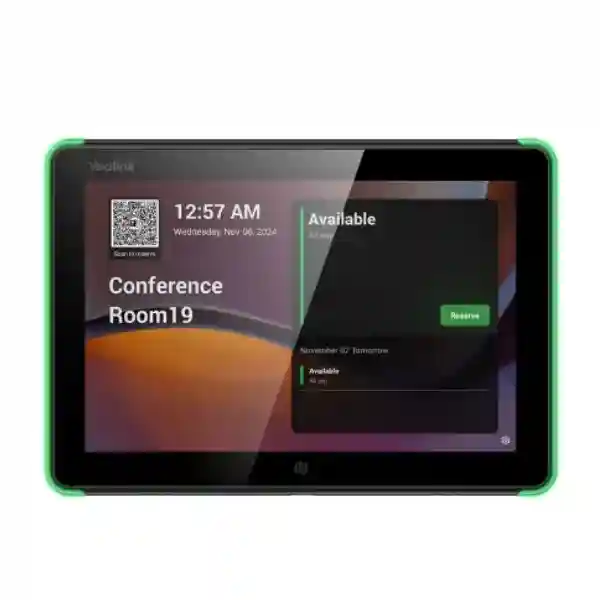
The Yealink RoomPanel Plus E2 is a purpose-built 10.1-inch room scheduling panel for organizations that want people to see room availability, review meeting details, reserve shared spaces, and interact with workplace calendars directly outside the meeting room. Instead of relying on printed room names, separate tablets, or employees checking a laptop before walking down a corridor, the panel creates a dedicated scheduling point at the room entrance. Its 1280 × 800 multi-point capacitive display is paired with high-visibility full RGB status lighting, helping staff identify room state from a practical viewing distance. Android 13, wired and wireless networking, Bluetooth 5.0, NFC/RFID, sensors, microphones, speakers, PoE and flexible mounting make the unit suitable for structured enterprise deployments rather than improvised tablet installations.
For procurement teams in Uganda, the value of a room panel is not simply the screen. A successful project depends on calendar platform choice, room resource configuration, network authentication, power availability, mounting surface, device administration, licensing, physical placement and rollout consistency. RoomPanel Plus E2 brings these considerations into a single commercial endpoint that can be standardized across boardrooms, executive meeting spaces, training rooms, huddle rooms and shared collaboration areas. It supports Microsoft Teams, Zoom and several third-party workspace platforms, although the exact functions available depend on the selected application and subscription. This distinction matters during planning because check-in rules, room release behavior, identity workflows and occupancy integrations may differ between platforms.
FourTeck supplies the Yealink RoomPanel Plus E2 for business and institutional projects in Uganda, with quotation support for single-site and multi-site requirements. Buyers can submit the number of rooms, preferred collaboration platform, mounting environment, network method, delivery city and required accessories so the bill of materials can be checked before ordering. This reduces the risk of receiving panels without the correct mounting approach, power design or platform assumptions.
Instant Specifications & Procurement Fact Rail
RoomPanel Plus E2
Manufacturer part 1303196
Meeting room scheduling and workspace status panel
10.1-inch LCD, 1280 × 800, multi-point capacitive touch
IEEE 802.3af PoE or 12V DC / 1.25A
10/100 Ethernet, 802.11a/b/g/n/ac Wi-Fi
Project quotation based on quantity, delivery point and configuration
The procurement fact rail should be read as a planning baseline rather than a substitute for a project bill of materials. The panel can be connected by Ethernet or Wi-Fi, but wired PoE is often attractive in enterprise deployments because one structured cable can provide both network connectivity and power. Where a PoE switch is not available, the 12V DC option provides another installation route, subject to local power positioning and cable management. The unit includes 13.56 MHz NFC/RFID, Bluetooth 5.0, a USB-A interface, ambient-light sensing and TOF proximity sensing. Operating temperature is specified from 0°C to 40°C, with 10% to 95% non-condensing operating humidity. The panel weighs approximately 0.627 kg and its display body measures about 247.6 × 166.36 mm. Warranty handling and regional service terms should be confirmed on the FourTeck quotation for the specific supply batch and destination.

Operational Product Architecture & Overview
RoomPanel Plus E2 is best understood as a dedicated room-edge endpoint. It sits physically at the threshold of a shared space and connects the digital room resource to the people standing outside it. That placement changes the operational requirement compared with a general-purpose tablet. A scheduling panel must remain powered, visible, remotely manageable and aligned with the organization’s calendar rules throughout the working day. It must also present status quickly enough that users can make a decision while walking past. The 10.1-inch display provides a larger visual surface than compact scheduling panels, while the RGB illumination creates a secondary status channel that can be recognized without reading small text.
The platform is based on Android 13 and is designed to host supported room scheduling applications. This allows the hardware to work with multiple meeting and workspace ecosystems rather than forcing every buyer into one calendar environment. Supported platforms published for the model include Microsoft Teams, Zoom, Gingco, GoBright, Flowscape, Space Connect and Appspace. Exact functionality is application-dependent, so a procurement exercise should identify the intended platform before hardware is ordered. A Teams deployment, for example, should be planned around Microsoft room-resource and administration requirements, while another workplace platform may use different authentication, sensor or booking rules.
Network architecture is deliberately flexible. A 10/100 Mbps Fast Ethernet interface supports wired deployment, including IEEE 802.1X methods such as EAP-MD5, EAP-TLS, EAP-PEAP/MSCHAPv2 and EAP-TTLS/EAP-MSCHAPv2. Wi-Fi support covers 802.11a/b/g/n/ac, providing an alternative where cable paths are constrained. For organizations with managed access networks, the authentication options are important because a room panel is a permanent network endpoint and should fit existing access-control policy rather than being placed on an unmanaged exception network. Bluetooth 5.0 supports nearby accessory and sensor workflows, while 13.56 MHz NFC/RFID can support identity-related interactions where enabled by the selected application.
The ambient-light sensor and TOF proximity sensor help the device behave more naturally in the physical workspace. Automatic brightness behavior can reduce the need for manual adjustment when corridor lighting changes, while proximity-based wake behavior can keep the interface ready when a person approaches. These features are small individually, but across dozens or hundreds of rooms they reduce repeated user friction. Two microphones and two speakers add audio capability for supported application functions, and a USB-A port is provided for service or supported peripheral workflows.
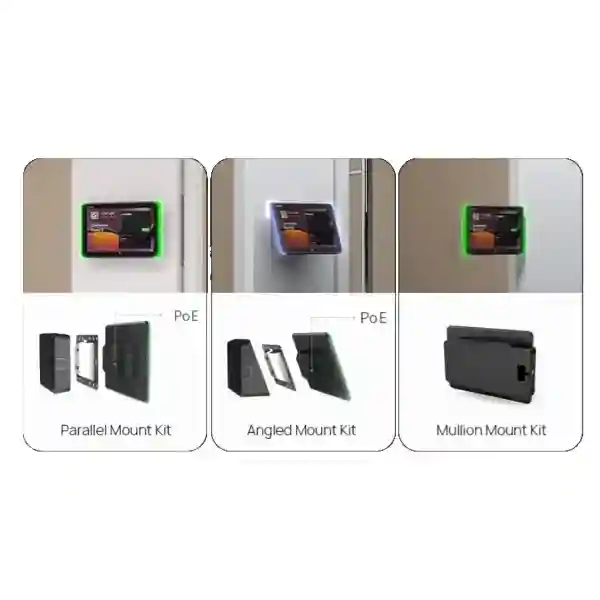
The physical architecture addresses another common deployment problem: buildings rarely present identical mounting surfaces. The panel supports zero-degree and 20-degree installation options and can be deployed on wall, glass or mullion locations with appropriate brackets. This allows the project designer to align screen angle with corridor sightlines and accessibility requirements. Before ordering, each room should be surveyed for surface material, cable entry, door swing, glass thickness or mullion position, user approach direction and the availability of a nearby data drop. Standardizing these details before installation prevents field teams from improvising with visible cabling or inconsistent panel positions.
Procurement managers typically investigate RoomPanel Plus E2 because existing meeting rooms are difficult to find, calendar status is not obvious, rooms are booked but unused, or different offices have inconsistent scheduling hardware. The product addresses the endpoint portion of that problem. It does not replace governance around calendar resources, user permissions or meeting policies. The strongest deployments combine the hardware with a documented naming convention, room-resource ownership, platform administration, network policy and support process. FourTeck can help translate those project requirements into quantities, accessories and deployment assumptions for the Uganda supply quotation.
Enterprise Business Outcomes & Value Analysis
A room scheduling system succeeds when employees can understand room state in seconds. The 10.1-inch screen provides space for meeting details and interaction, while the RGB light bars communicate status beyond the readable distance of text. This reduces corridor uncertainty and makes the scheduling endpoint useful even when a user is simply scanning several rooms. Multi-point capacitive touch supports direct booking, check-in or room interaction according to the active platform.
A dedicated panel removes many of the variables associated with consumer tablets, including improvised mounts and charging arrangements. PoE allows a structured network design in which power can be delivered from managed switching infrastructure. The alternative 12V DC input gives installers another path when PoE is unavailable. Consistent hardware across rooms also simplifies spares, documentation, training and troubleshooting.
Both Ethernet and Wi-Fi are available, allowing planners to match the endpoint to the building. IEEE 802.1X support is valuable in controlled enterprise networks where endpoints must authenticate before receiving access. For a multi-floor rollout, planners can standardize VLAN placement, addressing, authentication certificates and switch-port policy rather than treating each room as an isolated exception.
The product provides a current Android 13 foundation and network authentication options suitable for managed environments. NFC/RFID capability can support identity or attendance workflows where the scheduling application provides them. Security still depends on configuration: buyers should define who administers the panel, how credentials are provisioned, how firmware is maintained, which outbound services are permitted and how retired devices are reset.
Yealink provides remote device management capabilities through its management ecosystem, and platform-specific administration may also be available. Central visibility matters once a deployment grows beyond a few rooms. Administrators need to identify offline endpoints, confirm configuration, coordinate updates and diagnose issues without walking to every meeting room. The operational saving becomes more significant across campuses and branch networks.
The purchase price is only one component of a scheduling project. Installation labor, cable runs, switch capacity, platform subscriptions, mounting accessories, support time and replacement planning all contribute. PoE can simplify the physical installation because a single network cable can provide power and connectivity. Buyers should nevertheless verify PoE budgets at the access switch and reserve capacity for the full room count.
When the selected platform supports check-in, room release and occupancy-linked actions, a scheduling panel can become part of a broader process for reducing ghost bookings. The hardware supplies the interaction point and sensor connectivity, while policy determines what happens when a room is reserved but unused. This makes it possible to move from passive room signage toward active workspace governance.
Key Hardware & Software Highlights
| Component | Technical Detail | Operational Outcome |
|---|---|---|
| Display | 10.1-inch, 1280 × 800, multi-point capacitive, anti-fingerprint coating | Clear room information with direct walk-up interaction and easier routine cleaning. |
| Status illumination | Full RGB programmable LED bars | Room state can be recognized without standing directly in front of the screen. |
| System platform | Android 13 | Modern application foundation for supported scheduling ecosystems. |
| Wired network | 10/100 Ethernet with IEEE 802.1X methods | Fits structured enterprise access networks and managed switch deployments. |
| Wireless | 802.11a/b/g/n/ac and Bluetooth 5.0 | Flexible network placement and supported nearby sensor connectivity. |
| Identity interface | 13.56 MHz NFC/RFID | Supports platform-dependent identification and attendance workflows. |
| Sensors | Ambient light and TOF proximity | Supports adaptive brightness and approach-based wake behavior. |
| Power | IEEE 802.3af PoE or DC 12V / 1.25A | Allows clean one-cable network installations or local-power alternatives. |
These components should be evaluated as one endpoint design. A bright status light is only useful when room calendars are correctly configured; PoE is only useful when switch capacity and cabling are ready; wireless is only useful when signal strength and authentication are reliable at the door; and remote management only reduces support effort when ownership and update processes are defined. During procurement, FourTeck can review these dependencies so the supplied panel fits the intended operating model rather than becoming a standalone display with unresolved infrastructure requirements.

Technical Specifications Ledger
The following ledger consolidates published technical parameters for procurement review. Where a platform feature depends on a third-party application, buyers should validate that function against the intended software service before issuing a purchase order. Physical and environmental values are useful for site surveys, but installation teams should also inspect actual cable routes, wall construction, glass surfaces and local network conditions.
| Category | Specification | Procurement Note |
|---|---|---|
| Operating system | Android 13 | Confirm application support and tenant requirements. |
| LCD size | 10.1 inches | Plan mounting height and corridor viewing angle. |
| Resolution | 1280 × 800 | Suitable for calendar and room-status interfaces. |
| Touch | Multi-point capacitive | Supports direct booking and check-in interactions. |
| Contrast | 1000:1 | Consider reflections and direct sunlight during site survey. |
| Viewing angle | ±90° | Useful for corridor approach from multiple directions. |
| Surface | Anti-fingerprint coating | Supports cleaner appearance in high-touch areas. |
| Ethernet | 1 × 10/100 Mbps Fast Ethernet | Verify switch port, VLAN and authentication policy. |
| Wired authentication | IEEE 802.1X with EAP-MD5, EAP-TLS, EAP-PEAP/MSCHAPv2, EAP-TTLS/EAP-MSCHAPv2 | Coordinate certificate or credential provisioning with network security. |
| Wi-Fi | 802.11a/b/g/n/ac | Perform coverage check at the actual door location. |
| Bluetooth | 5.0 | Used for supported nearby device and sensor workflows. |
| NFC/RFID | 13.56 MHz | Function depends on application and identity design. |
| USB | 1 × USB-A | Use only for supported service or peripheral purposes. |
| Microphones | 2 | Application-dependent use. |
| Speakers | 2 | Supports audible interface functions where enabled. |
| Sensors | Ambient light and TOF proximity | Supports automatic display behavior. |
| PoE | IEEE 802.3af | Reserve switch power budget for all planned panels. |
| DC input | 12V / 1.25A | Plan socket placement and concealed cable route if used. |
| Mounting | 0° or 20°; wall, glass or side/mullion methods | Confirm bracket requirement per room. |
| Operating temperature | 0–40°C | Install in controlled indoor environments. |
| Operating humidity | 10–95%, non-condensing | Avoid condensation-prone or exposed locations. |
| Body dimensions | Approx. 247.6 × 166.36 mm display body | Check door trim, mullion and signage clearance. |
| Weight | Approx. 0.627 kg | Select fixing method appropriate to the substrate. |
For compliance documentation, tender submissions or regulated procurement, request the exact manufacturer documentation required by the project rather than assuming that a general datasheet satisfies every tender clause. Country-specific power accessories, warranty paperwork, serial-number records and platform certifications may need to be documented separately. FourTeck can align the commercial quotation with requested documentation where those requirements are provided before order confirmation.
Configuration & Sizing Worksheet
Step 1 — Count rooms and classify their role
Begin with an inventory of every space that needs a scheduling panel. Record the room name, floor, building, capacity and collaboration platform. Separate executive boardrooms, general meeting rooms, training spaces, interview rooms and shared project rooms if they use different policies. The panel count normally follows the number of room entrances that need an independent status point, but rooms with multiple entrances may require a separate design decision. Include spare units in the planning discussion where operational continuity is important.
Step 2 — Survey the physical environment
For each entrance, identify whether the panel will mount on painted wall, concrete, glass, wood, a door-side mullion or another surface. Measure available width and height, confirm the desired screen angle, and note nearby signs, switches or access-control readers. Check that the panel will not interfere with door movement. For glass partitions, consider how the rear of the mounting assembly will appear from inside the room. Consistent mounting height across the site creates a more professional deployment and improves accessibility.
Step 3 — Decide power and network topology
Where structured cabling is available, PoE is usually the cleanest design because it can reduce visible power cabling. Confirm that each network switch supports IEEE 802.3af and has sufficient aggregate power budget for the number of panels attached. Record switch, port, patch-panel and room references. If Wi-Fi will carry data, verify signal strength at the actual mounting position and define how credentials or certificates will be provisioned. If DC power is required, identify socket location and cable concealment before installation.
Step 4 — Validate software platform and subscriptions
Hardware compatibility does not automatically include every service entitlement. Confirm whether the organization will use Microsoft Teams, Zoom or another supported workspace platform. Document tenant ownership, room-resource accounts, administrator roles and any required room or device subscriptions. Determine whether users will be allowed to reserve rooms from the panel, extend meetings, check in, release rooms or authenticate with NFC/RFID. These decisions affect both licensing and configuration.
Step 5 — Prepare the quotation package
A useful request for quotation should state product model, quantity, delivery destination, desired installation schedule, collaboration platform, mounting surface, PoE availability and whether configuration or staging support is required. For multi-site projects, separate quantities by city and site. Add any required warranty terms, tender documentation, tax treatment, delivery conditions and acceptance criteria. Providing this information early allows FourTeck to prepare a cleaner bill of materials and reduces clarification cycles.
Buyer checklist: room count; spare quantity; platform; tenant readiness; room-resource accounts; wired or wireless network; IEEE 802.1X method; PoE switch budget; DC fallback; mounting surface; 0° or 20° preference; mullion requirements; NFC/RFID workflow; sensor integration; staging requirement; firmware baseline; delivery city; installation date; warranty requirement; and post-sales support contact.
Deployment Scenarios & Industry Use Cases
Large enterprise and multi-site networks
A large organization may operate dozens of rooms across headquarters, branches and regional offices. The challenge is consistency. Different sites may have different switch models, Wi-Fi designs, wall materials and support teams, yet employees expect the same booking experience everywhere. RoomPanel Plus E2 can be standardized as the room-edge endpoint while network and mounting templates are documented centrally. A typical rollout starts with a pilot floor, validates calendar behavior and network authentication, then expands in controlled waves. Device naming should map to the room resource and physical location so administrators can identify an endpoint without visiting the site.
Financial and banking institutions
Banks and financial organizations often place greater emphasis on network segmentation, identity, change control and asset tracking. The panel’s IEEE 802.1X capabilities can support controlled wired access designs, while centralized administration can reduce the need for technicians to access every room physically. Procurement should involve network security early, particularly if certificates are used. Meeting-room displays may expose meeting titles or participant information, so calendar privacy policies should also be reviewed. The project should define what information is visible in public corridors and how sensitive meetings are represented.
Educational and campus networks
Universities, colleges and training organizations can use scheduling panels for seminar rooms, faculty meeting spaces, project rooms and administrative facilities. Campus environments often contain buildings of different ages, making the choice between PoE, Wi-Fi and DC power especially relevant. A modern building may have a data outlet beside every room, while an older block may require a wireless approach or new cabling. Room naming and ownership should be standardized so students and staff do not encounter conflicting calendar resources.
Government and public-sector procurement
Government deployments frequently require formal specifications, documented acceptance, serial tracking, controlled configuration and clear warranty processes. Buyers should define whether the project is supply-only or includes staging, installation and configuration assistance. Technical submissions should distinguish confirmed manufacturer specifications from platform-dependent features. Where a tender requires a specific collaboration service, that requirement should be validated before the final bill of materials is approved. Delivery planning should account for access restrictions, site induction and handover documentation.
Across these scenarios, the room panel is only one layer. The complete operational design includes calendar governance, network access, device administration, physical installation and user communication. A deployment that addresses all five layers is more likely to remain consistent after the initial launch.
Technical Deep Dive 1: Processing, Interaction & Endpoint Architecture
RoomPanel Plus E2 is not purchased for raw compute throughput; its architecture is tuned to the persistent room-scheduling role. The important performance measure is responsive interaction over long daily operating periods. Android 13 provides the operating foundation, while the 1280 × 800 touch interface presents the selected scheduling application. A user approaching the room should be able to wake the display, understand availability, inspect meeting details and perform permitted actions without waiting for a general-purpose device to recover from sleep or expose unrelated applications.
The proximity sensor contributes to that interaction model by detecting approach, while the ambient-light sensor helps adapt the display to the corridor environment. Full RGB illumination separates status signaling from detailed screen content. This is architecturally useful because the user does not need to read the interface to obtain the first piece of information: whether the room appears available or occupied according to the active platform. Color behavior can differ between applications, so organizations should document the chosen platform’s visual convention during user rollout.
The network path is modest in bandwidth but important in reliability. Calendar and device-management traffic do not require gigabit access, which is why the 10/100 interface is sufficient for the endpoint role. What matters more is stable reachability, correct DNS and time configuration, platform access, authentication and PoE delivery. In enterprise networks, a well-documented Fast Ethernet endpoint on a managed access switch is preferable to an unmanaged high-speed connection with uncertain policy. Wi-Fi remains useful where cable installation is difficult, but signal quality and credential lifecycle must be treated as operational dependencies.
Technical Deep Dive 2: Software Ecosystem, Firmware Security & Operational Control
The value of a multi-platform room panel is flexibility, but flexibility creates a validation responsibility. RoomPanel Plus E2 supports several room and workplace applications, yet each service controls its own feature set, authentication model, licensing and update behavior. Procurement should therefore start with the service the organization intends to operate, not with a generic assumption that every advertised hardware capability is exposed identically. Teams, Zoom and third-party workspace applications may differ in booking rules, check-in, room release, identity functions, sensor behavior and administrative tools.
Firmware governance should be assigned to a named operational owner. Before a large rollout, define the approved software baseline, maintenance window, update method and rollback or replacement procedure. Devices should be enrolled into the appropriate management service as part of staging rather than left for ad hoc configuration after installation. Administrative credentials should be controlled, default values changed where applicable, and network access restricted according to the organization’s policy. If IEEE 802.1X certificates are used, certificate expiration and renewal must be included in lifecycle planning.
Remote management can materially reduce support effort. When a panel is reported offline, administrators should be able to distinguish a device problem from a switch-port, power, network or platform problem. Asset records should include serial number, room name, site, switch port, MAC address where required, installed firmware and warranty reference. This information makes escalation faster and helps prevent a simple room-panel fault from becoming an extended facilities investigation.
Technical Deep Dive 3: Availability, Redundancy & Recovery Planning
A scheduling panel is a convenience endpoint, but in a heavily shared office it can become operationally important. Availability planning should therefore focus on the dependencies around the device. With PoE, power continuity depends on the access switch and any upstream UPS. Organizations that require room scheduling during short building power events should verify whether the relevant network closets are protected. If the switch loses power, both network and panel power may disappear simultaneously. A DC-powered installation has a different dependency and should be evaluated accordingly.
Redundancy at the device level is usually handled through spare-stock strategy rather than dual hardware at each door. For a large estate, keeping one or more pre-approved spare panels can shorten recovery time. The spare should be maintained at an acceptable firmware level and the support process should explain how to remove the failed unit, transfer configuration or enrollment, update asset records and initiate warranty handling. Mounting standardization helps because a replacement can use the same physical arrangement.
Service recovery also depends on calendar and platform resilience. If the cloud scheduling service is unavailable, replacing the panel will not restore booking functions. Support teams should maintain a fault tree that separates local power, cabling, switch port, network authentication, internet reachability, platform status, room-resource configuration and endpoint health. This avoids unnecessary hardware swaps. For multi-site deployments, a simple runbook with screenshots, indicator meanings and escalation contacts can reduce downtime more effectively than keeping excessive spare inventory.
Pre-Purchase Buyer Gap Checklist
Are subscriptions included? Treat hardware and service licensing as separate line items unless the quotation explicitly states otherwise. The panel can support multiple platforms, but the organization may need room, device or workspace subscriptions from the selected service provider. Ask for a licensing map showing which entitlement is required per room and which tenant already owns it.
Will it work with the existing calendar? Compatibility should be validated against the actual platform and tenant configuration. “Supports Teams” or “supports Zoom” does not mean every tenant policy is automatically ready. Room resources, administrator permissions and device enrollment must be prepared. If another workspace application is planned, confirm the exact supported version and desired functions before purchase.
Is PoE enough for every room? The panel supports IEEE 802.3af PoE, but the switch must have an available powered port and sufficient total power budget. A site with many panels should calculate aggregate PoE demand rather than checking only one port. Cabling quality and patching should also be verified.
What if the building has glass walls? Glass mounting is a normal scheduling-panel requirement, but visual finish matters. Confirm the correct bracket, the preferred 0° or 20° angle, cable path and appearance from both sides of the glass. Mullion mounting may be preferable where a frame is available.
Does NFC/RFID automatically integrate with staff badges? No universal assumption should be made. The hardware includes 13.56 MHz NFC/RFID, but badge use depends on the scheduling application, credential technology and identity workflow. Provide sample badge technology and desired use case during solution validation.
Can occupancy automate room release? The product can participate in sensor-driven room workflows with supported accessories and applications. Automatic release and check-in behavior is platform-dependent. Define the business rule first—for example, release a room after a specified no-show interval—then validate whether the selected service and sensor combination supports it.
What is the real project cost? Budget for hardware, mounting accessories, network work, PoE capacity, platform subscriptions, installation labor, configuration, staging, delivery, taxes where applicable, spare units and support. A lower device-only price can become more expensive if the project later requires unplanned cabling or mounting changes.
How should lifecycle be handled? Record purchase date, serial numbers, warranty terms, firmware baseline and room assignment. Review vendor lifecycle notices periodically and plan replacement as a managed estate rather than waiting for isolated failures. Standardized room panels are easier to refresh in phases than a mixed fleet assembled over several years.
Uganda Regional Procurement & Delivery Logistics
FourTeck’s Uganda procurement process can be structured around the information that matters to an enterprise deployment: model, quantity, delivery location, required timeline, platform, mounting requirements and support scope. Once those details are available, the quotation can distinguish the core RoomPanel Plus E2 units from optional or project-specific items. Buyers should state whether the request is for supply only, supply with staging, or a broader rollout requiring configuration and installation coordination.
For imported enterprise hardware, delivery planning should be based on confirmed quotation terms rather than assumptions from international retail stock. Availability can change by batch and project quantity. A ten-unit office deployment may follow a different supply route from a multi-hundred-unit regional rollout. FourTeck can confirm commercial lead time, shipment method and delivery arrangements during quotation. Organizations with a fixed opening date should communicate the required-on-site date rather than only the purchase-order date, allowing time for receiving, staging and installation.
Pre-configuration can reduce work at the customer site. Where project scope permits, staging can include asset labeling, firmware baseline checks, configuration preparation and documentation before dispatch. The customer should provide platform credentials only through an agreed secure process and should define who owns tenant administration. For large deployments, a pilot group is recommended so network authentication, room-resource naming, mounting and application behavior can be validated before the remaining units are staged.
Commercial documents should identify the exact model and quantity, applicable warranty basis, delivery destination and included services. If the procurement is part of a tender, provide mandatory compliance forms and submission deadlines with the request so they can be reviewed before quotation expiry.
Local Coverage Matrix
Head-office, commercial, hospitality, institutional and multi-floor meeting-room projects can be quoted with centralized delivery and rollout planning.
Suitable for corporate offices, airport-related organizations, hospitality facilities and distributed administrative sites requiring managed meeting spaces.
Business, industrial and institutional deployments can be planned with room counts, network readiness and delivery requirements documented in advance.
Regional office and campus projects can standardize the same scheduling hardware while coordinating local installation conditions.
Branch and institutional requirements can be consolidated into a project quotation with appropriate logistics and support assumptions.
Coverage should be confirmed against the exact site address, project quantity and service scope. For distributed organizations, a single bill of materials can be split by destination so asset allocation and delivery records remain clear. Where local installation partners or customer facilities teams are involved, FourTeck can provide product-level guidance and staging documentation to support consistent deployment.
Cross-Border & Regional Supply Chains
Organizations operating beyond Uganda can coordinate related enterprise technology requirements through FourTeck’s regional web presence. Uganda project enquiries can start at FourTeck Uganda. Requirements for Kenya can be directed through FourTeck Kenya, while broader continental projects can use FourTeck Africa. UAE procurement is supported through FourTeck UAE, and Kuwait requirements through FourTeck Kuwait.
Cross-border projects should standardize the technical specification while allowing commercial and logistics terms to reflect each destination. Import procedures, tax treatment, delivery lead times and local warranty routing may vary. A regional customer should provide a site-by-site quantity schedule and required delivery dates so sourcing can be planned coherently. This is particularly useful for organizations that want the same room scheduling experience in Kampala, Nairobi, Dubai and other regional offices while retaining local delivery documentation.
Related Solutions & Internal Links
RoomPanel Plus E2 is normally purchased as part of a broader collaboration environment rather than as an isolated screen. Explore the FourTeck Uganda enterprise technology catalogue for related Yealink meeting-room systems, conferencing endpoints, desk communications, network infrastructure and deployment accessories. Buyers planning complete rooms should consider the scheduling panel alongside the in-room video endpoint, display, microphone coverage, speakers, presentation path, network switching and power design.
For a smaller scheduling surface, the Yealink RoomPanel E2 is the related 8-inch model. For larger collaboration spaces, Yealink MeetingBoard and MeetingBar families may form the in-room conferencing layer while RoomPanel Plus E2 remains outside the door. Occupancy projects can also evaluate compatible Yealink room sensors, subject to the selected platform. Network planners should include PoE access switching and structured cabling in the same bill-of-materials review. Contact FourTeck Uganda sales with the room list so related products can be matched to the deployment instead of selected independently.
FourTeck Technical Service Capabilities
Technical procurement support begins with engineering validation. FourTeck can review the requested model against the room role, intended platform, network method and mounting environment. This is particularly useful when a customer is replacing older room panels or standardizing multiple offices. The objective is to identify obvious mismatches before shipment, such as a missing PoE design, an unsupported workflow assumption or an unconfirmed glass-mount requirement.
Bill-of-materials verification checks quantities and dependencies. For a room-panel project, that may include panel count, spares, brackets, sensor requirements, network readiness and any related meeting-room equipment. Staging can be scoped to include visual inspection, asset records, firmware baseline work and configuration preparation. Where customer security policy restricts access to the production tenant, FourTeck can prepare the hardware and documentation while the customer completes final enrollment.
Pre-shipment firmware work can reduce variation across a large batch. A consistent baseline simplifies rollout testing and support. Post-sales assistance can help isolate whether an issue relates to the endpoint, network, platform, mounting or configuration. Warranty processing should retain serial numbers, purchase documents and fault details so replacement or manufacturer escalation can proceed efficiently. The exact service scope is defined in the commercial quotation, allowing customers to choose supply-only or a more assisted deployment model.
Extended Technical FAQ
1. What is the Yealink RoomPanel Plus E2 designed to do?
It is a dedicated 10.1-inch meeting-room scheduling panel intended for installation outside shared rooms. The device displays room and meeting information through a supported scheduling application and can allow users to perform actions such as booking or checking in, depending on the selected platform. Full RGB status lighting makes room state visible from the corridor. Unlike a general tablet, the unit is designed around permanent room deployment, with PoE, enterprise network authentication options, purpose-built mounting choices, remote management capability, proximity and ambient-light sensors, NFC/RFID, microphones and speakers. It should be planned as part of the organization’s calendar, network and device-management environment.
2. Does RoomPanel Plus E2 support Microsoft Teams and Zoom?
Yes. Yealink lists Microsoft Teams and Zoom among supported platforms, along with several third-party workplace services. However, support for a platform should not be confused with inclusion of every required subscription or tenant configuration. Before ordering, confirm which service the organization will use, which room-resource accounts exist, what licensing is required, and which panel functions are expected. Booking, check-in, room release, identity and occupancy behavior can vary by application. For a large rollout, test one or more panels against the production tenant and network policy before approving the full deployment.
3. Can the panel be powered directly from a network switch?
Yes. RoomPanel Plus E2 supports IEEE 802.3af Power over Ethernet, allowing a compatible PoE switch to provide power over the Ethernet cable. This can simplify installation because the same structured cable can carry network connectivity and power. The switch must have a powered port and sufficient total PoE budget for all connected devices. Network teams should calculate aggregate demand across the access switch rather than validating a single port in isolation. The panel also supports 12V DC at 1.25A, which provides an alternative where PoE is unavailable or a local-power design is preferred.
4. Can RoomPanel Plus E2 use Wi-Fi instead of Ethernet?
Yes. The device supports 802.11a/b/g/n/ac Wi-Fi. Wireless deployment can be useful in locations where pulling a network cable is difficult, especially in finished offices or glass-partition environments. Wi-Fi should still be engineered rather than assumed. Check signal quality at the exact mounting location, confirm the authentication method, define how credentials are provisioned and consider how credential changes will be maintained across the device fleet. If the panel is powered by PoE, Ethernet may already be present, making wired data the simpler choice. Where DC power is used, Wi-Fi can reduce the need for a data cable.
5. What mounting options are available?
The RoomPanel Plus E2 supports several mounting approaches intended for common meeting-room entrances. Published options include zero-degree and 20-degree angles, with wall, glass and side or mullion mounting methods. The correct choice depends on the building. A flush-looking wall installation may suit a solid partition, while a tilted mount can improve visibility along a corridor. Glass rooms require attention to rear-side appearance and cable routing. Mullion mounting can be useful where a frame is available. Before ordering a large quantity, survey representative room types and document a standard mounting detail for each construction type.
6. Does the NFC/RFID reader work with existing employee cards?
The hardware includes a 13.56 MHz NFC/RFID reader, but compatibility with an organization’s existing badge system cannot be assumed solely from frequency. The scheduling application must support the intended identity workflow, and the credential technology must be compatible with that workflow. Some organizations may use the feature for identification, attendance or authorization, while others may leave it unused. During design, document the badge technology, desired user action and selected room platform. If badge interaction is a mandatory requirement, validate it in a pilot using actual employee credentials before approving the production quantity.
7. How do the proximity and ambient-light sensors help?
The ambient-light sensor allows the device to respond to changing lighting conditions, while the TOF proximity sensor can support wake behavior when a user approaches. These functions improve the everyday experience because the panel can remain visually appropriate in different corridor conditions and become ready for interaction without requiring an unnecessary first touch. They can also contribute to a more controlled display behavior across the day. Sensor behavior should be tested with the chosen application and mounting position, especially in corridors with strong sunlight, reflective glass or constant foot traffic that could affect how often the panel wakes.
8. What should be checked before buying for a multi-room rollout?
Start with room count and platform choice, then verify network, power and mounting. Confirm room-resource accounts, subscriptions, tenant administration, wired or wireless design, IEEE 802.1X requirements, PoE switch capacity, mounting surfaces and bracket types. Decide whether NFC/RFID or occupancy sensors are part of the project. Create a naming convention linking each panel to its physical room and asset record. Plan staging, firmware baseline, spare quantity and warranty documentation. Finally, identify delivery destinations and installation dates. A pilot floor or representative set of rooms is strongly recommended before a large rollout because it exposes physical and configuration issues early.
9. How should warranty and hardware replacement be planned?
Warranty terms should be confirmed on the FourTeck quotation for the specific supply and destination. Operationally, maintain serial-number records mapped to room locations and purchase documents. When a fault occurs, record symptoms, power state, network state, firmware level and troubleshooting performed before escalation. Large estates may benefit from holding a small number of approved spare units so a failed panel can be swapped while warranty processing continues. Standardized brackets and configuration procedures make replacement faster. After a swap, update asset records and securely reset the removed device before it leaves organizational control or is returned through the warranty process.
10. Can FourTeck assist with configuration and deployment preparation?
Yes, configuration and staging assistance can be discussed as part of the project scope. The appropriate level depends on customer security policy and platform ownership. FourTeck can help validate the bill of materials, review network and mounting assumptions, prepare asset records, align firmware baselines and support pre-deployment checks. Where production tenant credentials cannot be shared, the hardware can be staged up to an agreed handoff point and the customer can complete final enrollment. For multi-site projects, documented configuration standards help ensure that panels in Kampala, Entebbe, Jinja, Mbarara, Gulu or other locations behave consistently and can be supported through a common runbook.
Prepare Your Yealink RoomPanel Plus E2 Procurement
A reliable room-scheduling deployment begins with more than a device count. Share your room list, collaboration platform, mounting surfaces, network method, PoE availability, delivery locations and desired rollout date with FourTeck. The project team can use those details to prepare a quotation that reflects the actual environment and identifies important dependencies before purchase. For a single boardroom, the process can be simple. For a multi-floor or multi-city deployment, early validation of room resources, switch capacity, mounting standards and platform licensing can prevent expensive changes during installation.
The Yealink RoomPanel Plus E2 combines a spacious 10.1-inch touch interface, visible RGB room status, Android 13, wired and wireless connectivity, Bluetooth, NFC/RFID, sensors, PoE and flexible mounting in a dedicated scheduling endpoint. When those capabilities are aligned with the organization’s calendar governance and network standards, the panel can provide a consistent front door to shared meeting spaces across the estate.



Reviews
There are no reviews yet.