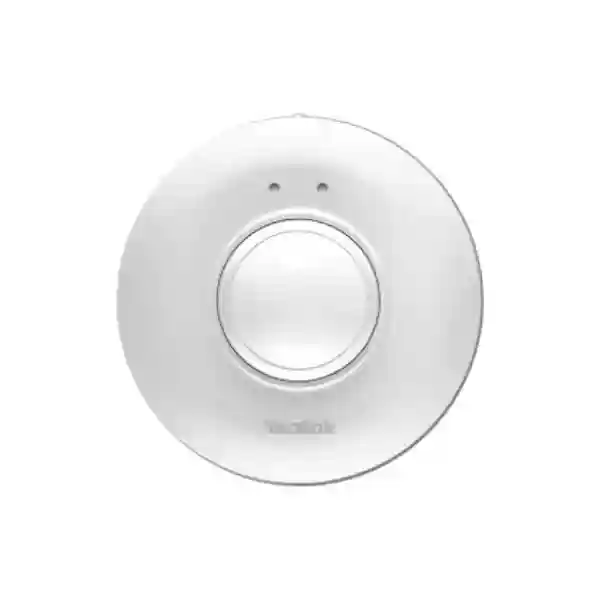
Yealink RoomSensor Enterprise Multifunctional Wireless Room Sensor
Yealink RoomSensor is a cable-free sensing device for professional meeting and collaboration spaces. It combines passive infrared occupancy detection with temperature, humidity and ambient-light sensing so organizations can build more responsive room-booking and workplace-management workflows. Instead of treating every meeting room as a static resource, facilities and IT teams can use sensor information within compatible Yealink deployments to support practical actions such as occupancy-aware room release, automatic check-in and environmental coordination. The unit communicates over Bluetooth Low Energy, uses a replaceable lithium battery and can be ceiling or wall mounted, making it useful where running additional Ethernet or electrical cabling would be costly or disruptive.
For Uganda projects, the important procurement question is not simply how many sensors are required. Buyers should establish room dimensions, mounting height, partition layouts, likely occupant movement, the location of compatible Yealink room-scheduling equipment and whether a single sensor or a multi-sensor BLE mesh design is appropriate. FourTeck can assist with bill-of-materials validation and deployment planning for individual meeting rooms or standardized multi-site rollouts.
Instant Specifications & Procurement Fact Rail
RoomSensor
Occupancy and environmental sensing
Bluetooth BLE 5.2
3 V, 1 × CR123A lithium battery
Ceiling or wall, magnetic bracket
Project quotation on request
The RoomSensor is designed as an endpoint in a wider workspace architecture rather than as a standalone room-booking display. Procurement teams should therefore validate the complete workflow they expect to achieve. Where automatic room release or check-in is required, compatibility with the intended Yealink RoomPanel and workspace-management environment should be confirmed as part of the project scope. Regional warranty terms should be confirmed on the commercial quotation because warranty handling can depend on supply channel, project terms and destination.
Operational Product Architecture & Overview
At the sensing layer, RoomSensor uses passive infrared technology to identify occupancy-related movement. PIR is well suited to meeting-room monitoring because the sensor does not need to capture conversational content or video imagery to detect motion. Yealink specifies a 120-degree PIR detection angle and an adjustable sensor angle of plus or minus 20 degrees. At a standard three-metre mounting height, published coverage is a six-metre radius for major motion and a three-metre radius for minor motion. These figures are useful for initial design, but real rooms contain furniture, partitions, screens and architectural features that can influence placement. A procurement plan should therefore map the intended detection zone rather than assume that one centrally mounted unit is automatically sufficient for every room.
The same compact device also measures temperature, relative humidity and light. Yealink lists a temperature measuring range of -10 to 70 degrees Celsius and a humidity measuring range of 0 to 80 percent RH, while the specified operating environment for the product itself is 0 to 40 degrees Celsius and 10 to 95 percent non-condensing humidity. This distinction matters: a measurement range describes what the sensor can report, while the operating range describes the environmental conditions in which the hardware is intended to operate.
Communication is wireless. The specification identifies Bluetooth BLE 5.2 on the 2.4 GHz band with a maximum stated reach of 30 metres and support for up to four simultaneous connections and BLE mesh. This architecture can reduce installation work because the sensor does not require an Ethernet drop at every mounting point. It also changes the site-survey task: teams should consider wireless distance, room construction and the location of compatible Yealink devices. For large spaces, Yealink positions multi-sensor networking as the route to broader coverage.
Power is supplied by one CR123A lithium battery. The current specification sheet states a five-year battery-life figure, though actual service intervals should always be planned around deployment conditions and organizational maintenance policy. The replaceable battery design is operationally valuable because facilities teams can maintain sensors without replacing the complete device. A simple configuration button and LED support local commissioning tasks.
The main buyer pain point addressed by this architecture is the mismatch between booked rooms and genuinely occupied rooms. Organizations can have calendars showing no availability while rooms sit unused because a meeting was abandoned, moved or never checked in. When integrated into a compatible Yealink workspace design, occupancy information can support automated workflows that return unused space to availability. Environmental sensing adds another layer of operational visibility for workspace teams that want to understand room conditions or coordinate compatible building controls.
Enterprise Business Outcomes & Value Analysis
Key Hardware & Software Highlights
RoomSensor packages four sensing functions into a white polycarbonate enclosure measuring approximately 95.3 mm in diameter by 36 mm, with a listed weight of 0.092 kg. Its compact dimensions help it remain visually unobtrusive in modern meeting spaces. The circular magnetic mounting bracket supports ceiling or wall installation, and the adjustable sensing angle provides a practical way to tune the coverage direction after the bracket position has been selected.
| Component | Technical function | Operational outcome |
|---|---|---|
| PIR sensor | 120° detection angle | Occupancy-aware room workflows without a camera feed |
| Environmental sensors | Temperature, humidity and light | Adds room-condition context to workspace operations |
| BLE radio | 2.4 GHz BLE 5.2, mesh support | Cable-free communications and scalable coverage design |
| Battery | Replaceable CR123A lithium cell | Avoids fixed power wiring at the sensor position |
| Magnetic bracket | Circular mount, adjustable lens angle | Faster installation and easier service access |
Technical Specifications Ledger
| Specification | Published detail | Procurement note |
|---|---|---|
| Detection | Occupancy, temperature, humidity, light | Four sensing functions in one endpoint |
| Occupancy technology | Passive infrared | Plan line of sight and motion zones |
| PIR angle | 120° | Use with mounting-height and room-layout planning |
| Adjustment | ±20° | Allows field tuning of sensing direction |
| Coverage at 3 m height | 6 m radius major motion; 3 m radius minor motion | Validate obstructions and expected occupant movement |
| Temperature measurement | -10 to 70°C | Measurement range differs from device operating range |
| Humidity measurement | 0–80% RH | Use as workspace environmental data |
| Wireless | Bluetooth BLE 5.2, 2.4 GHz | No Ethernet connection at sensor |
| Wireless reach | Maximum 30 m / 100 ft | Actual site conditions can affect wireless performance |
| Connectivity | Maximum four simultaneous, BLE mesh | Useful for larger-space topology planning |
| Power | 3 V, 1 × CR123A lithium battery | Maintain spare-battery policy for fleet deployments |
| Battery life | Published specification: 5 years | Real replacement interval depends on deployment conditions |
| Operating temperature | 0–40°C | Indoor commercial environment |
| Operating humidity | 10–95%, non-condensing | Avoid condensing locations |
| IP rating | IP20 | Designed for protected indoor deployment |
| Dimensions | Ø95.3 × 36 mm | Compact ceiling/wall footprint |
| Weight | 0.092 kg / 0.203 lb | Lightweight mounting load |
| Management | Yealink Management Cloud Service; Yealink Device Management Platform | Confirm project management architecture |
| Compliance references | RED, EMC, safety, RoHS, WEEE and REACH references in Yealink declaration | Request project documentation where tender compliance requires it |
Configuration & Sizing Worksheet
1. Estimate workload and room scale
List every room, its dimensions, typical occupancy and booking pattern. Separate huddle rooms, medium meeting rooms, boardrooms and divisible spaces. For each location, mark the intended sensor mounting height and the areas where seated occupants may make only small movements. Because the published coverage distinguishes major and minor motion, a design based only on floor area can be misleading. Larger or irregular rooms may benefit from multiple sensors rather than relying on the edge of one detection zone.
2. Check physical environment
Confirm that the proposed location is indoors, protected from moisture and within the specified operating environment. Review ceiling construction, access for future battery replacement and potential obstructions. The magnetic bracket is designed to simplify mounting and maintenance, but the supporting surface and fixing method must still be suitable for the site.
3. Validate wireless topology
Map the distance to the compatible Yealink endpoint and note walls, glazing, partitions or other materials between devices. The maximum published BLE reach should not be treated as a guaranteed distance through every building material. For larger spaces, evaluate BLE mesh and multi-sensor architecture during design rather than after installation.
4. Define platform and workflow
Document what the organization expects the sensor to trigger. Examples include room release, automatic check-in or environmental coordination. Confirm the required RoomPanel, workspace-management platform, gateway or other compatible component for the chosen workflow. Licensing or service subscriptions, where applicable to the wider solution, should be listed separately in the commercial bill of materials rather than assumed to be included with the physical sensor.
5. Prepare the quote request
Provide the number of rooms, approximate dimensions, ceiling heights, existing Yealink equipment, desired workflows, site locations, requested installation services and target delivery date. For tender projects, add compliance documentation requirements, warranty expectations, tax treatment and delivery destination. This information enables a more useful quotation than requesting a sensor quantity alone.
Deployment Scenarios & Industry Use Cases
Large Enterprise and Multi-Site Networks
A corporate estate may have dozens or hundreds of meeting rooms whose booking data does not accurately represent real occupancy. RoomSensor can form part of a standardized workspace design in which each room follows a documented mounting, pairing and management process. The major operational advantage is repeatability. IT can define approved room types, facilities can schedule battery maintenance, and procurement can order consistent bundles containing sensors plus the compatible scheduling and management components required by each room profile.
Financial and Banking Institutions
Banks and financial organizations often operate tightly managed offices where meeting space is valuable and installation changes need to be controlled. Wireless sensing minimizes the need for new sensor cabling at the mounting point. PIR-based occupancy detection can also be preferable where a camera-based occupancy method would be undesirable. Deployment should still follow internal security, privacy and change-management policies, and cloud-management choices should be assessed under the institution’s governance framework.
Educational and Campus Networks
Universities and training organizations can use room sensing as part of a broader approach to managing seminar rooms, meeting rooms and staff collaboration areas. Campuses commonly contain buildings of different ages, making cable-free installation useful in retrofit environments. Room-by-room surveys remain important because ceiling heights and room geometry can vary substantially across a campus. Central documentation should record device location, battery service date and associated workspace endpoint.
Government and Public-Sector Procurement
Public-sector deployments frequently require clear bills of materials, compliance documentation, warranty procedures and predictable lifecycle support. RoomSensor’s compact architecture can be specified as part of a standardized meeting-space package. Procurement teams should request the relevant manufacturer declarations, confirm regional warranty handling, define configuration responsibilities and document whether equipment will be staged before shipment. For sensitive environments, confirm whether the intended management topology meets organizational policy before purchase.
Technical Deep Dive: Sensing and Wireless Architecture
RoomSensor is not a packet-processing appliance and therefore does not have the switching backplane or accelerator architecture associated with network hardware. Its core technical value comes from combining multiple sensing functions with low-power wireless communication. Passive infrared occupancy detection reacts to changes in infrared energy caused by moving people. The 120-degree field and adjustable angle allow the installer to shape the monitored area by physical placement. Major-motion and minor-motion coverage figures are particularly important because seated meeting participants may produce less movement than people walking through a room.
BLE 5.2 provides the transport layer between the sensor and compatible Yealink workspace components. In practical deployment terms, BLE avoids an IP address, Ethernet switch port and PoE budget at every sensor location. This reduces infrastructure requirements but places greater importance on pairing, radio reach and correct association with the room’s workspace devices. Mesh capability can extend the architecture for larger areas. The maximum four simultaneous connectivity specification should be considered when designing complex room layouts.
Technical Deep Dive: Software Ecosystem & Operational Control
The sensor becomes most useful when its readings feed an operational workflow. Yealink describes integration with RoomPanel and the Yealink Workspace Management Platform for functions such as automatic room release and check-in. Environmental sensing can also be associated with compatible IoT controls. Buyers should distinguish between what the physical RoomSensor measures and what the complete solution can automate. Automation depends on the surrounding Yealink platform and compatible devices, so project design should identify each dependency before purchase.
Yealink also lists management through its Management Cloud Service and Device Management Platform. Enterprise buyers should establish who will own administration, how devices will be named, how room associations will be documented and what firmware or configuration maintenance process will be used. In a multi-site deployment, consistent naming and asset records are as important as the sensor hardware because they allow support teams to identify the physical room associated with a device alert or maintenance task.
Technical Deep Dive: Availability, Maintenance & Recovery
RoomSensor does not use dual power supplies or wired high-availability links. Its resilience strategy is instead based on simple endpoint design, replaceable battery power and the ability to deploy multiple sensors where coverage requires it. For critical workspace operations, organizations should define what happens if a sensor is unavailable. Room booking should not depend on a single undocumented automation path without a manual fallback. Keep spare batteries and, for larger fleets, spare sensor units available according to internal service targets.
Maintenance planning should include periodic inspection of mounting integrity, battery status where surfaced by the management environment, functional occupancy tests and verification that each sensor remains associated with the correct room. After office refurbishment or furniture changes, detection zones should be reviewed because partitions or changed seating can alter the practical movement pattern. Disaster-recovery planning for the wider workspace platform should also cover administrator access and restoration of room associations.
Pre-Purchase Buyer Gap Checklist
Is RoomSensor a standalone booking panel? No. It is a sensing endpoint intended to work within a compatible Yealink workspace architecture. Buyers wanting a visible room-booking interface should identify the appropriate RoomPanel and platform components.
Does it require Ethernet or PoE? The RoomSensor itself communicates by BLE and is powered by a replaceable CR123A lithium battery. This is a major advantage for retrofit installation, but the surrounding room solution may have its own network and power requirements.
Will one sensor cover every meeting room? Not necessarily. Yealink publishes coverage based on a standard three-metre mounting height and distinguishes major from minor motion. Large, irregular or partitioned rooms should be surveyed for multi-sensor requirements.
Are there hidden platform costs? The hardware purchase should be separated from any workspace platform, management, gateway, RoomPanel, installation or service requirements. Ask for a complete bill of materials showing hardware and any applicable service components individually.
Can it count people? The standard RoomSensor is specified for occupancy detection rather than people counting. Buyers requiring people-counting capability should evaluate the appropriate newer Yealink sensor model and confirm its compatibility with the planned environment.
What about battery life? Yealink’s current specification sheet lists five years. Treat this as a manufacturer specification, not a guaranteed maintenance interval in every environment. Establish a battery-replacement process for fleet deployments.
Can it be installed outdoors? The published IP20 rating and operating specifications point to protected indoor use. It should not be specified as an outdoor or weather-exposed occupancy sensor.
Will it work with non-Yealink room systems? Do not assume cross-vendor interoperability merely because BLE is used. Confirm the exact supported Yealink integration path for the intended workflow before ordering.
Uganda Procurement & Delivery Logistics
FourTeck Uganda can structure RoomSensor quotations around single-site purchases, meeting-room refreshes or multi-location workspace projects. A useful request should identify quantities and the wider room ecosystem rather than treating the sensor as an isolated accessory. Where existing RoomPanel devices are already installed, include their model information and current workspace platform. For new deployments, provide the desired scheduling and automation workflow so the sensor, panel and management components can be validated together.
Order processing can include bill-of-materials verification, commercial quotation, availability confirmation, logistics planning and optional technical staging. Delivery timing varies with quantity, project sourcing and destination, so buyers with fixed implementation dates should state the required-on-site date at quotation stage. For multi-branch deployments, shipments can be organized by project phase or destination where commercially agreed.
Technical pre-configuration requirements should be discussed before dispatch. Although physical installation is straightforward, successful operation depends on correct placement, pairing and platform association. For larger rollouts, a room schedule containing room name, building, floor, dimensions and assigned device identifiers can reduce commissioning errors and simplify future support.
Local Coverage Matrix
Kampala: suitable for corporate headquarters, banks, hotels, universities, public-sector offices and technology campuses requiring smart meeting-room rollouts. Entebbe: supports organizations operating airport-area offices, hospitality facilities and institutional meeting spaces. Jinja: project supply can support industrial, education and regional-office environments. Mbarara: suitable for western-region branches, campuses and distributed enterprise facilities. Gulu: organizations in northern Uganda can request project quotations for standardized meeting-space equipment and deployment planning. For every location, final delivery arrangements, lead time and installation scope should be confirmed on the quotation.
Cross-Border & Regional Supply Chains
Organizations operating across East Africa or the Gulf can coordinate requirements through FourTeck’s regional sites. Visit FourTeck Uganda for Uganda projects, FourTeck Kenya for Kenya requirements, FourTeck Africa for broader African projects, FourTeck UAE for United Arab Emirates sourcing and FourTeck Kuwait for Kuwait projects. Cross-border programs benefit from a standardized room bill of materials, consistent device naming and a single deployment worksheet that can be adapted to each country’s delivery and commercial requirements.
Related Yealink Workspace Products
A RoomSensor project commonly sits beside room-scheduling, conferencing and device-management requirements. Buyers planning automated check-in or room-release workflows should evaluate the compatible Yealink RoomPanel family as part of the same design. Meeting rooms may also require Yealink conferencing cameras, microphones, speakers or complete Microsoft Teams Rooms and Zoom Rooms solutions depending on the collaboration platform. Browse the FourTeck Uganda catalog or contact the team for a validated set of related models. Where a room requires broader occupancy analytics, ask whether RoomSensor or another Yealink sensing model is the correct generation for the intended feature set. For infrastructure planning, also account for the network switching, PoE capacity and structured cabling required by the room panel and conferencing devices even though the RoomSensor itself is battery powered.
FourTeck Technical Service Capabilities
FourTeck can support engineering validation before a RoomSensor order is finalized. This includes checking room dimensions against published coverage guidance, identifying likely multi-sensor rooms, reviewing the proposed Yealink scheduling architecture and validating the bill of materials for missing dependencies. For larger projects, staging requirements can include asset labeling, room-to-device schedules and agreed firmware checks on applicable managed equipment before shipment.
Pre-shipment validation is particularly useful when equipment is being distributed to several branches. A consistent record of model, quantity, destination and intended room can reduce on-site confusion. Post-sales support can focus on installation guidance, pairing and integration troubleshooting within the agreed project scope. Where a fault is suspected, structured diagnosis should first separate battery, placement, wireless association and platform configuration issues from actual hardware failure before a replacement process is initiated.
Extended Technical FAQ
What exactly does Yealink RoomSensor detect?
RoomSensor combines occupancy, temperature, humidity and light detection in one compact device. Occupancy is detected using passive infrared technology. It is therefore intended to identify room-use conditions rather than record video or audio. The environmental sensors add context that can be used within compatible workspace workflows. Before purchase, define which measurements you actually intend to use and which connected platform or controller will consume them. This prevents a common procurement mistake in which a sensor is purchased without the compatible system required to turn readings into an operational action.
How large an area can one RoomSensor cover?
Yealink specifies a 120-degree PIR detection angle. At a standard three-metre mounting height, the published coverage is a six-metre radius for major motion and a three-metre radius for minor motion. These are design references, not a substitute for evaluating the actual room. Seated participants may create smaller movements than people walking through the room, while partitions, furniture and unusual geometry can influence placement. Large boardrooms and irregular spaces should be reviewed for multiple sensors and BLE mesh rather than assuming a single device will provide consistent coverage.
Does RoomSensor need network cabling or PoE?
The sensor itself does not require an Ethernet cable or PoE feed. It uses Bluetooth Low Energy for communication and a 3 V CR123A lithium battery for power. This makes it attractive for retrofit offices because a sensor can be positioned for detection rather than being constrained by an existing network outlet. However, the broader solution may include a RoomPanel, gateway or conferencing equipment that has its own Ethernet, Wi-Fi or PoE requirements. The complete room bill of materials should therefore include infrastructure requirements for every component, not only the RoomSensor.
How long does the battery last and can it be replaced?
The current Yealink specification sheet lists a five-year battery-life figure and identifies one CR123A lithium battery as the power source. The battery is replaceable, which is important for long-term fleet maintenance. Organizations should still avoid treating the published figure as a fixed replacement date for every installation because real service life can vary with operating and deployment conditions. For a large sensor estate, maintain an asset register, define an inspection cycle, keep approved spare batteries and ensure facilities staff can safely access ceiling-mounted units when service is required.
Can RoomSensor automatically release an unused booked room?
Yealink positions RoomSensor integration with RoomPanel and the Yealink Workspace Management Platform for occupancy-aware functions including automatic room release and automatic check-in. The sensor alone does not provide a calendar interface or booking display. The desired automation must be designed as a complete workflow involving compatible Yealink components and the relevant workspace configuration. During procurement, specify the exact outcome you want—for example, releasing a room after a defined no-show condition—so the quotation can account for the required panel, platform and configuration rather than supplying only sensing hardware.
Can it be used in a large boardroom?
Yes, but the design should be based on coverage rather than the room label. Yealink describes a single RoomSensor as suitable for huddle to medium rooms and supports multi-sensor networking through BLE mesh for larger spaces. A boardroom with a long table may contain participants who remain relatively still for extended periods, so minor-motion coverage deserves particular attention. Provide room dimensions, ceiling height and seating layout when requesting a project design. Multiple sensors can be considered where one detection field would leave weak zones or where the room has an irregular shape.
Is RoomSensor suitable for outdoor or humid industrial locations?
RoomSensor has an IP20 rating and a published operating temperature range of 0 to 40 degrees Celsius with 10 to 95 percent non-condensing humidity. Those specifications indicate a protected indoor product rather than an outdoor, wash-down or weather-exposed sensor. Do not confuse its broader temperature measurement range with the allowed operating environment of the hardware. For factories, warehouses or semi-outdoor locations, first assess dust, moisture, condensation, temperature and mounting conditions. If those conditions exceed the product’s environmental specification, another sensing solution should be selected.
Does RoomSensor support centralized device management?
Yealink lists support for Yealink Management Cloud Service and Yealink Device Management Platform. The exact management experience should be confirmed against the surrounding workspace solution and current platform design. In an enterprise rollout, centralized management is most effective when accompanied by disciplined asset records. Use consistent device names, map each sensor to a physical room and document its associated panel or workspace endpoint. This makes troubleshooting faster and gives facilities teams a reliable way to connect a management alert or maintenance requirement with the correct building and room.
What warranty should Uganda buyers expect?
Warranty terms should be confirmed on the FourTeck commercial quotation for the specific supply because regional channel terms, project agreements and destination can affect the applicable process. Buyers should request clarity on warranty duration, return procedure, fault-verification steps and responsibility for transport before issuing a purchase order. For larger projects, it can also be sensible to purchase a small quantity of operational spares so a room can be restored quickly while a suspected faulty device is diagnosed or processed. Keep serial-number and deployment records to simplify any future warranty case.
What information should I send FourTeck for an accurate quote?
Send the required sensor quantity if already known, or provide a room schedule if sizing assistance is needed. Include each room’s approximate dimensions and ceiling height, the number of locations, existing Yealink RoomPanel or workspace equipment, desired occupancy automation, delivery city and target project date. For institutional or tender procurement, include required compliance documents, warranty expectations, installation or staging requirements and whether the quotation should separate hardware, services and any platform-related items. A complete project brief allows the bill of materials to be checked before commercial submission and reduces the risk of missing dependencies.
Plan Your Yealink RoomSensor Deployment in Uganda
A successful room-sensing project starts with the room workflow, not simply the sensor count. Share your meeting-room dimensions, existing Yealink environment, number of sites and the operational outcome you want to achieve. FourTeck can help validate the hardware mix, coverage assumptions and deployment requirements before quotation. This is especially useful for multi-room and multi-branch projects where consistent installation and device records matter as much as the hardware itself.
Request a commercial quote for Yealink RoomSensor supply in Kampala, Entebbe, Jinja, Mbarara, Gulu or other Uganda locations. For larger projects, include the rollout schedule and any staging, configuration, asset-labeling or support requirements so these can be addressed in the project scope.



Reviews
There are no reviews yet.