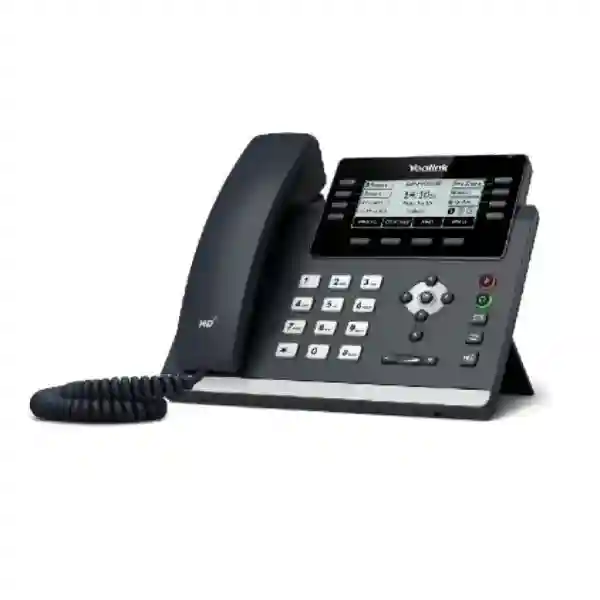
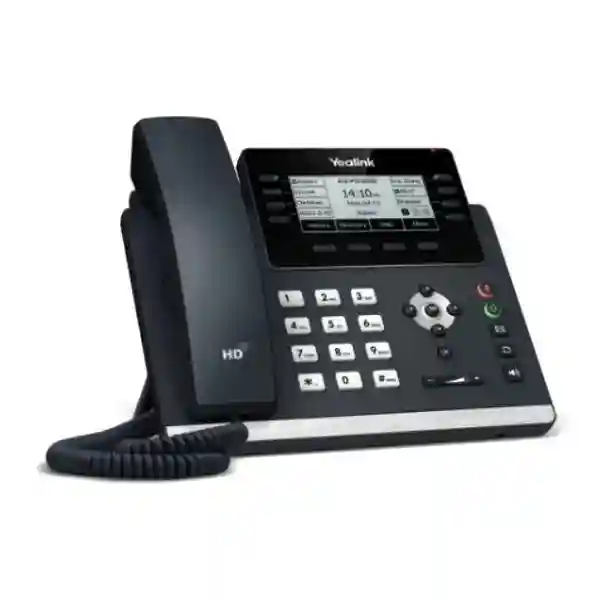
Yealink SIP-T43U Enterprise SIP Desk Phone
The Yealink SIP-T43U is a professional Gigabit IP desk phone built for organizations that require a dependable SIP endpoint without unnecessary desktop complexity. It supports up to 12 VoIP accounts, combines a 3.7-inch backlit graphical display with physical line and feature keys, and provides dual USB connectivity for selected wireless adapters, headsets, recording media and expansion accessories. In practical business infrastructure, the T43U sits at the user edge of an IP-PBX or hosted SIP environment: it registers to the voice platform, carries signaling and media across the LAN, presents line and presence information to the user, and provides a familiar handset, speakerphone and headset workflow for everyday communications.
For procurement teams, the appeal is less about a single headline feature and more about balance. The handset offers Gigabit pass-through networking for a connected workstation, IEEE 802.3af Class 2 PoE, broad SIP functionality, programmable DSS capacity, centralized provisioning methods and security features that suit managed networks. It can therefore serve ordinary office users while also scaling into receptionist, supervisor and operations roles through supported EXP43 expansion modules. Organizations evaluating replacements for aging 10/100 desk phones can also avoid making the phone itself a Fast Ethernet bottleneck between a wall port and a workstation.
FourTeck supplies the Yealink SIP-T43U for Uganda projects and can help buyers align handset quantities, accessory requirements, PoE readiness, voice VLAN design, PBX compatibility and rollout staging before ordering. This is especially useful where a project mixes ordinary users, reception staff, managers and headset-heavy teams rather than applying one identical desk configuration everywhere.
Instant Specifications & Procurement Fact Rail
Yealink SIP-T43U
Up to 12 SIP accounts
Dual-port Gigabit Ethernet
IEEE 802.3af PoE Class 2 or optional adapter
2 × USB 2.0
Confirm quantity, accessories and delivery point
The procurement baseline should distinguish the standard handset from optional accessories. The phone package includes the handset, handset cord, 2 m CAT5E Ethernet cable, stand and quick-start documentation; the external AC adapter and wall-mount bracket are optional. Projects using PoE should validate available switch power budgets and port configuration. Projects without PoE should include compatible adapters in the bill of materials. Wireless connectivity is accessory-based rather than built in: supported Yealink Wi-Fi and Bluetooth adapters should be specified where required. Warranty terms should be confirmed on the project quotation because commercial coverage can depend on supply channel, project terms and regional handling arrangements.
Operational Product Architecture & Overview

The T43U is designed around a straightforward enterprise endpoint architecture. On the network side, two Gigabit Ethernet interfaces allow the phone to sit inline between the access switch and a user’s computer. This arrangement can reduce cabling requirements at desks where only one structured network outlet is available. VLAN tagging, Layer 2 priority marking and Layer 3 traffic classification capabilities allow voice traffic to be separated and prioritized when the surrounding switching infrastructure and policies are configured accordingly. LLDP, CDP and DHCP VLAN mechanisms provide several paths for network discovery and voice-VLAN assignment, which is important in mixed-vendor campus environments.
At the signaling layer, the phone supports SIP v1 and SIP v2, proxy and peer-to-peer modes, DNS-SRV, UDP and TCP transport, NAT traversal through STUN, IPv6, call-server redundancy and a broad set of IP-PBX functions. That combination addresses a frequent procurement concern: whether a desk phone can participate in a standardized SIP estate rather than forcing a proprietary voice architecture. Actual feature behavior still depends on the selected PBX, service provider and provisioning profile, so advanced functions such as BLF, executive-assistant workflows, centralized recording or visual voicemail should be validated against the intended platform before a large order.
The user-facing architecture is deliberately conventional. Eight illuminated line keys can be programmed across three pages for up to 21 paperless DSS functions. Dedicated message, headset, mute, redial and speakerphone keys reduce dependence on menu navigation for common tasks. Four context-sensitive soft keys and navigation controls provide access to configuration and call functions. The 3.7-inch 360 × 160 monochrome display is not intended to compete with touchscreen executive phones; instead it prioritizes legibility, low power consumption and a familiar workflow for users whose core requirement is reliable voice calling.
Two USB 2.0 ports are a key differentiator in deployment planning. Depending on approved accessories and firmware, they can support functions such as Bluetooth through compatible Yealink adapters, Wi-Fi through WF40/WF50, USB headsets, USB call recording, selected Yealink speakerphones and expansion modules. This lets IT teams start with a wired desk phone and add capabilities for specific job roles rather than paying for every feature at every desk. Up to three EXP43 modules can provide substantial additional programmable key capacity for reception, dispatch or monitoring roles.
Audio processing combines HD handset and speaker audio with wideband codec support, full-duplex hands-free operation, acoustic echo cancellation, packet-loss concealment, adaptive jitter buffering, automatic gain control, Acoustic Shield and Smart Noise Filtering. The practical objective is intelligible speech in normal offices, open work areas and headset environments. Network quality still matters: latency, jitter, packet loss, incorrect QoS and overloaded WAN links can degrade any IP phone, so endpoint selection should be accompanied by sensible LAN and WAN voice engineering.
Enterprise Business Outcomes & Value Analysis
Key Hardware & Software Highlights
Gigabit Desk Connectivity
Two Gigabit Ethernet ports support LAN connection and PC pass-through, reducing the chance that the handset becomes a desktop network-speed bottleneck.
Dual USB Expansion
Two USB 2.0 interfaces support role-based additions such as compatible wireless adapters, headsets, recording storage and expansion accessories.
12 SIP Accounts
Multi-account capability suits shared identities, departmental lines, hosted SIP services and PBX environments that need more than a basic two- or four-line endpoint.
PoE Class 2
IEEE 802.3af power can consolidate data and power onto the network cable, supporting cleaner desks and centralized UPS-backed switching designs.
Enterprise Provisioning
Automated provisioning and unified T4U templates can reduce repetitive configuration effort across larger handset estates.
Voice Security Controls
SRTP, TLS 1.3, secure boot, certificate management, configuration encryption and 802.1X provide a useful control set for managed deployments.
Technical Specifications Ledger
| Category | Confirmed specification |
|---|---|
| Display | 3.7-inch 360 × 160 graphical LCD with backlight; caller ID; multilingual interface; message/call indication. |
| Accounts | Up to 12 VoIP/SIP accounts. |
| Ethernet | Dual-port Gigabit Ethernet. |
| Power | IEEE 802.3af PoE Class 2; optional 100–240 V AC input, 5 V/1.2 A DC adapter. |
| USB | 2 × USB 2.0 compliant ports; 5 V, 500 mA USB output specification. |
| Audio | HD handset/speaker, HAC handset, Acoustic Shield, Smart Noise Filtering, full-duplex speakerphone with AEC; G.722 and multiple narrowband codecs. |
| Security | SRTP, TLS 1.3, HTTPS certificate manager, AES256 configuration encryption, digest authentication, secure boot, IEEE 802.1X, OpenVPN and L2TP VPN. |
| Network | Static/DHCP, IPv6, STUN, DNS-SRV, VLAN, 802.1p/Q, Layer 3 ToS DSCP, LLDP/CDP/DHCP VLAN, ICE. |
| Directory | Local phonebook up to 1,000 entries; XML/LDAP remote phonebook; blocklist; call history. |
| Programmable keys | 8 line keys with LED, programmable across three pages for up to 21 paperless DSS keys. |
| Expansion | EXP43 support; compatible deployments can use up to three expansion modules. |
| Dimensions | 224.9 × 206.2 × 174.9 × 52 mm (published W × D × H × T notation). |
| Power consumption | PSU: 0.9–2.2 W; PoE: 1.5–3.2 W. |
| Environment | Operating: -10 to +45°C; humidity 5%–90% non-condensing; storage: -30 to +70°C. |
| Mounting | Two-angle stand; wall mountable with optional bracket. |
Specification review should be tied to the firmware release and accessory matrix planned for deployment. Wireless adapters, headset controls, expansion-module behavior and advanced PBX functions can vary by firmware or platform integration. For formal procurement, list the required workflow rather than only the accessory model—for example, “wireless headset with remote answer/end,” “Wi-Fi connection where no wired outlet exists,” or “receptionist needs 80 monitored extensions.” This allows the bill of materials to be checked against the operational requirement.
Configuration & Sizing Worksheet
1. Estimate user workload and role
Separate ordinary office users from receptionists, executive assistants, contact-heavy supervisors and hot-desk users. A standard user may need only the handset, PoE and several programmable keys. A receptionist may require EXP43 modules and a headset. A manager may require Bluetooth capability, while a temporary or shared workspace may prioritize hot-desking and centralized provisioning. This role map prevents over-specifying accessories across the whole estate.
2. Validate the network and physical environment
Confirm a Gigabit switch port, suitable structured cabling, voice VLAN policy and available desk space. The handset is 224.9 mm wide and supports a two-angle stand. If wall mounting is required, add the optional bracket and confirm cable routing. For sites exposed to heat or non-air-conditioned conditions, compare the location against the published -10 to +45°C operating range and 5%–90% non-condensing humidity requirement.
3. Calculate power and cabling
For PoE deployments, count every endpoint and compare the aggregate requirement with the switch’s available PoE budget, not simply the number of PoE-capable ports. The T43U is an IEEE 802.3af Class 2 device with published PoE consumption up to 3.2 W. Where PoE is unavailable, specify the optional Yealink power adapter for each required desk. If a PC will connect through the handset, confirm that the desk cable path and switching policy permit the inline topology.
4. Map PBX, firmware and service requirements
Record the PBX or hosted voice service, SIP registrar details, required codecs, BLF behavior, voicemail method, directory source, certificate policy and provisioning method. The T43U itself does not imply a recurring handset license; however, the PBX, hosted SIP service, call recording platform, management service or other surrounding systems may have licenses or subscriptions. Those costs should be identified separately in the project scope.
5. Prepare the quotation package
Provide handset quantity, delivery city, required date, PBX platform, PoE availability, headset type, wireless requirements, expansion-module quantity, wall-mount needs and any pre-configuration request. For multi-site projects, provide quantities per branch. This allows packaging, staging and shipment planning to reflect the actual rollout rather than treating every phone as an isolated retail unit.
Deployment Scenarios & Industry Use Cases

Large enterprise and multi-site networks
A multi-site organization can standardize the T43U as a general-purpose wired handset and use centralized provisioning to apply site-specific SIP accounts, VLAN parameters, directory settings and feature-key templates. Gigabit pass-through can be useful in branch offices where one outlet serves both phone and PC. Headset and expansion accessories can then be assigned only to job roles that require them. For WAN-connected branches, call-server redundancy and local network QoS should be considered as part of a wider continuity plan.
Financial and banking institutions
Banks and financial offices typically care about predictable endpoint management, network admission, encrypted signaling and media, and consistent user configuration. The T43U provides mechanisms such as 802.1X, TLS, SRTP, certificate management and configuration-file encryption. These capabilities do not replace an institution’s security architecture; they provide endpoint controls that administrators can integrate into it. Procurement teams should document certificate lifecycle, voice VLAN access, logging, recording policy and firmware governance before rollout.
Educational and campus networks
Universities, schools and training institutions often have a mix of offices, reception desks, administrative departments, libraries and shared staff areas. A SIP handset with PoE, automated provisioning and flexible DSS keys can simplify standardization across these roles. The local directory, LDAP/XML directory options and call features can support internal communications, while expansion modules can be reserved for central administrative desks. Campus switch capacity and emergency-calling policies should be validated during design.
Government and regulated procurement
Government deployments benefit from clear bills of materials, documented network requirements and repeatable configuration baselines. Buyers should record exact model, accessory part numbers, power method, firmware target, provisioning profile and acceptance-test criteria. Security capabilities such as secure boot, TLS, SRTP and 802.1X can support a controlled design, but the authority’s own standards determine whether the endpoint is acceptable for a particular environment. FourTeck can assist with product-level validation and staging requirements while the customer retains responsibility for policy approval and accreditation.
Technical Deep Dive: Audio, Processing & Endpoint Architecture
A desk phone’s processing workload is different from that of a network switch or firewall. The T43U must maintain SIP registrations, render its user interface, encode and decode real-time voice, handle jitter and packet-loss conditions, operate the speakerphone echo-cancellation path, drive line-state indicators and process peripheral functions. Yealink exposes the resulting capabilities rather than publishing a general-purpose processor benchmark. For procurement, this is the more useful level of evaluation: how many SIP accounts are supported, which codecs are available, what call functions are present, and whether the interface remains appropriate for the user’s workflow.
Wideband G.722 support enables higher-fidelity voice when the complete call path supports it. Narrowband codecs provide compatibility with common telephony environments. Adaptive jitter buffering, packet-loss concealment, voice activity detection, comfort-noise generation and automatic gain control are designed to manage common real-time audio conditions. Acoustic Shield and Smart Noise Filtering address environmental noise at the endpoint, while the full-duplex speakerphone supports hands-free conversations. None of these mechanisms can fully compensate for severe packet loss or badly engineered WAN links, which is why network assessment remains important in voice projects.
Technical Deep Dive: Firmware Security & Operational Control
The handset supports secure signaling and management components including TLS 1.3, SRTP, HTTPS, certificate management, AES256 configuration-file encryption, multiple digest authentication algorithms, secure boot and 802.1X. Administrators should treat these as configurable building blocks. A secure rollout requires appropriate certificates, strong administrative credentials, restricted management access, approved provisioning servers and controlled firmware versions. The presence of a protocol does not by itself guarantee that a deployment uses it correctly.
Dual firmware images are useful operationally because failed upgrades are a real fleet-management concern. Combined with automated provisioning, unified T4U firmware/template practices and logging capabilities, the platform supports controlled lifecycle administration. Before mass deployment, test the target firmware with the chosen PBX, headsets, expansion modules and directory integration. A small pilot group can expose workflow or interoperability issues before hundreds of endpoints receive the same profile.
Technical Deep Dive: Availability, Redundancy & Recovery
High availability for IP telephony is built in layers. The T43U supports call-server redundancy, but endpoint support is only one element. Access switches require resilient power, often through UPS infrastructure; DHCP, DNS and provisioning services should be available; WAN paths may need redundancy; and the PBX or hosted service must itself have a continuity design. When PoE switches are protected by centralized UPS systems, desk phones can remain powered through local utility interruptions without separate adapters at each workstation.
Recovery planning should also cover configuration. Keep approved provisioning templates, firmware versions, extension mappings and accessory profiles under change control. A replacement phone can then be staged rapidly rather than rebuilt from memory. For branch deployments, document whether emergency calls, internal extension dialing or local survivability are required during WAN outages, because those outcomes depend on the wider telephony architecture rather than the handset alone.
Pre-Purchase Buyer Gap Checklist
Are there hidden handset licenses? The physical T43U is purchased as an endpoint, but surrounding PBX extensions, hosted SIP seats, recording services, device-management platforms or other services may carry recurring charges. Ask for those separately so hardware and service costs are not mixed.
Is Wi-Fi or Bluetooth built in? No. These capabilities are added through compatible Yealink USB adapters. This distinction matters when comparing the T43U with models that include wireless radios internally. Specify the exact wireless requirement in the quotation.
Is a power adapter included? The adapter is optional. PoE deployments normally do not need one, but non-PoE desks do. Count non-PoE locations before ordering.
Can it support a receptionist? Yes, the programmable keys and EXP43 expansion support can make it suitable for reception or monitoring roles. Confirm the number of monitored extensions and the PBX’s BLF behavior before sizing expansion modules.
Will it work with an existing PBX? The phone is SIP-based and supports broad standards, but feature-level compatibility must be checked. Registration is only the first test; BLF, transfer behavior, directories, voicemail, recording, security and provisioning should also be validated.
Does the PC lose network speed? The phone has dual Gigabit Ethernet, so the handset’s Ethernet interfaces are designed for Gigabit connectivity. Actual workstation throughput remains dependent on the access switch, cabling, network configuration and endpoint.
What about lifecycle and firmware? Confirm the planned firmware branch, current vendor support information and compatibility matrix at quotation time. For long projects, avoid assuming that accessories or firmware available during initial evaluation will remain unchanged throughout a multi-year rollout.
What physical details are easy to miss? Check desk depth, stand angle, wall-mount bracket requirements, cable exits and headset cabling. The phone’s published dimensions and optional wall mount should be considered in kiosks, counters and compact workstations.
Uganda Procurement & Delivery Logistics
For Uganda procurement, a useful request for quotation starts with quantities and deployment context rather than the model name alone. State the number of SIP-T43U handsets, whether PoE is available, the required accessories, the PBX or hosted platform, delivery destination and target deployment date. For projects distributed across branches, split quantities by site and identify which desks require headsets, wireless adapters, expansion modules, wall mounts or external power supplies.
Order processing can include bill-of-materials review, accessory matching and staging requirements before dispatch. Where pre-configuration is requested, provide the parameters through an agreed secure process and define what should be loaded before shipment: firmware baseline, provisioning URL, VLAN behavior, account template or site labeling. Final credentials and sensitive production settings may be better applied by the customer’s own administrators depending on internal security policy.
Delivery timing depends on requested quantity, stock position, accessory mix, project staging and destination. Rather than relying on a generic lead-time statement, request a dated quotation for the exact bill of materials. This also gives procurement teams a cleaner basis for approvals, project scheduling and branch rollout sequencing.
Uganda Coverage Matrix
Kampala: enterprise headquarters, professional offices, financial institutions, hospitality administration and multi-floor deployments can be scoped with centralized staging and branch-ready configuration. Entebbe: office, logistics, aviation-support and hospitality environments can specify PoE and accessory requirements according to site infrastructure. Jinja: industrial, education and branch-office deployments can standardize wired SIP endpoints with centralized templates. Mbarara: regional offices and institutions can consolidate handset, headset and power requirements into one project bill. Gulu: distributed organizations can plan branch quantities, shipping and configuration profiles as part of a wider Uganda rollout. Coverage and delivery commitments should always be confirmed against the specific project address and requested schedule.
Cross-Border & Regional Supply Chains
Organizations operating across East Africa, the Gulf and broader African markets can coordinate product families and bills of materials across multiple country operations. Visit FourTeck Uganda for Uganda requirements, FourTeck Kenya for Kenya projects, FourTeck Africa for wider African supply, FourTeck UAE for UAE requirements and FourTeck Kuwait for Kuwait procurement. Cross-border projects should define the destination, quantities, incoterm or delivery expectation, warranty handling route and any country-specific documentation before purchase. This helps prevent a technically identical handset fleet from becoming operationally fragmented by different accessories, firmware baselines or support procedures.
Related Yealink Solutions & Internal Paths
A T43U project often sits within a broader communications design. Explore enterprise technology supply in Uganda and contact FourTeck for related Yealink desk phones, compatible headsets, EXP43 expansion modules, PoE switching requirements and IP-PBX deployment components. Buyers comparing user profiles may also request alternatives with integrated wireless connectivity, larger color displays or simpler entry-level controls. The correct comparison is role-based: ordinary office users may prioritize reliable SIP calling and Gigabit pass-through, executives may prefer larger displays and integrated wireless features, while receptionists may prioritize expansion capacity and headset workflows. For each role, specify the operational need and let the final bill of materials reflect that requirement rather than choosing accessories only after phones arrive.
FourTeck Technical Service Capabilities
FourTeck can support procurement with engineering validation focused on the product boundary and deployment bill of materials. This can include checking handset quantities, PoE assumptions, compatible accessory requirements, expansion-module counts, wall-mount needs and the intended provisioning approach. For mixed estates, a role matrix can be used to separate standard users from reception, management, shared-desk and headset-heavy profiles.
Staging requirements can be agreed before shipment. Depending on project scope, this may include visual inspection, firmware-baseline review, labeling, template preparation or pre-shipment configuration. Firmware changes should be tested against the customer’s PBX and accessory set before a mass update. Post-sales technical support can then focus on product configuration, accessory behavior and troubleshooting information while platform-specific issues are coordinated with the relevant PBX or service provider where necessary.
Extended Technical FAQ
1. How many SIP accounts does the Yealink SIP-T43U support?
The SIP-T43U supports up to 12 VoIP accounts. This does not mean every deployment should configure twelve identities on every handset. A typical office user may have one primary account plus shared or departmental appearances, while reception and supervisory roles may use more. The number of registrations and the behavior of shared lines, BLF keys or bridged appearances also depend on the PBX. During design, map account requirements by user role and test the intended call-control features on the actual voice platform before applying a fleet-wide template.
2. Does the T43U have built-in Wi-Fi and Bluetooth?
The T43U provides wireless expansion through compatible USB accessories rather than integrated Wi-Fi and Bluetooth radios. Yealink lists Wi-Fi support through WF40/WF50 and Bluetooth through compatible BT-series adapters, with exact accessory support subject to current firmware and compatibility documentation. This approach can be cost-effective where most desks are wired because wireless hardware is purchased only where required. Buyers who need wireless connectivity at nearly every desk should compare the total configured cost and operational simplicity with Yealink models that include wireless functions internally.
3. Can the phone be powered entirely by PoE?
Yes. The T43U supports IEEE 802.3af Power over Ethernet and is specified as Class 2. A PoE deployment can carry both network connectivity and power over the Ethernet cable, removing the need for a local AC adapter at the desk. For project sizing, verify the switch’s total PoE budget as well as port count. The published PoE power consumption is approximately 1.5–3.2 W per phone, but engineering practice should still preserve appropriate switch power headroom and consider other powered devices sharing the same access switch.
4. Is the Yealink power adapter supplied as standard?
Yealink identifies the external AC power adapter as optional in the published package information. If the network switch provides suitable PoE, an adapter is generally unnecessary. If a desk connects to a non-PoE switch, media converter or other network path without power delivery, include the correct adapter in the bill of materials. Mixed sites should be surveyed carefully because missing adapters can delay deployment even when the phones themselves are available. The published adapter specification is 100–240 V AC input and 5 V/1.2 A DC output.
5. Can the T43U be used for reception and attendant roles?
It can be a practical choice for reception and attendant-style workflows because its eight line keys can provide up to 21 paperless DSS functions across three pages, and the phone supports EXP43 color-screen expansion modules. Yealink states that up to three expansion modules can be connected, enabling substantially more programmable keys. Before ordering modules, count the extensions or functions that must be monitored, determine whether the PBX supports the required BLF or attendant behavior, and decide whether a headset is needed. This produces a more accurate receptionist bundle than ordering the handset alone.
6. What security features are available?
The T43U includes a broad set of endpoint security capabilities: SRTP for media, TLS 1.3 for supported signaling scenarios, HTTPS certificate management, AES256 configuration-file encryption, digest authentication options, secure boot, IEEE 802.1X network access control, OpenVPN and L2TP VPN support. Effective security depends on configuration and surrounding infrastructure. Administrators should disable unnecessary access, control provisioning servers, manage certificates, protect administrative credentials, segment voice traffic where appropriate and maintain an approved firmware baseline. Security requirements should be tested with the selected PBX because platform capabilities and policies influence the final configuration.
7. Will the T43U work with third-party SIP platforms?
The handset supports standard SIP and Yealink documents interoperability with major communications platforms. Nevertheless, “SIP compatible” should not be treated as a guarantee that every advanced function behaves identically on every PBX. Basic registration and calling may work while BLF, shared lines, voicemail indicators, directories, call recording, provisioning or certificate handling require platform-specific configuration. For larger orders, run a pilot using the exact PBX version, firmware, network policy and accessories planned for production. Record the successful settings and turn them into the deployment template.
8. What headset options should a buyer consider?
The T43U supports USB headsets, an RJ9 headset connection and EHS functionality, and Yealink documents compatibility with a range of its wired, Bluetooth and DECT headset products and adapters. Choose by workflow rather than connector alone. A call-intensive user may need remote answer/end, long wireless range and all-day comfort; a standard office user may need only a wired headset; a manager may value Bluetooth mobility. Confirm the exact headset and adapter combination against the current Yealink compatibility information, especially where advanced controls such as synchronized mute, volume or multi-call handling are required.
9. How should firmware upgrades be handled in a large deployment?
Treat firmware as a controlled change. Start with a small representative pilot group that includes ordinary users and any special configurations such as EXP43 modules, wireless adapters and headsets. Test registration, inbound and outbound calling, transfers, BLF, directories, voicemail, security, provisioning and accessory controls. The T43U uses dual firmware images, which is helpful from a resilience perspective, but a rollback mechanism is not a substitute for testing. Once the release is approved, use centralized provisioning to distribute the firmware and configuration according to the organization’s maintenance process.
10. What information should be sent to FourTeck for an accurate quote?
Provide the quantity of SIP-T43U phones, delivery city or cities, target deployment date, PBX or hosted voice platform, whether each site has PoE, and the number of users requiring Wi-Fi, Bluetooth, USB or DECT headsets, expansion modules, wall mounts or external power adapters. Mention any pre-configuration, firmware, labeling or staging requirement. For multi-branch projects, separate quantities by location. This information lets the quotation represent the complete deployable requirement rather than only the base handset, reducing last-minute accessory purchases and rollout delays.
Prepare Your Yealink SIP-T43U Procurement Package
A successful desk-phone rollout starts with a complete bill of materials and a validated voice design. Send FourTeck the required handset quantity, Uganda delivery location, PBX platform, PoE availability and any headset, wireless, expansion or wall-mount requirements. For larger projects, include branch quantities and staging expectations so the proposal can account for deployment sequencing. Technical teams can also identify the desired firmware and provisioning approach before shipment. This reduces uncertainty between purchase approval and installation and gives procurement, network and voice teams a common specification to work from.



Reviews
There are no reviews yet.