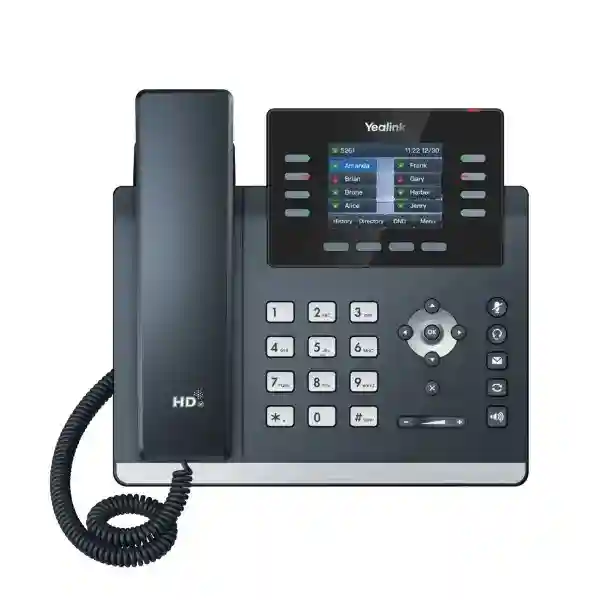
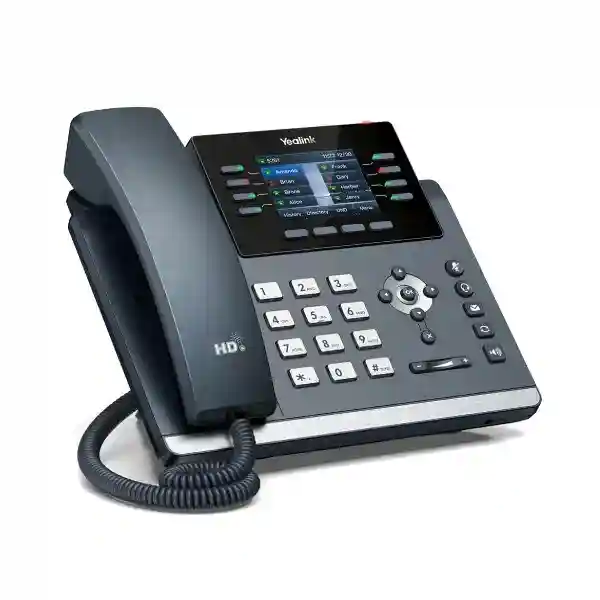
Yealink SIP-T44W Feature-Rich Wi-Fi SIP Phone for Business Communications
The Yealink SIP-T44W is a professional SIP desk phone built for organizations that need dependable voice communications, flexible network connectivity and practical expansion without moving to a large touchscreen endpoint. It provides a 2.8-inch 320×240 color LCD, dual-port Gigabit Ethernet, Power over Ethernet, built-in dual-band Wi-Fi, Bluetooth 4.2 and two USB 2.0 ports. These capabilities make the model suitable for office users, reception teams, administrators, customer-service desks and shared workplaces where a conventional handset remains important but deployment flexibility matters.
For procurement teams, the T44W addresses several recurring deployment concerns at once. Wired desks can use Gigabit Ethernet and PoE to reduce local power adapters, while locations where structured cabling is difficult can use the integrated 2.4 GHz or 5 GHz Wi-Fi capability when the network design permits. Bluetooth supports compatible wireless accessories, and dual USB interfaces provide room for supported headsets, recording or expansion options. The phone supports up to 12 SIP accounts, allowing organizations to standardize on one endpoint family across users with different line requirements.
The handset is designed around Yealink Optima HD Voice, wideband audio and smart noise filtering. The practical objective is straightforward: give users a familiar physical phone with clearer speech, programmable controls and a manageable enterprise provisioning path. For larger rollouts, Yealink’s provisioning ecosystem and unified T4U firmware approach can reduce the amount of device-by-device handling required by administrators.
FourTeck supports Uganda customers with pre-sales validation, bill-of-materials checks, accessory matching, staging requirements and delivery planning. Commercial details such as stock, exact lead time, warranty term, included power adapter and accessory availability should be confirmed on the quotation because these can vary by supply batch and project scope.
Instant Specifications & Procurement Fact Rail
SIP-T44W
Business SIP desk phone
Dual-port Gigabit Ethernet
2.4/5 GHz Wi-Fi + Bluetooth 4.2
PoE or optional 5V/2A supply
Confirm stock, warranty and lead time by quote
This fact rail is intended to help buyers qualify the endpoint quickly. The T44W can sit on a PoE-enabled access network, connect a downstream workstation through its second Ethernet interface, or use integrated Wi-Fi where a wireless voice endpoint is appropriate. Procurement teams should not assume that every accessory is bundled. Power adapters, headsets, EHS components, wall-mount hardware and EXP43 modules should be listed explicitly in the bill of materials when required. Likewise, SIP service subscriptions, PBX licenses and hosted voice seats are normally separate from the physical handset and should be validated with the chosen communications platform.
Operational Product Architecture & Overview
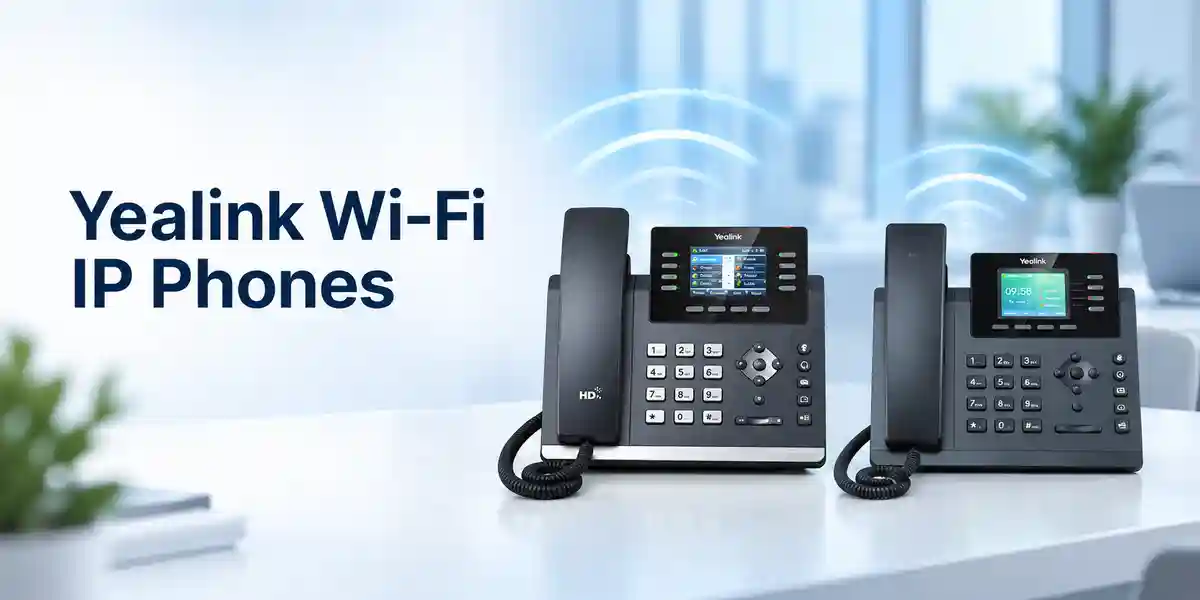
The SIP-T44W is best understood as an enterprise voice endpoint rather than a standalone telephone. Its job is to terminate SIP-based voice services at the user’s desk while participating in the organization’s LAN, VLAN, DHCP, DNS, time, provisioning and security architecture. Dual Gigabit Ethernet ports allow the phone to connect to an access switch and provide a pass-through network connection for a nearby computer. This arrangement can reduce the number of switch drops needed at an individual workstation, subject to the organization’s segmentation and performance policies.
PoE support simplifies physical deployment because a compatible Ethernet switch can deliver network connectivity and electrical power over the same cable. Yealink specifies PoE power consumption from approximately 2.0 W to 5.2 W, while use with a power supply is listed at approximately 1.7 W to 4.4 W. These figures are useful when estimating access-switch PoE budgets across a large floor. A project with hundreds of endpoints should calculate aggregate PoE demand with headroom rather than multiplying only the lowest idle value.
Integrated dual-band Wi-Fi gives planners another topology option. The phone supports 802.11a/b/g/n/ac across 2.4 GHz and 5 GHz. Wireless deployment can be useful for temporary offices, renovated spaces, executive rooms or locations where adding Ethernet cabling is disruptive. However, Wi-Fi should be treated as part of the voice network design: signal strength, roaming behavior, channel utilization, interference, QoS policy and power availability still need to be considered. Wi-Fi removes the Ethernet data cable requirement, but it does not remove the need to power the phone.
Bluetooth 4.2 supports compatible Bluetooth accessories and mobile contact synchronization scenarios. Two USB 2.0 ports expand the endpoint further. Depending on supported accessories and firmware, they can be used for USB headsets, recording and the Yealink EXP43 expansion module. This is particularly useful for receptionists, administrative staff and supervisors who need a larger number of programmable contacts or call-handling keys.
At the user interface layer, the 2.8-inch backlit color LCD presents call state, menus, directories and programmable functions without the cost or management overhead of a large Android-style touchscreen. The physical control layout includes illuminated line keys, feature keys, navigation controls and volume controls. The stand provides two adjustable angles and the device can be wall mounted where the deployment requires it.
Audio is a central part of the architecture. Yealink combines HD handset and speaker components with Optima HD Voice, G.722 wideband codec support and smart noise filtering. Codec choice remains dependent on the PBX, carrier, network path and remote endpoint. The phone also supports multiple narrowband codecs for interoperability. For buyers, this means the endpoint can fit into many standards-based SIP environments, but exact feature behavior should still be tested against the intended PBX or hosted service before a large fleet is ordered.
Enterprise Business Outcomes & Value Analysis
Key Hardware & Software Highlights
The T44W balances physical controls with software-driven flexibility. Its color screen is deliberately compact, keeping the endpoint focused on voice workflows. Eight LED line keys, programmable functions and paperless DSS capabilities can be mapped to common call operations. The handset uses a Hall switch design, while the device supports hands-free speakerphone operation and compatible headsets. For high-volume users, headset selection should be validated for wearing style, call-control support, charging arrangement and USB or EHS compatibility.
Two Gigabit Ethernet ports provide network uplink and PC pass-through. Integrated Wi-Fi avoids consuming a USB port for a wireless network adapter, and integrated Bluetooth similarly reduces accessory dependence. The two USB ports can therefore remain available for supported peripherals. Expansion-module support is particularly relevant to reception, executive-assistant and dispatch-style positions where visibility of many contacts or extensions matters.
On the software side, the endpoint supports SIP-based telephony, local and network directories, call handling and enterprise provisioning functions. Exact features available to an end user can depend on PBX integration. Features such as busy-lamp behavior, corporate directory access, call recording, transfer behavior and voicemail integration should be checked with the target platform rather than assumed from handset capability alone.
Security planning should include encrypted signaling and media where supported by the voice platform, secure provisioning, certificate handling, administrator credential policy, VLAN design and firmware governance. Yealink highlights TLS 1.3 and WPA3 capabilities for the T44W platform. A secure rollout therefore requires both endpoint configuration and matching infrastructure support.
Technical Specifications Ledger
| Category | Specification | Procurement relevance |
|---|---|---|
| Display | 2.8-inch 320×240 color LCD with backlight | Compact visual interface for call handling, directories and settings. |
| SIP capacity | Up to 12 SIP accounts | Supports multi-line and multi-identity user profiles. |
| Ethernet | Dual-port Gigabit Ethernet | Suitable for phone-plus-PC desk cabling designs. |
| Wi-Fi | Built-in 2.4/5 GHz, 802.11a/b/g/n/ac | Allows approved wireless endpoint deployment without a separate Wi-Fi dongle. |
| Bluetooth | Built-in Bluetooth 4.2 | Supports compatible wireless accessory workflows. |
| USB | 2 × USB 2.0 | Supports selected headsets, recording and expansion options. |
| Power | PoE; AC adapter input 100–240 V, output 5 V/2 A | Confirm whether local adapter is required and included. |
| Power draw | PSU 1.7–4.4 W; PoE 2.0–5.2 W | Useful for PoE switch and UPS capacity planning. |
| Audio | HD handset/speaker; G.722; smart noise filtering; multiple narrowband codecs | Validate codec policy with PBX and carrier. |
| Conference | 5-way conferencing listed | Platform configuration may affect conferencing behavior. |
| Mounting | Two-angle stand; wall mountable | Plan desk footprint or wall hardware as required. |
| Dimensions | 224.9 × 206.2 × 174.9 × 5 mm as listed by manufacturer | Check workspace clearance and mounting arrangement. |
| Operating temperature | -10 to +45°C | Keep endpoints within supported environmental conditions. |
| Operating humidity | 5–90% | Relevant to site environmental planning. |
| Storage temperature | -30 to +70°C | Relevant to warehousing and transport controls. |
Specifications should be checked against the firmware branch, regional packaging and current manufacturer documentation at order time. A specification may describe device capability without guaranteeing that every PBX exposes the same feature. For this reason, enterprise buyers should validate the full solution path: endpoint, switch, VLAN, DHCP, DNS, provisioning service, SIP server, session border controller where applicable, WAN, carrier and accessories.
Configuration & Sizing Worksheet
1. Estimate users and call profiles
Count ordinary desk users, reception users, executive assistants, supervisors and shared phones separately. Record how many SIP identities each role needs, whether users require busy-lamp keys, whether a headset is mandatory and whether USB recording is permitted. This prevents a single generic bill of materials from being applied to every desk.
2. Validate network and physical environment
Confirm whether each location has Cat5e or better cabling, a managed Gigabit access switch, voice VLAN support and suitable DHCP options. For Wi-Fi deployment, conduct coverage and capacity planning instead of assuming that general office wireless coverage is sufficient for real-time voice. Confirm desk depth, cable routing, stand angle and any wall-mount requirement.
3. Calculate power requirements
For PoE, calculate the number of phones per switch and reserve enough PoE budget for the expected maximum draw plus engineering margin. If local adapters will be used, specify the correct regional plug and ensure protected AC outlets are available. A UPS-backed PoE switch can simplify voice continuity compared with maintaining individual UPS units at every desk.
4. Confirm platform licensing
The handset itself does not replace a SIP service, PBX seat or hosted communications subscription. Confirm extension licenses, concurrent call capacity, SBC requirements, remote-worker licensing, voicemail, recording, directory integration and support subscriptions with the communications platform provider. Where possible, test a sample handset with the intended service before volume purchase.
5. Prepare the quote request
Provide quantity, delivery location, target PBX or hosted service, preferred connection method, PoE availability, headset requirements, expansion-module quantity, wall-mount requirements, staging instructions and desired delivery window. Include whether devices should be supplied factory-default or preconfigured. This information helps avoid revised quotations caused by missing accessories or deployment assumptions.
Deployment Scenarios & Industry Use Cases

Large enterprise and multi-site networks
A multi-site organization can standardize T44W endpoints across branches while maintaining centralized provisioning templates. The network team can define voice VLANs, QoS, NTP, directory and security policies, then apply role-specific configuration to different users. Gigabit pass-through can be useful at desks with one physical data outlet. Branches that lack convenient structured cabling can evaluate Wi-Fi deployment, provided voice coverage and power are addressed.
Financial and banking institutions
Banks and financial offices typically prioritize controlled configuration, encrypted signaling, predictable call quality and strong change management. The T44W can participate in such an architecture, but endpoint security is only one layer. Certificate policy, secure provisioning, switch access controls, segmentation, firewall policy, logging and PBX hardening should be designed together. Headset and recording functions should also align with internal compliance rules.
Educational and campus networks
Universities, schools and training institutions may deploy desk phones in administration blocks, admissions offices, libraries, security desks, faculty offices and residences. A common endpoint model simplifies spares and support. PoE can centralize power, while expansion modules may suit reception or switchboard-like roles. Campus network teams should confirm multicast, VLAN, DHCP and emergency-calling policies before deployment.
Government and public-sector procurement
Public-sector projects often require clear bills of materials, serial-number control, delivery documentation, warranty procedures and standardized configurations. The T44W’s standards-based SIP orientation and centralized provisioning capabilities can support structured rollouts. Tender documents should state required accessories, firmware baseline, encryption requirements, compatibility criteria, installation scope, training expectations and acceptance testing so bidders quote comparable solutions.
Technical Deep Dive: Processing, Audio & Endpoint Architecture
Unlike a network switch or firewall, an IP phone is not purchased for aggregate packet throughput. Its performance requirement is responsiveness and deterministic handling of signaling, media, user-interface functions and accessory control. The T44W combines its SIP software stack with dedicated endpoint hardware to process voice codecs, echo control, speakerphone operation, display updates, Ethernet forwarding and peripheral interaction. Buyers should therefore evaluate endpoint performance in the context of call setup responsiveness, audio quality, directory behavior and feature execution rather than using data-center throughput metrics.
Audio quality is influenced by the codec negotiated for a call, packet loss, latency, jitter, acoustic conditions and the remote endpoint. G.722 wideband capability can deliver richer voice when supported end to end. Narrowband codecs remain available for compatibility and bandwidth-sensitive paths. QoS markings alone do not guarantee quality; switches and routers must trust or remark traffic consistently, and WAN links need appropriate queuing policies.
The dual-port Gigabit architecture is also operationally important. A workstation connected through the phone shares the physical uplink but can still be placed into a separate data VLAN while the phone uses a voice VLAN, subject to switch configuration. This topology should be tested with endpoint authentication or NAC policies because the phone and attached computer may be treated differently by access-control systems.
Technical Deep Dive: Firmware Security & Operational Control
Firmware governance should be treated as a lifecycle process. New phones should be checked against an approved firmware baseline, staged in a controlled environment and tested with the organization’s PBX before mass deployment. Yealink’s unified T4U firmware strategy can simplify fleet administration, while dual firmware images add resilience during upgrade operations. Administrators should still maintain release records, configuration backups and a rollback plan.
Secure provisioning is equally important. Configuration files may contain server addresses, account information, certificates or credentials. Access to provisioning infrastructure should therefore be restricted and encrypted where supported. Default administrative credentials should not remain in service, and device web management should follow organizational access policy. TLS 1.3 and WPA3 support can strengthen transport and wireless security when corresponding infrastructure is configured to use them.
For remote branches, provisioning can reduce travel by allowing devices to obtain standardized configuration after network connection. The operational benefit is strongest when templates are documented, version controlled and separated by user role or site. A poorly governed automated configuration system can propagate errors just as efficiently as it propagates correct settings, so change control remains essential.
Technical Deep Dive: Availability, Redundancy & Recovery
Endpoint availability depends on more than the handset. A resilient voice design considers access-switch redundancy, UPS runtime, DHCP and DNS availability, PBX clustering or hosted-service resilience, WAN diversity and carrier routing. PoE can be a major advantage because phones can remain powered from centrally protected switches during a local mains interruption, but only if the switch and upstream voice infrastructure also remain operational.
For large fleets, spare-unit strategy is often more practical than attempting component repair onsite. Maintain a small quantity of configured or rapidly configurable spare phones, record serial numbers and define a swap process. If an endpoint fails, the service desk can replace it and reapply the user profile. This can reduce downtime while warranty processing continues separately.
Disaster recovery plans should include how users communicate when a primary office, WAN link or PBX is unavailable. Depending on the communications platform, phones may support alternate registration or failover mechanisms. These capabilities are platform-specific and must be tested. A procurement project should therefore include acceptance tests for registration loss, power interruption, network reconvergence and configuration recovery rather than assuming resilience from endpoint specifications alone.
Pre-Purchase Buyer Gap Checklist
Is a power adapter included? Do not assume so. If the deployment uses PoE, an adapter may be unnecessary. If local AC power is required, place the correct adapter explicitly on the quotation.
Does the phone include the SIP service? No. A physical SIP phone normally requires a compatible PBX, hosted voice service or SIP platform. Confirm licensing and account provisioning separately.
Will every Bluetooth headset work? Compatibility and call-control behavior can vary. Select headsets from validated compatibility lists or test the exact model before bulk purchase.
Can Wi-Fi replace Ethernet everywhere? Technically the phone has integrated Wi-Fi, but production voice over wireless should follow a coverage, capacity and QoS design. Dense offices and interference-prone locations may still favor wired Ethernet.
Can it drive expansion keys? The T44W supports Yealink color-screen expansion modules such as EXP43. Confirm module quantity, power implications, firmware compatibility and the actual number of monitored keys needed by the user role.
What are the hidden project costs? Common additional items include PBX seats, SBC or remote-user licenses, PoE switching, patch cables, headsets, expansion modules, wall mounts, power adapters, installation, staging, training, spares and support. A complete bill of materials should expose these before purchase approval.
Will it work with an existing PBX? SIP provides a strong interoperability foundation, but advanced features can be platform-specific. Validate registration, transfer, hold, voicemail, BLF, directory, conferencing and provisioning with the intended PBX.
What about lifecycle and firmware? Ask for the current supply status and recommended firmware branch at quote time. For enterprise fleets, document the firmware version accepted during testing and control later upgrades through a defined maintenance process.
How much PoE capacity is required? Yealink lists a PoE consumption range up to approximately 5.2 W for the phone. Engineers should calculate switch-level capacity with suitable margin and account for other PoE devices sharing the switch.
Uganda Procurement & Delivery Logistics
Uganda customers can request the Yealink SIP-T44W as an individual endpoint or as part of a larger communications bill of materials. A useful quote request identifies quantity, delivery city, target PBX, preferred headset, PoE availability, expansion requirements and whether staging is needed. FourTeck can then align the handset order with relevant accessories and project requirements rather than quoting an incomplete desk-phone package.
Order processing should include confirmation of the exact model, quantity, accessory list, commercial warranty terms and expected delivery schedule. For project deployments, buyers should also agree how serial numbers, labels, configuration profiles and acceptance documentation will be handled. Where pre-configuration is requested, the customer may need to supply extension information, provisioning details or a controlled configuration template.
Delivery time depends on stock position, order quantity, import routing and project-specific staging. Because these variables change, lead time should be stated on the formal quotation rather than assumed from a general product page. The same applies to warranty duration and replacement procedures. Enterprise procurement teams should retain the quotation and serial-number records for future support.
Uganda Coverage Matrix
Projects in Kampala may range from single-office refreshes to multi-floor deployments requiring VLAN, PoE and headset planning. Entebbe customers can request supply for corporate, hospitality, logistics and institutional environments. Jinja deployments may include manufacturing, education, branch offices and service operations. Mbarara organizations can plan standardized voice endpoints for regional offices, healthcare administration, education and commercial sites. Gulu projects can similarly be scoped around quantity, connectivity, power and support requirements. For every location, final delivery timing and onsite service scope should be confirmed against the specific quotation.
Cross-Border & Regional Supply
Organizations operating across East Africa and the Gulf often benefit from using a consistent endpoint standard while sourcing through regional channels. FourTeck supports procurement paths for Uganda, Kenya, the broader African market, the UAE and Kuwait. Cross-border projects should standardize model numbers, firmware expectations and accessories while allowing for local plug types, tax treatment, import procedures, warranty routing and delivery lead times. For multi-country rollouts, prepare one master technical bill of materials and then issue country-specific commercial schedules.
Related Yealink Options & Accessories
A T44W quote can be built around the wider Yealink voice ecosystem. Buyers who need a larger display or a different executive profile can compare other Yealink business IP phone options. Reception and administrative users should consider a compatible EXP43 expansion module where additional monitored keys are required. High-call-volume teams can pair the phone with validated wired or wireless USB headsets, while users requiring electronic hook switch functionality should specify the appropriate compatible accessory. Network projects may also require managed PoE switches, patch cables, UPS protection and voice VLAN configuration. Rather than selecting these independently, procurement teams should create a role-based package: standard user, headset user, reception user, executive user and shared-area phone. This makes quantities easier to audit and reduces missing accessories during rollout.
FourTeck Technical Service Capabilities
FourTeck can support the procurement process beyond handset supply. Engineering validation can check whether the proposed phone, accessories, PoE design and PBX environment form a coherent solution. Bill-of-materials verification helps identify omissions such as power adapters, headset interfaces, expansion modules or wall-mount requirements before the purchase order is released.
For larger projects, staging can reduce deployment time by applying an agreed firmware baseline and configuration profile before shipment. The exact staging scope should be defined in advance, especially where customer credentials, certificates or provisioning URLs are involved. Pre-shipment firmware work should follow the customer’s approved version rather than automatically applying an untested release.
Post-sales support can focus on hardware identification, configuration guidance, accessory matching and warranty workflow according to the commercial agreement. Customers should keep serial-number records and a copy of the approved configuration template. These records make troubleshooting and replacement much faster when a fleet contains many similar devices.
Extended Technical FAQ
Does the Yealink SIP-T44W support both wired Ethernet and Wi-Fi?
Yes. The phone includes dual-port Gigabit Ethernet as well as integrated dual-band 2.4 GHz and 5 GHz Wi-Fi supporting 802.11a/b/g/n/ac. This gives network planners flexibility between a conventional wired desk design and approved wireless deployments. Ethernet with PoE is often attractive because one cable can provide both connectivity and power. Wi-Fi can reduce structured-cabling requirements but still needs local power and a properly engineered wireless network. For production voice, validate signal strength, interference, roaming, QoS and authentication before selecting Wi-Fi as the standard connection method.
How many SIP accounts can the T44W register?
Yealink lists support for up to 12 SIP accounts. This is useful for users who need multiple identities, departmental lines or shared call appearances. The number of accounts supported by the handset does not mean that every PBX license includes twelve identities, and it does not guarantee identical feature behavior across providers. Before deployment, confirm how the intended communications platform handles registration, simultaneous calls, busy-lamp fields, shared lines, transfer, voicemail and conferencing. For most organizations, a role-based configuration template is easier to manage than assigning the maximum number of accounts to every phone.
Does the phone require a separate power adapter?
Not when it is connected to a compatible PoE network and the switch has sufficient available power budget. The T44W supports PoE, which is usually the cleanest enterprise deployment method because it combines power and network connectivity and can be backed by a centralized UPS. If PoE is unavailable, Yealink specifies a 5 V/2 A DC power option with an AC input range of 100–240 V for the relevant adapter. Confirm whether an adapter is included in the quoted package and ensure the correct regional plug is supplied. Do not assume the adapter is standard in every distribution bundle.
Can the T44W be used with USB and Bluetooth headsets?
The platform includes built-in Bluetooth 4.2, dual USB 2.0 ports and headset/EHS support, giving buyers several accessory pathways. However, physical connectivity alone does not guarantee full call-control compatibility with every headset. Features such as answer/end control, mute synchronization, volume behavior, firmware management and charging can vary. For enterprise orders, select a specific validated headset model and test it with the approved T44W firmware. High-volume call teams should also evaluate wearing comfort, microphone noise handling, battery runtime for wireless models and whether users need simultaneous PC and phone connectivity.
Does the T44W support expansion modules for reception desks?
Yes. Yealink identifies support for color-screen expansion modules, including the EXP43 family. Expansion modules are useful when receptionists, assistants or supervisors need many programmable contacts, busy-lamp fields or speed-dial keys visible at once. The required number of modules should be determined from the user’s actual monitored-extension count rather than ordered by habit. Confirm firmware compatibility, supported module count, physical desk space, power implications and the PBX’s BLF subscription limits. A pilot configuration with the receptionist’s real call workflow is recommended before a large rollout.
What security capabilities should be considered?
Yealink highlights modern security support on the T44W, including TLS 1.3 and WPA3 in applicable firmware, alongside secure transport and interoperability features. A secure deployment still depends on configuration. Organizations should use strong administrative credentials, controlled provisioning, approved firmware, encrypted signaling and media where the PBX supports them, suitable certificates, network segmentation and restricted management access. For Wi-Fi use, apply the organization’s enterprise wireless security policy rather than treating the phone as an unmanaged consumer device. Security acceptance testing should include provisioning, certificate validation, management access and behavior after firmware upgrades.
Is the T44W compatible with every SIP PBX?
The T44W is a standards-based SIP endpoint designed for broad interoperability, but advanced features vary between platforms. Basic registration and calling may work while features such as corporate directories, BLF, call recording, shared line appearance, remote provisioning, voicemail indicators or conferencing require platform-specific support. Before purchasing a large quantity, test a sample unit with the exact PBX or hosted service and firmware combination intended for production. Document the successful settings so later units can be staged consistently. This approach is especially important when replacing an older mixed-vendor phone fleet.
What should be included in a Uganda quotation request?
Include the required quantity, delivery city, target PBX or hosted service, PoE availability, wired or Wi-Fi preference, headset requirements, expansion modules, wall mounting, staging needs and desired delivery schedule. State whether power adapters are needed and whether the phones should arrive factory-default or preconfigured. For multi-site projects, provide quantities by branch and identify any different user profiles. FourTeck can then prepare a more complete bill of materials and identify compatibility questions before order placement. Stock, warranty terms, final price and lead time should be confirmed on the formal quotation because they can change with supply conditions.
How should warranty replacement be planned for a large fleet?
First confirm the warranty term and process on the commercial quotation. Then maintain serial-number records, purchase documents and site assignment data. For a business-critical deployment, keep a small spare pool so a failed endpoint can be swapped quickly while warranty processing takes place. Store a known-good configuration template and approved firmware package so replacement devices can be returned to service consistently. The service desk should record the fault symptoms, network tests and accessory swaps already performed before escalating a hardware case. This separates true endpoint failures from cabling, PoE, PBX or headset issues.
Can FourTeck help with configuration before delivery?
Pre-configuration and staging can be scoped for project orders. Typical work may include validating the bill of materials, applying an agreed firmware baseline, loading a customer-approved template, labeling devices and preparing deployment records. The exact scope depends on the PBX, security policy and information the customer can provide safely. Credentials and certificates should be handled through an agreed secure process. For complex environments, a pilot batch is preferable: validate registration, audio, transfer, voicemail, directories, headset operation and network behavior first, then use the approved configuration as the baseline for the remaining fleet.
Prepare Your Yealink SIP-T44W Procurement Request
For a useful quotation, send the number of T44W phones required, delivery destination, PBX or hosted voice platform, PoE status, headset requirements and any expansion-module or staging needs. FourTeck can use these details to validate the proposed bill of materials and identify missing accessories before purchase. For multi-branch projects, include quantities by location and note whether the same configuration will be used everywhere. Final pricing, availability, warranty terms and delivery schedule will be stated against the requested project scope.



Reviews
There are no reviews yet.