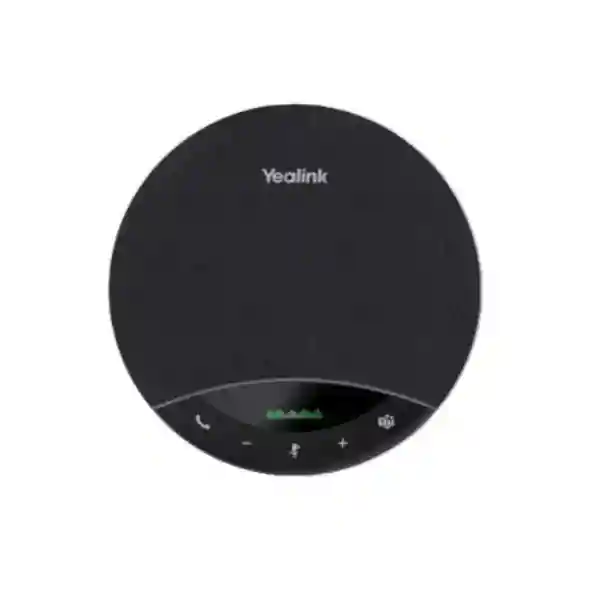
Yealink SP96 USB Speakerphone for Professional Meeting Audio
The Yealink SP96 is a portable USB and Bluetooth speakerphone built for organizations that need clearer group conversations without committing every workspace to a permanently installed room-audio system. It combines a six-microphone pickup system, up to 5-metre voice capture, a 65 mm speaker, full-duplex conversation, acoustic echo cancellation, reverberation control and advanced background-noise reduction in a compact 400 g device. The result is a practical collaboration endpoint for executive offices, huddle rooms, shared meeting spaces, project rooms, training areas and travelling teams.
For procurement teams, the SP96 addresses a familiar problem: laptop microphones and speakers are convenient but often inadequate when several people gather around one table. Participants sitting farther from the computer may sound distant, room reflections can reduce intelligibility, and people can interrupt each other when basic audio systems do not handle simultaneous speech well. The SP96 moves the audio endpoint into the centre of the conversation. Its microphone array is designed to capture voices around the table, while full-duplex operation allows participants at both ends to speak naturally without the rigid turn-taking associated with weaker conferencing devices.
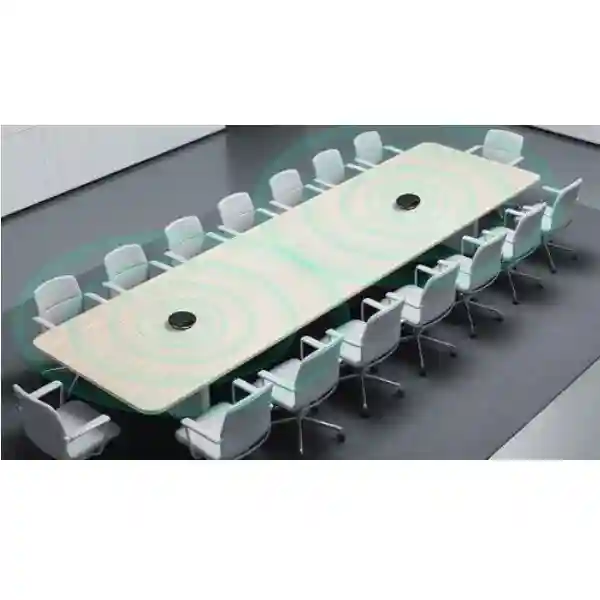
Connectivity is deliberately flexible. Users can connect by USB cable, Bluetooth 5.3, or a supported USB adapter and BT51C dongle configuration. The device can maintain two simultaneous Bluetooth connections and can remember multiple paired devices, which is useful in organizations where a speakerphone moves between meeting rooms or users. A liquid crystal display gives immediate visual feedback about operating and connection status. For larger table layouts, two SP96 units can be linked wirelessly to expand practical audio coverage without running an additional signal cable across the room.
FourTeck supplies the Yealink SP96 for Ugandan business deployments with procurement guidance covering room size, endpoint compatibility, required adapters, quantities, delivery planning and deployment support. Organizations can request a quotation before purchase so the supplied package matches the intended meeting workflow rather than relying on a generic accessory selection.
Yealink SP96
Huddle and meeting rooms
USB, Bluetooth 5.3
Up to 5 metres
Business quotation
Instant Procurement Facts
The SP96 is available in USB-C/A-oriented package configurations, with Yealink identifying part-number variants for the base USB-C/A package and a package supplied with a dongle. Buyers should therefore specify whether native USB cable use is sufficient or whether a dedicated wireless computer adapter is required. The internal 6000 mAh battery is rated for up to 26 hours of talk time, up to 35 hours of music playback and up to 230 hours of standby under stated conditions. Wireless range is rated up to 30 metres in suitable conditions, while microphone pickup is rated up to 5 metres. The speakerphone supports two-device wireless daisy chaining for expanded meeting coverage. Warranty handling can vary by supplied channel and commercial agreement, so Ugandan buyers should request the applicable regional warranty terms on the quotation rather than assuming a consumer-retail policy.
Operational Architecture and Meeting-Room Overview
The SP96 should be understood as a dedicated audio edge device for unified communications rather than simply as a louder laptop speaker. In a typical meeting, the computer or mobile device runs the collaboration application while the SP96 becomes the selected microphone and speaker endpoint. This separation improves physical placement: the laptop can remain in front of the presenter while the speakerphone sits closer to the centre of the participant group. That arrangement can materially improve consistency because microphone distance is one of the most important practical variables in a small meeting room.
Six microphones provide multidirectional voice capture. Yealink specifies pickup at up to 5 metres, making the device appropriate for huddle rooms and many small-to-medium meeting tables when room acoustics are reasonable. The audio path includes acoustic echo cancellation so sound reproduced by the speaker is less likely to be retransmitted as distracting echo. Reverberation cancellation helps manage reflections, while background-noise reduction is intended to suppress common environmental distractions. Full-duplex operation is especially important in business discussion because it permits both sides to speak at once. Negotiations, project reviews and customer calls become less mechanical when an interruption or acknowledgement does not cause one side of the conversation to disappear.
The 65 mm speaker is designed for speech and media reproduction, with Yealink specifying a 50 Hz to 20 kHz speaker frequency range and 48 kHz bandwidth in both music and speech modes. Virtual bass processing extends the perceived weight of playback, making the device useful beyond voice-only meetings when presentations include media. The built-in display improves operational clarity by presenting device state directly on the unit instead of requiring users to interpret only tones or application messages.

The connection architecture gives IT teams several deployment choices. A fixed desk can use a USB cable for predictable connectivity and charging. A mobile professional can pair directly over Bluetooth. Organizations that prefer a dedicated computer wireless path can select the appropriate package with the BT51C dongle. Bluetooth 5.3 supports a stated wireless range of up to 30 metres in suitable environments, two simultaneous Bluetooth connections and pairing memory for up to eight devices. These capabilities are useful where a speakerphone is shared, although administrators should still define pairing practices in sensitive environments so personal devices are not unintentionally retained.
For wider rooms, two SP96 units can be linked wirelessly. This is a useful middle ground between a single tabletop unit and a permanently installed conference-room system. It can extend participant coverage without requiring floor boxes or long USB runs. However, room geometry still matters. A long boardroom, a heavily reverberant room or a space with substantially more participants may justify a purpose-built room system. FourTeck can help determine whether one SP96, two linked units or another Yealink room architecture better fits the planned environment.
Management is available through Yealink USB Connect on a PC and through Yealink Management Cloud Service in supported deployments. This matters when organizations purchase multiple units because configuration consistency, firmware maintenance and platform settings become operational concerns. A managed fleet can be easier to support than independently configured personal devices, particularly when the same speakerphone model is standardized across departments.
Enterprise Business Outcomes and Value Analysis
1. Conversation Integrity
Six microphones, up to 5-metre pickup, echo cancellation and full-duplex audio are designed to make group conversations easier to follow. The operational value is fewer requests to repeat information and less dependence on the laptop position. This is especially useful for sales reviews, supplier negotiations, executive calls and hybrid project meetings where multiple people contribute from one room.
2. Reliable Daily Operation
A dedicated speakerphone reduces reliance on varying laptop microphone quality. USB provides a straightforward wired path, while Bluetooth offers mobility. The internal battery supports long sessions and the display gives users visible status. These features simplify day-to-day meeting preparation and reduce the number of variables users need to troubleshoot before joining a call.
3. Scalable Room Coverage
A single SP96 can serve individual offices and smaller meeting spaces, while two devices can be wirelessly linked when broader coverage is required. Organizations can therefore standardize on one portable platform across several room types before moving to more complex installed systems where necessary.
4. Controlled Endpoint Access
USB and Bluetooth choices let IT departments decide how endpoints should connect. Where wireless pairing is allowed, administrators can establish device-handling procedures. Where a more controlled path is preferred, USB operation can keep the meeting endpoint physically associated with a managed computer. Procurement should align the connection method with internal security policy.
5. Centralized Administration
Yealink USB Connect supports PC-side device settings, while Yealink Management Cloud Service provides an option for broader administration in supported environments. Standardized configuration can reduce support variation across departments and makes it easier to maintain an approved baseline for business communications equipment.
6. Lower Deployment Complexity
Portable speakerphones avoid many costs associated with permanent room audio: specialist mounting, ceiling microphones, dedicated cabling and construction coordination. They are not a replacement for every installed room, but for suitable spaces they can reduce deployment time and allow equipment to be reassigned when teams or offices change.
7. Multi-Platform Flexibility
Yealink states compatibility with more than 100 platforms and operating systems. This is valuable for organizations that interact with customers and partners using different collaboration services. Buyers should still validate any required call-control behavior against the exact application and operating system used in their environment.
8. Mobile Asset Utilization
At approximately 400 g and supplied with a carrying case, the SP96 can move between offices, temporary project rooms and off-site meetings. A portable asset can serve several use cases, which may improve utilization compared with audio equipment permanently tied to a room that is only occasionally occupied.
Key Hardware and Software Highlights
The SP96 combines physical audio components with software-controlled processing and device management. The following matrix connects the technical element to the practical reason an organization may specify it.
| Component | Implementation | Operational Outcome |
|---|---|---|
| Microphone array | Six microphones, up to 5 m pickup | Captures participants around a shared table with less dependence on laptop placement. |
| Speaker | 65 mm driver | Provides room-oriented speech playback and presentation audio. |
| Conversation processing | Full duplex, acoustic echo and reverberation cancellation | Supports more natural overlapping speech and reduces distracting room artifacts. |
| Display | Liquid crystal status display | Gives users visible connection and operating feedback. |
| Wireless | Bluetooth 5.3, up to 30 m stated range | Supports flexible placement and mobile-device workflows. |
| Battery | 6000 mAh; up to 26 h talk time | Enables extended wireless use through long working sessions. |
| Expansion | Wireless daisy chain, up to two units | Extends practical coverage for larger tables without an extra signal cable. |
| Management | Yealink USB Connect and Management Cloud Service | Supports configuration and fleet-management workflows. |
Technical Specifications Ledger
Procurement specifications should be read together with the exact quoted package because accessory inclusion can vary. The following values reflect the manufacturer-published SP96 technical information used for planning.
| Category | Specification | Procurement Note |
|---|---|---|
| Product type | USB and Bluetooth speakerphone | For personal, huddle and meeting-room audio. |
| Microphones | 6 | Designed for multidirectional meeting pickup. |
| Pickup range | Up to 5 m | Actual results depend on room layout and acoustics. |
| Microphone response | 100 Hz–10 kHz | Suitable for wide speech capture. |
| Speaker | 65 mm | Single integrated full-range meeting speaker. |
| Speaker response | 50 Hz–20 kHz | Supports speech and media playback. |
| Conversation | Full duplex | Supports simultaneous two-way speech. |
| Audio processing | Noise reduction, acoustic echo cancellation, reverberation cancellation, virtual bass | Designed to improve clarity in real meeting environments. |
| Bluetooth | Version 5.3 | Check local radio policy before broad enterprise deployment. |
| Wireless range | Up to 30 m / 100 ft | Range varies with obstacles and radio conditions. |
| Bluetooth connections | 2 simultaneous; up to 8 paired devices | Useful for shared-device workflows. |
| USB | USB cable; USB C/A adapter options | Confirm host connector and quoted bundle. |
| Daisy chain | Wireless, up to 2 SP96 units | For expanded room coverage. |
| Battery | 6000 mAh | Rechargeable internal battery. |
| Talk time | Up to 26 hours | Actual endurance varies by use and settings. |
| Music time | Up to 35 hours | Manufacturer-stated maximum. |
| Standby | Up to 230 hours | Depends on connection and power settings. |
| Net weight | 0.400 kg | Portable for shared and travelling use. |
| Gift box | 162 × 175 × 59 mm | Useful for storage and logistics planning. |
| Management | Yealink USB Connect; Yealink Management Cloud Service | Confirm organizational management requirements before rollout. |
The SP96 is not a rack-mounted infrastructure appliance, so rack-unit clearance, redundant power feeds and backplane throughput are not applicable. Its relevant physical planning factors are tabletop placement, charging access, USB compatibility, wireless policy, room acoustics and secure storage. Buyers should avoid forcing infrastructure-appliance criteria onto a portable audio endpoint; the correct procurement question is whether the speakerphone provides adequate pickup, playback, connection and management characteristics for the intended meeting spaces.
Configuration and Sizing Worksheet
Step 1: Estimate participant distribution
Record the normal and maximum number of people physically present in each room, but do not use headcount alone. Measure the table length and note where people actually sit. A compact group around a central table is a stronger fit for a tabletop speakerphone than the same number of people spread along a very long boardroom. Use the stated 5-metre pickup capability as a planning boundary, not as a promise that every acoustically difficult room will perform identically.
Step 2: Assess the room environment
Identify hard glass walls, bare floors, high ceilings, HVAC noise, open-plan spill and other sources of reverberation or background sound. The SP96 includes processing designed to reduce echo, reverberation and environmental noise, but good room acoustics remain valuable. In noisy or highly reflective spaces, conduct a practical test before standardizing a large quantity.
Step 3: Choose one or two units
Start with one SP96 for a conventional huddle or small meeting room. Where the table is longer or participant distribution is wider, consider two units using wireless daisy chaining. If two units still do not provide the required coverage, evaluate an installed Yealink room system rather than adding uncontrolled complexity.
Step 4: Select the connection method
For dedicated room computers, USB is straightforward and predictable. For mobile users, direct Bluetooth provides convenience. Where an organization wants a dedicated computer wireless adapter, specify the BT51C requirement in the quotation. Confirm whether host devices primarily expose USB-C, USB-A or a mixture so adapters are planned before deployment.
Step 5: Review power and charging
The SP96 is battery powered for mobile use and charges by USB. It does not require redundant AC feeds like a data-centre appliance. For shared meeting rooms, define where the device will charge between sessions and who is responsible for returning it. Long rated talk time reduces charging frequency, but an unmanaged shared device can still be found empty when needed.
Step 6: Define software management
Determine whether devices will be individually maintained through Yealink USB Connect or incorporated into a supported centralized management process. Define who approves firmware, who changes platform settings and whether users may pair personal mobile devices. These operational decisions become more important as fleet size grows.
Step 7: Prepare the quote request
Provide the number of SP96 units, target locations, typical room sizes, preferred connection type, dongle requirement, host operating systems, collaboration applications, desired delivery destination and any staging requirement. If two-unit daisy chains are planned, identify how many rooms require pairs. Ask the quotation to state package contents, warranty terms, lead time, taxes, delivery and any professional service charges separately.
Deployment Scenarios and Industry Use Cases

Large Enterprise and Multi-Site Networks
A multi-site organization can standardize the SP96 as a portable audio endpoint for huddle spaces, manager offices and temporary project rooms. Standardization simplifies user familiarity: employees encounter the same controls and connection behavior at different branches. IT can maintain a defined firmware and configuration baseline, while procurement can hold a consistent spare pool. Sites with larger formal boardrooms can use installed room systems while keeping SP96 units for smaller spaces, avoiding the cost of overengineering every room.
For a distributed enterprise, inventory discipline matters. Label devices by site or room, define charging locations and record whether each unit has a dedicated dongle or adapter. If devices travel between sites, carrying cases help protect the equipment and keep accessories together. Central procurement can also specify identical bundles so local offices do not receive incompatible adapter combinations.
Financial and Banking Institutions
Banks and financial organizations often need dependable audio for internal operations, branch coordination, vendor meetings and management reviews. The SP96 can support these use cases where portable tabletop audio is permitted by internal policy. Security teams should decide whether Bluetooth pairing is acceptable in particular areas and may prefer USB use on managed computers in controlled environments. Sensitive meetings should follow organizational confidentiality procedures regardless of endpoint model.
A bank rollout may divide rooms into categories: personal executive offices, small branch meeting rooms, regional conference rooms and large boardrooms. The SP96 can cover the first two categories and selected medium rooms after validation. This tiered approach prevents both under-specification and unnecessary capital expense.
Educational and Campus Networks
Universities, colleges and training institutions can use portable speakerphones for departmental meetings, remote guest lectures, administrative calls, project supervision and hybrid teaching in smaller rooms. Portability is valuable because rooms are frequently reassigned. A device can be checked out with a laptop rather than permanently installed. For teaching spaces, assess participant distribution carefully; a lecture room with people spread over many rows may require a dedicated microphone architecture instead of a central tabletop unit.
Campus IT teams can reduce support burden by publishing a simple connection standard: approved USB method, supported collaboration applications, charging process and return procedure. Standardizing one speakerphone model across departments can also make staff training easier.
Government and Defense Procurement
Public-sector buyers commonly require documented specifications, controlled procurement, asset identification and clear warranty procedures. The SP96 can be considered for ordinary administrative collaboration where organizational security rules permit commercial USB and Bluetooth peripherals. Procurement documents should identify the exact package, part number where required, quantities, warranty, delivery destination and acceptance criteria.
For restricted or classified environments, the responsible security authority must determine whether wireless functionality is permitted and what configuration controls are required. The presence of Bluetooth means the device should not be assumed suitable for every secure room. FourTeck can provide commercial and technical product information, but final accreditation remains the responsibility of the purchasing organization.
Technical Deep Dive: Microphone, Audio and Signal Architecture
The central engineering challenge in a portable conference speakerphone is managing the acoustic relationship between microphones, loudspeaker, room and remote participants. A speakerphone must reproduce incoming speech loudly enough for the room while simultaneously capturing local voices. Without effective echo cancellation, the microphones can pick up the remote participant’s voice from the local loudspeaker and send it back, producing the familiar delayed echo that makes a meeting difficult to tolerate. The SP96 includes acoustic echo cancellation specifically to address this loop.
Full-duplex operation is equally important. Basic systems can behave like a walkie-talkie, reducing or suppressing one direction when the other side speaks. That may be acceptable for announcements but not for collaborative conversation. Full duplex allows natural overlap: a participant can acknowledge a point, ask a quick question or interrupt constructively without the audio path collapsing. The six-microphone arrangement supports voice pickup around the device, and the stated 5-metre range provides a useful sizing reference for table placement.
Reverberation cancellation addresses another common room problem. Hard surfaces cause speech energy to arrive at the microphone through multiple reflections after the direct sound. Processing can reduce some of that effect, but placement remains critical. Put the SP96 on a stable central surface, avoid hiding it behind laptops or documents, and keep it away from strong mechanical noise sources where practical. The 65 mm speaker and broad published frequency response provide a useful balance for speech and presentation playback.
Technical Deep Dive: Software Ecosystem, Firmware Security and Control
A modern USB peripheral becomes part of an organization’s endpoint estate, so lifecycle management deserves attention. Yealink USB Connect provides PC-based access to device settings, including Bluetooth behavior, device naming, status tones, indicator behavior, automatic power-off choices, platform selection and softphone call-control options. These settings allow organizations to establish a predictable user experience rather than leaving every unit in an unknown state.
For larger estates, Yealink Management Cloud Service provides a management path in supported environments. Before rollout, IT should define an ownership model for firmware updates. A sensible enterprise process is to validate new firmware with a small pilot group, confirm compatibility with the organization’s main collaboration applications and operating-system build, then schedule broader deployment. This reduces the risk of introducing unexpected behavior across every meeting space at once.
Wireless configuration should also be governed. The SP96 can pair with multiple devices and maintain two simultaneous Bluetooth connections. That flexibility is convenient, but shared meeting-room units benefit from a clear pairing policy. Organizations may choose to clear pairings during room resets, restrict Bluetooth in selected departments, or use USB as the default connection. Device management is therefore not merely a convenience feature; it is part of making a portable peripheral fit an enterprise operating model.
Technical Deep Dive: Availability, Redundancy and Meeting Continuity
High availability means something different for a speakerphone than for a server or network core. There are no redundant hot-swappable power supplies or clustering protocols. Continuity instead comes from portable-device practices: battery readiness, spare units, consistent accessories, tested connection methods and rapid replacement. An organization that depends heavily on hybrid meetings should hold an appropriate spare ratio rather than assuming every peripheral will always be available.
The internal battery provides up to 26 hours of stated talk time, which can carry the device through extended work periods. For fixed rooms, regular USB charging keeps the unit ready. For mobile teams, charging should be included in travel preparation. A spare USB cable and, where used, a spare approved adapter can prevent a low-cost accessory from disabling an important meeting.
Two-unit wireless daisy chaining provides coverage expansion but should not be mistaken for fault-tolerant clustering. If one device fails, meeting coverage may be reduced. Critical rooms should have a documented fallback, such as a spare SP96 or an alternate room. This practical continuity model is inexpensive compared with infrastructure-grade redundancy and is usually appropriate for portable collaboration equipment.
Pre-Purchase Buyer Gap Checklist
Which exact package is being quoted? Yealink lists SP96 package variants, including a USB-C/A version and a version associated with a dongle. Confirm the part number, included adapter, cable and dongle status. A price comparison is meaningful only when the compared bundles contain the same accessories.
Are there hidden software subscriptions? Core speakerphone operation is based on the hardware connection, but centralized management services and organizational software environments can have their own commercial terms. Ask the quotation to separate hardware, management services and professional services. Do not assume a cloud-management entitlement merely because the device can be managed through a cloud service.
Will it work with our collaboration platform? Yealink states broad compatibility with more than 100 platforms and operating systems. Basic audio is generally straightforward, but call-control behavior can vary by application, connection type and operating system. If answer/end, mute synchronization or other controls are operationally important, validate the exact application and endpoint combination before mass deployment.
Is one unit enough for the room? Measure participant distance, not only room dimensions. The published pickup range is up to 5 metres. Long tables, poor acoustics and widely distributed participants can change real-world performance. Two SP96 units can be linked wirelessly, but very large rooms should be evaluated for an installed conferencing system.
What is the power requirement? This is a rechargeable portable device, not a rack appliance. Plan USB charging and device-return procedures. The 6000 mAh battery is rated for up to 26 hours of talk time, but battery life varies with usage. Shared rooms should not rely on users remembering to charge without a defined process.
How does Bluetooth affect security policy? The SP96 uses Bluetooth 5.3 and supports multiple pairings. Organizations with restricted wireless policies should involve security teams before purchase. USB operation may be preferable in controlled spaces. For highly restricted environments, procurement approval should explicitly address wireless capability.
What is the hardware lifecycle? Ask for current supply status, warranty terms and expected lead time at the moment of quotation. For a fleet rollout, consider purchasing a small spare pool with the original order so replacement devices match the deployed standard.
What physical clearance is needed? Rack clearance is irrelevant, but tabletop space matters. The speakerphone should be centrally positioned and not buried under papers or blocked by laptops. Plan a stable surface, convenient charging route and secure storage location. If the device is shared between rooms, the carrying case should remain with the unit.
Does it replace a full conference-room system? Not universally. The SP96 is strongest where portability, rapid deployment and tabletop audio are priorities. Rooms with multiple displays, integrated cameras, ceiling microphones, complex control systems or very large seating capacity may need a purpose-built room solution. Correct sizing protects the investment and user experience.
Uganda Procurement and Delivery Logistics
FourTeck supports business procurement of the Yealink SP96 in Uganda through a quotation-led process. Buyers can submit the required quantity, delivery location, room profile, preferred connection method and any adapter or dongle requirement. This allows the commercial offer to identify the appropriate bundle and avoids a common procurement problem in which the speakerphone arrives but the expected host connector or wireless adapter is missing.
Order processing should begin with technical confirmation for larger deployments. A small office may simply require one or two units, while an enterprise rollout may involve dozens of rooms with different layouts. For larger quantities, FourTeck can help organize the bill of materials by site and distinguish single-unit rooms from locations requiring paired SP96 devices. Commercial quotations can state applicable taxes, delivery scope, warranty terms and lead-time assumptions so the purchasing team has a clearer approval document.
Delivery timing depends on stock position, quantity, import cycle and destination. Buyers with a fixed deployment date should request lead-time confirmation before issuing a purchase order. For phased projects, quantities can be planned by priority site so critical meeting rooms are addressed first. Pre-deployment services may include compatibility review, configuration guidance and firmware planning where agreed in the scope.
On receipt, organizations should verify quantity, package condition, accessory inclusion and serial-number records before distributing devices. For managed fleets, apply the approved settings before handing units to users. This staging discipline reduces support calls and gives the organization a consistent starting configuration.
Uganda Local Coverage Matrix
Primary corporate deployments, head offices, professional services, financial institutions and central procurement projects.
Business offices, hospitality operations, logistics organizations and teams requiring portable meeting equipment.
Industrial, commercial, educational and regional office requirements with centralized purchasing support.
Regional enterprises, institutions and branch-office deployments requiring standardized collaboration endpoints.
Public-sector, education, development and business environments planning reliable hybrid meeting facilities.
Coverage planning should consider delivery destination, quantity and project schedule. Organizations with branches across several Ugandan cities can consolidate requirements into one bill of materials while identifying delivery quantities per site. This makes it easier to standardize accessories and maintain a common spare strategy.
Cross-Border and Regional Supply Chains
Organizations operating across East Africa, the Gulf and wider African markets often prefer a consistent collaboration-device standard. FourTeck supports regional procurement coordination through its market sites for Uganda, Kenya, African enterprise markets, UAE and Kuwait. Multi-country buyers should identify destination, quantity and required delivery window for each market because commercial terms, taxes, stock position and logistics routes can differ.
A regional standard should define the SP96 bundle, approved firmware baseline, required adapters and local warranty handling. This reduces variation when employees move between offices and gives central IT a repeatable support model. For cross-border projects, allow sufficient time for import procedures and final-mile delivery rather than assuming the same lead time in every country.
Related Yealink Solutions and Internal Paths
The SP96 is one component of a broader business communications environment. Buyers planning complete deployments can explore FourTeck Uganda enterprise technology and request guidance for related Yealink endpoints through the Uganda contact and quotation desk. A small room may need only the SP96 and a managed laptop, while a larger collaboration space can require a camera, room computer, display and dedicated control interface.
For desktop telephony projects, Yealink desk phones can complement speakerphones by providing dedicated calling at reception, executive and operational workstations. For individual hybrid workers, business headsets may be more appropriate where privacy and concentration are priorities. For formal meeting rooms, an integrated Yealink video conferencing architecture may provide a better fit than a portable speakerphone. FourTeck can help map these endpoint categories to room and user profiles rather than applying one product to every requirement.
Accessory planning is equally important. Confirm USB-C and USB-A host requirements, BT51C dongle needs, charging arrangements and spare cables. For two-unit rooms, procure SP96 devices in pairs and label them by room. For mobile pools, maintain carrying cases and a check-in process so adapters do not become separated from the speakerphone.
FourTeck Technical Service Capabilities
FourTeck’s role in an enterprise speakerphone project can extend beyond supplying a box. Engineering validation begins with the intended room and endpoint environment: room size, participant distribution, operating system, collaboration application, USB connector type, Bluetooth policy and management requirements. This helps determine whether the SP96 is appropriately sized and whether the base or dongle-oriented package is more suitable.
Bill-of-materials verification is particularly useful for multi-room projects. The review can identify quantities, paired-unit rooms, adapter needs, spare ratios and delivery locations. Where staging is included in the agreed scope, devices can be checked against a standard configuration plan before deployment. Firmware planning can also reduce inconsistency by defining an approved version and update procedure rather than allowing every user to maintain a device independently.
Post-sales technical support can assist with connection questions, configuration review and warranty escalation according to the supplied commercial terms. For a large fleet, customers should retain serial-number and site records so a support case can quickly identify the affected unit. Good asset records shorten troubleshooting and make replacement handling more efficient.
Extended Technical FAQ
1. What room size is suitable for the Yealink SP96?
The manufacturer states microphone pickup up to 5 metres, making the SP96 a strong candidate for huddle rooms, executive offices and many small-to-medium meeting spaces. Room suitability should be judged by participant distance and acoustics rather than floor area alone. A long narrow table can place people farther from the device than a compact square room of similar area. Hard surfaces and background noise can also affect results. For wider participant distribution, two SP96 units can be wirelessly linked. Very large boardrooms should be assessed for a dedicated installed audio system.
2. Can two Yealink SP96 speakerphones work together?
Yes. The SP96 supports wireless daisy chaining of up to two devices. This allows an organization to place one unit at each part of a longer meeting table and extend practical audio coverage without running an additional signal cable between the speakerphones. Pairing two units is useful when a single central placement does not adequately cover all participants. It should be treated as coverage expansion rather than hardware redundancy. If a critical room depends on two units, keeping a spare speakerphone available is a sensible continuity measure.
3. Does the SP96 require a paid license to make calls?
The SP96 is an audio peripheral and does not itself provide a calling account. It connects to a computer or mobile device running the organization’s chosen communication service. The commercial terms for Microsoft Teams, Zoom, Webex, softphones or other services are separate from the speakerphone hardware. Yealink also provides management tools, and organizations considering centralized cloud management should confirm any applicable service terms for their deployment. A procurement quotation should separate hardware, optional services and professional support so ongoing costs are clear before approval.
4. How can the SP96 connect to a laptop?
The device supports USB cable connectivity, Bluetooth and supported dongle-based connection using the BT51C configuration. The correct method depends on the laptop fleet and corporate policy. USB is simple for dedicated room computers and avoids reliance on direct Bluetooth pairing. Bluetooth is convenient for mobile users who move between devices. A dedicated dongle can provide a standardized wireless computer connection where specified. Before ordering, check whether laptops predominantly use USB-C, USB-A or a mixture and confirm exactly which adapters are included in the quoted SP96 package.
5. How long does the battery last?
Yealink rates the 6000 mAh battery for up to 26 hours of talk time, up to 35 hours of music playback and up to 230 hours of standby. These are maximum stated figures and real-world endurance can vary with volume, connection mode, device settings, battery age and usage patterns. For a shared meeting room, the best practice is to establish a regular charging location rather than depend on the maximum runtime. For travelling teams, include the USB charging cable in the carrying case and recharge before important off-site meetings.
6. Is the Yealink SP96 compatible with Microsoft Teams and other platforms?
Yealink states that the SP96 is compatible with more than 100 platforms and operating systems, and device settings include platform selection options. Basic microphone and speaker operation is generally the first compatibility requirement, while hardware call controls can depend on the application, operating system and connection method. Organizations that rely on specific behaviors such as synchronized mute, answer/end controls or application-specific buttons should test the exact software build used by employees. FourTeck can help document the target environment for validation before a large purchase.
7. What management options are available for an SP96 fleet?
Yealink lists USB Connect for PC-based configuration and Yealink Management Cloud Service for supported centralized management scenarios. USB Connect can be used to adjust device settings such as Bluetooth behavior, device name, status guidance, platform selection, automatic power-off and call-control options. For an enterprise fleet, define who owns configuration and firmware decisions. A controlled pilot-and-rollout process is preferable to allowing every device to update independently, especially when the organization uses a standardized operating-system and collaboration-application image.
8. How should warranty and replacement be handled in Uganda?
Warranty handling should follow the terms stated on the FourTeck quotation or sales documentation for the supplied product. Buyers should not assume that warranty duration and process are identical across every region or reseller channel. On receipt, record serial numbers and assign devices to sites or rooms. If a fault occurs, keep the affected unit, proof of purchase and fault description available for support. For organizations where meetings are operationally critical, maintaining a small spare pool can provide immediate continuity while a warranty case is assessed.
9. Is Bluetooth appropriate for secure organizations?
That decision belongs to the purchasing organization’s security policy. The SP96 includes Bluetooth 5.3, supports multiple paired devices and can maintain simultaneous Bluetooth connections. Those features are useful in ordinary business environments, but organizations with restricted wireless policies may choose USB operation or may prohibit the device in selected secure areas. Government, financial and defense buyers should involve their security authority before deployment. A commercial product’s wireless convenience should never override a site’s approved information-security controls.
10. What information should be included in a quotation request?
Provide the required quantity, delivery city, expected deployment date, room sizes, typical participant count, preferred USB or wireless connection, host connector type, collaboration applications and whether BT51C dongles are required. State how many rooms may need two linked SP96 units. For enterprise purchases, request the exact package or part number, included accessories, warranty terms, stock or lead time, taxes, delivery charges and any staging or support services. A detailed request makes commercial comparisons more accurate and reduces the risk of receiving an incomplete accessory bundle.
Plan Your Yealink SP96 Deployment in Uganda
The Yealink SP96 is a practical choice for organizations that want portable, professional meeting audio with flexible USB and Bluetooth connectivity, six-microphone voice capture, full-duplex conversation, a clear status display and the option to expand coverage with a second unit. The strongest deployment starts with correct room sizing and package selection. Confirm participant distance, host connectors, wireless policy, collaboration software, dongle requirements, charging practice and management responsibilities before the purchase order is released.
FourTeck can prepare a business quotation for single units, multi-room rollouts and multi-site requirements across Uganda. Share the quantity and deployment profile so the proposed bill of materials can account for adapters, paired rooms, spares and delivery destinations. For projects with a fixed go-live date, request current lead-time confirmation and staging options at the quotation stage.




Reviews
There are no reviews yet.