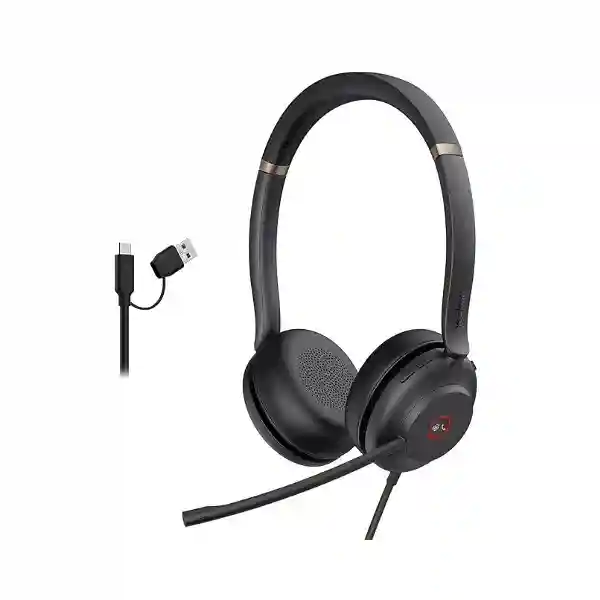
Yealink UH37 USB Headset – Professional Wired Business Communications
The Yealink UH37 is a professional USB-wired business headset built for organizations that need consistent call clarity, comfortable all-day wear and straightforward endpoint deployment. It is well suited to contact centres, customer-service desks, administrative teams, finance departments, reception environments, hybrid workers and general office users. Unlike wireless headsets that require charging schedules, battery-health monitoring and radio-range planning, the UH37 uses a direct wired USB connection. That makes it especially attractive for fixed workstations where predictable availability, simple support and rapid user replacement matter more than roaming freedom.
The platform is offered in Mono and Dual wearing styles and in Teams and UC-oriented variants. Its audio system combines 35 mm speakers with two ECM microphones and Yealink noise-reduction technologies. The microphone response is specified at 100 Hz to 10 kHz, while the speaker response extends from 20 Hz to 20 kHz. A built-in busylight gives colleagues an immediate visual indication that the wearer is occupied. The 300-degree adjustable boom provides practical positioning flexibility, and the lightweight construction reduces fatigue across long shifts.
For Uganda deployments, the important procurement decision is not simply whether the UH37 is suitable, but which exact variant fits the user group. Buyers should identify Mono versus Dual, Teams versus UC, USB-C requirements, host-device type and quantity before quotation. FourTeck can help map those choices to a consistent bill of materials for a single department or a wider rollout.
Instant Specifications & Procurement Fact Rail
UH37 Mono / Dual
Office, contact centre, hybrid work
USB-C with USB-A adapter / variant dependent
35 mm speaker, wideband voice
2 ECM microphones
Request current Uganda availability
The UH37 family includes multiple commercial part numbers, so procurement documents should state the required wearing style and collaboration variant rather than relying on the family name alone. Official Yealink listings include Mono and Dual models for Teams and UC environments, including USB-C and USB-C/A options. Warranty terms can vary by channel, project and regional supply arrangement; therefore the applicable Uganda warranty baseline should be confirmed on the FourTeck quotation rather than assumed from a generic global listing.
Operational Product Architecture & Overview
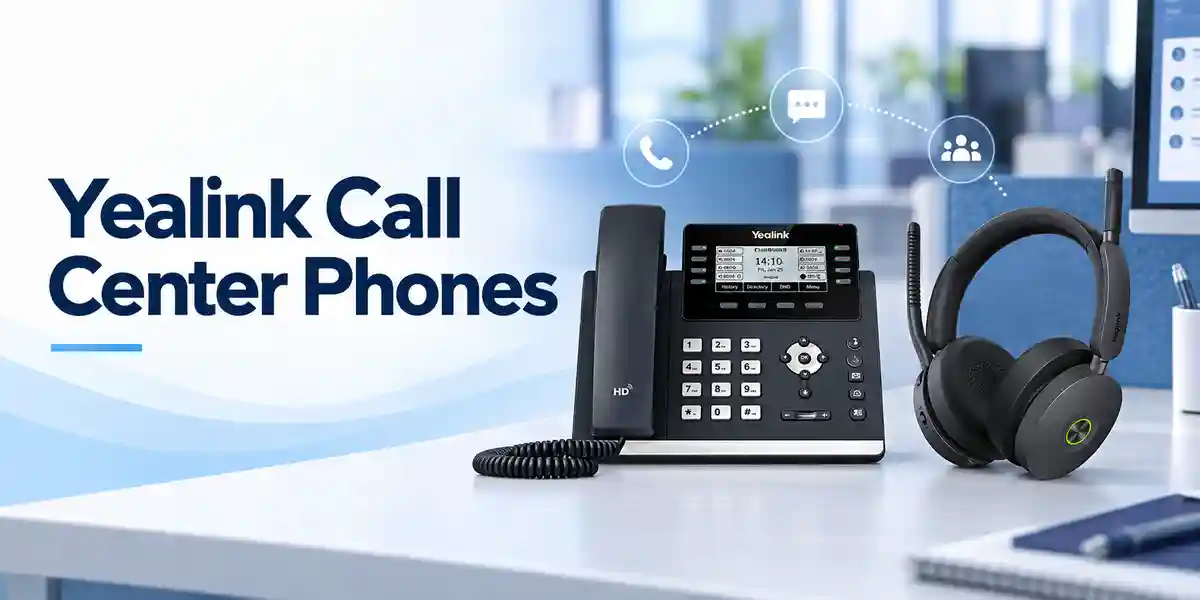
At its core, UH37 is an endpoint audio peripheral rather than a network appliance. Its operational architecture is deliberately simple: the headset receives digital audio and call-control signalling through USB, converts that stream for the speaker system, captures the user’s voice through a dual-microphone arrangement, and returns the microphone signal to the host application or compatible phone. This direct path reduces deployment variables because there is no wireless base station, rechargeable battery or Bluetooth pairing workflow to manage for ordinary use.
The two-microphone arrangement is important in open-plan environments. Yealink positions the UH37 with Acoustic Shield technology and dual-microphone noise cancellation to reduce surrounding interference and prioritize the wearer’s voice. This does not make a noisy room silent to the wearer; rather, it addresses a common business problem: the far-end participant hearing nearby conversations, office movement and ambient sound. Passive isolation from the ear cushions further supports concentration, particularly on the Dual model.
The 35 mm speaker system supports both speech and general media use. Dynamic audio behaviour is designed to provide appropriate reproduction for calls and music, allowing a single endpoint to serve meetings, softphone calls, training media and routine desktop audio. For organizations standardizing workstations, that reduces the need to issue separate headphones for multimedia and headsets for voice communication.
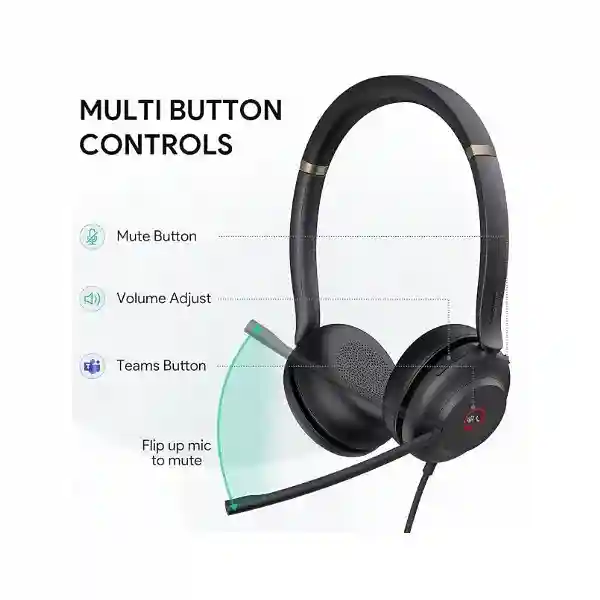
Physical ergonomics also form part of the system design. UH37 Mono weighs approximately 96.5 g and UH37 Dual approximately 139.5 g. A 300-degree rotatable boom provides adjustment flexibility, while the headband and ear cushions are designed for extended use. The busylight can illuminate automatically during calls or be activated manually, giving teams a low-friction visual method of reducing interruptions.
A major procurement pain point with headsets is inconsistent compatibility across laptops, desktops, desk phones and collaboration platforms. UH37 addresses this with USB connectivity, Windows and macOS support, compatibility with major unified-communications environments and integration with numerous Yealink IP phones. Older supported Yealink T41S, T42S, T46S and T48S phones require firmware version 82 or later for USB headset connectivity, so firmware validation should be part of rollout planning when existing phones are retained.
Enterprise Business Outcomes & Value Analysis
Key Hardware & Software Highlights
The UH37 combines a straightforward physical design with business-focused control features. The 35 mm speaker driver is specified for a 20 Hz–20 kHz response range and 32 ±4.8 ohm impedance at 1 kHz. Two ECM microphones provide a 100 Hz–10 kHz response range with wideband operation. The integrated controller supports common actions such as answer, end, reject and hold, volume adjustment, microphone mute and redial of the last outgoing call where the connected platform supports the function.
The boom arm rotates through 300 degrees, enabling practical microphone positioning and left/right wearing flexibility. The busylight provides an immediately visible status signal. Yealink ActiveProtection adds an acoustic-safety layer for staff who spend significant portions of the day on calls. At the software level, the family is designed to work with major UC platforms and can be managed through Yealink USB Connect on supported computers. This combination is useful for IT teams because physical deployment and user controls remain simple while administrators retain a supported configuration path.
For purchasing teams, the most significant feature is variant discipline. A Dual headset may be preferred for focused contact-centre work, while Mono can suit users who need greater awareness of colleagues and their surroundings. Teams-labelled variants can be selected for organizations standardized on Microsoft Teams, while UC variants serve broader collaboration environments. The connector must also be matched to the device estate.
Technical Specifications Ledger
| Category | Specification |
|---|---|
| Product type | Professional USB wired headset |
| Wearing options | Mono and Dual |
| Connection | USB-C; USB-A support through adapter/selected variants |
| Cable | Current Yealink comparison information lists 1.7 m; earlier datasheets list 1.2 m, so confirm supplied revision on quotation |
| Operating systems | Microsoft Windows, Apple macOS |
| Microphones | 2 × ECM |
| Mic response | 100 Hz–10 kHz |
| Mic sensitivity | -44.0 dB re. 1 V/Pa |
| Speaker size | 35 mm |
| Speaker response | 20 Hz–20 kHz |
| Speaker impedance | 32 ±4.8 Ω @ 1 kHz |
| Speaker input power | Normal 10 mW; maximum 30 mW |
| Weight | Mono 96.5 g; Dual 139.5 g |
| Operating temperature | -10°C to +50°C |
| Boom | 300° bendable/rotatable boom arm |
| Call controls | Answer/end/reject/hold, volume, mute, redial subject to platform integration |
| Compliance | Yealink datasheet identifies CE, FCC and IC markings |
Specifications should be read against the exact part number supplied. Yealink has released several UH37 variants and documentation revisions. Where physical packaging, cable length or accessory details are project-critical, FourTeck should confirm the current stocked revision before purchase-order release.
Configuration & Sizing Worksheet
1. Estimate workload and user profile
Count permanent desks, hot desks, remote users, supervisors, reception points and spare units. Separate staff who spend most of the day on calls from occasional meeting users. Dual is generally appropriate where concentration is the priority; Mono can be appropriate where users must remain aware of their immediate surroundings.
2. Validate workstation interfaces
Audit the USB ports on notebooks, desktops, docking stations and Yealink phones. Newer devices increasingly use USB-C, while established office fleets may still depend on USB-A. Selecting the correct UH37 connector package prevents the rollout from depending on unplanned third-party adapters.
3. Confirm platform profile
Identify whether users operate Microsoft Teams or a broader UC/softphone environment. Match Teams and UC variants accordingly. For Yealink desk phones, record phone models and firmware revisions before finalizing the order, especially where older T4S-series phones are present.
4. Plan desk environment and cable routing
A wired headset needs a clear cable path from the user to the host device. Check sit/stand desks, under-desk PCs, docking stations and monitor hubs. Do not assume a cable length from older documentation when desk geometry is tight; request confirmation of the supplied revision.
5. Licensing and software
UH37 itself is a USB peripheral and does not require a wireless service subscription. Collaboration services, softphones and enterprise device-management platforms may have their own licensing arrangements. Include those separately in the project bill of materials when required.
6. Quote checklist
Provide quantity, Mono or Dual preference, Teams or UC requirement, USB connector preference, PC/phone models, delivery city, required delivery date and whether staging or compatibility validation is requested. Add a spare ratio for high-utilization contact centres so damaged or misplaced headsets can be replaced immediately.
Deployment Scenarios & Industry Use Cases

Large Enterprise and Multi-Site Offices
Enterprises can standardize UH37 for fixed desks across departments while reserving wireless models for executives or staff who genuinely require mobility. A common wired model reduces training variation, spare-part complexity and help-desk diagnosis. Branch offices can hold small spare pools and use the same configuration standard as headquarters.
Financial and Banking Institutions
Banks, insurers and financial-service operations often require clear, repeatable voice communications at customer-service desks and back-office teams. Wired connectivity is attractive where endpoints are fixed and controlled. Procurement teams should validate collaboration software, call recording workflows and local endpoint policies as part of acceptance testing.
Educational and Campus Networks
Universities, colleges and training institutions can deploy UH37 for administration, admissions, distance-learning support and help desks. Mono models may suit administrative users who interact with nearby colleagues, while Dual models can support focused remote teaching and service-desk work.
Government and Public-Sector Procurement
Public-sector deployments benefit from precise part-number documentation and acceptance criteria. Tender schedules should state variant, connector, required compatibility, quantity, warranty expectation and delivery locations. Where devices will be used with an existing Yealink phone estate, include firmware validation in the pre-deployment checklist.
Technical Deep Dive 1: Audio Processing & Microphone Architecture
UH37’s dual-microphone system is designed around a practical office requirement: preserving the primary speaker’s voice while reducing competing environmental sound transmitted to the far end. Two microphones provide more information about the acoustic field than a single microphone, enabling the headset’s noise-reduction approach to distinguish useful speech from surrounding interference more effectively. Yealink combines this arrangement with Acoustic Shield technology. For contact-centre supervisors, the benefit is not a theoretical specification but more stable conversation quality when multiple agents occupy the same room.
The microphone frequency response of 100 Hz to 10 kHz is aligned with wideband business voice. On the playback side, 35 mm speakers cover a much broader 20 Hz to 20 kHz range, allowing the headset to handle speech, notification tones, training media and music. This dual-purpose capability matters in modern unified communications because a headset is rarely used only for telephone calls. Users may move from a customer call to a video meeting and then to recorded training without changing endpoints.
The wired architecture also gives the audio subsystem a consistent connection to the host. There is no radio link to pair and no battery state to influence availability. That predictability is valuable in high-seat-count deployments where each additional variable becomes a support burden.
Technical Deep Dive 2: Software Ecosystem, Firmware & Operational Control
The UH37 is designed to work with major unified-communications platforms and integrates particularly closely with compatible Yealink IP phones. Yealink USB Connect provides a supported PC-side path for device configuration and maintenance, while Yealink’s broader device-management ecosystem can support administrators managing standardized endpoint estates. Organizations should still validate the precise management functions required for their selected part number and software environment before a large rollout.
Firmware compatibility becomes especially important when UH37 is connected to an existing desk-phone fleet. Yealink identifies a range of supported phones, including T42U, T43U, T46U, T48U, T53, T53W, T54W, T57W, T58A and VP59, with T41S, T42S, T46S and T48S requiring version 82 or later. This is why an endpoint inventory should precede deployment: a headset purchase can expose outdated phone firmware that was not previously operationally visible.
For change control, test a representative workstation and phone from each hardware generation before mass issue. Validate call answer/end, mute, volume, conferencing behaviour and the organization’s primary softphone. Document the approved combination so help-desk teams can distinguish supported configurations from ad-hoc user setups.
Technical Deep Dive 3: Availability, Resilience & Continuity
A headset does not provide server-style high availability, but endpoint resilience still matters. UH37’s wired design eliminates two common failure conditions associated with wireless peripherals: depleted batteries and lost pairing. For a call-centre seat, that can reduce the number of interruptions that require immediate technical assistance. Continuity planning should focus on physical spares, standardized variants and rapid swap procedures.
For critical operations, hold spare headsets at each major site rather than relying exclusively on central inventory. Label Teams/UC and Mono/Dual stock clearly so a replacement does not introduce a platform mismatch. Where USB-C/A configurations are used, keep the supplied adapter with the headset or maintain controlled spare adapters. A simple asset register can record serial or part-number information, assigned department and replacement date.
Disaster-recovery planning for user endpoints is often overlooked. If staff relocate temporarily to another office or home workspace, a wired USB headset is easy to move because it does not depend on a dedicated charging base. Standardizing UH37 across primary and continuity sites can therefore make voice endpoint recovery more predictable.
Pre-Purchase Buyer Gap Checklist
Are there hidden headset subscriptions? The headset is a wired USB endpoint; however, the collaboration service, softphone or enterprise management platform used with it may have separate licensing. Request a complete solution bill where those services are part of the project.
Which generation is being supplied? UH37 documentation has evolved, including cable-length references and connector packaging. Purchase against an explicit part number and have the quotation identify the supplied variant.
Will it fit the desk layout? Check host-device location and cable routing. Under-desk desktops, sit/stand tables and distant docking stations may change what is practical.
Does it work with existing phones? UH37 supports a defined range of Yealink IP phones. Older T4S models may require firmware upgrades. For other vendors, validate USB headset support with the phone manufacturer and test before volume purchase.
Mono or Dual? Mono preserves more awareness of the room; Dual provides stronger physical separation from surrounding activity. Role requirements should drive the choice.
Teams or UC? Select the commercial variant aligned to the collaboration platform and user controls required. Do not mix variants casually in a standardized estate.
What happens when a unit fails? Define local spare stock, warranty-return procedure and replacement authority. High-volume contact centres should not wait for a warranty cycle before returning an agent to service.
Does USB-C mean every USB-C device is supported? No. Connector compatibility and application compatibility are separate questions. Validate operating system, application and host-device support.
Uganda Regional Procurement & Delivery Logistics
FourTeck Uganda can structure UH37 procurement around a defined endpoint schedule rather than a generic headset request. A useful enquiry includes exact quantity, preferred Mono or Dual wearing style, Teams or UC environment, USB interface, intended PC or Yealink phone models, delivery destination and project deadline. This allows the commercial team to identify the appropriate part number and reduce clarification cycles before quotation.
After commercial confirmation, order processing should align the approved part number with the customer purchase order. For multi-site projects, quantities can be separated by destination and department. Delivery timing depends on current stock position, inbound supply and project volume, so buyers should request a current lead-time statement on the formal quote rather than planning around an assumed number of days.
Technical pre-configuration requirements should also be declared early. Although UH37 is designed for plug-and-play use, organizations may need compatibility validation, endpoint standards, firmware checks on existing Yealink phones, packaging by site or user group, and documentation for rollout teams. FourTeck can incorporate these requirements into project planning where agreed.
Local Coverage Matrix
Kampala deployments may include headquarters, call centres, financial institutions, government offices and distributed corporate teams. Entebbe requirements often include hospitality, logistics, aviation-related offices and branch operations. Jinja customers may need standardized communications for industrial, educational and commercial environments. Mbarara projects can include regional offices, healthcare administration, education and growing private-sector operations. Gulu organizations may require reliable endpoints for public-sector, NGO, education and branch-office use.
For each location, procurement should specify the receiving contact, quantity, site address, user profile and whether the headsets are intended for PCs, docking stations or compatible Yealink phones. Multi-city orders benefit from a consolidated bill of materials with site-level allocation, helping prevent variant mismatches when different departments request equipment independently.
Cross-Border & Regional Supply Chains
Organizations operating across East Africa and the Gulf can coordinate communications procurement through FourTeck regional channels. Visit FourTeck Uganda for Uganda requirements, FourTeck Kenya for Kenya projects, and FourTeck Africa for wider African deployments. Gulf requirements can be coordinated through FourTeck UAE and FourTeck Kuwait.
Regional standardization is most effective when the organization defines one approved headset family and a controlled set of variants. Country teams can then procure the correct local quantity while maintaining a shared technical standard. Lead times, taxes, import arrangements and warranty handling may differ by destination, so each country quotation should state its own commercial terms.
Related Products & Deployment Options
A complete user-communications project may extend beyond the UH37 itself. Organizations can review Yealink communication solutions in Uganda for compatible desk-phone and collaboration requirements. Users who need premium wired features can compare the Yealink UH38, while staff requiring desk mobility may be better served by Yealink WH-series DECT headsets. Mobile and hybrid workers who prioritize Bluetooth connectivity can consider Yealink BH-series business headsets.
When the UH37 is paired with Yealink IP phones, include phone power supplies or PoE network infrastructure where required by the phone deployment. For PC users, verify docking-station and USB-port availability. Replacement ear-contact components and spare USB adapters should be considered according to expected service life and workplace hygiene policies. A related-products quote should be built around the actual user workflow rather than adding accessories automatically.
FourTeck Technical Service Capabilities
Enterprise headset rollouts benefit from basic engineering validation before purchase. FourTeck can help confirm the requested UH37 part-number family against user roles, collaboration platform and intended host devices. Bill-of-materials review is especially useful when a project combines headsets, Yealink phones, switches, power components and accessories because connector and firmware assumptions can otherwise be missed.
For larger deployments, staging requirements may include sample validation, grouping by department, asset information, firmware review of compatible Yealink endpoints and rollout documentation. Pre-shipment checks can reduce site-level surprises, while post-sales technical support can assist with supported connectivity, call-control behaviour and escalation of warranty issues according to the applicable commercial terms.
Customers should state any mandatory acceptance tests before ordering. Typical tests include microphone clarity, speaker output, mute behaviour, answer/end controls, Teams or UC integration, operation with the customer’s standard laptop image and compatibility with specified Yealink phone models.
Extended Technical FAQ
Is the Yealink UH37 a wireless headset?
No. UH37 is a professional wired USB headset. That distinction is important for purchasing because there is no wireless base station, Bluetooth pairing process or headset battery to manage in normal operation. It is best suited to fixed or semi-fixed workstations where the user remains close to a computer or compatible Yealink IP phone. Organizations that need users to walk away from the desk while remaining on calls should evaluate a DECT or Bluetooth model instead. The wired design is attractive for contact centres and standardized office desks because it provides predictable availability and avoids charging-related downtime.
What is the difference between UH37 Mono and UH37 Dual?
UH37 Mono uses a single-ear wearing format, while UH37 Dual covers both ears. Mono can be a strong choice for reception staff, supervisors and users who need to hear nearby colleagues while on a call. Dual is often preferred by contact-centre agents and focused office users because covering both ears provides greater passive separation from surrounding activity. The weight also differs: Yealink specifies approximately 96.5 g for Mono and 139.5 g for Dual. Audio, platform and connector variant requirements should still be checked independently of the wearing style.
Does UH37 support USB-A and USB-C?
Yes, the UH37 family is available with USB-A/USB-C connectivity arrangements. Current Yealink information describes a USB-C cord with a USB-A adapter for relevant configurations, while the part-number family also contains USB-C and USB-C/A variants. Because packaging has evolved, the safest procurement method is to state the host interface required and purchase against a confirmed part number. This matters when organizations have mixed laptop generations, desktop PCs, docking stations and desk phones. Avoid assuming that every box contains the same connector arrangement without checking the quoted variant.
Can UH37 connect directly to Yealink IP phones?
UH37 supports USB connectivity to a range of Yealink IP phones, including models in the T4U and T5 families and selected earlier T4S phones. Yealink notes that T41S, T42S, T46S and T48S devices should be upgraded to firmware version 82 or later. For a business with an established phone estate, create an inventory of models and firmware versions before purchasing a large headset quantity. Direct testing on a representative phone is recommended where advanced call-control behaviour is operationally important.
Does the UH37 require a separate licence?
The physical UH37 wired headset is an endpoint peripheral and is not dependent on a headset radio subscription. However, the application or service used for calling may have its own licensing. Microsoft Teams, a hosted PBX softphone, contact-centre software, call recording, analytics or enterprise device-management services can all have separate commercial terms. Procurement teams should distinguish the headset hardware cost from collaboration and communications service costs. If FourTeck is quoting a wider solution, request a line-item bill so recurring and one-time charges are clearly separated.
How does the microphone handle office noise?
UH37 uses two ECM microphones with Yealink’s noise-cancelling approach and Acoustic Shield technology. The objective is to reduce surrounding interference transmitted to the far end and keep the wearer’s voice prominent. This is particularly relevant in open-plan offices and contact centres where nearby conversations can otherwise reduce call quality. The headset also provides passive noise isolation through its ear cushions, especially useful with the Dual configuration. Buyers should remember that microphone noise reduction primarily improves what the other party hears; room acoustics and user seating still influence the wearer’s own concentration.
Is the headset comfortable enough for full-shift use?
Yealink designed UH37 as a lightweight professional headset for extended office use. The Mono version is approximately 96.5 g and the Dual approximately 139.5 g. The design includes a soft, skin-friendly headband and cushioned ear contact surfaces, plus an adjustable 300-degree microphone boom. Comfort remains personal, particularly for users wearing glasses or working very long shifts. For large contact-centre projects, a small pilot group can validate fit and wearing preference before the full order. This also helps determine the right Mono-to-Dual ratio for different roles.
What does the busylight do?
The integrated busylight provides a visible status indication that can illuminate automatically when the user is on a call or meeting, helping colleagues recognize that the wearer should not be interrupted. It can also be activated manually as a working-status signal. In shared offices, this small feature can improve behaviour without requiring additional desk signage or software. It is particularly useful when a Dual headset physically isolates the user from nearby colleagues, since someone approaching the desk can see the call state before trying to start a conversation.
What warranty and replacement process applies in Uganda?
Warranty should be confirmed on the FourTeck Uganda quotation for the exact supplied part number and project. Regional commercial terms can differ, so buyers should not rely on an unrelated international reseller’s warranty statement. For high-utilization departments, maintain operational spares even when the product is covered by warranty because a warranty return and an immediate user replacement are different processes. Record the affected unit, fault symptoms, purchase reference and any troubleshooting completed. FourTeck can then guide the customer through the applicable support or replacement process under the agreed terms.
What information should I provide for a volume quote?
Provide the number of users, required quantity, preferred Mono or Dual style, Teams or UC environment, USB-A/USB-C needs, host computer or Yealink phone models, delivery city and required project date. For multiple offices, split quantities by location. Also state whether you require a pilot sample, compatibility validation, staging or spare units. This information helps turn a family-level request into a precise commercial bill of materials. Where the customer is uncertain about the correct variant, FourTeck can use the endpoint and application details to guide the selection before the purchase order is finalized.
Procure Yealink UH37 for Your Uganda Deployment
Standardize business calling with a professional wired headset designed for clear voice, practical USB connectivity and comfortable daily use. Send FourTeck Uganda your required quantity, Mono or Dual preference, Teams or UC environment, connector requirement, host-device details and delivery location. The team can prepare the appropriate commercial configuration and current project quotation. For multi-site rollouts, include branch allocations and any staging or compatibility requirements so the proposal can reflect the complete deployment rather than a simple unit count.



Reviews
There are no reviews yet.