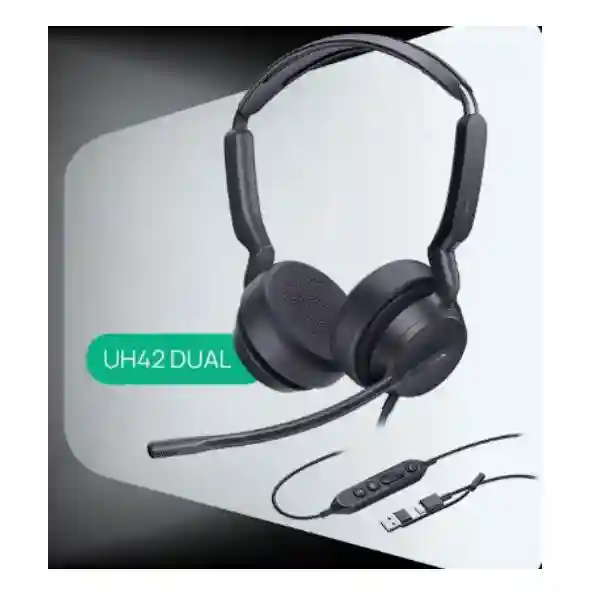
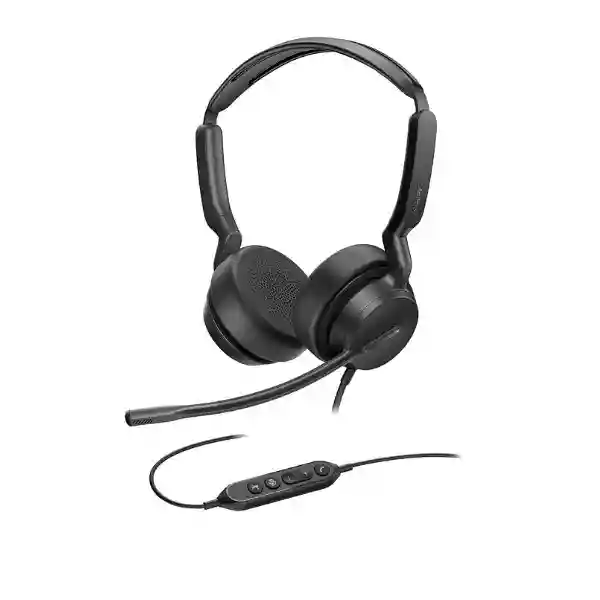
Yealink UH42 USB Headset – Professional Wired Business Communications
The Yealink UH42 is a professional wired USB headset built for organisations that want predictable call quality, straightforward deployment and simple day-to-day user control across offices and contact-centre environments. Instead of depending on wireless pairing, batteries or charging routines, the UH42 uses a direct USB connection. Its USB-C cord and supplied USB-A adapter are particularly practical in mixed device estates where newer notebooks coexist with desktops and compatible business phones using conventional USB-A ports.
For procurement teams in Uganda, that simplicity matters. Headset projects often appear uncomplicated until deployment exposes connector differences, platform variants, user-role requirements and inconsistent acoustic experiences. The UH42 provides a clear baseline: mono and dual wearing variants, UC and Microsoft Teams versions, a 35 mm speaker, in-line call controls, a single microphone with noise-cancellation processing, and management through Yealink USB Connect or Yealink Management Cloud Service. This combination makes it suitable for general office calling, customer-service positions, reception functions, shared work areas and teams standardising endpoint peripherals.
FourTeck can quote the UH42 as a single-unit requirement or as part of a wider headset rollout. Before ordering, organisations should identify the required mono or dual format, UC or Teams control variant, endpoint types, quantity by site and whether the headset will connect primarily to Windows or Mac computers or to supported Yealink desk phones. These checks reduce rollout friction and help ensure that the exact commercial variant matches the intended workflow.
Instant Specifications & Procurement Fact Rail
Yealink UH42
Office / Call Centre
USB-C + USB-A adapter
Mono / Dual; Teams / UC
35 mm
Contact FourTeck Uganda
The UH42 should be ordered by exact user profile rather than model family name alone. A mono headset leaves one ear open to the surrounding workspace and can suit reception, supervisory or collaborative roles. A dual headset places audio at both ears and can be preferable where concentration and call immersion are priorities. Teams and UC versions should likewise be mapped to the collaboration environment used by the organisation. Warranty terms, lead time and stock status should be confirmed on the issued quotation because these commercial details can vary by batch and supply route.
Operational Product Architecture & Overview
The UH42 is best understood as a managed USB audio endpoint rather than merely a pair of headphones. Its architecture combines the physical wearing assembly, a boom microphone, 35 mm speaker system, USB audio electronics and an in-line control unit. The direct wired path removes radio pairing from the support equation and eliminates headset battery lifecycle management. In large deployments, those characteristics can reduce the number of variables that service desks must diagnose when a user reports a communications problem.
The headset cable runs from the wearing assembly to the control unit, while the USB lead continues from the controller to the endpoint. Yealink specifies a USB-C connection with a USB-A adapter, which gives administrators a practical migration path between older USB-A workstations and newer USB-C computers. The design is therefore useful when a company refreshes PCs in phases rather than replacing its entire endpoint estate at once.
Audio is centred on a 35 mm speaker with a specified 20 Hz–20 kHz frequency response. Yealink lists music bandwidth at 20 Hz–20 kHz and talk bandwidth at 100 Hz–20 kHz. The microphone frequency-response range is 100 Hz–14 kHz. These figures describe a headset intended to serve both voice communications and general computer audio without forcing users to change peripherals between meetings and routine listening.
The in-line controller exposes the functions that users need most frequently: answer, end or reject a call, raise or lower volume, and mute or unmute the microphone. Centralising those controls on the cable reduces dependence on locating controls inside a desktop application during a live conversation. LED indicators provide visual feedback around call-control behaviour, supporting users who handle repeated calls throughout the day.
For fleet operations, Yealink lists support for Yealink USB Connect on PC and Yealink Management Cloud Service. That management layer is relevant to organisations that want a repeatable peripheral lifecycle rather than an unmanaged collection of individually purchased headsets. Administrators can incorporate supported management and firmware processes into endpoint operations, while recovery procedures are documented by Yealink for the UH42 family.
Procurement friction usually appears around four questions: which connector reaches the endpoint, which platform variant is required, whether users need one or two earpieces, and whether the target desk phone supports the headset. The UH42 addresses the first issue with USB-C plus a USB-A adapter. The second and third require selection at order time. For the fourth, compatibility should be checked against the exact Yealink phone model; Yealink publishes tested USB-headset compatibility information for supported phone families.

Enterprise Business Outcomes & Value Analysis
A wired USB path gives each provisioned user a consistent physical connection and removes Bluetooth pairing state and charging level from everyday operation. For high-volume calling teams, fewer connection variables can translate into simpler user guidance and more repeatable workstation setups.
Because the headset is powered through its USB connection, users do not need to maintain a headset battery before a shift or meeting. This is valuable in hot-desking and shared-seat environments where peripheral readiness must be predictable at the start of work.
Mono and dual options allow one product family to cover different roles. Procurement can establish a standard while still giving supervisors, reception users and focused agents a wearing style suited to their operating context.
Yealink specifies Peak Block Protection under EN50332, Australian G616 protection and daily noise-exposure protection. These features add an important acoustic-safety layer for organisations where users spend substantial time wearing headsets.
Support for Yealink USB Connect and Yealink Management Cloud Service gives IT teams a defined management path. That can be preferable to treating headsets as disposable accessories outside normal endpoint governance.
A wired design avoids charging stations, wireless dongles for standard PC use and battery replacement planning. The supplied USB-A adapter also helps preserve usability across mixed connector generations, potentially reducing adapter purchases.
Teams and UC variants allow buyers to align headset controls with their collaboration standard. Correct variant selection should be part of the bill-of-materials review before a volume order is released.
Physical answer, end, volume and mute controls are familiar and easy to reach. A simple interaction model can reduce training requirements when headsets are distributed across a large workforce.
Key Hardware & Software Highlights
The core hardware design combines a lightweight mono or dual wearing assembly with a boom microphone, 35 mm speaker drivers, cable-mounted control unit and USB-C termination. The included USB-A adapter broadens endpoint compatibility without changing the headset itself. Dual units have a published net weight of approximately 160 g, while mono units are approximately 116 g, making weight an important but manageable consideration for long-duration use.
On the audio side, the speaker response is specified from 20 Hz to 20 kHz, with the microphone operating from 100 Hz to 14 kHz. The headset is designed for high-quality voice and media reproduction, and the single-microphone system incorporates Yealink noise-cancellation processing to help keep transmitted speech intelligible in typical office and call-centre conditions.
The controller is the user’s operational interface. Dedicated call and volume functions mean routine actions can be performed without moving focus to a softphone window. This is particularly useful for service roles where users alternate between CRM, ticketing, browser and communication applications throughout a call.
The software side matters during rollout and support. Yealink USB Connect provides a PC management route, while Yealink Management Cloud Service can support broader device administration scenarios. Firmware governance should be included in the deployment standard: validate an approved firmware release, pilot it with representative endpoints and collaboration clients, then expand to the wider fleet under change control.
Technical Specifications Ledger
| Category | Specification | Procurement Relevance |
|---|---|---|
| Connection | USB-C cord with USB-A adapter | Supports mixed USB-C and USB-A endpoint estates. |
| Operating systems | Microsoft Windows and Apple Mac OS | Useful for heterogeneous computer fleets. |
| Microphones | 1 | Professional voice capture with Yealink noise-cancellation processing. |
| Microphone response | 100 Hz–14 kHz | Specified voice capture range. |
| Speaker | 35 mm | Designed for voice and general audio use. |
| Speaker sensitivity | 113.8 ±3 dB at 0.980 V | Manufacturer acoustic specification. |
| Speaker response | 20 Hz–20 kHz | Broad audio range for calls and media. |
| Music bandwidth | 20 Hz–20 kHz | Supports general listening between calls. |
| Talk bandwidth | 100 Hz–20 kHz | Supports clear wide-range call audio. |
| Controls | Answer/end/reject, volume up/down, mute/unmute | Fast access during active calls. |
| Hearing protection | Peak Block EN50332, AU G616, daily noise-exposure protection | Relevant to occupational headset deployments. |
| Management | Yealink USB Connect; Yealink Management Cloud Service | Provides a defined administration path. |
| Net weight | Dual 160 g; Mono 116 g | Useful for user-comfort assessment. |
| Dimensions | Dual 169 × 178 × 63 mm; Mono 153 × 184 × 63 mm | Supports storage and deployment planning. |
| Carton quantity | 10 pieces | Relevant to bulk logistics and receiving. |
Specifications should be matched to the exact regional and platform variant stated on the quotation. For a large order, request a sample or pilot unit when practical, validate it with the intended softphone and endpoint build, and preserve the tested configuration as the deployment baseline.
Configuration & Sizing Worksheet
1. Estimate Users and Workload
Count named users, shared desks, training stations and spare units separately. A 100-agent contact centre may require more than 100 headsets once supervisors, QA positions, training rooms and operational spares are included. Define a spare ratio according to service criticality and replacement logistics.
2. Choose Mono or Dual
Select mono where awareness of nearby colleagues or the physical environment is important. Select dual where users benefit from two-ear audio and greater concentration. Avoid mixing variants randomly; map them to roles so replacement stock is predictable.
3. Validate Endpoint Connections
Record whether target computers expose USB-C, USB-A or both. The UH42 USB-C cord and USB-A adapter simplify mixed estates, but port availability still needs to be checked where docking stations, security keys and other peripherals compete for limited connections.
4. Confirm Collaboration Platform
Specify Teams or UC variant requirements before the purchase order. Also list the softphone applications in use and any Yealink desk phone models that will receive direct USB headset connections. Compatibility should be validated against the exact phone model and firmware.
5. Plan Management
Decide who owns firmware and configuration policy. For managed fleets, define the approved version, pilot process, maintenance window and rollback or recovery procedure. Yealink USB Connect can be part of the PC-side support workflow, while Yealink Management Cloud Service may be relevant to broader administration.
6. Prepare the Quote Request
Provide quantity, mono/dual split, Teams/UC split, deployment cities, endpoint models, required delivery date and whether staging or pre-shipment validation is required. If multiple branches are involved, include quantity by site so packing and dispatch can be planned appropriately.
Deployment Scenarios & Industry Use Cases
Large Enterprise and Multi-Site Operations
A multi-site company can standardise the UH42 across administrative, service and collaboration roles while maintaining a controlled choice of mono and dual versions. Standardisation makes support documentation easier to write, simplifies spare allocation and reduces the number of peripheral models the IT team must test against operating-system updates. Branch offices can receive pre-labelled quantities by department, while headquarters maintains the master configuration and firmware baseline.
Financial and Banking Institutions
Banks and financial organisations often need dependable voice peripherals for service desks, internal operations, back-office teams and customer contact functions. A wired headset avoids wireless pairing complexity at fixed desks and can fit controlled workstation environments. Procurement should still validate the organisation’s endpoint-security policies, USB-device controls and approved collaboration applications before rollout.
Educational and Campus Networks
Universities, colleges and training organisations can deploy the UH42 for administration, remote teaching, help desks and shared communication rooms. The USB-C and USB-A arrangement is helpful where device generations vary between faculties. Shared environments should include cleaning procedures, labelled storage and a defined replacement process for frequently handled peripherals.
Government and Public-Sector Procurement
Public-sector buyers can treat the UH42 as a standard endpoint accessory within a larger communications bill of materials. Tender documentation should state the exact required variant, connector arrangement, quantity, delivery destinations, warranty expectations and acceptance-testing process. Where compatibility with an existing Yealink phone estate is required, list the phone models and firmware versions so validation can be completed before volume shipment.

Technical Deep Dive 1: Audio Processing & Hardware Architecture
The UH42’s practical value comes from combining acoustic components and USB control electronics into a single predictable endpoint. The 35 mm speaker system is specified across the 20 Hz–20 kHz range, while the microphone covers 100 Hz–14 kHz. That separation reflects two different jobs: the speakers need to reproduce voice plus general computer audio, while the microphone concentrates on the frequency range most relevant to transmitted speech.
A wired USB audio architecture also changes troubleshooting. Rather than diagnosing radio congestion, pairing records or battery state, support teams can begin with USB enumeration, selected audio device, application permissions, mute state and firmware. This narrower diagnostic tree is valuable in large fixed-seat environments. The in-line controller acts as a dedicated human interface, allowing users to adjust volume or mute without depending solely on application controls.
Noise cancellation is applied around the microphone path to reduce distracting background contribution to outgoing speech. No headset can remove every acoustic challenge, so room design remains important. Contact centres should still manage workstation spacing, hard reflective surfaces, HVAC noise and agent speaking levels. The headset works best as one component of a properly designed voice environment rather than as a substitute for acoustic planning.
Technical Deep Dive 2: Software Ecosystem, Firmware Security & Operational Control
Peripheral firmware deserves the same operational discipline as other endpoint components. Yealink provides USB Connect for PC-side device management and documents recovery procedures for the UH42 family. An enterprise rollout should establish an approved firmware baseline, validate updates on a small representative pilot group and only then move to wider deployment. This reduces the risk that an untested change affects call controls, application integration or endpoint behaviour across an entire department.
The management workflow should also record which collaboration client versions, operating-system builds and desk-phone firmware were tested. That record becomes especially useful months later when a user reports that a call-control function changed after an unrelated software update. Rather than replacing hardware immediately, the support team can compare the affected workstation with the known-good baseline.
Where Yealink Management Cloud Service is adopted, administrators can include supported headsets in a broader operational model. The exact capabilities and licensing applicable to the customer’s environment should be confirmed during solution design. Procurement should distinguish the headset hardware purchase from any separate cloud-management or platform-service commercial terms that may apply to the wider environment.
Technical Deep Dive 3: Reliability, Redundancy & Recovery
A headset does not implement network high availability in the way a switch, firewall or server does, but business continuity still matters. For the UH42, resilience is created operationally through standardised models, spare inventory, documented recovery steps and compatible replacement units. A wired headset can be swapped quickly when an issue is isolated to the peripheral, provided local stock is available.
Yealink documents a recovery-mode procedure for UH42-series devices that involves reconnecting the headset while holding specified controller buttons and then using Yealink USB Connect to perform a manual firmware update. IT teams should retain vendor documentation and test recovery procedures before they become urgent. For large sites, keeping one or more known-good test workstations can help distinguish headset faults from operating-system or application issues.
Disaster-recovery planning for call centres should include peripheral capacity. If staff relocate to an alternate site, work remotely or move to temporary workstations, compatible USB headsets need to be available alongside PCs, network access and communication credentials. The UH42’s USB-C plus USB-A approach can simplify that contingency by supporting more than one physical USB generation.
Pre-Purchase Buyer Gap Checklist
Are there hidden battery or charging costs? The UH42 is wired and receives its operating power through USB, so there is no headset battery charging cycle to plan. This can simplify fixed-desk ownership compared with wireless models.
Does USB-C mean older PCs are excluded? No. Yealink specifies a USB-C cord with a USB-A adapter. Buyers should nevertheless confirm that each workstation has an available port and that corporate USB policies permit the device.
Is the same headset suitable for every employee? Not necessarily. Mono and dual variants address different working preferences. Platform variants also matter. Build the order from user roles rather than applying one configuration blindly.
Will it work with a Yealink desk phone? UH42 is supported with selected Yealink USB-capable phones, but compatibility must be checked against the exact phone model and firmware. Do not assume every USB-equipped phone behaves identically.
What about application call controls? Answer, end, reject, volume and mute controls are available on the headset controller, but integration behaviour can depend on the platform, client and selected Teams or UC variant. Validate the actual software stack used by the organisation.
What should be tested before buying hundreds of units? Test comfort, microphone intelligibility, incoming audio, mute behaviour, call answer/end, operating-system detection, target softphones, desk phones where relevant, USB port availability and any endpoint-control policies. A representative pilot is more valuable than relying on connector compatibility alone.
How should spares be calculated? There is no universal percentage. A contact centre with strict service targets may hold more local spares than a normal office. Consider user count, branch distance, replacement lead time and whether employees can temporarily use another approved headset.
Are management services automatically included? Hardware and management services should be treated as separate commercial considerations unless the quotation explicitly states otherwise. Confirm the management architecture and any applicable service terms during solution design.
Uganda Regional Procurement & Delivery Logistics
FourTeck Uganda can prepare a commercial quotation around the exact UH42 configuration required by the customer. The most useful request includes the number of users, mono and dual quantities, Teams and UC requirements, endpoint types, delivery destination and target project date. For a multi-branch deployment, quantities should be separated by location to support packing and logistics planning.
Order processing should begin only after the buyer verifies the model and variant shown on the quotation. For project procurement, the purchase order should reference the agreed commercial description rather than a generic phrase such as “Yealink headset.” This helps prevent ambiguity between different UH-series models and between mono, dual, Teams and UC versions.
Delivery timelines depend on confirmed stock, order volume and supply route, so they should be stated in the formal quotation rather than assumed from a generic web page. Where a rollout has a fixed cutover date, include that date in the request so sourcing and staging can be planned backwards from the deployment milestone.
Technical pre-configuration may include firmware validation, compatibility review and bill-of-materials checks where agreed for the project. For large fleets, consider receiving a pilot batch before the main shipment. That provides an opportunity to validate the complete workstation and collaboration stack under real user conditions.
Local Coverage Matrix
Head office, enterprise, contact-centre and branch rollout requirements.
Business, hospitality, administration and service-desk deployments.
Commercial, industrial and institutional communication projects.
Regional office, education, healthcare and branch requirements.
Regional organisations, public-sector and distributed-office projects.
For locations outside these hubs, provide the full delivery destination during quotation so logistics can be assessed accurately. Multi-site customers should include a location-by-location quantity schedule, especially when units need to be labelled, grouped or dispatched separately.
Cross-Border & Regional Supply Chains
Organisations operating across East Africa, the Gulf and broader African markets may need the same communications standard across multiple legal entities and delivery points. FourTeck regional sites can support product discovery and commercial engagement for Uganda, Kenya, the broader African market, the United Arab Emirates and Kuwait.
For cross-border projects, keep the technical standard consistent but request commercial terms per destination. Freight, taxes, warranty handling, stock position and delivery lead times can differ by country. A central bill of materials with country-specific quantity schedules is usually the clearest starting point for a regional rollout.
Related Yealink Solutions
The UH42 can sit within a broader Yealink communications environment. Buyers comparing wired headset tiers can review Yealink UH44, Yealink UH46 and Yealink UH48 options. Wireless requirements can be assessed against Yealink WH64 and other DECT headsets, while mobile-oriented users may prefer Yealink BH70 Bluetooth solutions.
For complete desk deployments, also consider Yealink IP phones and Yealink Teams endpoints. Selecting phones and headsets together allows compatibility, USB availability and user workflows to be reviewed as one solution rather than as separate purchases.
FourTeck Technical Service Capabilities
A successful headset project depends on more than unit price. FourTeck can support engineering validation around the intended endpoint environment, helping buyers document computer platforms, desk-phone models, collaboration applications and required headset variants. Bill-of-materials verification is especially useful when an order combines mono and dual models or different platform versions across departments.
For agreed projects, staging can include practical checks such as model verification, firmware review and packaging by deployment group. Pre-shipment firmware work should follow an approved project baseline rather than applying changes without customer validation. Where the organisation maintains strict change control, the tested firmware version can be recorded alongside the deployment documentation.
Post-sales technical support should begin with reproducible information: headset model and variant, serial details where applicable, endpoint model, operating-system build, collaboration client, symptoms and troubleshooting already performed. This information helps distinguish a hardware problem from a software, policy, firmware or compatibility issue and supports a more efficient warranty or replacement process where required.
Extended Technical FAQ
1. Is the Yealink UH42 a USB-A or USB-C headset?
The UH42 uses a USB-C cord and is supplied with a USB-A adapter. That means one headset can serve many modern USB-C computers as well as older or docked systems where USB-A is the available connection. Procurement teams should still audit port availability because a compatible connector does not guarantee that a free physical port exists. Some corporate endpoints also restrict USB devices through security policy, so a pilot should confirm detection and operation on the standard workstation image before a large deployment.
2. Does UH42 come in mono and dual versions?
Yes. Yealink lists both mono and dual versions. Mono is often selected for roles where users need to hear colleagues or environmental activity through the uncovered ear. Dual can suit users who want audio delivered to both ears and greater concentration during calls. The choice is operational rather than purely technical. For a large order, define which job roles receive each version and maintain corresponding spare stock so replacements remain consistent with the user’s original configuration.
3. Is the UH42 suitable for Microsoft Teams?
Yealink offers Teams and UC versions of the UH42 family. Buyers using Microsoft Teams should specify the appropriate version in the quotation and validate expected call-control behaviour against the organisation’s Teams client and endpoint build. If the organisation uses several communication applications, test the intended workflow across those applications before standardising. Platform certification and physical USB compatibility solve different problems, so both the headset variant and the actual software environment need to be considered.
4. Can UH42 connect to a Yealink IP phone?
The UH42 can be used with selected Yealink phones that support compatible USB headset operation. Yealink publishes tested compatibility information for phone families, and the exact phone model should be checked before purchase. This is particularly important in estates containing several generations of desk phones. Provide FourTeck with the phone model numbers and, for a controlled deployment, firmware versions. A short pilot call test should verify audio, mute, volume and call-control behaviour on the actual phone configuration.
5. What hearing-protection features are specified?
Yealink specifies Peak Block Protection aligned with EN50332, Australian G616 protection and daily noise-exposure protection for the UH42. These functions are relevant where users spend long periods on calls. They should complement, not replace, the organisation’s occupational-health practices. Contact centres should also manage sensible listening levels, break patterns and acoustic workspace design. If a project is governed by a specific local or corporate hearing-safety standard, include that requirement in the procurement review rather than assuming a generic headset specification satisfies every policy.
6. Does the UH42 require a battery, charger or wireless dongle?
For normal wired USB operation, the UH42 does not rely on a headset battery or wireless charging process. It connects directly by USB, so users do not need to remember to charge it before a shift. The standard USB-C connection and supplied USB-A adapter also mean a separate wireless USB dongle is not part of the normal PC connection architecture. This can simplify asset management for fixed desks, though organisations should still track headsets as supported peripherals and retain suitable spare units.
7. How is the UH42 managed and updated?
Yealink lists Yealink USB Connect for PC management and Yealink Management Cloud Service as management options. An enterprise should establish an approved firmware baseline and test changes before wide rollout. Yealink also documents recovery procedures for the UH42 family if manual firmware recovery is needed. IT teams should keep those procedures accessible and train support staff on the distinction between application configuration, operating-system audio selection, firmware state and physical hardware faults before escalating a unit for replacement.
8. What is included in the UH42 package?
Yealink’s UH42 datasheet lists the headset and a quick start guide as package contents. The connection design includes USB-C with a USB-A adapter. Exact package composition should still be verified against the quoted regional SKU, particularly for a project where packaging, accessories or platform-specific variants matter. During receiving, organisations should reconcile delivered model labels against the purchase order before distributing units, because visually similar headset variants can have different intended platform or wearing configurations.
9. What warranty and replacement process should Uganda buyers expect?
Warranty terms should be taken from the FourTeck quotation or sales documentation for the specific supply rather than assumed from a generic product description. For any support case, retain proof of purchase and record the affected unit, symptom, endpoint, software environment and troubleshooting completed. Where a fault is suspected, testing the headset on a known-good compatible workstation can help isolate the problem. FourTeck can then advise the applicable support, warranty or replacement path according to the commercial terms of the supplied product.
10. What information should be sent for a bulk UH42 quotation?
Send the total quantity, required mono and dual split, Teams and UC split, target computers or Yealink phone models, deployment locations and required delivery date. For multi-site projects, include quantities per city or branch. Also state whether you require pilot units, firmware validation, staging, labelling or other pre-shipment services. This level of detail allows the quotation to reflect the real deployment rather than only a unit count and reduces the chance of discovering variant or compatibility questions after the purchase order is placed.
Request Your Yealink UH42 Procurement Quote
For a single office, contact-centre rollout or multi-branch standardisation project, send FourTeck Uganda your required quantity, mono or dual preference, Teams or UC requirement, target endpoint models and delivery locations. A detailed request allows the commercial and technical teams to align the exact UH42 variant with your environment, confirm current commercial terms and prepare the appropriate supply plan.
For volume projects, include your expected deployment date and any pilot, staging or compatibility-validation requirements. If the headset will be used with Yealink desk phones, provide those phone models as part of the request. This creates a cleaner procurement path from quotation through receiving and rollout.



Reviews
There are no reviews yet.