Yealink UH44 USB Headset – Professional Wired Business Communications
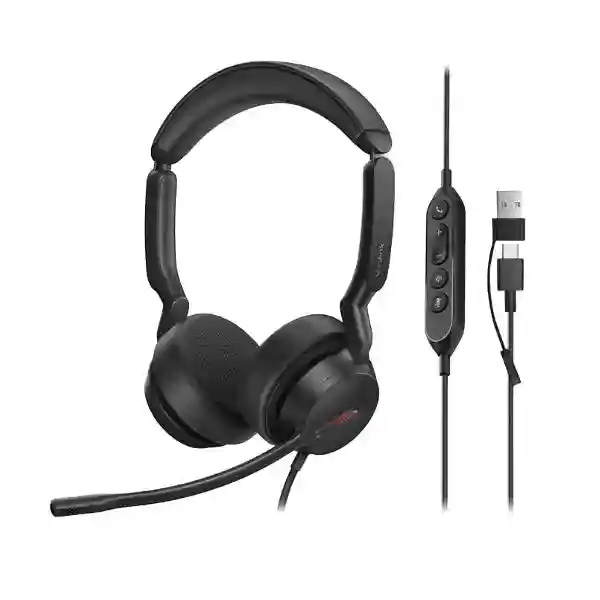
The Yealink UH44 is a professional USB-wired headset created for organizations that need consistent call clarity, practical user controls and comfortable daily wear without introducing wireless charging, pairing or battery-management tasks. It is suited to offices, contact centers, reception teams, service desks, remote workers and unified communications deployments. The headset connects through a USB-C cable and includes a USB-A adapter, giving procurement teams a practical path for mixed fleets of modern notebooks, docking stations and established desktop computers.
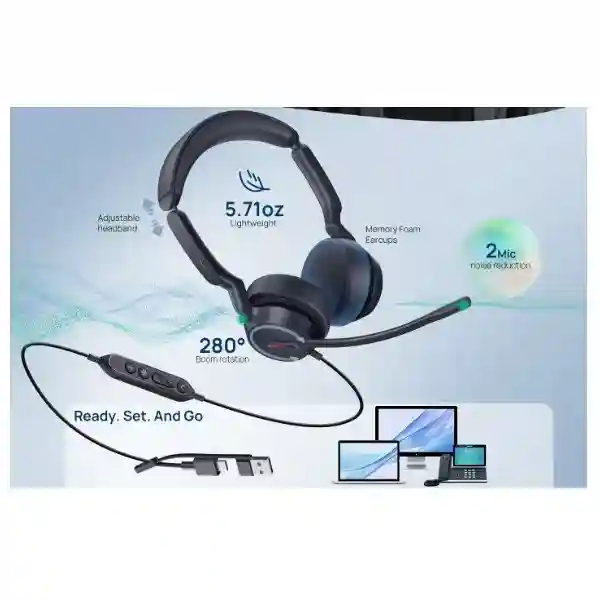
For voice capture, the UH44 uses two microphones together with Yealink Acoustic Shield 3.0 technology to reduce distracting background sound reaching the far end of a call. A 35 mm speaker supports clear communications and full-range audio, while the in-line controller puts essential call, volume and mute functions within reach. The microphone boom can also be lifted to mute and lowered to resume voice transmission. A visible busylight helps colleagues recognize when a user is occupied.
Uganda organizations can procure the UH44 for individual replacements, departmental refreshes or larger standardized rollouts. FourTeck can assist with variant selection, quantity planning, endpoint compatibility, staging requirements and delivery coordination before purchase. This is especially useful where a project contains a mixture of UC users, Microsoft Teams users, mono-headset roles and dual-headset roles.
Procurement Fact Rail
Yealink UH44
Office, call center, hybrid work
USB-C with USB-A adapter
Mono / Dual; UC / Teams options
USB powered; no headset battery
Confirm quantity and exact variant
The UH44 family includes part-number variants for Dual Teams USB-C/A, Dual UC USB-C/A and Mono USB-C/A configurations. This distinction matters during procurement because wearing style and collaboration controls should be aligned with the intended user group. Buyers should identify whether staff need dual-ear concentration for busy spaces, mono-ear awareness for reception and front-desk work, or a platform-specific version for a standardized collaboration environment. Warranty terms, commercial availability and delivery timing should be confirmed on the issued quotation for the exact SKU supplied in Uganda.
Operational Architecture and Workplace Role
Unlike a wireless headset architecture, the UH44 keeps the endpoint path deliberately simple. Audio, control signalling and operating power are carried through the wired USB connection. That removes headset radio pairing and rechargeable battery state from the normal support workflow. For IT departments deploying hundreds of seats, simplicity at the endpoint can translate into fewer variables during onboarding: users connect the headset, select it as the audio device where required, and use the in-line controller for routine call handling.
The audio architecture centers on two microphones and Yealink Acoustic Shield 3.0 voice isolation. In practical business use, the objective is not to make the room silent for the wearer; it is to improve the voice sent to the remote participant by reducing surrounding distraction in the microphone path. This distinction is important when comparing professional communications headsets. The UH44 is a wired business headset with microphone-side noise management rather than a battery-powered wireless active-noise-cancelling travel headset.
Its 35 mm speaker is designed to cover both communications and general workplace audio. Dynamic audio behavior supports the differing needs of calls and media, allowing one standardized headset to serve meetings, softphone conversations, training content and ordinary computer audio. The physical design uses on-ear cushions, an adjustable headband and rotating earcups. Dual models are appropriate where concentration and stereo reproduction are valued; mono configurations preserve greater environmental awareness.
The cabling is arranged around an in-line call-control unit. Approximately 0.65 m runs from the headset to the controller, while a 1.5 m USB section runs from the controller to the USB plug. This gives users room to place the controller within reach while connecting to a desktop, notebook or docking arrangement. Cable routing should still be reviewed for sit-stand desks and deep work surfaces so the lead is not placed under unnecessary tension.
For fleet administration, Yealink USB Connect provides PC-side management and Yealink Management Cloud Service supports broader device-management workflows. Organizations should validate the management functions required by their particular estate and deployment policy before rollout. Central visibility is valuable where IT wants to maintain consistent headset settings and firmware practices rather than troubleshoot each seat independently.
Enterprise Business Outcomes
Two microphones and Acoustic Shield 3.0 focus on keeping the user’s speech intelligible when normal workplace sound is present. Better transmitted voice quality can reduce repetition and make customer, supplier and internal conversations easier to follow.
A direct USB connection avoids charging cycles and wireless pairing. For fixed desks, hot desks and agent positions, this provides a predictable operating model with fewer battery-related interruptions.
USB-C plus the supplied USB-A adapter supports mixed computer generations. Mono, dual, Teams and UC choices allow one product family to cover several job roles while preserving procurement consistency.
The published feature set includes Peak Block Protection, Australian G616 protection and daily noise exposure protection. Organizations should still maintain appropriate workplace audio policies and safe listening levels.
The in-line controller handles answer, end, reject, volume and mute functions. Raising the microphone boom also provides a direct physical mute action that is easy to understand during meetings.
No rechargeable headset battery means no charging docks, battery-health checks or replacement charging routines. The practical value is strongest in permanently assigned and shared workstations where predictable availability matters.
Key Hardware and Software Highlights
The UH44 combines professional audio components with deliberately uncomplicated workstation connectivity. The two-microphone array and Acoustic Shield 3.0 form the voice-capture layer. A 35 mm speaker forms the listening layer, with a published speaker frequency-response range of 20 Hz to 20 kHz. The user-control layer includes an in-line controller with LED indicators, volume controls, call handling and mute. A busylight provides a visual workplace signal, while the boom arm adds a physical mute gesture.
The interface layer is USB-C, supplemented by a USB-A adapter. This is significant for organizations transitioning from USB-A desktops toward USB-C notebooks because the same headset family can be deployed across both connector environments. Windows and macOS are listed as supported operating systems. Yealink USB Connect and Yealink Management Cloud Service form the management layer for configuration and fleet operations.
Comfort engineering also has an operational role. Soft memory foam, rotating ear cushions and an ergonomically shaped headband are intended to distribute pressure for prolonged wear. A headset that users can tolerate throughout repeated meetings and calls is more likely to remain correctly positioned, which in turn helps preserve microphone placement and consistent voice pickup.
Technical Specifications Ledger
| Item | Specification | Procurement relevance |
|---|---|---|
| Connection | USB-C cord with USB-A adapter | Supports mixed modern and legacy USB workstation fleets. |
| Microphones | 2 microphones; Acoustic Shield 3.0 | Designed to improve transmitted voice isolation in active workplaces. |
| Microphone response | Published UH44 documentation lists 100 Hz–16 kHz on current support pages | Confirm exact regional revision if a tender requires a fixed numeric specification. |
| Speaker | 35 mm; 20 Hz–20 kHz frequency response | Suitable for calls, meetings and general workplace media. |
| Speaker sensitivity | 113.8 ±3 dB at 0.980 V | Published technical reference for audio evaluation. |
| Headset-to-controller cable | 0.65 m | Places controls within practical desk reach. |
| Controller-to-USB cable | 1.5 m | Review desk and dock placement before large deployments. |
| Controls | Answer/end/reject, volume, mute/unmute, boom lift-to-mute | Reduces reliance on on-screen controls during calls. |
| Operating systems | Microsoft Windows and Apple macOS | Useful for mixed corporate computer estates. |
| Management | Yealink USB Connect; Yealink Management Cloud Service | Supports standardized administration and maintenance workflows. |
| Net weight | Dual 162 g; Mono approximately 127 g | Relevant to prolonged wear and shipping calculations. |
| Product dimensions | Dual 199 × 178 × 63 mm; Mono 153 × 184 × 63 mm | Useful for storage, lockers and rollout kits. |
| Package | Headset, carrying bag, quick start guide | Confirms standard box contents for receiving teams. |
Where a formal tender depends on a precise specification revision, request confirmation against the quoted manufacturer part number. Published documents can be revised over a product lifecycle, so the commercial quotation and current manufacturer documentation for the offered SKU should form the final procurement reference.
Configuration and Sizing Worksheet
1. Estimate user roles and quantity
Separate users by work pattern rather than ordering one variant automatically. Contact-center agents and users in active open offices often prefer dual-ear models for greater focus. Reception, supervisory and front-desk personnel may prefer mono designs where environmental awareness is important. Include spare units in the bill of materials according to your internal support policy and site criticality.
2. Map workstation interfaces
Record the percentage of endpoints with USB-C and USB-A ports. Because the UH44 uses a USB-C cord with a USB-A adapter, it can simplify mixed-fleet deployment, but docking stations, thin clients and restricted USB policies should still be checked. Test representative endpoint types before a large rollout.
3. Confirm collaboration platform
Identify whether the deployment is standardized around Microsoft Teams or requires a broader UC configuration. Select the matching product variant where applicable. The headset is designed for broad platform compatibility, but button behavior and certification requirements can differ by environment, so platform-specific acceptance testing remains good practice.
4. Review physical desk layout
The headset-to-controller lead and controller-to-USB lead provide practical reach for common desks. For sit-stand stations, under-desk computers or docking stations mounted away from the user, verify cable routing before bulk purchase. Avoid extensions unless their compatibility has been tested with the exact endpoint.
5. Define management policy
Decide whether individual users will manage settings locally through Yealink USB Connect or whether IT will use a centralized management workflow. Establish firmware approval, pilot and deployment procedures so changes are validated with the organization’s softphones and collaboration clients.
6. Prepare the quotation request
Provide organization name, delivery city, quantity, mono or dual preference, Teams or UC requirement, endpoint types, desired delivery date and any staging requirements. For multi-site projects, provide quantities by location. This allows the quotation to reflect the correct variants rather than treating all UH44 units as interchangeable.
Deployment Scenarios and Industry Use Cases
Large enterprise and multi-site operations
A large organization can standardize the UH44 across headquarters, branches and hybrid-worker kits while selecting mono or dual variants by role. Wired USB connectivity is useful where IT wants a repeatable peripheral with no charging logistics. Before deployment, a pilot group should represent the main laptop models, desktops, docking stations and collaboration clients. After acceptance, IT can document a standard connection and firmware baseline and distribute the same user guidance across sites.
Financial and banking institutions
Banks and financial services teams handle frequent internal and customer calls where intelligibility and predictable device behavior are important. A wired endpoint can suit fixed desks and controlled workstations. The visible busylight is useful in shared office spaces, while microphone-side voice isolation can improve conversations when nearby colleagues are also speaking. Procurement teams should align headset rollout with endpoint-security policies, approved USB-device rules and collaboration-platform controls.
Education and campus environments
Universities, training centers and administrative departments can use the UH44 for online meetings, admissions calls, help desks and hybrid teaching support. USB-C/A flexibility helps when campuses contain computers from different refresh cycles. Dual models can help staff focus in shared offices; mono models may suit service counters. For shared labs, establish cleaning, storage and assignment procedures because the UH44 is a personal-wear device.
Government and institutional procurement
Government projects commonly require clear part-number identification, documented specifications and predictable receiving quantities. FourTeck can prepare a quotation around the exact requested variant and delivery site. Buyers should state any tender requirements for platform certification, warranty documentation, delivery schedule and acceptance testing so these can be addressed before purchase. For secure or managed desktops, the customer’s technical team should validate USB-peripheral policy and application compatibility.
Technical Deep Dive: Voice Processing and Audio Engine
The most important technical function of a business headset is the two-way audio path. On the transmit side, the UH44 employs two microphones and Acoustic Shield 3.0 to distinguish the user’s voice from surrounding acoustic activity. In a busy office this can help reduce the amount of nearby speech and general room noise delivered to the remote party. It is particularly relevant to contact centers, shared offices and home environments where complete acoustic isolation is unrealistic.
On the receive side, the 35 mm speaker supports a broad published frequency response and is intended to serve both speech and media. This means users do not need one peripheral for meetings and another for training videos or ordinary computer audio. The design also incorporates hearing-protection functions. These safeguards complement, rather than replace, organizational controls around safe listening volume and duration.
Because the headset is wired, the audio transport avoids the radio link used by Bluetooth products. That architecture removes pairing state, wireless range and headset battery charge from the basic signal path. It does not mean every application will behave identically; operating-system audio settings, softphone selection and platform permissions still affect real-world results. A deployment pilot remains the most reliable way to validate the complete workstation stack.
Technical Deep Dive: Management, Firmware and Operational Control
Enterprise peripherals become easier to support when IT can define a known configuration. Yealink USB Connect is available for PC-side headset management, while Yealink Management Cloud Service provides a path for centralized device operations. Organizations should decide who owns headset configuration, which firmware revisions are approved, and how changes are tested before broad release.
A sensible change process starts with a small representative pilot. IT validates a proposed firmware revision against the main operating systems, softphones and meeting clients, then deploys it more broadly after acceptance. This is especially important in contact centers, where even a minor change in call-control behavior can affect large numbers of agents. Maintain an asset record linking physical model, manufacturer part number, assigned site and deployment group where governance requires it.
Security teams should treat headset management software like other endpoint utilities: package it through normal application controls, restrict administrative permissions appropriately and keep approved versions current. The UH44 itself is a USB audio peripheral, so organizations with restrictive endpoint policies should validate whether their security controls permit the device and its management components.
Technical Deep Dive: Availability, Standardization and Recovery
High availability for a wired headset is less about redundant electronics and more about operational design. Since there is no battery or wireless base station to fail, the core recovery method is straightforward replacement from local spare stock. Large deployments should define an appropriate spare ratio based on user criticality, site remoteness and replacement lead time. A service desk can swap a failed unit quickly and return the affected employee to calls without waiting for a battery cycle or pairing procedure.
Standardization strengthens this model. If branches use the same approved UH44 variant for a given role, a spare held at one location can replace another unit with minimal user retraining. For geographically dispersed organizations, keeping small site-level spare pools may be more resilient than holding every spare centrally. Asset labels and clear variant naming help avoid accidentally replacing a Teams-specific deployment with an unintended configuration.
Business continuity planning should also include alternative audio paths. Critical call-center or service-desk operations may maintain spare headsets and a tested fallback endpoint method. The aim is not to claim hardware redundancy inside the headset, but to design a replacement process that matches the importance of the user role.
Pre-Purchase Buyer Gap Checklist
Does it need charging? No headset battery is listed; operation is through the wired USB connection. This simplifies fixed-desk deployment. Will it connect to both USB-C and USB-A computers? The connection is USB-C and a USB-A adapter is supplied, but organizations should still test representative docks, thin clients and endpoint policies. Is it available in mono and dual versions? Yes. Match the wearing style to role and acoustic environment. Are Teams and UC choices available? The UH44 family includes Teams and UC variants; specify the required version on the quotation.
Are there recurring headset subscription fees? The physical wired headset does not depend on a battery service or radio subscription. However, collaboration applications, cloud management services or broader enterprise software may have their own commercial terms. Confirm any organization-specific service licensing separately rather than assuming it is included with the headset. Will all call-control buttons work with every application? Broad compatibility is a strength of the product, but application integrations can differ. Validate the intended softphone or meeting platform, especially where answer/end controls are operationally important.
How much desk clearance is required? This is not a rack product, but cable path matters. Allow a safe route from the user’s wearing position to the controller and then to the USB port without creating tension or snag points. What happens if the workstation only has USB-C? Connect directly through USB-C. What if it only has USB-A? Use the supplied adapter. Can it be centrally managed? Yealink identifies USB Connect and its Management Cloud Service as management options; determine the exact management workflow required by your IT policy.
What should be confirmed before issuing a purchase order? Exact manufacturer part number, mono or dual design, Teams or UC requirement, quantity, delivery site, warranty terms, expected lead time, endpoint compatibility and any staging service. Capturing these items at quotation stage prevents a generic model-name request from turning into the wrong physical variant.
Uganda Procurement and Delivery Logistics
FourTeck supports Uganda organizations that require structured quotations for Yealink headset projects. A useful request begins with the number of users, preferred UH44 variant, delivery city and collaboration platform. Where the customer is unsure about mono versus dual, the user roles and workplace conditions can be reviewed before the bill of materials is finalized. Multi-site buyers should divide quantities by branch so packing and dispatch requirements can be planned correctly.
Order processing should be based on the exact SKU shown on the accepted quotation. Commercial availability and delivery lead time can vary with quantity and variant, so these should be confirmed at the time of order rather than assumed from the general model family. For larger rollouts, staged delivery may be useful when different offices have different readiness dates.
Technical pre-deployment assistance can include model validation, compatibility review, firmware planning and basic rollout guidance. Where a customer uses a tightly controlled workstation image, representative units should be tested before mass deployment. This reduces the chance that a local endpoint policy, dock, thin client or collaboration client introduces unexpected behavior after units reach users.
Local Coverage Across Uganda
Projects can be coordinated for Kampala headquarters and branch environments as well as Entebbe, Jinja, Mbarara, Gulu and other Uganda locations. Kampala deployments may include corporate offices, service desks, contact centers and professional-services teams. Entebbe buyers may need headsets for hospitality, aviation-support offices and administrative operations. Jinja and Mbarara organizations can standardize branch communications without selecting a different peripheral simply because users are outside the capital. Gulu and other regional deployments benefit from clear quantity planning and spare-unit allocation where replacement logistics may take longer than at a central office.
For nationwide projects, provide a location-by-location quantity schedule. This allows the procurement plan to distinguish central stock from branch allocations and helps determine whether spare headsets should be held locally or at headquarters.
Cross-Border and Regional Supply
Organizations operating across East Africa, the Gulf and broader African markets may need consistent headset standards across multiple legal entities and offices. FourTeck regional channels can support procurement planning through Uganda, Kenya, Africa, UAE and Kuwait. Regional standardization can reduce the number of approved peripheral models and make support documentation easier to maintain.
Cross-border projects should still account for local invoicing, import conditions, warranty handling, delivery lead times and stock position. Request a regional project review when several countries must receive the same UH44 configuration.
Related Yealink Solutions and Internal Resources
The UH44 commonly forms one part of a wider communications environment. Explore the Yealink product range in Uganda when a project also requires desk phones, meeting endpoints or other user devices. Buyers planning broader voice deployments can review FourTeck Uganda enterprise technology solutions and use the project quotation desk to request a combined bill of materials.
For headset estates, compare the UH44 with other Yealink wired and wireless options when users require mobility, different acoustic isolation, or alternative wearing styles. A contact-center deployment may prioritize simple wired availability and spare-unit interchangeability, while managers who move frequently between rooms may prefer a wireless design. The correct choice depends on the work pattern rather than a single specification.
FourTeck Technical Service Capabilities
FourTeck can support the procurement process beyond model naming. Engineering validation helps confirm that the selected UH44 variant matches the intended collaboration platform, workstation interfaces and user roles. Bill-of-materials verification checks quantity, variant and accessory assumptions before an order is finalized. For controlled enterprise environments, representative-unit testing can be incorporated into the rollout plan so compatibility is established before mass distribution.
Where appropriate, staging can include asset identification, deployment grouping and firmware review. Pre-shipment firmware updates should only be performed against an agreed customer baseline and validated platform requirements. Post-sales technical support can help isolate whether an issue is associated with the headset, endpoint USB connection, operating-system audio selection, collaboration client or local device policy. This structured approach is more useful than replacing hardware before the actual cause is known.
Frequently Asked Questions
Is the Yealink UH44 suitable for contact centers?
Yes, it is positioned for professional office and call-center use. The wired USB architecture is useful for fixed agent stations because users do not need to manage charging or wireless pairing. Two microphones and Acoustic Shield 3.0 are designed to improve the voice sent to the remote party when background sound is present. The in-line controller gives agents direct access to call, volume and mute functions. For a large contact-center deployment, validate the exact softphone integration, preferred mono or dual wearing style, and headset-management process with a representative pilot group before bulk rollout.
Does the UH44 connect to USB-C and USB-A computers?
Yes. The headset uses a USB-C cord and includes a USB-A adapter, which is useful for businesses operating mixed generations of desktops, laptops and docking stations. This reduces the need to maintain separate headset families solely because one workstation has USB-A while another uses USB-C. Compatibility should still be tested on representative endpoint models, particularly thin clients, specialized docks and machines with restrictive USB-device security policies. Cable placement should also be checked on sit-stand desks so the controller remains accessible and the lead is not placed under tension.
What is the difference between mono and dual UH44 versions?
The mono configuration leaves one ear uncovered, which can be valuable for reception desks, supervisors and users who need to remain aware of nearby colleagues or visitors. The dual configuration covers both ears and is often preferred for concentration in shared offices, sustained meeting use and contact-center roles. The dual model is listed at approximately 162 g, while current support documentation lists the mono model around 127 g. Choose by user role and environment rather than ordering solely on price, and state the desired wearing style clearly on the quotation.
Does the Yealink UH44 require a battery or charging dock?
No headset battery is specified because the UH44 is a wired USB model. It receives the required operating power through its USB connection, so there is no normal charging cycle, charging stand or battery-health routine to manage. This can simplify support at permanently assigned desks and high-utilization agent positions. The trade-off is that the user remains physically connected to the computer or compatible endpoint by cable. Organizations that require staff to move around while remaining on calls should compare the UH44 with an appropriate wireless headset instead.
Can the UH44 be centrally managed by an IT department?
Yealink lists USB Connect for PC management and Yealink Management Cloud Service for device-management workflows. This gives IT teams options for configuration and maintenance beyond purely manual per-user support. The precise operating model should be planned around the organization’s endpoint-management and security policies. A good enterprise process is to test firmware or configuration changes with a small representative group, document the approved baseline, and then expand deployment. Where cloud services or enterprise applications have separate commercial terms, those should be confirmed independently during procurement.
Does the UH44 work with Microsoft Teams and other collaboration platforms?
The UH44 product family includes Teams and UC variants, and Yealink positions it for broad platform and operating-system compatibility. For procurement, specify whether the organization wants the Teams or UC version rather than requesting only the generic UH44 model name. While USB audio can function broadly, call-control integration and certified user experience can vary between applications. Enterprises should test the intended meeting client, softphone and operating-system image, including answer/end behavior and mute synchronization where these functions are important to users.
How does microphone noise reduction work on the UH44?
The UH44 uses two microphones together with Yealink Acoustic Shield 3.0 voice-isolation technology. The goal is to reduce distracting background sound in the transmitted microphone signal so the remote participant receives a clearer representation of the user’s speech. This is particularly useful in shared offices and contact centers. It should not be confused with a promise to make the physical room silent to the wearer. Real-world results depend on microphone placement, background sound, application processing and the acoustic environment, so pilot testing is recommended for demanding deployments.
What comes in the standard UH44 package?
Published Yealink documentation lists the headset, carrying bag and quick start guide as standard package contents. The connection design includes a USB-C cord with a USB-A adapter. Receiving teams should verify the exact manufacturer part number and box contents against the purchase order, especially on projects that contain several variants. For large rollouts, record delivered quantities by site and retain a small controlled spare pool according to operational requirements. Any optional accessories or project-specific services should be listed separately on the commercial quotation rather than assumed to be part of the standard box.
How should warranty and hardware replacement be planned?
Warranty terms should be confirmed on the FourTeck quotation for the exact unit and supply arrangement. For operational resilience, organizations should not rely solely on warranty turnaround for users whose calls are business-critical. Maintain spare units based on site size, user criticality and replacement lead time. Because the UH44 is wired and straightforward to reconnect, a service desk can normally restore a user quickly by swapping in a known-good spare, then process diagnosis or warranty handling for the affected unit without keeping the employee offline.
What information should I provide to get an accurate Uganda quotation?
Provide the required quantity, delivery city, mono or dual preference, Teams or UC requirement, primary computer or endpoint types, expected project date and whether the units are for a single office or multiple sites. For a nationwide rollout, add quantities for Kampala, Entebbe, Jinja, Mbarara, Gulu and any other locations involved. Mention any controlled workstation image, thin-client environment or special staging requirement. These details allow FourTeck to prepare a quotation around the correct UH44 configuration and identify technical questions before an order is placed.
Plan Your Yealink UH44 Deployment in Uganda
For a single department, contact-center refresh or multi-site communications project, begin with the exact user count and work pattern. FourTeck can help map mono and dual requirements, Teams and UC variants, workstation connectivity and delivery locations into a clear procurement plan. Include your preferred deployment date and any endpoint-management requirements so compatibility and staging considerations can be addressed before shipment. Commercial availability, warranty terms and lead time will be confirmed for the exact quoted SKU and quantity.
A well-defined headset standard reduces support variation and gives users a consistent way to handle calls, volume and mute controls. The UH44’s wired USB-C/A architecture, professional microphone system and management options make it a practical candidate for organizations that prioritize straightforward daily operation.




Reviews
There are no reviews yet.