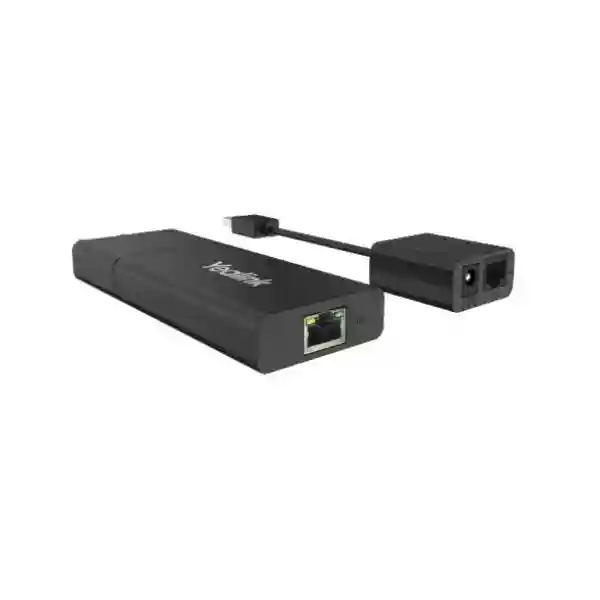
Yealink USB2-EXT-10M 10m USB 2.0 Extension Cable for Professional Meeting Rooms
The Yealink USB2-EXT-10M is a 10-metre USB 2.0 Type-A extension accessory designed for professional conferencing deployments where the host and connected room equipment cannot sit close together. In practical meeting-room projects, that distance appears when a compute unit is secured in a cabinet, behind a display, beneath a table or in another protected mounting position while a USB-connected component must be placed where users, cameras or room controls require it. Rather than redesigning the room simply because a standard cable is too short, the USB2-EXT-10M gives integrators a Yealink-listed 10m extension option for appropriate room-system designs.
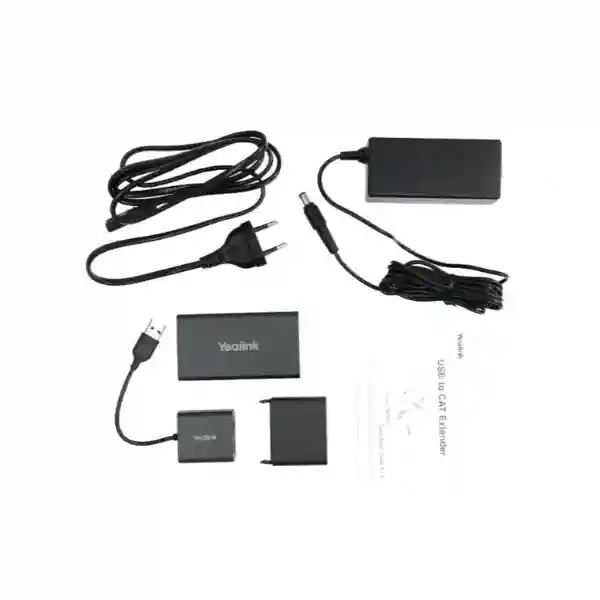
Official Yealink material identifies the USB2-EXT-10M as a 10m USB 2.0 Type-A extension cable. Yealink solution documentation also identifies part number 330000102002 and lists a 10m USB2 cable plus power adapter in the package. That combination matters to procurement teams because cable distance is only one part of a reliable collaboration-room design: the correct accessory, supported endpoint relationship, route, power availability and installation method should all be confirmed before ordering.
FourTeck supplies the USB2-EXT-10M for Uganda projects and can review the intended room topology before quotation. Share the Yealink system model, room layout, required quantity, cable route and destination city so the bill of materials can be checked before supply. This approach is especially useful for multi-room rollouts where a small accessory mismatch can otherwise be repeated across many rooms.
Procurement Fact Rail
USB2-EXT-10M
Yealink
10 metres
USB 2.0 Type-A extension
330000102002
10m USB2 cable + power adapter
Stock position, commercial warranty handling and delivery lead time should be confirmed on the project quotation because they can vary with order quantity, sourcing route and destination. For an enterprise rollout, identify every room requiring the cable rather than estimating from room count alone; some spaces may use a different connection path or a longer-distance extender architecture.
Operational Architecture and Deployment Overview
USB cabling in a collaboration room is part of the signal path, not merely an installation afterthought. Conference-room systems often distribute compute, displays, touch interfaces, cameras, sharing devices and audio equipment across several physical zones. The equipment may be logically close in a system diagram while being separated by furniture, wall cavities, display mounting structures and service loops in the actual room. A 10m extension option helps bridge these practical distances while keeping the deployment within a defined accessory plan.
The USB2-EXT-10M should be selected by topology. Start with the exact source and destination devices, identify the native cable supplied with each component, and then establish why an additional 10m is required. The cable route should be measured along the real installation path rather than as a straight line across the room. Allow for vertical rises, cable-management bends, furniture entry points, service loops and safe separation from hazards. A nominal room dimension can therefore underestimate the cable length actually consumed during installation.
Yealink lists the accessory among its room-system accessories, and official solution showcases include it in professional Teams and Zoom room configurations. That makes it particularly relevant to integrators working with Yealink collaboration ecosystems. Compatibility, however, should still be validated against the exact current room-system design. A product being part of the same accessory family does not mean every possible USB peripheral and topology should automatically be assumed compatible.
The included power adapter is another procurement detail that should be planned rather than discovered onsite. Confirm an appropriate power outlet near the required installation position, ensure the adapter can be serviced after fit-out, and avoid trapping power components in inaccessible locations. Where a project requires substantially longer USB reach, Yealink also offers a USB-over-CAT5e extender architecture for distances beyond the role of this 10m cable; that is a different product class and should be specified when the room topology demands it.
Business Outcomes and Value
Allows greater freedom when separating compatible USB-connected room components from the host location, helping installers follow furniture and display architecture rather than forcing equipment into inconvenient positions.
A defined Yealink accessory can be documented in a standard room bill of materials, making multi-site purchasing and installation handover easier to control.
Planning the correct extension cable before installation reduces pressure on field teams to source an unvalidated substitute after discovering that the supplied native cable cannot reach.
Proper cable routing, labelling and accessible power placement make future room troubleshooting simpler because technicians can identify the intended extension path without dismantling unrelated equipment.
Part number 330000102002 provides purchasing teams with a precise reference that can be carried across quotations, purchase orders, staging records and deployment schedules.
Including extension requirements during design helps expose cabling and power needs before site work begins, reducing avoidable variation orders and emergency accessory purchases.
Key Hardware Highlights
The core specification is deliberately straightforward: a Yealink 10m USB 2.0 Type-A extension cable intended for room-system accessory deployments. Independent channel specifications describe the connection as USB Type-A male to USB Type-A female, while Yealink identifies the product as a Type-A extension cable. The package documented by Yealink includes the 10m USB2 cable and a power adapter. For procurement, these facts are more useful than broad performance claims because they determine connector fit, route length and the supporting power requirement.
The product should not be confused with Yealink’s USB2-EXT-5M or USB2CAT5E-EXT. The 5m model serves shorter extension requirements, while the CAT5e-based extender is intended for much longer reach and uses transmitter/receiver hardware. Selecting among these options should be based on measured route distance and the supported device topology, not simply on choosing the longest accessory available.
Technical Specifications Ledger
| Item | Specification | Procurement relevance |
|---|---|---|
| Brand | Yealink | Use manufacturer and model together on purchase documents. |
| Model | USB2-EXT-10M | Distinguishes the 10m version from shorter and CAT5e extender products. |
| Part number | 330000102002 | Useful for BOM and quotation verification. |
| Cable length | 10 m | Measure the actual routed path before ordering. |
| Interface family | USB 2.0 Type-A extension | Confirm the endpoint connector requirement. |
| Connector arrangement | Type-A male to Type-A female | Validate against the source cable and receiving device. |
| Package contents | 1 × 10m USB2 cable; 1 × power adapter | Plan a suitable power location in the room. |
| Primary application | Professional meeting-room USB extension | Validate against the exact Yealink deployment design. |
Dimensions, environmental limits and adapter electrical ratings specific to this exact cable are not stated in the referenced Yealink product listing, so they should not be invented for tender documentation. If a project requires those values for compliance, request the current manufacturer documentation during quotation.
Configuration and Sizing Worksheet
Step 1 — Map the USB path
Record the source device, destination device and every intermediate connection. A drawing should show where the host sits, where the peripheral sits and which cable is native to each component. This prevents a common error: measuring between two visible devices while overlooking that the actual USB termination is located elsewhere inside a cabinet or mounting assembly.
Step 2 — Measure the installed route
Measure around furniture, through cable trays and along vertical drops. Add sensible service allowance, but do not create large coils of excess cable. Confirm that the route is protected from crushing, sharp bends, moving furniture and locations where connectors could be pulled under tension.
Step 3 — Confirm power
Because Yealink documents a power adapter with this 10m cable, include a suitable accessible outlet in the room plan. The outlet should remain serviceable and should fit the project’s electrical and facilities standards.
Step 4 — Validate endpoint compatibility
Provide the exact Yealink room-system and endpoint models to the supplier. Do not approve the accessory solely because both ends physically resemble USB Type-A. Functional compatibility depends on the intended room topology and supported product relationship.
Step 5 — Prepare the quote request
For each site, list quantity, room name, Yealink system model, cable route estimate, destination city and required delivery date. For larger rollouts, separate pilot-room quantities from production quantities so the design can be validated before broad deployment.
Deployment Scenarios
Large enterprise and multi-site rooms
Enterprises standardising Teams or Zoom collaboration spaces often want identical installation patterns across headquarters, branches and regional offices. The USB2-EXT-10M can become part of a controlled room BOM where the validated topology requires 10m USB extension. Standardisation makes spare holding, installation documentation and troubleshooting more predictable. It also lets procurement teams compare like-for-like room costs instead of allowing each installer to choose a different extension product.
Financial institutions
Banks and financial organisations frequently place compute hardware in secured furniture or controlled technical areas while keeping user-facing room devices accessible. A planned extension route can support that physical separation. Installation teams should document cable routes carefully, maintain access controls around cabinets and ensure that any power point associated with the cable remains maintainable without compromising room security procedures.
Education and campus environments
Lecture rooms, hybrid classrooms and training spaces may have teaching positions, displays and conferencing hardware separated by significant furniture distance. A 10m extension can be useful where the validated Yealink design calls for it. Campus procurement should group rooms by layout rather than buying the same cable for every room, because teaching spaces often vary considerably in lectern position and equipment mounting.
Government and institutional procurement
Government projects benefit from precise model references and documented package contents. Specify Yealink USB2-EXT-10M and part number 330000102002 on the BOM, then require compatibility validation against the intended system. Where tenders require detailed environmental or electrical certificates, request current manufacturer documentation instead of inserting assumptions into the compliance schedule.
Technical Deep Dive: Signal Path and Cable Architecture
The principal engineering challenge in a long USB room connection is maintaining a practical and supportable path while accommodating the physical separation created by modern AV layouts. The USB2-EXT-10M addresses a defined 10m extension requirement in the USB 2.0 Type-A family. Its value is therefore architectural: it lets the designer place compatible equipment according to room function and service access rather than allowing a short native lead to dictate equipment placement.
For project documentation, treat the extension as a named component in the signal chain. Label both ends, record the part number, note the associated power point and include the route on as-built drawings. This becomes important months or years later when a technician needs to distinguish a permanent room extension from an ordinary patch cable. Good documentation also helps prevent an installer from inadvertently replacing the designed accessory with an unknown cable during maintenance.
Technical Deep Dive: Ecosystem and Operational Control
The USB2-EXT-10M does not introduce a software subscription or management console of its own. Operational control therefore comes from disciplined physical deployment and from the conferencing devices connected through the room design. Procurement teams should not budget a separate licence for the cable itself. They should, however, verify any licensing associated with the wider Microsoft Teams Rooms, Zoom Rooms or Yealink system in which it is deployed, because those requirements belong to the platform rather than the extension accessory.
Change control matters. If the conferencing endpoint, camera, touch controller or room compute is replaced later, revalidate the extension path rather than assuming the old cable topology remains supported. Keeping the cable model in asset documentation gives support teams a useful starting point when reviewing a changed room.
Technical Deep Dive: Reliability and Recovery Planning
A cable has no failover mechanism, so resilience is created operationally. For high-value rooms, organisations can keep a validated spare accessory, maintain accurate labelling and ensure the cable can be replaced without destructive building work. Critical boardrooms may justify a spare USB2-EXT-10M held onsite or centrally, particularly when several rooms use the same standard BOM.
Troubleshooting should proceed methodically: verify endpoint power and status, inspect connectors, confirm the extension power arrangement, test the native connection where practical, and substitute a known-good validated cable if required. This sequence helps isolate the physical extension from software or endpoint faults and avoids replacing unrelated room hardware prematurely.
Pre-Purchase Buyer Checklist
Is a licence required? No separate software licence is indicated for the cable itself. Licensing for the wider conferencing platform should be evaluated independently.
Does the box include power? Yealink solution documentation lists one power adapter together with the 10m USB2 cable.
Can it be used with any USB device? Do not assume universal compatibility. Validate the exact source, peripheral and Yealink room topology before ordering.
What if 10m is not enough? Reassess the architecture rather than chaining extensions without validation. Yealink offers a separate USB-over-CAT5e extender product for longer-distance applications.
What should be included on the purchase order? Use the manufacturer, model USB2-EXT-10M, part number 330000102002, quantity and destination. Include the related room-system model in project notes.
How should a rollout be staged? Validate a representative room first when the project is large or the topology is new. Confirm fit, route, power placement and operation, then release the remaining quantities.
Are warranty and lead time fixed? These commercial terms can vary by sourcing route and project, so request them on the FourTeck quotation.
Uganda Procurement and Delivery Logistics
FourTeck Uganda can quote the Yealink USB2-EXT-10M as a standalone accessory or as part of a wider conferencing-room bill of materials. A useful request includes the exact Yealink platform, number of rooms, quantity per room, project location and required delivery schedule. For multi-room projects, sharing a room schedule allows accessories to be grouped against each room type, which helps reduce omissions during purchasing and staging.
After technical validation, the commercial quotation can reflect the required quantity and available supply route. Delivery timing should be confirmed at quotation because accessories may be sourced with the main conferencing system or separately. For installations outside Kampala, provide the final destination and any receiving restrictions early so logistics can be planned alongside the equipment schedule.
Pre-deployment support can include bill-of-materials review and checking that the specified extension length aligns with the room design. The most valuable time to resolve a cable mismatch is before equipment is dispatched to site, particularly when installers are travelling to regional locations.
Uganda Coverage Matrix
Kampala: Suitable for headquarters, corporate meeting rooms, hospitality and institutional projects where coordinated delivery with conferencing hardware is required. Entebbe: Support for offices, hospitality facilities, aviation-related organisations and meeting spaces requiring planned collaboration-room accessories. Jinja: Supply planning for industrial, education and business environments with centralised procurement. Mbarara: Regional project support for organisations deploying standardised communication rooms away from the capital. Gulu: Accessory supply can be coordinated for institutional, education, NGO and enterprise projects where accurate pre-shipment BOM verification reduces onsite procurement risk.
Cross-Border and Regional Supply
Organisations operating across several countries can align conferencing accessory procurement through FourTeck’s regional channels. Visit FourTeck Uganda for Uganda requirements, FourTeck Kenya for Kenya projects, FourTeck Africa for broader African deployments, FourTeck UAE for United Arab Emirates sourcing and FourTeck Kuwait for Kuwait requirements. Regional standardisation is most effective when the same validated room BOM, part numbers and installation documentation are used across sites while local delivery, commercial terms and compliance needs are handled per country.
Related Yealink Room Accessories
Depending on the room design, buyers may also evaluate the shorter Yealink USB2-EXT-5M for routes that do not require 10m, or the Yealink USB2CAT5E-EXT when the architecture needs substantially longer reach. Wider collaboration projects may include Yealink room compute, touch panels, cameras, AV processing, wireless presentation devices and BYOD accessories. Browse FourTeck Uganda or send the complete room requirement through the contact page so related accessories can be matched to the intended system rather than selected independently.
A complete accessory review should cover USB cabling, display connectivity, network cabling, power availability, mounting hardware and any room-specific sharing or audio components. This is particularly important when a conferencing system is being installed into an existing room where furniture and electrical points cannot easily be moved.
FourTeck Technical Service Capabilities
FourTeck can support procurement teams by reviewing the intended bill of materials before supply, checking that accessory models correspond to the proposed conferencing system and helping identify obvious gaps in room connectivity. For repeatable rollouts, staging records can associate accessory quantities with individual room types so installers receive a more predictable kit.
Where the wider room solution includes configurable Yealink devices, project preparation may also include coordination around firmware and deployment requirements for those devices. The USB2-EXT-10M itself is a physical cable accessory and does not require firmware. Keeping that distinction clear prevents unnecessary configuration expectations while ensuring the active room components receive the attention they require.
Post-sales troubleshooting can begin with BOM verification and physical-path checks before escalating to endpoint configuration. For accessories, this structured approach is often faster than treating every room symptom as a software problem.
Frequently Asked Questions
1. What is the Yealink USB2-EXT-10M?
It is a Yealink 10-metre USB 2.0 Type-A extension cable listed among Yealink room-system accessories. Official Yealink solution documentation identifies part number 330000102002 and shows the package containing one 10m USB2 cable and one power adapter. Its practical role is to provide additional USB reach in supported professional meeting-room designs where equipment placement makes a shorter cable unsuitable.
2. What connectors does it use?
Yealink describes the product as a USB 2.0 Type-A extension cable. Channel specifications identify a Type-A male connector at one end and Type-A female at the other. Before purchase, compare the actual source and destination connection in the planned room design, because physical connector fit alone should not be treated as proof of functional compatibility with every USB device.
3. Does the USB2-EXT-10M include a power adapter?
Yes. Yealink room-solution documentation for part number 330000102002 lists one 10m USB2 cable and one power adapter. During room planning, make sure a suitable power point is available at the required location and remains accessible for service. If the project needs the adapter’s exact electrical specification for a compliance schedule, request the current manufacturer documentation for this specific model.
4. Is the cable suitable for Microsoft Teams Rooms or Zoom Rooms?
Yealink includes the USB2-EXT-10M in official professional room-solution showcases, including Teams and Zoom configurations. That establishes its role in Yealink collaboration deployments, but the exact compatibility of a particular room design should still be validated against the devices being connected. Send the complete system model and topology with the quote request so the accessory can be reviewed in context.
5. Does the cable require a subscription or software licence?
No separate subscription is indicated for the USB2-EXT-10M cable itself. It is a physical extension accessory. The broader room platform may have its own software or service licensing requirements, such as those associated with Microsoft Teams Rooms or Zoom Rooms, but those are separate from this cable. Procurement teams should therefore keep accessory cost and platform licensing as distinct line items.
6. What should I use if I need more than 10 metres?
Do not automatically chain several extension cables. Reassess the signal architecture and validate a purpose-designed longer-distance option. Yealink offers the separate USB2CAT5E-EXT, which uses CAT5e cabling and is intended for longer USB extension applications. The correct choice depends on the exact endpoints, route and supported topology, so provide the room design when requesting a recommendation.
7. How do I know how many cables to order?
Count validated cable paths, not simply rooms. Two rooms of the same capacity may have different equipment locations and therefore different extension requirements. Build a room schedule showing the compute position, peripheral position, route length and accessory model for each room type. For large deployments, include sensible project spares only after the standard design has been proven in a pilot room.
8. Can FourTeck help confirm compatibility before supply?
Yes. Provide the Yealink system model, connected devices, room type and a basic description of the intended USB path. FourTeck can use that information for bill-of-materials review before quotation. This is particularly valuable when an organisation is deploying multiple rooms, because validating one standard design helps avoid repeating the same accessory mistake across an entire rollout.
9. What information should be included in an Uganda quotation request?
Include the product name Yealink USB2-EXT-10M, required quantity, related Yealink room-system model, destination city, project deadline and whether the cable is part of a new deployment or an existing-room change. If possible, add the measured route length and the devices at each end. This gives the supplier enough context to distinguish a straightforward accessory purchase from a topology that needs further validation.
10. How should the cable be handled in maintenance documentation?
Record the model and part number on the room BOM, label the installed cable path and note the associated power location. Keep as-built diagrams updated when room hardware changes. In critical rooms, consider holding a known-good validated spare. These simple practices make future fault isolation easier and reduce the likelihood that technicians substitute an unknown cable during urgent maintenance.
Request a Yealink USB2-EXT-10M Quote for Uganda
For a precise quotation, send the required quantity, destination, Yealink room-system model and intended cable path. FourTeck can review the accessory requirement as part of the complete room bill of materials and help align purchasing with the planned installation. This is especially useful for boardrooms, classrooms, training facilities and multi-site enterprise rollouts where consistent room standards and documented part numbers simplify deployment and long-term support.




Reviews
There are no reviews yet.